38434 comments found.
Is it possible to get the form style I had in version 8?
I upgraded to version 9 and it changed to that automatically.
Hey ofmarconi, Unfortunately the minimal style had to be simplified to not rely on javascript to move the labels around/create the animation – it conflicted with many third party form systems and was general unstable. If you would like to remove the BG color from the fields to look the same beside the of focus event styling, add this into the custom css box located in the Salient options panel > general settings > css/script related tab
body[data-form-style="minimal"] input[type="text"],
body[data-form-style="minimal"] textarea,
body[data-form-style="minimal"] input[type="email"] {
  background-color: transparent!important;
}

Hi there,
May i know how do i set 2 list in a row? but the default setting is one list in a row.
Currently is like this : https://prnt.sc/ln7kdr
Thank you very much.
Hey tommytai,
Please share your URL in regards so I can take a look to assist
Thanks 
Hello, How i can remove off canvas menu secondary menu on mobile? I removed it from desktop website and its working, but on mobile version it appers.
Hey craba,
Can you kindly share your URL in regards so I can take a look to assist?
Thanks in advance
Hello again, friend! One last thing here – I’m hoping to be able to manually populate icons in manual reviews I’m putting up on a page. So, basically I’m trying to have five of the icons stacked side by side (rather than one on top of the other in their own rows. How can I do that? Here is an example of what I’m trying to accomplish with your icons, rather than the image I am currently using: https://pasteboard.co/HOUtmSV.png Thanks again!
Hey LukeNielson!
Here’s the setup you can paste into the classic editor view and then switch back into the page builder to see how it’s done: https://pastebin.com/2wY2HbGy
Cheers
Hello! I have “Support” purchased but the support ticket site continues to loop for me when verifying purchase. I’ve tried to figure out the help I need but I am getting desperate, so I’m just going to post here:
My website URL: collectjurassic.com
Items I need help with: 1. Centering the logo on mobile. Code I have found on other support topics did not work. 2. Social icons in header navigation are not functioning correctly (tested on safari). The mouseover effect appears to show 2 logos at once, instead of one swiping away to reveal another. 3. Tweak Page Header text so it doesn’t scale so small on mobile. It scales to the size of the body text basically, it needs to read bigger. Code I have found on other support topics did not work. 4. Hide the author but NOT the date on the blog feed. Have only been able to find code that hides both author and date (currently active). 5. Adjust font/font style/font size of “Categories” text above each blog post in the blog feed.
Questions I have: A. Is a parallax effect possible the navigation image background workaround I currently have in place? B. Currently I am “faking” a continues blog feed that is Masonry mixed with Standard to pull out 3 featured posts, utilizing the post offset setting. Is there a way to sticky posts so that they only show up in the top 3 post areas in the Masonry area, but not be sticked in my Standard area?
Thank you for your help! If someone can help me post a ticket for this and resolve my problem with the “verifying purchase” loop, I am happy to do so there.
Hey TimPiper3D, are you still having the issue with verifying your support pack?
1. Add this into the custom css box located in the Salient options panel > general settings > css/script related tab
@media only screen and (max-width: 1000px) and (min-width: 1px) {
html body:not(.material) header#top #logo {
    text-align: center;
}
body header#top .col.span_3 { width: 100%!important; }
header#top #logo img [ display: inline-block; }
}
2.
body header#top nav #social-in-menu a { line-height: 14px; }
3
@media only screen and (max-width: 690px) {
#page-header-bg .span_6 h1, .single.single-post .section-title h1 {
    font-size: 34px!important;
    line-height: 40px!important;
}
}
4. This is an option coming in the next release due out very shortly
5. That blog style will be effected by the “Form Labels” in the Salient options panel > typgoraphy > general html elements tab
A. It would require custom development to apply a parallax effect to a custom BG image set on the header navigation.
B. This would also require custom development as of now if you didn’t want to assign those to a separate category, which could then be queried for separately
Cheers
Thank you for your help! Everything worked like charm, don’t know how I missed Form Labels! Looking forward to the next Salient release.
Even though the code you provided fixed the social icon display issue, for #2, it made them all bump up higher than the rest of my “menu” (currently acting as a subheadline until I build out more pages). Is there a way to fix this display issue without doing that? I am leaving that fixed code our for now.
Hey TimPiper3D!
Could you kindly allow me to bypass the coming soon page you have active on the URL now so that I can assist more with #2
Cheers
Sorry about that, navigating to collectjurassic.com/newsfeed should get you through. I am putting back in the code that makes the social icons offset, so you can see what I am talking about.
Thanks TimPiper3D,
2 needs to changed to:
body header#top nav #social-in-menu a {
    line-height: 14px;
}
li#social-in-menu {
    margin-top: 10px;
}
Cheers
Works perfect, thank you so much! Can’t say enough how awesome Salient is, and the support is excellent as well. Usually able to search what other’s have had questions about and cobble together an answer for myself, but it’s good to know when I need help that it is readily available! Worth every penny.
That’s really great to hear TimPiper3D Glad I could help!
Is there an easy way to have ‘blog_next_post_link’ only linking to the next post in the same category?
Hey ofmarconi, that would require some custom modding as of now however I’ve noted the idea on the wishlist
Cheers
Hi buddy – really loving your theme – great job! Your support is great too. When I google my site, I notice a strange page called “fashion” (see screenshot here: https://pasteboard.co/HOT6UCh.png). This page isn’t live of course but it was from the demo. I assume there is nothing I can do to remove this, right? It’s just a search engine crawling thing? Please let me know if you have any advice! Thank you.
Hey LukeNielson!
Have you deleted that category from your site yet? It should have been imported as a blog category
Ahh, excellent! I just found it in blog categories and deleted it from there – thank you again. Your support is the best buddy!
Glad I could help LukeNielson
how do i remove the author info (post by admin, date and icon) in each of these 3 sections? https://imgur.com/a/yhG11Nx
Hey brianfreeman, there are options to remove those in the current beta – if you’d like access, please reach out in regards via the contact form on my author page https://themeforest.net/user/themenectar The official release
Hi,
I upgraded to the latest version, I currently use PHP 5.6, I tried to upgrade to PHP 7.2, it reports these errors, it seems that it is not compatible with PHP 7.2
/themes/salient/nectar/nectar-vc-addons/nectar-addons-no-lean.php FOUND 2 ERRORS AFFECTING 1 LINE 1374 | ERROR | Indirect access to variables, properties and methods will be evaluated in the left-to-right order since PHP 7.0. Use curly braces to remove ambiguity. 1374 | ERROR | Indirect access to variables, properties and methods will be evaluated in the left-to-right order since PHP 7.0. Use curly braces to remove ambiguity.Here too we have errors
Salient WPBakery Page Builder
/plugins/js_composer_salient/include/classes/shortcodes/vc-accordion-tab.php FOUND 2 ERRORS AFFECTING 1 LINE 245 | ERROR | Indirect access to variables, properties and methods will be evaluated in the left-to-right order since PHP 7.0. Use curly braces to remove ambiguity. 245 | ERROR | Indirect access to variables, properties and methods will be evaluated in the left-to-right order since PHP 7.0. Use curly braces to remove ambiguity.What should I do?
Thanks
Hey bsnewline,
1. The file nectar-addons-no-lean.php is never called upon unless you’re on a very old version the salient page builder plugin ( < 4.9) the current version is 5.5.2 2. That code is contained within the method “contentAdmin_old” and is also not used in current versions anymore either – it, like the code mentioned in #1 is only around for older legacy setups
What version of the theme/page builder plugin are you using?
Cheers
Hi, I downloaded the file from your site on 11/24/2018, then either overwritten the files via FTP I installed this PHP Compatibility Checker plugin and then I did an analysis of the various plugins and themes if they were compatible with PHP 7.2 Version of the Salient Version: 9.0.2, also use Salient child theme 01 Salient WPBakery Page Builder 5.5.2 there are 2 errors and 16 warnings I await your instructions to resolve these errors Thanks
Hey bsnewline, when using WPBakery 4.9+ the sections of the 2 files your checker plugin picked up for errors are never executed. Therefore no errors based on those files will ever actually occur on your site. However the release coming out in a few days will remove the code all together to prevent the false positive. In regards to the other warnings you’ve found, could you kindly open a ticket in regards via the support forum with your admin credentials so we can take a further look into this?
https://themenectar.ticksy.comThanks in advance
i get that this is fancy box but i can’t get it to look like this.. can you send me the code on how you did this exact look? https://imgur.com/a/XNr82qV
Hey brianfreeman, here’s the row code setup which you can paste directly into the classic view on your page editor and then switch back into the page builder mode to play around with it: https://pastebin.com/Ri4HkKPy
Hi, there is a bug with the drop-down menu items on hover. See this image: https://i.imgur.com/CnU7QWx.jpg
Hey tonevski, could you kindly share your actual URl so I can take a look into why that’s occurring for you?
Thanks in advance
Hi, I’ve entered translate Y on the second row to get it in front of my nectar slider on this site: https://delint.kleidi.nl/ . But it’s getting higher only it goes behind the nectar slider instead of in front. How to fix this?
Best regards
Hey Abbenhues,
edit the row with the translateY value and set a z-index value to allow the row to appear on top. You can use “100” to ensure the browser renders it on top.
Cheers
Hello my friend – I have check these buttons and the column padding, but I cannot find what is making them display broken at the ipad screen size (see screenshot here: https://pasteboard.co/HOFr1hR.png). I want all the buttons to have the same padding/spacing as the one in green. Here is the page that I screenshotted for reference: https://seasonalmaine.com/select-term/
Thanks again buddy!
Hey LukeNielson!
Add this into the custom css box located in the Salient options panel > general settings > css/script related tab
@media only screen and (max-width: 1100px)  and (min-width: 690px) {
.nectar-button.has-icon, .nectar-button.tilt.has-icon {
       font-size: 16px;
    padding-left: 30px;
    padding-right: 30px;
}
}
Cheers
Can you please check this out again? I input your code, but I’m still seeing this (https://pasteboard.co/HOTtsvc.png). Do I need to tweak the data inputs? Appreciate your help on this. You guys have top tier support!
Hey LukeNielson, please verify that no “pre” tags got pasted into your custom CSS box with the snippet. If you find any, remove them to allow the CSS to process normally
Cheers
I just checked and there were indeed pre tags. I removed them (screenshot of final code here: https://pasteboard.co/HP4niW8.png) but still getting the same view in ipad horizontally.
Could you kindly reach out in regards via the contact form on my author page with temporary admin credentials so I can take a closer look why it’s not working? https://themeforest.net/user/themenectar
Thanks in advance
Done! Just submitted it via the form. Thanks buddy!
Glad to hear LukeNielson
Hello Support Tearm,
Let me know how can we add AJAX Search short code [wd_asp id=1] via CSS ?
We turn of Salient search field. * because this field don’t find products by code #mobile-menu #mobile-search, header#top nav ul #search-btn { display: none!important; }
Hey Gaspadoriai,
Are you trying to add that into the header navigation bar of the theme? If so, you’ll need to modify the header.php file and use this:
<?php echo do_shortcode('[wd_asp id=1]'); ?>
Cheers
hi thres some effects over noticed on Visual Composer premium (such as a background slider) that I woud really like to use for my website using your theme. See here: https://visualcomposer.io/help/design-options/element-background/
1. Are you likely to be having these features with VC in your next update, and if so when approx?
2. If you dont, how easy is it for me to add the premium/updated VC version to your theme, without any hassle with uodates/ci=onflicts with your theme?
Please advise.
Thanks
Hey alisonleon, WPBakery page builder and Visual Composer are two totally separate products – theme authors do not bundle visual composer with their theme https://visualcomposer.io/help/faq/visual-composer-website-builder-vs-wpbakery-page-builder/ Visual Composer is a standalone products with alternative features, sold outside of Envato
is this theme seo ready?
Hey justinpham, yes – Salient is SEO ready and also compatible with popular SEO plugins such as Yoast/All in one SEO
Hey, I tried to open a ticket on theme nectar, but the purchase verification screen endlessly loops in both Safari and Chrome. I need some help with a few blog-display related issues. If I can’t open a ticket, I will just ask about them here?
Hey TimPiper3D, do you have another user account with an active support pack that you’re accessing the forum with? I’m seeing this user name does not currently have a support pack. However, you can also reach out in regards via the contact form on my author page https://themeforest.net/user/themenectar
How can I disable the categories menu in the shop like I can do with the filters? But did’nt found any button to disable categories menu?
Hey nlvato, could you kindly share your URL in regards so I can take a look to assist?
Thanks in advance
Does the theme not support a transparent header on mobile???
Hey sputnikpower, a transparent header on mobile can only be achieved when using the “permanent transparent header” option
as shown on this demo: http://themenectar.com/demo/salient-agency
Aha, all right! Great, thank you!
You’re welcome sputnikpower
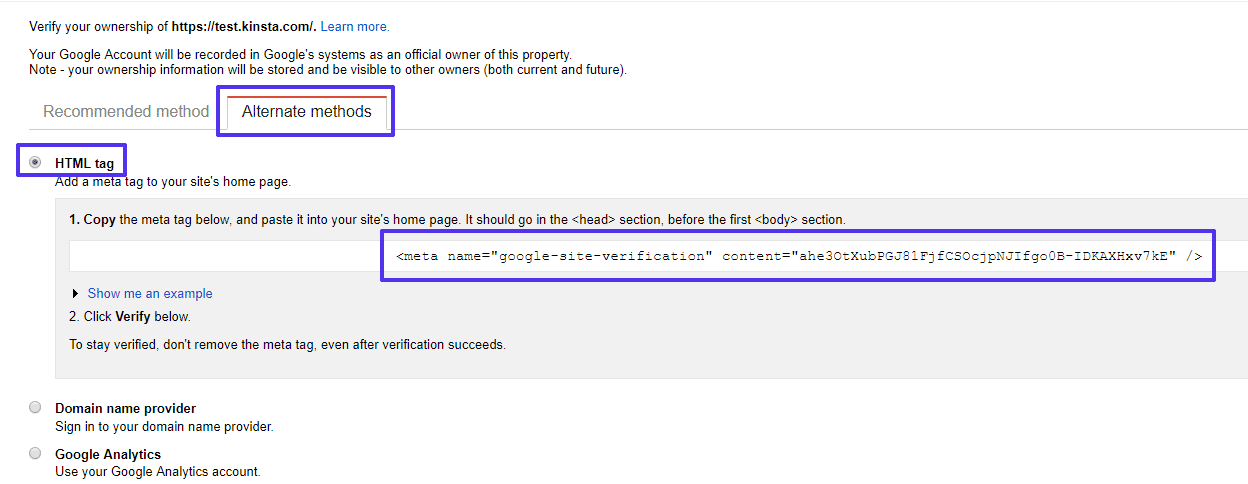
Hi! I need add the code google site verification.
https://kinsta.com/wp-content/uploads/2018/07/html-meta-tag-verification.pngOnly I have seen the Google Analytics, it’s works! But I need add another code.
thank!
Hey alandres!
You can add another script into that field if need be, it will still display on the front. However if you would like another field for this specifically, take a look at this plugin:
https://wordpress.org/plugins/google-site-verification-using-meta-tag/ CheersThank you soo much!!! It’s works
Glad to hear alandres





.)

.)
.)
)