460 comments found.

am having issues importing demo…. ‘all in one migration plugin’ saying upload max size exceeds …. and i have increased the upload max size to 1528
please am having issues with demo inmport…. uploads get to 100% then nothing happens
There should be following code in the .htaccess file (root of wp installation)
php_value upload_max_filesize 512M
php_value post_max_size 512M
After demo content installation you can remove this code.
If it won’t help then please send me the e-mail message so I will send you back a file with other method of content installation.
how can i change a group featured image?
please am unable to edit my homepage…. ‘sorry the content was not found on your page’
Are you trying to edit the “Home Elementor” page, not the “Home” page?
i tried editing all still no way….
Does it work when a default WP theme is active?
am not using any theme…. the error message is saying You must call “the_content” function …...
i tried using that but still having same issues….
can someone help with that..?
I have to take a look on your dashboard. So please send me your login credentials via contact form – https://themeforest.net/user/diabolique
credentials sent…
Like I said you used a wrong page template. I setup a Home Elementor page as your frontpage, you can customise this page using elementor.
will the community junction theme work with ultimate membership pro and ultimate affiliate pro?
How about the Youzer plugin? Theme was tested with this plugin http://diaboliquedesign.com/demo/communityjunction-youzer/groups/music/
i need a lot more than just a profile page… i need affiliate marketing, referral system etc… so your theme has not been tested with ump and uap… it might or might not work?
If you send me this plugin then I can test it.
i messaged you the plugins
where can I find the documentation for the theme please?
It’s in the Help folder. Probably you downloaded a zip file with theme only. You should download a full zip file.
i downloaded zip with all files – no help folder is contained. thanks.
I just downloaded the file from TF, there are following folders – https://imgur.com/a/264lhn1
Is one of those labelled help?
I am sorry, I don’t know how I could miss it. Here is a link to the online doc http://diaboliquedesign.com/demo/communityjunction/Help/
No problem, s I thought I was going insane for a bit lol thank you
I am thinking of buying this theme. Before I have following questions: - can you do custum work on the theme? - is it possible to add/include possibilities that users can geotag a location with there posts? And that this is show on a map. - Is it possible to disable the comments on posts by other users? - can users re-edit their already post items? - what are the main differances between your themes: Community Junction, Cinematrix and Xphoria?
Already thanks for your help. Kind regards, Frans
Hello, Unfortunately I don’t offer any custom work.
is it possible to add/include possibilities that users can geotag a location with there posts?And that this is show on a map
Not possible, maybe it can be done with additional plugin.
Is it possible to disable the comments on posts by other users? can users re-edit their already post items?
Yes
what are the main differances between your themes: Community Junction, Cinematrix and Xphoria? There is no significant difference except design.
is this Mobile capable? and is there an analytics page?
Yes, of course – http://www.responsinator.com/?url=http%3A%2F%2Fdiaboliquedesign.com%2Fdemo%2Fcommunityjunction%2F&device=iphone-x&orientation=portrait
Analytics page is possible with additional plugin like this one – https://wordpress.org/plugins/wp-charts/
How do I make single blog posts responsive for mobile? When I open a blog post on mobile it opens zoomed in, and I need to zoom out a lot but the tekst is very small when I do that.
Probably you entered some element with fixed width into post.
Wow that looks much better indeed, not sure what I did to not have that anymore… 
Do you have the same problem on the all posts?
I have the problem on the homepage for mobile and on single posts, maybe more places. I switched hosting and someone from the company migrated the website for me. Perhaps you could try to fix it for me if I extend support?
Ok, I can fix it.
Great, I extended support. Where can I send credentials so you can have a look? What information do you need?
Please send URL and WP dashboard login via contact form – https://themeforest.net/user/diabolique Thank you
Done, thanks!
Hello,
It was caused by the share button plugin and probably by related posts plugin, now single posts page looks fine. Also you assigned too many categories to post, you should use tagging.
Good morning,
Alright, thank you for fixing that. Looks perfect again now. Also I will make changes to the feeds for tagging. Homepage can not be fixed?
It looks like this news feed is not responsive, you can test it with a default WP theme, if it won’t be responsive then you can contact with the author of the news feed.
I have done tests and everything is responsive except the homepage. It just loads a bigger screen on mobile, not fitting the screen size. Even if I remove everything the page is still larger than mobile screen size.
Login credentials aren’t working.
Hi, is there any login demo?
Hi,
Yes
Nicole passw777
hi , can i use google adscence code with this theme to monetize my website. if yes then how
Hi,
Yes of course, you can put your ads everywhere.
we are unable to load sample data, how can we bring that. The instructions you mentioned in text file in theme bundle, by using wp-clone plugin, we followd all instruction , it is saying 0 tables, 0 rows updated. after successfull restore. and we cant see any sample data. please reply with how to retrieve sample data
I just send you an e-mail.
I did not recieve any email
Got it, was in spam, how can i proceed after downloading
hello, I tried several methods, first uploaded it into my server and provided url in restore from url, option the result is same, no data is fetched, then i moved the zip file in wp-clone ’s backup directory and repopulated the backup list, selected the demo backup, proceeded to restore , and after completion the process , yet i am not able to get sample data
It looks like your server can’t unzip bigger files than 100 MB. I sent you an e-mail with solution. Also please make sure you are using php 7 on your server.
Hi. Please tell me the Russian language is supported? And if not supported then how to translate your theme to Russian language?
Hi,
Yes, of course. You should install a Russian version of BuddyPress – https://ru.buddypress.org
Thank you! I noticed your site search is not working. For example phrase which you have on site “Screens on smartphones” not finds. Does not find any information at all on your site. Will you fix it and when?
There was just disabled searching of the custom meta. Now it works fine.
Here on the main page there is a greeting with the text”BuddyPress lets users sign-up and start creating profiles, posting messages, making connections, creating groups, and much more…”is it edited by an editor with the ability to add htm (pictures)?
Yes, you can customise it very easy with the Elementor page builder.
Please tell me, is your theme adapted for mobile devices?
where can I change the color of the header-title (background-color:#0891e6) (((((background-color of the page-title )))))
All colors you can change under appearance -> customize – https://imgur.com/inpCbAd
I installed the theme community junction in wordpress but nothing is shown, just the user icon. If I deactivate buddypress if you see the content of the posts….
Hello, support is provided for clients only.
so you could delete all the things from the homepage and make it the way you want it with elementor correct?
Also to add on that question.. you can create your own pages correct? like say I wanted to use my arcade plugin for a page for games I can do that right?
Yes, you can build your own homepage with elementor. Yes, you can create inner pages too but not all, for example buddypress pages.
oh you are awesome!! I am sold. I love how you respond man I’ve read a lot and you are dedicated to your craft my friend! worth every penny I think.. I just need to wait for Friday payday haha. But I am getting a new host server and starting fresh can’t wait for my site. Would love to give a shout out to you for the themes once the site launches if that’s cool
Hey Diabo so I’m about to purchase this but I just had a couple of questions before I do. 1. is this is one time purchase once you pay? and 2. is there a way on here you can have you members make auctions for themselves?
Hi,
1. Yes
2. What kind of auctions? Generally if you can make it with a default wp theme then you can make with a CJ theme too.
thanks for #1.. and I just mean could I have it where ppl can sell their stuff or their time like lawn care or home repair? or flipping homes like contract work? like ebay or craigslist
It’s possible with this extension https://wordpress.org/plugins/yith-woocommerce-product-vendors/
does this theme support image slider on the front home page
Hello,
Theme is integrated with the Elementor page builder so you can just add some free slider plugin: https://wordpress.org/plugins/smart-slider-3/ https://wordpress.org/plugins/ml-slider/when a user logs in there is this message that says whats new ? Vestibulum … how do i get rid of it
Hello,
Please go to admin profile -> messages -> notices and deactivate this notice.
Hi, when we press the logout button it redirect us to the standard wordpress template, how do we redirect the logout button to the junction home?
And when we edit the frontpage and saving it, the change does not show on the website?
Hi,
Do you use multisite. After log out user is redirected to homepage – https://imgur.com/a/Z8LyfNA And when we edit the frontpage and saving it, the change does not show on the website?
You should select the Frontpage Page Builder page template for the Home page.
when we not logged in we get the standard template from wordpress, when we login we get your template. but as soon when we logout again we get standard template.
Hi, yo my mate says the template is fcked up, that the index file is bad or something?? When you try to go to my site you get a standard wordpress template, but when you loggin everything is okay. and when you logout it redirect to the bad wordpress standard template
Hi,
You are the first person with such problem. Please go to Settings → Reading and make sure you have the same settings like on this screenshot -> http://diaboliquedesign.com/demo/communityjunction/Help/assets/frontpage.png Also install second WP installation with demo content just for testing, it’s possible there is something corrupted in code.
So the only way to load demo data is to download a two year old plugin? Are you serious???
If it’s a problem then please send me login credentials and I will install demo content within few seconds.
Hello great theme but when my users register it send an activation mail and then but when they click on the link to activate it STILL TELS THEM TO ENTER ACTIVATION CODE .. here is my link www.dondadagroup.com/forum
Hello,
It was fixes some time ago. You should update the wp-content/themes/communityjunction/buddypress/members/activate.php file. This file should contain bp_get_current_activation_key()
HOW do i do that ? where do i put this line of code “bp_get_current_activation_key()”
Open the wp-content/themes/communityjunction/buddypress/members/activate.php file, remove everything and paste it https://pastebin.com/g92ske05
Hello, I just purchased your theme cause you use elementor page builder. However, I have not been able to figure out how to edit the homepage or other pages. They dont apear to be built on elementor and I dont see the shortcodes in the WP editor window either. So, can you tell me how are the demo site pages constructed? This is a very crucial question. I post my question here because I have not been able to login into your support forum. My first impression is that your support sucks!!
Hello,
If you want to customize the frontpage using Elementor then you should edit “Home Elementor” page. There are 2 versions of frontpage, one (Frontpage 1 page template) doesn’t use any page builder and the second one (Frontpage Page Builder page template) you can customize with Elementor. I see you successfully createn a new topic on the support forum.
I have, but just logging in the forum was a tough challenge and an exercise of patience. How do I edit the Front Page 1? The WordPress editor does not show any editable element. What tool do I use to edit that homepage?
If you install demo content go to Home Elementor page and click on the Edit with Elementor button – https://imgur.com/CSNcnHd Result – https://imgur.com/Kgjik7K
Of course you should setup this page as your front page.
hello i bought and downloaded this theme but the INSTRUCTIONS IS NOT STRAIGHT FORWARD…. THE DEMO FILE LINK GIVEN IN THE INSTRUCTION IS BROKEN AND ITS EVEN A 2015 FILE 1. I CAN SEEM TO GET MY HOME PAGE AS THE DEMO LOOKS 2. EVEN WHEN I GOT IT I CANT EVEN EDIT THE DEMO CONTENT PLEASE KINDLY PROVIDE A COMPREHENSIVE INSTRUCTIONS THAT IS WORTH THE PRICE OF THIS THEME
Hello,
The last demo content edit date was 22-06-2018. Did you follow all instructions in the OneClickDemoContentInstallation.txt? Make sure you re-saved the permalink structure. Also you can send me login details so I will install full demo content for you for free.
ok thanks am all setup now BUT AM SAVING THE CONTENTS ON THE HOMEPAGE ITS NOT SAVIING MY OWN CONTENT … ITS STILL SHOWING THE DEMO DUMMY CONTENTS CHECK HERE http://www.dondadagroup.com/forum/
If you want to change it using Elementor then you should edit “Home Elementor” page. There are 2 versions of frontpage, one (Frontpage 1 page template) doesn’t use any page builder and the second one (Frontpage Page Builder page template) you can customize with Elementor.
i just did and saved but its not changing by the way THANKS THIS theme is soooooo LOVELY .. IT MAKES ME GO CRAZY HAPPY
i just did and saved but its not changing
What part do you want to change? Btw, you should setup this page as your front page.
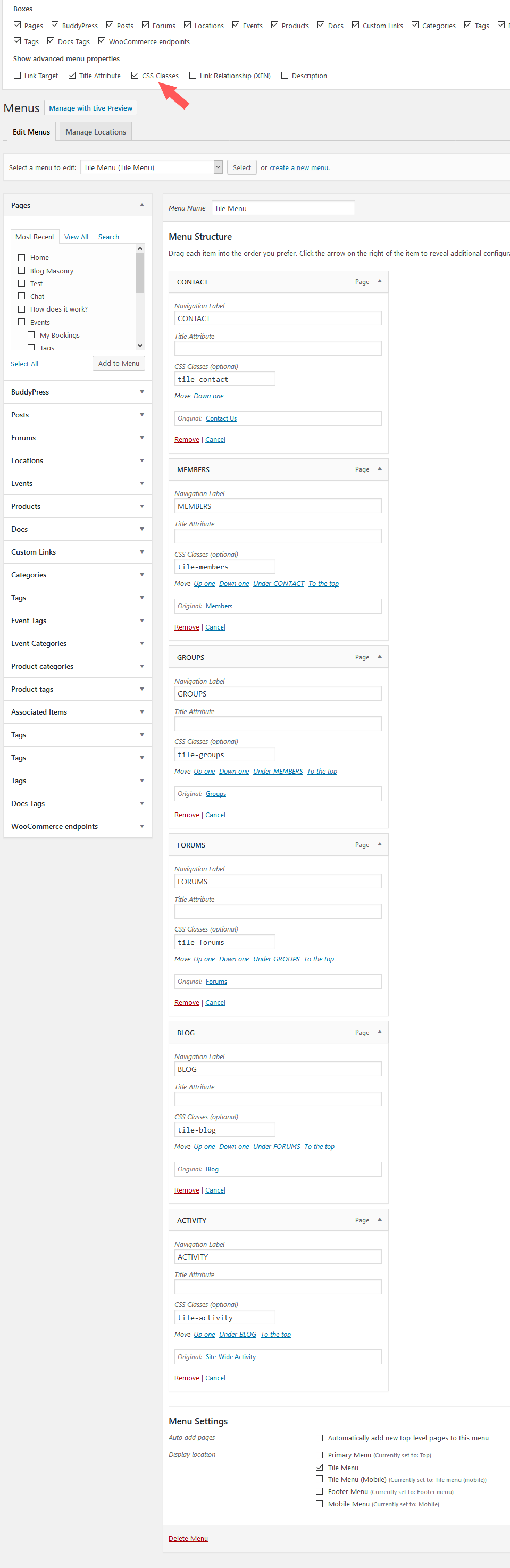
hi, blog, groups, forums contact icons do not appear on tile menu. why could it be? website: kamuturk.net
Hi,
You have to add css classes here – http://diaboliquedesign.com/demo/communityjunction/Help/assets/tile-menu.png
I’ve done this before. but it does not work
There is no tile-activity, tile-blog… etc in code source on your website so you didn’t insert classes properly.
how do i do these?
Fill the CSS Classes fields like on this screenshot – http://diaboliquedesign.com/demo/communityjunction/Help/assets/tile-menu.png
Thanks for the quick response. I’ll try
where can I remove the following text from the main page: ”” Announcement: Aenean volutpat pretium enim eget ultricies. Duis iaculis sem id rhoncus ullamcorper…..”
You can change under the elementor page builder.
mail is going while the member is registering but the activation key does not go. why weldable
Open wp-content/themes/communityjunction/buddypress/members/activate.php remove everything and paste it – https://pastebin.com/V5a1P4hm
Thanks