147 comments found.

Hi, just bought the theme and love it so far  Quick question – which Instagram plugin are you using at the bottom of the pages of your demo? It has a nice clean look and I’d like to use it too. (I’ve registered for support but haven’t received email confirmation yet).
Thanks!
Quick question – which Instagram plugin are you using at the bottom of the pages of your demo? It has a nice clean look and I’d like to use it too. (I’ve registered for support but haven’t received email confirmation yet).
Thanks!
Hello there,
we have used the “WP Instagram” plugin -> https://wordpress.org/plugins/wp-instagram-widget/
Concerning the registration issue, we will send you a new password for the platform.
Let me know if you have any other question,
Best,
Simone
Hello, is Brix page builder compatible with the plugin Revolution Slider? Thank you
Hi there,
yes you can use Revolution Slider with Brix, but Brix is not included in Clayton.
Let me know if you have any other question ( anche in italiano  )
)
Simone
Buongiorno Simone, continuo in Italiano Il mio cliente vorrebbe assicurarsi che sia possibile aggiungere più elementi su una stessa pagina. Ad esempio sull’home page vorrebbe la presenza di una Slider e sotto la slider delle anteprime di alcuni album, del testo etc. Visto che sul sito demo vedo un solo elemento per ogni pagina mi chiedevo se si potesse fare. Ultima domanda: è possibile fare partire in automatico la slider e lasciarla in loop? Grazie!!!
Buongiorno,
il tema è stato sviluppato sul nuovo block editor di WordPress che consente di creare layout di pagina anche più complessi. In WordPress ogni pagina può essere impostata come home page, quella della nostra demo è solo un esempio e tra i vari template di pagina ne abbiamo uno “full width” pensato per essere usato anche con page builder come Elementor, per avere più libertà a livello compositivo.
Per quanto riguarda l’ultima domanda, purtroppo non abbiamo l’opzione di autoplay e infinite loop ma aggiungiamo la sua richiesta nella nostra lista per gli sviluppi futuri.
Mi faccia sapere se ha altre domande.
A presto,
Simone
Buongiorno, continuo a tormentarvi
Avrei un’altra domande:
Esiste una funzione che prevede la scelta di far scaricare le foto da parte di un utente? Mi spiego meglio: in alcune gallerie (o album) vorrei che le foto non si possano scaricare nè condividere, in altri mi piacerebbe attivare questa funzione (solo il download, senza la condivisione). È possibile?
Grazie!
Buonasera!
Il bottone di download presente nella lightbox è configurabile in ogni singola galleria.
Nel tema è presente anche un’opzione globale che consente di disabilitarlo automaticamente in tutte le lightbox, avendo sempre la possibilità di attivarlo individualmente in una specifica galleria.
Oltre all’opzione di download anche i link di condivisione sono configurabili in ogni singola galleria.
Mi faccia sapere se ha altre domande.
Buon weekend,
Simone
Hi, I’m looking for a new theme for my art website and this is definitely on the shortlist! One question before I buy… on the front page, is it possible to keep the dimensions of the main image fixed, and just have it resize for responsive display? (At the moment in the demo it resizes and shows the centre of the image ‘portrait’ rather than the whole image ‘landscape’). It’s just that for some of my art cropping to show the centre won’t showcase the picture very well at all! Thanks
Hello there,
this is the image behavior you are looking for? -> https://justevolve.it/demo/clayton/2018/07/28/illo-eos-odit-optio-quae/
The page/post featured image can be displayed full screen (as our home page demo) or with the image ratio (like the linked post).
Let me know if you have any other question.
Best,
Simone
Hi, thanks for the link, yes I think that’s what I’m looking for; the image keeps it’s image ratio. Can this be used on the home page too? Also, I see there is this layout: https://justevolve.it/demo/clayton/2018/08/06/iusto-qui-qui-perspiciatis-et/ Showing a horizontal scrolling gallery. Could this also be used on the home page? And when viewing on a phone could it also keep it’s horizontal layout? (I see on that demo page it resizes into a long gallery when on a smaller screen but I would like it not to do this). Thanks!
Hello there,
yes, every page can be defined as home page.
Concerning your mobile question, every album on mobile will be displayed as column layout, you can choose between 1, 2 or 3 columns, individually for every album.
Let me know if you have any other question,
Regards,
Simone
so there is no way to keep it displaying as a horizontal scrolling gallery on mobile? That would be a good feature to add, because it would be a good look for the home page
Hi there,
nope, unfortunately this is not possible, thanks again for the suggestion.
Best,
Simone
hi I can not find the following pages within your package
“Album Cover” “Beautiful shots from above”
Where can I find these models?
Hello there,
these pages are included in the demo content, but you can recreate easily:- Album cover -> is a page with the “Collection” page template and the “Album cover” layout
- Beautiful shots from above -> is a page with the “Album” page template and the gallery “Row” layout.
Let me know if you have any other question (anche in italiano )
Best,
Simone
che bello ! grazie mille per la dritta simone, un piacere parlare in ita su Envato
mi sono accorto che impostando la pagina con ” album Cover ” il testo che appare sulle gallerie passando con il mouse nella versione Desktop, non funziona su smartphone…perchè giustamente manca il mouse…c’è un modo per mostrare il nome dell’album solo su mobile ? perchè appare solo se ci clicco sopra col dito e non si ha il tempo di leggere perchè entra subito nell’album.
inoltre ho notato che su una galleria impostata come “album” con 100 foto, non funziona sempre lo scroll con la rotella del mouse…è un bug ?
grazie mille Ciao!
Ema
Buongiorno Ema,
grazie per la segnalazione riguardo al problema dell’album cover, verrà corretto nel prossimo update.
Per quanto riguarda il problema con album molto grandi, avrebbe per caso un link da condividere in modo che possiamo analizzare meglio il problema?
Grazie e a presto,
Simone
Buongiorno Emanuele,
non abbiamo riscontrato problemi con lo scroll nella sua pagina. Ha riscontrato questi problemi su un browser in particolare?
A presto,
Simone
su Google Chrome
Buonasera Emanuele,
abbiamo provato su Google Chrome con diversi computer e mouse (magic mouse e mouse tradizionale con rotella) e non abbiamo riscontrato problemi, la pagina si carica molto velocemente e lo scroll è fluido e si raggiunge il fondo della pagina senza problemi. Potrebbe essere un problema legato al suo computer? Ha provato su altri computer?
A presto,
Simone
p.s. Complimenti per le fotografie!
Ok allora proverò a reinstallarlo… già che ci sono posso chiederti se è stata prevista qualche opzione per contenuti video ? perchè mi piacerebbe mettere un video a pagina intera, ma non ho trovato niente nel template demo, ne da altre parti.
Grazie mille.
Buongiorno Emanuele,
può vedere un esempio di video caricato in pagina a questo link -> https://justevolve.it/demo/clayton/2018/07/28/illo-eos-odit-optio-quae/ I video sono supportati nel page content usando il blocco di WordPress.
A presto,
Simone
questo genere di impaginazione è perfetto. dove posso trovare la guida per impostare tutto correrttamente ?
ho visto che è uscito un nuovo aggiornamento del tema, è possibile vedere le novità portate con l’aggiornamento ?
Buongiorno Emanuele,
può installare la demo, dalla pagina “Clayton” > tab “Demo content”, ed editare la pagina che vede nella demo. Ad ogni modo è un post composto interamente con il nuovo block editor di WordPress, con una featured image impostata e un blocco video con layout “full width”.
Le novità del nuovo aggiornamento sono indicate nel changelog e nella demo online può guardare le voci di menu che hanno il badge “New feature” nel menu “Albums”.
Saluti,
Simone
ma installando la demo, non rischio di perdere tutto il lavoro che ho fatto fino ad ora? posso recuperare anche solo una pagina dal template demo ? e l’aggioramento del template come lo posso installare velocemente ?
grazie mille per la disponibilità
Buongiorno Emanuele,
è possibile installare il contenuto della demo sull’installazione attuale senza cancellare il dato presente. Tenga presente che le nuove pagine che vede nella demo online non sono ancora state inserite nella demo presente nel pacchetto del tema. Purtroppo non abbiamo un metodo per importare una sola pagina.
Per quanto concerne invece l’aggiornamento del tema può usare il plugin di Envato -> https://envato.com/market-plugin/
A presto,
Simone
hi team,
Just saw the 1.7.1 update, and i had not realized that all images were available for download (you’ll understand that that’s a serious copyright violation mean directly from our website). With all albums, posts etc already done it would take ages to go through each one of them in both languages to update them.
is there a SQL command I could run to disable it on all posts & pages to start with ? and then I can go in the ones i’m interested in to enable it again ?
For 1.7.2 : Could this be an option to globally disable it and enable it only where we want it ? (as it’s done with comments in WP Settings & in post/page settings).
Could we have a global/local setting for Sharing too ?
Thanks a lot, Olivier
Hi Olivier,
thanks for the suggestion, we will work to add a global option to disable the “Download” link on all albums + collections.
Best,
Simone
Great, Meanwhile is there a SQL command i could run for it to take place on all former albums & collections ? would really help me out
You can do it via code with the following PHP snippet:
add_filter( 'clayton_gallery_config', function( $config ) {
    $config[ 'lightbox' ][ 'download' ] = false;

    return $config;
} );
Place the above code in the functions.php file of the theme/child theme, and you should be good.
HI, thanks a lot, added this to my functions.php in the parent theme, then tried in the child theme and doesn’t work, can still download any image from share button (and download is active in my options).
https://www.olivierborgognon.com/corporate-lifestyle/#&gid=1&pid=10Hello there,
unfortunately the filter works only on albums, not collections.
We will manage this functionality in the next theme update.
Regards,
Simone
hi simone,
Ok i get it, so if i understand well that means that the photo wall, or any other way of showcasing images which is not an Album enables images to be downloaded. Meaning… If i disable download on an album, but this album is in a collection… images become downloadable at this stage correct ?
Hello there,
yes, but we will fix this in the next update
Best,
Simone
Hey simone and team,
Great 1.8 update ! Fantastic to have global disable/enable download & local inherit, disable/enable option. Fabulous feature
May I add a couple of things or ask for previous ones for next version ?  - sharing -> email ? (for those of us not on social media)
- Option of having social media icons (social, email, etc.) on the main menu bar (wonderfulmachine for example require it to be part of their enrolment process)
- update on the “footer sidebar” idea ? (which can allow me to have a contact form anywhere and not above my wall in collections/photo wall mode) etc.
- Amount of colums selection in “full layout” mode ?
- sharing -> email ? (for those of us not on social media)
- Option of having social media icons (social, email, etc.) on the main menu bar (wonderfulmachine for example require it to be part of their enrolment process)
- update on the “footer sidebar” idea ? (which can allow me to have a contact form anywhere and not above my wall in collections/photo wall mode) etc.
- Amount of colums selection in “full layout” mode ?
Must look into that shortcode for albums to see how that works, because it looks like just a kick-ass feature !
So, again, but it’s always good to say it and to hear it… THANK YOU ! the whole team is working amazingly and it’s really inspiring to work on our websites to develop our business like that.
Hello there,
first of all, thank you for your kind words and amazing review, we really appreciate!
Concerning your requests:
1. Yes, this can be done and will be included in the next theme update
2. Nice idea, we have to figure out a couple of things concerning the design of the header but we will include this request on our list!
3. We already have this feature on our list but we are trying to prioritize the new features, don’t worry, will be included in a future update
4. The option for a full-width post is already on our list, but without columns, because you already have the new WordPress “column” block that allows you to create a more flexible layout. Let me know if I understood correctly your request.
Best,
Simone
Hi simone,
You are welcome.
for points 1-3 awesome.
For point 4, it was more about being able to have more density options on a full-width gallery, album, collection to showcase maybe 1-3 images per row, and not about the column element of Gutenberg.
Thanks a lot,
Olivier
and quick question… how does the Albums shortcode work ? can’t find it in the documentation (which i guess is somewhat quite normal… release was 2 hours ago :D)
Hello there,
thank you for the clarification of point 4.
Concerning the new shortcode, you can find the shortcode in the documentation (the “Offline documentation”) file inside the main package, the shortcode is called clayton_album_cover, this is an example: [clayton-album-cover id=”17”] and these are the extra functionalities:- Turn album link on/off: Name: link Values: 0 or 1 (default)
- Toggle the display of album’s images count Name: count Values: 0 or 1 (default)
- Display album title Name: title Values: 0 or 1 (default)
[clayton-album-cover id=”17” link=0 count=0 title=0]
Best,
Simone
hi Simone, I was just looking at the Wedding skin, and basically, the columns size and look of the wedding home page (below the slider header) is exactly what I was asking for a while back.
How do I implement that in my default skin ?
Thanks,
Olivier
Hi Simone, any news on this one ? Thanks a lot, Olivier
Hi Olivier,
sorry for the late reply, you can take a look at this snippet -> https://pastebin.com/sYtQduvy for the wedding page. Just copy and paste it in a new page (with the “code editor” switch active). Concerning the skin unfortunately the only way to add it is to import the Wedding demo (from the “Clayton -> Demo content” section) but keep in mind that this procedure will erase your options and create new pages/post that you will later need to remove it.
Regards,
Simone
Hi simone,
Thanks for the snippet, Can use that and duplicate a page if i need to for some pages… thought it was way more complex, didn’t think about using full page gutenberg mode with galeries, and give verts + horiz images to float them (for the line of 3 in a 5 col galery). Really helps. THANK YOUUUUU !
To get the skin, is there a way to FTP it kind of that following way : 1) install theme on local computer 2) copy required files (which ones ?) 3) FTP files from point 2 into theme folder of my active domain 4) apply theme model (in pages selector) to the given page ?
would that work ?
Hi Olivier,
the easiest way is to replace the theme_mods of your active theme in the database if you can do it. These are the settings for the wedding skin -> https://pastebin.com/v8cMJzqf You have to replace the content of the theme_mods_clayton (or the child theme if is active) with the snippet data.
Best,
Simone
I just want to buy, but no more for 39? Please!! one day more!
Hey there,
we are sorry but it was a time limited promotion
Best,
Simone
Hi, just bought this fantastic theme and website is looking great. Two questions:
1. How do I remove the download option in light box?
2. How do I change the size of footer text?
Many thanks
Hello there,
thank you for choosing Clayton!
1. we already have this request in our feature list, will be included in the next update.
2. The footer text is linked to the “Text small” option in the Customizer > Clayton > Typography tab, we will create a dedicated control in the next theme update.
Let me know if you have any other request/suggestion
Best,
Simone
how can i add a search box to the menu bar …
can you make this a feature a future update …
Hello there,
thanks for the suggestion, we have added this request to the features list!
Best,
Simone
Hi team,
Feature question
Could we have another option for the photo wall or mansonry Gallery with a choice of how many columns we would like (or an even lower density… like 3-4 images per row ?)
Thanks a lot,
Olivier
Hello Olivier,
you can choose the number of columns if you change the “layout” option to “boxed”, but we can add more customizations controls also for the full-width option.
Thanks for the suggestion
Best,
Simone
Hi evolve team,
Is it possible to display on homepage the last 3 blog posts (for example)? And is it possible to limit the number of posts on the blog page? Or display a navigation menu beside the blog post list?
Hello there,
the blog page template rely on the global WordPress reading settings, so you can change the number of posts from the “Settings > Reading” page.
If you want to add a navigation, or any other widget, beside the blog page you can enable the sidebar, from the “Options” page metabox > Sidebar tab, and add your desired widget.
Let me know if you have any other question.
Regards,
Simone
Hi evolve team,
Question for you guys, i’m using photo wall with Posts as Galleries to showcase my work.
My problem is that i’m also writing blog articles, and in my blog, obviously, the category used for the wall shows up too.
The main issue is that blog articles are not albums, and they don’t relate in the same way… is there a way of solving this problem and disabling the albums or collections from the blog/categories ?
Other “issue”, in Scattered mode, the text written in Gutenberg always ends up below the image gallery.
Final question, as albums are “posts”, i have the blog “next post” features below, but that’s not really practical for albums or collections, as they are not “blog” content but really featured content for photographers.
Thanks a lot,
PS : That could be an awesome feature in 1.6.3
Hi there,
first of all thanks for using Clayton.
1. Do you need to exclude a specific category from the blog page?
2. The albums galleries are always printed before the page content, so yes, if you add some text will be displayed after the images gallery.
3. Albums can be pages or posts, if an album is a post should be paginated like other posts. Are you suggesting to disable the posts navigation when the post format is gallery? Collections are not paginated, since they are pages.
Let me know if you have any other suggestion!
Talk soon,
Simone
Yes i meant exclude a specific category from a blog page, is there a way to do that ? (might come in useful)
your answer of point 3 solves my problem of paginations. I hadn’t realised i could do them as galleries or pages of album template. I’m changing them all now to pages, hopefully it won’t collapse my SEO ranking too much… Worth while updating the documentation to clarify, never know.
For positioning of galleries, would be great to have them where we position them, as it’s also a way to have text before, after, or spaced out, using the power of gutenberg blocks
That being said, you guys are super reactive and your theme updates are awesome, sincerely top notch service.
Hello there,
thank you so much for your kind words, we really appreciate!
Concerning your blog question, we have added this request to our features list, this is something that we should definitely include in the blog page template.
We are still investigating on gallery positioning, we will improve this functionality in future updates.
Thanks again for your feedback and let me know if you have any other suggestion!
Best,
Simone
Hey Simone,
Back again with another suggestion :
Would it be possible in 1.6.3 to have a sidebar positioned as a footer bar in pages & posts ?
The idea is the following :
I’m on WPML, and Visibility widget option doesn’t work well in multilingual, so i can’t de-activate my footer in both languages correctly on most pages.
As your theme provides the option of creating custom widget areas, i created a Contact Form Area in which i added an embed of Custom HTML which i can then append to every page or post I want.
Now the issue is that I want to have it below all my pages or posts and not on the side, and when i use your sidebar option… it’s only left or right, could you guys add “bottom” and “top” for those of us who would need it ?
That would solve issues with visibility, and we can apply where needed still using WP features.
Workaround but not awesome :
What i’m doing now is that i created 2 blocks, one H2 with the title, and one Custom HTML with the embed code, and i’m adding them manually to all pages. But if the code changes for any reason… i’m damned because i must edit every single page for both languages individually.. instead of 1 custom HTML in a widget.
Thanks a lot,
Olivier
Hello Olivier,
if I understand correctly, you need a full width sidebar before the footer?
Talk soon,
Simone
Another question, the sidebar should be like the footer sidebar, one column widgets or should be a “column-like” widget area? If you are using both regular sidebar and this new post footer sidebar should be confined to the post content or should go full also below the default sidebar?
Talk soon,
Simone
hi simone,
The way I imagine it.
Full width (either boxed or full width depending on template selection) Position : Below Post content Optional : choice of 1-2-3 columns to place widget areas)
at this stage i see 1 full width column as the easiest to implement, as it’s the same as the sidebar content, but with a container at the bottom instead of on the side.
I wasn’t thinking of having both actually to keep it simple, but if you have both sidebar & footerbar, i would say 100% width (covering both content + sidebar area).
Thanks so much for taking the info and seeing what can be done
Basically the issue with Widget areas in WP are that you can’t decide if you want them or not, the Visibility function is non-effective and not working properly with multi-lingual. So i’m trying to figure out an option through Themes or as another awesome idea : a Widget Block !
You can then reuse it and put it wherever you want.
Hi Olivier,
thank for your clarification, we will investigate further in order to find the best solution for this new feature
Thanks again for your feedback and don’t hesitate to contact us if you have any other idea for the theme!
Have a nice weekend,
Simone
Hello,
Is this theme compatible with the most populars free multilingual plugins?
Hello there,
yes, and have a special integration with Polylang.
Let me know if you have any other question.
Regards,
Simone
Hi, I’ve just bought your theme and I’m very happy
I’m just wondering how to display the instagram feed (I’ve just set up WP instagram Widget) at the bottom of the website? I don’t think widget areas are the correct solution?
Could you tell me how did you set up your instagram feed, just above the footer, on the Homepage of your demo website?
Thanks a lot
Hello there,
we have used a plugin called “WP Instagram Widget”, but you can install the plugin you like. We have added the Instagram widget to the footer widget area and configured with 9 images and thumbnail image size.
Let me know if you have any other question or suggestion.
Regards,
Simone
Thanks!
Another little question: is it possible to change the width of the blog posts?
Hello there,
are you referring to the blog loop page? If yes you can choose between 1,2 or 3 columns.
Let me know if you have any other question.
Best,
Simone
Hello, no I’m talking about the blog page detail, like this one on your demo for example: https://bit.ly/2SaJpwK Here a screen shot of my wish: https://ibb.co/8BVF6q9
Hello there,
there isn’t an option to change the post content width yet, you can use the “Columns” block, from the new WordPress block editor, and choose a full or wide option.
We will consider to add an option to switch between different content sizes.
Regards,
Simone
Hi,
I consider buying the theme, just a few questions:
1) I like the captions to the lightbox option in the galleries. is it also available for the Boxed Photo Wall? I don’t see any captions to the photos there.
2) Is it possible to remove the huge headings, shadow etc. everything I boxed in here: http://silkephoto.com/wp-content/uploads/2019/01/Screen-Shot-2019-01-27-at-17.48.25.png 3) Also the “view album” under the smaller heading
4) Instead is there and option for a quick categorie filter? I want to use the small headings to label the different galleries and I love your photo wall concept that I can have all galleries on one page! However, to avoid scrolling too much, can there be a filter above the first heading so people can jump down to the gallery they clicked on? It would be nice, also as a preview of people to see what galleries there are ahead.
5) Can I have the Logo ABOVE the menu as well?
Thanks in advance, Silke
Hello there,
thank you for your interest in Clayton.
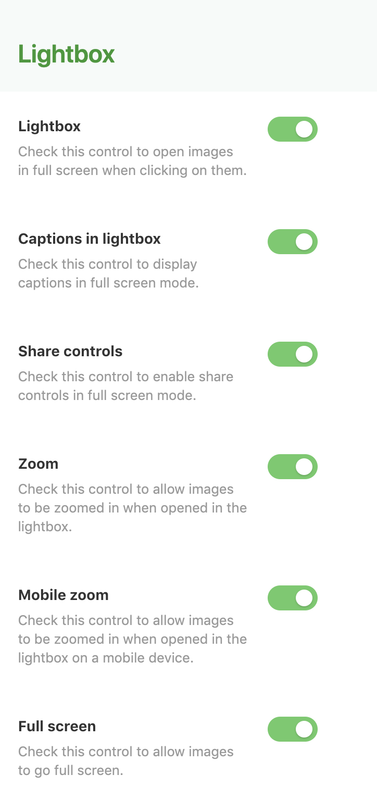
1. Yes, every album or collection that support lightbox also support captions -> a screenshot of all the lightbox options available: https://i.postimg.cc/g0gmdq1R/Schermata-2019-01-28-alle-09-25-28.png2,3. yes, you can customize everything about the page header -> https://i.postimg.cc/ZYpYv3Nk/Schermata-2019-01-28-alle-09-26-41.png
4. currently the only collection that has a sort of filter is the default collection -> https://justevolve.it/demo/clayton/nature-and-landscapes/ we are interested in your suggestion, can you please detail better what are you need, perhaps if you want you can use the feature request form -> https://goo.gl/forms/2uZYgz3wHxOcriga2
5. not right now but thanks for the suggestion. We have 2 different header layouts, the default one, with centered menu and logo and a variant with the logo on the left and menu on the right.
Let me know if you have any other question/suggestion.
Regards,
Simone
Hi!) I got an idea for one really valuable feature for «Album Cover» Collection layout (for other collection types it’s not so valuable, because they will not be used that way).
So the feature is – an option (better via on/off switcher or as a default behavior) to make Album Covers items displayed in the frontend collection page in reversed order compared to the list of those Albums listed in the backend.
This is really needed in the case you want to use this «Album Cover» collection page to display your works in order of appearance so the newest works (shootings) will appear in the top of the page, when you add them in the backend list. But today’s behavior of this collection is like this – when you add a new album to the albums list in the collection page options in backend – this last added album appears in the bottom of the page in the frontend. So to make it appear in the top of the page you need to drag’n’drop it to the top of the list, but if there are a lot of albums added in this list 10-30-50 etc – it will be really tricky to do it each time.
So need an option to make this list of albums in the backend displayed in reverse order in the frontend – so the last added album will appear in the top of the page as a first item (And the oldest works will be to the bottom). (The same layout way like it done now but in reversed order).
Hope you understand what I mean – See screenshot – https://ibb.co/Bcr6YGz
And got another idea for very useful feature for any gallery types (page or post) – is there any way to add lightbox behavior for other galleries on the page, not only for first one – to have several galleries in one page that will be able to open images in lightbox (in separate lightbox bundles) (using same Clayton framework without side plugins).
I mean I want for example create a gallery page with main carousel (or grid or whatever) gallery in the top (for example for final pictures from photo shooting), then below it I want some title and some text, and then some gallery of another images pack in grid layout (for example – backstage photos from this shooting) (added using default gutenberg editor block) and then some text again and some another pack of images in gallery grid block etc. etc. And I want all those pictures in all galleries be able open up in lightbox mode.
Because now I can create such a page, but only first gallery will be able to open up in lightbox, but all other galleries below (added using default gutenberg editor block) will look nicely but they will stay small an will NOT be able to open in lightbox, and it’s a pain:)
Could you please add some option (feature) to make all those other images in any galleries on the page (added using default gutenberg editor block) be able open in lightbox mode (in separate lightbox bundles – each one for each gallery so not to mix with other pictures on the page when slide them previous-next) And make them all use/share global lightbox settings for this page to keep it simple – I mean «Captions in lightbox» «Share controls» «Zoom» «Mobile zoom» «Full screen»
Let all those extra galleries can be on the page like they are now in default grid mode (created using default gutenberg editor gallery block options) just let them be able open in lightbox – that’s it.
Hope you understand what I mean (got no screenshot for this).
As a P.S. for the last suggested feature – even more powerful will be a feature as an on/off option to be able make any default gutenberg editor gallery block opened in lightbox (with lightbox options that could be global for the certain page to keep it simple or individual for each gallery block if possible)
And not only for Gallery gutenberg editor block but for Single Image gutenberg editor block as well. Not only for «Album» page/post template, but for any other page/post templates too («Default template», «Full width» etc.)
(There is already a default wordpress option for every gutenberg editor gallery/image block – «Link» that can be set to «Mediafile» – so images will be opened as a files in browser on click (but it seems useless), need add there «Lightbox» behavior somehow, or maybe add it to another place, so not to loose this feature with Wordpress updates).
First of all thank you much for new update and new Scattered mode!
I found some issues, please fix them if possible:
1. Scattered mode in Albums and Collections both got same issue with Columns option selector – no matter that you choose – there will be only 3 columns layout in the frontend page. (Not sure if there are any layouts for 1,2 and 4 columns though) See screenshot – https://ibb.co/Z1qfFnB
2. Not an issue, but I noticed that this 3 columns Scattered mode layout consists of 3 different row patterns, so they repeat over page depending of images amount in gallery. It all looks great, but need slightly tweak patterns #2 and #3 for better overall balancing – make it slightly accurate (Pattern #1 looks great) (Check and tweak balancing for 1, 2 and 4 columns Scattered layouts if they exist) See screenshot – https://ibb.co/R6kx8Bt
3. Please fix layout behavior for default Gutenberg editor block – Columns. Because It’s very useful block for easy page construction, but it got significant layout troubles in Mobile and Tablet modes, and some in Desktop mode as well. See screenshot – https://ibb.co/HtkHQVj
Hi there,
thank you for your feedback!
1. we have added to the features list the order switch for collections, is a nice idea
2. we can suggest to use a plugin like https://wordpress.org/plugins/lightbox-photoswipe/ that use the same lightbox script we are using for the galleries
3. this is our mistake, we forgot to disable the column options when scattered mode is on, we will disable them in the next update.
4. the idea behind the scattered mode is that we can add in the next updates different variants, so you can choose the one that fits better your images in a specific album, because the pattern we have created can work better if you are combining images with different ratios.
5. we will check again the columns block, thanks for reporting
Have a nice weekend,
Simone
Got it! That’s great! Thank you!
Concerning Lightbox with PhotoSwipe plugin – I tried it, it looks nice, but seems it has some interaction conflicts with the theme engine – when I activate it – and try open any gallery (that goes first on the page) that is driven by the theme engine – it opens first images but then the top part of the website (the whole top viewport ) becomes unclickable – including main menu, top images in gallery etc. If scroll down the page a bit – then items below (the whole viewport) become clickable, including menu etc., but if scroll up to the top of the website again – the top part of viewport becomes unclickable again.
Seems it overrides theme engine somehow and become open all images using this plugin engine.
Because in mobile mode it opens all images on the page using this plugin, not in theme engine.
If we have two galleries on the page: first one – driven by default theme engine and second (that’s not driven by theme engine by default) – if I try open second gallery first – it opens in this plugin lightbox engine and main menu stay clickable (but it doesn’t inherit Clayton lightbox options), but if I try open any image of the first gallery then all those troubles mention above will occur top part of the site will become unclickable, but it start inherit Clayton lightbox options for other pictures, that stay clickable.
If I disable default Clayton Lightbox switcher for this gallery page – but keep this PhotoSwipe plugin active – this first gallery will not be opened in lightbox, but second will be opened in lightbox (in PhotoSwipe plugin). And in this case top part of the site will stay clickable ok (main menu)
So If you can do some tweaks to prevent those conflicts somehow (make PhotoSwipe plugin open other galleries and images, and inherit Clayton lightbox settings for the page – that will be great!
Or if you can activate lightbox behavior as an selectable option for other galleries and images on the page using theme native framework with all lightbox controls options that will be perfect!
Have a great weekend too!
Thanks for reporting, we will take a look to see if we can prevent those conflicts!
Best,
Simone
Thank you!)
I got few ideas for a new features:
1. Could you also please add an option for Posts – disable/enable Title and disable/enable Categories link and text block. See screenshot – https://ibb.co/xgVpzYD
2. Is there any way to add an global option for Posts pages navigation (Previous-Next buttons) – to limit navigation to the current category of the opened Post only?
For example – we have several categories: 1, 2, 3, etc. “Category 1” – for albums, “Category 2” – for texts articles, “Category 3” – for something else. When we open any post in any category it has navigation between posts (Previous-Next buttons) – but by default it navigates between all posts in the whole wordpress database no matter the category.
Need add somehow a global option to limit this previous-next navigation to currently opened post category only. So for example if we open albums in “Category 1” – it will navigate only between posts in this “Category 1”. (And if the Post assigned to several categories – navigate between them all) So thus we can create collection pages with Posts only that will have their own navigation.
UPD for pt.2: And also need an Option for Blog loop Page – selector which categories to show. So that we can have separate loop pages for separate categories of posts. (One page for text articles, one page for Albums etc.)
If that possible and not so complicated, just a suggestions:)
Hello there!
1. we have added this suggestion to the list
2. We can add the pagination lock to a single category, but not to multiple categories, but we still have to analyze better the problem.
Thanks again for your suggestion
Best,
Simone
Thank you much for the new update! Scattered mode and all new patterns is super-cool feature! (Hope there will be even few more patterns someday, but even now it’s all cool though!
And “Columns block” now works perfect! Great!
Concerning pagination lock to a single category – that will be quite enough for the start I think, because it’s not so needed for multiple categories. If it could be done for multiple categories though (and ability to show/hide certain categories in Blog loop Page) – that will be perfect, but not so necessary if it’s very complicated)
The only valuable issue left for scattered mode – is that in Albums pages/posts with Scattered mode activated there are no paddings from logo in Desktop and Mobile and Tablet modes (for all patterns) so the Site Logo becomes invisible because it appears over first images. It all occurs when checked Disable page header (so when Page Header is hidden) When Page Header enabled – t’s OK – there are paddings from Header so it looks ok. But need paddings when Page Header Disabled as well. And by the way – in Collection page with «Album Cover» and Scattered modes active – all works perfect for all modes (there are proper paddings from Site Logo) So please fix it for Albums (for Desktop, Mobile and Tablet modes)
And got one issue for Collection page with «Album Cover» with normal mode, not Scattered (Scattered works OK here): The issue is that albums that go latest in the backend list (items that appear in the bottom of the site) – got mixed up in the frontend and loose it’s correct order. Try add more than 4 albums in that list with 1,2,3,4,5,6,7,8,9, etc. names in sequential order of numbers (with 4 columns mode, and 3 also and even 2) – and watch the numbers order in the frontend page – there numbers order will got some mixed up for latest items (that goes in the bottom) (When Scattered mode is active – the order of appearance is correct) Please fix that if possible (It’s not that so critical, but in some cases could be annoying)
And also I noticed strange behavior occurs in Collection page with Photo Wall mode with several albums inside (and in any single Album in Grid mode) If I try rearrange images using drag’n’drop in the Gutenberg gallery block settings, the order of images in any album (that’s added to this Collection) – their previews will appear on the Collection page (and in the album page in Grid mode) with the correct order I’ve just made, but when I open those images in lightbox and swipe them – the rearranged order (that I’ve made with drag’n’drop in the gallery block settings) got ignored and images become queueing based on their real file names instead (in the exact order they was added to the galley, ignoring any drag’n’drop rearrangements). So not sure if that is an easy issue to fix – but if possible – that could be nice)
Hello there,
concerning the scattered album issue, can you please send us a link to a page with this issue so that we can understand better the problem? By the way, since we have done a lot of refactoring work on javascript and php in the latest update concerning the scattered mode and spacing you may need to clean your browser cache or server cache.
Let me know.
Concerning your last question, the problem here is this is how the masonry layout works. The masonry doesn’t necessarily respect the image order, he has to fill all the empty spaces so can switch some images position. This is true for all the grid layouts in the theme, album grid, collection default, photowall and album cover.
If you want a regular grid you can create a new cropped image size, maybe using a plugin like Simple image sizes, and use this new image size as size for your grid with the dedicated option https://i.postimg.cc/BZ1MF7Vm/Schermata-2019-01-29-alle-10-54-03.png.
Regards,
Simone
Well seems it’s not a cache thing, but the layout code structure itself because I try it even in Incognito mode – with no caching.
I mean that: try to disable the Page Title (with all Title effects) on this page – https://justevolve.it/demo/clayton/album-scattered/ and watch what will happen (in all Desktop and Mobile and Tablet modes). You will see it with all patterns on mobile/tablet modes and especially with patterns B and C in desktop mode. (Because pattern A in desktop mode is OK for the first look, but still it cuts a bit some part of the first image, especially if it’s in landscape orientation).
But Collection Page with «Album Cover» with scattered mode works fine as expected – because it has different layout code structure.
I found the temporary solution that works for me (Because I don’t use the Page Titles in scattered Albums): The custom CSS code, that overrides default template settings:
.clayton-g-t-scattered {
    margin-top: 150px;
}
(But if Page Title is active – the extra space under the Page Title will occur – so it only works OK if you don’t use Page Titles in Albums)
And by the way – Google Chrome does’n see any custom CSS changes even if I refresh the page (only see it if I open the page in Incognito mode). Seems it caches CSS and never update it even if it has some custom changes. So it’s very strange behavior and a real problem. (Firefox works OK though).
Could you please suggest some reliable plugin to force Google Chrome (and any other browser) to redownload CSS (and the other changed content – .css, .js, .pdf etc.) each time I made any changes to it and also each time Wordpress or Clayton Theme or site plugins files got updated? (That will for example generate and add on the fly new versions for all files names in the source code like (?ver=123456) after each time some changes made – or somehow else). Because average User will never clean their browser cache and won’t see the updates.
Concerning the last question for Masonry layout behavior – now I got it, that’s the trick! Thank you for explanation!
Hello there,
yep, this issue is related to the page header disabled, we will fix in the next theme update, thanks for reporting.
Best,
Simone
Thank you!)
And concerning last question about browser caching for CSS (and JS): Could you give some advise how to solve this problem? Maybe reccomend some plugin that helps update browser cache each time some changes made to CSS (and when theme files got updated)?
Is there any way to add unique name for file versions each time I made some changes to child-theme CSS?
Because now by default it adds only ver number based on current Wordpress version like this:
/wp-content/themes/clayton-child/style.css?ver=5.0.3'
/wp-content/themes/clayton/style.css?ver=5.0.3'
So browser keep those CSS in cache even if I add some new custom CSS strokes to child theme CSS and people can’t see any changes even if refresh the page.
(This problem actual for Chrome browser and maybe some others, only Firefox seems to work correct)
I found some advise in the web to add that code to functions.php of the current active theme, so it will generate versions based on file modified time, but seems it doesn’t work or maybe I do something wrong
/**
 * Enqueues script with WordPress and adds version number that is a timestamp of the file modified date.
 *
 * @param string      $handle    Name of the script. Should be unique.
 * @param string|bool $src       Path to the script from the theme directory of WordPress. Example: '/js/myscript.js'.
 * @param array       $deps      Optional. An array of registered script handles this script depends on. Default empty array.
 * @param bool        $in_footer Optional. Whether to enqueue the script before  instead of in the <head>.
 *                               Default 'false'.
 */
function enqueue_versioned_script( $handle, $src = false, $deps = array(), $in_footer = false ) {
    wp_enqueue_script( $handle, get_stylesheet_directory_uri() . $src, $deps, filemtime( get_stylesheet_directory() . $src ), $in_footer );
}

/**
 * Enqueues stylesheet with WordPress and adds version number that is a timestamp of the file modified date.
 *
 * @param string      $handle Name of the stylesheet. Should be unique.
 * @param string|bool $src    Path to the stylesheet from the theme directory of WordPress. Example: '/css/mystyle.css'.
 * @param array       $deps   Optional. An array of registered stylesheet handles this stylesheet depends on. Default empty array.
 * @param string      $media  Optional. The media for which this stylesheet has been defined.
 *                            Default 'all'. Accepts media types like 'all', 'print' and 'screen', or media queries like
 *                            '(orientation: portrait)' and '(max-width: 640px)'.
 */
function enqueue_versioned_style( $handle, $src = false, $deps = array(), $media = 'all' ) {
    wp_enqueue_style( $handle, get_stylesheet_directory_uri() . $src, $deps = array(), filemtime( get_stylesheet_directory() . $src ), $media );
}
and this also
function themename_scripts() {
    enqueue_versioned_style( 'themename', '/style.css' );
    enqueue_versioned_script( 'themename', '/js/scripts.js', array( 'jquery'), true );
}

add_action( 'wp_enqueue_scripts', 'themename_scripts' );
Hello there,
we haven’t a solution to suggest but we will further investigate if this is something that we can tweak on our framework so that we can attach the theme version number to every CSS and JS files.
Regards,
Simone
a collection question (running 1.5.1)
i really like the new albums cover collection page …
https://preview.themeforest.net/item/clayton-an-elegant-theme-for-photographers/full_screen_preview/22991166?_ga=2.63307439.1218297882.1548332372-582701088.1547304302but how do i create it …
my way gets me the old album cover layout …
see http://loop48.com/relics/test/
so what’s the trick
Hi there,
it seems that your page is already the collection album cover, did you solve your issue?
By the way, the new album cover mode https://justevolve.it/demo/clayton/albums-cover/ is a variant of the Collection page template, so you just need to create a new page with the “Collection” page template, save as draft, refresh the page and choose “Album cover” as collection layout.
The cover is generated using the first image of the album gallery or the album featured image if you have one defined, this allows you to experiment different layout solutions since is a masonry template (as you can also see on our online demo).
Let me know if you have other questions.
Regards,
Simone
got it now …
the trick was refresh …
Hi there passionate developers!
Your theme looks fantastic as handy and absolutely could replace my current one (which I have been using for years now).
4 pre-sale questions:
+ Can there be longer descriptions implemented in the lightbox? I would like to put them on the side for portrait and below for landscape shots. I feature a short 3 – 10 line description for every photo together with tags of date and location (see https://guss.name/?portfolio=along-the-lines-i-u4-stadtpark)
+ Is there a dark version planned? + Can the spacing and size of the (boxed) photo wall be altered? + Is the theme GDPR ready?
Thank you for your reply.
Kind regards, Christoph
Hi there,
thank you for your kind words!
- Yes, captions can be added and displayed in the lightbox -> https://justevolve.it/demo/clayton/weddings/ but currently there isn’t a support for tags/date or location data, but thanks for the suggestion, we put on our list this feature.
- Dark version can be obtained by changing colors in the customizer, every element can be styled quickly as you like. We will consider to create a dark demo preset
- there isn’t an option to change the spacing when the image is boxed, but is something that can be tweaked via CSS
- yes the theme is GDPR ready
Let me know if you have any other question or suggestion!
Best,
Simone
Dear Simone,
Thank you for your fast reply. As the weekend is approaching I will continue to evaluate your theme for replacing my current one.
Keep up the good work.
Best regards, Christoh
Hi Christoph,
you’re welcome, let me know if you have any other question.
Regards,
Simone
pre-sales question
Hello Evolve-Themes, first, so far it is one of the best themes for photography i found. Congratulations for the design. I wonder that some pictures loading time are slow. For example – in the first Album Manhattan, when i click trough the images some images stay grey and loading sometimes after 5-8 seconds. On the other hand when you “Zoom in” to the white background – the images are immediately loaded. Is there a way to avoid that? My second question is that i found some presentation problems on the ipad (mini,normal,pro) in the querformat. for Example – Album – Beautiful Shots from above – only one picture is loading. Same for “Color Palette”.
Hi there,
thank you for your kind words!
1. Sure, you can use a plugin like Simple image sizes, generate a new optimized size to be used in your carousel and configure the template to use this image (there is a really simple select option on every template). Currently we are loading pretty big images, 2700px height, so is not really optimized. Keep in mind that every single image is lazy loaded only when is in viewport.
2. thanks for spotting this issue, we will definitely fix this visualization issue on landscape orientation in the next theme update!
Let me know if you have any other question.
Best,
Simone
Hi!) Thank you much for new collection layout (Album Cover), that’s cool new feature, seems absolutely what I wanted!)
By the way – is it possible to add many albums (10-30-50 etc) in that collection? Will it work ok (on the frontend and in the backend editor as well)?
For now I got new idea for a new useful feature:
A new album type (for page template and for post as well) with several various types of controlled negligence (controlled picture display randomization) Like it done here http://albertplehov.com/ or here http://www.treskow.photography/personal or here http://www.treskow.photography/2018 And some other several variants whatsoever Not absolutely random chaotic, because it will look bad, but kind of stylish predefined chaotic (Hope you can feel the difference between those two variants) Some predefined stylish negligence
That will add a kind of artistic look for some cases
This will be especially useful if you got only one type of photos in one album – only verticals (portrait) or only horizontals (landscapes), because masonry feature doesn’t work in that case and in accurate rows and cols they can look a bit boring
And another idea for a new feature – password accessed pages (and posts) (that will show content only if you enter password, that can be specified for a certain page) I suppose it can be done with some plugins, but if it’s not so difficult to make as a native feature – that will be nice
Hello there,
yes you can add as many albums you need, every single image is lazy loaded so there is no problem with the page loading time.
Thank you as well for your new album idea, is something that we already have in mind and we will definitely add in one of the next theme updates.
Concerning your last question, currently every post and page can be password protected, so let me know if something is not working as expected.
Regards,
Simone
That’s all great! Thank you!) Concerning you said above that “currently every post and page can be password protected” – could you please point it out where can I activate this feature? Seems I can’t find it. And could you please tell is there something meaningful to keep in mind (some fixes or whatever) in this new today 1.5.1 update, because I can’t find any info about this update in the changelog. Thank you much againg for keep developing such a great theme!
Hello there,
password protection is a WordPress core feature, you can read more about it here https://codex.wordpress.org/Using_Password_Protection
The latest update it was a bug fix release and you can read the complete changelog here https://justevolve.it/it/prodotto/clayton/changelog/
Regards,
Simone
Got it! Seems I didn’t know about this feature:) Thank you!
You’re welcome
Pre-sales question. I’d like to display a title on each photo within the lightbox. Does it use the META EXIF DATA from the photo file? Do you have a demo showing this?
Hello there,
thank you for your interest in Clayton! Yes, the lightbox support captions. Currently the EXIF data is not extracted from images, we already have a plan for an update with this feature.
You can see an example of a caption in the lightbox in this page https://justevolve.it/demo/clayton/weddings/ (the first image)
Let me know if you have any other question.
Regards,
Simone
Okay. Captions are usually descriptions on the photos. The “TITLE” from the EXIF is what most photographers would be interested in. So hopefully you can incorporate the title. Thanks.
Hi there,
thank you for the suggestion, we will definitely include this feature in the theme!
Let us know if you have any other request/suggestion!
Best,
Simone