3565 comments found.

Hi team,
Long time no see. I want to stop the sticky header that growing when I scrolling down. I just wish it to stay in the same size as when it is not on sticky mode.
Can you please help me by providing the CSS fix?
My site here: https://tahunterbaik.id
Hi
please enable WPBakery Page Builder on your site, as now it’s disabled and throws bunch of errors so I can’t check that issue
Take a look at the header
Sorry, what’s wrong there? This is how sticky header works.
Hi,
AMAZING THEME!! I have the few pre-sales questions:
1. Remove all delete options from job seekers and users (company admins) 2. Can there be multiple registered users for a single company account 3. After the user (company admin) completes their online sign-up can the company fields be hidden? Is there a toggle switch where the admin can decide which options are visible and which are not 4. Can job seekers & employers message each other after the job seeker has applied to their job 5. Can we disable the resume search functionality 6. XML job imports possible 7. Can the admin control how applications are received, email or URL? 8. Can the Subscription options be hidden from public and only visible to registered users (company admin)
Sorry for the big questions list. 
Looking forward to your reply.
Hi
thank you
ad1. You mean you want to remove all options from users to delete content? It would require simple modification
ad2. No
ad3. You can edit job submission fields https://wpjobmanager.com/document/editing-job-submission-fields/ but the company fields are pre-filled after the first time you’ll submit your data
ad4. There’s no internal messaging system in theme
ad5. Yes
ad6. Yes, with WP All Import
ad7. Yes
ad8. Would need some modification
Is there a password forget / reset option for job seekers / user (company admins)?
So you have the functionality where only registered Job Seekers can apply to jobs?
Admin must approve featured job seeker & Employer company account activation and job activation before going live?
Yes you can require registration for that but there’s not option to approve users, you’d need additional plugin for that
Hello there,
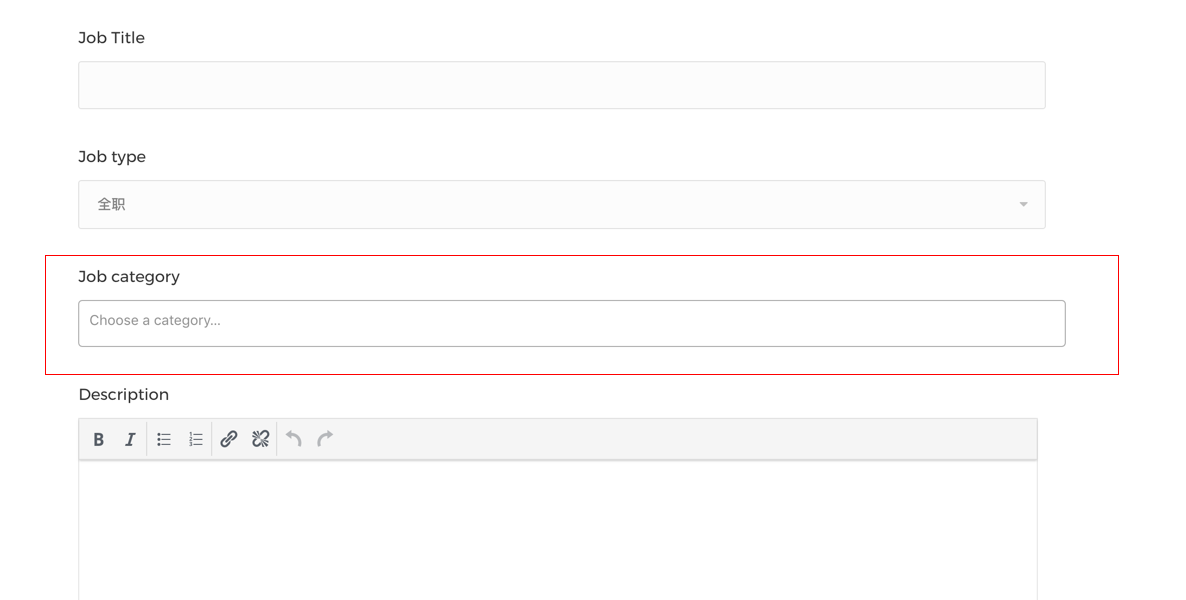
This is my website, the “post a job” page, and the style of the “Job category” is not displayed correctly, I want it to be the same as the “Job type”, what should I do?
https://i.loli.net/2019/03/19/5c90651fdc174.pngIt’s caused by recent change in WP Job Manager from chosen.js to select2 script, we’ll post an update for that soon
I bought the theme. How do i support https://developers.google.com/search/docs/data-types/job-posting Google Jobs?
Please verify your purchase first. And this is supported by default in WP Job Manager
Hello dear,
0- I would like to know, Is it possible candidates and employers apply job without registration. Mostly I need candidate apply job without registration. I need candidate send CV and fill in their information and send it without registration – Even I do not want to have registration in my website. No registration.
1- Is it possible to add more field to the “send CV form” and “Apply for job form”? Right now there are some fields such as name, surname and etc … I would like to add more fields into that page.
2- Is it possible to remove Map top of job search page and resume search page?
3- Is it possible to add or remove field in search filter?
4- Is it possible to remove packages? because in the website that I would like to have , everything must be free. Everyone can add job (free) , add resume (free) . You know because registration it will be disable.
5- Would you help for customization (a bit for some parts) even if you charge me?
Best regards.
Hi
ad0. No it’s not possible
ad1. Yes it is possible https://wpjobmanager.com/document/resume-manager-editing-submission-fields/
ad2. Yes of course
ad3. It requires a bit of coding now
ad4. Yes, it’s optional
ad5. No sorry, we don’t have resources now for customization jobs, but we can refer you to developers who have been working with our theme.
Best regards
Hi the issue is still not resolved gutenberg is off turned off all plugins when editing pages the text editor is blank so still can alter any text within the whole site. Regards
Greg
Hi
disable the plugin Modal Survey, it causes JS errors in wp-admin, you’ll see it works correctly with that plugin deactivated https://www.dropbox.com/s/weq2llx616xr4oa/Screenshot%202019-03-13%2023.01.05.png?dl=0
Thanks I did disable them all I will contact the plugin author abut the conflict.
Regards
Greg
Hi purethemes,
Is it possible to get a demo login to the admin site, so i can see how data, fields and setup can be manipulated to our needs?
Also,
In case you don’t support our needs—do you offer money back? I’m a bit hesitant to buying as i see some comments on here, as well as i might not have any use of the theme since i haven’t seen the admin panel.
Hi
sorry, we don’t have admin access to demo, we can offer you a w weeks “no questions asked” period for a refund if you won’t like the theme.
Which comments make you hesitant? 
Can I add audio questions in the resume dashboard
I’m afraid there’s no such option
Hello, nice looking theme that we consider to buy for my Company.
Please allow some pre-sale questions:
1. Is it possible to make a customized field for the Search Tool? 2. Is it possible to let not Reistred Members to apply on Job? 3. To make just a “simple” Job Search Tool on the Homepage and remove Recent Job list from the Homepage (is this an shortcode?), and make an seperatly Page with Extended Job Search Tool with more filters and the Recent Jobs List? 4. change the theme colour? 5. Integrate language button to switch between german and english? 6. NOT to Integrate WooComerce? (we only offer jobs, and we not need any payments for it) 7. Change the button “apply for this job” link to our database (we already have such a link) 8. Disable the login and registration system for guests, butt allow the Admin Post jobs in the frontend?
I am very grateful for an answer. Thank you very much
Hi
- With a bit of coding it’s possible
- Depends on which application form you choose, but generally they are registered
- Yes you can do that like that
- Sure, it’s in Customise section
- We don’t have such option
- Sure, it’s optional
- What do you mean by that? How do you link to database
- Sure, it’s in options
Hello, nice theme i love it Can u say me how i can remove the Reset and RSS buttons. Thx
Hi! please contact us there https://themeforest.net/item/workscout-job-board-wordpress-theme/13591801/support and us link to your website
Hi, I want to show in sigle job sidebar all the applications sent to this position. I want the application view to be visible to everyone. How to do it?
Hi
I’m afraid there’s no such option, it would require custom modification
The salary range slider in the jobs board does not really work on mobile. Is there a way to improve it?
Will be probably be changing it to bootstrap slider as WorkScout is about to be rebuild soon.
Is there a way to increase the logo upload as “Maximum filesize is 1mb” regards
greg
Hi
yes, please check https://wpjobmanager.com/document/limit-file-upload-size/
Can you look at the text editor is the a visual composer issue as its packaged with your theme?
I replied to your other comment
Text editor still blank? HI the previous thread assent resolved updated all plugins the text editor is still blank so NONE of the test can be altered in the site this is becoming a big issue I sent email with admin privileges and have outlined the issue to be Visual composer and Gutenberg update. Phase can you look at this with urgency as we are looking to launch soon.
Kind Regards
Greg
Hi
I tried your website now( it’s nationaltradesmen right?) and I don’t see any issue, text editor works on jobs and resumes. On Pages you actually have Gutenberg but you can disable that by installing https://wordpress.org/plugins/classic-editor/
Hi yes I already had Gutenberg disabled with another plugin which was not disabling it, tried the classic editor that does not disable it either, disabled all plugins, installed and activated another disable gutenberg plugin still no joy, its something in visual editor I’m sure that update they relate will fix the issue ?
Where exactly do you have this issue? Because like I said, I checked your site and editor is working
In editing pages adding or changing HTML or text the box is blank
regards greg
Hello
could you please help me to fix that without update theme ?
https://i.ibb.co/DfHctn5/Capture.pngHi
Please verify your purchase first, you don’t have “Purchased” badge
sorry but I’m designer and i have short time to finish this task and i will ask the site admin for the license ,Make sure that I will do that ASAP
Please help me to Please help me to fix this problem
I’m waiting please Help!
I’m sorry but we only provide support for verified buyers, and that’s probably only possible to fix by updating theme to latest version
In the [jobs] shortcode I added “show_description=”false”. It works on the homepage, and in the main page where the [jobs] shortcode is placed. But if I click on a job category link and see the list of all jobs listed under a separate category, they still display the description of the job ad. How can it be disabled?
Hi
the jobs shortcode is hardcoded in those templates, so you need to edit taxonomy-job_listing_category.php and add it in line 41
Hi! Quick question before I buy this theme. 1) I want to use this website to use as a jobmarket for students. So companies should be able to purchase a job post. Do I choose for a regular license or a extended license?
2) I can change the ‘workscout’ logo into my own logo right?
Hi,
1. In theory extended but from our (authors) point of view regular license if enough.If you will be interested in Extended license please contact us – price can be negotiated.
2. Sure.
How do I turn off the map on my job categories list page?
$map = Kirki::get_option( 'workscout', 'pp_enable_jobs_map', 0 );to
$map = false;
Hi there, I have just purchased this theme but getting this error when trying to install required plugins:
Installing Plugin: Purethemes.net CPT
Download failed. cURL error 60: SSL certificate problem: unable to get local issuer certificate
Could you please let me know what this issue might be?
Thank you
Hi
the script doesn’t have permission on your server to access the plugin that is included with theme. You probably need to install it manually, you’ll find all included plugins in workscout/plugins/
Hi. I can see that company buys package to post job. Can you set the same for candidate to buy package first before applying for jobs?
Do you have demo login for company and candidate?
Hi
you can register on demo, it’s fully functional. The package allows candidate to upload resume, there’s no option to require package to apply for job
Hello. Is it possible to hide the complete address and appear only the city and country for the visitors like jobify theme;