5481 comments found.

Hi,
Can we able to change the property style from grid to list? I don’t see any demo with the list style type.
This might be helpful if we can do that.
Hope to buy this theme once we have confirmed the capability to change the property listing style.
Thanks.
Hello jlmisdev
Thank you for the interest in the theme.
We have this only in half map – demo here https://office.wprentals.org/find-a-space/
Thank you
Hi Can the new hourly and daily reservation feature be used anywhere? Or is this feature only for skirent and office? The feature is very user-friendly for some businesses and we also need it.
Of course, I still did not check this feature, but, as a rule, the user of the booking period must be able to choose the type of calendar. Start and end calendar or daily booking calendar.
Hello mehdi_hidden007
Thank you for the interest in our theme/
Anywhere – meaning any theme? No, it’s just for our rentals themes. You can enable it in any wprentals theme installation. You can test office or ski to see how it works and what options are available
Office – is mix (daily or rental) and owner choose in submit for each property
Ski – is hourly exclusive
Thank you
Sorry, you seem to have misunderstood the subject I mean the disappointment of your product, not other themes … For example, it’s easier: I will not use a single state on my site (for example, Office), and in another case, I want to use. Is there a new daily and hourly selection of calendar options all over your theme? And the site manager can use it with short codes anywhere in the template? Or is it possible for users in the Office and skirent mode to choose daily booking calendars? Maybe this calendar is very practical for me, but the Office layout is not yours and I’d like to use the other demo modes you have provided with personal tastes.
Hi. The options are in admin (not as shortcodes). You can use these options in any other demo https://help.wprentals.org/article/how-to-setup-hourly-booking/
Thank you
Hello,
Using PayPal, if a user wishes to cancel a confirmed booking, how do they get their refund if the cancellation is within the cancellation policy time frame?
Do they get a full refund or can this be set to give a certain percentage of refund based on how close to the booking date that they cancel?
Still using PayPal, are refunds a manual process only? Does the Admin have to initiate the refund directly in PayPal, or can this be done via WP Rentals?
I wish to use this theme for a client who will be the only property owner of all the properties listed on the site – he will be site admin with no other owners. He will be using PayPal. I couldn’t find anything in the documentation that answers my questions.
Thanks,
Monica.
Hello,
I haven’t had a response you my query yet. Are you working on your reply?
Thanks,
Monica
Hello Monica,
Thank you for the interest in our theme.
Admin always gets the money in the theme.
In your case owner (admin) can do the refunds manually or through a 3rd party add-on (beta version), through RentalsClub assistance.
But PayPal adaptive payments (what is supported by Rentals Club) has this info on their page https://developer.paypal.com/docs/classic/adaptive-payments/integration-guide/APIntro/
Important: Adaptive Payments is now a limited release product. It is restricted to select partners for approved use cases and should not be used for new integrations without guidance from PayPal.If client wants to use the addon (besides checking with paypal if he can get approved for such an account), he must know this
The add-on is in Beta version now, works ONLY for payments done through PayPal – and it’s free for the time being. It may become paid in the future (there is no immediate plan for this direction).
With the add-on activated (activation is done through RentalsClub – an API system) – you will get access to your Rentals Club account to see payments received and make payments to the owner.
Here you have some screenshots of the interface to understand how it works https://www.rentalsclub.org/how-payments-management-extension-works/
In this situation, with RentalsClub, the owner will type their PayPal address in this Profile field and user to add paypal to get refund or deposit feed.
The theme doesn’t manage PayPal fees, that’s why we offer the option to set a SERVICE FEE (which should be a value that covers your costs as site admin).
If you have other questions let me know please.
Thank you
Hi,
Thanks for your reply. That’s fine, it sounds like it can only be done in PayPal which should hopefully be enough for my client because PayPal handles handles refunds quite well.
At least I can let my client know that refunds can only be done via the payment gateway (PayPal) or the RentalsClub addon (+PayPal).
Hopefully should be buying your plugin soon.
Thanks,
Monica.
Hi Monica, Thank you. If you have further questions please contact me and will help clear everything before you make the decision. WE can also share wp-admin for a test before you make a decision as well. You can send us a message from here https://themeforest.net/user/wpestate for this test.
Thank you
Hi, Your demo site has errors, in mobile (((
http://prntscr.com/na9wrp
http://prntscr.com/na9ykh
Hi, Will check. Thank you
listings not appearing when clicking the area https://hauteretreats.com/area/california/ after the update to 2.5 version please let me know if you can replicate the issue
Hi, Check if you updated the plugin too. This is the same 2.5 version https://main.wprentals.org/area/manhattan/ – https://help.wprentals.org/wp-content/uploads/2018/01/update-1.png
If you need our help please send us the details in client support – http://support.wpestate.org/ and confirm the ticket ID to check asap. Thank you
I fixed the issue. however there is a new one please check https://hauteretreats.com/properties/ani-retreat-luxury-estate-anguilla-2-2/ calendar is not working and advance search is not showing …
the advance search on the right bar…
Hi – I see some items loading from cache with 200 error http://prntscr.com/naf068 Clear everything in case (server cache – if you use, cdn cache – if you use , plugin cache – if you use and theme cache) and reload the page and just in case you also have cache in brwoser – delete browser cache. If still doesn’t work – send us the ticket please because I cannot replicate any issue from our end https://main.wprentals.org/properties/beautiful-cabin-simple-price/ Thank you
Thank You I could not update functions.php as we don’t have the child theme and yes the problem is the calendar for the booking form not working I opened 2 tickets already..and I would like to let you know that I identified a couple of issues that I brought to the attention to support couple of weeks ago that should have been fixed with this version.
Hi – You must do a full update as functions.php is a key file. I don’t know what changes were done as custom word, but a full update is required for the theme to work correctly. And then changes may need to be applied again.
I don’t know what is the support account and I don’t know if I can give you a partial update in this case. Tell the the username or a ticket id to check.
The update includes a lot of modifications for Envato new author market requirements too (functions rename) as explained in change log. We may not be able to give just a file without updating everything.
Thank you
I found the ticket. See my reply please.
yes I got it however the property page is not working at all https://hauteretreats.com/properties/luxury-villa-rent-sea-view-ibiza-cala-moli/ image galley not working, calendar not working, book form not working…please help ASAP
Hi Sabrina
It’s still not clear if you made a clean theme update or you still use custom changes.
Now you have problems on the page because you have a conflict – the message is too general http://prntscr.com/nah4rk but it’s related to all problems you have. One wrong code blocks all js and no js actions work. It’s not happening on our end, must be either from wrong update or custom changes.
If you made a clean theme update but still have problems, please let us know in the ticket to re-check the update. For custom changes we cannot advise since we don’t know their purpose or how they were implemented. But we can help with a clean theme update if you wish.
Thank you
Thank You so much. there were not custom changes as everything until yesterday worked fine..the only thing that was not working was the dropdown menu…matter of fact was something you implemented with the new version..I really don’t understand what is going on..again no custom changes were made..only plugins that all worked fine yesterday..again we don’t have a child theme implemented so functions were not updated..we wrote several tickets including the screenshot of our end functions.php thanks.
Hi Sabrina
I will answer punctually and I hope this helps find the best solution you want to move forward with because I cannot help unless you choose one of these 2 options:
again we don’t have a child theme implemented so functions were not updated..—> This is the problem. You cannot use functions.php from 2.4 in 2.5.
—> I can show you the latest functions.php and I recommend updating it for 2.5 to work, but I cannot fix your old functions.php with new theme because you said you have custom changes in functions.php. I cannot help move custom changes from an old functions.php to 2.5 functions.php without a developer assistance and without testing and understanding what it does.
—> So either the same person who made the changes in functions.php helps again to add them in the new functions.php after you update that file too, or you revert to the version you had before and I help with the next item
the only thing that was not working was the dropdown menu—> If it’s easier for you revert your version to what you had yesterday and I will help solve just this item so you don’t need to update your functions.php which is not in child theme
Thank you
there were not custom changes. Everything was working just fine until yesterday before I updated the theme. so please let me know if we install the child theme the problem can get fixed getting the site back to normal. Or we revert to the 2.4 version, we install the child theme, we modify the child them and we update to the 2.5 version. please let me know which one will guarantee the site working back to normal.
Hi Escape76
If you use the theme original code – everything will work. I can guarantee that.
If you modify child theme – I cannot guarantee without knowing what changes you made.
If you revert to 2.4 – then make changes in child theme and then update – I still cannot guarantee because I don’t know what changes you made. If the theme functions (original one) change – the child theme or custom changes you make need to be rechecked too.
I can guarantee for a clean theme installation (2.4 or 2.5 as you prefer) and I will help make the fix for ticket 28594 manually.
Thank you
let’s do that let’s try a clean them installation 2.5. As I stated earlier no changes where made to child theme matter of fact it is not installed, and no custom changes were made to the theme version 2.4. Should we install the child theme before you proceed in installing the version 2.5 again? thanks for your assistance
I can only say THANK YOU we got a scary situation but everything is back to normal. SUPER support team!! Enjoy your weekend!! Please don’t hesitate to buy from this team of super heroes!!
Thank you 
Hi, Description of the problem: We have a basic and two additional languages implemented by the WPML. To mark the dates engaged, we only use Google Calendar, only hand. The URL-s fields of the Google Calendar are filled in correctly in all three language versions. Once we have a Google Calendar dates engaged, this is immediately and automatically reflected only in the main language of the site. In the other two additional languages, the busy date is never updated, even and after 3 hours. Updated only if we enter in the appropriate language and we press manually SAVE. Question: Our version is WpRentals 1.20.5.4. In change log of Wp Rentals 2.1 is written: “UPDATED: WPML compatibility for syncing bookings automatically between different languages”. Our license has already expired. If we buy a new license and update to WpRentals Version 2.5, our problem will be resolved automatically ? Thanks.
Hi Sense_Art_OOD – The license you purchase never expires. Only support expires and can be renewed. But the license doesn’t expire and that gives you unlimited free updates – https://themeforest.net/page/item_support_policy
You can update the theme and this auto sync should exist (we made a special compatibility code for this). But there are several other factors to consider when updating from an old theme version to latest (which is 2.5) – so please send us a message in support http://support.wpestate.org/ to guide you on how to update.
Thank you
Hi, Another question, the site will be in 3 languages. Will one property (in several languages) have one shared calendar (reserved dates)? Or different? It is very important that the reserved dates be the same (regardless of the language).
Hi, I apologize for the delayed reply.
We have this list with what was tested as 3rd party for multi-language https://help.wprentals.org/article/multi-language-3rd-party-recommended-solutions/For WPML support there was a solution released October version https://help.wprentals.org/article/wp-rentals-1-21-october-15/ I didn’t test since then, but I assume nothing changed.
Weglot – does auto sync because it translates in page (not in database)
The 3rd solution – I didn’t test personally but the client said everything works (not booking in particular)
Thank you
Hi,
Thank you for your comment !
As far as I understand “WPML” is not fully tested? And it is not clear whether it will work and compatible with for syncing bookings automatically between different languages…
How is it possible to know for sure which plugin works correctly?
What about “Polylang”?
Weglot: unfortunately unreasonably expensive, 492 € per year.
Hi, WPML is tested by WPML team – Last test was 1 month ago https://wpml.org/theme/wprentals/ I’ve seen Polylang with a few clients, but I don’t have the link to share. Personally we didn’t get the chance to test Polylang.
Hi there, we are looking for a wordpress theme for our town. We really like this theme as it has accommodation functionality, but we need to have few normal pages just for contents such as about our town, walking tracks, and history. I can only see “blog” page in the demo.
Would this theme be able to create normal pages with text and images in different sections.
Thanks.
Also, I know you have 12 months extended support, but it is on going website. Would we be able to purchase ongoing support beyond the first 18 months?
Hello ggginty – Thank you for the interest in our theme.
You can create any kind of page from admin – pages – add new.
You get 6 months included support with the purchase and you can extend at any time if you need the support services that can be offered – https://themeforest.net/page/item_support_policy
If you wish to see the backend before you make a decision you can send a message from here https://themeforest.net/user/wpestate
Thank you
I made the Register for the Item support with an invalid account so I didn’t receive any email for password. Looking forward to hearing from you. Thanks!!!
Hi budhaholidays – Send me a message here please and will help enter in client support – https://themeforest.net/user/wpestate Thank you
Hello. Presale question. Can the availability calendar at the bottom of the property page be turned off? I just want the renter to contact the owner directly with their booking dates. Thanks.
Hello stevewooldridge
Thank you for the interest in our theme.
We have the help to hide booking form and availability. It’s not by default on = off but we have the technical help to make this happen
Thank you
Is it possible to use object rentals and accomodation rentals on the same site? i.e. both categories at the same time – or only one at a time (object OR accomodation)?
Hi Elektra123 , We don’t have the option to switch submit based on category or search based on category. So you would have everything (all categories, all fields, all features etc) in same submit and same search. ON property page you see only the details fields. And you can switch between daily or hourly booking as in our office demo – https://office.wprentals.org/ If you have other questions or you want to test something you can write me from here https://themeforest.net/user/wpestate Thank you
Hello I have a question I want make a multi language website with WP Rentals theme with deferent calendar for example in English and Turkish version Gregorian calendar and Persian languages Persian calendar and Arabic,Arabic calendar is it possible?
Hello hamidff
We don’t have RTL support for the theme and I assume persian is RTL. We don’t have Persian calendar and Arabic calendar either. We have standard date formats – https://help.wprentals.org/article/theme-options-booking-settings/#date_format
Thank you
Hello Is it possible in future versions that users can be deposited on time Provides a percentage of the total amount and this can be specified by admin in the amount or percentage of the total bill and the remaining amount will be paid in the presence of the reservation.
Hi mehdi_hidden007
Our theme works the following way – in short. If you need further details please let me know
If admin sets a deposit value – he can do it as a % from total booking or a fixed amount per booking
If deposit is different than 0 – user must pay the deposit for booking to be confirmed even if owner approves the request.
Payment in theme can be done via PayPal or Stripe (as merchants) or Wire Transfer (manual transfer of money to an account admin sets in theme options)
Thank you
How to make the property open on a new page from this page – properties-list-half-map/
Thank you
Few things,
Want to use Pay u india as payment…how to do it?
The hourly calendar selection is not intuitive enough for the user for dragging and selecting multiple hours. can we simply that may be from hrs to hrs etc?
Hello uniqplacements
Thank you for the comment.
Theme works with Paypal, Stripe or Wire Transfer.
New merchants need custom development, including the one you mention. We have a guideline help here https://help.wprentals.org/article/technical-how-to-integrate-new-payment-gateway/ for developers who work on such changes, but still needs a developer assistance.
The hourly calendar support doesn’t include selector I am afraid. Only as it works in demo https://skirent.wprentals.org/ https://office.wprentals.org/ with click and drag.
Thank you
Can we at least add a helper text saying click and drag to select more hours?
One more thing in the email management everything is empty…do you have any predefined emails to get started ?
Hi uniqplacements
There are predefined email template (in import they should all show). If you wish us to check send us a message from here http://support.wpestate.org/ and we can copy just those if you skipped demo import and already have content.
For the text – already exists http://prntscr.com/na3tqn
You can customize with css if you wish http://prntscr.com/na3ulx
Thank you
I have imported the office demo, I want to change the filter text …tye keyword and All Sizes…how do I do that?
Hi, You Use Loco Translate. https://help.wprentals.org/article/how-to-modify-theme-text-in-english-with-poedit/ If you need further support please contact us through client support http://support.wpestate.org/
Hi, I just updated the theme to access your new demos, but there are no demo files available. “There are no predefined import files available in this theme. Please upload the import files manually!” Please advise Thanks! Kimberly
Hi Kimberly – Please see this help with all the steps for demo import http://help.wpresidence.net/article/demo-content-1-click-import-starting-1-15-update/ For further assistance you can reach us through support http://support.wpestate.org/ Thank you
Hi, it appears that the issue is that when I reinstalled, my license has been deactivated. How can I do that?
Meaning, how can I reactivate the license? There isn’t a message window asking for my license activation as is shown in your documentation.
This is resolved. Thanks for the help!
Hi, Thank you for the follow up.
Hi I’m having an issue, the header photo is not updating eventhough i already clear cache and the mobile logo is not updating
Hi minriemacapugay
Thank you for buying the theme. In this comment area I can only to existing help
Help to change header photo – https://help.wprentals.org/article/custom-header-options/
Help for logos – https://help.wprentals.org/article/1-18-themeoptions-logos-favicon/
If you need us to check your setup please open a ticket in client support http://support.wpestate.org/
Thank you
Presales Question, i client ask me to provide a ski rental site with about 500 sets of ski, 2 question, i have seen the demo Gear (hourly) Rental, and it looks good, but with so many ski sets, does the admin have an overview of any kind of kalender to see the free skis?
second question: is it possible for a special discount when a visitor rent in example 30 pair of skis (for groups)?
Thanks
Hello winock2014
Thank you for the interest in our theme. Please see my reply
Presales Question, i client ask me to provide a ski rental site with about 500 sets of ski, 2 question, i have seen the demo Gear (hourly) Rental, and it looks good, but with so many ski sets, does the admin have an overview of any kind of kalender to see the free skis?
—> Admin doesn’t have a calendar. Only each owner can have a calendar (but for daily bookings). Hourly bookings do not have such a calendar.
second question: is it possible for a special discount when a visitor rent in example 30 pair of skis (for groups)?
—> Discount can be issued only manually https://help.wprentals.org/article/how-to-add-manual-discount-when-issuing-an-invoice-how-to-add-custom-elements-to-an-invoice/
If you wish to test the backend you can send a message from here https://themeforest.net/user/wpestate
Thank you
how to fix? https://prnt.sc/n71qpe
WMPL not work!b stype=tax&search_location&advanced_city&advanced_area&advanced_country&property_admin_area&check_in&guest_no&submit=Search
Hello again
Regarding: how to fix? https://prnt.sc/n71qpe
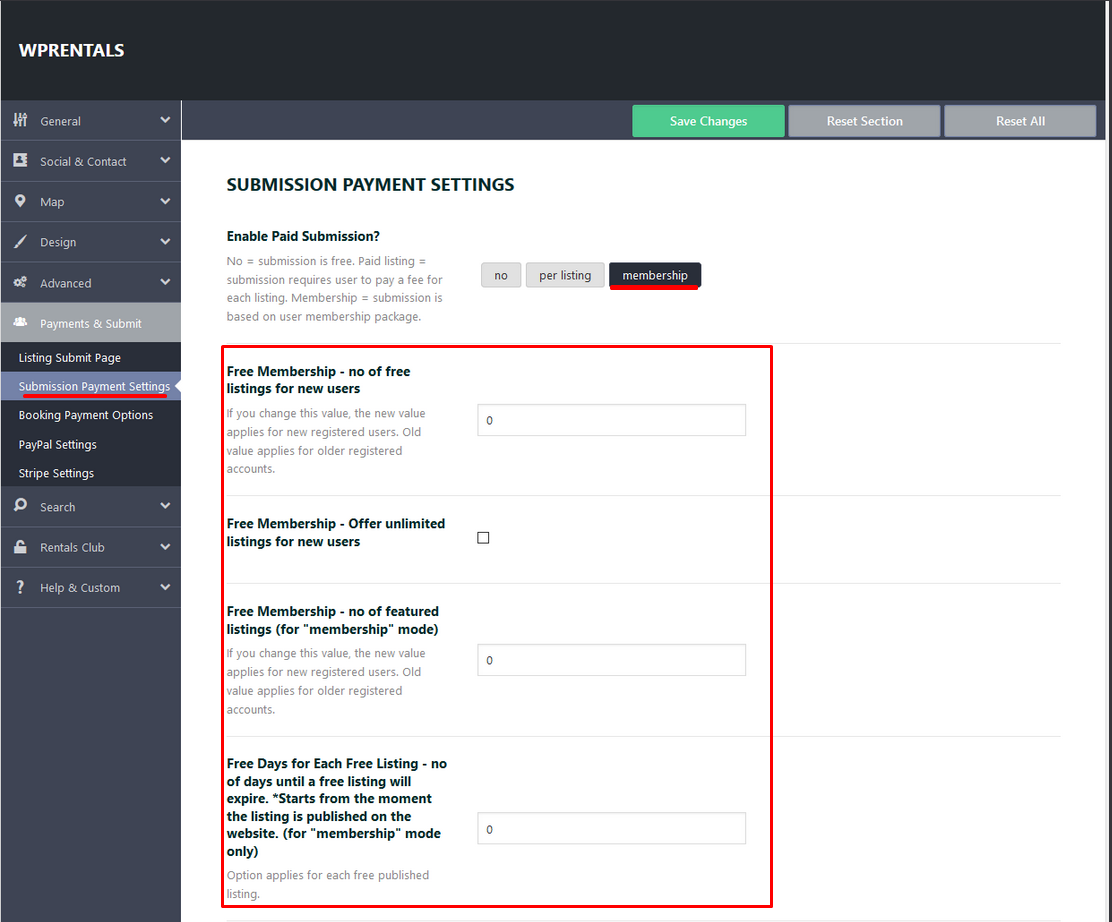
—> This can only show if you set membership after user was registered or the free membership options are not set – Fill in all these details https://help.wprentals.org/wp-content/uploads/2015/10/membership-3.png New accounts will show all details and hence the alignment will be like this – http://prntscr.com/n79ye5 for free or paid membership.
The account from your screenshot can be fixed too by manually adding listings available in admin – edit user. Help https://help.wprentals.org/article/how-to-add-a-membership-package-manually-to-a-registered-subscriber-from-admin/ Add at least listings available and featured listings available.
WMPL not work!b stype=tax&search_location&advanced_city&advanced_area&advanced_country&property_admin_area&check_in&guest_no&submit=Search—> I don’t understand, sorry. Please open a ticket in support with the site details and will do my best to guide. Thank you
Can the availability calendar be replaced by the booking calendar? The availability one looks the same but can’t be used to select dates. I’d like the user to select dates and start the booking process from down there too.
Hi, I understand but it’s not possible. Only in booking form can the booking requests be sent. Thank you