

12220 comments found.

Hello!, how can I disable kt-tooltip on mobile ? i’m using like this: . but i dont want it to appear on mobile, how can i hide it on small screens ?
<div class="kt-header__topbar-item dropdown" data-toggle="kt-tooltip" data-skin="brand" title="{{ __('Notificaciones') }}" data-placement="bottom"> </div>
Hi,
You can try to add below window resize handler:
KTUtil.addResizeHandler(function() {
                if (KTUtil.isInResponsiveRange('tablet-and-mobile')) {
                    $('[data-toggle="kt-tooltip-mobile"]').each(function() {
                        KTApp.initTooltip($(this));
                    });
                } else {
                    $('[data-toggle="kt-tooltip-mobile"]').each(function() {
                        $(this).tooltip('disable');
                    });
                }
            });
under your layout.js script’s main init function. Then use
data-toggle="kt-tooltip-mobile"attribute to initialize desktop only tooltips.
Regards, Sean
I added the code in my layout.js and recompiled but it doesnt work, now it doesnt show on desktop or mobile
Hi,
Please try to use below code:
var initDesktopTooltips = function() {
                if (KTUtil.isInResponsiveRange('desktop')) {
                    $('[data-toggle="kt-tooltip-desktop"]').each(function() {
                        KTApp.initTooltip($(this));
                    });
                } else {
                    $('[data-toggle="kt-tooltip-desktop"]').each(function() {
                        $(this).tooltip('dispose');
                    });
                }
            }

            initDesktopTooltips();
            KTUtil.addResizeHandler(initDesktopTooltips);
And for the HTML part please use:
data-toggle="kt-tooltip-desktop"
Regards, Sean
Do you have just an HTML version for those of us who don’t want to use Angular?
Hi 
The HTML version is included as the main source code. You can find it in the downloaded package. (in this directory /theme/default)
Please check our documentation for more information; https://keenthemes.com/metronic/?page=docsThanks
Great! Thank you!
Your welcome
This has probably been asked before, but does this have an HTML version included? I don’t want to use angular at all.
Hi
The HTML version is included as the main source code. You can find it in the downloaded package. (in this directory /theme/default)
Please check our documentation for more information; https://keenthemes.com/metronic/?page=docsThanks
hi @keenthemes, is it possible for me to buy older version of Metronic (version 4)?
Hi
You can buy the latest version through Themeforest, and send us an email with your purchase code. We will provide you the link to download the previous version of Metronic v4.
Thanks
I’v buy the latest version here, where should I sent the email to?
Hi
Thank you for your recent purchase. Please send the request to our support email support@keenthemes.com. We wil provide you the download link.
Thanks
Hello Keenthemes, We are eagerly waiting for the Angular 8 version of Metronic…Please could you tell us the ETA ? ? ?
Hi
Angular 8 will be included in the next version 6.0.4. Almost there, it will be released in the next few more days.
Thanks
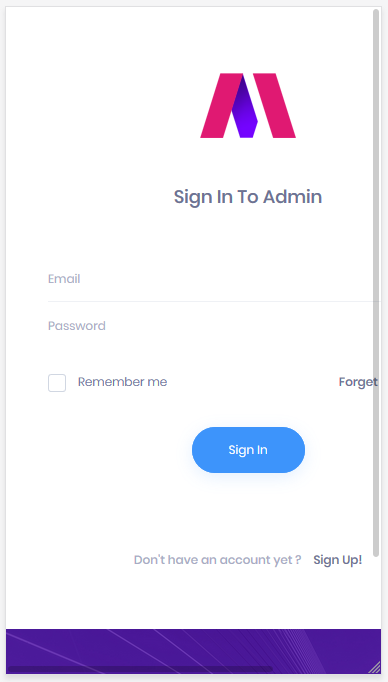
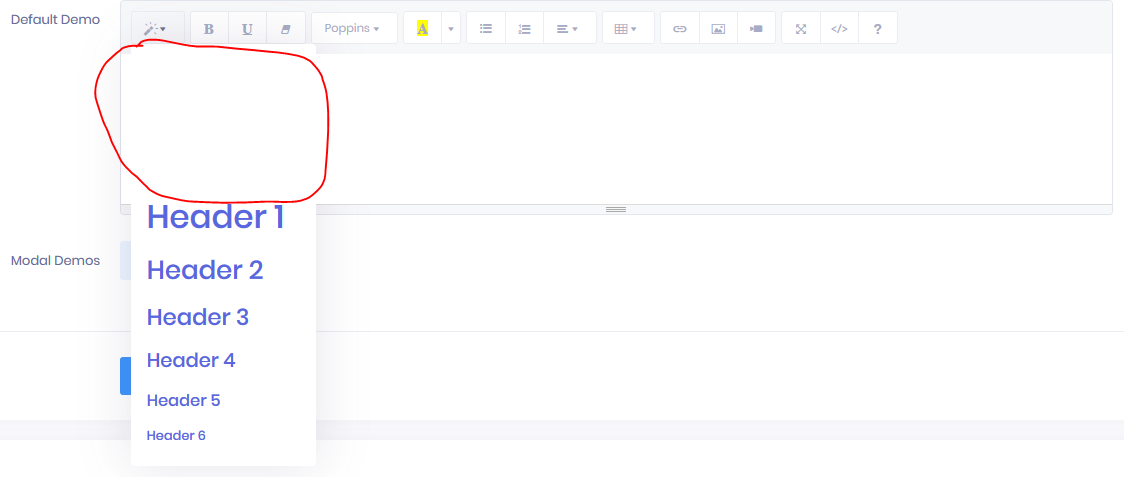
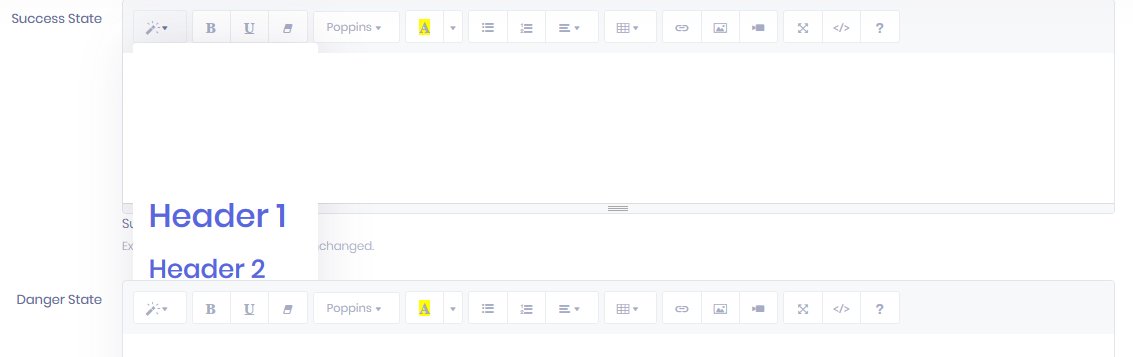
Hello, just a comment about login page and summernote editor. Login page 6 : in mobile mode, not aligned well (https://adiag-lob.s3.fr-par.scw.cloud/sharing/temp/LoginPage.PNG) Summernote : each menu has a zindex problem I think (https://adiag-lob.s3.fr-par.scw.cloud/sharing/temp/Summernote1.PNG and https://adiag-lob.s3.fr-par.scw.cloud/sharing/temp/Summernote2.PNG)
Thanks !
Hi
Sorry for the late response. Thanks for your feedback. We will include fix for these bugs the future updates soon.
Thanks
Hi, I am working for my client who purchase your template. Getting an issue with angular while install package and run. I am getting many problems. Will you please send me the updated package.json file to get it run as soon as possible. I am stuck with this from 2-3 days.
Please check the below package.json which I tried to solve
{
  "name": "ang",
  "version": "0.0.0",
  "scripts": {
    "ng": "ng",
    "start": "ng serve",
    "build": "ng build",
    "test": "ng test",
    "lint": "ng lint",
    "e2e": "ng e2e"
  },
  "private": true,
  "dependencies": {
    "@angular/animations": "~7.1.0",
    "@angular/common": "~7.1.0",
    "@angular/compiler": "~7.1.0",
    "@angular/core": "~7.1.0",
    "@angular/forms": "~7.1.0",
    "@angular/http": "^7.2.15",
    "@angular/platform-browser": "~7.1.0",
    "@angular/platform-browser-dynamic": "~7.1.0",
    "@angular/router": "~7.1.0",
    "@fortawesome/fontawesome-free": "^5.9.0",
    "bootstrap": "^4.3.1",
    "core-js": "^2.5.4",
    "datatables.net": "^1.10.19",
    "datatables.net-dt": "^1.10.19",
    "flat-icons": "^1.0.0",
    "jquery": "^3.4.1",
    "line-awesome": "github:icons8/line-awesome",
    "ng2-smart-table": "^1.4.0",
    "rxjs": "~6.3.3",
    "tslib": "^1.9.0",
    "zone.js": "~0.8.26"
  },
  "devDependencies": {
    "@angular-devkit/build-angular": "~0.11.0",
    "@angular/cli": "~7.1.2",
    "@angular/compiler-cli": "~7.1.0",
    "@angular/language-service": "~7.1.0",
    "@types/datatables.net": "^1.10.17",
    "@types/jasmine": "~2.8.8",
    "@types/jasminewd2": "~2.0.3",
    "@types/jquery": "^3.3.29",
    "@types/node": "~8.9.4",
    "codelyzer": "~4.5.0",
    "jasmine-core": "~2.99.1",
    "jasmine-spec-reporter": "~4.2.1",
    "karma": "~3.1.1",
    "karma-chrome-launcher": "~2.2.0",
    "karma-coverage-istanbul-reporter": "~2.0.1",
    "karma-jasmine": "~1.1.2",
    "karma-jasmine-html-reporter": "^0.2.2",
    "ng2-completer": "^3.0.2",
    "protractor": "~5.4.0",
    "ts-node": "~7.0.0",
    "tslint": "~5.11.0",
    "typescript": "~3.1.6"
  }
}
Please let me know about it ..
Hi
Could you please send the screenshot? What was the error message?
Thanks
I am getting below error in console and it is showing loader for forever
core.js:1673 ERROR Error: Uncaught (in promise): TypeError: You provided 'undefined' where a stream was expected. You can provide an Observable, Promise, Array, or Iterable.
TypeError: You provided 'undefined' where a stream was expected. You can provide an Observable, Promise, Array, or Iterable.
    at subscribeTo (subscribeTo.js:41)
    at subscribeToResult (subscribeToResult.js:6)
    at SwitchMapSubscriber.push../node_modules/rxjs/_esm5/internal/operators/switchMap.js.SwitchMapSubscriber._innerSub (switchMap.js:92)
    at SwitchMapSubscriber.push../node_modules/rxjs/_esm5/internal/operators/switchMap.js.SwitchMapSubscriber._next (switchMap.js:85)
    at SwitchMapSubscriber.push../node_modules/rxjs/_esm5/internal/Subscriber.js.Subscriber.next (Subscriber.js:93)
    at MapSubscriber.push../node_modules/rxjs/_esm5/internal/operators/map.js.MapSubscriber._next (map.js:81)
    at MapSubscriber.push../node_modules/rxjs/_esm5/internal/Subscriber.js.Subscriber.next (Subscriber.js:93)
    at Observable._subscribe (scalar.js:5)
    at Observable.push../node_modules/rxjs/_esm5/internal/Observable.js.Observable.subscribe (Observable.js:161)
    at MapOperator.push../node_modules/rxjs/_esm5/internal/operators/map.js.MapOperator.call (map.js:51)
    at resolvePromise (zone.js:831)
    at resolvePromise (zone.js:788)
    at zone.js:892
    at ZoneDelegate../node_modules/zone.js/dist/zone.js.ZoneDelegate.invokeTask (zone.js:423)
    at Object.onInvokeTask (core.js:3811)
    at ZoneDelegate../node_modules/zone.js/dist/zone.js.ZoneDelegate.invokeTask (zone.js:422)
    at Zone../node_modules/zone.js/dist/zone.js.Zone.runTask (zone.js:195)
    at drainMicroTaskQueue (zone.js:601)
I am sharing a screenshot with you
Console Error Screenshothttps://drive.google.com/open?id=1xwzz76eC7QozQbnWaR4ftbjPOWprZFKc
Compiled Successful Screenshot
https://drive.google.com/open?id=1p0rRUChKq_04CA9qJwsowsXfH5M0Zs28
Hi
The error appears in the browser. Which part you are you working on? Does this issue happens in the fresh installed Angular? Have you done any customization or changes to the source code?
Thanks
Hi, I have not done any single changes or customisation in source code. This is happens in the fresh installed angular. Please provide me your skype id or something else to fast communication to resolve this issue as soon as possible.
Hi
Sorry for the late response. We have sent the reply in your another comment.
Thanks
Can you send me the link to the metronic 5.5 demo’s?
Hi
If you need to download the Metronic v5.5.5, please send an email to support@keenthemes.com with your purchase code.
Thanks
if I update my Angular from 7 to 8 … the theme “Metronic Angular” is compatible ?
Hi
Angular 7 does not compatible with version 8. We will release this update soon.
Thanks
Where i can found menu like “components” and “crud” on my download ?
i cant found on default or classic theme
Hi
Are you refering to Angular “components” and “crud”? These demo pages only in Angular.
Thanks
after i download the template file and unzip it, i have not found other files in those demo themes. where are those files? there is only one file in every demo themes!
Hi,
The Default Package is a separate package of Keen that uses mainly build tools, such as Gulp(task manager), SASS , Yarn(package manager). To launch the package you should install the required build tools by referring to the documentation and run “gulp build” to generate the HTML templates and the theme assets(css, js, media).
Also, we fully support new developers by constantly updating our documentation and create video tutorials for everyone to understand Metronic better. In fact we added video tutorials to show the best practises to use Metronic for all small to enterprise size projects. You can have a look at the links below:
1. Installation & Getting Started: https://youtu.be/dqZLWuAEdJ8 2. Your First Project: https://youtu.be/yu0O2Y2NXxc 3. Customization: https://youtu.be/7PG5Qbg0-gM
For any further info you can also check our detailed theme documentation: https://keenthemes.com/metronic/?page=docs
Please follow us at http://twitter.com/keenthemes to stay updated.
Regards, Sean
Hi ,
I have an issue with the Angular version. On the following pages:
role-edit.dialog.component.ts role-edit.dialog.component.html that belong to the user-managment.module.ts
I have a two way binding on the view for the input field of the title, like this:
<input matInput [disabled]=”roleBI.isCoreRole” placeholder=”Enter Title” [(ngModel)]=”roleBI.title”/>
and in the .ts i have the property defined like this:
export class RoleEditDialogComponent implements OnInit, OnDestroy { // Public properties roleBI: Role; role$: Observable<Role>; hasFormErrors: boolean = false; viewLoading: boolean = false; loadingAfterSubmit: boolean = false; allPermissions$: Observable<Permission[]>; rolePermissions: Permission[] = []; // Private properties private componentSubscriptions: Subscription;
when i hit the submit button it seems that the two way binding is not working becauese the roleBi.title property is not updated with the input value i just changed.
in the user-managment.module.ts i have the following import:
import { FormsModule, ReactiveFormsModule } from ’@angular/forms’;
and in the imports section i also have:
@NgModule({ imports: [ CommonModule, HttpClientModule, PartialsModule, RouterModule.forChild(routes), StoreModule.forFeature(‘users’, usersReducer), EffectsModule.forFeature([UserEffects]), FormsModule, ReactiveFormsModule, TranslateModule.forChild(), MatButtonModule, MatMenuModule, MatSelectModule, MatInputModule, MatTableModule, MatAutocompleteModule, MatRadioModule, MatIconModule, MatNativeDateModule, MatProgressBarModule, MatDatepickerModule, MatCardModule, MatPaginatorModule, MatSortModule, MatCheckboxModule, MatProgressSpinnerModule, MatSnackBarModule, MatExpansionModule, MatTabsModule, MatTooltipModule, MatDialogModule ],
What could be the problem? Thanks for your kindly help.
Hi
It’s NGRX issue, store is immutable and the ’role’ object from store has read-only properties (including title property) We will fix this in next release. Right now you able to work the copy of this object from store.
Thanks
Hi, I have a lot of warning in fluid.html for demo4. such as;
<a href="#" class="kt-widget2__title">
 Completa Financial Report For Emirates Airlines
   < / p >
</a>
it begins with “a” and finish with ”/p”, there are a lot examples like that.
Is this a mistake or not?
Hi,
Thanks for the feedback. We will fix it in the next update.
Please follow us at http://twitter.com/keenthemes to stay updated and check out our video tuts channel on Youtube https://www.youtube.com/c/KeenThemesTuts/videos
Regards, Sean
Hi
Thanks for your feedback.
We will fix it. p tag should not be there.
                                                                    <div class="kt-widget2__info">
                                                                        <a href="#" class="kt-widget2__title">
                                                                            Completa Financial Report For Emirates Airlines
                                                                        </a>
                                                                        <a href="#" class="kt-widget2__username">
                                                                            By Bob
                                                                        </a>
                                                                    </div>
Thanks
Hi. Does this release of metronic include ribbons? Can’t seem top find them anywhere.
Hi ,
We will consider adding those ribbons for this new version line in a future update.
Please follow us at http://twitter.com/keenthemes to stay updated and check out our video tuts channel on Youtube https://www.youtube.com/c/KeenThemesTuts/videos
Regards, Sean
Hi there! I have just purchased your theme and downloaded it. I wonder where can I find some html files like in your demo? For example where in download folders this html file is: https://keenthemes.com/metronic/preview/demo2/crud/metronic-datatable/advanced/record-selection.html ??? Thank you, Slava
I found it. It’s ok. Thank you!
Great! Thank you
I’m downloading version 6, but there is a lack of files. Files won’t open
Hi
Thanks
Hi Keenthemes,
Which css file contains class “mat-form-field-fluid”. I use Angular version with Material Design But I did not find this class in CSS or SCSS. Which file should I refer to?
Thanks
Hi
It seem this class does nothing. We will check it further and remove it.
Thanks
Hi
.mat-form-field-fluid class can be found in these scss files. It does the input width to be full width fluid.
/theme/angular/src/sass/theme/core/material-angular/components/_table.scss /theme/angular/src/sass/theme/core/material-angular/components/_general.scss
Thanks
Hi Pixel, Thanks. But what css file name will be generated from that scss? In this file “assets/vendors/global/vendors.bundle.css” . It does not contain that CSS class.
And I also see there is no any references to “material-angular scss” from the other scss files
Hi
It can be found in this css bundle for angular; /theme/angular/dist/default/src/assets/css/demo1/style.bundle.css
Thanks
Hi, Thanks, that worked. In total, how many css do we need to Angular Version Demo 1. Only 2 files ? style.bundle.css and vendors.bundle.css ?
How about these things? Do we need these?
@import “angular/material/prebuilt-themes/indigo-pink.css”;
@import “material-design-icons/iconfont/material-icons.css”;
@import “highlight.js/styles/googlecode.css”;
Hi
Those css files are optional.
Please check this demo1 base scss also./theme/angular/dist/default/src/app/views/themes/demo1/base/base.component.scssIt does contain the separate skins css (not in all demos).
Thanks
Hi. I am not using gulp to generate CSS. Because It looks complicated to me. I only use a single version Demo 1.
In \default….. \demos\demo1\style.scss, I see you import @import ”../../core/include”; This file you include almost everything such as base, general, layout, typography, widgets, vendors BUT I dont see you import “material-angular”
So How do you export all scss files in “material-angular” Can you please tell me how many scss files I need to include in the main style.scss of Angular project to run the application that looks exactly like your Demo in themeforest.
Thanks
Hi
For Angular scss, can you refer to this file? The Angular material scss included here. This will be the entry scss file for style.bundle.css
/theme/angular/src/sass/theme/demos/demo1/style-angular.scss
Thanks
Hello keenthemes,
When metronic theme update for angular 8?
Thank.
HI ,
In a few days. We are preparing the next update with Angular 8.
Please follow us at http://twitter.com/keenthemes to stay updated and check out our video tuts channel on Youtube https://www.youtube.com/c/KeenThemesTuts/videos
Regards, Sean
Hello keenthemes,
For some reason the kt-quick-panel is showing to the left (Demo 10) while it should be showing to the right,
Can you tell me what control it’s direction on the screen so I can fix it? css code or js code ?
Thanks
https://imgur.com/UGkhRUNHi ,
Thanks for your feedback. It will be corrected in the next update. You can also fix it by adding “kt-quick-panel—right” class to the body tag.
Regards, Sean
Not able to redirect page from controller
After integrating theme with CodeIgniter architecture, page redirection from controller, after posting values ,is not working on ajax submit.
Background actions like saving the contents , loading waiting symbols etc is working.
I can see page redirection is happening through its Network tab, but is not applying in web browser. So I cannot redirect user to other page from our application
Something is overriding our controller actions..
We need your sincere attention
Hello Keenthemes,
Waiting for your reply.
Thanks
Hi,
It seems this issue is related to your custom code. Metronic has no ajax request handling code that can cause such issue. Do you see any JS error in your code before the page redirection ?
Thanks.

This item was featured on ThemeForest

Power Elite Author
Contact the Envato Market Help Team



)
)

