26721 comments found.

Hi! Is there a way to show categories on “Blog Gallery” template? I can only show the categories above the blog when I choose “Blog Masonry”.
Kind regards!
Hello,
No, unfortunately, that option is for Masonry template.
Best, Qode
Pre-sale Question: Does it have email collecting landing page feature like clickfunnels? I usually sell my digital courses after collecting emails through free courses.
Hello there,
Thank you for taking interest in our in Bridge theme. May we ask you to explain this what you want to achieve further more? Thanks
Qode
Something like this:- http://vanessalau.mykajabi.com/
Hi,
If you are talking about this sing up form https://www.screencast.com/t/RrJQBzhY Then we could suggest to use CF7 form for that purpose and to connect it with Mailchimp additional plugin, like this one https://wordpress.org/plugins/contact-form-7-mailchimp-extension/ We hope this is what you’re looking for.Best, Qode
No, I am asking about the layout. The page design. Is it possible to do the same?
Hello,
Ok, Thanks. Yes, it looks pretty doable using our elements implemented in Bridge theme.
Don’t forget to sign up for our newsletter and be the first to find out all the latest news.
My menu bar doesnt look right on Google Chrome but works just fine on Safari. How can I fix this problem? I know I read somewhere that it was a common problem but I am not sure how to get there again.
This is what shows up at the bottom of my page behind the menu on google chrome
Warning: getimagesize(/home/soficohd/public_html/bridge10/wp-content/uploads/2014/06/logo.png): failed to open stream: No such file or directory in /home/soficohd/public_html/wp-content/plugins/bridge-core/modules/shortcodes/shortcode-elements/_slider/slider.php on line 356
Hello,
Please, check this article for this warning https://qode.ticksy.com/article/9536 and for any other question, just open a ticket at https://qode.ticksy.com/ and include your website URL with wp-admin access and our agent will gladly assist you there.
Best, Qode
Hello, I’ve been using this theme for years on my website. All the sudden the “Have a coupon?” field on the check out page is gone, I updated the theme but that didn’t fix it, can you help?
Hello,
Please check if you enabled coupons in WooCommerce settings first https://www.screencast.com/t/OPxzajMsD3W2
Best, Qode
Yup! it’s enabled, I found someone to fix the cart and check out templates for me because it was urgent but I think there’s a bug on the last update  thank you
Ok, thank you for the update. We will check this closer.
Best, Qode
Caracoletadeborba.com
Thank you for using Bridge 
Thank you also, but still I can’t see background can you help me? Please contact me via email subwoofer21@gmail.com
Hello,
Please, for any question like this one, open a ticket at https://qode.ticksy.com and include your website URL with wp-admin access and our agent will gladly assist you there.
Best, Qode
Cant see page image background
Hello,
Please, send us here your page link where you’ve sent page image background. Thanks
Best, Qode
please help me. the site is caracoletadeborba.com i can’t use you ticket system because it has expired. please contact me via email subwoofer21@gmail.com i can’t set any background color or image
Hello,
Thanks for sharing website link. As we could see, you are still using old version of our theme and included plugins. So, try just to update Bridge, here are instructions: - first update our theme Bridge: http://bridge.qodeinteractive.com/documentation/2-getting-started/2-3-installing-the-bridge-theme/2-3-4-theme-update/ – then install/activate our new Bridge Core plugin and after you could update other of our plugins. Also, make sure to have parent theme activated while doing this update. Then if you have child theme and made some modification in functions.php code of your child theme, just check if you are using any method with “qode” prefix and replace it with “bridge_qode” After this, you are able to activate child theme, too. Everything should be working well. Please, let us know how it goes.Don’t forget to sign up for our newsletter and be the first to find out all the latest news.
hello ainda i have updated theme to latest 18.1 version. but still can’t set a background.Please contact me via email subwoofer21@gmail.com if needed admin settings. please help
Hello again,
As we could see, background image is set and applied https://www.screencast.com/t/BDE92hfEv2Vx but it cannot be loaded and there is 404-Not found error for this image https://www.screencast.com/t/skMS5Xxsnq https://ondedoar.pt/caracoleta/wp-content/uploads/2018/11/green-hosta-leaves-38012.jpg We could suggest to try to re-upload this image on your installation. If you have any further doubt, our support team could check this closer, just open a ticket at https://qode.ticksy.com/Don’t forget to sign up for our newsletter and be the first to find out all the latest news.
is there a way to insert titles and descriptions to the images and or galleries? Also if it is SEO optimized why do all demos have h1 and h3 headings without any h2 headings?
Hello,
Thank you for taking interest in our theme. Yes, our theme is fully seo optimized and you are able to use any desired heading. And for advanced seo, our theme is fully compatible with Yoast. When it comes to images and galleries, some elements already have description included. And also there is image with text element. So, please, send us some page with this element you have on your mind, so we could provide you with right response if it could be done.
Best regards, Qode
Hi guys,
I hope you can help me. I am using the full screen search and would like to find out if there is a way to also have the Search close when you press Esc on your keyboard? Secondly, is there a way to highlight the search term you have searched for in the results that came up?
Thank you in advance.
Regards, JHorene
Hello there Jhorene,
- For closing on esc, you’ll need to change js code a bit. - No, there is no option for highlighting those words.
Best, Qode
Hi,
Lots of your demo sites, do not work with the scrolling wheel in firefox.
For example: https://bridge91.qodeinteractive.com/ I can’t use the mouse wheel to scroll through the page, I have to manually grab the slider on the right of the page.
What’s going on ?
Hello there,
We have just tested scrolling up/down on a a homepage of demo website you’ve sent and it looks that everything is working fine. We have just made one video in order, please, check it here https://www.screencast.com/t/ujMsJfVMgps So, we could suggest maybe to clear the cache on your browser and check this again. It there is any other doubt, feel free to reach our support team at https://qode.ticksy.com ThanksBest, Qode
yes you are right,
it works
thanks
Great. Thank you for the update!
I just installed the update for this theme on my website and it crashed my site… I tried it again with fresh installation and updated version Wordpress and same thing happened. I get a blank screen that says ‘The site is experiencing technical difficulties. Please check your site admin email inbox for instructions.’ and the only way I can fix the website is to delete the theme and all plugin entirely.
Im being told by my host that the plugin WPBakery VIsual Composer (js_composer) that is causing the issue, they are saying it is corrupted. I downloaded fresh version and got the same result please advise.
Hello, - first update our theme, here are instructions http://bridge.qodeinteractive.com/documentation/2-getting-started/2-3-installing-the-bridge-theme/2-3-4-theme-update/ - then to install/activate our new Bridge Core plugin and after you could update other of our plugins. Also, make sure to have parent theme activated while doing this update. Then if you have child theme and made some modification in functions.php code of your child theme, just check if you are using any method with “qode” prefix and replace it with “bridge_qode” After this, you are able to activate child theme, too. Everything should be working well. Please, let us know how it goes.
Just note that right procedure for doing update of Bridge is to:Best regards, Qode
Hi,
I just noticed a link to reset the activation, however it saying there’s noting or no history of past use ( www.https://kreaturamedia.com/reset-activations/ ) if you can think of something to help please let me know.
Thanks again
Hello,
This is for purchased plugins, and since this plugin came with bundled licence, you should not do that. Like we explained just use this plugin normally. Here it is explained https://qode.ticksy.com/article/9426
Qode
Hi,
I purchased the Bridge theme and never used it or the support, I paid double what you’re charging for the theme now, I extended the support several times, just didn’t have a chance to use it, the domain that it was originally purchased for has been cancelled. I have a new domain that I would like to use it on, but I can no longer deactivate the layer slider plugin because the original domain has been deleted. I just need to know how to activate the layer slider plugin on the new domain without going back to the original domain, which no longer exist to deactivate the layer slider?
Thank you
Hello,
There is no need to activate plugins that came bundled within our theme using purchase code or any licence. You are able to use those without activation. Please, find more about it here: https://qode.ticksy.com/article/9426Qode
Hi. I am really interested to this theme but I find a very mouse sensitive, it’s too fast movement. Is there anyway to remove the mouse sensivity? I want it more natural.
Hello,
Thank you for writing in and taking interest in our Bridge theme. Please, note when it comes to mouse sensitivity it is not related on website you are browsing. It is something you could change in your Control Panel. And here is one link where it explained https://www.drivereasy.com/knowledge/mouse-sensitivity-how-to-change-mouse-sensitivity-and-fix-mouse-sensitivity-issues/ If there is any other doubt, we are here.
best, Qode
Not really. I have never changed the sensitivity of the mouse due to navigation. By the way I have found a lot of other themes with smooth and normal speed which I will probably buy it. I would love get your theme but is not practical because of this issue. A lot of people don’t care about this, but is crucial for me.
Hi,
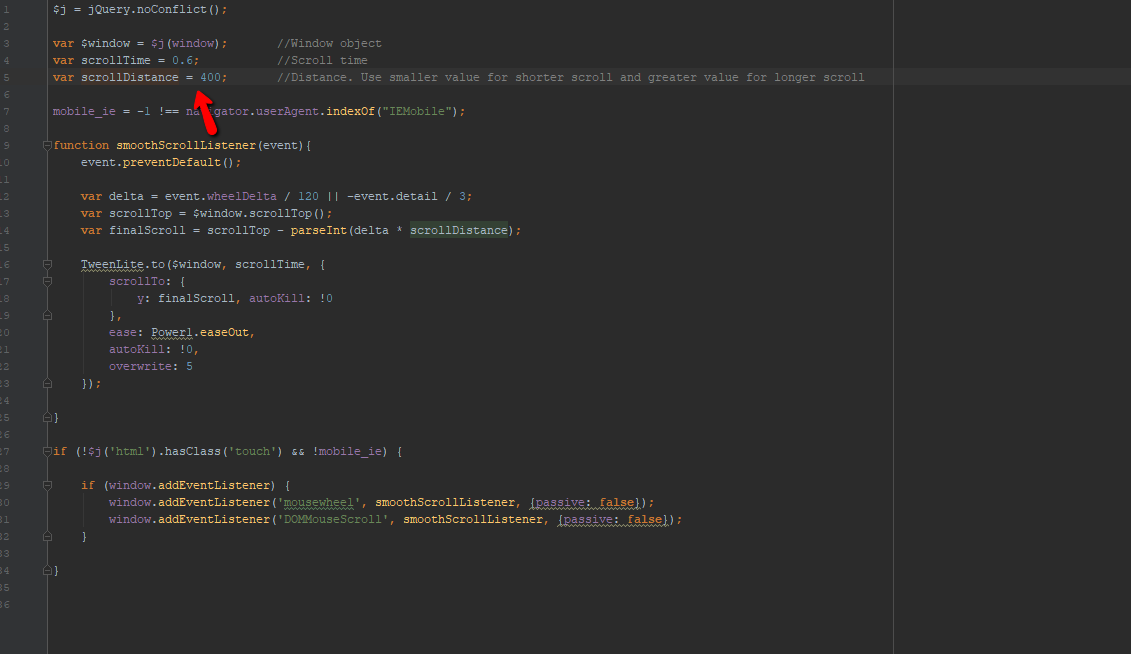
Please, note that nothing is changed inside our theme related to this. Only thing that could be done is to change scrolling speed:
https://ticksy_attachments.s3.amazonaws.com/5504925579.pngBest, Qode
Exactly what i meant. Where can I change this scrolling speed? Which file? Thanks
Hello,
If you already have our Bridge theme, please, reach our support team at https://qode.ticksy.com/ and our agent will assist you there.
Best, Qode
I am having issue when saving any page its going to 404 page. i have updated all the plugins, theme and wordpress version is 5.2.2
how i can i solve this issue
Thanks
Hello,
Please, reach our support team at https://qode.ticksy.com Just open a ticket and include your website URL with wp-admin access so our agent could check this closer and assist you.
Best, Qode
I am having an issue with changing this template. I want to change the hearder ABOUT THIS PROJECT but cannot find it anywhere to change. I NEED HELP. https://bridge35.qodeinteractive.com/portfolio_page/art-design-blvd/
Found it in all the comments. Not need help again
Glad to hear this has been resolved. Thank you for the update!
Hi there: Presales Question: does the gardening theme has a woocommerce template? https://bridge156.qodeinteractive.com/ how about the blogsection? I found no one in this theme. exists templates for blogposts? thanks a lot and greetings from germany.
Hello,
Thank you for taking interest in our theme. In this demo website we didn’t install WooCommerce, but you of course could do that, since Bridge theme is fully compatible with this shop plugin. Also, you are able to combine parts from different demo websites. The same is for Blog. We didn’t create page with blog posts, but of course, you could do that on your own, using any of included blog post templates.
Best, Qode
Some ICONS for the theme do not match, like bridge/templates/blog-parts/blog-share-like-post-info.php ,many templates have icons that look like this
<span class="dots"><i class="fa fa-square" /></span>
Hi,
For any question like this one, we need to ask you to reach our support team at https://qode.ticksy.com/ and they will investigate. Thanks
Qode
Search page word not shown on the search page <title> field,so as the archive page too, please check thank you!
such as http://www.test.com/?s=one “one” It doesn’t show up in<tittle>
Hello,
Please, open a ticket at https://qode.ticksy.com/ and include your website URL with wp-admin access so our agent could check this closer and assist you there.
Best, Qode
Hi, Is it possible to change the colour on the Title Angle on one page only?
Don’t worry, I’ve seen I need to re-confirm I want an angled background at the bottom of the page and change the colour there.
Glad to hear this has been resolved. Thank you for the update.
Is it possible to chage image to custom size and proportions in blog image in left box
Hello,
You could force original image size instead of full width for example. For further assistance, please, reach our support team at https://qode.ticksy.com
Best, Qode