371 comments found.

Shame there is no bbPress theme. Any plans to add it? We like the looks of PlayerX for a gaming website we are working on but we need bbPress to look nice with the theme.
Hello,
Thank you for taking interest in our theme!
No, unfortunately not, sorry about that. We can confirm that bbPress works fine with PlayerX according to some other users, but it’s important to note that you might have to style the forum additionally, because forum elements might not match theme colors.
Support
Edge Portfolio part of
Qode Interactive
Don’t forget to sign up for our newsletter and be the first to find out all the latest news.
Pre buyer question: Its possible create a teams directory? Is built in? or must be customized? like a user register and create his own clan page?
Hello,
Thank you for taking interest in our theme!
Teams directory is not included as custom post type in PlayerX theme, sorry about that. Login/Register functionality doesn’t exist neither. If there’s anything else, please let us know.
Support
Edge Portfolio part of
Qode Interactive
Don’t forget to sign up for our newsletter and be the first to find out all the latest news.
Hello there we get issue with rev-slider after we bought, there is no license number in the field. and we get errors when site go live and demo content imported.
Following error: how to fix.
Revolution Slider Error: Slider with alias parallax-home not found. Maybe you mean: ‘about-the-clan’ or ‘development-studio’ or ‘landing-bottom’ or ‘landing-top’ or ‘about-the-clan1’ or ‘development-studio1’
Hello,
Thank you for reaching us.
The plugins that you got after the purchase are called bundled and we, as a theme authors, have purchased an extended licence for them. That means you don’t have to activate them and they’ll work for you regardless of that.
When it comes to warning/error message related to Revolution Slider, it mens that you didn’t import demo sliders. Please follow instructions from this article and you will be able to import demo sliders: https://edge.ticksy.com/article/13458If you have any other question or you need some help, please open a ticket at https://edge.ticksy.com/ and one of our support agents will assist you.
Support
Edge Portfolio part of
Qode Interactive
Don’t forget to sign up for our newsletter and be the first to find out all the latest news.
Hello Edge-Themes,
I’d like to change some of the default labels of the theme.
According to the documentation I should change them in the “en_US.po” – however there is only a “playerx.pot” in the directory and if I change them in there nothing changes on the website.
I hope you can help me.
Hello,
We located your ticket #2100373 where you wrote about the same issue. We’ve forwarded it to our support team for some quicker response. Please check ticket status in a couple of minutes. Thanks!
Support
Edge Portfolio part of
Qode Interactive
Don’t forget to sign up for our newsletter and be the first to find out all the latest news.
hello, nice theme, im trying to figure where is the menu text “this is a playex, a theme for gamers, clans & esport”so i can change it
also, im having a hard time finding the “Glow hover effect” in the theme options and the scroll bar color too.
Hello,
We managed to find ticket from you and our agent answered you. Please, check whole response on ticksy. For any further assistance, our support team will assist you there.
Support
Edge Portfolio part of
Qode Interactive
Don’t forget to sign up for our newsletter and be the first to find out all the latest news.
hi, any reason the gallery post type doesnt show the smaller version of the images? I get the images at the top large and rotating, but in the grid view below theres no html rendered. Im using [edgtf_image_gallery type=”grid” enable_image_shadow=”no” number_of_columns=”three” space_between_items=”normal” images=”12,13,14”] but in the rendered html its just empty
Hello,
Thank you for reaching us!
Since author’s dashboard is meant for general inquiries and pre-sale questions, we would appreciate if you could submit a ticket to our forum and include your website URL along with wp-admin access and one of our support agents will assist you.
Support
Edge Portfolio part of
Qode Interactive
Don’t forget to sign up for our newsletter and be the first to find out all the latest news.
Hi, too much padding on the divided header at smaller browser size, causing the header to wrap onto the revolution slider. changing the padding to 0 10px prevents this and then putting back to 0 30px for width over 1200px
.edgtf-main-menu>ul>li>a {padding:0 10px !important;}
@media only screen and (min-width: 1200px) { .edgtf-main-menu>ul>li>a { padding: 0 30px !important; } }
Hi,
We would appreciate if you could submit a ticket to our support forum https://edge.ticksy.com and include your website URL along with wp-admin access and one of our support agents will assist you.
Support
Edge Portfolio part of
Qode Interactive
Don’t forget to sign up for our newsletter and be the first to find out all the latest news.
Hi, looking to set up the template manually as demo content not working, but wanted to know how you get blog posts with sidebar for a category view? in category view theres no sidebar or links to other categories, just 100% width – this is an important requirement. Also, how is it possible to create a page like blog left sidebar/right sidebar but specify which categories it shows, limiting it to just those categories. Thanks
Hello,
Thank you for reaching us!
Since author’s dashboard is meant for general inquiries and pre-sale questions, we would appreciate if you could submit a ticket to our forum and include your website URL along with wp-admin access and one of our support agents will assist you.
Support
Edge Portfolio part of
Qode Interactive
Don’t forget to sign up for our newsletter and be the first to find out all the latest news.
Hey, i have a problem with my theme. My website works fine on 3840×2160 and 1920×1080 resolutions. On smaller displays the menu is just wrong (https://www.ultim8gaming.net/testwebsite/wp-content/uploads/2019/07/Example.png). I’ve tried a smaller logo but it didn’t changed. On your demo website all works fine. Hope someone can help me
Hello,
Since author’s dashboard is meant for general inquiries and pre-sale question, we would appreciate if you could submit a ticket to our support forum https://edge.ticksy.com/ and include your website URL along with wp-admin access and one of our support agents will assist you.
Support
Edge Portfolio part of
Qode Interactive
Don’t forget to sign up for our newsletter and be the first to find out all the latest news.
Guys pretty frustrated at the moment. I have updated our logo to the theme settings and yet it still shows the default. On the live site I can right click and open image in new tab and it shows the CORRECT logo and yet onsite it still shows the default. I have removed logos, removed the files, cleared cache, and yet it still shows the default. Would appreciate a fast reply here as I am not wasting any more of my time on this. If this cannot be resolved I will refund this item. Thank you
Hello,
Thank you for reaching us.
Please note that the logo image can be changed globally in PlayerX Options > Logo. Also each page has the option for uploading logo images, and if set on the page, it will override global (playerx) options.. So please make sure that you changed default PlayerX logo in page settings. Just edit your pages and scroll down to Edge Logo section and upload your logo image. Please see the following screenshot: https://www.screencast.com/t/KWe1ZC4W9i7NIf you have any other question or you need some help, please submit a ticket to our support forum https://edge.ticksy.com/ and include your website URL along with wp-admin access and one of our support agents will assist you.
Support
Edge Portfolio part of
Qode Interactive
Don’t forget to sign up for our newsletter and be the first to find out all the latest news.
HI, I like the look of the theme and wanted to ask – the different homepage styles in your demo – can they be created as actual individual pages? eg I would like a section of my site to be “tournaments” so id want that section to have the style of the esports homepage. Then for game reviews I want each page to look like the landing page demo.
Hello,
Thank you for your interest in PlayerX!
You can import demo content and you will get all pages that we have on out live preview. Our demo site content can be used as a starting point. Next, you can delete pages you don’t need, and mix and combine page elements to create your own layouts.
You can use every demo page for the purpose that suits you. So you can use Esports demo page for tournaments and use Landing page for the game reviews.
If you have any other question, please never hesitate to contact us.
Support
Edge Portfolio part of
Qode Interactive
Don’t forget to sign up for our newsletter and be the first to find out all the latest news.
HI, I bought it – set up all required plugins etc in advance. Then when I chose import demo data, all content and download images. My site is populated with text, but my media library is full of empty assets…
ive rolledback my database to raw playerx install, then ran same import but told it not to save attachments locally – same issue again – textu only content. page layouts ar ein place but 0 visual content.
Hello,
Thank you for purchasing our theme!
Please take a look at this helpful article about the issues which usually occur during demo import:
https://edge.ticksy.com/article/10241In case it doesn’t help, please open a ticket at https://edge.ticksy.com/ and one of our support agents will assist you. Just include your site URL and wp-admin access.
Support
Edge Portfolio part of
Qode Interactive
Don’t forget to sign up for our newsletter and be the first to find out all the latest news.
Hello does this theme have bootstrap integrated, also In the elements I heavent seen any table designs which are very important for gaming
Hello,
Thank you for your interest in our theme!
WPBakery Page Builder’s grid, that is our main page builder is based on Boostrap.
We didn’t show any element that would be suitable for creating tables, but we have Pricing Table element. https://www.screencast.com/t/2VYbqp4jEq This theme also has Match List element where you can show scedule of matches, results, etc. https://playerx.edge-themes.com/elements/match-list/If you have any other question, please never hesitate to contact us.
Kind Regards, Edge
Hello, i had theme 1.1 – Today i updated to 1.5 and i can’t access my admin dashboard anymore. I get this message “The site is experiencing technical difficulties. Please check your site admin email inbox for instructions”
It was working perfect before
Hello,
Thank you for writing in.
Please, note that it is really important to perform this major update on right way. You should update your theme by performing the following steps:
1. Deactivate and delete PlayerX Core plugin (you can do this via FTP, just go to wp-content/plugins and remove playerx-core plugin folder completely) 2. Download the latest theme .zip file from ThemeForest 3. Extract it and locate playerx.zip 4. Extract playerx.zip and locate the playerx folder 5. Copy/Replace the contents of the playerx folder to the /wp-content/themes/playerx folder of your web site. 6. Login to wp-admin panel, go to Appearance > Install Plugins and install and activate PlayerX Core 1.0.2
Everything should be working well after.
Best Regards, Edge
Hello,
I tried to submit a ticket through ticksy but it had really bad loading times. Trying it again after and it’s down now. I’m not sure what’s happening. I am hoping someone can help me through here instead.
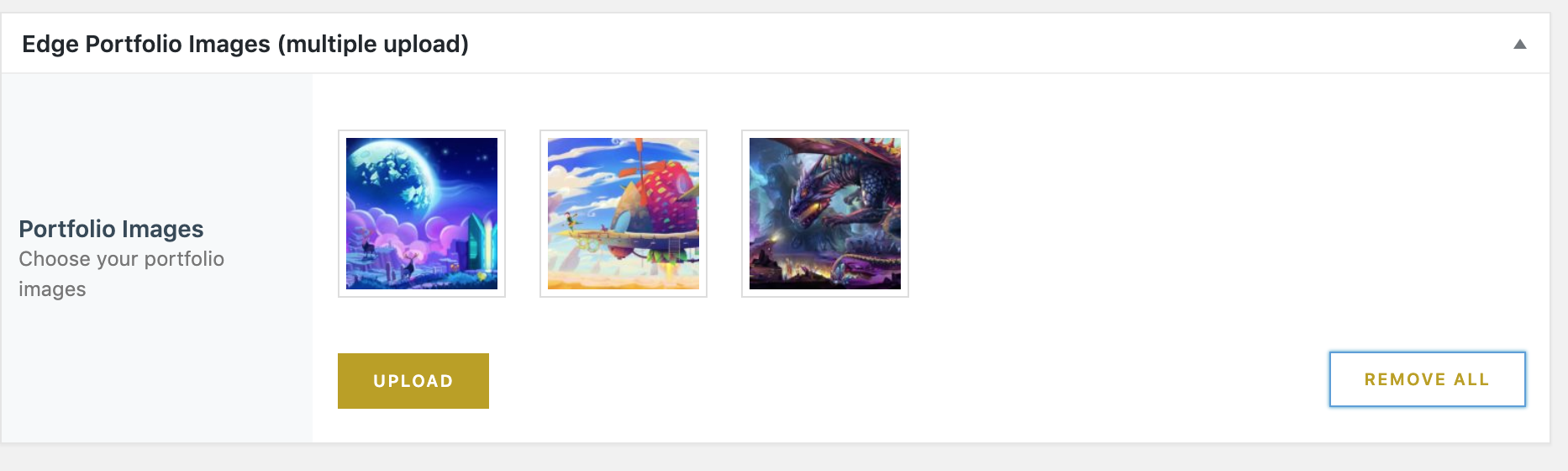
1 : https://i.gyazo.com/bcff7b2448fbefc30584d880fce83f72.png This doesn’t seem to be working at all when I tried to remove these images. The upload and remove button doesn’t work. So far all the other upload and remove buttons from the page section works. Actually, even within this same page everything but that works.
2 : https://intoxis.games/sunsveil/ I’m trying to have a slider (I like the Portfolio small slider style) for the small gallery section I have for this page but it’s really not working. I also didn’t like using the portfolio item slider because it’s really strange to have to make an entire post PER image. Is there a way to just get a lightbox/small slider working here?
Thank you very much.
Kind Regards, Vanessa
Hello there Vanessa,
We managed to find ticket from you and it is already answered. Please, check response on ticksy.
Best, Edge
Hi, Does this include the HTML version? If i was to purchase could you include it? I don’t have a need or use Wordpress and want to integrate with React? Thanks Phillip
Hello,
Our Company’s focus is on developing WordPress themes, and in the development process we are integrating directly into our WordPress framework, so HTML version does not exist.
Best Regrads, Egde
Hello, Would it be possible to see a demo with buddypress & bbpress? I am interested in the theme but I want to see how it will handle these 2 plugins before purchase. Thank you!
Hello,
Thank you for your interest in our theme!
Unfortunately there is no option to see live preview with Buddypress and bbPress plugins.
However, Buddypress and bbPress plugins are compatible with PlayerX theme and there shouldn’t be any compatibility issues.
If you have any other question, please never hesitate to contact us.
Best Regards, Edge
Is it possible to change the overall color scheme, with white background for example? It would be amazing also to switch from day to night mode, changing the related .css
Hello,
Thank you for your interest in our theme!
This theme has First Main color option that will change majority of the elements in theme. Also there is an option to choose the background color for page content, like it is shown on this screenshot: https://www.screencast.com/t/W4ccPoxymjMaIf you have any other question, please never hesitate to contact us.
Best Regards, Edge
Hi, I have a problem with the social icons. These are unfortunately not displayed if you are not logged in: www.warkidz.eu
Nevermind. Now it works without any changes…
Good to hear that it works fine now. If you have any other question or you need some help, please open a ticket at https://edge.ticksy.com/ and one of our support agents will gladly assist you.
Hi,
Added a support ticket and need urgent help after updating the theme through backend. Did not get a warning about deleting core plugin before updating and now the theme is broken, was ready to launch site.
Please check ticket as this is critical.
Thanks in advance
Hello,
We located your request #2008971 and forwarded to our support team as urgent. Please check ticket status in a couple of minutes. Thanks!
Best Regards, Egde
Hi, thanks a lot. We got that problem solved and your support is truly great 
But, i got another issue today, on launch day of the site of course. WP bakery page builder, gutenberg or whatever does not work, just a whole bunch of code in the editor from page builder and this totaly fucks up my day…..
It happened for no reason what so ever, worked perfectly fine last night, but when i went to work on it today, this shit hits my face like a bomb.
If the other request was urgent, this is like armageddon, the sky is falling down, aliens are invading and i’m panicking like hell. PLASE help lol
Your ticket has been assigned to our agent who is currently working on it. You can expect a reply on Ticksy soon.
As above, the live preview appears to be broken. Was interested in the theme but it simply does not load.
We had some temporary server issues so please try again to visit our demo site. Thank you for understanding.
Hi, why the live preview is an error page? Can u send me a preview link ? thanks
Hello,
Sorry, we had some temporary server issues. Please try again to visit our demo site, here is the link https://playerx.edge-themes.com/landing
Everything should be working well now. Thanks
Best, Edge
is this default builder using visual composer?
WPBakery (formerly Visual Composer) is bundled with our theme and it is default page editor/builder. We have integrated our own elements into WPBakery Page Builder.



.)