5515 comments found.

Hello, I brought the theme and It is well done. I need help with the features and amenities section. When I add features and amenities in the dashboard they do not show on the add a listing page when the user adds a listing. How do I get them to show so they can show on the users listing page?
Hello pmarie310
Thank you for the comment. Please check this help to save what fields (including features and amenities) should show in submit form. This must be done after you add new features and new custom fields. Help https://help.wprentals.org/article/1-30-how-to-manage-submit-form-fields-and-mandatory-fields/
If you need further help. please use our client support http://support.wpestate.org/ and we will assist asap.
Thank you.
The WooCommerce update is missing from my child theme options. How do I get this fixed?
Hello exclusive_concepts
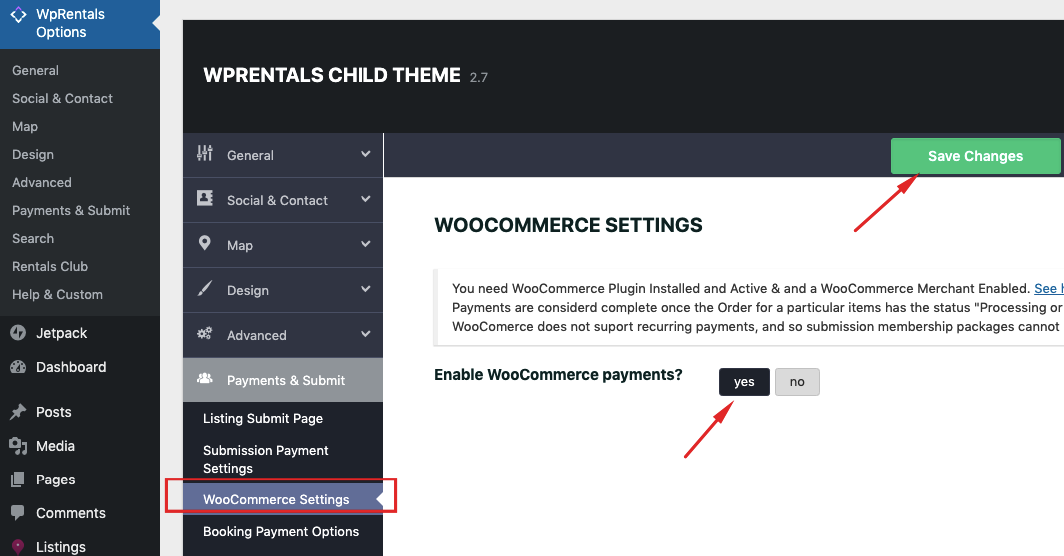
Thank you for the comment. WooCommerce is an option we added as theme option setting (which allows to switch to woo commerce for payments).
It’s not in child theme, so I am not sure why you expect to see in child theme. It’s in main theme and a full main theme update (and wprentals core functionality plugin) are needed to see the theme options . Help for woo commerce https://help.wprentals.org/article/install-woocommerce-and-use-woocommerce-payments/
If you need further help. please use our client support http://support.wpestate.org/ and we will assist asap.
Thank you
Hi, is any possibilities to put some custom icons to every amenities? Will you add numbers of views” for every property page? One page add listing will be great in your future update.
Hello babasss, Thank you for the comment.
For features and amenities, you can see this solution we can recommend now https://help.wprentals.org/article/how-to-add-icons-to-features-and-amenities/ We have the idea on wishlist for research as well. I saved the suggestion about adding number of views. You may be able to add that with a plugin too (there must be plugins to show number of views for custom post types). It’s an idea that may work but has to be tested. And I understand the suggestion about 1 page submit form. We will check further, but we have to consider the clients who like the current submit as well. A change that would affect them has to be researched carefully for old clients who don’t want a 1 page.
Thank you
Thank you!
You’re welcome!
Hello WpEstate Team.
I am thinking about buying the Theme for our holiday rental business.
But first we would like to know:
Is it possible to create emails that are send automatically by the system to guests, staff, etc.? I mean, is it possible to set up when exactly (days after booking, before arrival, after departure, etc.) emails are going to be send automatically by the system to a certain person?
Is it possible to create reports in the system about the monthly bookings, payments and export them for example to a excel sheet?
Is there a special kind of host/server that we need for that the theme, all the features, booking, guest details, ... will be working correctly and safe?
Thank you in advance.
Kind regards.
Nathalie
Hello Nathalie
Thank you for the message. We don’t have the features you describe. I can help test the existing theme options if you wish.
About the last question, any kind of WordPress hosting should be enough. The theme is safe (we recently received the Envato compliance badge which confirms the theme has been checked for all latest security norms)
If you wish to see the theme backend you can send a message in private here https://themeforest.net/user/wpestate Thank you
Hello Envato Market Team.
Thank you for your response.
Ok. That’s a pity that this features do not exist in WPRentals. Are there probably Plugins we can install to have this features?
Right now we are using „Beds24“ as our Property Management System because it has all this features (but they do not offer website). But there is a Beds24 Plugin for WordPress. Is it possible to set up that the bookings that we get through WPRentals WordPress synchronize with Beds24?
Thank you in advance.
Kind regards.
Nathalie
Hi Nathalie,
I honestly don’t know how a plugin could work. I never tested this particular plugin either. If you send a message from here https://themeforest.net/user/wpestate I will help with a test domain to check the plugin.
Thank you
Hello again. Ok. Thank you! I think it will probably not work with the plugin. maybe there are other plugins that can be used for this features? I wrote you a message in the web you wrote above but I have no answer yet.
Thank you in advance.
Nathalie
Hi, I sent a message to the email you sent a few minutes ago. I didn’t receive another email besides the one I replied to. Thank you
Hi, why is sent the same message in the internal message system after the booking request, so I mean the person how rents the boat gets the same message like the person who owns the boat. Its not ok!! please help me.
Hi ratabalint
Thank you for the comment.
I understand you refer to Inbox message. We send a duplicate message of what owner gets in inbox (and we inform that the message is sent to owner and user in the message, as well as that the message is initiated by the user) so that the user can easily follow up to his request by simply hitting reply via private message.
See here a reply sent by user to that message copy as seen by owner, to understand why it’s useful https://prnt.sc/pm3bai The copy exists intentionally as it’s an easy way to reply to such a request via Private Message.
I am not sure what you would like to change, but in this case, the only thing that can be done technically is to not send the copy of the message to the user (although the purpose is useful). But in this case, I would need to consult with the development team to confirm the technical solution so please open a ticket in client support for this solution http://support.wpestate.org
Thank you
Best regards, Roberto
Hi Roberto_Oliva, Thank you for the comment and for buying the theme. Please send us in client support the details you want and we will add them for you – http://support.wpestate.org Thank you
Hello! And how i can enter in WpEstate Support System? I try registered with my Envato Licensing Code, but password not arrive in email.
Hi Roberto_Oliva, If you still need help please send a message from here https://themeforest.net/user/wpestate Thank you
How can increase images more than 10 in listing ?
Hi, You change from theme options. Please see this help https://help.wprentals.org/article/how-to-add-edit-images-in-a-property/
Thank you
Hello! i try to modify default image from Index (Amenities) but the Amenities categories dont have featured image. You have some solution? Thanks!
Hi, Thank you for writing and for buying the theme. I don’t find the link you refer to https://main.wprentals.org/feature/family-kid-friendly/ Please send a ticket in private with your site url to check and help – http://support.wpestate.org/. This is a safe and private system where only you and we see your tickets.
Thank you
After the recent update I am no longer able to edit listings via the user dashboard. When I click on the listing’s ‘Edit’ option the screen reloads but remains in the same properties listing screen but the url appears to be the page where i edit the listing.
I am trying to add an iCal link to a property so that I can display its availability. Is there anyway to do this from the regular listing dashboard? I dont see this field there.
Thanks!
I sent this same message to ticket support 
Hi Angie, Thank you for the ticket.
You were missing the correct dashboard pages, as I suspected. You seem to have deleted that content but you need to edit the properties (and also you need a template for the ical feed) I created these 3 pages with the correct template https://prnt.sc/pjihl7
The submit is limited to another user, I cannot test to edit your properties, but all should be ok now. Please check and let us know if you need further help.
Thank you
Hi there, I am interested in purchasing this theme but have a few questions first. Is there any way someone could email me?
Hello. Thank you for the interest. You can send your questions directly to our email here https://themeforest.net/user/wpestate Thanks
Hello, I purchased the theme and I need to need is there anyway to change the label on the home page from “per/night” to per/day or daily. Can the word night be deleted?
Hello pmarie310, Thank you for buying the theme.
Easiest is to change labels through .po and this help explains how to easily do this with a plugin – https://help.wprentals.org/article/how-to-modify-theme-text-in-english-with-poedit/
If you need our help we can assist as it’s an easy change. Please open a ticket in client support http://support.wpestate.org for our assistance.
Thank you
Ok, thank you so much
I tired to use .po but it’s giving me a error
Im trying to us .po but it keeps giving me a error message when I tried to change the text.
Hi pmarie310
Thank you for the follow up. Please open a ticket in support http://support.wpestate.org and give me the ticket ID. Will check the pot (eventually make a new one) and help with the translate. It works for me without problems in our test domain.
If the plugin cannot be used on your installation, you can give FTP and I will put the translated .po files through FTP to help since this is an easy change.
Thank you
I purchased this theme quite a while ago but have only recently sat down and set it up. It’s quite good but there are some limitations with extra guests which could easily be addressed. The functionality in WP Rentals is not consistent with other booking sites and could lead to confusion.
1. To charge for Extra Guests the default guest number for a property is entered. However, when a customer searches the search feature uses the default guest number as the maximum allowed guests.
2. In order to charge for Extra Guests, there is no way to set a maximum number of guests allowed. That is, I set the default number of guests to 2, however my property can accommodate up to 6 guests. If I charge for extra guests, there is no way to stop the person making the booking from selecting 8 or 9 extra guests. The main config can limit the number of guests selectable for all listings on the site but this is not configurable per listing.
Please look into improving the way extra guests are managed. The current system is simply inadequate.
Hello gedm
Thank you for the comment.
I understand. Will save your comment to our wishlist to check further the extra guests has a max limit in booking form.
In search, you can now add custom fields with type 3 or 4 (search types) so there could be a custom field like dropdown for Guests and Extra guests allowed.
Thank you
Hello, and sorry for my english. I am studying your Theme for replacement on one of my site – catalog of tourist places, where the author has stopped supporting (SuperList Theme ).. And also possible that I will use your theme on other sites of my clients…
And I already have a contract to create a real estate catalog.
In fact, I am looking for a universal directory Theme for many projects. I would like a detailed answer to my questions.
First question - 1. Does your theme support custom listings? Can I create separate listings? ... for example a separate listing for tourist places, a separate listing for hotels, for guides?
Important – these are different types of objects. These objects must have different fields.
2. Can I create my custom taxonomies? 3. Can I create my custom fields?
4. Can I create custom fields for the search form?
Can I have two prices in the search form? One price field for sale of property, another price field for rent of property?
My question is that at the moment I have the task to import about 1000 properties.
The owners of these properties sell real estate, and rent this property at the same time.
Therefore, for almost every object I have to have two fields for the price. One price field for sale, and one price field for rent.
And also these two prices should be configured in the search form. Is it possible?
5. Does your Theme support the Polylang plugin? The site will be in several languages.
Thanks in advance!
Hello andrei4ka
Thank you for the comment. Please see my reply
Hello, and sorry for my english. I am studying your Theme for replacement on one of my site – catalog of tourist places, where the author has stopped supporting (SuperList Theme ).. And also possible that I will use your theme on other sites of my clients…
-> I don’t know this theme, sorry. I may not be able to offer an answer in comparison for that reason, but I can answer any question related to our theme.
And I already have a contract to create a real estate catalog.
In fact, I am looking for a universal directory Theme for many projects. I would like a detailed answer to my questions.
-> Ok.
First question – 1. Does your theme support custom listings? Can I create separate listings? ... for example a separate listing for tourist places, a separate listing for hotels, for guides?
-> No, this is not a feature. We have custom listings (1 type)
Important – these are different types of objects. These objects must have different fields.
—> I understand, but it’s not a directory style theme so we don’t have this kind of separation.
2. Can I create my custom taxonomies? 3. Can I create my custom fields?
—> You can create your custom fields for the post type built in (listings). Help https://help.wprentals.org/article/property-custom-fields/
4. Can I create custom fields for the search form?
—> Yes https://help.wprentals.org/article/advanced-search-type-3-and-4-custom-search-fields-setup/
Can I have two prices in the search form? One price field for sale of property, another price field for rent of property?
—> No. We don’t have Sale as an option in the booking theme.
My question is that at the moment I have the task to import about 1000 properties.
—> In rentals we don’t have a straight import solution. Wp AllImport have said they will work on an add-on for their plugin, but it’s not a live solution. They have an add-on for residence theme (our other theme) and the property structure is the same but prices in custom calendar won’t be able to import. Those have to be set automatically. Owner has to exist to be assigned to the import (if it’s different than admin)
The owners of these properties sell real estate, and rent this property at the same time.
Therefore, for almost every object I have to have two fields for the price. One price field for sale, and one price field for rent.
—> I understand, but we don’t have that kind of feature.
And also these two prices should be configured in the search form. Is it possible?
—> No
5. Does your Theme support the Polylang plugin? The site will be in several languages.
—> We didn’t test this particular plugin. We have here a list of plugins tested by us or by our clients https://help.wprentals.org/article/multi-language-3rd-party-recommended-solutions/
Thank you
Hello Anna,
Until now I had never needed to use translation plugins. I have taken a look at the comments and questions here to know what options there would be and the truth is that I doubt a bit. On the one hand, I see that WPrentals is ready to work 100% with WPML, but I think that this plugin is very heavy and slows the web. I have read comments about translate press, transposh, Qtranslate and I think I haven’t seen about the multilingual press. In your opinion ,leaving wpml aside, would these other options work correctly with wprentals? Do you know if the theme is compatible with the multilingual press?
Thank you.
Hello J-Carlos
Thank you for the comment.
It’s very nice to hear from you. We have put here the list of recommendations based on what clients tested https://help.wprentals.org/article/multi-language-3rd-party-recommended-solutions/
I haven’t tested personally all from your list, but I hope what we have as recommendations will help choose / test a viable solution for you.
Thank you
woocommerce payment gateway for booking purpose
Hello, The woo commerce is part of the latest update. This is how it works https://help.wprentals.org/article/install-woocommerce-and-use-woocommerce-payments/
Change log https://help.wprentals.org/article/detailed-change-log/
Help to update https://help.wprentals.org/article/how-to-update-the-theme-and-plugins/
Thank you
woo commerce don’t work in wp-rental 2.6
Hello, The theme update that started to work with woo commerce for payments is 2.7 The update to 2.7 must be done to have the option. Thank you
woo commerce running but pay now button don’t show
woo commerce show on wp-rental option under by payment & submit but when i book my property and press instant booking button then don’t show pay now button .in which file will be change tell me what’s change my theme right now
Hello,
Regarding
woo commerce running but pay now button don’t showYou must have 2.7 to activate the option to show woo commerce as payment option https://help.wprentals.org/wp-content/uploads/2019/08/woo.png
Thank you
yes its show and i enable this option
Ok. Then make sure you clear cache and the button will show in front when you try to make a purchase. If you need further help please send us the site url in client support http://support.wpestate.org Thank you
pay now button not function
Hello priti2389
Please open a ticket to be able to check. I cannot advise further without seeing the site. Please give me the ticket ID after you created it to check asap. Thank you
how to update latest version and i m using wp rental 2.6 version and this version not support to woocommerce plz help me and i want to use woocommerce
Hello, The woo commerce is part of the latest update. This is how it works https://help.wprentals.org/article/install-woocommerce-and-use-woocommerce-payments/
Change log https://help.wprentals.org/article/detailed-change-log/
Help to update https://help.wprentals.org/article/how-to-update-the-theme-and-plugins/
Thank you
Hi, ı have 2 question before the buy this theme
1. I want so search field is open in the mobile version (homepage), but looks this https://prnt.sc/ph6ibk, can advanced search filed looks like this https://prnt.sc/ph6iyj in the mobile version .
2. I want to show that I have a discount looks like this https://prnt.sc/ph6jeq, is this possible ?
Hello again, Thank you for the follow up.
1. You can make mobile search open by default with a small css instruction. Ex https://prnt.sc/phbnec https://ibiza.wprentals.org
2. We have a text you can use before price label, but to style with strike as in example, you would need some custom css and html changes done from your end. So by default, we don’t have that look.
Thank you
It is possible to change the order of detail on the properties page. for example in DEMO SKIRENT, I want to show “owner profile” first and then “product description” and add the location map of the owner like the others demo.
Hi kemass
Thank you for the comment. You can change the property type layout to 1 https://main.wprentals.org/properties/great-villa-to-rent/ or 3 https://main.wprentals.org/properties/cozy-house-in-the-sunnyside/
It’s not the same slider as in type 2, but the order is already set in code. Help to change the type https://help.wprentals.org/article/theme-options-listing-page-settings/
Other option is to edit in code the page 2 layout – this explains the basic structure https://help.wprentals.org/article/technical-how-to-change-property-page-details/ but this change will need a developer to re-order elements and possibility redesign the sections for web and responsive.
Thank you
WP Rentals Download Error for Themeorest. XML Download
This XML file does not appear to have any style information associated with it. The document tree is shown below.
<Error>InternalError
<Message>
We encountered an internal error. Please try again.
</Message>
<RequestId>623E46D45FC4F62C</RequestId>
<HostId>
hRXmIW3J6IwYPE3qRF0AdSqkf0tP/L4kcsPYGJOE1gFTQPSL7pnXR9dstPs90Sjj9ze8IA3COmw=
</HostId>
</Error>
Hello talegal, I am not sure what do you try to download?
If you still cannot download, we can help in client support http://support.wpestate.org Please open a ticket and let us know what you need to download so we can help. Thank you
Hi, We took over a website from e developer that wasn’t delivering to the client. They have WP Rentals loaded as the theme to use on the site. I am, how ever, unsure if they have a legitimate copy of the theme on as the theme is still on version 1.22 on the site, and on Envato Market the version is 2.7 already. Is this a pirated theme issue or how do I update the theme on the website? I have asked the client to get the purchase code form the previous developers, but they are being difficult. I can thus not log into your site to lodge a support ticket, and Envato doesn’t offer the ability to transfer a licence so they can’t send me the theme and licence from their account to mine.
Hi PeriPeriCreative, Thank you for the comment. The envato team can transfer the license, if the owner initiates the request. But without the buyer account, you cannot download the theme updates. Thank you
I asked Envato before if we can do it and they said no…. I’ll do a check again…
Does the theme not update through the normal wordpress and plugin updates screen?
I can’t find where one would initiate such a transfer so I can ask the other developers to do it. Do you know where?
I know this was possible some time ago, but it’s not a standard process and envato policies change all the time too. Request here https://help.market.envato.com/hc/en-us/requests/new as the buyer. Thank you
Thank you! I have sent the client the link and requested him to send to the previous developers.