5515 comments found.

So did I get this right, that it is impossible to add seasonal prices (prices for particular days/period of time) to a listing through the backend? If it is only possible via the frontend add listing process what are the necessary steps to make this possible? I adjusted settings so that the login/register and submit button appear in the header, but when I click on either (e.g. the submit button) nothing happens – it does not link/redirect anywhere but the page remains the same? Is this a bug? Or did I forget to activate something?
Thank you!
Hi fewoko
Thank you for the comment. Yes, custom prices, calendar management (add manual bookings, ical management) are features you have only using front end submission.
Front end submission can be restricted just to administrator (and you can use it without activating submit or login to show in header).
What it’s import to have are the user dashboard pages published (add listing, edit listing and dashboard with all listings, and you can restrict the submission from wp-admin so only your user can see these pages.
Help to check dashboard pages https://help.wprentals.org/?s=user+dashboard
Help to restrict submit https://help.wprentals.org/article/use-wprentals-for-a-single-property-single-owner/
For further help please use our client support http://support.wpestate.org/ and my colleagues will assist asap. Our standard office hours are Monday – Friday, 9AM-5PM Europe timezone.
Thank you
Hi there – thank you for your reply.
I published the dashboard pages (or rather downloaded demo content so they were already there). But now let’s assume I am on the homepage and I click on my user name to see the menu (my profile, my listings, add listing, favourites etc) it doesn’t matter where I click – it doesn’t redirect me to a new page, but I stay on the homepage. The hrefs are empty. This is where I am confused… Is this common, and do you know how to fix this?
Thank you!
Clear cache please. If it still doesn’t apply, you may have double theme installation and we need to check in client support with FTP credentials included to look over the themes folder. Support is here http://support.wpestate.org/ Thank you
Hi,
I have problem with map. I managed API key and it works (when I search, it displays property by location), but it doesn’t display map properly, it displays just blue background with pin.
Hi Tomi
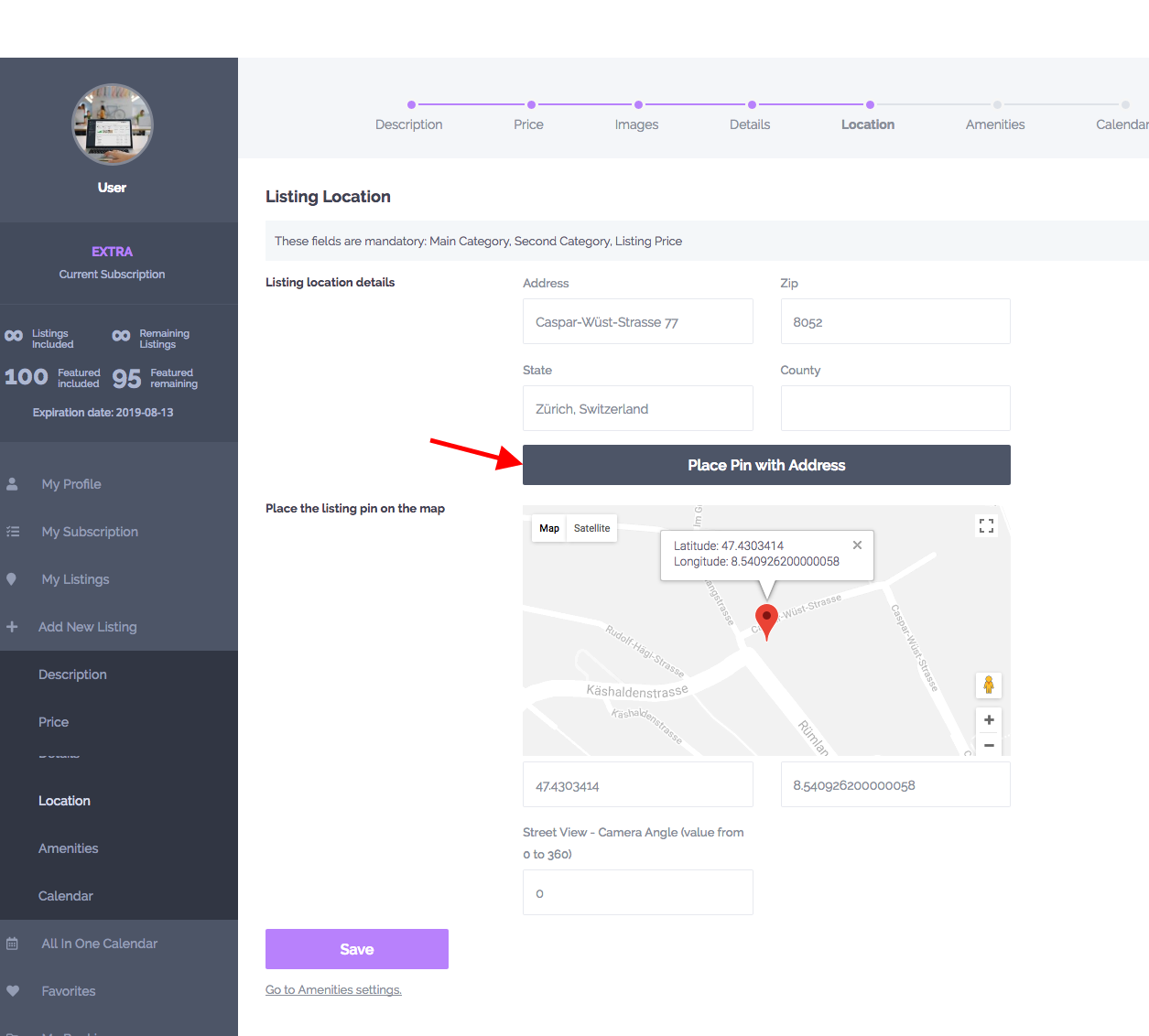
Seems like the map is in the middle of the earth (lat 0, long 0) because it wasn’t pinned to a custom location. Please see this help https://help.wprentals.org/article/how-to-set-the-location-of-a-property-on-the-map/
Check the property lat and long values in Location settings https://help.wprentals.org/wp-content/uploads/2017/04/pon.png
They must not be 0 so they don’t show in the middle of the earth.
Thank you
Hello, will it work with Stripe Connect?
Hello, Thank you for the comment. We don’t use payment to user through Stripe, so Stripe Connect is not integrated. Only Stripe payments are supported (with the latest API, following EU regulations for double authentification) Thank you
When I tried to install the zip file I have this answer “The link you followed has expired.” How can I solve this? I also wrote you to the support yesterday but no reply yet. Thanks for the help
Hi skvillas,
Thank you for your comment.
I did not found your ticket. Plaese send me the ticket ID and I will reply asap.
Thank you,
Where can I found it? I cannot find it anymore…
Hi. Our support is here http://support.wpestate.org/ If you have a ticket, just let us know the ticket url (which contains the id). The solution to the message you get is to increase max upload size https://help.wprentals.org/article/the-link-you-followed-has-expired/ which must be done from server end. We can help install the theme via FTP until that is managed. You can also send your credentials through our email here https://themeforest.net/user/wpestate and we will help access support too.
Thank you
Pre-purchase Questions:
Planning on charging a service fee per rental. For example 5%. Site owner will be listing items for rent. Site owner will allow others (lenders) to list items for rent and collect the Rental fee Site owner does NOT want to collect full rental fee and send owner their cut.
1) Site owner wants to collect just a service fee.
“If the admin wishes to get just a % deposit of booking as his service fee and let remaining payment to be handled outside the theme, between user/owner he can do that.”
So they would set deposit to 5% and service fee to 0? Since deposit HAS to be greater than service fee?
2) Does the site display “Deposit Fee”? I’d want it to show as “Non Refundable Booking Fee” Deposit implies they get money back.
3) Standard booking process/instant checkout enabled Is this something we can change if one method not working for us? Just wondering if it is like deciding membership or not where we are stuck we one option.
4) Can JUST the site owner collect full rental payments to them? So in addition to collecting the service fee could just the site owner for their own listings collect the rental fee directly through the site?
They don’t want to handle full rental amount for other lenders and have to deal with sending them their balance.
5) How would site owner charge a fee for a listing to be featured in this non-membership model?
Hi MasonDad
Planning on charging a service fee per rental. For example 5%. —> It’s possible.
Site owner will be listing items for rent. —> It’s possible.
Site owner will allow others (lenders) to list items for rent and collect the Rental fee. —> It’s possible.
Site owner does NOT want to collect full rental fee and send owner their cut. —> That’s how it works.
1) Site owner wants to collect just a service fee.
“If the admin wishes to get just a % deposit of booking as his service fee and let remaining payment to be handled outside the theme, between user/owner he can do that.”
So they would set deposit to 5% and service fee to 0? Since deposit HAS to be greater than service fee?
—> It’s 5% deposit and 5% service fee, so deposit covers service fee.
2) Does the site display “Deposit Fee”? I’d want it to show as “Non Refundable Booking Fee” Deposit implies they get money back.
—> Yes. You have this https://prnt.sc/qluezq showing to user and you can change text with loco translate.
3) Standard booking process/instant checkout enabled Is this something we can change if one method not working for us? Just wondering if it is like deciding membership or not where we are stuck we one option.
—> Instant booking is on/off per each property. You can check/uncheck at any time from edit property.
—> It is not related to membership though, which is used only to add properties on the site. So if you want to use membership to add listings, it’s best to choose before you start running the theme live as switching to paid submission will apply the new fees to new users (and old users with active membership will have to be manually approved)
4) Can JUST the site owner collect full rental payments to them? So in addition to collecting the service fee could just the site owner for their own listings collect the rental fee directly through the site?
—> Just for his listings, no. He can collect 100% for ALL listings.
They don’t want to handle full rental amount for other lenders and have to deal with sending them their balance.
—> Remaining balance payment (after deposit) is optional. That can be used for site owner clients to get paid for the remaining balance, but it’s an option available for all properties. If you remove it, it’s removed for all properties.
5) How would site owner charge a fee for a listing to be featured in this non-membership model?
—> Please see here how paid submission works https://help.wprentals.org/article/paid-submission/
Thank you
Still not clear on charging for featured if I use free submission can I have an option to make listing featured? Would I set price to 0.00 and set a price for featured? The directions say don’t set to 0. Please clarify. Thanks!
Hello Mason
Free submission is free (no fees whatsoever)
Paid submission -> requires prices value (so 0 is not possible).
If you want to charge just for featured, it’s not an option by default that you can use.
The only workaround is to create membership packages with a fixed number of featured listings, and listings included to be always unlimited (for free and for a paid package)
But with membership free listings will expire based on the number of days you select in membership settings
Thank you
Thank you – that helps. One more follow up – so there’s no way admin/site owner could make a listing featured? Just wondering if the site owner could charge a fee outside the system and manually change the listing? Or if this is something you could do as custom work?
Admin can make the listing featured manually from wp-admin – > https://help.wprentals.org/article/featured-properties-how-they-work/ But I don’t know how to charge users outside the theme.
Thank you
Thank You!
hello, i cant sync my wp rentals iCal to AirBnB. is it a bug? or i cant exsport wpRental iCal calendar to AirBnB?
thanks for the answer, i very need this
Hi, There is no bug. It’s working for sure.
Check:
1. Ical is set as in help https://help.wprentals.org/article/icalendar-import-export/
2. You have the property published
3. No maintanence mode is active, so airbnb can read the ical
4. you have bookings made on wprentals in the property you export, bookings made actually on wprentals (not imported from another ical)
And should work without problems.
For further assistance you can send us your site property link, or the feed url to check your feed and wp-admin to check step 1.
URL. http://support.wpestate.org/ Our standard office hours are Monday – Friday, 9AM-5PM Europe timezone, so we will check tomorrow if you send after you read my reply. Thank you
Hi,
You don’t have any bookings to export.
Your calendar is blank https://prnt.sc/qleid3
Add at least 1 booking (at least one manually) https://help.wprentals.org/article/adddelete-booked-periods-as-owner/ and try again.
Thank you
thanks for your response, but one question again.
Can i use this case?
1. if my friend have airBnB account with active listing 2. i imported my friend airbnb calendar inside my wp rentals site (it works properly)
and then :
1. i create an airBnB account
can i import my wp rentals iCal (inside this iCal consist my friend’s reservation in airBnB) to my new airBnB account?
for me, it is not work properly.
thanks
Hi. This is a general rule: Ical exports and imports booked dates from the source of the booking. So you need to export your friend airbnb to the 2nd airbnb to see your friend’s booking since it’s made on airbnb. You export wprentals to airbnb to syncs bookings from wprentals to airbnb.
If you need a 3 source combination – you import in wprentals your friend airbnb and your personal airbnb. Hope this explains well how it works. Thank you
Great theme – thanks for that!
We have a question about the add-listing process (frontend): How we can delete some of the steps and keeping “next/previous” buttons working? All fields in some steps are not needed at the moment.
Second question: As default the search / advanced search just show search results where the title match the searched keyword. How we can extend it, to search in listing title and listing description?
Thanks in advance 
Hi Mewigo
Thank you for the comment.
For 1 – i can share this https://help.wprentals.org/article/remove-a-section-from-front-end-submit-form/
But for 2 – i don’t have a solution as code I am afrad. It would need custom development.
Thank you
hello, i wanna know whether the listing in homepage interface can change in mobile view? change from horizontal view to vertical view?
thanks
Hello. We don’t have this option. Will add to wishlist for future review though. Thank you
have a question related to taxes as this seems very confusing after reading the comments. How to set this site up as VRBO, where the admin and the owner are the same. Essentially the renter will list properties and customers can book. There will be a tax, cleaning fee, city fee. Can these fees be shown separately to the customer? If not what items can be separate or is everything included in the price. The customer/renter will pay all fees, including rates, taxes, cleaning fee etc. But would like to show the breakdown.
Hi Bruno
In our theme the taxes (site service fee) is not paid by renter, it’s paid by owner. That’s why it’s no listed when booking.
Renter pays booking, cleaning fee, service fee – but there is no tax extra. What he sees in booking it’s what he pays
https://prnt.sc/ql9j36Owner sees the details like this in his dashboard – https://prnt.sc/ql9ksc
Thank you
it is possible enable “wallet WooCommerce plugin”? And display wallet for owner and renter? Is the wallet plugin compatible with the system?
Hi Saber, We don’t use “Wallet” We have woocommerce compatibility only to process payments through merchants supported by woo commerce, as shown in this demo https://demo1.wprentals.org/ Thank you
my question is. Can the wallet be activated with the plugin? And show the wallet to the owner and renter?
How to pay the rent to the owner of the villa?
HI, We don’t use wallet as we don’t keep money in theme. Money goes from user to admin through the merchant you choose.
We don’t pay owner in the theme. Please read here more https://wpestate.org/monetize-wp-rentals-theme-for-submissions-and-booking-requests/ Thank you
i wanna change the word “advanced search” with another word like “quick search here” for mobile view. How i can do that?
thanks so much
Hi. Please see this help to rename such default texts https://help.wprentals.org/article/how-to-modify-theme-text-in-english-with-poedit/ If you need our help please reach us through client support http://support.wpestate.org/ and we will help with this. Thank you
Hello, Can you tell me if I can remove some of the options on the custom price page? (image here https://i.imgur.com/CfovgtD.png I want to remove the +7 +30 weekend price etc and make it less complicated.
Also when putting in the custom price, I have to keep using the right arrow to go from the Jan/Feb page to the month I want a custom price, for example September, and each time it keeps going back to the jan/feb page making it a very long process. Is there a way to stop it being on the jan/feb page as default, or a way to display more months eg 6 month blocks.
Thank you.
Hi achesman,
Thank you for the comment and for buying the theme.
I cannot see the screenshot, but I assume you want this
https://prnt.sc/qkprpuPlease see this help https://help.wprentals.org/article/remove-options-for-custom-price-panel-with-custom-css/
The custom price panel refreshes to save a period and that’s why calendar starts over.
About the question to show more months, I am not sure on the answer. Please open a ticket http://support.wpestate.org/ to confirm with my colleagues from development team and let me know the ticket id here to check asap.
Thank you
Great, thank you the css options are the area I want to change. I have opened a ticket 178531 regarding the other query.
While I have your attention I have another query on the custom price, if we select for example monday to Friday is there a way to make this selection (ie 5) the populated choice for the minimum nights/days field? rather than having to enter this number manually.
eg someone selects Saturday to Saturday = 7 automatically Friday to Monday = 4 Monday to Friday = 5 and so on rather than having to add it manually.
Regards
Hi, I answered for question 1 in the ticket. Thank you
For question 2, since there is one minim day value, what you describe is not possible as a general rule.
If you put minim days 3 – it’s minim days three no matter which is check-in day.
If you choose turn-over day to be a specific day – it’s just one day you can select. Force check-in just on Monday OR Saturday. So it’s not for multiple days.
You can force turn-over checking and check-out on the same day (meaning if you choose Monday, check-in and check-out must happen on Monday) but it’s also one choice for this option.
Help Manage Turn Over days – https://help.wprentals.org/article/1-20-submit-price-details/
Thank you
Thank you, I see the reply please give me time to digest the information and i’ll get back to you over the coming days. Thank you for your prompt replies.
Hi achesman, You’re welcome. Sure, take your time. Thank you
Hi,
I am trying to add some extra discounts fields in the listing page.
By studying the theme’s code, I could not find any filters to add those field.
So, in order to achieve my goal, the only way i can think of, is by editing the core theme’s code. But the changes will be overridden by the next update of the theme.
Can you suggest any other way?
Thank you
Hi georgenet
Thank you for the comment. I cannot answer without understanding where you want to add discounts.
If you want simple fields – and let discount apply manually by owner, you can use custom fields https://help.wprentals.org/article/property-custom-fields/ and manual discount help https://help.wprentals.org/article/how-to-add-manual-discount-when-issuing-an-invoice-how-to-add-custom-elements-to-an-invoice/
Thank you
Hi,
Thanks for your reply.
What i actually need is to allow the below discounts per listing:
• 2 nights stay we offer a 10% discount • 3 nights stay we offer a 15% discount • 4 to 7 nights stay we offer a 20% discount • 8 nights stay we offer a 25% discount
with the ability to change the percentage amount from time to time.
Hope it is clear now.
Thank you
Hi George
Unfortunately what you’re trying to do needs complex custom work because we have many options as booking possible variables and it’s impossible to guide further than below notes.
First, you have to consider we have many options as variables: price by guests, allow extra guests, price without guest (vacation rental), min days, cleaning fee, city fee (with different calculation options), deposit with fees included or not, custom price, and so on.
If you still want to try, you can get a direction to our existing booking process here https://help.wprentals.org/article/technical-booking-explained/ and here is a guideline to existing formulas https://help.wprentals.org/article/1-20-info-about-formulas-used-in-invoices/
Hope this helps.
Thank you
Hi,
Do i get license for WP Bakery builder?
I need to use WP Bakery templates but i cant without license.
Hello Tomi, For the plugins you get with the theme you don’t need buyer license to use them. Since we have the extended license we give all our clients plugin updates through theme updates. There is only one license per purchase – so only we can use this license to get the updates and then share the update with our clients.
If you have any problem with the plugins or if you need help updating the plugins please open a ticket in our private support system here – http://support.wpestate.org/ and we will help you asap. Thank you
OK, so i dont get Premium version of WPBakery Page Builder plugin?
Hi Tomi, I am sorry, I am not sure what you mean by “Premium version”. The plugin has one version that can be activated and used from theme installation. You don’t need to activate the license to use the plugin.
Premium templates may be offered by bakery separately and they may ask for a license to access them, but the extended license we can offer as authors cannot apply in this case and it’s the same with any theme that offers Bakery as included. We explain here the entire process https://help.wprentals.org/article/can-i-activate-bakery-page-builder-to-use-their-premium-sliders/
Hope this helps.
Thank you
Hallo, its possible to remove the right sidebar in villas and remove “BOOK NOW”?
And and a button with external link?
Hi, Yes you have this option for each property – It will look/work like this https://main.wprentals.org/properties/west-town-3rd-floor-dorm/ Thank you.
Hi. Can I replace the guests field in the search with the number of rooms and disable the multiplication of the price by the number of guests when calculating the total amount?
Hello kirilldonenko
Thank you for buying the theme.
Can I replace the guests field in the search with the number of rooms
—> In search you can use custom search fields (type3, 4 or 5) and add the fields you want. Help https://help.wprentals.org/article/advanced-search-type-3-and-4-custom-search-fields-setup/
disable the multiplication of the price by the number of guests when calculating the total amount?—> Guests in book form can be disabled. https://help.wprentals.org/article/can-i-hide-the-guest-number/
—> Price by guest is done only if it’s set so by owner, so it’s now always price by guest.
For further assistance please use our client support http://support.wpestate.org/ and my colleagues will assist asap. Our standard office hours are Monday – Friday, 9AM-5PM Europe timezone.
Thank you
Hi, very interesting plugin. Do you think that WP rentals works with DOKAN MULTIVENDORS in order to grant direct payments to various vendors? Thank you for your answer. Jerome
Hi Jerlec, Thank you. I am afraid it won’t work with that. Thank you
Hello, is it possible to have high season and low season prices?
For instance from 1-jul to 30-september 50€/night and from 1 october to 1-jan 40€ / night
thanks
Hi, Thank you for the comment. Yes, you can add a custom price per night. Please see this help https://help.wprentals.org/article/how-to-choose-different-prices-for-different-dates/ Thank you
Hi, I have some pre-sale question.
1) Is it possible to make it a rental site without the calendar option on the whole website. Only the products with information and a price?
2) Is it possible to rent Tools from only the shop owner, no 3th parties (as like the ski gear)? So only some tool products that the owner can put on the site and customers can view his assortiment on categories and call him to rent a tool?
3) Is it possible to delete the whole shop/payment methode, because they want to pay in cash at the shop.
Thanks
Hello bounddesign
Thank you for the message.
1. You can hide booking through code, or you can use the affiliate link to redirect users to a separate page for the booking.
2. The theme works with listings added by owner (not 3rd parties), as you describe and want. So even the ski rental demo is a demo where owner add his listings.
3. You can let free submission of listings and 0 deposit for site admin for bookings, making the site functional as you see in demos, and no payment required at all.
Thank you
When I import Demo, I encountered Error: Internal Server Error (500). Please advise solutions…
Hi. Thank you for buying the theme. Please check first of all the server requirements https://help.wprentals.org/article/wordpress-server-requirements-to-install-and-use-wp-rentals/
If there is no server limit, import will go through.
If the limits are set and the error still shows, hosting can confirm the exact server limit (500 server limit is very general), but for sure it’s served end (stopping the import because of a limit)
After you check with hosting and make sure the limits are removed, you should be able to import without problem following the help – https://help.wprentals.org/article/demo-setup-with-1-click-demo-import/
If you need further help you can write through support http://support.wpestate.org/ and we will do our best to follow up with you, but please be aware now we’re having the Christmas Holidays. If you have the ticket id, you can leave it here and I will check as soon as possible.
Thank you and Happy Holidays.
The server is already on correct settings and no limit.. Still encountering same issues.
I will create ticket for this
Hi. Please let me know the ID or the ticket url to check. Thank you