83 comments found.

How do I insert the instagram feed to my page
Hi there,
Please check this article that might help you here Alternatively you can try using this plugin to connect with Instagram https://wordpress.org/plugins/instagram-feed/
We hope this helped and if you have any additional questions we would kindly ask you to submit a request at our help center and our support team will be happy to help.
Thanks.
Support
Edge Portfolio part of
Qode Interactive
Don’t forget to sign up for our newsletter and be the first to find out all the latest news.
Is your theme compatible with WP 5.6? is the latest version of your theme 1.4?
Hi there,
Thanks for writing in!
It is compatible but please read this article here.
Thanks.
Support
Edge Portfolio part of
Qode Interactive
Don’t forget to sign up for our newsletter and be the first to find out all the latest news.
Ok thank you. And is 1.4 the latest version of your theme?
Hi there,
Yes, version 1.4 is the latest released version.
Support
Edge Portfolio part of
Qode Interactive
Don’t forget to sign up for our newsletter and be the first to find out all the latest news.
Hello, the theme is very nice! I have created two beautiful websites with this theme. I have encountered a problem with both sites. I’m on the last page and I want to visit the previous page so I use the backward navigation button but a blank page appears (as if there was an upload problem). I see the same problem as the demo version of the website. How can I solve this problem?
Thanks 
Hi there,
Could you please provide us with your website URL so we can check this.
Thanks.
Support
Edge Portfolio part of
Qode Interactive
Don’t forget to sign up for our newsletter and be the first to find out all the latest news.
Thanks
Hi there,
Once we check we do see that you are using an outdated version of the theme. Please update to the latest version of the theme and its plugins. If you need instructions on how to update the theme and included plugins, you can refer to the following article: How To Update A WordPress Theme And Plugins.
We hope this helped.
Support
Edge Portfolio part of
Qode Interactive
Don’t forget to sign up for our newsletter and be the first to find out all the latest news.
Hi,
I have updated the theme but unfortunately the problem is still there.
I have the same problem with another site and only with this theme.
Can you tell me what can be the cause of the problem?
Thank you very much!
Hi there,
Once we check you are still using Edge Core 1.1 and the Edge restaurant plugin 1.0.1. The latest plugins Edge CPT to 1.1.1 Edge Restaurant to 1.0.2
So please update them according to the tutorial we have provided you with.
Also you can try to disable the smooth page transition within the theme options.
Keep us updated.
Support
Edge Portfolio part of
Qode Interactive
Don’t forget to sign up for our newsletter and be the first to find out all the latest news.
Hello. When you have available an update to WP Bakery? Thank you.
Hi there,
Thanks for writing in! Our team is working really hard on updating all our themes at the moment, however if you need an immediate update of any of the plugins, please send us a mail to helpcenter@qodeinteractive.com providing your purchase code in it and one of our support agents will provide you with latest versions.
Thanks.
Support
Edge Portfolio part of
Qode Interactive
Don’t forget to sign up for our newsletter and be the first to find out all the latest news.
Hi, there was a security announcement regarding WPBakery versions <6.4.1. Will this theme have the update available before the exploit is made generally available on 21st October?
Hi there,
We are working hard to update all our themes, but we can’t say exactly when this update will be available. We will provide all our customers with the latest WPBakery version. Please submit a request on our helpcenter in the upper right corner and one of our agents will assist you.
Support
Edge Portfolio part of
Qode Interactive
Don’t forget to sign up for our newsletter and be the first to find out all the latest news.
We are having a couple of issues configuring your morsel wordpress theme,
1— In the shop page sidebar at resolutions below 1280 the price gets under the product picture this only happens at chrome is there anything you can do to helps out? 2 — We are trying to change the button color from #c4b4a7 to #61574e we already tried by changing config in edge options and by changing CSS styles, nothing has work so far, what can we do to change this color?
Hi there,
Could you please provide us with your website URL so we can check this.
Thanks.
Support
Edge Portfolio part of
Qode Interactive
Don’t forget to sign up for our newsletter and be the first to find out all the latest news.
Sure thing, the site is darkleaf.us, thank you.
Hi again,
1. We checked your site and it looks fine: http://prntscr.com/uvys7k2. Let us know what button you are referring to, please.
Support
Edge Portfolio part of
Qode Interactive
Don’t forget to sign up for our newsletter and be the first to find out all the latest news.
I will show you with some Printscreens we are trying to change the button color with the edge options and by css we could not find the class, thank you
https://prnt.sc/uwyfng https://prnt.sc/uwyfub https://prnt.sc/uwyfx9Hi again,
Try adding this code to Appearance >> Customize >> Additional CSS:
.woocommerce-page .edgt-content .wc-forward:not(.added_to_cart):not(.checkout-button), .woocommerce-page .edgt-content a.added_to_cart, .woocommerce-page .edgt-content a.button, .woocommerce-page .edgt-content button[type=submit]:not(.edgt-woo-search-widget-button), .woocommerce-page .edgt-content input[type=submit], div.woocommerce .wc-forward:not(.added_to_cart):not(.checkout-button), div.woocommerce a.added_to_cart, div.woocommerce a.button, div.woocommerce button[type=submit]:not(.edgt-woo-search-widget-button), div.woocommerce input[type=submit] {
  background-color: red;
}
Support
Edge Portfolio part of
Qode Interactive
Don’t forget to sign up for our newsletter and be the first to find out all the latest news.
Hi Again, we just pasted the code and it didnt work, Is there anything else we can do?
Hi there,
Please double check if you have pasted the code provided above correctly, as once we check this and add that code it works perfectly fine changing the button color as you can see here.
You can also try with this code instead, as both of the codes will work
.woocommerce-page .edgt-content a.button {
    background-color: #382a4d;
}
If we somehow misunderstood you and you were referring to some other button please let us know.
Thanks.
Support
Edge Portfolio part of
Qode Interactive
Don’t forget to sign up for our newsletter and be the first to find out all the latest news.
We are not talking about the button you guys show in the screenshot, actually we are talking abount ALL the buttons, please check this printscreen out https://prnt.sc/v4liqr as we tell you guys we havent been abble to change color or fix the responsivenes error we showed you before.
Hi there,
Sorry about the misunderstanding, checking this we do see that this code will affect all your desired buttons:
.woocommerce-page .edgt-content .wc-forward:not(.added_to_cart):not(.checkout-button), .woocommerce-page .edgt-content a.added_to_cart, .woocommerce-page .edgt-content a.button, .woocommerce-page .edgt-content button[type=submit]:not(.edgt-woo-search-widget-button), .woocommerce-page .edgt-content input[type=submit], div.woocommerce .wc-forward:not(.added_to_cart):not(.checkout-button), div.woocommerce a.added_to_cart, div.woocommerce a.button, div.woocommerce button[type=submit]:not(.edgt-woo-search-widget-button), div.woocommerce input[type=submit] {
  background-color: red;
}
.edgt-woo-single-page .woocommerce-tabs ul.tabs>li.active a{
    background-color: red;
}
As you can see here
We hope this helped and if you need any further assistance we would kindly ask you to submit a request at our help center and our support team will be happy to help.
Thanks.
Support
Edge Portfolio part of
Qode Interactive
Don’t forget to sign up for our newsletter and be the first to find out all the latest news.
Hi – I’m just about ready to go live with my website, but one thing I’m struggling with – reordering menu items. I can’t find a way to move them around. I understand the ASC and DESC concept of listing them, but when I update the date the items were published, this still doesn’t change the ordering. Any help is appreaciated.
Hi there,
Thank you for reaching us!
Since author’s dashboard is meant for general inquiries and pre-sale questions, we would appreciate if you could submit a ticket to our Help Center and include your website URL and one of our support agents will assist you.
Thanks.
Support
Edge Portfolio part of
Qode Interactive
Don’t forget to sign up for our newsletter and be the first to find out all the latest news.
Hi there, is your theme compatible with wordpress 5.5 yet?
Hi there,
Yes, it is.
Support
Edge Portfolio part of
Qode Interactive
Don’t forget to sign up for our newsletter and be the first to find out all the latest news.
Thank you!
You’re welcome!
Support
Edge Portfolio part of
Qode Interactive
Don’t forget to sign up for our newsletter and be the first to find out all the latest news.
Hello, I purchased your theme and I’ve been a bit frustrated with the customization for a number of reasons. The most annoying of which is the header menu. It has been a pain to edit and almost every option causes it to disappear. Plus even though I edit it via the central Edge options I still have to make changes to the menu and header on every page. I need a header and menu that is responsive and identical on all pages. I am at my wits end; how do we fix this, please??
Hi there,
Please understand that if you edit the page settings it will overwrite your Global Options, you can read more about it here. So best would be if your settings on the page are set to default, that way you will be sure that your Global options will be applied on every page.
If you have any additional questions we would kindly ask you to submit a request at our help center and our support team will be happy to help.
Thanks.
Support
Edge Portfolio part of
Qode Interactive
Don’t forget to sign up for our newsletter and be the first to find out all the latest news.
Hi, just bought the theme for our restaurants. One question regarding the opening times. We have two restaurants with different opening times. From what I found in the theme settings, I can only enter the opening times for one restaurant? Is there a solution to enter different opening times for different restaurants? Thanks in advance!
Hi there,
Within our Edge Options > Restaurant you do have an option to add working hours which will be applied to when you add Working hours shortcode to your page. You do have an option to set Working Hours and Working Hours simple which might differ if you wish as you can choose which working hours will be presented on your page or widget area. Additionally you could consider simply using text or icon with text to create additional working hours for another restaurant of yours if you wish.
If you have any additional questions we would kindly ask you to submit a request at our help center and our support team will be happy to help.
Thanks.
Support
Edge Portfolio part of
Qode Interactive
Don’t forget to sign up for our newsletter and be the first to find out all the latest news.
Hi, I need to put a notice like the bootstrap ones (https://getbootstrap.com/docs/4.0/components/alerts/) how can I set it with your theme? thank you very much
Hi there,
You can use our Call to Action shortcode or simply add content to a Row and have a background for that row.
If you have any additional questions we would kindly ask you to submit a request at our help center and our support team will be happy to help.
Thanks.
Support
Edge Portfolio part of
Qode Interactive
Don’t forget to sign up for our newsletter and be the first to find out all the latest news.
Thank you! one last question if I can ..
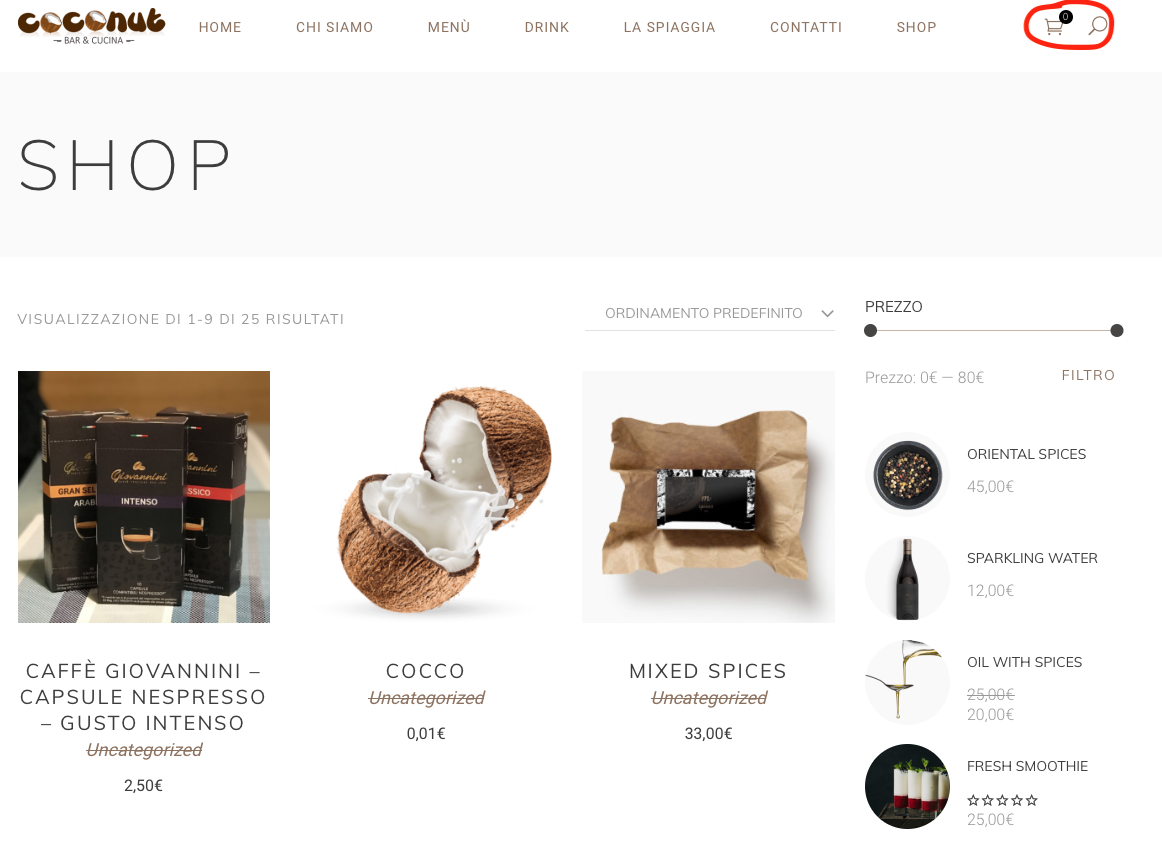
how do I add the “cart” not only to the shop page, but also to the others? see screenshot: https://www.barcoconut.it/images/topbar.png
if possible also in the “mobile” version
thanks
Hi there,
To display the cart on mobile please refer to our article here also if you have set your cart in Appearance > Widgets > Header widget area it will be shown on every page.
If you have any additional questions we would kindly ask you to submit a request at our help center and our support team will be happy to help.
Thanks.
Support
Edge Portfolio part of
Qode Interactive
Don’t forget to sign up for our newsletter and be the first to find out all the latest news.
Hi! Do U provide PSD files with the theme plz?
Hi there,
Thanks for taking an interest!
You can read more about it here.
Do let us know if you have any additional questions anytime.
Support
Edge Portfolio part of
Qode Interactive
Donít forget to sign up for our newsletter and be the first to find out all the latest news.
Thanks, but I just need PSD files now, before buying your theme… Please let me know how to purchase them.
Hi there,
We do provide our customers with our PSD files once they have purchased the theme. You can for sure always showcase our demo website for this purpose.
Thanks for taking an interest!
Support
Edge Portfolio part of
Qode Interactive
Donít forget to sign up for our newsletter and be the first to find out all the latest news.
How to remove Open table widget from Slider Main_home please help
Hi there,
Please submit a request on our helpcenter in the upper right corner and one of our agents will assist you.
Support
Edge Portfolio part of
Qode Interactive
Don’t forget to sign up for our newsletter and be the first to find out all the latest news.
Hello, the theme is outdated, and is not working good with woocommerce. The cart on menu is redirecting to homepage, plus wpbakery and rev slider so outdated! Can you show me how to fix at least the cart problem?
Hi there,
Please submit a request on our helpcenter: https://helpcenter.qodeinteractive.com in the upper right corner and one of our agents will assist you with all these issues.
Support
Edge Portfolio part of
Qode Interactive
Don’t forget to sign up for our newsletter and be the first to find out all the latest news.
HI. When you have a Slider Revolution update?
Hi there,
Thanks for writing in!
Please note that we are constantly working on updating all our themes. At the moment we don’t have any ETA when this update will come out, but it will for sure be out soon and once the update is release you will get access to all the updated plugins as well.
Thanks.
Support
Edge Portfolio part of
Qode Interactive
Don’t forget to sign up for our newsletter and be the first to find out all the latest news.
Hi, i’d like to ask, if there is a way to change the main menu to lowercase…
Hi there! Yes, of course, just apply the code below from Appearance > Customize > Additional CSS:
.edgt-main-menu>ul>li>a,
.edgt-drop-down .second .inner ul li a {
    text-transform: lowercase;
}
Support
Edge Portfolio part of
Qode Interactive
Don’t forget to sign up for our newsletter and be the first to find out all the latest news.
Hi, Can I push columns on mobile for split screen template?
On mobile version I prefer to have “image, text, image, text…” but if I use your style “black – white / white – black / black – white” on mobile I’ve this order and it’s noisy
Thank you
Hi there,
please submit a request on our helpcenter and include your page url and wp admin credentials and one of our agents will take a look.
Support
Edge Portfolio part of
Qode Interactive
Don’t forget to sign up for our newsletter and be the first to find out all the latest news.
Hi,
is the current version compatible with PHP 7.1?
Hi there,
Yes, our theme is compatible with it.
Support
Edge Portfolio part of
Qode Interactive
Don’t forget to sign up for our newsletter and be the first to find out all the latest news.
Hello, what is the preloader with the vegetables ? thanks
Hello,
Thank you for your interest in our theme!
The Preloading Animation can be enabled/disabled through theme options. There are several different loader animations, including the ‘Loading Image’ animation as we showed on our landing demo page. https://morsel.edge-themes.com/landing/ You can use any GIF as the preloader and you can apply it for each page. Please see the following screenshot: https://www.screencast.com/t/rcaZz0HwNEIf you have any other question, please never hesitate to contact us.
Best Regards, Edge
I am looking at the demo, and there is a “cross out” font used throughout that my client hates and thinks it looks like an error, is that easy to change?
Hello,
Thank you for reaching us!
Well, if you don’t like strikethrough effect, you can disable it for all labels at once.
If there’s anything else, please let us know.
Edge
Great, thank you, will buy the theme today.
You’re welcome, looking forward to your purchase.
Thanks, where do I disable it all at once? I can’t seem to find that in the documentation or options.
Hello,
You can use the following CSS code to disable the strikethrough effect:
.edgt-strike-trough::before {
    display: none !important;
}
Just put it into Appearance > Customize > Additional CSS
It will disable that effect for majority of the elements, but please note that some elements those having their own settings in WPBakery, for example Edge Section Title. Please see the following screenshot: https://www.screencast.com/t/bY9AgaA33If you have any other question or you need some help, please open a ticket at https://edge.ticksy.com/ and one of our support agents will assist you as soon as possible.
Best Regards, Edge