5515 comments found.

Will you be adding Strip Connect? It looks like people have been asking you for it since 4 years ago. I spoke to a rep at Stripe and they will even help guide the development. Maybe you can connect with them to make this happen? This would be a HUGE help to a lot to everyone. I would gladly pay extra to buy as a plugin or to have it integrated. If I were to attempt this on my own which files and code would I need to find in the theme’s directory?
Hello. Thank you for the message. Please send me a message in private https://themeforest.net/user/wpestate Thank you
Hi,
for whatever reason only 15 reviews are showing up for each property. How do I fix it?
I have more than 15 reviews. Please check below
https://bit.ly/3baL7DLHi. We have pagination https://prnt.sc/sd1bhg so it works to show more. I cannot tell what theme version you have. Perhaps you need a theme update. Please contact us in support for further assistance http://support.wpestate.org/ Thank you
Hello, trying to submit a ticket but the support forum seems to have an issue. We cannot sign up, no password is being sent to email. Please advise.
What our issue is btw – the newly added ‘bed situations’ doesn’t seem to work properly in the submit form. We have added 4 different types of beds, sofas etc. but in the submit page it shows one type of bed(the last one listed in the control panel) and it shows this bed 4 times. Furthermore when we add a number next to the types of beds it doesn’t show properly.
Thank you in advance
Hello, Thank you for buying the theme.
You can write here https://themeforest.net/user/wpestate and I will help with the support account. About the description, i am not able to replicate. As you type the number of beds, the types you add in wp-admin show https://prnt.sc/sd1e1g Please send me your site + details via email to check that at the same time I create the support account.
Thank you
ok, now i have support account and created ticket
Hi. Thank you for letting me know.
hi in the main demo on themeforest: in “All in one calendar” page, Set custom price or mark dates as booked for selected period, mark dates as booked for selected period it works correctly. but, custom price for selected period does not work right. custom price Not set
Hello. Thank you. I am not able to give any answer to this comment here. I saved your comment and we will check. Custom price can be set from property details as well – https://help.wprentals.org/article/how-to-choose-different-prices-for-different-dates/ If you need further info or want to test our theme backend with your published properties, please send a message from here https://themeforest.net/user/wpestate Thank you
in ““All in one calendar”” page in owner side does not work right. custom price Not set.
yes, in details in price section, the Custom price it works correctly.
in previous comment, i am say in ““All in one calendar”” page in owner side does not work right. custom price Not set.
Hi, I understand and we will check this. Thank you
When done, please let me know
Hey, amazing theme by the way, very clean and user friendly
I have been testing the theme as both a host (listing properties) and a user (booking properties)
I see within the user panel there is a field to scan ID which is great and I also see that this can be done from camera. I also see that the admin is able to click to verify this image presumably by checking the name shown against the account name. Once admin has verified the user (person booking) sees that this has been verified.
This all sounds great… but how does the host know that their customer has been verified by admin? The system does not seem to show this anywhere on the host side nor does the image become available anywhere else, so the host can see that ID if they need it.
Any advice appreciated.
Thank you!!
Hello Ricky, Thank you for the feedback first of all.
The ID is used as a feature for the site admin to verify owners. It was asked by clients who manually review their owners and want to add the “verified” tag to owner profiles.
If you don’t use the separation of users on register, all users will have a profile created and the status verified will show on profile page which users can check from dashboard.
I understand you wish the owners to know their users have been verified, and this would be the only way (for them to have a profile created on registration so that admin, who does the ID verification, can enable the status for other users to see it too.
I am not sure if we can use the verified tag differently. I will add to wishlist to check further.
If you need further help please let me know.
Thank you
Thank for getting back to me
OK, seems a long work around but I changed the guest profile from ‘1’ to ‘0’ effectively changing them from a guest to a host… U suppose this could work as their dashboard looks to be the same.
I am still not seeing this test user as verified on the host account. I really want to make sure hosts know their guests have been verified before they confirm a booking.
Thanks
Hi Ricky
I will do my best to explain here the steps
Status verified shows on owner profile https://main.wprentals.org/owners/liliademo/
From dashboard there is a link to profile it if exists.
For profile to exist this option must be enabled for registration – https://prnt.sc/scn6je
Create a new account (editing old ones is not enough) so that the profile is created.
Then make a booking with the new account.
As owner you will see the renter name and a link to his profile – https://prnt.sc/scn8ib
And on profile page you will see verified if admin has enabled that manually.
Thank you
When I delete a listing, my bookings are still showing up for that listing in my user dashboard. Is there anyway that bookings connected to a listing automatically delete when I delete that listing?
Hi, It’s actually a security system so that paid bookings don’t get deleted for when admin allows people to add their listings. Only admin can delete those bookings if a property is deleted (from wp-admin -> bookings). Thank you
hi in the main demo on themeforest: in “All in one calendar” page, Set custom price or mark dates as booked for selected period, mark dates as booked for selected period it works correctly. but, custom price for selected period does not work right. custom price Not set
Hi. Please see my other reply. Thank you
Hello, I have a few pre-purchase questions about the theme.
1. Is there a possibility to integrate the occupation-calendar via iCal just like other platforms like booking.com?
2. Main-bookers are from germany, but the house is in the netherlands. Is it possible to translate the website into dutch?
3. Is it possible fort he guests to add pets with their booking? And if not, is there another possibility to add pets?
4. Is there an option to interrogate the identity no. and bank details within the booking details?
5. Is it possible to deposit last-minute-offers and different rates depending on the day or length of booking? For example: A booking on Tuesday is cheaper than on Saturday. Or rates for 6 days each day are cheaper than for 3 days.
6. Is ist possible to make the rates dependent on the number of guests?
7. Is there an option to determine fixed departures per season, like in the main season it is always Saturday
8. We have several vacation homes. Is it possible to deposit a different billing account for each house?
9. Is there an option to split the payment in down payment/deposit and final payment?
10. Is it possible to add a security/deposit into the booking system, so our guests see their payment? And is it possible to install an automatic transfer back after their vacation?
11. Is it an option to automatically send the vacation details after their payment?
Thanks.
Hello
1. We have ical import and export
2. The theme default language English can be translated to any language by yourself. For multiple languages you will need to work with a 3rd party plugin https://help.wprentals.org/article/multi-language-3rd-party-recommended-solutions/
3. You can add extra booking options https://help.wprentals.org/article/1-20-add-extra-options-in-booking-form/
4. No.
5. We don’t have like that
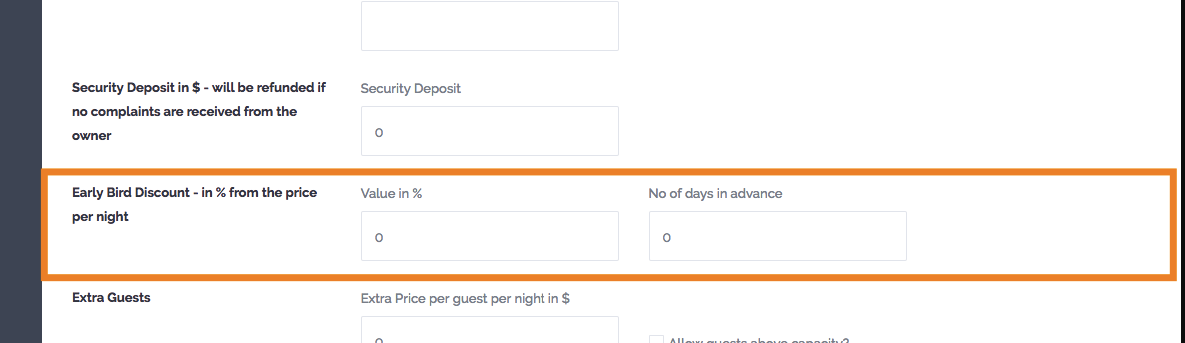
We have custom price per day for 7d+ bookings or 30d+ bookings You can add custom price https://help.wprentals.org/article/how-to-choose-different-prices-for-different-dates/ for specific days You can add early bird discount for bookings made in advance – https://help.wprentals.org/wp-content/uploads/2017/08/early-bird-1.png – demo https://demo1.wprentals.org/properties/2-bedrooms-condo/
6. You can enable price by guest – https://help.wprentals.org/article/price-per-guest/
7. We have turnover days as it follows: force check-in on a specific day of the week force check-in and check-out on a specific day of the week
We do not have force check-out only on a specific day.
8. No. Only admin gets payments
9. Yes. But money go to admin in both cases
10. I don’t understand. We have security deposit as a fee that is added to total that must be paid. Please read here https://help.wprentals.org/article/1-20-about-security-deposit-fee/
11. We send only a notification about booking confirmed. The rest of the information exist in user dashboard in the theme.
If you need further info or want to test our theme, please send a message from here https://themeforest.net/user/wpestate
Thank you
I’d like to request a refund. The system is fairly poor and does not meet requirements. It does not manage bookings properly and is fairly complicated for the user to use.
Hi needss, Thank you for the comment. Our system offers everything shown in demos https://wprentals.org/ We can help with any setting from our demo as everything works as showcased. You can contact us in private https://themeforest.net/user/wpestate and we will help asap. About refunds you can read the Envato policy here https://themeforest.net/page/customer_refund_policy
Thank you and we hope to hear from you soon.
Thank you
Actually the system does not provide a demo for the backend and I don’t feel it is as described.
I would request a refund.
Hi. We do offer wp-admin on request, but please do as you think it’s best for you. Thank you
So how do I request a refund
Hello. Please read here https://help.market.envato.com/hc/en-us/articles/202821460-Can-I-Get-A-Refund- Thank you
Hi, can the Winter Sports demo also be used with the daily rental calender?
Grts Mileau
Hello Mileau
Thank you for the message.
Yes, you can enable daily rental instead of hourly rental for that demo.
I can help with a test domain if you wish to check this first.
Please send a message from here https://themeforest.net/user/wpestate
Thank you
Is anyone else experience drastic lag? The latest update v2.8.5 is causing my server CPU and memory to max out on simple tasks like going to WP dashboard or refreshing a page. I narrowed it down to the core plugin.
Hi MCoolU, All our demos use the latest theme version https://main.wprentals.org/ Please check you updated the core plugin – https://help.wprentals.org/article/how-to-update-the-theme-and-plugins/#f_wpestate_id And clear any cache / optimization files you may have active to be sure the latest files are being loaded.
If you need further help. please use our client support http://support.wpestate.org/ and we will assist asap. Our office hours are Monday – Friday, 9AM-5PM Europe timezone. Thank you!
If you need help to register for support please send a message from here https://themeforest.net/user/wpestate
Thank you
I’ve already gone through the update process and updated the theme along with plugins. After the update the whole site has gotten extremely slow to the point that it is unusable. It takes a user minutes to login now.
Hi MCoolU, It looks like a process doesn’t complete. Either the update was incomplete or you’re loading an old version of a file from a plugin. Please send your site details to check as I cannot advise further. For sure we updated all our demos and not have problems with login or loading. You can check this yourself too. You can send here the details as well https://themeforest.net/user/wpestate Thank you
i opened a ticket with credentials so waiting on a response from there. Thanks
Hi. I will check. What is your ticket ID please? I will check asap. I cannot find it by your username so I assume you registered under a different name. Thank you
yes its a different name. #183761
I answered. Thank you
I just bought this theme but I’m afraid I am stuck already. The documentation seems to be quite inadequate. Quite simply, I want to create a new property page template which is like “Property Page Type 4” in your main demo. But I cannot find any instructions how to even begin to do this, and it certainly isn’t intuitive. Can you point me in the right direction please?
Hi. Thank you for buying the theme. You just need to select type 4 in theme options as in this help https://help.wprentals.org/article/theme-options-listing-page-settings/ Thank you
Hello, Would you please let me know if it’s possible to enable Listing media uploading within edit listing (from wordpress dashboard), just as you can do when you access through the wprentals create/edit listing menu? The reason I want to do it this way is because my site is not meant to be for anyone to access and post properties, it’s meant for only the admin to post them. So I want to have a similar layout of uploading and managing media following the theme’s interface (drag and drop, ,delete, star for feature, etc) within the wordpress usual interface. Please let me know if it’s possible or if I need to modify a template or function, please give me a hint on it.
Thank you.
Hello nrizzo, Thank you for the comment. Please see my previous reply. Thank you!
Hi there, is it possible to have to login to Admin Dashboard Demo Website? Thanks
Hello campchamp
Thank you for the message. Yes, I can help with this test account. Please send a message from here https://themeforest.net/user/wpestate
Thank you
I see that there were many requests for password strengthening over a year ago. Has this been implemented? There are several plugins that add in password policies but that’s for the wordpress profiles and doesn’t let me add it to the wp rentals register forms or updating password from profile.
This is a MUST for these types of websites. Having many users with simple passwords is a security risk.
Hello ZeemDev
Thank you for the comment.
The theme uses wordpress nonces – for login and register https://codex.wordpress.org/WordPress_Nonces This security system, a WordPress and Envato security requirements, blocks login if too many attempts happen and it’s no need to put a strong password in this case.
Thank you
My question is can I put a strong password requirement? I would like to add this instead of letting someone add a password of “pass” or “123”. I want users to input a complex/hardened password.
Hi ZeemDev, We don’t have something specific for this and a plugin may work or not. I cannot be sure. Please write here https://themeforest.net/user/wpestate and you can test a plugin if you wish that/. Thank you
Hello again, I created an owner account to list a rental property. However, when I try logging in using the “login” feature on the menu, it does not recognize that I’m logged in. Am I missing something here? I’ve cleared cache and everything.
Also, I noticed on the pricing details, when I try to save the pricing part of filling out the listing information the saving gets stuck and it does not save. Do you know what is happening here?
Again, thank you
Hello nexgenbryce
Thank you for the comment.
You seem to have a conflict, but not something we have replicated from our end on our demos before. First check extra plugins. See if you enabled some plugins that control JS actions and that may create conflict (like optimization or some other plugins) and disable them.
For further help, please use our client support http://support.wpestate.org/ and my colleagues will assist asap. Our standard office hours are Monday – Friday, 9AM-5PM Europe timezone.
If you need help to register for support please send a message from here https://themeforest.net/user/wpestate
Thank you
Hi there!
First; superb theme! Great job, keep it up!
I know it´s not a hotel booking theme and all… but would and will it be possible to add a hotel booking type feature.
Sometimes you have more than one thing (room) you want rent out within a house. So even if it´s not a hotel, you would want to manage multiple rooms for that accommodation as the accommodation owner.
So, you would have a “mother” accommodation with “child” accommodations.
Of course you could add a listing per room for the same accommodation, but that is not the best way to do it and will not lead to the best experience for the owner AND the customer.
Look forward to hearing from you.
Hello campchamp
Thank you very much for the feedback. Please see my reply
For the theme to have an availability calendar for each room, it must be added as single listing.
What other clients do with a similar setup is create separate listings for the room and for the single house. Then they use ical feed to sync calendar availability. If the full house is booked, the ical blocks the dates for the room calendar.
Thank you
Hello, I bought your theme before. But I had to quit because Paypal and Stripe did not work in my country. WooCommerce is now running. First of all, does WooCommerce work in rentaboat theme? And can I buy your theme again?
Hi, Thank you for the message. WooCommerce can be enabled to process payments for bookings in any demo (including rentaboat). https://help.wprentals.org/article/install-woocommerce-and-use-woocommerce-payments/ Thank you
Login and Sign Up do not work in IE is there a setting I am missing?
Hi gfool, Thank you for the message. We don’t replicate this. Please send us a ticket http://support.wpestate.org/ with your site url and details about what IE you use to check further. Thank you
My support has unfortunately run out but I thought you should be aware. Your demo site https://santorini.wprentals.org/ using Version IE 11.778.18362.0
Hi. Thank you. We will check this again on this exact browser. Thank you
Pre Sale question. I see your theme with your link. But i can’t understand if i completly change sidebar for a single pageproperty (in top i see even search/booking). Thanks for yor help.
Hello, Please show me what you wish to change from our demo and I can answer easier. Now I don’t understand the question very well, honestly. Thank you
Hi, on page: https://demo1.wprentals.org/properties/terrace-condo-penn-station/
I’d like on right sidebar to change order and/or widget myself. Is possible? If i can, i can purchase!
Hi! On this page booking form + agent card are always on. The rest are managed from theme options.
Thank you
Ok, and in property page, is possible to choose order content appear?
Hi, The property page content can be changed through custom code only. We have a technical help as guide, but you would need to change order through code. Thank you