23249 comments found.

Hi, im interested in buying this template but as long as i can see, the product categories dont have H1 neither text field for SEO, could it be possible to include it my self with Advanced Custom Fields int the acrhive-product.php or any place else?
Thx
Hello, @Jose_Tassias,
First of all, thanks for showing your interest in Porto WordPress.
You can use Yoast SEO plugin, OR you can directly Customize the Theme Core files for changing it as H1 tag as per your requirements.
Regards, P-THEMES.
We need your help to fix the following: ////make the background of a image white instead of black where the image is not fitting the image box./////to show Weight and other info under SKU instead of the additional info tab////to add search box at the top of the product page on mobile version////
Hello, @iislb,
1. Which image background color you want to change? Can you please share the screenshot and also the URL of the page where those images appearing so that I’ll check and provide you the best possible solution for it.
2. Sorry to say that but this is not possible, there is no such option in the Theme for it, This requires customization. Item support does not include services to modify or extend the item beyond the original features, style, and functionality described on the item page. For customization services that will help you tailor the item to your specific requirements, we recommend to contact our customization team for paid customization services or hire a developer.
3. Please copy and paste the below-given CSS code to Porto >> Theme Options >> Skin >> Custom CSS and check your site after removing the browser cache.
@media (max-width: 575px){
#header .searchform-popup {
    display: inline-block !important;
}
}
And also could you please purchase support extension to get further support? Your 6 months of support period is expired from 01/12/2018. According to the Envato support policy, renewing support is required for further support.
Thanks for your understand.
1. Which image background color you want to change? Can you please share the screenshot and also the URL of the page where those images appearing so that I’ll check and provide you the best possible solution for it. >check the following link, we updated the custom css to change the product background and size but it didn't work gmartgroup dot /wp-content/uploads/Capture.png
3. Please copy and paste the below-given CSS code to Porto >> Theme Options >> Skin >> Custom CSS and check your site after removing the browser cache. > didn’t work even after we deleted the cache
Hello, @iislb,
1. Just checked your site now and there is no such background color on your site at my end, please see the below given screenshot, It must be the cache issue at your end nothing else: https://postimg.cc/gwnwkb3b
2. That Code wotking fine at my end, please purchase the support extension and then contact us via our support system we will check it for you.
Regards, P-THEMES.
thank you for your update, still have the same issue even after deleting the cache, check the on-sale part please
Hello, @iislb,
Please share the URL of the page and the screenshot as well so that I’ll again check it for you.
Regards, P-THEMES.
Thank you for your reply,
URL is gmartgroup [dot] com
Screenshot: https://snipboard.io/nt8g4M.jpg
Hello, @iislb,
This is not the Theme issue but this is your images which has those black background as showing in this screenshot: https://postimg.cc/bZ3bT4p6
You have to alter your images and remove that background color from your images with the help of any graphic designer and then you have to reupload the images again for those products and it will work for you as you want.
And also could you please purchase support extension to get further support? Your 6 months of support period is expired from 01/12/2018. According to Envato support policy, renewing support is required for further support.
Thanks for your understand.
I appreciate your help and we will renew the support if there is any additional questions however the images doesn’t contains any black background, check the following url: gmartgroup dot com/product/savart-whitening-face-serum/, we just want to update the black background to white whenever the image size is not full comparing to the cropped one. i think the image link sent describe the issue clearly
Hello, @iislb,
Please once check with the default WP Theme Twenty Twenty for making it sure that the issue is from our Theme or not, If you will find the same issue with WP default Theme then it means the issue is not with our Theme and you have to contact WooCommerce support for it.
OR
Try with deactivating all the third-party plugins and check back after removing the server, site, and browser cache.
I have again checked your site and finds the same as showing in this screenshot: https://postimg.cc/R3qmwP2h
Regards, P-THEMES.
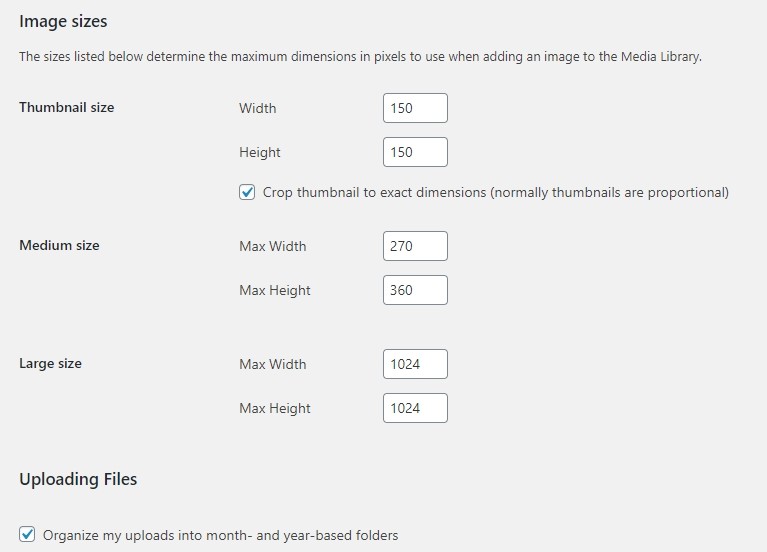
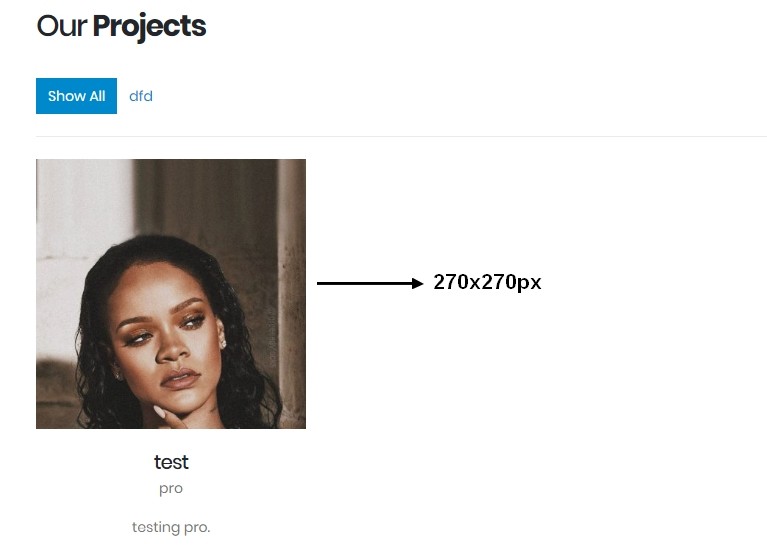
I am using this page “content-archive-portfolio-grid”. What should we do to get 270×360px in “WordPress Media Settings” instead of 270×270px on the Portfolio archive page?
WP Media Setting; https://i.hizliresim.com/xEzoLh.jpg
Portfolio Archive Page: https://i.hizliresim.com/VOiiEY.jpg
In short, the pictures I uploaded are 1200×1600px, but they appear as squares on the site. How can we show this proportionally?
Hello, @fatihemregunes,
This is because of the size of the container of the image is set as square, You have to change the layout of the page from Porto >> Theme Options >> Portfolio >> Portfolio Archives as per your requirements:
OR
If you want to use the same layout then you have to Customize the particular layout Core files for changing it as per your requirements.
And also could you please purchase support extension to get further support? Your 6 months of support period is expired from 28/09/2019. According to the Envato support policy, renewing support is required for further support.
Thanks for your understand.
First of all, thank you for your reply. But your suggestion didn’t work for us. Our uploads are 1200×1600 pixel and our uploaded images are always cropped from the top and bottom. Is there any other you can suggest to fix this? All the images we upload to our portfolio are 1200×1600 pixel and we want them to be adjusted proportional.
Hello, @fatihemregunes,
I already explained you above in detail that this is because of the layout of the Portfolio, The image depends on the container size and there is no option in the Theme for changing the container size, This is only possible with the help of Customization.
And also could you please purchase support extension to get further support? Your 6 months of support period is expired from 28/09/2019. According to Envato support policy, renewing support is required for further support.
Thanks for your understand.
Can you help with customization if we buy support?
Hello, @fatihemregunes,
No, Sorry to say that but Customization is not included in the Support Policy, you have to pay for Customization work seperately.
Thanks for your understand.
Hello,
i get some info with “developer” on the Maps. How can i remove it ?
Hello, @ProTechEx,
Can you please explain your issue more clearly if possible with the help of screenshots, so that I’ll provide you the best possible solution for it.
Regards, P-THEMES.
Hello can you make the admin approve the registration of new users Manually? and can I add custom field on registration form?
Hello, @kkateo,
Sorry to say that but by default WooCommerce does not provide these functionalities and you have to use any third-party plugin for it, OR it requires Customization.
Regards, P-THEMES.
When I import it
https://www.screencast.com/t/xUXqB5Tls29I wanted exactly as it shows
Hello, @kkateo,
I have just checked your site now and it is working perfectly fine at my end, please see this screenshot: https://postimg.cc/7CZNvbZn
, It must be the cache issue at your end nothing else.
Regards, P-THEMES.
Hello Support,
I have some pre-sale questions.
Can you please check the following plugin list and let me that the plugins are compatible with your Porto Theme?
Yith Plugins
1. Yith Advanced Refund System For Woocommerce
2. Yith Woocommerce Sms Notifications
3. Yith Woocommerce Customize My Account Page
4. Yith Woocommerce Gift Cards
5. Yith Woocommerce Points And Rewards
6. Yith Woocommerce Affiliates
7. Yith Woocommerce Recover Abandoned Cart
8. Yith Woocommerce Frequently Bought Together
9. Yith Woocommerce Order Tracking
Other Plugins
10. Refer a Friend for WooCommerce PREMIUM https://wpgens.com/downloads/refer-a-friend-for-woocommerce-premium/ 11. WooCommerce Refund And Exchange With RMA https://codecanyon.net/item/woocommerce-refund-and-exchange/17810207 12. WooCommerce Recover Abandoned Cart https://codecanyon.net/item/woocommerce-recover-abandoned-cart/7715167 13. WooSwatches – WooCommerce Color or Image Variation Swatches https://codecanyon.net/item/wooswatches-woocommerce-color-or-image-variation-swatches/7444039 14. Product Filter for WooCommerce https://codecanyon.net/item/woocommerce-product-filter/8514038Thank you.
Regards,
Alex
Hello, @alexurth,
First of all, thanks for showing your interest in Porto WordPress.
We have not tested those all the plugins with the Theme yet officially so we are unable to suggest you on it If you want you can try it with the Theme at your own risk.
You will find all the Theme compatible plugins list confirmed from our end here:
https://themeforest.net/item/porto-responsive-wordpress-ecommerce-theme/9207399
Regards, P-THEMES.
Hi,
I am interested to purchase your template.
But, before purchasing I would like to see the screenshots that it actually looks like after I purchase it.
Thanks
Hello, @tamzidul,
First of all, thanks for showing your interest in Porto WordPress.
You can check all our live Demos here:
https://www.portotheme.com/wordpress/porto_landing/
Regards, P-THEMES.
How to use urdu font and upload
Hello, @Niyara,
Download the URDU Font complete zip file from Google and then upload the complete zip file of the Font from Porto >> Theme Options >> Font Control and then you will be able to use that Font on your site.
And also could you please purchase support extension to get further support? Your 6 months of support period is expired from 14/12/2017. According to Envato support policy, renewing support is required for further support.
Thanks for your understand.
Can you pls expedite Ticket #90867 ? Despite opening it 20 hours ago, it’s still not resolved.
Thanks.
Hello, @majestic-printing-works,
We have replied your support ticket #90867 now, please check your ticket reply and reply to your support ticket accordingly and please keep in mind that our business hours are Monday to Saturday – from 12:00 AM to 08:00 AM EST so you will always get the reply of your ticket once it resolved, always please be patience.
Regards, P-THEMES.
hello dear i liked your theme and i want to purchase but is very expensive do you have a coupon or discount for me?
Hello, @zellamall,
First of all, thanks for showing your interest in Porto WordPress.
Sorry to say that but we do not have any discount on Theme, for now, you have to purchase it at its regular price.
Regards, P-THEMES.
I installed the “Elementor Shop Demo 1” version. But it still requires Visual Composer. Why isn’t there a Testimonial widget in Elementor?
and also how to remove the message: “The following required plugin is currently inactive: WPBakery Page Builder.”
Hello, @Derzz,
This is just a warning, you can ignore it, there is no way to remove that warning for now from backend, we will work on it with future upcoming updates of the Theme.
And regarding elements, Sorry to say that but we have just added the Elementor compatibility with the Theme a couple of updates ago so not all the elements have been made with elementor as with WP Bakery, we will add those elements with elementor with future upcoming updates of the Theme, For tracking, you can always check the changelog of the Theme here:
https://themeforest.net/item/porto-responsive-wordpress-ecommerce-theme/9207399#item-description__change_logs
Regards, P-THEMES.
Hi again.
Search form in header is very good on FF but broken on Safari and Chrome.
How can i solve this problem?
Thank you.
http://nishdijital.com/moore/?1386150665Hello, @celikyaman,
I have just tested your site now at my end on very latest version of Chrome browser and it is working perfectly fine at my end, please see this screenshot, It must be the cache issue at your end nothing else: https://postimg.cc/QHSXXMnQ
Regards, P-THEMES.
hello i purchased your theme sir and i did use it for a site of a client and then i removed it from his site and i used another theme Now i’m trying to use my Porto theme copy to another site it gives me a message that i used before on another site but its not activated on this site and i also delete its files from hosting but same error ocuurs
i have two copies of porto and i cant use it any where ! Please help sir
Hello, @GoodWorc,
I have reset your purchase code, now you can use the same purchase code for registration of your theme.
Regards, P-THEMES.
Hi, i enter my purchase porto code but in wordpress says: Invalid code, or corresponding Envato account does not have Porto purchased. i purchased it on 15 May 2020. what’s wrong?
Hello, @prescadenvato,
Some times, It happens because of the old version of the Theme, Please make sure that you are using the latest version of the Theme by following the below-given article and then try to activate the Theme I am sure you will not finds this issue anymore:
https://smartwave.freshdesk.com/en/support/solutions/articles/12000052422--13-update-porto-theme-manually-without-loosing-any-data-
OR
Some times, It happens because of the wrong purchase code, please again make sure that your copied purchase is correct, no space in between/start or end, and try again.
OR
Some times, It happens because your server environment can not access to our server https://portotheme.com
Please try to ping our server and let us know if it works.
Please enable the curl extension form server this will fix your issue. This extension is required for the registration process.
OR
The issue mostly occurs when the server has any kind of restriction and do not allow to communicate your server with our internal server for activation, so please ask your hosting provider to remove all sorts/kinds of restrictions from your account and deactivate the firewalls for some time until you activate the theme.
Regards, P-THEMES.
Hi iwant change “availability” word to french. I see in another topic that is in loop/sale-flash.php I see availability but there’s many “availability” word in php which must i modify?? thanks for all
$availability = $product->get_availability(); if ( ‘out-of-stock’ == $availability[‘class’] ) { if ( $porto_settings[‘product-stock’] ) { echo apply_filters( ‘woocommerce_stock_html’, ‘ ’ . esc_html( $availability[‘availability’] ) . ‘ ’, $availability[‘availability’] ); } } else { if ( ‘2’ != $porto_settings[‘add-to-cart-notification’] ) { echo ‘ ’; }
Hello, @alderanda,
No need to change anything on code, If you simply want to change/translate the “Availability” word, you can change it into the Theme langauge files as per your requirements as showing below:
Regards, P-THEMES.
My Website Mini Cart Icon Always Keep Buffering on the home page only instead of showing the item in add to cart see the sc : https://prnt.sc/sjr8vz
Hello, @sdjewels,
This is your site any third party plugin confliction issue, please deactivate all the third party plugins and check your site after removing the browser cache, I am sure your issue will solve and then again you have to activate all the third party plugins one by one and check which one is creating an issue on your site.
And also could you please purchase support extension to get further support? Your 6 months of support period is expired from 06/03/2017. According to Envato support policy, renewing support is required for further support.
Thanks for your understand.
I found W3 Total Cache causing the problem how do I fix it, I used a WP Super Cache as well but that also didn’t work to resolve the issue. Both above mention plugin has be told compatible with your theme. Please suggest soltuion.
Hello, @sdjewels,
That is plugin issue, Please try to contact plugin Author and ask to fix the issue for you on your site, OR do not use that plugin and use any other plugin which better meets your requirements.
And also could you please purchase support extension to get further support? Your 6 months of support period is expired from 06/03/2017. According to Envato support policy, renewing support is required for further support.
Thanks for your understand.
Hello, @agenciafox,
This is not the Theme issue but this is your WordPress permalinks setting issue, This is because you have set the permalinks as plain, you have to set the permalinks as Post name from WordPress Dashboard >> Setting >> Permalinks and save changes and check your site after removing the browser cache.
And also could you please purchase support extension to get further support? Your 6 months of support period is expired from 28/05/2016. According to Envato support policy, renewing support is required for further support.
Thanks for your understand.
Hi, How can i put the banner “out of stock” in product page. For archive, you have set a bouton ton show or not, not for product page. I must show on product page that the product is out of stock. which code i must add on php?
Hello, @alderanda,
Sorry to say that but this is not possible, There is no such option in the Theme for it, This requires Customization or you can try with any third party plugin which better meets your requirements.
Regards, P-THEMES.
Can blogspot.com be added to the social link list?
Hello, @Imre81,
Sorry to say that but this is not possible, There is no such option in the Theme for now, This requires Customization.
Regards, P-THEMES.
For the Newsletter Popup Form & Footer Newsletter Form (Shop 30) you have use the contact form 7.
As these are Newsletter Forms So I want these email directly added into the subscribers list of mail poet.
In other words I want contact form 7 form work like mail poet form, whenever user fill their email & submit user’s email added to the subscribers list.
Can you please guide How I can do it ?
Hello, @sdjewels,
Sorry to say that but this is not possible, You have to create Mail Poet Forms and use Mail Poet Forms at place of Contact Forms it will work for you, there is no other way.
And also could you please purchase support extension to get further support? Your 6 months of support period is expired from 06/03/2017. According to the Envato support policy, renewing support is required for further support.
Thanks for your understand.
Thank you for you message I understand it’s not possible to use Contact Form 7 forms for mail poet subscribers list. So would it possible to designs mail poet form like https://prnt.sc/sjr6ol (for footer) & like this https://prnt.sc/sjr84b for popup ?
Hello, @sdjewels,
Yes, you can style your Forms as per your requirements using Custom CSS.
Regards, P-THEMES.
Any Guidance How I can do it ?
Hello, @sdjewels,
You can take a hint from below given articles:
https://docs.mailpoet.com/article/70-design-style-subscription-form-widget-shortcode
https://kb.mailpoet.com/article/140-create-a-subscription-form
https://wordpress.org/support/topic/put-form-elements-on-one-horizontal-row/
https://ninjaforms.com/docs/mailpoet/
And also could you please purchase support extension to get further support? Your 6 months of support period is expired from 06/03/2017. According to the Envato support policy, renewing support is required for further support.
Thanks for your understand.