38438 comments found.
Hi ThemeNectar,
Is there a way to designate a custom linking sticky button per portfolio post/ page like you did the sticky social share button on the lower right?
Hey BlueScreenPanda,
Unfortunately there’s no element built in to assist with that by default

Hi, when checking out, place order button is showing up twice.
https://www.mysterymonks.com/checkout/Hey adiojack, It looks like something is hooking that to the WooCommerce action “woocommerce_after_checkout_form”, which shouldn’t be the case by default. Please either open a ticket with temporary admin access on the support forum, or reach out via the contact form on my author page so that we can take a closer look: https://themeforest.net/user/themenectar
Thanks in advance
Hi there,
Is there a way to remove the Header/ Footer on a portfolio project, in the same manner as the options you have on the Page format?
Hey BlueScreenPanda, That would require some custom CSS – add this into the custom CSS box in the page builder (top right gear icon)
#header-outer, #header-space, #footer-outer {
 display: none!important;
}
Cheers
Thank you, ThemeNectar. That worked.
Glad I could help, BlueScreenPanda 
How to create a table of contents for a Blog? The table of contents has links to various part of the particular blog.
Hey saurabhn,
Salient does not include a built-in TOC option. You would need to use of the available plugins that add that: https://www.cminds.com/5-best-table-contents-wordpress-plugins/
Cheers
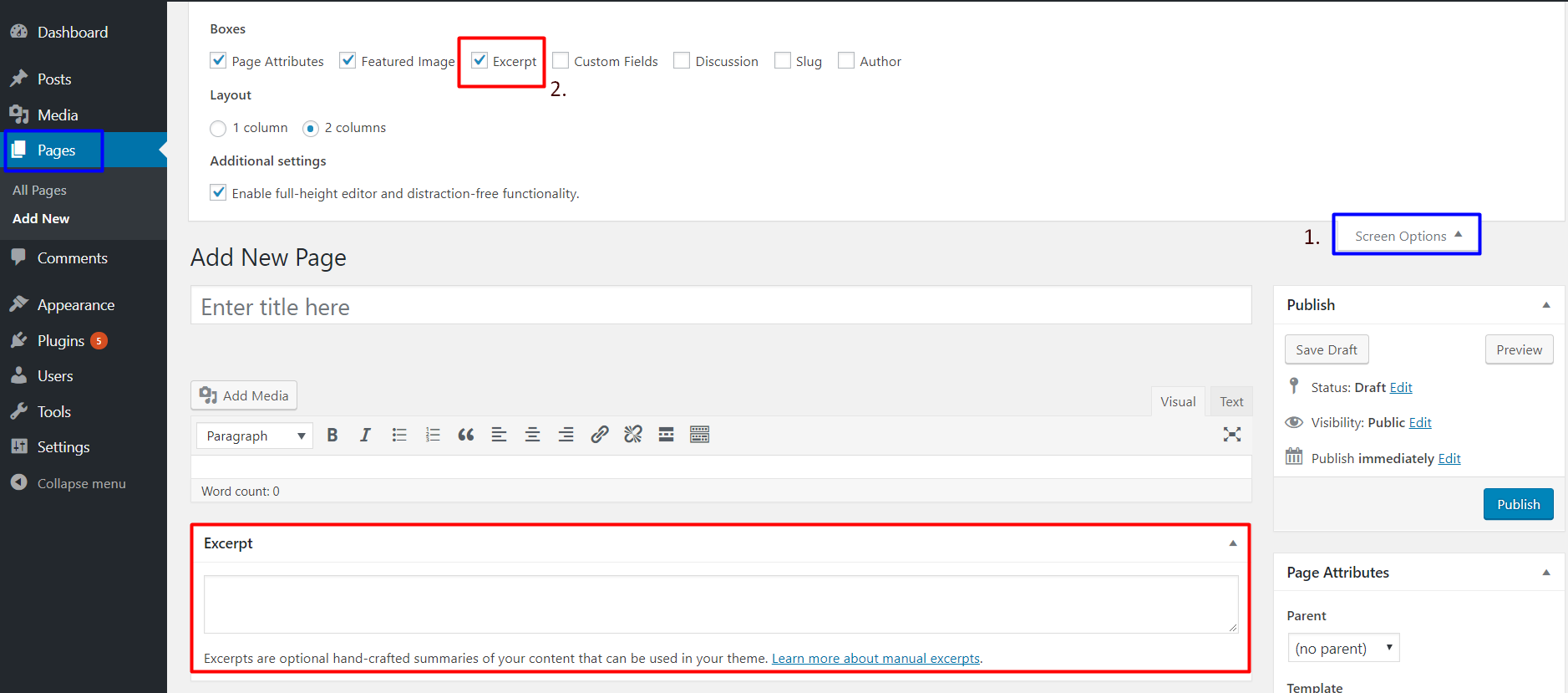
New Feature Request: Would be nice to have a custom Excerpt area for posts (like we have for portfolio entries). That way, we can display custom, controlled excerpts.
Virtual beer on me.
Cheers
I TOTALLY forgot about that option! Thanks for the assist.
You’re welcome arteest
Hello, I’m getting a conflict on my site with gravity forms and the theme. On single product pages, where I use variable products and gravity forms the ‘variable’ element in this case ‘Colour’ is no longer showing it’s options/allowing me to select it. There seems to be a clash.
When I run the console it tells me that the gform is not defined. A lot of what I’ve found on google says the theme could be loading its own version of jquery which conflicts? But I’m really lost not sure what is going wrong.
Any support greatly appreciated!
Hey sobrilliant,
Salient is not loading a custom version of jQuery – have you tried to test if the issue resolves when switching to the default WordPress theme? If you can kindly share your URL in regards, I’d be glad to take a look.
Thanks in advance
Is there a way to have recent blog posts have the 3d parallax hover effect like the portfolio posts? Looking to have the blog posts just be images, then on hover show the title, etc.
Hey skucenski,
As of now that is exclusively available to the portfolio element. The new “Post grid” element is the first element to offer a shared pool of styles between the post types. I’ve noted your +1 for the idea to add a parallax style to that.
Cheers
Thanks! Much appreciated. One other questions – how can I remove the rounded corners on the multiple visible recent post slider (blog)?
Hey skucenski,
That should be effected by your choice for “Button Styling” in the Salient options panel > general settings > styling tab
Cheers
I already had that set to default, all the buttons are square edge but it’s the actual card for the recent posts (multiple visible slider) that are rounded
Hey skucenski, Sorry for the confusion. add this into the custom css box located in the Salient options panel > general settings > css/script related tab:
body .nectar-recent-posts-slider_multiple_visible .flickity-viewport .nectar-recent-post-bg-wrap,
body .nectar-recent-posts-slider_multiple_visible .nectar-recent-post-bg {
  border-radius: 0;
}
Cheers
Hi! Is there a way to show product prices on the search result? (Using Masonry Grid)
Hey JaviWild!
That would require modifying salient/search.php file in regards. It can be copied into a child theme to keep the modifications safe through future updates.
Cheers
Thank you so much; Can you help me with the code to force price to appear?
<?php
global $product;
echo '$' . $product->get_price();
 ?>
Thank yo sooo much; this has been a lot of help. Now Im having another issue, the price looks this way: $99999,00 When it should look this way: $99.999 Im missing a point that marks the thousands (Chilean Peso), and have decimals, I dont need. Sorry for bothering, could you please help me again?
Hey JaviWild
You can try using the formatted option instead:
<?php
global $product;
echo $product->get_price_html();
?>
Hello! Congratulations on the subject. I have a question, how can I duplicate the entries and have them take the same styles, or how can I put the posts that appear on the blog with a full background? Thank you
Thanks spatier
1. Are you trying to duplicate blog posts? Can you elaborate on what you mean by the same style further?
2. The page builder can still be used inside of blog posts, just ensure that you option enabled titled “Hide Sidebar on Single Post” in the Salient options panel > blog > styling tab
Cheers
Hi! The video player does not align in center, no matter what i do. Even if i try to change the video width to like 80% it always remains left.
The row is centered, the column is centered yet the video player won’t center.
https://wobblefinstudios.com/portfolio/the-last-soldier-2/Hey Wobblefin!
Since you’re using a full width content row, you could leave the video at 100% and add right/left padding (10%) on the row itself for the same effect. Let me know if that’s not working for you.
Cheers
Thanks, this solution seems a little flimsy though….will this be fixed later? Is it a bug of some kind? Video at 100% is not nice, because it tries to fit the screen and if the menu is fixed, you have to scroll down to find the play button on vimeo player.
Update: I added the padding, but still video is too big, so put it back to 80% and added 10%padding on the row.
——Result, still not centered. 
Hey Wobblefin,
1. Yes, the video align center option will be corrected to work as expected in the full width content row type in the next release.
2. if i use “Full width background” why is the column not letting it go fullwidth? Can you elaborate on what you’re referring to? The full width background row type will only extend the background layer of the row itself to the edges of the screen, while keeping the content contained. In your row settings, that would be the black background color, which appears to be expanding the full width of the screen.
I just updated your theme, I’ve been using it for 5 years already and just wanted to tell you that you do a really good job. Your theme is awesome.
That’s really awesome to hear, muskha.
Thanks for your kind words
Hi
In the RTL version of Salient, there is a problem with Testimonial. As you can see in the photo below, this section is not in the middle of the screen and has moved slightly to the left. How to solve it with CSS?
http://uupload.ir/files/9tlj_capture.jpgWell, I found the problem. The problem is with Full Width Content on RTL pages. All element in a row with Full Width Content have an empty space on their right. I think we have to modify RTL file to fix Full Width Content row.
Hey Jabbarpour,
Since that’s not a known issue and I can’t replicate it locally, can you please share your actual URL so that I can take a closer look at the setup?
Cheers
Hi Phil,
Is it possible to deactivate the “Page Transition” effect only on a page via custom CSS?
Thanks
Hey RV73,
add this into the custom css box located inside of the page builder (top right gear icon)
#ajax-loading-screen {
  display: none!important;
}
Cheers
Thanks Phil, it works perfectly. 
You’re welcome RV73
Hi, just a small issue on the woocommerce cart. For some reason on some items the variants chosen display underneath with associated headings and for others it’s merged into the title? Also the Qty selector is not rendering correctly – could you advise what is happening for both problems/ a fix?
https://www.v2.lydiab.co/wp-content/uploads/2020/05/Screenshot-2020-05-26-at-03.42.30.pngHey calsherry3,
1. Salient doesn’t override the functionality of the WooCommerce cart – it only styles it. WooCommerce adds variations with simple attributes into the title itself. Here’s a link to the same question being asked to the plugin developers: https://github.com/woocommerce/woocommerce/issues/15656
2. The quantity buttons have limited space to display because of the long product name – you can correct that by adding this into the custom css box located in the Salient options panel > general settings > css/script related tab:
.woocommerce table.cart td.product-name {
    width: 30%;
}
Cheers
padding: 0px 90px;to:
padding: 0px 40px;
When I insert the css in my custom style sheet the container pushes to the left.
Thank you
Hey danyno45,
Currently, the only way to modify that globally would require a javascript modification, since the value of 90 is expected for the full width row calculations. If you used a full width content row, you could also set the left/right padding on it to be 40, which would yield a similar result. I’ve noted to add this in as a theme option for the next release.
Cheers
Hi Nectar, thank you for your prompt answer, it will be hard to do it within the builder since I need it site wide. I will wait for the next release. Thanks again
You’re welcome danyno45
If you’d like a pre-release copy, you can also shoot me an email via the contact form on my author page https://themeforest.net/user/themenectar
Hey Nectar! Hope all is well with you man. Quick question one of my site’s is getting a lag time that is causing a long delay with the CSS relating the Salient theme. Could you help me figure out what to do with it?
https://gtmetrix.com/reports/thehoppymonk.com/wIJA5eJIPlease look in the waterfall section under the 4 second delay for the CSS
Hey lnbbroductions,
It looks like that’s coming from a missing image for the “Custom Loading Image” option in the Salient options panel > page transitions tab. That CSS rule shouldn’t be getting added unless an image is supplied, but I can see that it still is. To fix this before the next release, open the salient/css/custom.php file and delete the following section near line 852
 if( isset($nectar_options['loading-image']['id']) ){
    echo ' .portfolio-loading, #ajax-loading-screen .loading-icon, .loading-icon, .pp_loaderIcon { background-image: url("'.nectar_options_img( $nectar_options["loading-image"] ).'"); } ';
 }
Cheers
Hi, i want to do this https://themenectar.ticksy.com/article/2294/ with the new Salient but you changed the code. Now i think looks like this:
// Click event. $(’#header-outer #mobile-menu .sf-sub-indicator’).on(‘click’, function(){
var $parentLI = $(this).parent().parent();$parentLI.toggleClass('current-open-item');// Open.
if( $parentLI.hasClass('current-open-item') ) {
$parentLI.find('> ul').show();
setTimeout(function(){
$parentLI.addClass('visible');
},30);
} else {
// Close.
$parentLI.find('ul').hide();
// Ensure open children also close.
$parentLI.find('li').removeClass('visible').removeClass('current-open-item');
$parentLI.removeClass('visible');
}[Hey MarcosK, If you’re using the “Simple dropdown” off canvas menu style, you can accomplish this with CSS instead now. add this into the custom css box located in the Salient options panel > general settings > css/script related tab:
body #header-outer #mobile-menu a > .sf-sub-indicator {
    width: 100%;
    text-align: right;
}
Thanks for the reply, I’m using the “Fullscreen Cover Split” so that fix didn’t worked for me.
And another question, you know why sometimes the “Cart In Nav Style” with “Slide in Full Page Height” dosen’t work?. I put that, then i try once and work perfect, then i continue exploring the website and dosen’t work anymore.
Thanks!
Hey MarcosK,
1. The “Fullscreen Cover Split” can make use of the option titled “Off Canvas Menu Dropdown Behavior” in the Salient options panel > header navigation > off canvas menu tab. No further customization is needed.
2. Can you please share your URL in regards so that I can take a look?
Thanks in advance
Hello, how to change number of search results on page? https://cyklopedia.cc/?s=fthr Thank you.
Hey Fixedman,
The search results will use the “Blog pages show at most” option which you have defined in Settings > Reading
Thank you!
You’re welcome, Fixedman
Why are the demos so slow? They literally lag my entire browser in FF and Chrome
Hey hcwang, that’s pretty strange. Are you seeing that occur on every day or specific demos?
Nope slow all the time. Just checked again, it’s quite bad
Hey hcwang,
Are you experiencing the same on your own installation? Also, kindly verify that it’s not related to the ThemeForest iframe by accessing a demo directly: http://themenectar.com/demo/salient-blog-dark/
Yes ive removed the iframe and it is still slow. I was trying out different demos to redo my page as there has been significant updates to theme but i am a bit concerned now as the performance appears to be an issue
What version of the theme are you using?
It’s possible that you would experience slower performance on some newer demos which are animation intensive (depending on your machine), but when comparing the same setup from an older version to new version – it should run even smoother. Salient has actually increased its performance, both in page speed and in JavaScript calculations since earlier versions.
Since I can’t replicate the issue you’re describing, and you’ve mentioned that it’s occurring for you on every page of any demo rather than just pages which are using many animations, the only way to troubleshoot it would require getting an export of a Chrome profiler report. This way I can import it and see exactly what’s occurring in your browser performance wise. Please reach out via the contact form on my author page with that: https://themeforest.net/user/themenectar If you’re unfamiliar with how to record/save a performance profile, check out these two sections in the Google docs:
https://developers.google.com/web/tools/chrome-devtools/evaluate-performance/reference https://developers.google.com/web/tools/chrome-devtools/evaluate-performance/reference#saveHi
Just a quick question, the flyout hoverable off canvas menu…
How can i remove the words “Menu” before the hamburger icon? Or change it to something like “quick links”
slide-out-widget-area
Hey Wobblefin
The option to add that label is called “Off Canvas Menu Add Menu Label” and is located in the Salient options panel >
Header navigation > Off canvas menu tab. It can also be translated using the included .pot file like any other theme string to be a custom string: http://themenectar.com/docs/salient/translations/
Cheers