

1508 comments found.

Hi team, I need to update my current theme (Vela 1.4.9) with my newly purchased version (Vela 2.0.6). I had to repurchase due to the old web tech not being in touch anymore and he had the license. Could you walk me through updating the theme without losing all of my old content? I have access to my FTP. I tried simply uploading the theme file to my theme folder but kept getting errors. Thanks!
We suggest to install the Envato Market plugin so you can download and install the new update of the theme under Appearance -> Themes when there is a new update available.
You can find the instructions on how to setup the Envato Market plugin in the documentation: https://wydethemes.com/vela/documentation/#update
Thank you, this worked! I appreciate the fast help.
Hi there,
Can you please advise how I can make our website appear more mobile friendly? For example, if you compare our homepage on desktop to a mobile device you will see some images appearing really compressed for one.
Is it possible to make certain sections of content hidden on mobile?
Any tips would be really appreciated.
https://www.animoassociates.com/Many thanks, Alessandro
Sure, you can hide certain columns on mobile.
Click on the edit icon at the center top of the column to edit the column settings:
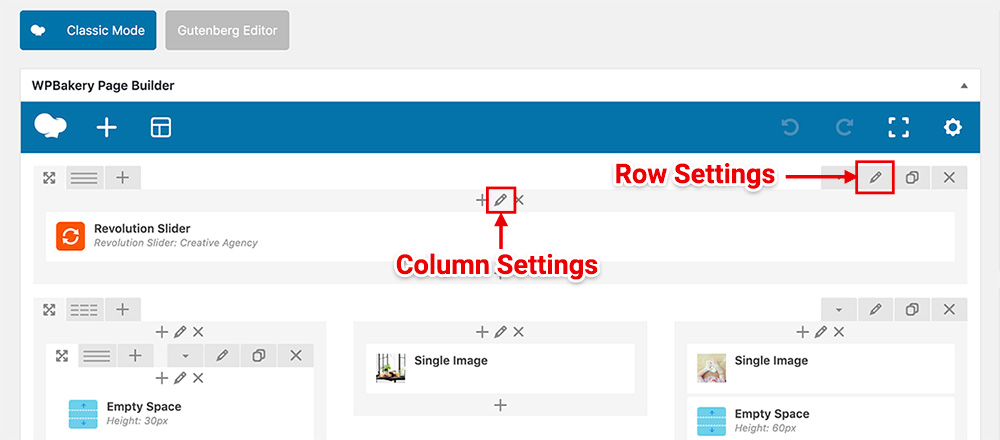
In the Column Settings window, select the “Responsive Options” tab and then select “Hide on device?” for the mobile icon (extra small screen) to hide it on mobile.
When I upload the zip file that I downloaded it says “unable to install theme, style.css stylesheet is missing. So I uploaded the individual two zip files inside the folder after I extracted, they are 2 files: Vera and child theme. I uploaded both and they worked successfully, but when I activate them on my site it’s just a blank site..?
I am under a very tight window as this site has to be done by Friday afternoon, all I need at this point is for the theme to work. If not I will have to find another theme and request a refund. All the best.
After you extract the main zip file, you will find the theme file in the folder WordPress Theme. Upload the file vela.zip under the Themes section on your WordPress admin and then install all bundled plugins. You can find the instructions on how to install the theme here: https://wydethemes.com/vela/documentation/#installation
If you would like to install the demo content, you will need to install the “vela-demo-content.zip” plugin that’s included in the folder “Demo Content” in the main zip file. Then you will be able to import the demo content under Theme Options -> Home. You will find the instructions on how to import demo content here: https://wydethemes.com/vela/documentation/#import-demo-content
Hi there,
I have updated contact form 7 on our website to the latest version, 5.1.2.
However, on my website, I am now seeing a red box at the bottom of all contact forms on my website: https://www.animoassociates.com/
If you scroll to the bottom of the homepage you will see an example of this.
Many thanks, Alessandro
If there is a caching plugin on your site. You may need to clear all caches after updating.
Thank you for your response. Yes I have a caching plugin installed, and I have now emptied cache, but the red box is still appearing.
It seems to be working fine on my end. It might be a browser caching issue. Try to press Ctrl + F5 (CMD + SHIFT + R on Mac) to see if it works.
Hi,
I installed your theme, it worked fine, but I don’t why, when i’m charging a demo template, this one is empty, I don’t have the full page. I just have the header and nothing more in the page (home page).
Can you help me please? I would like to start my website with that.
Thank you very much.
Fullflag
If you would like to change a demo, you will need to reset your site to remove all existing content and then import a new demo under Theme Options -> Home. If it still doesn’t work, you may need to give me your web address so I can check it.
Hi there,
If you take a look at our About page: https://www.animoassociates.com/about-us/
On this page there is a section with two rows, amd each row is divided into tow 1/2 + 1/2 columns. You will notice in this section that I am trying to align the content so that the columns across the two rows display in perfect alignment. You will notice that they are slightly off. Are you able to provide any guidance with how I can get this aligned as needed?
Thanks.
Instead of using a Single Image, you will need to set the image as a background for the column so it will fit perfectly with no spacing between columns.
That worked perfectly. Thank you.
Hi there, I am wondering if you can provide any guidance on a problem I am having with our contact forms. I have configured the ‘mail (2)’ auto responder, but emails are not being sent to the user completing the forms. However we do receive the email enquiry to our inbox. Not sure why this is happening?
Thanks.
My apologies for the delayed response!
Anyway, please ensure that you have set the “To” and “From” in the Mail (2) correctly.
“To” must be an email field from the contact form, for instance, [your email].
“From” must be the same email address as the “From” in the primary Mail settings.
Also, try checking the Junk/Spam folder. The auto-reply mail might be there.
You can find more details on how to setup the auto responder here: https://www.websofttutorials.com/set-up-autoresponder-in-contact-form7/
Thank you for your response. As far as I can tell the form was already formatted correctly as you outlined. Not receiving anything in junk or spam. Could it be an issue related to hosting that is preventing mails being sent?
It’s highly possible that the mail has been filtered out by the mail server. If you can check the log of your mail server, it could give you some clues. Spam filter often causes this kind of problem.
Hi,
are there any live chat plugins in particular that you would recommend that work well with your theme? What would be your go to choice?
Thanks.
We are sorry but we’ve never tried any live chat plugin with this theme before.
Anyway, try checking out the links below, they are popular plugins:
https://wordpress.org/plugins/zopim-live-chat/ https://wordpress.org/plugins/wp-live-chat-support/ https://wordpress.org/plugins/whatshelp-chat-button/Thanks for getting back to me. I have tried Drift, it works ok but might also test out another to compare.
Hi there, I have used one of your features shown on a demo as inspiration. I have recreated how you have listed your services on the demo page here: https://wydethemes.com/vela1/our-services/ My question though is how can i hyperlink the headers used for each service, and the icons used?
Thanks.
We are sorry but the Info Box element doesn’t have a link option. You can add a hyperlink to the text in the content area only.
However, we will look into this and add it in the future.
Hi there, could you please tell me how I can go about changing the colour of the underline for a Vela Heading, without changing it site wide please? I am guessing I need to apply custom css for this? How can I go about doing this please? Thanks
My apologies for the delayed reply!
Here is the custom CSS to change the colour of the underline for a Vela Heading:
.heading h2:after {
    border-top-color: #013abb !important;
}
If you would like to change it on specific pages, you will need to add custom CSS to the Custom CSS settings in the Page Settings window on the page edit screen:
If you would like to change it for every page on your site. Add it to Appearance -> Customise -> Additional CSS instead.
However, the custom CSS can vary depending on the Separator Style of the Vela Heading. If the one above doesn’t work, please let me know which one you would like to change.
Perfect, that worked 
When I update the Vela theme from 2.0.5.1 to the latest version 2.0.6, the top menu and other elements are broken. The staging site can be seen here: https://www.staging2.adamyounggolf.com compared to the live site: https://www.adamyounggolf.com/.
Any ideas on how to fix the situation?
Looks like the main CSS file (css/vela.css) is not included in the page.
Please ensure that you have the PHP code below in the functions.php file in your Vela Child theme:
<?php

function vela_child_theme_enqueue_styles() {
  $version = wp_get_theme()->get('Version');
  wp_enqueue_style( 'vela', get_stylesheet_directory_uri() .'/style.css', array( 'vela-theme' ), $version );
}
add_action( 'wp_enqueue_scripts', 'vela_child_theme_enqueue_styles' );
If it is not there, you will need to update the child theme or simply add the code above to functions.php in your child theme. You will also find that code in the new update of vela-child-theme.zip that’s included in your download package.
Hi, I updated everything and the site is more back to normal now. The one issue is the font awesome icons seem to be coming out wrong.
If you look at the top menu you can see that there are now squares next to the dropdown menu items. There is also a square under the Adam Young Golf heading and Connecting the dots subheading on the homepage. These used to be solid arrows pointing down. When moused over the bottom menu icons were arrows pointing up but are also now squares.
You can see this happening with all font awesome icons through the site.
Any help in this matter is greatly appreciated.
My apologies for the delayed reply!
However, it seems to be working fine now. The icons on your site are showing properly. If it doesn’t work on your end, try to clear the browser caches to see if it works.
I’m running a vela child theme that requires the vela parent theme. When I try to use a newer php version (currently using 7.1) the site generates the following error.
Warning: count(): Parameter must be an array or an object that implements Countable in /homepages/16/d274218273/htdocs/clickandbuilds/Capax/wp-content/themes/Vela/inc/metaboxes/init.php on line 747
I’m wondering if upgrading to the latest version of the vela theme will fix this issue when using the latest php version?
Of course, the Vela theme version 2.0 and greater are compatible with PHP 7.1, you can find more details in the changelog: https://themeforest.net/item/vela-responsive-business-multipurpose-theme/9793377#item-description__update-log
Purchase Code: da7222b6-b7f7-45d7-8187-4bdf8bbb3857
Hi there,
I have recently updated the Vela theme from a much older version. It hadn’t been updated in a few years. I have done the update on a staging site first but I am noticing an issue specifically around the Slider Revolution plugin. When navigating from page to page the slider loads blank not showing the image. But if you refresh the page it then displays as it should. I have deactivated almost every plugin to see if that might resolve the issue, but it did not work. You can see my staging website here: http://animoassociates-wp.c.wpstage.net/ To view the site you need to enter the credentials below: username: blogvault password: 26b9c2bf
Many thanks.
I just want to add that all Wordpress and all plugins have been updated to the latest versions, and Slider Revolution is running version 6.2.5
There seems to be an issue with the AJAX Page in this theme and the new update of Slider Revolution plugin. We are working on this and it will be fixed in the next update of the theme.
In the meantime, you may need to disable the AJAX Page Transitions under Theme Options -> Page -> AJAX Options to work around this.
Thank you for your response. This has solved the issue. The banners are displaying correctly and page speed is back to normal.
However I have now noticed an issue with our website contact forms not working. When I submit an enquiry through the form on our contact us page I receive the following message in an orange box: Failed to send your message. Please try later or contact the administrator by another method.
Many thanks.
There is an error message from reCAPTCHA in your contact form. It says “Invalid domain for site key”.
Try checking the reCAPTCHA settings under Contact -> Integration -> reCAPTCHA, and make sure the keys are valid and you set the correct domain name of your website in the registration form. Otherwise, you may need to disable the reCAPTCHA to resolve this issue.
When navigating forward from main page to subpage, e.g.: crossfit85.com to crossfit858.com/team and then back (using browser back button) to crossfit858.com, slider-revolution doesn’t seem to reload.
Looks like issue is reproducible on vela-demos-2, which also has a slider.
Vela Parent Theme v 2.0.6 w/ child theme active.
There seems to be an issue with the theme when working with the new version of Slider Revolution plugin.
Thank you for reporting issue, we will fix it ASAP!
In the meantime, you may need to disable the Ajax Page Transitions under Theme Options -> Page -> AJAX Options to work around this.
Hi,
With latest version of parent theme, 2.0.6., and Vela Child as the active theme, I’m seeing an error when going to Appearance > Menus
load-scripts.php?c=0…av-menu&ver=5.4.2:2 Uncaught Error: Syntax error, unrecognized expression: .nav-tab-wrapper a[href=http://www.crossfit858.com/wp-admin/nav-menus.php] at Function.ea.error (load-scripts.php?c=0…av-menu&ver=5.4.2:2) at ea.tokenize (load-scripts.php?c=0…av-menu&ver=5.4.2:2) at ea.select (load-scripts.php?c=0…av-menu&ver=5.4.2:2) at Function.ea (load-scripts.php?c=0…av-menu&ver=5.4.2:2) at Function.a.find (load-scripts.php?c=0…av-menu&ver=5.4.2:8) at n.fn.init.find (load-scripts.php?c=0…av-menu&ver=5.4.2:2) at n.fn.init.a.fn.find (load-scripts.php?c=0…av-menu&ver=5.4.2:8) at a.fn.init.n.fn.init (load-scripts.php?c=0…av-menu&ver=5.4.2:2) at new a.fn.init (load-scripts.php?c=0…av-menu&ver=5.4.2:8) at n (load-scripts.php?c=0…av-menu&ver=5.4.2:2) Then only the Pages sidebar will expand when the triangle icon is clicked, the rest of the menu items, Post, Portfolio won’t expand.
We have never seen this issue before. Everything is working fine on our site.
However, that error is not from the theme and bundled plugins either.
There may be plugin conflicts on your site, try to deactivate your plugins to see if it works.
Hi I would like to customize the color of the contact form text but this is not working: .wpcf7 input[type=”text”], .wpcf7 input[type=”email”], .wpcf7 input[type=”tel”], .wpcf7 textarea { background-color: #f6fcf5; color: #80ff00; } it workds only for the background not for the text color. Could you help me on this? please
My apologies for the delayed reply!
However, I’ve tried that CSS snippet and it seems to be working fine. Both background and text color of the text input have been changed to green.
There may be CSS conflicts on your website, try to deactivate your plugins to see if it works.
If it still doesn’t work, you may need to send me your web address so I can check it.
It didn’t work. My website: http://www.avalgo.com/
That’s because your CSS is incorrect. You will need to replace:
color: #80ff00 !veryimportant;With:
color: #80ff00;
HI I would like to increase the logo in the sticky header. How can I do it?
My apologies for the delayed response!
You will need to add the CSS snippet to Appearance -> Customize -> Additional CSS to increase it:
#header #logo img {
  min-height: 90%;
}
Also, if you would like to increase the height of sticky header, here’s the CSS snippet:
#header.fixed .header {
    line-height: 85px;
}
Thank you
Hi,
we are using one page version of your template Vela. In team members section we have 3 members. It works fine on the desktop. On mobile, only one member appears at the time. It can be swiped to the left to see other one. But there is no navigation, so it is hard to realize you should do it (even though the checkbox “show navigation” is checked). Is there a way to add navigation on mobile? Or a way to display all there members at once, one below the other?
website: vilman.cz
Many thanks!
Best regards, Jiri
My apologies for the delayed reply!
By default, the navigation (next and previous) won’t show up on mobile, only the pagination (dots) will.
However, we will look into this and enable it in the next update of the theme. Thank you for reporting this issue.
About the Vela Counter Box, we’ve noticed (please access: viking-tech.com.br/casos-de-sucesso/) that on the field “set counter value” one can’t insert decimal point ex.: we’ve tried out 1,6 and it shows just 1 on the homepage. furthermore, when we use value at thousands it’s shown with coma ex.: 5,000, but the correct brazilian defaut would be 5.000 (using a dot). Could we maybe change those two setting so we can match our metrics system?
Thank you for reporting this issue. We will add a format option in the next update so you will be able to set the number format for the Vela Counter Box.
Ok, I am looking forward.
Hi!
how can I make portfolio images on my site non-clickable, please? Hover efect is fine.
Many thanks! Jiri
.portfolio-grid .view figure a {
  pointer-events: none;
}
Perfect, thanks!


