944 comments found.

Hi,
I have just installed the theme and was perfect, but I have seen that the look and feel is not the same as in the demo, for example for events: https://preview.lsvr.sk/pressville/events/
And In my installation is: https://imgur.com/M7JztY9I have the LSVR Events plugin 1.8.0 version, not sure if I have to update from somewhere.
Thanks
Hi,
you can change the layout under Appearance / Customize / Events.
Lubos
More of comment really….when using the LSVR Documents Widget, clicking on the “more” button parses the category (as it should) but it doesn’t take forward any tags, so the whole category is then displayed. Is there any way that tags can be included as well so that only tagged documents are shown within the category.
I accept that a workaround is to expand categories further and not use tags at all, but I thought I’d ask 
Hi,
I am sorry but that is not possible (at least not without custom coding). Tags have their own archive pages. A tag is basically a specific form of category in itself in the WordPress context.
Lubos
Is it possible to edit widgets to make the background transparent (takes on the background of whatever is behind it). Specifically, the featured events widget. Additional CSS doesn’t change it.
Hi,
try this CSS to make the Featured Event widget transparent
.lsvr_event-featured-widget__content { background-color: transparent; }
Lubos
I haven’t purchased yet, but am very tempted to for my city planning consultancy. My clients are cities all around the Southeastern US. The Directory section would be a great way for to feature projects in a number of categories. i am thinking I would add each project by address (choosing a central location or, if possible, just use city, state). I’d like to hide the street address, zip code, and ‘USA’ when viewing the map icon info, overlays in the grid listings, and on individual pages. Just curious – since I can’t see the back end – how difficult will it be to hide/lose that address info? Maybe having to tweak the theme files or css? Thanks!
Hi,
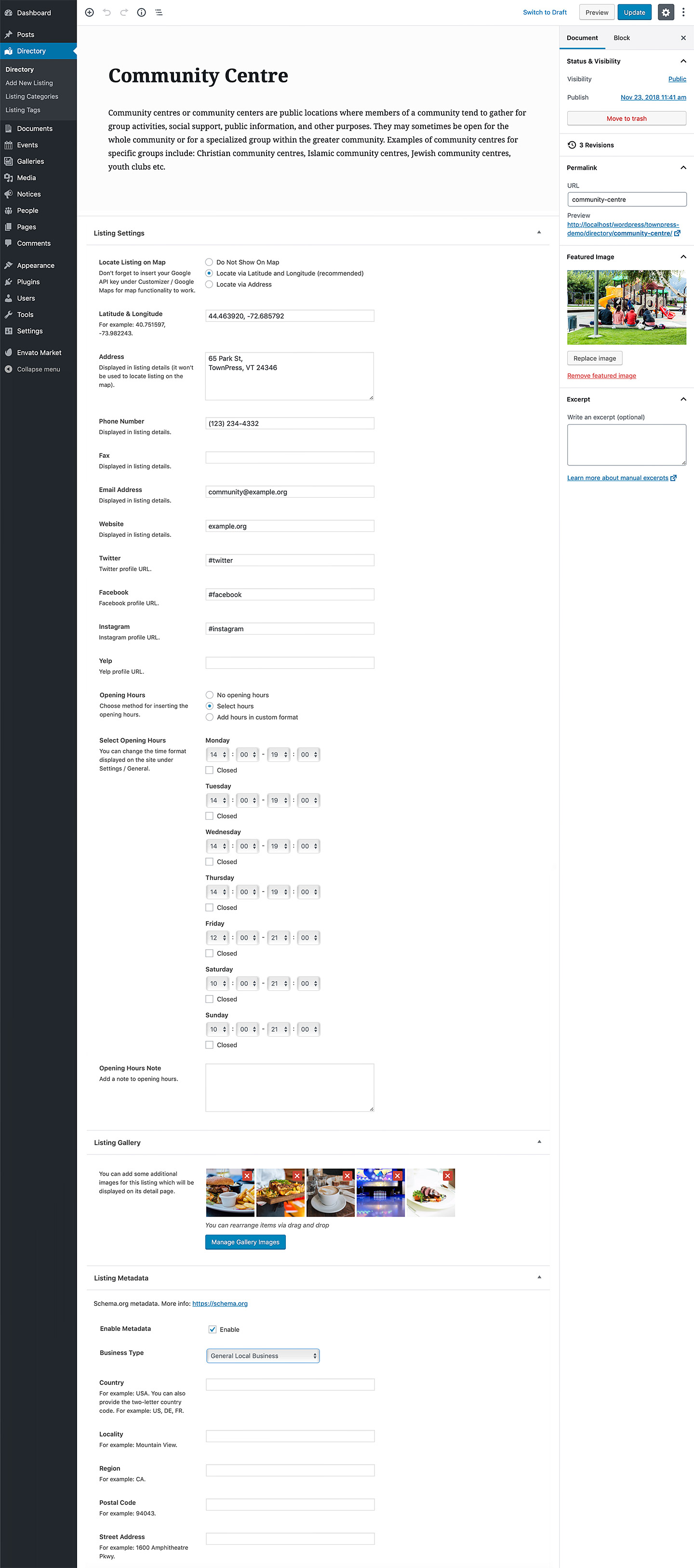
address which is used for locating the listing on the map and address which is displayed on the site are added via two different fields. The display address can be even left blank if you want. Here is the admin screenshot.
Lubos
Great. Thanks!
Is there a setting somewhere to change the width of the sidebar? I want it at 15% instead of 33.
Hi,
you can try this CSS, but it will make most widgets look completely broken:
@media ( min-width: 992px ) {
body .columns__main { width: 85%; }
body .columns__sidebar { width: 15%; }
}
Lubos
I retract previous message. Problem solved.
Hi,
glad you’ve sorted it out!
Lubos
I want to put Custom Sidebar Two on my front page but when I select the template, sidebar on left, i don’t see the sidebar setting where I can choose one. I have checked the checkbox under options for Sidebar Settings but no luck.
Hello, I need to display the submenu items in the top menu. How can I do this?
Hi,
I am sorry but topbar menu doesn’t support submenus.
Lubos
OK no problem! what is the top menu directory so i can edit it manually? Thank you.
What do you mean by “top menu directory”? You can edit all menus under Appearance / Menus.
Sorry, where I can find the htmls, css and js files inside the theme folder to edit the theme and show the submenus?
Under template-parts/header/menu-secondary.php. You should of course do it via a child theme. The location for CSS and JS is in the “assets” folder, but this information is irrelevant since you have to write your own CSS/JS and put it in your child theme. Do not change anything in the parent theme because you won’t be able to update the theme. Everything code-related has to be done using the child theme.
Right! Thank you very much for your great job!
Documents (excluded categories) breaks LSVR Document Widget. If you add any category in appearance/customise/document/excluded categories then the LSVR Document Widget ends us displaying documents from all categories regardless of the category selected. Is there any way I can rectify this please ?
As an update, if in the excluded categories you use “cat&tag_ID=” with the category’s number then the LSVR Document Widget works properly but the default archive page doesn’t exclude the category from displaying
Hi,
“default archive page doesn’t exclude the category from displaying” – you mean from the list of categories at the top? I will take a look at it in the next update
Lubos
No, that works ok by unticking “Display Archive Categories”.
What I meant was that the ‘excluded categories’ will exclude any document of those from displaying on the default archive page “website/documents/” (expected result and does work).
The issue is that this the above breaks the LSVR Document Widget whereby if you have any entries in the excluded category (in the customiser/documents/excluded categories) the LSVR Document widget ignores the category set in the widget controls “Display documents from a specific category”. Instead it displays documents from any category.
I’ve tried to see if I can do a workaround with tags but this won’t work either. It appears you can either have the default archive displaying as you want (with categories excluded) OR the LSVR document widget displaying correctly, but not both.
I’m assuming it may be to do with the excluded categories changing the category variable that the LSVR Document Widget uses but I have not been able to track it down yet.
Also, sorry I forgot to say ….Great Theme !!!
Hiya, just to say that I have checked it on another installation (different account and licensed) and i get the same results – using excluded categories in the customiser breaks the LSVR Document Widget (it no longer respects the category choice in the widget settings). As soon as you remove the excluded categories from the customise/documents, the widget works again.
Right, I see it now too. It’s a bug. I will address it in the next update in the next few days.
Hiya, I’ve just applied the update to v2.2.5 but the LSVR Document Widget now doesn’t include any documents that are entered in the customise/documents/excluded categories. I see from the changelog that was your intention but that wasn’t what I was referring to originally. Surely if you select a category in the LSVR widget then it should show that category (as it has been selected), otherwise what would be the point of the widget
Here is how I ‘thought’ things should work:
If category A is entered into customise/documents/excluded categories then category A documents will not appear in the default archive but they will display in the LSVR Document widget if category A is selected in the widget.
The end result is that documents only show where you want them to show. Please let me know if I am not explaining myself well.
Hi, have you updated the LSVR Documents plugin as well (to 1.7.1 version)? Because the way you are describing it is the way how it works on my end. Excluded category is not displayed on archive nor in widget. It is displayed in the widget only if you specifically select it.
I sincerely apologise, I didn’t realise that I needed to update the plugins as well (sorry whilst I am an old hand at hand coding websites, I am a newbie with Wordpress). You are absolutely correct, once the widgets were updated everything works perfectly.
I should really read up on Wordpress a lot more than I have done…...back to school for me
When you update the theme, you should see a notification at the top of your admin if there are new plugin updates available. Or just check out the changelog on the item page where any plugin updates are always mentioned.
Events section tag filter not working properly. I’m able to create tags on a single Event (website.com/events/singlearticle).
When the tag is clicked, it goes to correct page (website.com/events/event-tag/tagname) and shows the tag name as header BUT instead of showing list of posts with the tag, it shows “No events matched your criteria”.
How can I fix this? Thanks.
Hi,
please share the URL where I can see it.
Lubos
how could i contact you via private msg or email? i set up a test version and same issue happens, thanks.
You can send me a PM.
just sent, thanks.
Got it and replied.
Hi (firstly great theme), is there any way of supressing the author of documents (and anything else) being displayed. Even though I have un-ticked “Author” under “Screen Options”, the author is still displayed. TBH I would be happy with a blanket supression of the author right across the theme.
Many thanks in advance.
Sorry, I was looking in the wrong place. Of course the answer is untick it under Customise ….doh !!!!
Hi,
check out options under Appearance / Customize for each post type.
BTW Screen Options are related only to your admin screen, they have nothing to do with the frontend.
Lubos
Many thanks….....weekend support in 7 minutes, I’m impressed !!!
Hi,
I have recently purchased Pressville Theme, first of all thank you for the amazing theme it really looks great and has everything a municipality website needs.
I have uploaded the theme in my website and my website has 3 language and the good thing is that the theme support rtl and what i really want is i need to have three different logos for 3 different languages.
Thank you!
Hi,
it depends how you’ve implemented the multilingual functionality. If you are using WPML, then check out this thread https://wpml.org/forums/topic/logo-translation-8/. If you are using some other plugin, then please check out their support forums for a solution.
Lubos
I am using Polylang
Check out this https://wordpress.org/support/topic/polylang-logo-change/
I am sorry but the theme support doesn’t include help with 3rd party plugins. If the solution above won’t work then get in touch with the plugin author via their support forum https://wordpress.org/support/plugin/polylang/
Hi, firstable thank you very much for this amazing theme. I am building it using elementor and Gutenberg and I love it so far!
I have a couple of questions:
1. How do I get the weather from the widget in Fahrenheit and not centigrades?
2. in the directory single pages the social media icons don’t look centered. it’s a way to change their colors and maybe remove the circle background on them?
3. Is there a way to have the directory map larger on desktops? would it be a lot of code work to have the map in the right side of the page and the listings on the left?
Hi,
1.) edit the widget and change Units Format to Imperial
2.) you mean vertically centered, right? Try this CSS and let me know if it helped so i can include it in the next update:
.lsvr_listing-post-single .post__social-link { line-height: 32px; }
If you still want to just remove the background use this CSS instead:
.lsvr_listing-post-single .post__social-link,
.lsvr_listing-post-single .post__social-link:hover { color: #2d93c5l background-color: transparent; }
3.) You can change its height with this CSS:
@media ( min-width: 1200px ) {
.lsvr_listing-map__canvas { height: 500px; }
}
Changing its position would require some advanced custom coding and you would have to hire a developer for that.
Lubos
Hi Lubos, thank you very much for your quick response, the line-height:32px worked great so you should totally include it in the next update.
Great! Will do.
Hi Lubos, I am having the same icon issue with the “search this site” form widget in the sidebars, The magnifying glass icon is all the way in the bottom of the search form, how can I center it?
Thanks!
Try this one, if it doesn’t help then please share your URL since I can reproduce this on my end:
.c-search-form__button { line-height: 32px; }
I want to add a post category in events design, but I can’t add with Gutenberg I will be happy to help me
solved, but I have anoyher problem, I want to turn off comment on posts, no one should be able to post any comment
Hi,
you can disable them under Settings / Discussion.
Lubos
Please note that customization is not included in the theme support. If no built-in widgets fits your criteria then please take a look into the official plugins repository, I am sure you will be able to find a suitable plugin there.
when I want to add widget as HTML saving take a long while and don’t save even I deactivated plugin
I am sorry but I do not understand. Which widget are you talking about?
footer widget
But which one?
I can’t add image url in footer widget, when I add it take so long to be add but doesn’t add at end
But which widget are you using? “Footer Widget” is just the position of the widget. But I assume you are using some specific widget there. Which one?
I use text widget and I want to add a texture as background, how can I do that
Background for that widget? You will have to share your URL where I can see the widget to help you with that.
texture background in whole website, the homepage and others not widget
You can change the main background image under Appearance / Customize / Header
white background color, not header image
You can use this CSS:
body { background-color: #FF0000; }
Just change the ”#FF0000” to your desired color and add the code under Appearance / Customize / Additional CSS.
Please note that customization is not included in the theme support.
If you want to use an image then use this instead:
body { background: url('http://yourimageurl.com'); }
when I add custom css in footer by default or plugin I get error 404 not found plz help how can I solve it
Custom CSS should go to Appearance / Customize / Additional CSS, or to your child theme’s style.css file.
no at all. when I want to justify text WPBakery with pressing alt+shift+j the page facing 404 error, without that I don’t have problem
I am sorry, but I do not understand. Please clarify your issue.
WPBakery works fine but when I justify a text in a page that is designed by WPBakery with alt+shif+j I get 404 error
The theme have nothing to do with functionality like that. Either try it in different browser or justify the text using the buttons in the editor instead of keyboard shortcut.
there in no justify button and I tried with opera and chrome, both have the same result
and I want to add an HTML widget in footer, but when I add I get 404 error
So first you said it is when you do alt+shift+j in WPbakery. Now it is when you add html widget in footer? So what it is? With all due respect, but I can’t read your mind. If you want me to help you, then please, describe your issue IN DETAIL. You drag and drop HTML widget into sidebar and immediately get 404 in the admin? Or you put some code into widget save and then you get 404 in admin? Or you get 404 on frontend? I am tired of guessing what exactly is your issue.
in appearance>widgets when I add HTML code the code will be added but when I add a photo link the page redirect to 404 not found
Which page redirect to 404? Please share your code. Seriously, is there a language barrier? Like, do you understand me when I ask you for more details? This issue could be resolved in few minutes if you actually described your problem IN DETAIL.
I have send it by PM, the code and login details
I’ve replied.
I have two questions, 1. how to remove bg color of submenu and 2. how to align center logo in header
and one another question, how can I full page elements in theme, when I change an item background doesn’t fully change, just a part change
1.) That is not possible without some customization, but since customization is not included in the theme support, you will have to hire a developer for the job.
2.) Appearance / Customize / Header / Center Logo option
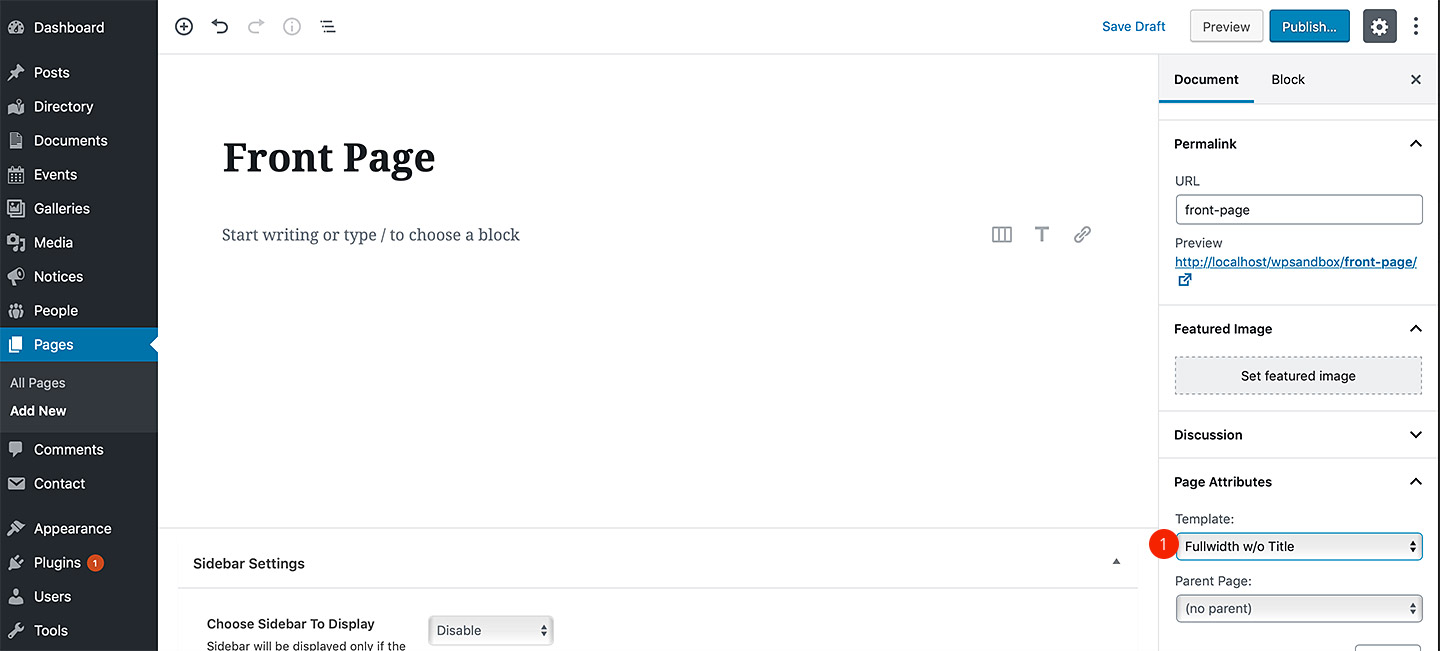
3.) when editing a page, change the page template to Fullwidth in the right panel. See this image.
I mean element bgcolor with wpbakery
If the element doesn’t offer such option then it is not possible without customization.
but how did this site done? bazarak-m.gov.af? I need it, I will buy about 40 Licences if I done it will
Do you mean the dark background of the Events section? Just edit the element in page builder and enable “Darken Background” option. Just follow the tutorial on how to create the front page in the documentation. All those elements and their options are available in the WPbakery as well http://docs.lsvr.sk/pressville.wp/#front-page
I did, but dark background will be in box, but I want stretch
You need to switch your page template to Fullwidth. Please, SEE this image.
It doesn’t seem you’ve switched to a Fullwidth template, OR this first section is nested in some additional, unnecessary, element. It shouldn’t be nested in anything, except maybe Row element (without any styling) if it is not possible to do it without it.
I use WPML for multi language the site, but I have a probelm, in header in language switcher there is language Codes, but I want it should be language name thanks
Please check out your WPML settings to change your language labels.
I just took a better look into the code and I am not sure if it is actually possible right now. You will have to custom code it by overriding the lsvr_pressville_get_languages theme function via child theme. Please hire a develoepr if you don’t know how to do that.
I have changed to full names, but the languages in the switcher will disappear
I guess you will have to change it in the code to display labels instead of codes. I may take a look at it in the next update as well.
Thanks, can I have language switcher just in mobile or PC version?
There is no such option, you will have to custom code it.
one more question, how can I full width menu design plz help
Try this CSS:
.header-navbar__inner > .lsvr-container { max-width: 100%; }
However it was not tested to be used like this so I can’t guarantee it won’t cause some issues.
thanks, but it only change primary header not top bar header
Add this one:
.header-topbar__wrapper > .lsvr-container { max-width: 100%; }
Please note that the customization is not included in the theme support, so please hire a developer for any future customization requests. Thank you.
thanks, and one more question how can I change color of text to white, but when the mouse goes on text it becom blue thank you alot
Again, customization is not included in the theme support. Please hire a developer for the job.
just instruct me, a bit and I will do it
oh sorry, it is ok in demo, plz help me hoe can I reset style
I am not going to tech you how to code. You can learn here https://www.w3schools.com/Css/
Appearance / Customize / Colors
You can’t without custom coding.
With all due respect, but we exchanged more than 50 messages in mere a few days. Most of it was about customization which is not included in the theme support anyway. Please stop abusing the theme support. If your project is way too big for your skills, hire a developer for the job. Thank you for your understanding.
ok thanks
Read this and read this thoroughly https://help.market.envato.com/hc/en-us/articles/208191263-What-is-Item-Support-
Hi I can’t change header background image help me plz!
Hi,
have you did it via Appearance / Customize / Header?
Lubos
yes, but not solved
Can you please be more descriptive? What happened after you’ve uploaded a new image in Customizer? Any error message? Are you sure it is not just a caching issue? I need much more details to be able to help you.
when I upload a new one, I still get the image that I uploaded before, no I don’t get any error
solved, when I just deleted the image from gallery
It was probably something with the cache.
Hi, I can’t edit any part in WPBakery Page Builder if you want, I can send you my login details and one thing else, I havn’t found any place to activate my theme
Hi,
please note that the demo content was build using the block editor (Gutenberg) so it can’t be edited via WPbakery. If you want to use WPBakery, you have to create those pages from scratch. Here is the tutorial on how to create main demo page from scratch. All the elements mentioned there are available in the WPBakery as well.
Alternatively, you will find legacy WPBakery demo in the full package / Legacy / VC demo data folder.
If you meant something else by “can’t edit any part” then feel free to get in touch via PM.
“I havn’t found any place to activate my theme” – not sure what you mean by that. If you’ve activated your child theme under Appearance / Customize, then followed the prompt to install and activate all the bundled plugins, then that’s all regarding the installation/activation.
Lubos
Hi I add a menu (say “article”) on “Primary Header Menu” by copying plugin “lsvr_document”. Everything is going well, but the font style/size & color of the list tittle of “article” have changed. In the lsvr_document, font size is smaller and red. However, in article, the font of list tittle becomes larger and blue with underline. Where I did a mistake in copying lsvr_document? I copy every line of “document” code into “article” by changing word “document” into “article”. thanks a lot.
Hi,
I am sorry but, I do not understand your question. Please share your URL where I can see the issue.
Lubos
I am sorry, my web is not on the internet yet. it is still on localhost
if you don’t mind, I will send the screenshoot through your email.
thanks a lot.
Just send me a PM and I will reply from my email.
Hi I have problem with the menu events. When I type the date (date from and date to) and click Filter, my screen goes to front page, and doesn’t go to the event list. I am using URL ”?post_type=lsvr_event” on that menu. I am a beginner. I saw a similar question 1 year ago from akobryan, but I didn’t find an answer for that. Thanks a lot.
Hi,
please set your permalinks settings as per the documentation http://docs.lsvr.sk/pressville.wp/#post-installation-setup-permalinks (and go through the rest of the documentation as well)
Lubos
thanks a lot
For the Events calendar filter, once I filter dates and results display, if I click on “Reset Filter” it shows an error msg “No events matched your criteria” instead of returning to the original state of listing all events. how can i fix this?
Hi,
please share your URL where I can see it.
Lubos
just sent you an email w/screenshot thanks.
Replied
please i do have issues about finding and importing the demo import
Hi,
what kind of issues exactly? Have you followed the documentation http://docs.lsvr.sk/pressville.wp/#demo-import
Lubos
Hi,
I’ve replied to your PM you sent today, but the mail was returned. There is something wrong with your email address. Anyway, here is my reply:
Please follow the documentation: http://docs.lsvr.sk/pressville.wp/
However, if you are new to WordPress, then make sure to read through some WordPress tutorials first: https://codex.wordpress.org/Getting_Started_with_WordPress
If you have further questions, just let me know.
Lubos