16332 comments found.
Do you have any reference with multivendor option active? We are planning to use with vendors with mimimum 500 products.
Hi, yes Webkul Marketplace or this one from Purpletreesoft.
Just make to confirm this with their respective developers to ensure full compatibility with our theme.
Best Regards.

Hi.
I am stuck in an issue where my account page is not responsive on mobile, Just like desktop view its coming in 2 column which is quite annoying and not looking good, it should come one beneath the other.
You can open the following link in mobile… Its issue in your theme… Kindly update the same. https://www.journal-theme.com/7/index.php?route=account/accountKindly tell how to rectify the same.
Thanks
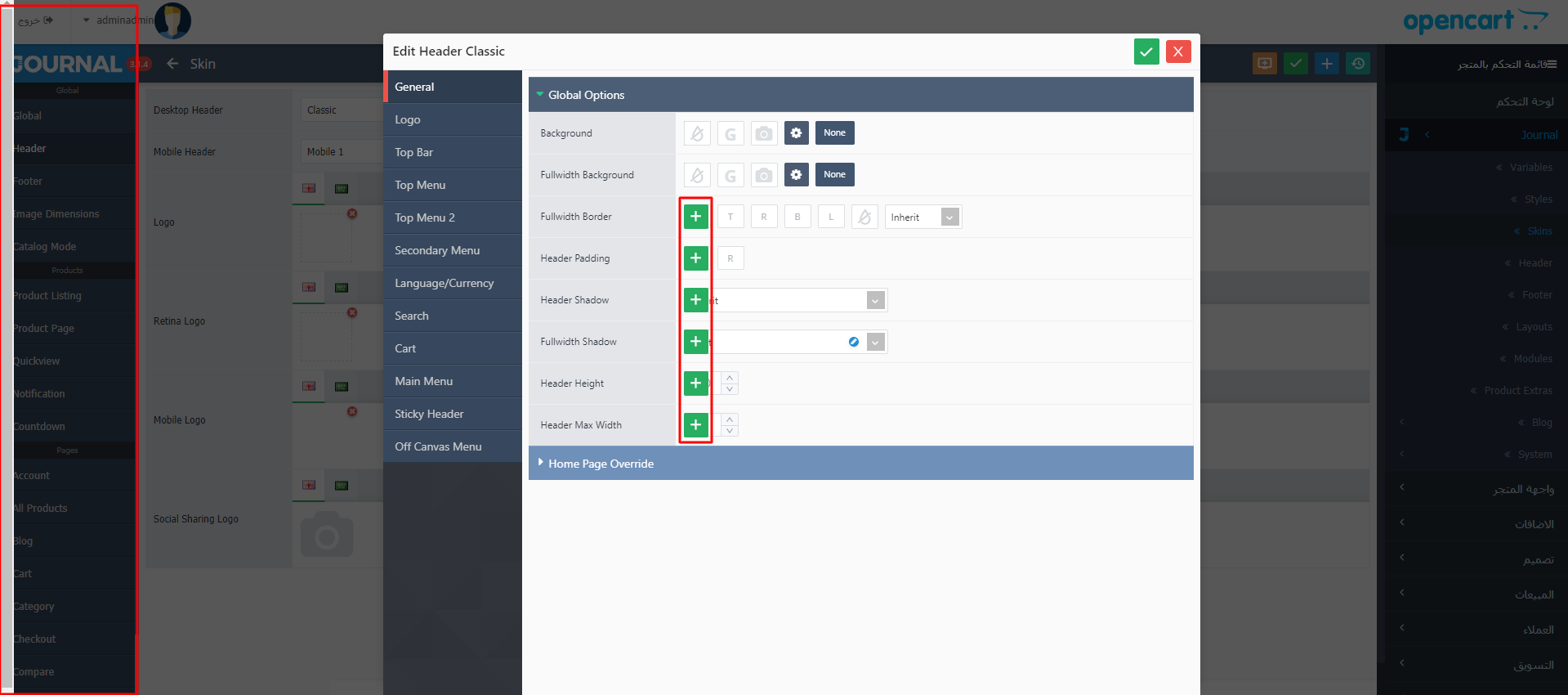
Hi, you need to set up the proper column split for those elements, look in Journal > Skins > Edit > Account > Login Page and indicate how many columns should be displayed.
As you can see we display 2 columns in default state (all screen widths), but add a breakpoint rule (green plus button on the right side of the option) where we indicate a different screen width at which to change the option value. In this case we change the columns to 1 per row (stacked on top of each other) only at or below that resolution (980 in this case) but you can indicate whatever screen width you want and when the window is at or below that width the different option state will change.
This concept applies to any CSS based option (pretty much all of them) where you can define different option states for different screen widths. For example you can have a larger font size that you like on desktop but want to make it smaller on phones…so you add a breakpoint rule for that particular option, indicate your desired screen width and apply a different font size which will only kick in when the screen reaches that breakpoint width.
Learn more about breakpoint rules here: https://docs.journal-theme.com/docs/variables/breakpoints/
Best Regards.
Hi there, I’ve read through support threads and your documentation but I cannot find how I can easily switch between the default demo that installed when I downloaded the SQL file (demo #1) and switch to Demo #9 that I wanted? TIA.
Can you please help?
Hi, there is no automatic way to do that, you’d have to just import that other demo, after exporting it from our demo admin. See this https://docs.journal-theme.com/docs/demos/demo/
Same concept applies to any demo.
Best Regards.
Into the product List, how can be set the icon color for the active one? Into the Product Listing -> Grid /List buttons there are settings for Normal and Hover only
Hi, please file a ticket on our support page and consult with our developers.
Best Regards.
There is a problem with the template.
RTL
https://a.top4top.io/p_16809vp581.png . Journal 3.1.1 to 3.1.4Hi, we’re looking into it and we’ll provide a fix for this if needed in our next update.
Best regards.
For those of us with the Journal Theme on Opencart who want to swap the main image with the option image you may want to check out Option Image Swap for Journal here: https://www.cartmega.com/option-image-swap-for-journal-3x-oc-3-x.html
Hi, if that extension works fine with Journal and you provide compatibility support we can recommend it to our customers.
Thanks!
I have it tested up to Journal 3.0.40 on OC 3.0.3.2. I tried to upgrade to Journal 3.1.4 but I get Fatal error: Cannot redeclare DB::$log in …/oc_storage/modification/system/library/db.php on line 20, right after I refresh modifications. Of course we stand behind our products. We use them ourselves! Send me an email address at info@cartmega.com and I will send you a copy so you can check it out for yourselves.
Hi, we are not aware of such issue, please manually clear modifications folder and then reupload all the theme files to your server, refresh Opencart modifications and your issue should be solved after. Please file a ticket on our support page if you need further assistance.
Best regards.
hi, we are using oc 3.0.3 and lastest update of j3. is there easy way to clear client side browser cache or expire in few minutes? we are facing payment problems because of caching after change theme interface. (it will not problem if customer clears browser’s cache)
Hi, client side caching is not something controlled by Journal and we’re not sure what exactly you’re trying to achieve, please file a ticket on our support page for more information.
Best Regards.
Hello, can I use this theme for multivendors???
Hi, yes Journal works with Webkul Marketplace and we’ve been told also with this extension: https://www.opencart.com/index.php?route=marketplace/extension/info&extension_id=31461
Please confirm with these developers first that they support custom themes like Journal.
Best Regards.
When searching products through brand the filter (categories) shows up all categories and subcategories, it only works correctly when you are searching through category (where it displays subcategories). Is there a way for it to work with manufactures page (so the category filter will display which categories contain the selected brand)? J Theme 3.1.4 oc 3.0.3.2
Hi, only main categories are displayed on pages like Manufacturers, Search, Special. Subcategories work on Category pages only.
Best Regards.
This is not the case, main categories and 1st level sub categories are being displayed when manufacturer is chosen, on search and special pages it works correctly (only main categories are displayed). To make it clear, only when manufacturer is picked this happens.
Sorry again, this also happens on specials page, main categories and 1st level sub categories are being displayed alltogether. Only on search pages the main category is being displayed.
Hi, can you replicate this issue on our demos? We don’t understand what exactly you are referring to. Or try to include some screenshots and/or a link those pages.
Best Regards.
Hi, only parent categories are shown on manufacturer pages, it’s not possible to show subcategories, please file a ticket on our support page if you need further assistance.
Best Regards.
Support is expired, just wanted to point out the issue. Didn’t you see the screenshot from your own demo? Parent categories are displayed and alos sub-categories (if the sub category has a third sub category under it).
We understand and we’ll look into this and provide a fix if needed in one of our next updates.
Best Regards.
is any option to show Product Option value or Name into Product listing with Product thumb? My site is too slow if comparing with other sites of Opencart? do you check and help me to solve it out?
Hi, it’s not possible to show product options near product thumb in product grid or list, unfortunately.
Regarding store performance, there are a lot of factors that may affect your store performance like hosting plan, amount of store data, content displayed on pages, etc, please file a ticket on our support page if you need further assistance.
Best Regards.
can i have grocery store themed layout? I need it for my store
Hi, unfortunately we don’t have a dedicated demo for that purpose, however all of our demos are multi-purpose and can be used for any type of store.
Best Regards.
Dear sir i need help to install your theme
Hi, please file a ticket on our support page and consult with our developers.
Best Regards.
9GM-9LL-U4GQ
this is the ticket id , but no answer ?!
Our developers respond within 24h as there is a long list of tickets.
Thanks for your patience!
Your developers couldn’t help me. I ask about fresh installation and they reject this. They tell me that the help to install the theme only not creating database or similar like this. Limit support not fully support Thanks for reply
Hi, we do not provide such service unfortunately, installation is not part of our support. Our support only covers bugs or issues with built-in features.
Also, if you have issues with the installation they can tell you what those are but you must do it yourself.
We have clear instructions in our documentation: https://docs.journal-theme.com/docs/installation/
And for demo import here: https://docs.journal-theme.com/docs/demos/demo/
Envato does sell installation services for any theme but that is not provided by us, you’d have to consult Envato directly about this.
Thank you!
Hi, Journal use a third party search module? It is able to set something of followings or any of these?
(1) products with the exact phrase, (2) products with ALL keywords, correctly spelled, (3) products with ALL keywords, possibly misspelled, (4) products with ANY keywords, possibly misspelled
Thaks, Barna
Hi, there is no such search mechanism in Opencart nor Journal, third party extension may be needed in order to achieve that functionality, please search for such extension on Opencart marketplace.
Best Regards.
i’m finding the documentation very confusing. do you have a simple video which at least goes thru simple design? for example, i have an image i simply want to remove from a section of what i think is a grid. i do not know if i need to go to a module, a layout, a grid, or a banner! i think i am using skin 2 but not sure. so looking at demo 2 home page it says journal->modules->grid and also it says layouts-home-top-row 2. its journal-speak which is another language
Hi, Journal language is actually english. Just point out where you are stuck in some screenshots and we’ll tell what they are.
Best Regards.
Hi, we are the authors of no. 1 bestselling multivendor platform on opencart. Here is our listing: https://www.opencart.com/index.php?route=marketplace/extension/info&extension_id=31461 We get so many customers who use your theme. Although our extension supports your nice theme, we want to have an official partnership with your theme. This can result in mutual benefit and also ease for our common customers. Can you please guide in the right direction?
Hi, we cannot provide support for 3rd party extensions, but if you are familiar with Journal and provide full compatibility support we can recommend your extension to our customers.
Best Regards.
hi, we already provide support to our customer for our extension. Regarding the compatibility, we support your themes , journal 2 and 3 since a long time , with our extension. We have also written it on our selling page here https://www.opencart.com/index.php?route=marketplace/extension/info&extension_id=31461 Is it possible that you can mention similarly on your selling page about the compatibility with our extension? Thanks.
Please send us a private message via the contact form on our profile page so we can discuss more.
Best Regards.
please is this is include products sku ?
Hi, Opencart has product sku field and it can be displayed on product page if that’s what you’re referring to.
Best Regards.
Sucks theme and i have ever used worst theme. Its cache everything admin, checkout, after installation my sale decreased,
I do not recommend to purchase. Sucks Cache System
Hi,
There is surely a misunderstanding, Journal has the most advanced caching method built in, which no other theme on the market has and it never caches admin, cart nor checkout pages, they are 100% dynamic and definitely cannot be cached by any means.
We believe your issue is related to something else but we cannot guess what could be wrong without taking a look at your setup. Since you have never filed a ticket on our support page and you have never contacted us reporting this problem, we cannot guess what could be wrong – it could be something related to Opencart or the way you display content in Journal, etc.
So, please, just get in touch with us first so we can assess your situation and provide some guidance.
You can send us a private message via the contact form on our profile page and our developers will get back to you.
Thank you!
Hi again, we haven’t received your message to investigate your issue.
Please send us a private message via the contact form on our profile page so our developers can help you out.
Thank you.
Hello, does this theme support the OpenCart Captcha Page Option for Guest Checkouts?
Thank you.
Hi, unfortunately there is no captcha support in one page checkout at this point.
Best Regards.
Dam, not good for credit card testers, thank you for coming back to me.
Is this something that you could provide a quote for to create?
Hi, unfortunately not, please consult with an Opencart developers to see if this is possible.
Best Regards.
Hi,
Any way I can style the alert message on the cart page, when for a product the stock quantity is exceeded?
Thanks!
Hi, that should be in Journal > Styles > Alerts > Default…
Best Regards.
Hey after the recent update, in the checkout page no mater what code coupon I enter(valid or invalid) it says”Your coupon discount has been applied!”. I use isense lab’s Promotions module and that is not working any more. The coupons are working fine in “View Cart” page.
Hi, we are not aware of such issue, can you replicate it in our demos? If not, please file a ticket on our support page if you need further assistance.
Best Regards.

This item was featured on ThemeForest

Power Elite Author
Contact the Envato Market Help Team