5515 comments found.

please i’m having an issue with my wp rentals when i add a new listing in Best places to visit (Featured Cities & Areas) i can’t find it there it goes to Featured listings to rent (latest listing added )
Hi ghanoubent, I am very sorry but I don’t understand the issue.
To make this answer quick, send here your site url and a screenshot to understand what doesn’t work.
Please include wp-admin username and password to check the page content as well, if needed, and with all this info I can help asap – https://themeforest.net/user/wpestate
Thank you
my problem is when i add a new listing i cant find it the featured city of the listing for example i added a new hotel listing in london and when i go to london listing i don’t find it , it’s all empty in the london listing
Hi ghanoubent, I need to see the “london” listing to understand what it is (search, list). I also need to the see property to understand how it connects.
What i can advise (if the featured city is a shortcode) is to see if there is any cache (clear theme cache) which may prevent the number of listings to update in the shortcode display (which is normal when cache is used).
But for further advice I must see the site, the listing page and wp-admin to check the settings of the property.
Please include wp-admin username and password to check the page content as well, if needed, and with all this info I can help asap – https://themeforest.net/user/wpestate
Thank you
thanks a lot i solved the problem have a good day
Great! Thank you
Hi, property page on mobile browser, booking form shows in top before listing photos. can i show firstly listing photos and title then booking form on mobile.
on desktop, booking form is in sidebar. is there option to move everything on property page?
Hi tosunkaya, Thank you for the message.
We have that structure with some property page layout types that have the images in header. Ex https://main.wprentals.org/properties/property-for-rent-in-new-york/
Thank you
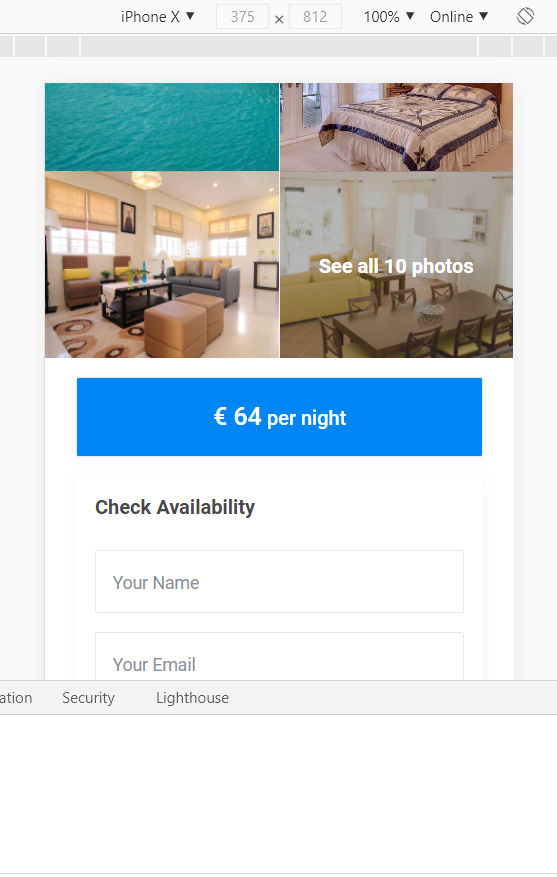
hi. no, it’s not related with this. i reviewed demo. if you open the property page in mobile (as mobile user agent) it shows booking form firstly.
even if you select the layout type that you sent link, after first photos still booking form is here before title.
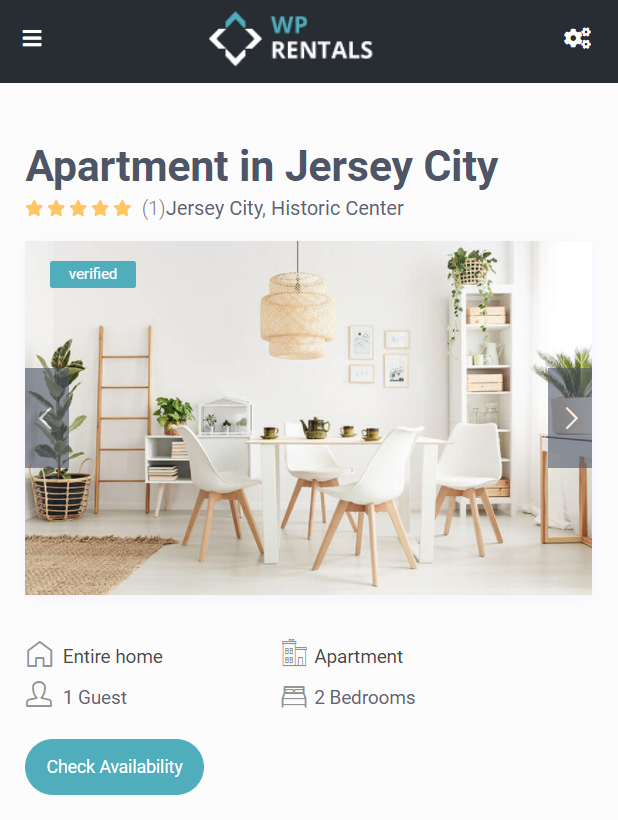
i want this layout: https://demo1.wprentals.org/properties/apartment-in-jersey-city/
desired mobile view (if i load on desktop then shrink window): https://i.ibb.co/PhxhGdv/image.png current one (on phone or mobile useragent): https://i.ibb.co/PhxhGdv/image.png
showing reservation form before title and images is not good.
is there any setting for this (first title+photos then reservation) or can i move parts (availability, price info, amenities, desc etc) as i want? or should i change theme files?
also on availability calendar on same page how it booked both day+nightly
https://demo1.wprentals.org/properties/apartment-in-jersey-city/i want to get the theme and close registrations and show booked days myself (i will mark)
Hi tosunkaya, My bad, you said also title but I read only below images.
That layout for mobile is set in code. I am not sure how it’s changed (if it’s easy or needs devel). We can show where the position is set now for sure, but i would need to check with devel team as well. So I cannot offer a confirmed answer about how to change the layout or if you can do it yourself or need developer.
You can replace theme booking wih contact form – so people who don’t login can still send messages. Ex https://santorini.wprentals.org/properties/beautiful-cabin-simple-price/
That would give you full control over adding only manual bookings for your listings and people won’t need to register for booking.
Demo 1 uses booking and users actually book (not owner). Users would make the booking when actually going through with the booking process on checkout – https://demo1.wprentals.org/properties/apartment-in-jersey-city/
Thank you
Still no difference on mobile. The form shows before title or everything. this is bad for visitor. https://i.ibb.co/Bss1Qf7/image.png
1 question. I saw when instant booking is active, visitors can see which dates are booked or not on the booking form. is it showing on contact form dates too? there is any booked days on santorini demo.
If you dont have, you should add functionality of moving parts and mobile settings. thanks.
Hi. I already answered the comment about mobile behavior. Please see my answer. It’s the same when using contact or booking form.
Instant booking is actually booking – from user end without owner approval.
Santorini is only a contact form that goes to owner email address.
I don’t know if we can make the dates save. Will check with devel team.
Thank you
Hello, the contact form is not working. A new update has come to the FormCraft plugin. Could you help
https://codecanyon.net/item/formcraft-premium-wordpress-form-builder/5335056?irgwc=1&clickid=WJw1WBXcJxyORwlwUx0Mo3EFUkiVkk0JCw3NxQ0&iradid=275988&irpid=1258259&iradtype=ONLINE_TRACKING_LINK&irmptype=mediapartner&mp_value1=&utm_campaign=af_impact_radius_1258259&utm_medium=affiliate&utm_source=impact_radiusproblem solved
Thank you for the follow up. This is not our plugin, but I am happy you solved this. Thank you again
Thank you for your response, but is there also a field where the owner can enter his account number? For payment from admin to owner? Thanks in advance.
Hi Dennis, Thank you for the comment. We have a private field in user profile, but we don’t have automatic payment to owner. We only receive the money in admin accounts.
We’re running an internal survey on a possible addon for payments to owners. If you wish more info please contact me in client private – https://themeforest.net/user/wpestate/portfolio
Thank you
Hi guys!
I would like to know why on the code there are restriction to press enter when you are searching a destination in Advanced Search? We have been working to get to the destination when you press enter on the keyboard without use the mouse.
Here is the code that we find about this:
//////////////////////////////////////////////////////////////////////////// ///prevent form submit on enter //////////////////////////////////////////////////////////////////////////// wpestate_prevent_enter_submit(‘main_search’,’search_location’,’check_in’,’check_out’,’guest_no’); wpestate_prevent_enter_submit(‘widget_search’,’search_locationsidebar’,’checkinwidget’,’checkoutwidget’,’guest_no_wid’); wpestate_prevent_enter_submit(‘form-search-mobile’,’search_location_mobile’
Thanks Best regards
Hi Juan, I am sorry for the delay, but i didn’t know the answer without checking with devel team and I can only add 1 comment here
The code prevents accidental submission of the form before finishing all selections.
You can remove to see if the behavior works for you.
Thank you
Hi guys!
We would like to know if it`s possible for the home owners to connect the template with automatic softwares of property management like (Your Rental, CloudBeds, etc…).
Thanks Best regards
Hi Juan,
Thank you for the message. We can only use ical feed to import and export calendar availability. I don’t know what other services you would need to connect, but since there is no global standard / API for channel manager, any other integration than ical would mean custom development based on each channel manager documentation.
Thank you
Hi guys!
I am writing to you because the API to log in to Facebook and Google is presenting issues… The main error is that it creates new accounts for mails that already exist as users. Do you have a solution for this problem?
Best regards
Hi Juan, Thank you for the message.
I will explain below how it works.
WordPress doesn’t allow 2 users with the same address https://prnt.sc/u8qq9m
But if you try to login with the email which you’ve already used through a social login, the social API can create a new account as the username is different (the social api creates a different username based on email address)
If your manually generated account has an identical username as facebook would create, facebook would not create another account.
The 2nd account created by facebook will not keep the email in user profile if the email already exists (because wordpress doesn’t allow 2 accounts with the same email)
If you have a different scenario, you must send the details in client support to check further.
Thank you
Hi, The listing properties site contains many fields that I don’t use (such as propertyID). Is it also possible to delete or hide it?
Hi Opvliegert, Thank you for the message. Property ID can be removed with css. It’s the only field that has an automatic value. The rest of the fields don’t show if there is no value and you can manage which fields to include in submit form (so you can control which fields would be available to be filled in.
If you need further info or want to test our theme, please send a message from here https://themeforest.net/user/wpestate
Thank you
Goodnight, I have seen a major error in the booking calendar when using the object rental. If a person chooses to rent an object for example on August 28 and 29. Only the payment of a single day is added. This is an important mistake when renting objects, if the client rents the object for two days, he should pay two days, not just one day as the reservation form adds.
Can you tell if they will solve this problem? If it is not solved, I cannot use the theme for my business.
Regards
Hello Angelchacon
Thank you for the comment.
The booking by day is working as expected I am afraid. There is a minimum 24 hours considered for a day the calendar can that by selecting 23-24 or 24-25 or 25-26 etc/
In your example 24-25 is one day.
For 2 minim days you have to select 23-25 as that’s how this calendar can ensure the 1 day minimum requirement.
The calendar cannot support the type of full day as it not allowing to select hours as well as days (which would allow what you wish to achieve)
Perhaps you can use the hourly booking instead? We have a demo here https://skirent.wprentals.org/ and help here – https://help.wprentals.org/article/how-to-setup-hourly-booking/
You can choose availability hours in a day, and set minim hours too.
Please use our client support http://support.wpestate.org/ if you need further help. This is also a private support where you can send us your site details (url and wp-admin access). Our standard office hours are Monday – Friday, 9AM-5PM Europe timezone. If you wish my assistance to register in support please send a message from here – https://themeforest.net/user/wpestate
Thank you
I fully understand that in the reservation form from the 28th to the 29th, add one day, since it is normal for accommodation.
But if we want to use your theme to rent objects, the reservation calendar should add up to the total price that the owner has chosen per day. Example: if a client chooses to rent the object or boat in my case, and chooses September 28 and 29, the system should add two rental days.
Please create an option when selecting object rental so that the calendar adds the price per day.
Hi Angelchacon, I will add to wishlist to research further on the idea, but I cannot promise this feature as it’s dependant on the calendar script which doesn’t support the 1 day select as you describe. Thank you
Thanks for adding to the wish list. Being able to reserve items for a day or two on the calendar is essential.
Thank you.
Are referrals active on this theme?
Hi mckinz027, Thank you for the message. We don’t use an affiliate system I am afraid (i assume that’s what referral would be used for).
Please use our client support http://support.wpestate.org/ if you need further help. This is also a private support where you can send us your site details (url and wp-admin access). Our standard office hours are Monday – Friday, 9AM-5PM Europe timezone. If you wish my assistance to register in support please send a message from here – https://themeforest.net/user/wpestate
Thank you
Hello, I want to buy this template, but I have some questions first: - For the skiing material, would it be possible to filter by location? - It would be possible to integrate an affiliate system? If people promote my website, they would have a comission on all the sales?
Thanks.
Hi samuelsoares17, Thank you for the message.
You can add a location to every listing, and then use search by location for find that listing. So this can be done for this demo as well https://skirent.wprentals.org/
We don’t have affiliate system, sorry.
If you wish to test the theme before you make a decision, please send a message from here https://themeforest.net/user/wpestate
Thank you
Hi, Each demo is separated OR all in one ?
Hi shiyanthan, Thank you for the interest in the theme
It’s one theme (the same theme) in every demo, but with different options.
If you need further help, or have any other question, please let me know.
Thank you
Hello guys!
I would like to know if the template has any advanced configuration to register “payouts methods” from home owners, something more advanced than “Payment Info / Hidden Field”, for example: credit card registration, PayPal and Stripe account registration, to receive payments for his “Reservations”.
Best regards Thanks
Hi Juan, Thank you for the comment. We don’t have more advanced options. The payment info field was added as a text field . Can include any kind of private text content, but it’s the only feature that exists now.
Thank you
I want to enable my local payment method on my website but its not working.
Hi mckinz027, Thank you for buying the theme. Please send some details about what is your payment and what you’ve done so far / what is not working and will guide.
If it helps, here are the help articles I can offer here:
Theme included merchants (if you use them)
Stripe https://help.wprentals.org/article/stripe-set-up/ Paypal – https://help.wprentals.org/article/paypal-set-up/
If you don’t use theme merchants, you can switch to woo merchants. For that you have to follow this help to enable the woo options https://help.wprentals.org/article/install-woocommerce-and-use-woocommerce-payments/ and then you have to look for the merchant as woo add-on and then set the details based on the merchant help. Without knowing that merchant name, it’s the besT i can offer here
Thank you
Hi poppeto, It’s a question I don’t have a way to answer on the spot, very sorry. Please use our client support http://support.wpestate.org/ and I will consult with development team on how we can help with this question. You can send me the ticket ID here to check directly. Thank you
Hi there,
is it possible, in the All Villas Standard View, to put the different periods with their prices underneath the listings?
Thank you
Hi. You wish to show custom price table in a different place than listing page? Can you please show me where exactly?
A custom price table can have lots of data. Not sure if that can work (even if we can advise on the code we use now for displaying the table, which I assume my colleagues could do for you)
Thank you
I mean right here under the listings to have the table with the different periods
https://prnt.sc/u2ul91Hi kokkinos, I couldn’t find any similar request in our support. It was a question never asked and I don’t know if there is any way we can guide to make this change on your own or with a developer assistance.
We have this help on the list / card structure https://help.wprentals.org/article/technical-how-to-property-list/
I need development’s team assistance to advise if there is any other info they can share to help you customizing this feature on your own. So please use our client support to see if there is anything else we can share – http://support.wpestate.org/
Thank you
Hi,
when I add new property and translate that property to another language (with WPML plugin), I can’t see translated property on advanced search property list.
On backend I have 30 translated properties, but on frontend (when I go on Advanded search) I can see just few of them…
Tomislav
Hi Tomislav, Thank you for the comment.
Technically if some show, all should show. Try to clear cache (all) just to see if it has any result.
WPML has this setting as well https://help.wprentals.org/article/wpml-different-results-when-logged-in-and-when-not-logged-in-when-using-ajax-filters/ which in case you use ajax search, can trick. Check that too
Thank you
How can I hide footer widetized area ?
And how can I change “Submit Property” at top I tried to do it with loco translate – with no luck
Hi VIsionART-PH
We have widget area always on, but you can hide with css (easy way)
#footer-widget-area {
    display: none;
}
For sure it works with loco translate. Send us the site details in private to check what you’ve done so far – http://support.wpestate.org/
Thank you
Hello team!
I tried to register via your ticket system but couldn’t. I shall take a closer look at that later on.
I am on my second install of your fabulous theme (I purchased after its big overhaul recently) and so far I’m loving it even more than its previous version. You’ve obviously put a lot of hard work into it.
I did start with a long list of things I needed help with – but I’ve whittled those down to just one item for now. Woot! I know there are a couple of other things on my list – but let me see if I can work those out myself first – I’ll come back to you if not.
I hope that you’re still as fabulous with your support as you were before :o) Your pre-sales help via email was excellent too – thank you!
Okay… here we go! My one question – for now :o)
1: I have opted for website visitors to send an enquiry rather than a booking (a super new function – thank you!). However – the Owner dashboard still includes such redundant menu items as “My Bookings,” “My Reservations,” and “Invoices”. These occur in the left sidebar but also in the drop down element that appears when you click on the Owner’s Profile in the top right corner. Screengrabs showing this in case my description is unclear: https://snipboard.io/hnRAuZ.jpg and https://snipboard.io/PG5ToK.jpg - Where do I remove those please?
Thanks ever so much in advance!
Elle xx
Weirdly – my question doesn’t show up – but when I went to “edit” it – it was there. let me know if you’d like me to get it to you a different way. EDIT: Sorted the question’s appearance – it doesn’t like hashtags :o)
Hi Elle
Thank you for the messages. I have already cleared the question about support by email.
1: I have opted for website visitors to send an enquiry rather than a booking (a super new function – thank you!). —> Great. Thank you as well. We’re happy you like this.
However – the Owner dashboard still includes such redundant menu items as “My Bookings,” “My Reservations,” and “Invoices”. These occur in the left sidebar but also in the drop down element that appears when you click on the Owner’s Profile in the top right corner. Screengrabs showing this in case my description is unclear: https://snipboard.io/hnRAuZ.jpg and https://snipboard.io/PG5ToK.jpg – Where do I remove those please?
—> The 3 menu pages have a different purposes.
My Reservations -> show booking requests made by you to other properties (as if you wanted to rent)
My Bookings -> show booking requests you receive from other users.
My invoices -> show invoices issued connected to your username (invoices issued for bookings received, or payments for subscription based submission or payments for paid based submission)
—> If you do wish to remove, that can be done through code and for this code solution I kindly ask you to open a ticket in support system as I need to double check with development team.
Thank you Anna
Hi Anna – and thanks for coming back to me (both by email and in here) so quickly.
With regard to “Booking requests” and “Reservations” – these are replaced by “Enquiries” – so I ran a test between two owners to see if it is the “Enquiries” that then land in those places. They didn’t – only in the “Inbox” (and email of course). I’ll take this thread over to the support system a little later today with some extra info like logins and screengrabs etc for you and extra detail… or reply to this thread to say I’ve swapped back from “Enquiries” to “bookings”.
Thanks again.
E xx
Hi Elle, We have a separate section for “enquiries” which we call “Inbox”. That holds the messages between users (when messages are sent from contact owner form as logged in, or booking request initiation, or replies from inbox page).
We would need to see the details in order to advise on the specific behavior you describe. Please send me the ticket ID to check if you wish as well.
Thank you
Hiya! Thanks for your reply. Don’t worry though – Anna has sorted me out in your Support Ticket forum. I’m a happy bunny again xx
Great  Thank you!
Hi there… is it possible to remove all pricing from all listings, no deposit fee/admin fee etc?
Additionally, is it possible to display the subscription plan on the owner profile?
Hi Matt, Thank you for the message.
You can put 0 for deposit and service fee.
If you add 0 price for properties, then you should replace the booking with contact form – https://santorini.wprentals.org/properties/villa-hercules/
Subscription plan question is not clear. Subscription is only supported to add listings in the theme.
The option is managed from owner dashboard – but it is a separate area https://prnt.sc/u0wlxm
If you need further info or want to test our theme, please send a message from here https://themeforest.net/user/wpestate
Thank you