38435 comments found.

https://www.xyz-tc.com/
Hey wowoffer, Salient does support the use of video backgrounds.
Cheers
Hello again
Sorry for another question
We want our product name to be displayed before its image on the mobile screens. How can we make this change?
Thank you so much
Hey,
That would depend on which product layout you’re using. If you’re using the ” Left Aligned Thumbnails + Sticky Product Info”, add this into the custom CSS box in the Salient options panel > general settings > css/script related tab:
@media only screen and (max-width: 800px) {
.single-product .product[data-gallery-style=left_thumb_sticky] .nectar-sticky-prod-wrap {
display: flex;
flex-direction: column-reverse;
}
}
Hey,
You can use this instead:
@media only screen and (max-width: 1000px) {
.woocommerce div.product {
    padding-top: 50px;
}
body.single-product div.product .product_title {
    padding-right: 0 !important;
    position: absolute;
    top: 0;
}
}
Dear ThemeNectar,
Thank you so much, You are the best.
You’re welcome, Jabbarpour 
Dear ThemeNectar
We added this code and worked well, also we added short description class (.woocommerce-product-details__short-description) to bring up the product short description like title but now we have a strange problem. The product image gallery doesn’t swipe in android phone but it’s working in iPhone!
We add this to the end of above code:
.woocommerce-product-details__short-description {
    padding-right: 0 !important;
    position: absolute;
    top: 40px;
}
Hey Jabbarpour,
Try to also add in this CSS:
@media only screen and (max-width: 999px) {
.product .summary.entry-summary {
    clear: both!important;
}
}
Cheers
Awesome! Thank you
You’re welcome Jabbarpour
Hello dear ThemeNectar
Is it possible to change position of slide out from right off canvas’s close bottom in mobile screen size to be like desktop position? the position is on top and right but because our website is right to left, the location of this button interferes with the menus.
Thank you
Hey Jabbarpour,
Please share your URL in regards so that I can take a closer look at the setup to assist.
Thanks in advance
Hey,
You can use the following CSS: https://pastebin.com/a9gdk5TF
Thank you for your response
But actually it didn’t work as well. Due to the different width of the screen size in mobile phones, this code can not be used. You have set the distance of this button to the right to 380 px, which cannot be used for all mobile screens.
However, Thank you so much dear ThemeNectar.
Hello Team,
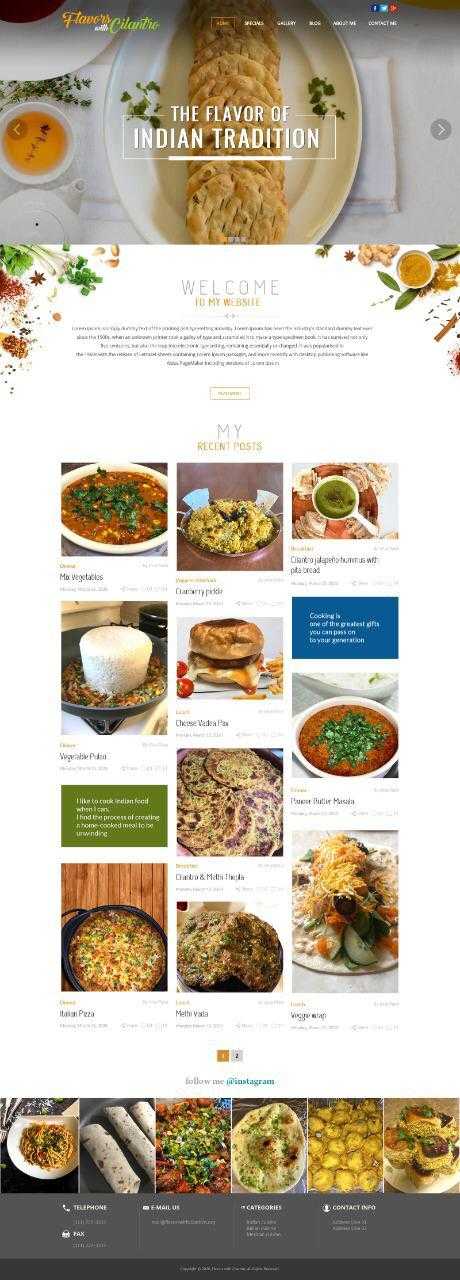
we want to start a food blogging WordPress website.
your required design is as below:
Page 1 : https://snipboard.io/oe4fkx.jpg page 2 : https://snipboard.io/4Lq82c.jpg
if there is any related design in your demo than we want to buy your theme.
Please suggest us your demo design link.
Thanks Pratik Patel
Hey Pratik,
There’s no pre-made demo that’s like that design, though by using the page builder a design similar to that could be achieved.
Cheers
Hello there! Can I know what is the Font Name of the text “Salient WordPress Theme ” &
“Beautiful & unique websites made easy”
shown in this page header?
Link: http://themenectar.com/promo/
Thank you!
Hey chsa11!
The main heading is “Neuton” and the sub heading is “Roboto”.
Cheers
Does it supports RTL ?
Hey ahmadhilali,
Yes, Salient includes an RTL stylesheet
Team Awesome, heyyyy there. I have a quick question and maybe there’s already a sample or demo in existence for what I’m looking for. If I have a 3-column setup, how do I add a vertical line between columns 1 and 2?
It would look something like this… 1 | 2 | 3
Hey arteest,
If you’re using a text block in the column, you can use the design options tab for that: https://ibb.co/fSMXcwX
Hi Phil, same here like marcodegroen above me. Out of nowhere the page doesn’t save any salient settings in the panel und can’t save edits on pages. Plugins and everything else is the same as it used to be when it worked. :/ Could it be WP 5.5.1?
Hey TheChuckOne,
Salient is compatible with WP 5.5.x – just ensure that you’re using a recent release of the theme. There are many plugins which are not compatible with WP 5.5 that could cause loading issues in the admin. Have you tested by disabling all third party plugins for a moment? You can also install the jQuery migrate plugin from WordPress to correct javascript related issues to WP 5.5: https://wordpress.org/plugins/enablejquerymigrate-helper/
If you can’t find the root cause, and that plugin doesn’t fix your issue, please reach out in regards via the contact form on my author page with temporary admin access.
Cheers
Hi there, I got a problem. Our of no where the mobile version of the theme is not working anymore. The theme also got loading problems. Any idea why this is? my website is www.marcodegroen.com
Hey marcodegroen,
There’s a javascript error coming from your plugin “asset cleanup”. Please try to temporarily disable that to test.
Hi there, I have deactivated and even deleted the plugin. But no result yet. Anything else you can suggest?? Its just not loading.
Hey,
now is looks like the core WordPress jQuery (JS Library) is not loading. If you’re not manually dequeuing that from a child theme then something is wrong.
Have you tried to also clear the cache from your hummingbird plugin since removing asset cleanup?
Hey there, yes I have cleared the cache after removing the asset cleanup. I did install the jQuery Updater plugin just now. After that the site because visual again, only it still has loading errors. As far as I know I did nothing with the wordpress jQuery. Any ideas what I should do now??
Hey,
a plugin like that shouldn’t be required to load jQuery. Once you find out what’s preventing it from loading in the first place within your setup, the rest of the errors should also resolve. Have you tried to disable all third party plugins yet to test?
Hi there, I am having a ton of strange errors on my theme and the message: no menu assigned while i already did that. Any idea what is causing these coding errors? please check: https://www.marcodegroen.com/
Hey marcodegroen,
I’m not seeing that message from my end and can’t immediately notice the strange coding errors you’re referring to: https://ibb.co/m4VY6t7 Can you let me know where the errors are occurring and what they say?
Thanks in advance
Hey there, I decided to ask my hosting to restore a back up. so now its gone. not quite sure what caused it. thanks for checking.
Hey marcodegroen, i’m glad that you got it sorted.
Cheers
Hey dude,
Hope you are well. Is there an issue with Salient options panel > blog > functionality tab via the ”Related Posts On Single Post Page” option?
My excerpt is not showing when the style is set to classic enhanced or material.
I’m using Version: 12.1.2
Many thanks in advance!
Hey collier_creative!
The related posts don’t use an excerpt by default. To add that in, you would need to copy the function titled “nectar_related_post_display” in salient/nectar/helpers/blog.php into your child theme for modifying.
Hello! I’ve taken over this website uadayprogram.com. How can we get the vertical scroll bar that normally appears on the right side to appear? Right now it’s gone. Right now it’s missing and people are having a difficult time scrolling down. I also noticed that I can’t scroll down on my android device. It appears to be stuck. Thanks.
Cheers
Hello! The Heebo font is missing from the “Custom Heading” font family list. Can this be fixed? This is the font: https://fonts.google.com/specimen/Heebo?query=heebo+
Hey xperfomance!
The custom heading element is a core element of the WPBakery page builder, which only provides a small list of Google fonts. Unfortunately there’s no easy way to add new fonts to that list. However, you can find the font “Heebo” in the Salient options panel > typography tab and assign it to one of the headings.
Good day is ken burns now working on mobile? my client really needs Ken burns to work on mobile
Hey SimbotiDigital,
add this into the custom css box located in the Salient options panel > general settings > css/script related tab:
@media only screen and (max-width: 999px) {
.nectar-slider-wrap .swiper-slide .slide-bg-wrap {
    transform: scale(1.35)!important;
    transition: transform 11s cubic-bezier(0.1,0.2,.7,1)!important;
}
.nectar-slider-wrap .swiper-slide.ken-burns .slide-bg-wrap {
    transform: scale(1)!important;
}
}
Hi Guys,
I’m using a red bottom shape divider.
Is it possible to set a border in that fill with a different color?
Hey Eli_mo2020,
add this into the custom css box located in the Salient options panel > general settings > css/script related tab:
.nectar-shape-divider path {
   stroke: #009aff;
   stroke-width: 4px;
}
Cheers
thank you!!
You’re welcome, Eli_mo2020
Hi there, On this page: https://pluutpartners.nl/ is it possible to get the testimonial blocks more wider?
Hey workforceit, add this into the custom css box located in the Salient options panel > general settings > css/script related tab:
@media only screen and (min-width: 1000px) {
.testimonial_slider[data-style=multiple_visible] blockquote {
    width: 55%;
}
}
Hi there, On this page: https://pluutpartners.nl/blog/ I’ve multiple blogs but the 4th blog on this page is from July 2nd so it’s not in order of date. Do you have any idea why the first blog is the newest and it goes well until blog number 3, but the fourth one is newer compared to the 3th one?
Hey workforceit,
Can you confirm that none of those posts are set as sticky posts https://wordpress.org/support/article/sticky-posts/ and that you don’t have any plugins active which are altering the post order?
Salient is such a good theme and your always making progress with every release. Unfortunately, it’s hard to see what’s coming up in your roadmap.
In saying that, given the state of the world, I wonder, will your next focus area be on the WooCommerce styling/customisability? For example, will you do more work on the product, categories and checkout pages to keep your theme competitive for store owners?
Hey reganmcgregor, I appreciate the kinds words.
The next release will indeed be adding new WooCommerce functionality. We run public beta’s for weeks before
major releases – if you’d like to check out the next release early, please reach out via the contact form on my author page and I’ll get a copy
to you once the next round is ready
Hey apinzon,
You can use the column responsive options to define how they display on mobile viewports: http://themenectar.com/docs/salient/page-builder-columns/#width
Cheers
Hola Mr. Nectar,
Do you know any plugin to replace background image only in mobile?
I would love to see this functionality in the future in the theme for example: https://share.getcloudapp.com/WnuJmXbXThank you.
Hey nocomments,
As of now there’s no option to upload a separate image for row BGs on mobile. However, i’ve noted the idea on the wishlist
Thank you. I would love to see in the next updates.
Hi, I’m having bootstrap vulnerability issues report from Qualys, do you know how to fix this?
Hey YdigitalAsia,
Salient doesn’t include bootstrap. Please reach out via the contact form on my author page with more specific details: https://themeforest.net/user/themenectar