

59157 comments found.

Hello,
I would like to ask some presale questions:
1) Is your theme comptatible with the latest Wordpress Update (5.5.1) ? 2) Is your theme compatible with Dokan Lite and Dokan pro plugin? 3) Is there any demo that I can see the layout of the Dokan Vendor page, with your theme?
Thank you
1,2 – yes 3. https://redokan.wpsoul.com/store/ambrella/
For a regular user on the website, I click on the “submit a deal” button and I fill out the form. Everything works great! However, when click on the user profile in the top-right corner and click “Edit My Posts” I do not see the post anywhere. Please see here: https://imgur.com/qlACJRo
I’ve created a FH Frontend Pro. I tried creating “Post” and “vc_grid_item.” Neither one helps me show pending posts for a user.
Do I need to create the form another way?
Hi.
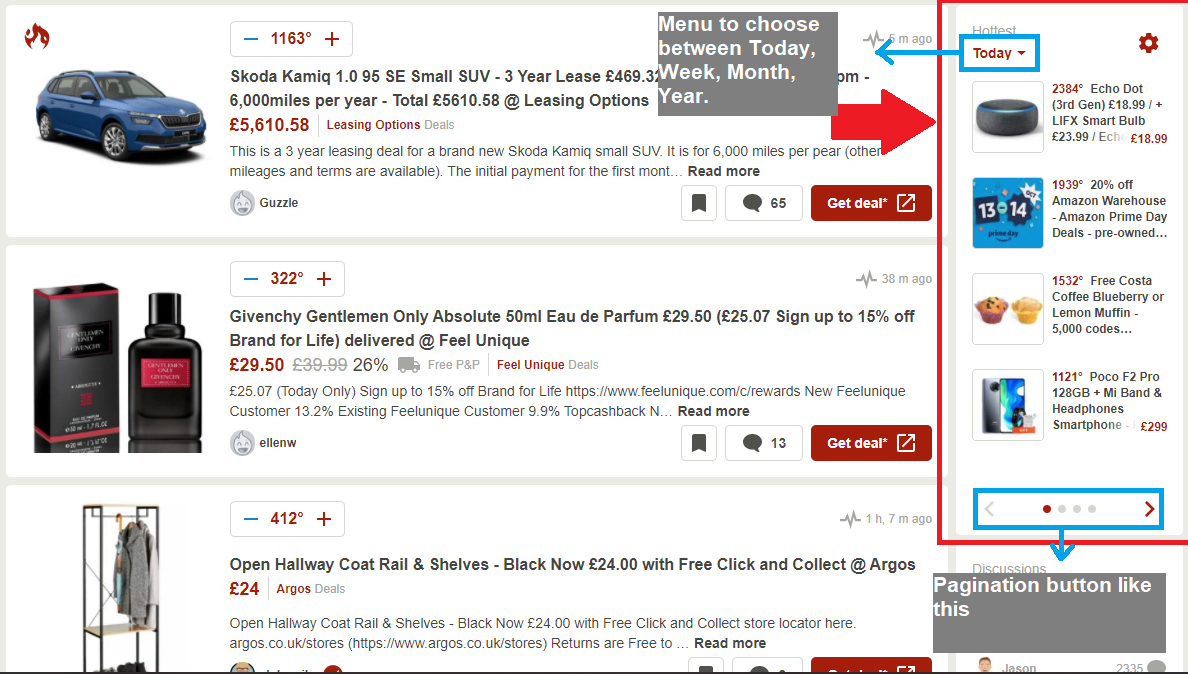
1) Is there any way to implement what is shown below?
https://i.gyazo.com/f1b31f06de4bd01cafcea8689009464c.png2) The best I could do was this:
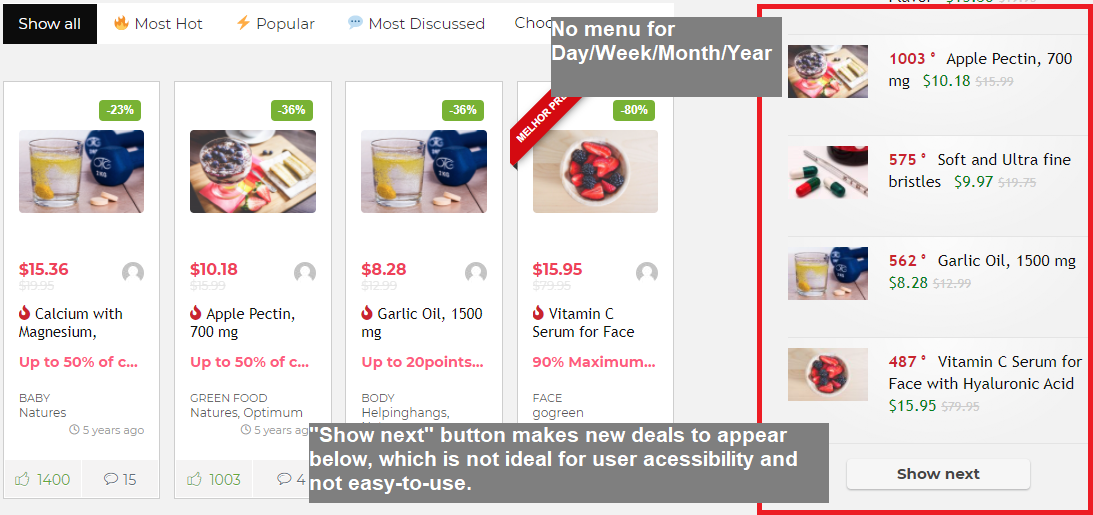
https://i.gyazo.com/a5028efcc8d1b88310e4413b74761622.pngBut
2.1) the “Show next” button makes new deals to appear below the existing ones which is not good for user accessibility and it’s not easy to use. Something like 1) would be great.
2.2) there is no Menu for Day/Week/Month/Year.
Best Regards.
you can make custom filter panel and choose own pagination type in options of module. Please, update your support if you need customization help
i want to create my own custom page and URL to but i can not create custom URLS for my post kindly assets me to resolve my problem.
How do we translate in compare section? loco does not work
https://hizliresim.com/BrbwsMplease, write from your buyer’s account. We don’t support not official and nulled versions of theme
Hey. Did an update of Re:Hub and now the Theme Options page is stuck on General Options (trying to get to the badges page). Tried reinstalling but have the same issue.
And, now it’s working – never mind. Great theme BTW!
rename buttons
Hi. i try to rename a button in the recash theme.
the “BUY IT NOW” button in the post layout
I tried using the “SAY WHAT” Plugin in, but i couldnt find the needed original string and domain in the code.
could u help me out here?
or another simple solution?
greets Max
theme option – localization
There is a product we have added before with the Offer module. This product has 5 affiliate links. We just want to change the price and affiliate link of one. How can we do this with ImportWP?
https://prnt.sc/uxwgnmhow to update prices and how to import for price comparison is described in our video. http://rehubdocs.wpsoul.com/docs/rehub-theme/affiliate-settings/bulk-import-of-offers/ You can update offers which you import early via plugin, you can’t update prices if you posted offers manually without importing them
Hi, I did a Rehub Theme update and I get this error “Sorry, the content area was not found in your page” when I go to a page that I built just before. Any idea how to fix this?
Because you enabled specific template without content area in page attributes
A sidebar has now appeared on the the page too. When I look at the Elementor page settings, these: - Content with sidebar, - Full Width Content Box, - Full width of browser window, no longer appear under the templates dropdown. But they do appear when I go back to the Guttenberg editor.
So to test, I created a new page, saved, opened in Elementor. still couldn’t see them, then went back to Guttenberg, and no page option show in Guttenberg (but they do in another page) I dont mind issues, but inconsistent ones worry me. ;-(
Hallo Sizam, I think with the update of the theme I lost the button of the coupon grid in Elementor. I don’t understand why I can’t manually activate the button under the post. See the screenshot. I cleaned the cache but the button does not show up. I have updated all Rehub en Elementor plugins. Do you have a clue what the problem may be? https://snipboard.io/wvI2Cu.jpg
Because you disabled them in theme option – loop customization
Aahh. thanks a lot. Now it works 
Hi there, how can I make italic text to normal text on the theme. I’m currently using re:think, re:cash, also re:direct on my websites. Can I change all the italic text to normal text on the theme?
Please, update your support if you need our customization help
Hello there
Can i show large image in front page post list please refer this ss https://postimg.cc/bDyYrZN6
Regards Lakmal
You can choose other post module for this. Each post module has different size of images
Hi, when I am importing products from csv file using the “ImportWP” plugin, the “uncatogerized” category is getting added in addition to the categories listed in the csv file. For example, my csv file contains category as “Phones>Redmi Phones” for a product. When I run the ImportWP tool, the Product has “Phones, Redmi Phones, Uncategorized” categories. Please advise.
You missed to send screenshots how you import them
Hi, please find the screenshots at https://www.bestmioffers.com/wp-content/uploads/2020/10/Office_bmo_category_issue.png
Could you also please let me know if it is possible to import the “slug” using the ImportWP plugin. I couldn’t find that option.
Ok. I will check issue.
You can’t import slug of categories, they are created automatically based on category name.
Thank you. Is it the same with the slug of products/posts?
Yes
OK. Could you please let me know how to get rid of the white button (https://snipboard.io/GHcYsy.jpg) beside the “BUY NOW” button on product page (“Default full width 2 column” layout)
Screenshot link : https://snipboard.io/GHcYsy.jpg
Link to the page, in case needed, https://www.bestmioffers.com/product/test-1/
.woo-button-area .button_action{display:none}
you can place this in theme options – general options – custom css
Worked like a charm! Thank you very much boss!
Hi, I have created variable affiliate product page, using the “Hidden Products” technique suggested in the rehub docs. It’s working as expected. I am wondering if I can stylize the variations, e.g. blue background with white fonts.
https://snipboard.io/j8PSzW.jpg https://www.bestmioffers.com/product/full-width-advanced-product-layout-variable/instead rh-cartbox, you can use other helper classes. For example
rehub-sec-color-bg
http://rehubdocs.wpsoul.com/docs/rehub-theme/advanced-tips-and-customizations/helper-classes-and-functions/#Formating_and_stylesDid you get a chance to check the issue “when I am importing products from csv file using the “ImportWP” plugin, the “uncatogerized” category is getting added in addition to the categories listed in the csv file. For example, my csv file contains category as “Phones>Redmi Phones” for a product. When I run the ImportWP tool, the Product has “Phones, Redmi Phones, Uncategorized” categories.”
Yes, it will be fixed in next update of addon
Great, thank you very much!
Also, please check the “short description (post_excerpt)” is not getting imported via ImportWP.
How do I add only a star review no comments? https://kalasbonusar.se/spela-com-kasino/
Please, update your support if you need customization help
If I purchase this theme one time, Can I use this theme on multiple domains? if not then, is there is any licence like GPL?
2nd, I see multiple demos with this theme, if i purchase this theme, Can i access all of the demos?
3rd if I can install this theme on multiple domains, can I use separate demo for separate domains?
1. You can activate on 2 sites – main and test site. You can deactivate license and activate on another site unlimited times
2. Yes
3. See 1)
Add Deal – RH Frontend Pro not working.
I added a form to the “Add Deal” page, and I have it setup to create “bp-email”. When I fill out the form to submit a deal, it goes to the “Email” section in the WordPress admin page. However, I can’t open the posts like the ones that were imported with dummy data.
See screenshot here: https://imgur.com/BJvGMe9
Bp-email is not for making posts. Use “posts”
I tried that too. Same result.
Please, send all details, links, test account
Please, follow this guideline and provide us all required information, screenshots what you did, links on pages, so we can check your problem and help you faster
https://sizamtheme.support-hub.io/articles/how-to-write-to-support-if-you-need-technical-helpI just tried “posts” again, and it worked. it saved a draft to my Posts. However, is there a way to get this to go to the “Email” section instead, so my “Posts” section doesn’t get flooded with too many?
You cant send it to email because this section is not for posts. Its for buddypress email templates
Due to recent updates, is the plugin “RH Grandchild Custom” still necessary? It looks like it’s messing up rehub+repick.
Remove it. Repick child also must be removed. Theme option – general – theme subset and choose repick
Great, now everything is esier to manage, thank you.
Where do I put custom php files that used to be in the RH Grandchild plugin “inc” folder?
In blank child theme. Please, check our documentation or update your support if you need customization help
Hello Sizam,
is there any way (customization, next theme update) how to add Bottom Description also for Tags in Products of WooCommerce?
- http://prntscr.com/uxlelg – product brand has it - http://prntscr.com/uxlfor – product category has it - http://prntscr.com/uxlgjc – product tags bottom description is missing
Thank you for you advices
No, product tags dont have it. Tags are not for such purpose, in most cases you must close it for indexation. Possible only via core customization. Here is email of customization team webbizdirect@gmail.com
Hi,
I need to change the default light blue color on buttons, text link hover and many other places on rehub revendor theme woocommerce marketplace/ wcfm. The default blue colour does not change when adjusting it in theme colour options. https://prnt.sc/uxkdrn
1) On vendor store page chat and inquiry button is blue – want to change it to red text on white button. Chat box is blue . Change to black 000000- woocommercemarletplace.
https://prnt.sc/uxkatzVendor dashboard – menu text hover is blue. Want to change it to red#c80000
https://prnt.sc/uxkdrnI contacted wclovers about this, but they said it is a theme setting. https://prnt.sc/uxkpm5
Thanks!
You can change colors in setting of WCFM
This does not work – I contacted wclovers about this, but they said it is a theme setting. https://prnt.sc/uxkpm5
Please, send screenshot where you chsnged settings, ehich settings you added, link on site, test account, etc
Please, follow this guideline and provide us all required information, screenshots what you did, links on pages, so we can check your problem and help you faster
https://sizamtheme.support-hub.io/articles/how-to-write-to-support-if-you-need-technical-helpHere I changed the: 1) store style: https://prnt.sc/uxnhqg 2) dashboard style: https://prnt.sc/uxnicw 3) chat box colours: https://prnt.sc/uxnj07
Let me know if you need admin access.
Thanks for your assistance!
Ok, clear. these blue buttons are coming from WCFM, theme doesn’t change them
https://wysjouvleis.com/wp-content/plugins/wc-multivendor-marketplace/assets/css/min/store-lists/wcfmmp-style-stores-list-classic.css?ver=3.4.4this file has styles for button and it’s not from theme. You can write to WCFM developers





)


