5515 comments found.

hi, on mobile view the prices and text are not in the right position please see here https://ibb.co/Hn9S0QN
is it same for you guys?
Hi. I tried to replicate but I cannot – this is what I see https://prnt.sc/106o8zu
There is a css as well for responsive for smaller sizes
@media only screen and (max-width: 568px){ .date_duration, .date_interval, .inv_exp, .inv_data, .inv_legend { width: 100%; } }
You can change this in your end to see if it applies to your simulator.
Thank you
‘Hi guys  thx for taking time,
you have not replicate it, i am using custom price and booked for 7 nights and used instant booking! that option does not exist on your demo i try to look for it.
Hi. I undestand. If that css does not change, You can send me the same invoice details in support and I will check the css directly there and make sure it is covered in the next update.
Thank you
Hi Guys,
if i go to listing in dashboard i can see this message: Please add properties from front end interface using a user account with subscriber level registered in front end.
now if i want to add “Featured” to a listing i need to do it in dashboard > Listing
So my questions what can change in a listing in dashboard and what can i NOT change?
Hi Birken, You can make featured form wp-admin -> edit listing. This option in front end works if you have a memberhsip enabled, but since you are single owner, you do not need it. You can change text, categories, values for fields added, images. You cannot edit custom price, ical, custom bookings, extra booking options. Thank you
good morning do you have a css fix for the “Listing Icon Area Design” so the text align underneath the icon like this please > > https://ibb.co/7t5t429
Hi, I tried to look for a solution but I could not find an easy one, just with css. If I find something, I will advise. Thank you
any solution please
Hi, Yes. Add this custom css
.custom_prop_header {
    display: flex;
    flex-direction: column;
    text-align: center;
    float: left;
}
Thank you
nice it worked fine
Perfect. Thank you for letting me know. Anna
Hi, I have your theme for a while now and its great!
The plugin My Private Site comes with it. I have been able to make some individual pages public but now I can’t. I am perplexed because it says I need add ons to do that. Was there a change in the plugin? Is there another recomended plugin that I could use?
Hi Denis, Thank you for the message. I never heard of My Private Site plugin – I assume you have it separately because for sure it is not part of our theme. We offer Bakery, Ultimate Addons and Revolution Slider premium plugins included. I do not know how it works unfortunately to guide further, but perhaps you can double check with the plugin developers if they changed something in their code.
We will gladly help with theme included plugins or theme features if you need our assistance. Please use our client support http://support.wpestate.org/ to help with theme features or our included plugins. Our standard office hours are Monday – Friday, 9AM-5PM Europe timezone. If you wish my assistance to register in support please send a message from here – https://themeforest.net/user/wpestate
Thank you
Hello,
on the single page property on the booking form here https://ibb.co/SfJJXp7
is Book Now text title and on the button. how can i make these separately as i want a different title text and different button text?
Hi. Please try first to change with loco translate plugin – https://help.wprentals.org/article/how-to-modify-theme-text-in-english-with-poedit/ The labels should be in theme (child theme)
Thank you
hello, sorry for my bad explanation. the title and button have same text i cant have different text. so how can make them different?
Hi. I checked what you already did and it is correct. It seems that as long as the label is the same, the translation will replace it in both places. So in this case you need to edit the title separately – in libs/help_functions – https://prnt.sc/105rmoo
Thank you
super thx
good morning,
how can i make the listing images crystal clear?
i have an identical image in size and weight and it is not clear on wp rentals please see here https://ibb.co/k1myLxL
How can i fix this please.
Hi. We use a thumb version of the image you upload for speed. Thumbs are generated based on wordpress resize rules (height, width and crop). The images seem to be different width/height in the screenshot, so if you wish to use the same image width/height you will probably need to disable the thumb. In general this is not recommended because of speed.
Without seeing the exact images I cannot tell more. So please open a ticket and send the ticket id here to check the 2 pictures live and advise how to resize the theme thumb to the same as in the other theme.
Thank you
Hi i need to say first that your Support is outstanding i have lots of themes and plugins and no other has your response like you guys.
The pic is same size is just my screenshot that i made is from two different images.
i understand with thumbnail and speed but when renting properties the images is what sells so is the most important?
here is the ticket: #196559
Hi. Thank you. I will check tomorrow the ticket. Thank you
main image on listing keep disappearing randomly very weird? just notice if i change custom price, image dispears in Listing Media?
any ideas why?
Hi. Please check if you have the latest update https://help.wprentals.org/article/detailed-change-log/ Thank you
all up to date:
i have child theme installed:
Current Theme: WpRentals Child themeVersion: 2.7
WpRentals Version: 3.2
WpRentals -Theme Core Functionality by wpestate – 3.2
Hi. 3.2 should have the update for this. I will go to the ticket you opened to check in your site. Thank you
wait i have change them logins
i have updated the ticket #196522
Hi. I used my test account. And you do not have the theme update. Please see the ticket update. Thank you
Unpacking the package…
Installing the theme…
Could not copy file. ...........wp-content/themes/wprentals/libs/plugins/revslider.zip
Theme installation failed.
There has been a critical error on this website. Please check your site admin email inbox for instructions.
Error Details
An error of type E_COMPILE_ERROR was caused in line 4 of the file …./public_html/wp-content/themes/wprentals/functions.php. Error message: require_once(): Failed opening required ’....../public_html/wp-content/themes/wprentals/libs/plugins.php’ (include_path=’.:/opt/cpanel/ea-php74/root/usr/share/pear’)
i found the problem is was no storage left on server fixed now trying to update
Hello! Is latest theme version compatible with Woocommerce 5.0.0?
Hi. We use in our demos 5.0 and with test merchants and it has been ok. Thank you
OK! Thank you
hi, on Listing Page underneath the header image how can i add my own info there. please see screenshot. https://ibb.co/tDcjmTh
i want to add Bedrooms, bathrooms, Pool, AC, Free Wifi icons and text?
Hi. You can enable custom icon area https://help.wprentals.org/article/theme-options-listing-page-settings/ The fields you wish to show must be default or custom property fields.
Thank you
Hello,
i am a bit confused, i am using WP Rentals as one travel agent so i control all the listings. now i just installed woocommerce so i wonder how the work flow is?
how do i accept a booking where do i go? do i go in to the listing thru wp rentals or do i go thru the woocommerce orders?
could you please explain in a simple way what is the easiest way to control bookings payment etc…
Hi birken
The wp-admin area is used to set the merchants you wish to use with woo commerce. Woo has extra options from its plugin to track orders. Money is sent to site admin, so in your merchants you see the money you receive.
As owner, you manage your listings in dashboard. Same place you manage your bookings.
Since you are a single owner, you limit submit to your account (can be the admin account so it is easier to switch between theme options, when you need to and owner dashboard). Help https://help.wprentals.org/article/use-wprentals-for-a-single-property-single-owner/
As admin, you control the submit form from theme options. Help https://help.wprentals.org/article/1-30-how-to-manage-submit-form-fields-and-mandatory-fields/
As owner, you add the listing from add listing in front end – and then manage bookings in My Bookings (same dashboard). This help is currently in process of being updated with the new dashboard design but it is the help that explains all options for a booking received https://help.wprentals.org/article/issue-invoice-reject-booking/
Thank you
hello, i don’t understand i just made test booking with woocommerce offline credit card payment successfully.
1. i can see the booking and i have now issued an invoice successfully. So Status is now “Invoice Issued”
2. Now where do i confirm that booking manually? i can only see these buttons: Delete Invoice, Reject Booking Request and Send reminder email!
Hi. if I understand right, you use offline payment which means you do not get the money transferred through woo instantly.
In this case, check the woo order status in wp-admin. Woo orders must be with status processing or completed (which is what happens with automatic merchants) If it is an offline merchant, I assume woo needs you to make the order status manually to processing or completed.
Since money is received as admin, this can be done by who gets the money (site admin)
I do not know the exact add-on you use, but in general these things can be confirmed with the documentation from woo as well. For example, Direct Bank Transfer from Woo explains this as well https://prnt.sc/103m3tg
Thank you
The offline woo payment plugin i use is set on processing now, and made a test user that just paid for deposit. and when user now goes in to my-reservation page it says Confirmed?
Now i as admin i need time to process the deposit payment first manually, and then enable it as confirmed payment of deposit Right?
i cant understand the workflow to handle bookings invoices and so on. should i use woocomerce for it or some your system as sometimes i get message saying Do NOT edit booking details from admin!
for me is ok if only need to use woo for everything but i need your expertise advice!
Hi. I will explain as best as I can.
You should not put processing as default status if you do not want confirmed to show before you process the payment. So put on hold in your plugin. Process the payment and go to wp-admin > Woo commerce -> Orders to confirm the order paid (change status manually to processing)
That is what is needed for woo commerce payment system.
Do not edit anything in wp-admin -> bookings
You do not need to edit anything in My Dashboard – My Bookings either to confirm a payment.
Thank you
nice i did test order and went in to orders and change it to processing.
Now as a renter i can now after adding my credit details go to my-reservation page. And there i can now see my invoice as a renter and is a bit confusing please see here https://ibb.co/3fkLNrt
Hi. Ok, glad that worked.
In details you have default price per night (as standard option), but then the custom price details by day are listed if they apply. The custom price shows for each day booked, if it applies.
Service fee refers to admin service fee – https://help.wprentals.org/article/1-20-how-to-work-with-deposit-fee-and-service-fee/ It is not related to credit card directly. It can be set to 0 in theme options and will be 0 in invoice.
The label is correct, because the price is calculated from custom price in that invoice. If you wish to change default labels you can use this help https://help.wprentals.org/article/how-to-modify-theme-text-in-english-with-poedit/
Thank you
Did you look at my screenshot? https://ibb.co/3fkLNrt
1. why is showing Confirmed when is set to processing?
2. why is it showing custom price? that is confusing for customer it should only show what period they pay on invoice. is very normal that holidays rental has different prices so is no need to have that! (how can i remove it?)
3. subtotal says 7x custom price. here custom price should show the price or nothing at all. (how can i remove it?)
4. As it says confirmed at the top so why is it saying “Reservation Fee required” how can i change?
Hi Birken,
I checked the screenshot again. Please see my updated reply
1. There are 2 statuses – woo and booking.
Processing is a default woo status when making automatic payments. So it is an order status that makes booking confirmed. Processing or Confirmed are the 2 statuses in woo that make a booking confirmed as well. But these apply to woo only (not bookings)
Theme bookings can be pending (waiting for confirmation or payment) and confirmed.
If a woo order is processing -> theme booking status is confirmed
If a woo order is on hold -> theme booking status is pending
2. Custom price shows when you have custom price set for the booked period. And in your screnshot you have that.
In price details we show price by day, if it includes a period with custom prices, as sometimes there can be different prices for each day
Custom price label shows when you have custom prices . In your example https://prnt.sc/105r1eu – matches one of the custom prices – https://prnt.sc/105r3rp
if you have only standard price invoice looks like this https://prnt.sc/105r5io
we recommend keeping this if you have custom price enabled. I was not able to find the exact code to delete, in your site either. so please share an account from your site with the exact invoice to check with development team how to delete.
3. If you have custom price for a period, it will show custom price as each day may have a different custom price. Without custom price will show like this https://prnt.sc/105r5io “custom price” is text found in .po You can translate it with loco translate and put a blank text (as workaround). I cannot show here the exact steps. The help shows how to use loco to make this. If you need our help, please open a separate ticket for this, with the user account that has that invoice to check the translation applies correclty.
4. Reservation fee always shows always. It is not connected to booking status. Can be 0 (if you put 0 in theme options-> bookings settings) or a different value if you put a value different than 0. If you wish to hide use this css https://prnt.sc/105r8rf
.deposit_show_wrapper.total_inv_span { width: 100%; display: none; }
Thank you
thx guys,
i am so bad to explain by writing, i understand what the things are, but my questions was actually why some text is there.
for example the text that says “Has custom price” for a renter to see that on a invoice is very strange?
most of the stuff i try to explain does not make sense on invoice and in renters admin area, ex. confirmed when is not etc…
i will try to see if i can solve it…
Hi. I understood the questions, and did my best to explain. I hope I was able to explain well enough. If you send the link with the invoice I can try to remove the text, but the text has sense when used with custom price. Removing it may confuse (you would see 7 days x …. – ... = blank)
Thank you
ok, i think on the invoice is no meaning to show custom price when is not used. customer don’t care about custom price they already know the price when they click book now. so is just confusing message for customer.
i will remove it myself in lang file. just a pointer for you guys as this is the best rental script out there.
Thank you. We will check , but clients have asked to have as much details as possible, and we have to keep that in mind for any changes. But thank you for the feedback! I appreciate it.
i have a problem when using booking without login. i get stuck on sending request all the time so i tried it on your demo and is the same there also see video here https://www.loom.com/share/e03b3c76bb9c48529255123919e78fd7
Hi, Thank you for the message. I think it may have been cache related after a recent update. I cleared the cache and it is working https://prnt.sc/103g21p If you need further help, please send us a ticket for this to check the exact message you have. Thank you
hello i have two questions:
1. in dashboard > Listings > Categories here https://ibb.co/cFj4hcc i have added some categories but in submit new/edit listing area i cant see the categories anywhere?
2. also at When is your listing available Edit Calendar how can show more then one calendar there i need to show 6 month at least!
hello, regarding above questions:
1. i just found the where to choose the categories in edit-listing > Description > Category and Listed In/Room Type > and in dropmeny i can only choose one? as in wordpress dashboard > Listings > Categories here https://ibb.co/cFj4hcc i can choose more then one. So why is it not possible to choose more than one in your system?
2. in edit-listing > Calendar > “When is your listing available” here how can show more than one calendar, i need to show 6 month at least!
Hi. For the dropdowns, the theme does not support multi-check (wp-admin is wordpress, and that is why the categories show as multi-check, but as submit and search we have only 1 select option). The calendar months are managed from theme options. Help https://help.wprentals.org/article/theme-options-booking-settings/#month_number
Thank you
good morning, how can i add different deposit, some i need full payment and some 25% deposit and some only booking request?
Hello, Thank you for the comment. I am afraid we only have 1 deposit value – help https://help.wprentals.org/article/1-20-how-to-work-with-deposit-fee-and-service-fee/ Thank you
i don’t know if i explained properly as that is weird if users add their own listing they can’t add their own deposit Fee??
or is it anyother way as is a very important thing every owner have there own rules?
Hi birken, The theme is built for administrator to get all money, so owner cannot decide deposit I am afraid. Only site admin can. And as option, we only have 1 deposit value possible, which applies to all booking requests. Thank you
hi, how difficult will it be to be able to set different deposit for listings?
Hi. It is difficult because the entire formulas include 1 variable for deposit now. The change involves a more complex modification (create the deposit by property and then change the entire booking formulas since deposit is used as a main key feature)
The best I could guide is this help about our existing code, but the change you wish to make was not estimate before,so we would not be able to give directions specific to that I am afraid
Thank you
Where is the custom css file in the theme folder?
Hello. The theme custom css is not in theme folder. Theme folder has style.css and some other .css file
Custom css is in theme options.
Thank you
Pre-Sales Question: Can your theme do something like this website? https://wearespaces.com/
Hi. I cannot know all the differences, but we do not have prices for hour / half day / full day as in the example I saw for sure. There may be more items. You can check our dems or ask me exact features you need to have, and I can confirm if we support them or not. Thank you
Hi, thanks for the feedback. Briefly, below are requirements from my client: 1) Overall goal is to provide a platform for venue or space for specific events 2) Venue/space owner will list their available space for rent for specific function (i.e. hall, meeting and conference rooms, ballroom, training and seminar rooms , Galleries, nightclub, etc.) 3) Public user or organization can search based on specific criteria (i.e. location, room size, available facilities, etc.) 4) Booking and payment can be made online.
Hi, As far as I could tell on that link you shared, booking has to work in a specific way and we do not have those price options.
From your list, users can add their listings, but payment goes always to site admin. Submit is 1 form, so the list of items would be a list with all the categories as in our demo.
Search can be configured, for specific types, with your chosen fields (features and amentieis, room, location are possible)
Thank you
Hi, is it possible to create an object which can be ordered by hours or days? So my customer rents trailers which can be ordered by 4, 8, 12 hours or 1,2,3,4,5,6,7,8,9,10,11,12,13,14 days – Is there any option that 1 object can be ordered like my example? Greets, Justin
Hi. it is not possible I am afraid. Thank you
Could I use this to build a self storage unit website. Including Monthly bookings and reoccurring subscriptions and inventory ?
Hello Rob, Thank you for the message. We do not have these options. Thank you
i am using menu type2 and Center but menu is not center below logo why? please see here https://ibb.co/7jJryw2
Hi. Center is for logo position. Menu is left as on right we use login and / or submit button for not logged in.
If you do not plan to use the right elements, I will try to help with a custom css solution just for your setup. But our clients use the login in general. Thank you
why not use the login & sign up in top header if possible? yes please send me css for center the menu
Hi. I am confused. If you wish to have the login and submit you must enable them. In your screnshot they are not https://ibb.co/7jJryw2 They are by default with demo, so only you could have removed them manually. To add them back you can use this option – https://help.wprentals.org/wp-content/uploads/2016/08/show-login.png
For the css, if you will use login centering only men will not look ok. But this is the css
.header_wrapper.header_type2 #access { text-align: center; }
thank you
super thx for the css, sorry for my bad explanation i mean to add login and signup in the small top header above header, i that possible?
Hi. we do not have a theme option for top bar. You can edit code and move code from current position to top bar php file. These are directions from our other theme, but it is the same file http://help.wpresidence.net/article/move-submit-property-button-in-top-bar/ The code for login has to be moved too.
Thank you
that is fantastic, should i put the top_bar.php in child folder?
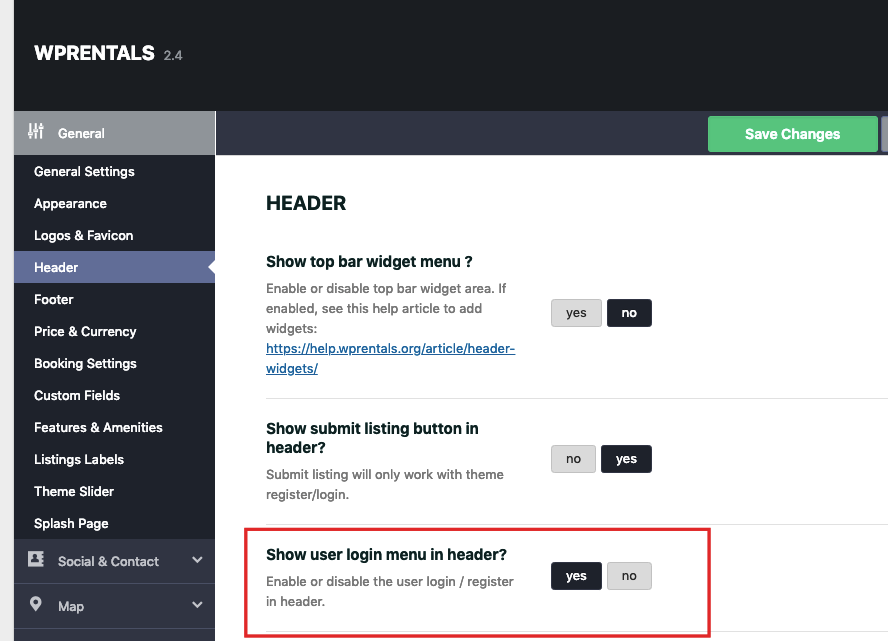
this is how my code look like in top_bar.php and i have enable also show user login in in header, still cant see the login in top header?
<div class="top_bar_wrapper <?php echo 'topbar_show_mobile_'.wprentals_get_option('wp_estate_show_top_bar_mobile_menu',''); ?>">
    <div class="top_bar">
        <div class="left-top-widet">
            <ul class="xoxo">
            <?php dynamic_sidebar('top-bar-left-widget-area'); ?>
            </ul>
        </div>

        <div class="right-top-widet">
            <ul class="xoxo">
            <?php dynamic_sidebar('top-bar-right-widget-area'); ?>
            </ul>
        </div>
        <?php
                        if (esc_html(wprentals_get_option('wp_estate_show_top_bar_user_login', '')) == "yes") {
                            get_template_part('templates/top_user_menu.php');
                        }
                        ?>
    </div>
</div>
Check if you enabled login as well from theme options. I cannot advise more here as I cannot check the code without doing it myself. Thank you
i have sent you login details
Hi! I would like to add contents for SEO for each search page per categories, area, city. How can I add contets for each of them?
Hi. We only have 1 search page. I assume you mean taxonomies/categories? By default you can add category description (in edit property category) and that is read as description in search results. With SEO plugins you should be able to enhance this standard wordpress options. Thank you
Hi Again, I tried your adviced and ad description for property category (also tried for cities) but description was not appear. Could you please help me?
Hi. For SEO the theme description is included in the page source – you can look at the page source and look for the description you add. The search engines look for the source and that description will be read.
Here is an example
Edit category and add description https://prnt.sc/105rg68 Save and look in the category page source – you will see this
<meta property=”og:description” content=”some text description ·” />
Which is what search engines look for.
Thank you
Hi Again,
Thank you for your respond,
This is only for meta description. I would like to add content to visitor can reach and read while searching about cities. It also power our SEO. like: https://prnt.sc/105rxpb
Is it possible in this theme?
Hi, The description is only in source.
The categories can show content from the page ID (a page you create in admin -> pages). – https://prnt.sc/106okv6
If you wish to show the text as it is, you can use this workaround http://help.wpresidence.net/article/how-to-display-category-descriptions/ as it should apply to this theme too. But must be tested first.
Please use our client support http://support.wpestate.org/ if you need further help. This is also a private support where you can send us your site details (url and wp-admin access). Our standard office hours are Monday – Friday, 9AM-5PM Europe timezone. If you wish my assistance to register in support please send a message from here – https://themeforest.net/user/wpestate
Thank you
Hi there, I’m about to recommend a client purchase this software to build their bnb website. I just have a couple of questions:
1. Does the theme have an option for people to request a custom price per night? Our client would like the website to have an option where if a specific place wasn’t rented out by the asking price, renters can request a reasonable price per night and submit that to the owners. Almost a bidding set-up but even just a
2. Does the default search bar have the check-in & check-out dates like in the examples? i.e. if we use this software, we won’t need to custom code the search bar ourselves?
3. Do we need to purchase the full version of Woocommerce (bookings) to be able to accept payment for this? And how does it work?
4. Are users allowed to create different accounts – i.e. renter and owner – and will we be able to create payment plans according to which one is chosen? i.e. R299 for owners and R0 for renters. Renters would just pay owners. And if renters can pay for their accommodation online, how does it end up in the renters account?
5. Is this website compatible with PayFast – is there a separate extension we’d need to pay for?
I look forward to hearing from you, thank you. Nic
Hi Nic,
1. We do not have a bidding system. We have the option to replace booking with contact owner form which would look like this – https://santorini.wprentals.org/properties/beautiful-cabin-simple-price/ Owner can do manual bookings like this – https://help.wprentals.org/article/adddelete-booked-periods-as-owner/
2. Our demos use default and custom search and what you see as check-in and check-out are option built in the theme.
3. We do not use woo commmerce for bookings. WooCommerce is used only to pay a deposit or to pay for a submission with paid submission enabled. It is used just for payment. demo – https://demo1.wprentals.org/
4. You can use separate users on registration, but we do not have membership as you describe. Our membership is only to add listings and it works with theme merchants – paypal and stripe (or offline wire transfer)
5. The theme supports woo commerce merchants to pay for booking deposit (which you do not want to use), and paid submission (pay a fee to have the listing published). You can check if PayFast is supported by woo and if they are, it would work under these terms.
thank you
Hi. Trying to activate our license and it shows it is incorrect. Please assist
Hi kiriguy, Thank you for the comment. Please make sure you install the latest theme, clear browser cache in case you had an older theme installed before and try again. Please use our client support http://support.wpestate.org/ to assist you further. To check what you have installed so far we need the site url and wp-admin. Our standard office hours are Monday – Friday, 9AM-5PM Europe timezone. If you wish my assistance to register in support please send a message from here – https://themeforest.net/user/wpestate Thank you