1960 comments found.

Hey there, my sober carousal is not working on the home page for my www.cottoncottageindia.com site, it is showing in vertical format instead of horizontal slider I have raised a ticket but I haven’t received any update yet, please can you process our ticket lil bit faster? Thanks
Hello,
Thank you for your feedback. Please open a ticket on the support site. Our staffs will check this issue for you.
Thank you
I have already done, but yet i have received no response from there. Can you please do it asap?
Our supporters will check your ticket and answer you soon. It is delayed a bit on weekend, and it needs some time to check and debug the issue. They will reply to your tickets asap after found the problem.
Thank you
Will have the update to the latest version of wordpress?
Hello,
Yes, this theme will be updated with a new version in a near future. At this moment, it is fully compatible with the latest version of WordPress.
Thank you
Wonderful! is compatible with WPBakery 6.7?
Yes, it is fully compatible with WPBakery Page Builder 6.7. The version 6.7 is also included in the theme.
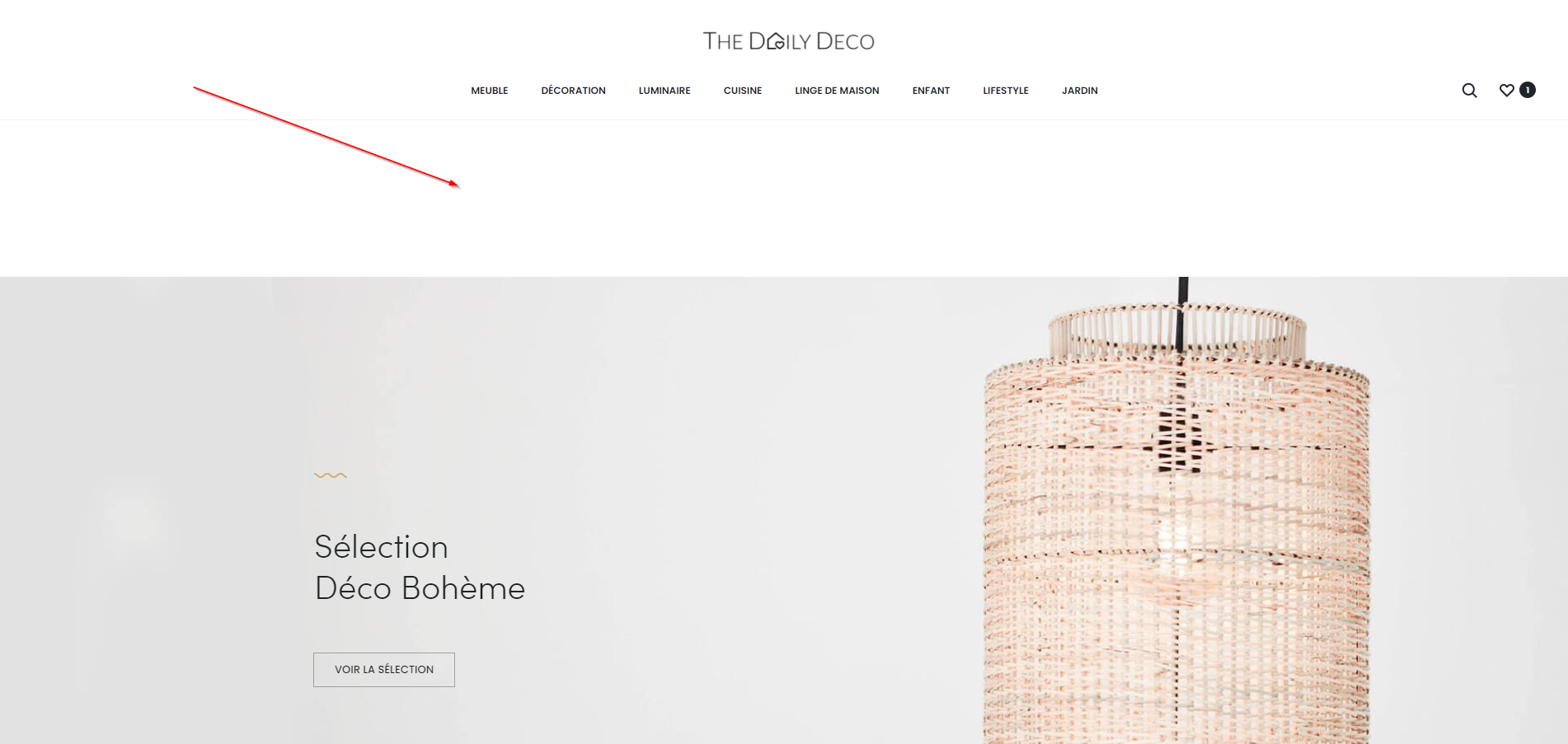
Hello, I have a display problem when I activate Sticky Header (Normal sticky Header). It adds me randomly :
element.style { padding-top: 336px; }
Do you have an idea ?
I share the link with you: https://www.zupimages.net/up/21/30/tcgq.png
Thanks for your help
Hello,
It is a script of the theme. It is added when you have the topbar or white header background. If it cause any issue, please share your website address, we will check this for you.
Thank you
Hello,
You can see the problem at this address https://thedailydeco.com/categorie-produit/decoration/Thanks for your help
As we tested, you are using a cache plugin on your website, but it has JS errors. You can check the developer tool of Chrome browser to view them: https://prnt.sc/1im3i1k
Therefore the JS of theme and plugins may not work properly and cause this issue.
You need to config the cache to load JS in the proper order, so all scripts will work as expected.
Or you can use this CSS to fix this issue on the category page:
@media (min-width: 1024px) {
    .tax-product_cat.header-sticky .site {
        padding-bottom: 86px !important;
    }
}

@media (min-width: 768px) {
    .tax-product_cat.header-sticky .site {
        padding-bottom: 146px !important;
    }
}
However, this is not a complete solution (it is more like a trick than a solution).
Kind regards
Hello,
Thanks to you I just fixed my problem by modifying the cache to load JS in the right order.
Thanks a lot for your help.
Have a nice day
Sorry the problem is still there. I just deactivated my plugin and the problem is still there. There are no more error messages in the console. This problem is also present on my main page. Both pages were created with Elementor Pro. If I do a preview with Elementor, the problem does not appear but appears when it is published. The problem is really random and the css code did not solve it. The Sober theme works correctly but not the child theme
Thanks for your help
I have corrected the problem. There is a bug with the theme in the Header>Logo section If we put a logo 2362×472 with Logo Width : 250px then the problem is present. The dimension of the logo must be modified before the import and not via Logo Width.
Best regards
Hello,
Thank you for your sharing. If this error appear only with the child theme activated, it seems to be a problem with the custom code in your child theme. You should check it too.
Thank you
when i add new page, how to edit the sub-header
Hello,
Do you mean the page header? You can check this document for more information.
https://docs.uix.store/sober/#/page-header/generalThank you
yes, i also read it but did not tell me how t edit the sub-header “text”
The page header text is the title of the current page. For example, if you are viewing a page, it is the page title; if you are viewing a category page, it is the category name. You can edit the page title or category name if you want to edit it.
Thank you
yes, the problem is HOW to edit
Hi,
You can edit the title from the admin dashboard. For example, if you want to change the title of a page, you can navigate to “Pages > All Pages” and edit that page to change the title. With the product category title, you can edit them in “Products > Categories”.
Thank you
Bought it, tried to import demo… everything ok with the message Import completed. When I check there are no pages added, only the slider. Should I enable exec or something like that?
Hello,
Thank you for your feedback. If the importer has completed the process, all pages should be imported. Please open a ticket on the support site and share a temporary admin credentials. Our staffs will check this issue for you.
https://uix.ticksy.com/Thank you
how to set after login to my designated dashboard ?
Hello,
You can use the official plugin of WooCommerce to change the redirection URL after login.
https://woocommerce.com/products/redirect-after-login-registration-and-logout/Or you can try to use this code snippet.
https://gist.github.com/gbot/3ebdb6ac0330443fe758You can add the code to the child theme or use a plugin. Please check this documentation for more details:
https://docs.uix.store/konte/#/customize/customize-with-pluginsThank you
About the Home v12, the two banner image below the slider , the two images have wording, how to change the text fonts size and colors? thanks
Hello,
If you use Elementor to build and edit your website, you will see options to change them. But if you are using WPBakery Page Builder, it is not possible to change text styles without using custom CSS.
Kind regards
Hello. The product page does not show the videos that I upload. Do they have to have a specific format? .mov / .mp4 don’t work.
Thanks and best regards.
Hello,
By default, the theme will display the video you uploaded. You can upload .mp4 files or use the Youtube URL. Perhaps a plugin conflict with the theme, please try to deactivate plugins one by one to test the issue.
If you need more assistance, please open a ticket on the support site and share the admin login credentials. Our staff will check this issue for you.
Thank you
after install,How to choose the demo like home v11
Hello,
You can use the demo importer to import the home v11, please check this documentation for more details:
https://docs.uix.store/sober/#/installation/import-demoOr if you are using Elementor, you can follow this documentation to recreate the home v11 using the template libruary.
https://docs.uix.store/sober/#/elementor/templatesThank you
Hello. Pre-sale question. Is it possible on variable product to show only photos of color that i choose and not from all colors?
Thanks in advance.
Hello,
We’re sorry it is not possible at this time. There are some plugins to add more images for each product variation, but they don’t work properly with all of product layouts. We’re finding a built-in solution for this feature.
Kind regards
Hi, “Go To Top” Icon don’t show on mobile
Hi,
By default, it is disabled on mobile. You can try this CSS to display it on mobile:
@media screen and (max-width: 767px) {
    #gotop {
        display: block;
    }
}
Thank you
I am trying to remove / edit the header menu under my account to remove Tracking Info and Wishlist. The last reply to this same request was 4 years ago and unfortunately it is not under Woocommerce > Settings > Accounts & Privacy anymore (to remove Tracking Info). Do you know where I would go to edit or remove the header under My Account?
Hello,
WooCommerce has moved these settings to WooCommerce > Settings > Advanced. They are “Account Endpoints” settings. You just need to empty endpoints you want to remove.
Thank you
Hi, i wan to ask how did this theme work with YITH WooCommerce Compare?
Hello,
We have tested this theme with the YITH WooCommerce Compare plugin, but if it doesn’t require any special, it will work well with this theme.
Hello,
1. How to solve this problem at product page , the button + at quantity missing when i open mobile version ?
2. how to edit the sizing button ” Apply Coupon” in mobile version?
thankyou
Hello,
Thank you for your feedback. Please open a ticket on the support site and share your website address. Our supporters will be happy to check it for you.
https://uix.ticksy.com/Thank you
Hi there, I have a couple of presale questions if you do not mind helping.
1) Does it support Elementor Pro? And if so does it support the footer builder section?
2) Is there an option to have a visible ajax search field in the header for direct search? Instead of having to click on the icon each time?
3) On mobile do the single product pages have the ability to include a sticky add to basket section?
Cheers.
Hello,
Regarding your questions:
1. Yes, the theme does support Elementor Pro. The footer builder is supported too.
2. At this time, the theme has only one modal search.
3. The mobile version of the single product page doesn’t support sticky add-to-cart section. It is under development. We will include this feature in coming updates.
If you have further questions, please feel free to contact us.
Kind regards
Hi there, trust you are safe and doing well. I’m Rahul Sinha and I work as a freelancer based in Mumbai, India.
Currently am working for a client where am making a website for them using the Sober theme, previously this client was working with somebody, and then they had some argument. I know the support option for this theme is closed now I have a theme license pdf though, but could you please help me with one thing, I am facing an issue with the product category filter option, I have attached the screenshot where when am selecting the product category option, the options are going behind the filter and because of that am not able to select the option( please see the attached screenshot) How do I fix that? Could you please help me with that?Your support would really help me a lot. Thanks in Advance.
Hello,
It seems you are using an old version of the theme. Please update it to your website. If you are using a child theme, you can also try to deactivate it and test the issue with the parent theme.
Thank you
You can try this CSS to fix it:
body > .select2-container {
    z-index: 9999;
}
Thank you
Hey there, am having issue with mobile responsive site. 1)the fonts are merging with icons on sale products.(see the image #1 from the given link) 2)the apply coupon text isn’t aligned properly(see the image #2) 3)For desktop version, when am using sober contact info addon on my contact page, few of the icons are not visible and i am not able to add links to the contact info, also, contact us page is not center aligned on mobile devices, texts are getting cropped.( checkout this link ” http://cc.therrrahul.com/contact-us/" or see the image #3)
4) Also, i wanna add back button to the header, where people can go back to the previous page, will you please me to get it done?
Apart from all of this, thank you for this beautiful am already enjoying and recommending people to buy it. Great Work, Thanks! Link for images: https://drive.google.com/drive/folders/1UgLiYbX4jYU3fi-9FVNk56QP6ogqoBiu?usp=sharing
Hi,
Look like there is a conflict between the theme and a plugin on your website. Please open a ticket on the support site and share the admin login credentials. Our supporters will check these issues for you.
https://uix.ticksy.com/Thank you
its asking me to extend the support. Can you please help me with this?
We’re sorry but we have to check these issues from the backend and it requires the admin login credentials. You need to open a ticket on the support site and share this information to our supporters.
Hi
Is it possible to modify the footer?
I would like to have the footer menu to be displayed on the right side but it is always forced to the left (with the copyright or in the copyright box I’m not sure).
Thank you
Hi,
At this time, it is fixed in the code of the theme. You can only edit it in the theme’s file (inc/frontend/footer.php). Or you have experience in WordPress developing, you can use a “hook” to modify it. For example, you can remove the action “sober_footer_info” then add it again in your child theme.
We will try to add more options for it in the coming updates.
Thank you
Thank you for the solutions!
Editing the theme file worked well. (I didn’t know where to find it at first, thank you for mentioning the path.) Now I’ll only have to figure out how to make sure the changes won’t be lost when the theme is updated. 
Kind regards
You can remove the action “sober_footer_info” then add it again in your child theme. It will look like this:
add_action( 'after_setup_theme', function() {
    remove_action( 'sober_footer', 'sober_footer_info' );
    add_action( 'sober_footer', 'sober_child_footer_info' );
}, 20 );

function sober_child_footer_info() {
    // Your code
}
Kind regards
Hi there,
Some pre-purchase questions:
—-Is it feasible to open the landing page of the product on click, and not the pop-up?
—-Can I add more filters, like shoe sizes? (30,31….45,46)
—-can i have a menu item and a landing page for more categories of items?(the demo has only one ’’shop’ menu item). I want to have: women, men, women-shoes, men-shoes, hats, etc
thank you very much
Hello,
Thanks for your questions:
1. Yes, it is absolutely possible. You can disable the popup in the options of the theme.
2. Yes, you can add as many filters as you want. It depends on your product attributes. For example, if your products contain attribute “Size”, you can use it as a filter.
3. Yes, you can. You can build a page to display product categories. You are also able to change the display of the shop page from displaying products to displaying categories (or both categories and products).
If you have further questions, please let us know.
Kind regards
Same issue with @Attheworkspot. The woocommerce template disregarding the setting in “Display Setting”. All cart/checkout/myaccount/tracking page with woocommerce shortcode do not have correct header and page header! PLEASE DO NOT SEND THE CANNED REPLY AND FIX IT IMMEDIATELY.
Hello,
Thank you for your feedback. The header background can be changed with the option in the “Display Settings” meta box in each page. If you don’t see this box, please check and ensure the plugin “Meta Box” is installed and activated. It is a required plugin of the theme.
Please open a ticket on the support site and share the website address with the admin login credentials. Our supporters will be happy to help you solve this issue.
https://uix.ticksy.com/Thank you
I swear, I have never been able to successfully install this theme’s demo content. It’s always breaking the site, never looks like it’s supposed to, multiple duplicate menus bug across the page, the page content is all over the place, completely broken. I’ve tried this from scratch following every step at least 5 times over the past 2 years.
Hello,
Thank you for your feedback. In the recent update, we have improved the demo importer. Please update the theme and test it again. If it still persists, please mail us your website address with the admin login credentials. Our developer will check this issue for you.
Thank you