5515 comments found.

I have purchased a theme and need support. The registration button is not working. Please fix that so, i can register and get the support. Booking check-in and checkout calendar is not working properly. It is accepting the same data as checkin and checkout. I also have review your demo version and it is persist with your demo version also.
I need a solution. please help me
Hi, Thank you for buying the theme, You can send here a message https://themeforest.net/user/wpestate and we will create the account.
About the comment about booking form, there is a minimum 1 night between bookings. I tested and I cannot chose the same day for check-in and check-out https://prnt.sc/1rdrvd1 You can send us all the details to look over this question after I create the support account.
Thank you
Algumas questões a serem tiradas para efetuar a compra:
1- Os depósitos de reserva instantânea pagos por meio do WooCommerce NÃO exigem login do usuário. Pelo jeito isso é uma regra de negócios, certo? Como alterar isso fazendo com q todos necessariamente estejam logados tanto para incluir a sua propriedade como o usuário?
2- Preciso criar 2 categorias de usuário além dos que irão enviar as suas propriedades, somando 3 tipos. É possível?
3 -posso acrescentar mais páginas criadas com Elementor?
Hi, Thank you for the message. I do not speak Portuguese. I will do my best to answer based on what i understand the question is.
1. The login with woo commerce + instant happens as the user pays. User still has an account, but it is created on check-out.
2. For user we can only split in 2, users who can only book and users who can rent and book.
3. I assume you mean create new pages. You can create new pages from wordpress and use elementor as page builder.
Thank you
Hi contatogohiking
1- Os depósitos de reserva instantânea pagos por meio do WooCommerce NÃO exigem login do usuário. Pelo jeito isso é uma regra de negócios, certo? Como alterar isso fazendo com q todos necessariamente estejam logados tanto para incluir a sua propriedade como o usuário?—> When making an instant booking you can choose to create an account or not. The option to Allow customers to create an account during checkout can be found on WooCommerce > Settings: Account & Privacy. See this help article: https://help.wprentals.org/article/1-19-instant-booking/
2- Preciso criar 2 categorias de usuário além dos que irão enviar as suas propriedades, somando 3 tipos. É possível?—> I’m afraid that this is not possible. We have the option to create users and owners only. See this help: https://help.wprentals.org/article/owner-post-settings/
3 -posso acrescentar mais páginas criadas com Elementor?—> Yes. You can create as many pages as you wish.
If you wish to test something in particular you can send a message from here https://themeforest.net/user/wpestate and you can test yourself on a test domain.
Thank you
Is there a way to stop the theme from resetting the settings after importing a demo? I haven’t finished the site just yet, but every time I try a new demo all saved settings such as logo, google map api key, latitute/longtitude, etc, are lost and have to be added anew. Also, how do I add a country as my country is not in the list?
Hi fatosi
Thank you for writing.
When a demo is imported also settings from the selected demo are imported so the setup you have done on theme options will be overwritten.
Before demo import, you can export theme options and save them locally. Then after you import the demo you wish you must import also the options you have saved locally.
See this help article: https://help.wprentals.org/article/export-import-theme-options/
I’m not sure why you import multiple demos but if you wish to have areas from other demos we can help you on our support system http://support.wpestate.org/ This is also a private support where you can send us your site details (url and wp-admin access). Our standard office hours are Monday – Friday, 9AM-5PM Europe timezone. If you wish my assistance to register in support please send a message from here with the buyer account – https://themeforest.net/user/wpestate
Thank you
Hi, good theme! presales questions, as follow:
1 – is there cancellation policies fees settings? 2 – is there email, documents and mobile verifications for both sides user & rental? 3 – android and ios apps is required now a days for such a business model. Any plans?
Hi thomasgeo
Thank you for writing.
1 – is there cancellation policies fees settings?
Owner can manually add his terms -https://help.wprentals.org/article/how-to-manage-terms-cancellations-policy-section-from-listing-page/ Please note money goest to site admin in the theme, and refunds are not processed automatically (site admin can process refunds from the merchant account set and used to receive payments.
2 – is there email, documents and mobile verifications for both sides user & rental?
The admin can enable option to verify Owners. After the Owner registers, in My Profile page he will have the option to UPLOAD AN ID SCAN: https://help.wprentals.org/article/1-20-5-verify-owner/
3 – android and ios apps is required now a days for such a business model. Any plans?
We don’t have APP or any plan for an APP I am afraid.
Thank you
Are you recommending for a rental website like https://www.rentstuffs.today/product-category/furniture-for-rent/
Hi rentstuffs
Thank you for the message.
We don’t have stock management.
Thank you
Is it possible to integrate the calendars and pricing with Airbnb and VRBO?
Hello, We have a iCalendar feature that you could use to sync the calendar(only booked dates ), You can look over this video to see how is working https://youtu.be/YB6K4cLF6_0 . Thank you
Hi! I am a satisfied customer of yours but I have some suggestions, which if implemented on the theme, I think can make a difference:
It would be great if it were possible to lower and raise prices in a massive way. Select for example 10 properties and increase the price for a specific period, by 10% or lower it by 15%. Is that clear what I mean?
Another thing that would be very useful is to have the bookings for a specific property within the property card itself. For example, an icon could be placed next to the edit, delete and disable ad icons.
For now I can only think of these things which if they were implemented on the theme would be amazing.
Greetings and congratulations again for the theme 
Hi eggeno, Thank you for the feedback and for the details. I have been trying to find a similar solution as you describe to understand better the technical part of such a request, but I did not find anything that can help me understand the entire flow. Please send an example of screenshots from a site that do these items already. I will check and follow up with questions if needed, but before adding new ideas to wishlist, we need to understand the full process.
A new update is currently in progress and ready to be launched in a few days. I hope you will like the new additions.
Thank you
Hello! Thanks for reply. I think the best way is to create events to be saved in a new MySql table. Then associate the event ID with the Structure IDs. I have created screenshots with the whole flow. Where can I send them?
Let me know! Have a nice day!
Hi, You can send here the details https://themeforest.net/user/wpestate Thank you
OK! I have opened a ticket (#204317) on http://support.wpestate.org/ Let me know! Kind regards
add in hosting to php8/ and have error Warning: Constant NONCE_SALT already defined in /home/sdampr05/sdam-prodam-illichevsk.od.ua/www/wp-config.php on line 72
Hi, I do not recognize this message. It seems like you may have something defined in wp-config and you need to remove that line 72. But I do not know what it is used for.
For PHP 8 we are doing checks with WpRentals and PHP 8 for the next theme update. If you see this in a theme related page, we can compare with our test domain and php 8 to check further.
lease use our client support http://support.wpestate.org/ to send us the details. Our standard office hours are Monday – Friday, 9AM-5PM Europe timezone. If you wish my assistance to register in support please send a message from here – https://themeforest.net/user/wpestate
Thank you
Hello, All the properties on my site have a minimum duration of 3 days, how can I add that limit to the front calendar ? I have tried minSpan on daterangepicker and control.js but it’s not quite right.
Regards
Hi achesman, Thank you for the message. I do not know what the front calendar is. The minimum duration you set in each property will apply in the front end booking form calendar – https://prnt.sc/1qsdgmj
Please use our client support http://support.wpestate.org/ if you need further help. This is also a private support where you can send us your site details (url and wp-admin access). Our standard office hours are Monday – Friday, 9AM-5PM Europe timezone. If you wish my assistance to register in support please send a message from here – https://themeforest.net/user/wpestate
Thank you
Hi there,
When adding 12 properties to show, whilst pressing to view page 2, 3 even though the page loads it still shows the initial 12 properties it was showing in page 1…even though in the url it shows page/2
What is the issue?
Hi, I cannot be sure without checking your site. First check pagination matches number of posts in these 2 areas https://help.wprentals.org/article/property-custom-taxonomies-category-what-do-you-rent-city-and-neighborhoodarea/#a_wpestate_id
If you need further help please send us a ticket with the url you check and wp-admin to be able to look into your setup.
Thank you
Is it supports RTL languages?
Hi, we do not have RTL support in WpRentals. Thank you
Hi, I am trying to update prices for next year but oddly the calendar only goes until June 2022, is there any way to increase that until the end of 2022?
Btw your support registration is not working.. I am not receiving the email after registering.
Hi Lumi, You can increase the number of months in bookings settings https://help.wprentals.org/article/theme-options-booking-settings/#month_number
The email may have arrived in spam, please check. If you still do not have it, please send a message here https://themeforest.net/user/wpestate and I will activate your account/
Thank you
Thank you for the quick response I appreciate it, I have updated the months.
Perfect, thank you for letting me know.
Hi guys – we are having an issue with the Place Pin with Address feature. Upon clicking on the button it does set the pin on the map but then is not displaying it – the listing being displayed on a random location.
Please see the console error below. https://prnt.sc/1qc75t2 https://prnt.sc/1qc7d09I have tried the usual debugging, deactivating all the plugins and so on. Can you please have a look asap – I opened a ticket – ticket number is #203806
Thank you!
Hi BarryOlive
Thank you for writing.
I have checked your site and the issue happened because you didn’t set property Latitude & Property Longitude fields to the submission form. Check my reply on the ticket you have opened.
See this help where is explained to set the location of a property on the map: https://help.wprentals.org/article/how-to-set-the-location-of-a-property-on-the-map/
Thank you
That worked – thank you! Appreciate the quick answer.
Thank you for the follow up. I am happy it works. Thank you
I receive an error message when i try to upload the SVG icons into features and amenities, it says this type is not supported.
Hi kmricketts
Thank you for the message.
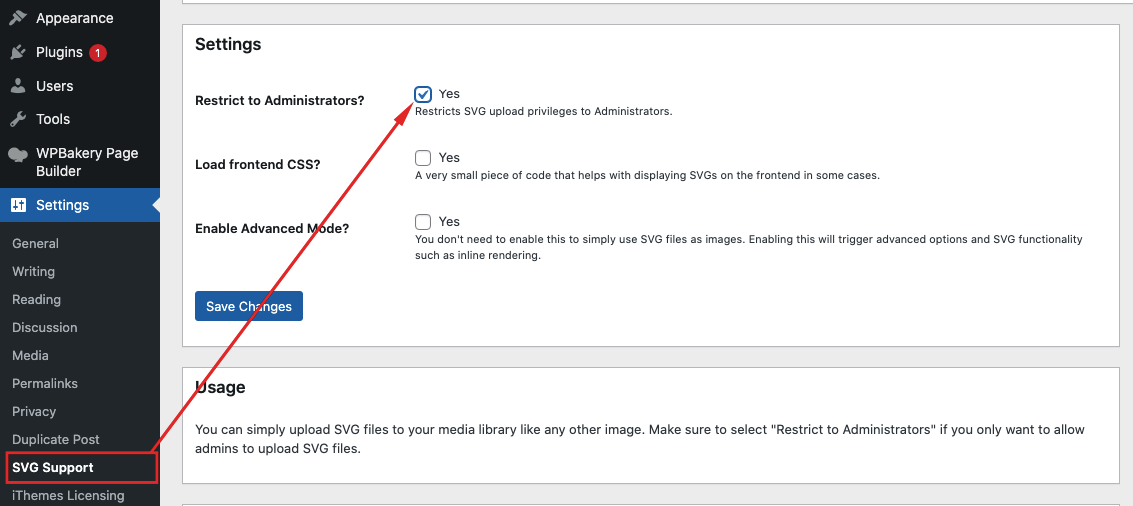
SVG icons are disabled by default from WordPress. To allow SVG before import, you need to enable this at the server level.
The easy way – add this plugin https://wordpress.org/plugins/svg-support/ and then make this check so just admin can add svg: https://help.wprentals.org/wp-content/uploads/2020/05/svg-support-secure.png
Please use our client support http://support.wpestate.org/ if you need further help. This is also a private support where you can send us your site details (url and wp-admin access). Our standard office hours are Monday – Friday, 9AM-5PM Europe timezone. If you wish my assistance to register in support please send a message from here – https://themeforest.net/user/wpestate
Thank you
Hi there – I have a few questions about the theme
1 . Can you bulk upload properties?
2. Can you change the ‘Instant booking’ button to say ‘check availability and pricing’? Which is an external URL for the individual property?
3. I only need people to be able to sign in to favourite properties – can you turn off the other features?
4. Can you remove the ‘Contact Owner’ and ‘Owner profile’?
Many thanks
Hi tobyhamp
Thank you for the message.
1. We don’t have the option to bulk upload properties.
2. We have the option to Add a Redirect URL to each property instead of Book Now button. Check this help where is explained how it works: https://help.wprentals.org/article/add-a-redirect-url-instead-of-book-now-button/
3. You can separate on registration owners from users who just want to book. See this help article: https://help.wprentals.org/article/howtoallowonlycertainusers-tosubmitproperties-infront-end/ The dashboard is set as in demos and on the images from the provided help article. It cannot be customized further in terms of what options show for each unless you modify it through code.
4.These details can be removed with custom CSS. We can provide the custom css needed to make this change.
If you want to test our theme, please send a message from here https://themeforest.net/user/wpestate
Thank you
Thanks for your reply.
1. Can I use a plug-in to do this? Such as WPImport?
2. Ok thanks – does that include adding a URL for ‘make a reservation’ button which appears on mobile at the bottom of the screen?
3. Ok thanks
4. Ok thanks
I also have another question regarding availability calendars – is it possible to update these via an API?
Many thanks
Hi tobyhamp
1. We didn’t test this plugin to advise you. If you want to test this plugin with our theme, please send a message from here https://themeforest.net/user/wpestate
2. Yes.
5. You can sync the availability calendar by using ical feed import and export. We have this help where is explained how it works: https://help.wprentals.org/article/icalendar-import-export/
Thank you
Ok thanks
5. Is the theme customisable? So could potentially get a dev to update the calendar info via an API?
We can only use ical for calendar update. I am not aware of a method to update by API, so I cannot advise if this will be possible,even as custom work. Thank you
Hi. I want the pictures for a villa to show in original full size without crop. I found a page in documentation and tried to follow the instructions on that page which is “https://help.wprentals.org/article/show-full-images-in-property-unit-without-crop/” At that page, It says there must be a part of code in templates\property_unit.php (or templates\property_unit_3.php) which consists the resize rules. According to that page, i need to make a line of code change in the .php files that i mentioned above. But the problem is i can’t see the line of code in my .php file that needed to be replaced the same as shown in the screenshot in documentation page. I need your help please.
Hi, I re-checked the help as best as I could. The functions are now common for all card types. Please try the same procedure but in these files https://help.wprentals.org/article/show-full-images-in-property-unit-without-crop/
Please use our client support http://support.wpestate.org/ if you need further help. This is also a private support where you can send us your site details (url and wp-admin access). Our standard office hours are Monday – Friday, 9AM-5PM Europe timezone. If you wish my assistance to register in support please send a message from here – https://themeforest.net/user/wpestate
Thank you
My demo import keeps failing. I have went over all the documentation and do not see where I am going wrong. It sits there forever and either says 404 or just doesn’t say anything. Please help!
Hi allen_baum, Thank you for buying the theme. The error is strange. We must check the domain to see the installation of the theme and we will help with demo setup as well.
Please use our client support http://support.wpestate.org/ to help. Thi is a private support where you can send us your site details (url and wp-admin access). Our standard office hours are Monday – Friday, 9AM-5PM Europe timezone. If you wish my assistance to register in support please send a message from here – https://themeforest.net/user/wpestate
We are in the office now, so we can help asap.
Thank you
Why can’t i see the see owner profile or view full profile for an owner like it is seen in the demo?
Also when entering one of the user profile that has 25 listings…they are not visible?
Hi, The owner must register as owner in front end and his profile is created automatically. Admin can use the theme to add listings, but he does not have a profile. I cannot tell why the properties do not show, we have not had this happen before. Please try to enable debug following this help https://wordpress.org/support/article/debugging-in-wordpress/ and please send us the url to check exactly the user setup and the user profile with debug enabled to help further.
Please send a ticket in http://support.wpestate.org/ and let us know the ID and we will check asap.
Thank you
Great i will create a new user and check it out!
Thank you
It works but why it is developed in this way? Admins cannot create and have their own profile and listings?
Also can we show the listings first and then the reviews in the owner profile page?
The Administrator Role does not have a profile. It was not asked before to be honest. If Administrator is the only, his information shows in the property and the messages go to his email, but there is no profile for admins. Will check to see if there is something we can add for this idea in the future, but now owners are subscribers who register in the login/register so the process is automatic for those who want to let people to register and add listings.
Thank you
Hi there,
Someone else mentioned 4 months ago on how to remove Private Notes.
Your reply:
[for=”private_notes”] { display: none; }
But this does not remove the text…only the box.
How can i make both the text disappear from left and right?
Also how can this be removed from the back end when a user is creating a listing so that it is not visible?
Hello? Is there anyone from the support here?
Hi, Thank you for the message.
I am sorry we missed this message, but usually support is done in our client support http://support.wpestate.org/
This is also a private support where you can send us your site details (url and wp-admin access). Our standard office hours are Monday – Friday, 9AM-5PM Europe timezone. If you wish my assistance to register in support please send a message from here – https://themeforest.net/user/wpestate
For your question, add this css https://help.wprentals.org/article/3029/
[for="private notes"] { display: none; }
[id="private_notes"] {
display: none;
}
Thank you
Hi,
Will property publisher-user be able to enter different versions of descriptions of their properties for different languages with WPML or Weglot? I mean we need users to be able to enter all translations for their properties themself while creating a property ad.
Regards
Hi RudyMore
Thank you for the message.
We tested WPML and this plugin will require for admin to manually translated everything from admin.
This is our help article with Multilanguage plugins recommendations: https://help.wprentals.org/article/multi-language-3rd-party-recommended-solutions/
The Weglot plugin should translate everything automatically. They offer a free account so you can test the plugin functionality, prior to purchase. Website: https://weglot.com/ Demos: https://wprentals.weglot-translate.com/
Thank you
Thank you!