23244 comments found.

I don’t have any space in between my menu. They are all on top of each other. I tried to do padding through theme settings>skin>menu and padding everything 50 but still it’s not working. Please tell me why all my menu items are directly next to each other. bylora.nl
Hello, @muzammilmahmood1992,
I have just checked your site now and it is working perfectly fine for me, please see this screenshot: https://postimg.cc/KKBjK26s it must be the cache issue at your end nothing else.
And also could you please purchase support extension to get further support? Your 6 months of support period is expired from 21/03/2021. According to Envato support policy, renewing support is required for further support.
Thanks for your understand.
Hi guys just a quick one that I can’t seem to find the answer for previously asked – I notice the product names are cut after a certain amount of characters in the product grid etc before you go into the single product page – is there a way to cancel this from happening and showing the WHOLE product name below the thumbnail? i.e. not cut it short? Thanks!
Hello, @garydee77,
Please copy and paste the below-given CSS code to Appearance >> Theme Options >> Skin >> Custom CSS and check your site after removing the browser cache.
ul.products li.product-col .woocommerce-loop-product__title {
    white-space: normal !important;
}
ul.product_list_widget li .product-details a, .widget ul.product_list_widget li .product-details a{
    white-space: normal !important;
}
And also could you please purchase support extension to get further support? Your 6 months of support period is expired from 10/08/2016. According to Envato support policy, renewing support is required for further support.
Thanks for your understand.
hi how to set carousel infinte slider?
Hello, @norman_ansao,
You have to set Autoplay ON and it will work for you as Infinite Scroll with Elementor page builder, you can set it from Section >> Layout >> Porto Additional Settings: https://postimg.cc/0znCFtvH
Regards, P-THEMES.
hi thank you for your response i already set the autoplay but banner still not infinite https://prnt.sc/1xclh4k
please check out here www.bestwayme.com
Hello, @norman_ansao,
Sorry for the inconvenience, I have debugged it in deeper and found that there is no option in that element of the Elementor for infinite scroll, it only scrolls infinite when there will be the “Loop” option turned ON from Porto >> Theme Options >> Extra >> Slider Config: https://postimg.cc/zyMpzCNF
Regards, P-THEMES.
Hi, I want to purchase this theme and use the demos in 2 different subdomains , does this mean I have to purchase 2 licenses
Hello, @Nevdev,
First of all, thanks for showing your interest in Porto WordPress 
Yes, you have to purchase 2 licenses, one license for one single live URL only, this is Envato policy and you may wish to confirm from them as well.
Please read our very latest announcement here: https://ptheme.zendesk.com/hc/en-us/articles/4404831432337-Announcement-for-Porto-WordPress-purchased-Clients-regarding-License-Reset-
Reset link: https://www.portotheme.com/support/reset-sites/
Regards, P-THEMES.
Can you please indicate me how can get a multi-sites licence ? Otherwise, it seems that I can’t purchase your theme various times, how can I use your theme on several websites ? Kindly
Hello, @ADRENALIN06,
Sorry to say that but there is no multisite license policy, one license is for one live URL only, Please read our very latest announcement here: https://ptheme.zendesk.com/hc/en-us/articles/4404831432337-Announcement-for-Porto-WordPress-purchased-Clients-regarding-License-Reset-
Reset link: https://www.portotheme.com/support/reset-sites/
Regards, P-THEMES.
Hi, how can I disable the homepage popup?
Hello, @vivipapaliaga,
Please read and follow the instructions written in the below-given articles:
https://www.portotheme.com/wordpress/porto/documentation/faq/home-page-newsletter-pop-up-modal-box-background-image-and-text-changing-or-removing-the-pop-up-modal-box-using-visual-composer-page-builder/
https://www.portotheme.com/wordpress/porto/documentation/faq/home-page-newsletter-pop-up-modal-box-background-image-and-text-changing-or-removing-the-pop-up-modal-box-using-elementor-page-builder/
https://www.portotheme.com/wordpress/porto/documentation/faq/home-newsletter-pop-up-modal-box-background-image-and-text-changing-or-removing-the-pop-up-modal-box-using-wpbakery-page-builder/
And also could you please purchase support extension to get further support? Your 6 months of support period is expired from 22/07/2021. According to Envato support policy, renewing support is required for further support.
Thanks for your understand.
Please suggest
1 a). Where to look for the settings from Theme options to change the Background color (ON Mouse Hover) of any Menu name on the Main Menu bar. (or Header-bottom)
1 b). As well as Setting from Theme options to change the Color of Menu name itself ON Mouse Hover.
https://paste.pics/EIMLE
2. Is the highlighted one (in below screenshot), a Sticky Header or Sitcky Main Menu, or something else
https://paste.pics/EIMMS
3. Similarly, what setting from Theme options, will change the colors of above ones, in Sticky Main Menu (or Sticky Header). For Mouse-Hover event
https://paste.pics/EIMMS
4. What setting in Theme options will work to change the Font type (and other font properties), of this same Main Menu (as shown in above SShots)
Regards
Hello, @ShwetaHAG,
1,2. You have to check it under Porto >> Theme Options >> Skin >> Main Menu: https://postimg.cc/gXVfnnTT
4. You can change it from Porto >> Theme Options >> Skin >> Main Menu: https://postimg.cc/jDyQVPwm
Regards, P-THEMES.
Hi Porto,
Why if I enter a predefined layout of Porto in page builder, spend 15 seconds in be showed at my screen ?
https://www.candleart.es/es/test at the top of pagethanks, Joaquim
I have to scroll from movile or computer to be showed, if I leave without scrolling does not appear the Image
Hello, @Joaquim_,
That is because of the animation and lazy load of the images and content, for the lazy load you have to turn it OFF from Porto >> Speed Optimization Wizard, and for animations, you have to edit your page and edit those elements and remove the animations from the elements settings one by one.
Regards, P-THEMES.
I have turned off but now gtmetrix show 5 secons in open. Any easy suggestion for me how I can do it faster to load? Im not a developer.
thanks,
Hi,
Can you please send your site admin login details with your issue details through our support system so our support staff will check and solve the issue on your site.
Regards, P-THEMES.
Hi Porto,
But if I off the lazyload this will have impact in my entire webside? I only want in the home page. Regarding the images I have eliminated the animations existing and when open the webside the images are not showed correctly after a few second, thats why I have leaved the animations are before.
thanks,
Hello Porto,
My lazyload is off but for movile is slow opening the webpage. And suggestion please ?
Hello, @Joaquim_,
Regarding Mobile Site Speed: You can read more about it in the below-given docs:
https://dzone.com/articles/how-to-improve-mobile-page-speed-using-googles-pag
https://apppresser.com/speed-up-wordpress-mobile/
https://wp-rocket.me/blog/how-to-make-your-mobile-site-load-faster/
https://www.shoutmeloud.com/check-website-loading-time.html
Regards, P-THEMES.
Hi Porto,
I want to place the button in my web to offer the content translated in a lot of languajes. Porto have some feature or any option in page builder porto to insert it? Or something similar, or if you can tell me how to do it.
I have my web in 5 languajes translated (are offial translations), and I would like to maintain those 5 translations and and some more with the help of this feature.
thanks Joaquín
Hello, @Joaquim_,
You have to use the WPML plugin for this, and it will help you in translating your site in multiple languages and provide the language switcher functionality as well.
Regards, P-THEMES.
Dear Porto, I mean if there is a button to place multilanguaje but without my translation, I mean I need an automatic translation to rest of languages. But if posible maintaining my 5 idioms already translated
Hello, @Joaquim_,
No there is no such option in our theme for it, you can try with any third party plugin which better meets your requirements.
Regards, P-THEMES.
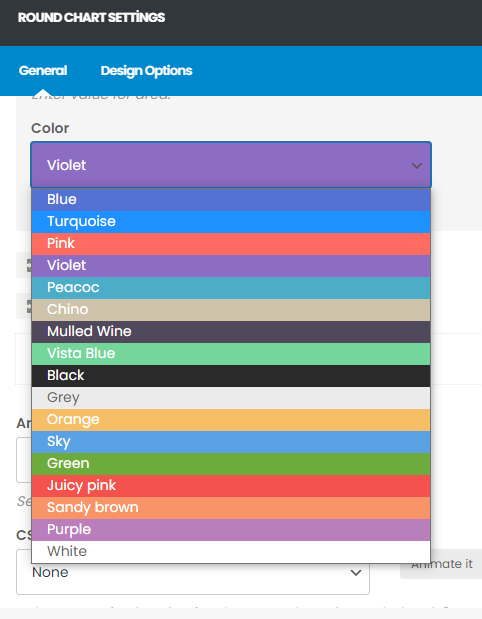
How can I change visual composer’s color chart in one go? https://i.hizliresim.com/7n7mhkh.png
Hello, @fatihemregunes,
Sorry to say that but that is element color chart and you can not change it as our theme does not have any influence on it, this is the default functionality of the page builder.
And also could you please purchase support extension to get further support? Your 6 months of support period is expired from 28/09/2019. According to Envato support policy, renewing support is required for further support.
Thanks for your understand.
Hello, i can’t update the theme and the website got lot of bugs and errors can you please help ??
Hello, @blasterDev,
Please read and follow the instructions written in this article: https://ptheme.zendesk.com/hc/en-us/articles/360020667197--24-Update-Porto-Theme-Manually-without-Loosing-any-Data-
And also could you please purchase support extension to get further support? Your 6 months of support period is expired from 28/04/2021. According to Envato support policy, renewing support is required for further support.
Thanks for your understand.
i think my licence key is used somewhere else, how can i reset it. ??
Hello, @blasterDev,
Yes, You have to reset your purchase code and then reactivate the theme again, and it will solve your issue.
Please read our very latest announcement here: https://ptheme.zendesk.com/hc/en-us/articles/4404831432337-Announcement-for-Porto-WordPress-purchased-Clients-regarding-License-Reset-
Reset link: https://www.portotheme.com/support/reset-sites/
Regards, P-THEMES.
the login doesnt work on your support plateforme
Hello, @blasterDev,
For now, I have reset your purchase code, now you can use the same purchase code for registration of your theme.
And for your support Logins, please contact us via our email newsmartwave@gmail.com with your theme purchase code PDF file so that our support staff will check/verify and create the support account for you.
Regards, P-THEMES.
Dear Porto,
If i’m using predefined templates of Porto to insert. If in the future i do not use anymore Porto, I will lost those designs imported?
thanks,
Hello, @Joaquim_,
It depends on the content, if you will not use Porto then Porto elements will not work on your site and the content based on the page builder like WP Bakery, Visual Composer, Elementor will be there and will not be affected.
Regards, P-THEMES.
Ok please can you give me an example about what is Porto element? I understand the code will be showed always. I’m not sure if Is correct. I will place carrusel images, text and a simple image for home page. Thanks a lot
Hello, @Joaquim_,
Like lets take an example of WP Bakery page builder, you will have the theme elements under it: https://postimg.cc/tsm7fP1H and those elements will not work when you will turn OFF the particular page builder.
Hope this make sense.
Regards, P-THEMES.
Hi Porto,
I want to redesign my home page cause the design i did is obsolete. Is a shopping webpage.
Porto have any template to copy as a model of homepage and then I can adapt with my content ?
thanks Joaquim
And with the Bakery pagebuilder I have I don’t know if I should pay the pro version to copy templates: says:
“In order to receive all benefits of WPBakery Page Builder, you need to activate your copy of the plugin. By activating WPBakery Page Builder license you will unlock premium options – direct plugin updates, access to template library and official support.”
thanks
Hello, @Joaquim_,
1. To redesign the home page, you can use and import the page using Porto Studio: https://www.portotheme.com/wordpress/porto/documentation/porto-studio/
2. You can always get the latest updates of the Premium plugins with the Theme update in the Theme Package.
And there is no need to activate or purchase a new license for this plugin. This plugin is already included in the theme package and already purchased the license by P-Themes. This activation message for those who want to update the plugin directly from their website. In our case, you can receive the updated plugin always with the theme update release.
So no need to activate it, just ignore the message and feel free to use it.
You can not use the library/template of any Premium plugin including in any Theme Package, If you want to use the premium plugin library/template then you have to purchase that particular plugin license separately, this is Envato policy you may wish to confirm from them as well.
Regards, P-THEMES.
Dear Porto,
Thanks those templates to import looks good. Just one important query for me and my business:
I’m using an old desig of home without using pagebuilder: https://www.candleart.es/es/ but is ranking on the Seo serphs.
Using those type of layout predefined by porto to insert this will have any bad affectation for the Home seo ranking ? Cause I see have a lot of image at the beginning and Im thinking to place all my text at the end.
thanks, Joaquín
Hello, @Joaquim_,
It will not have any bad affection for the SEO, perhaps if you want more ranking in SEO you should have to try with Yoast SEO plugin as it is fully compatible with our theme.
Regards, P-THEMES.
How could we force fue_subscribe / followup-checkout / (Send me promotions and product updates) to be checked by default?
Hello, @antanast,
Sorry to say that but there is no such option in our theme for it, so this requires Customization.
Regards, P-THEMES.
After updating the template from version 6.18 to 6.20, the modal window select city stopped working. the site insain.ru contains new version template 6.20, insain0.na4u.ru contains previous version template 6.18
Hello, @Rinatius,
Which modal window select not working? Can you please share the small video clip of your issue for my better understanding?
And also could you please purchase support extension to get further support? Your 6 months of support period is expired from 07/08/2020. According to Envato support policy, renewing support is required for further support.
Thanks for your understand.
Hello, @Rinatius,
Please check back those modal popup settings again on both of your sites and it might help you in finding the cause of the issue.
Regards, P-THEMES.
Can’t activate theme on my new website. What should i do? I have a purchase code, but nothing happens.. I have disable it on old website, and cant activate it on new one
Hello, @vsarkov,
I have reset your purchase code, now you can use the same purchase code for registration of your theme.
Regards, P-THEMES.
“Porto is multi-language ready. You can expect all linguistic .po files from our customer support team.”
Hi, I need the German language file …
Where can I get this?
Regards, K.Guenther
Hello, @lokalfux,
Can you please contact us via our support system with that request so that our experts will provide the files to you if possible.
Regards, P-THEMES.
OK will be done! thanks
You’re Most Welcome!!!
Hi Porto,
Is there any option to see my homepage panoramic (complete horizontal size). https://www.candleart.es/es/ But in the rest of pages, products … mantaining the format I have ? https://www.candleart.es/es/tienda/velones-herboreos/velas-esotericas/vela-limpieza-negra/thanks, Joaquín
Hello, @Joaquim_,
You can edit your home page and set the page layout from page view options only for that particular page as per your requirements: https://postimg.cc/bZyTsZhk
Regards, P-THEMES.
Hey, sorry that I’ve missed the “deadline”. You’ were absolutely in the right to decline my question..sorry about that. I did purchase the other licence … Hoping this will be OK with your…. And here we go again: I’ve got a question: I’m currently re-designing the main website on a sub-domain, and wanted to use the Popup menu as shown on Architecture & Interior Design Demo (similar to mobile icon). But I’ve encountered a problem – the Primary menu options are not linkable, when you click on it only shows sub-menu options, which are clickable, but with this menu I can’t get to the main category, on top of that: in menu options even if I set “show arrow” for submenu – it doesn’t seem to work either. Is there any solution for this? Thank You!
Hello, @katrin585,
Can you please contact us via our support system with your site WP Admin Login details and if possible with a small video clip of your issue to duplicate it as well so that we will check it for you on your site and help you out if possible.
Regards, P-THEMES.
Hello,
Is it possible to change the domain name for the same project after activation ?
Regards
Hello, @Besir_S,
You have to reset your purchase code and then reactivate the theme again, and it will solve your issue.
Please read our very latest announcement here: https://ptheme.zendesk.com/hc/en-us/articles/4404831432337-Announcement-for-Porto-WordPress-purchased-Clients-regarding-License-Reset-
Reset link: https://www.portotheme.com/support/reset-sites/
Regards, P-THEMES.
Many thanks
You’re Most Welcome!!