5515 comments found.

When the renter pays half online and half when they arrive, how does the owner enter the payment they receive when the visitor arrives and hands them their card?
Also, how do you mark a renter as arrived?
Hi stuckathomemom
Thank you for the message.
Owner cannot change a booking payment as fully paid because he does not receive the money through the theme. I am afraid we do not have such an option.
The payment is marked as fully paid if the user pays remaining balance through his account (and money arrives to admin account through one of the possible theme payment systems – wire transfer, paypal, stripe or any woo commerce merchants if that is enabled)
There is no option to mark renter as arrived, it is the first time I hear about this. if you can send me a complete description of the process i can check this further with our team.
thank you
Renters don’t always pay online. Many times renters pay the balance when they arrive. Every hotel can enter a payment when the guest arrives – that’s a normal business practice. If the owner can’t enter that the renter paid on arrival then it looks like the renter never paid and that throughs off the accounting, which throughs off taxes – governments don’t like that. What is the work around?
Hi stuckathomemom,
I am a little confused. You wish to create a hotel booking? We are not a hotel booking theme. Owners and site admin can be the same, or can be different. Please confirm how you wish to use the theme to confirm how we work based on your scenario.
We do not provide payment to owner, so owner cannot create manually invoices or mark his reservation as fully paid
Admin gets the money. Admin can get paid. Admin can mark a reservation as fully paid if user choose wire transfer (offline payment)
If you need further info or want to test our theme, please send a message from here https://themeforest.net/user/wpestate
Thank you
The owners ARE the admin. The people who Own the site are the Admins of the site. So if the renter choose wire transfer, how do the owners mark it as paid?
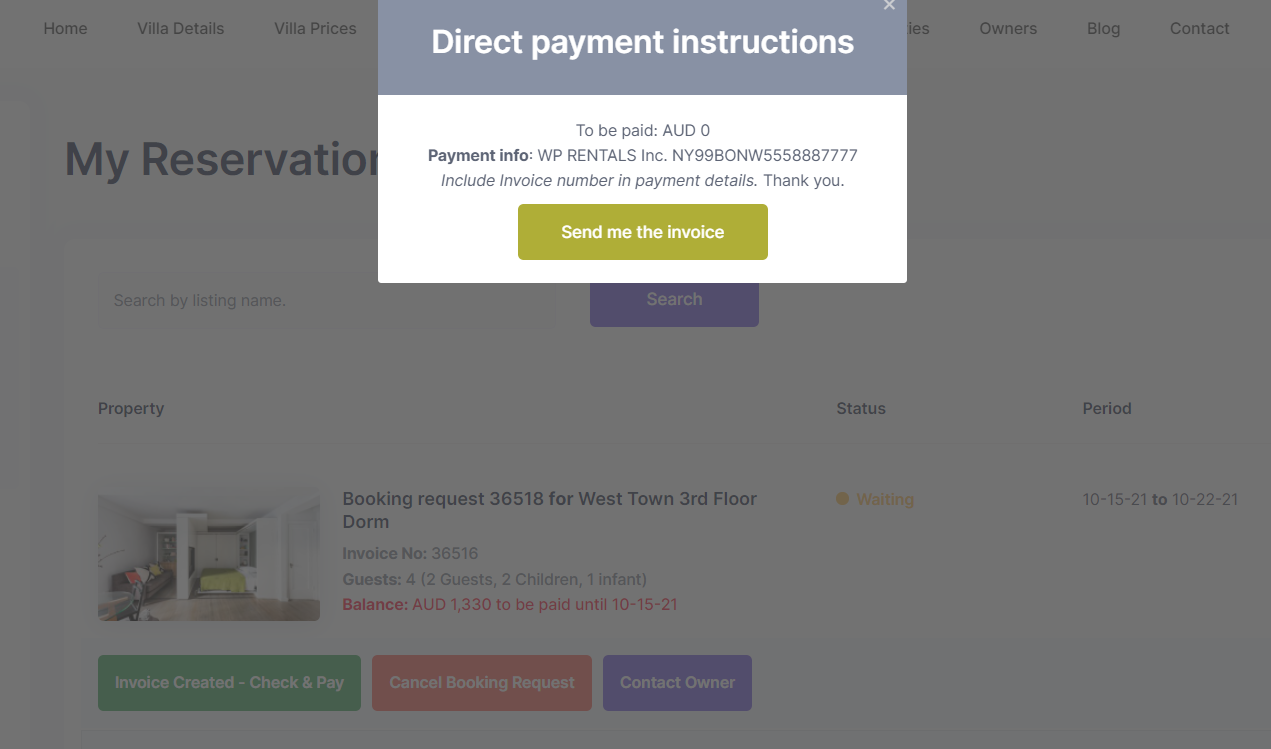
Hi, Admin can only be one. Renter initiates the payment process by pressing the wire transfer method https://help.wprentals.org/wp-content/uploads/2019/04/Screenshot_131.png
He can do that for deposit and remaining balance.
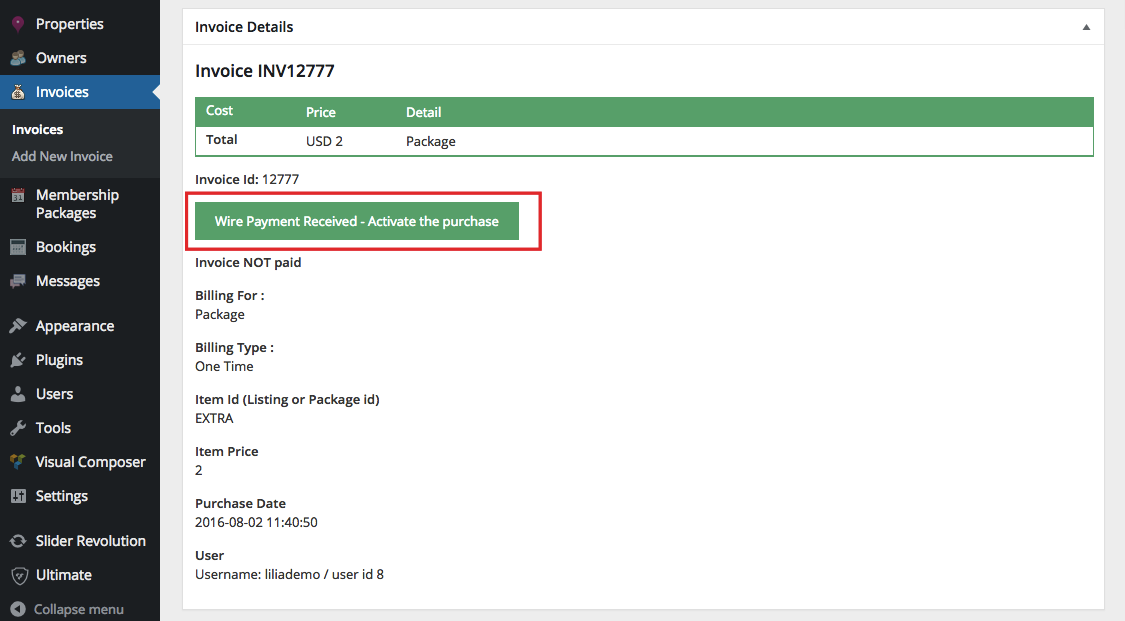
Admin marks invoice as paid – https://help.wprentals.org/wp-content/uploads/2016/08/activate-purchase.png
If you need further info or want to test our theme, please send a message from here https://themeforest.net/user/wpestate
Thank you
I don’t see a wireless payment option in the invoice, so that work around isn’t going to work.
Let me give you a different scenario, maybe this will help you understand what I’m asking. The Admin owns the site, right? We agree on that. Ok, a renter pays the deposit online, but later when the renter goes to pay the balance, he can’t log in to his account for whatever reason. The site has an 800 number for when renters need help. So the Renter calls the 800#, and tells the site Admin that he wants to pay over the phone by credit card. So the site Admin takes the information over the phone, charges the credit card and now the renter has paid for the rental in full. How does the Admin mark the rental as Paid?
Hi stuckathomemom, There is no option to mark an invoice as paid if the user does not initiate the payment. The solution we have is for wire transfer payment method, not offline booking system.
So admin would have to login as user, generate the invoice, initiate the wire transfer payment and make the payment as complete from admin.
There are plugins that allow admin to login as user.
Thank you
That doesn’t make sense. You describe this theme as a ‘build your own’ vrbo or other rental website, but you don’t have any way for the admins to collect payment other than online?
That should be a Warning in Big Bold Print at the very top of the description.
People who are serious about running this kind of rental business know that renters can’t always access the internet, lose passwords, misplace usernames or have some issue where they can’t login and you don’t provide Any Kind of Option for the admin to take a payment over the phone??? Or at the very least mark the rental as paid?? There is nothing in Woo that would work with your software to do this? No work around? Nothing?
Hi, I do not understand your comments. I will answer to what I think is relevant for you.
If you want to add bookings yourself, you can add them manually https://help.wprentals.org/article/adddelete-booked-periods-as-owner/
If you wish to go through the booking system where user sends a booking request – and you want to get money for that booking as admin, the payment is done through the merchants available (theme, woo commerce merchants or wire transfer) Booking can be confirmed if you confirm the payment as explained before.
If your clients send a booking request you can use instant booking and they can pay as they send the booking request. They can register for an account and type password so they are sure they know the password or you can use woo commerce to process a deposit and you can let them checkout and register automatically as in this demo https://demo1.wprentals.org/properties/condo-in-liberty-state-park/ WooCommerce has also offline payment system so if they choose that and they pay you offline you as admin just change the woo commerce order to processing from pending and booking confirms.
If you need to redirect users to another platform to make the booking, you can do that too and add a custom url instead of book now.
We do not use woo commerce to create bookings. Just to process payments for booking deposit, remaining balance or paid submission (money goes to admin)
Thank you
hello,
I am really interested in wp rental. But I have a few questions If you can answer us or do a customize work for it.
We don’t need the account system. No need to add property on frontend. Is it Possible?
Can we customize the email templates according to our need and requirements?
Invoice system(multilingual + according to our needs)? or can you do it for custom?
If we need any custom work can you do it ?
Make checkout system more user friendly ?
Hi, I answered by email. I copy my email here too
I am really interested in wp rental. But I have a few questions If you can answer us or do a customize work for it.
We don’t need the account system. No need to add property on frontend. Is it Possible?
-> You can be single owner but the account for user who sends bookings still is mandatory and can include only the option to see his reservations. https://help.wprentals.org/article/use-wprentals-for-a-single-property-single-owner/
Can we customize the email templates according to our need and requirements?
—> It depends. You can only use the theme email management – https://help.wprentals.org/article/email-management-in-theme-options/
Invoice system(multilingual + according to our needs)? or can you do it for custom?
—> I do not understand this question very well. Here is what i can answer. The multilanguage is not a built in solution. So I do not know how you will plan to use the theme. But we have not tested WPML or WeGLOT (2 compatible plugins) for invoices specifically. For what we have as invoice (the details show in user dashboard). Weglot may be able to make the info in 2nd language,but has to be tested.
—> We do not send invoices by email. The invoices are shown in user account and they should be in one language.
If we need any custom work can you do it ?
—> No, I am sorry.
Make checkout system more user friendly ?
—> If you plan to use checkout from woo commerce, that is the woo commerce template. Not sure what you wish to do to answer further than this.
Thank you
For the project Buy properties in North Cyprus we are looking for a template or plugin for booking holiday homes, flats and studios. It is important that you can book a property. The payment is done by the provider. Can your template realise this? Many greetings.
Hi, Thank you for the message The website looks really nice. If you wish to add booking on top of WpResidence, I am afraid the 2 themes cannot be merged.
If you wish to create a separate platform for renting by night or hour, wprentals can do this. Booking requests are sent to the property owner. The money admin asks as deposit is paid by the person who requests the booking to the site admin (we do not have payment to owner)
If you need further info please let me know.
If you need further info or want to test our theme, please send a message from here https://themeforest.net/user/wpestate
Thank you
Hello, I’ve got several presales quastions : - Do you plan to have IOS and Android apps ? - Can we add listings by Hour & by night & by night ? I.E, can we add lisings like a flat by night, another flat by hour during the day, and a boat by Hour ? - Do you plan an affiliate program for buyers on their next stays ( like Airbnb does) - Do you plan to add “Experiences” like AirBnb does ? - Does listing can be added for free at the begining with no package but then, can they place their listing when they want as “Featured” to be on top of searches with a package ?
Hi, Thank you for the message. Please see my reply
We do not plan to have apps.
We can only do by hour OR by night (each listing must have only one set). Demo https://office.wprentals.org/
If you plan to add different types of listings, it can be confusing because the submit form is unique (so all the features and amenities and details would be in the same form)
We do not plan to make affiliate system.
And experiences are not in our roadmap as separate rentals item.
You can add the listing free with a time set in days for the item to stay published. Then you can create membership packages users would need to subscriber to in order to keep their listings published for the time you set in the package. The package can include listings and featured listings, so user can make the listings he wants featured if he has the available featured items in his package.
If you need further info or want to test our theme, please send a message from here https://themeforest.net/user/wpestate
Thank you
Dear Sir / Madam,
We are currently using the template for a client of ours (Anemonivillas.com) and would like to know if there is a way to export the bookings (and booking details) on an file (Excell, PDF, etc) for our clients to keep a manual record of their bookings. We would like to know if such a feauture is implemented on the theme or if there are any plugins that you could suggest to incoporate to the theme for such a functionality.
Thank you very much in advance, looking forward to hearing from you.
Kind Regards,
Hi, Owner can print or save as PDF each confirmed booking https://prnt.sc/1zrxz83
Or he can export the ical for each property into a google calendar.
I hope this helps.
Thank you
@WpEstate How to import the demo which is designed using Elementor. When I am importing the demo, it is doing that with WP Backery plugin, which I don’t want. Please help ASAP.
Hi, The demos have the Elementor homepages too. Please see this video https://www.youtube.com/watch?v=tj2rSVUAToo&t=183s
Please use our client support http://support.wpestate.org/ if you need further help. This is also a private support where you can send us your site details (url and wp-admin access).
If you wish my assistance to register in support please send a message from here with the license code or buyer account – https://themeforest.net/user/wpestate
Please note that our standard office hours are Monday – Friday, 9AM-5PM Europe timezone.
Thank you
Hello, I have a question. I would like to give the person the possibility to rent a house for example but also services (cleaning, wifi, transportation from airport to the house, etc.), cars, tours, etc. Is it possible to make this ? Because often client need other services. If yes how can I make thisThanks for your answer. BR Fred
Hi Fred, Thank you for the message. We have extra booking options in the booking form which may help – Documentaiton https://help.wprentals.org/article/1-20-add-extra-options-in-booking-form/
Please use our client support http://support.wpestate.org/ if you need further help. This is also a private support where you can send us your site details (url and wp-admin access).
If you wish my assistance to register in support please send a message from here – https://themeforest.net/user/wpestate
Please note that our standard office hours are Monday – Friday, 9AM-5PM Europe timezone.
Thank you
Hello!
I am having an issue activating the license of WP Rentals. I paste the Purchase Code at the required field but the Check License button doesn’t seem to be working. It is not clickable.
What do I need to do in order to solve this?
Thank you in advance!
Hi AppeStudios, Thank you for buying the theme.
This usually happens is the SSl is not set correctly (usually the site url in wordpress settings does not have the url with https). Please send a message here with the site url and wp-admin username and pass and I will help with this step asap https://themeforest.net/user/wpestate
You can also use our client support http://support.wpestate.org/ This is also a private support where you can send us your site details (url and wp-admin access).
Please note that our standard office hours are Monday – Friday, 9AM-5PM Europe timezone.
Thank you
Hi – Is it possible to integrate Afterpay or Zip Pay?
Hi chjcoughlan, Thank you for the message.
As theme we have support to pay for booking deposits or paid submission to the site admin through woo commerce. And woo commerce supports hundreds of merchants.
Afterpay seems to exist https://woocommerce.com/vendor/afterpay/
ZipPay exists too https://wordpress.org/plugins/zipmoney-payments-woocommerce/
What you have to check is if these extensions are free as that i could not tell for sure.
As help for how to use WpRentals with WooCommerce we have all the details explained here https://www.youtube.com/watch?v=N7k3xdgpLXI
Thank you
Hello, we are working with Stripe but can’t receive the url for the payment confirmation. The payment is received in Stripe, but the stripe processor page isn’t working, the template is not being created. What is missing here? How can we solve it? Thanks so much!
Hi hcolombo, Thank you for the message. I will copy the message from the email I just sent.
I am not sure of the issue. Did you try to create the stripe processor page and did not work. We have one by default and you can use that in your Stripe API.
The communication with stripe happens through the processor page. That must exist in your stripe setup (the link) and the page with the link must be published in you site.
We have a help here https://help.wprentals.org/article/stripe-set-up/
With stripe we cannot enter in your stripe account to check what you did, but you can show us your stripe account screenshots to compare with our help.
In pages list you should have 1 page with stripe processor. do not access the page in front end, just use the url.
To send us these details I created your support account. I emailed you the details so you can send us a ticket with the stripe setup screenshots and so we can assist further.
Thank you
The theme map displays wrong if anyone publishs a listing without setting his location on the map. Our users locate in Los Angeles, but the map displays Atlantic if anyone of the users didn’t set his location on the map. It is very strange. is there any solution on it? Thanks
Hi, Thank you for the message. A property needs a lat and long values. When you add the location lat and long can auto-complete if you use Open Street -https://help.wprentals.org/article/how-to-set-the-location-of-a-property-on-the-map/ You can also add manually the pin on the map. Or use a button to place the property on the map.
We can check in support your setup if you wish as well – http://support.wpestate.org/
Thank you
Hi, Not every user set his location on the map. If anyone, just one user, didn’t set his location, the map is totally wrong. This is a big problem because the website admin doesn’t know who didn’t set a location on map. The issue occurred for more than 3 years. Thanks
Hi Leon, The lat and long must be triggered somehow with one of the methods I explained above. With Open Street places user types the address and the places API returns the lat and long. So he just types address which you can make a mandatory field from theme options if you wish.
If a property is not with a lat and long, you see it with default lat and long (0) positiond in the middle of the ocean. You can edit the property and set lang and long from admin too.
We can check in support your setup if you wish as well – http://support.wpestate.org/
Thank you
Hi, I tried to set Property Map as mandatory, but it got more problem and not published if not approved by Admin. You can test to find what is wrong in it. Actually, not every user want to put their location on Map, so I hope you can improve it. Thanks
Hi, can i set a default lat and long myself for Google Map i am using? If so, it can be resolved. Thanks
Hi Leon, If a mandatory field is not added, it is not approved as listing. That is correct behavior. About setting a default lat and long manually if none is set, I do not have an answer here. Please open a ticket in support to check with development team http://support.wpestate.org/ Thank you
Hi, It doesn’t work. I set Propety Map as as mandatory, and add Map location for the listing, but lhe listing is not published as before. It needs Admin to publish it, this should not be needed according to my setting. You can test it to find out what is wrong in the theme. Thanks
Hi Leon, Thank you. We are not aware oPlease open a ticket for this too to check further. Thank you
This theme is good for housing rental with daily price, but it is not too good for other rentals with hourly price. For rentals, we ususlly need to mark some time as Booked, but it is not working for hourly option, only working for daily option. I hope the theme developer can improve it in the future.
Hi leon_66
Thank you for writing.
For hourly bookings you can Import an ical feed with blocked dates form 3rd party platforms like Google Calendar, Airbnb, etc.
See this help: https://help.wprentals.org/article/how-to-make-calendar-and-booking-unavailable/
Please use our client support http://support.wpestate.org/ if you need further help. This is also a private support where you can send us your site details (url and wp-admin access). Our standard office hours are Monday – Friday, 9AM-5PM Europe timezone. If you wish my assistance to register in support please send a message from here – https://themeforest.net/user/wpestate
Thank you
Hello, My site uses membership mode and has a free trial period of 14-days.
I want to disable the default behaviour of the free trial being used at the end of the membership period (at the end makes no sense, I only use it before their first listing).
How do I change this, is it a cron I can remove?
Best Regards
Hi achesman, Thank you for the comment. Free membership is required. If the paid submission fails, or expires it must have a default system and that is what free membership does (sets a default membership for new users and users without an active paid membership). But if the free membership listings are used once, they cannot be used again. And the listing with free membership expires after the period set for a free listing expires and cannot be activated again. Thank you
Thank you, I shall do more testing. I thought I saw it reverting to have an available listing in free mode once the membership had expired (despite it already being used before a paid membership was taken out).
Can I ask another question, how can I change the Paypal return URL, its taking me back to /my-profile even though I changed it to something else in the Paypal account settings.
Hi, Thank you for the follow up. The free listing offered by default has an expiration set in number of days from published date. Even if the free membership exists after a paid membership, that free listing will expire when the cron that runs daily to check user membership package verifies when the listing was published and how many days have passed since. And if the duration is over, it will be set to expired mode.
About the redirect URL, that is set in code. We have this as general directions to change the redirect URL https://help.wprentals.org/article/technical-change-redirect-page-after-booking-payment/
Please use our client support http://support.wpestate.org/ if you need further help to check for paypal specific with development team. This is also a private support where you can send us your site details (url and wp-admin access).
Thank you
Thank you, I see, perhaps I saw issue because in my test mode, the free duration was actually longer than my paid membership (14-days vs 1 day). I’ll change for live.
Regarding the paypal query, this is the return URL from purchasing a membership package not a booking deposit so the technical page does not help.
I see its these options in ajax_functions.php
$payment = array(
                'intent' => 'sale',
                "redirect_urls"=>array(
                        "return_url"=>$processor_link,
                        "cancel_url"=>$dash_link
Am I safe to change these so they return to /user-dashboard rather than /my-profile ?
Regards
Hi. Try here https://prnt.sc/1yecr4n because it mentions pack price
Thank you
Thanks great, thank you very prompt and useful replies as always 
I am happy I could help. Thank you for your kindness as well.
Hello, i’m trying to register on the support portal but the form is not working. I dont recieve the confirmation email so i can login after. Please check this issue because i want to contact the support
Hi alienstudiodev
Please send me a message here https://themeforest.net/user/wpestate and I will help you.
Thank you
Hi guys – do you have any user regsitration moderation section? I would not want to allow registration without moderation – to avoid spam and unwanted users. Is that possibel? Thanks!
Hi BarryOlive
Thank you for the comment.
We don’t have an option for user approval.
You can add reCaptcha only for the registration form. See this help: https://help.wprentals.org/article/enable-and-setup-recaptcha-for-register-form/
Thank you
Hello, where can I find the language file for the guest picker e.g. adults, children etc.
Hi automondo, Please send me a message here https://themeforest.net/user/wpestate and I will help. Thank you
Hello, your Theme looks great. I want to create a 4×4 Tracks Booking website, where clients can book for a 4×4 track at a certain location. Do you this will be able to be done with the Theme, I will also need to add option at booking form to ask how many cars and then sometimes how many guests. Do you think this will work?
Hi Jonathan, I do not think the theme can work. It is created for accommodation and the options you need are not included. The booking form can only be those showcased in our demos https://wprentals.org/
Thank you
Is it possible to remove the check out part, and only put a check in option when making a booking?
Hi, Check-in and check-out are mandatory because they look for an interval. Thank you
Hi!
For hourly booking: I book let’s say a car from 8am to 9am. Finish booking. Can I make another booking to the same timespan?
Thanks!
Hi robster0326
Thank you for your interest in our theme.
We don’t have such an option I am afraid.
Thank you
Hi!
I’m happy to hear that! Just to be on the safe side, so if I rent something from 8 to 9, then nobody can rent the same for the same timespan, since that product is not vacant from 8 to 9, right?
Hi robster0326, Thank you for the follow up. Yes, if a booking request is sent and confirmed for a specific period, that time period cannot be booked the 2nd time.
If you need further info or want to test our theme, please send a message from here https://themeforest.net/user/wpestate
Thank you
the new them version has issues with php 8 … calendar not syncing and stays with saving without updating the calendar
Hi Escape76, Thank you for the comment. I checked with support team. We have on our list to check the PHP 8 + save ical. Now it does save, even if the message does not reflect that and on refresh the link shows correctly. We will have this solved for the next version for sure.
But we do not replicate the issue with calendar not syncing, as explained in the ticket. We will re-test when we make the update for the save situation and follow up on the results in the ticket.
Thank you
Hi guys – I want to edit the placeholder from the WpRentals Login Form – I tried with loco translate but it doesn’t seem to be working – can you advise me on that? I want to have displayed Email instead of username. Thank you!
Hi Barry, It is changed from.po https://prnt.sc/1xd9t5d – https://prnt.sc/1xd9wvk
wprentals/languages or wprentals-child/languages, as you use
Update the pot and try again if you cannot apply these changes as in my screenshots (these are tests made with the latest theme version just now). Help https://help.wprentals.org/article/how-to-update-the-po-translation-after-a-theme-update/
Thank you
Hi guys – that is just not working – it works in the theme login popup but in a page that I have the WpRental Elementor Login WIdget – it is not working.
Hi Barry,
Thank you for the follow up.
We must check above on your site.
Please open a ticket on client support http://support.wpestate.org/
This is private support where you can send us your site details (url and wp-admin access).
If you wish my assistance to register in support please send a message from here – https://themeforest.net/user/wpestate
Thank you