164 comments found.

The Theme looks good but it needs to have a lot more color controls for the theme. It should be able to change the font colors of all areas. Background, foreground, Fonts. Example: If we needed Gold lettering for a film name or title, the theme should be able to provide a nice colorization control for that. Highlighted fonts. Special effect options for the credits, headers and titles. Framing needs control options for colors also. If I wanted to apply a video background for the framing of the theme (around the placeholders, etc), it needs to have a local ability to place background videos for the theme background itself. There is no information on this themes colorization options. Does the theme have full color customization?
Hello,
There is a First Main Color option in Theme Options >> General that you can use to change the most dominant theme color. The First Main Color won’t affect every element. Some elements (like header, footer, fonts, buttons, etc.) have their individual color settings for customizability reasons.
In case you need further assistance with the colors you can submit a ticket at our Help Center and one of our support agents will gladly help you. To submit a ticket please follow instructions from this article – How To Submit A Ticket.
Support
Edge Portfolio part of
Qode Interactive
Don’t forget to sign up for our newsletter and be the first to find out all the latest news.
When is the next update for this theme? Some of the core third party elements like WP Bakery have made important chnages to their plugins and your theme is not handling it well. Please advise.
Hello,
The theme will be updated, however, at the moment we don’t have an ETA when the update will come out.
Bundled plugins do get updated with the theme, however, in case you need immediate update of any bundled plugin you can contact us through this email (just add your purchase code in the mail) and our support agents will provide you with latest version.
Support
Edge Portfolio part of
Qode Interactive
Don’t forget to sign up for our newsletter and be the first to find out all the latest news.
Thanks, just sent

Support
Edge Portfolio part of
Qode Interactive
Don’t forget to sign up for our newsletter and be the first to find out all the latest news.
Will this theme receive an update to make it compatible with the latest version of WooPayments? It hasn’t been updated in over a year, and this feature no longer works.
Hello,
Thank you for reaching us!
The theme is supported and it will be continued to be updated, however, at the moment we don’t have an ETA when the update will come out.
Please contact us through this email, include your purchase code in the email, and our support agents will check this and assist you.
Support
Edge Portfolio part of
Qode Interactive
Don’t forget to sign up for our newsletter and be the first to find out all the latest news.
Current version of Silverscreen – Wordpress 6.4.4 – When I try to access Slider Revolution, a pop up “Help Us Make Slider Revolution Better!” opens with two choices…no matter which option I choose, an “Ajax Error” is displayed and the pop up does not disappear. As a result, I no longer have access to Slider Revolution…
Hello,
We couldn’t reproduce this on our end. Please contact us through this email, include your purchase code in the email, and our support agents will check this and assist you.
Support
Edge Portfolio part of
Qode Interactive
Don’t forget to sign up for our newsletter and be the first to find out all the latest news.
please reply my ticket #241324 and help me fix the issue asap please
Hello,
We’ve checked and we see that your ticket has now been updated with response. In case you need further assistance please continue the conversation with our support team at the Help Center. Thank you.
Support
Edge Portfolio part of
Qode Interactive
Don’t forget to sign up for our newsletter and be the first to find out all the latest news.
Not sure why this is happening, but when I try to edit any page (or any editable element for that matter), the site gives me the 404 error page. I’ve updated Wordpress to the latest version and I’m using the latest version of this theme.
Hi there,
Please try to reset permalinks, just click Save under Settings > Permalink, If you need any further assistance we would appreciate it if you could please submit a ticket at our Help Center or contact us through this email, include your purchase code and URL of your site in the email, and one of our support agents will check this and assist you further. Thank you.
Support
Edge Portfolio part of
Qode Interactive
Don’t forget to sign up for our newsletter and be the first to find out all the latest news.
Hello and sorry for the late reply, but I never got the Bakery and Slider Revolutions plugins enabled and now that I have to switch to php 8 it becomes a problem. I tried to clarify this with the plugin manufacturers, but they said I should clarify this with the theme provider. The manufacturer’s website can’t find a license or activate the plugins, and neither system can do anything with the purchase code in the license file, so I shouldn’t be forced to buy a license for both. I don’t think that’s so great and would like to ask you for help! Is there anything we can do, or me? Thanks in advance! Regards Guido
Hello,
Bundled plugins do get updated with the theme so please check if you have updated the theme and its plugins to the latest version listed in change log.
To update theme and bundled plugins please follow instructions from this article – How To Update A WordPress Theme And Plugins. After you update the theme all of the bundled plugins with available updates should be listed in Appearance > Install Plugins.
Support
Edge Portfolio part of
Qode Interactive
Don’t forget to sign up for our newsletter and be the first to find out all the latest news.
Thank you! Did you know how long you update this theme?
You’re welcome.
We are constantly working on updating all our themes. Also, you should know that in case you need latest version of any bundled plugin you can submit a ticket at our Help Center or contact us through this email (just add your purchase code in the mail) and our support agents will provide you with latest version.
Support
Edge Portfolio part of
Qode Interactive
Don’t forget to sign up for our newsletter and be the first to find out all the latest news.
That sounds great thank you. I would like to ask one more question. Yesterday i got a hint in the design section that Silverscreen Version 1.7.1 is available for update withi in the theme. I have 1.6.1. and i work at that moment on some other updates and backups etc., after all that and updateing the revolution slider manualy, now this update is no more available in the theme section! Can i wait that it is coming back while i am afraid to install the complete theme zip, while some time before that szenario killed my complete website and i have had a lot of work by this. I thought a update via the theme update function is saver, or? Thanks and regards Guido
Hi,
As we previously mentioned, to update theme and bundled plugins you can follow instructions from this article – How To Update A WordPress Theme And Plugins. Here it is explained how to update theme either via Envato Market plugin or via FTP.
After you update the theme all of the bundled plugins with available updates should be listed in Appearance > Install Plugins.
If you need any assistance with the theme or theme options you should know that you can always turn to our support team and our support agents will be happy to help. To submit a ticket please follow instructions from this article – How To Submit A Ticket.
Support
Edge Portfolio part of
Qode Interactive
Don’t forget to sign up for our newsletter and be the first to find out all the latest news.
Hi, I have this error, solved deactivating the social share option in theme’s option but think you have to solve it soon.
Fatal error: Uncaught Error: Call to undefined function SilverscreenEdge\Modules\Shortcodes\SocialShare\silverscreen_edge_addslashes() in /homepages/28/d602625662/htdocs/clickandbuilds/tvbgn/wp-content/plugins/edge-cpt/shortcodes/socialshare/social-share.php:145 Stack trace: #0 /homepages/28/d602625662/htdocs/clickandbuilds/tvbgn/wp-content/plugins/edge-cpt/shortcodes/socialshare/social-share.php(116): SilverscreenEdge\Modules\Shortcodes\SocialShare\SocialShare->getSocialNetworkShareLink(‘facebook’, Array) #1 /homepages/28/d602625662/htdocs/clickandbuilds/tvbgn/wp-content/plugins/edge-cpt/shortcodes/socialshare/social-share.php(84): SilverscreenEdge\Modules\Shortcodes\SocialShare\SocialShare->getSocialNetworksParams(Array) #2 /homepages/28/d602625662/htdocs/clickandbuilds/tvbgn/wp-content/themes/silverscreen/framework/lib/edgt.functions.php(1282): SilverscreenEdge\Modules\Shortcodes\SocialShare\SocialShare->render(Array, NULL, ‘edgtf_social_sh…’) #3 /homepages/28/d602625662/htdocs/clickandbuilds/tvbgn/wp-content/plugins in /homepages/28/d602625662/htdocs/clickandbuilds/tvbgn/wp-content/plugins/edge-cpt/shortcodes/socialshare/social-share.php on line 145
Thanks in advance JDCR
Hello,
Please check if you have updated the theme and its plugins to the latest version listed in change log.
If you need to update theme and bundled plugins please follow instructions from this article – How To Update A WordPress Theme And Plugins. After you update the theme all of the bundled plugins with available updates should be listed in Appearance > Install Plugins.
Support
Edge Portfolio part of
Qode Interactive
Don’t forget to sign up for our newsletter and be the first to find out all the latest news.
Hi, I just bought the silverscreen theme but I have some issue’s with the revolution slider. I can install the slider, but once installed, it gives me the following error: “A critical error has occurred on this site. Check your site administrator email inbox for instructions.”. When I open the revslider.php in my database, I find a note that says: “ERROR: It looks like you have more than one instance of Slider Revolution installed. Please remove additional instances for this plugin to work again.”. The thing is, I don’t have a second Slider Revolution installed. To be sure I deleted everything in my database including the database itself and started over, but still the same error. I also noticed that the Revslider isn’t up-to-date. Maybe an updated version will solve this issue. Can you provide me with an up-to-date version of Revolution Slider?
Hello,
Please note that plugins should be installed and activated one by one. If you’ve selected all plugins and clicked on install as bulk action then this could create an error, as it could be that the slider revolution folder was created in plugin folder, however it was not installed fully.
As we do not have enough information in order to help you, and since author’s dashboard is meant for general inquiries and pre-sale questions, we would appreciate if you could please submit a ticket at our Help Center, include URL of your site, and one of our support agents will check this and assist you further. Thank you.
Support
Edge Portfolio part of
Qode Interactive
Don’t forget to sign up for our newsletter and be the first to find out all the latest news.
Presales question: Is there an update soon for Wordpress 6.0.3, in your roadmap?
Hello,
Thank you for taking interest in our theme!
Our dev team is working hard at the moment on updating all of our themes. We don’t have any ETA when this update will come out, however once it is updated this will be listed in the change log.
To use theme on latest version of WordPress you should install this plugin.
Newer WordPress versions introduced block based widgets feature, so we do recommend using this plugin which reverts widgets back to classic as a temporary solution until we add compatibility with block based widgets.
Feel free to reach us if you have any additional questions.
Support
Edge Portfolio part of
Qode Interactive
Don’t forget to sign up for our newsletter and be the first to find out all the latest news.
Hi, I’m willing to buy this theme, but first I want to know one thing – it says that I can import one of the nine demo contents – does any of those demos contains this top slider that is on the main page of theme (I’m talking about that black screen with blinking REC and SILVERSCREEN logo appearing – this is what I want to use on my website, but I’m affraid it won’t be available in the demos).
Hi there,
After you install and import the demo content you will get everything you can see on our live demo, so you will be able to use it and customize for your website.
Support
Edge Portfolio part of
Qode Interactive
Don’t forget to sign up for our newsletter and be the first to find out all the latest news.
Hi,
i have a big problem. How can I change the hover color from header and footer (Back to the top – arrow)
Thank you.
Hi there,
Thank you for reaching us!
Since the author’s dashboard is meant for general inquiries and pre-sale questions, we would appreciate it if you could submit a ticket to our Help Center and one of our support agents will assist you.
Thanks.
Support
Edge Portfolio part of
Qode Interactive
Don’t forget to sign up for our newsletter and be the first to find out all the latest news.
Hi,
my support license has expired and I think this is a problem of the template. In each theme you can easily change the color in the backend. Not here.
Thanks for your help.
Hi there,
To change the background color of the back to top you can do it within our Edge Options > General > First Main Color
As the arrow does not have an option you can add this code to Appearance > Customize > Additional CSS
.arrow_carrot-up:before {
    color: #ff7f50;
}
And when it comes to Menu items you may find the options for it within Egde Options > Header > Main Menu and change the text/hover and active color to your needs.
Support
Edge Portfolio part of
Qode Interactive
Don’t forget to sign up for our newsletter and be the first to find out all the latest news.
Hi,
thank you very much for your help!! Everything worked except for the social media buttons. Unfortunately, these are yellow.
You’re welcome, glad that we could help!
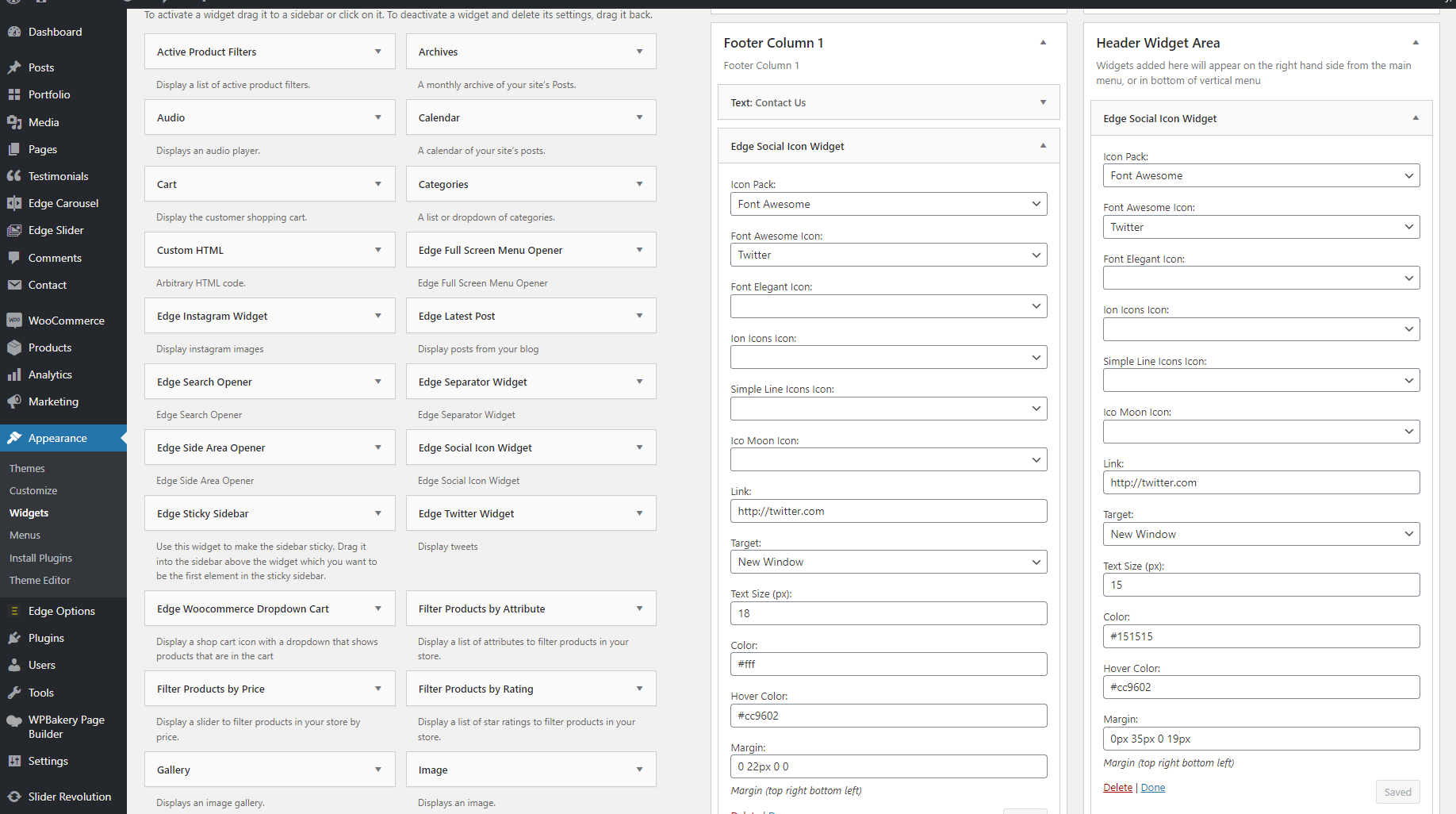
Social Media icons in header and footer can be adjusted through “Edge Social Icon Widget” options in header and footer widget areas in Appearance > Widgets (please see screenshot).
Support
Edge Portfolio part of
Qode Interactive
Don’t forget to sign up for our newsletter and be the first to find out all the latest news.
Hi I purchase you Silverscreen theme.. All is working great.. only thins is the Widget.php does not load.. i get a message “There has been a critical error on this website. Please check your site admin email inbox for instructions” Unfortunately I don’s have access to the email that WordPress support sent to fix issues..
Hi there,
Thank you for reaching us!
In case that you are running latest WordPress version, please note that we haven’t tested our theme with WP 5.8 yet, however you can try using this plugin as a temporary solution if you run into issues with widgets on the latest WordPress version.
WP 5.8 introduced block based widgets feature, so we do recommend using this plugin which reverts widgets back to classic as a temporary solution until we add compatibility with block based widgets.
You should know that you can always turn to our support team and you are more than welcome to submit a request at our help center and our support team will be happy to help. To submit a ticket please follow instructions from this article – How To Submit A Ticket.
Support
Edge Portfolio part of
Qode Interactive
Don’t forget to sign up for our newsletter and be the first to find out all the latest news.
I was watching your theme.I want to know that when I click on preview, the page it shows, is it also a demo page…?? Or only the rest 9 are the demo pages..? And if this link is also a demo page “https://preview.themeforest.net/item/silverscreen-a-theme-for-movies-filmmakers-and-production-companies/full_screen_preview/20013967?_ga=2.173084515.1143363812.1635767082-936861952.1623573948” , then can I set a video in the background of the header pic where is is showing something like a recorder.?
Hi there,
Thanks for taking an interest! The landing page is included and you will be able to edit the slider which has the recorder frame. You can add video within the slider as a background video or as an element.
Do let us know if you have any additional questions.
Support
Edge Portfolio part of
Qode Interactive
Don’t forget to sign up for our newsletter and be the first to find out all the latest news.
I am unable to install the Silverscreen Child demo site. It hangs and after that I do have a menu, but there are no pages to be found.
The import Demo content does not work properly. How can I install the demo site anyway?
Hi there,
Thank you for reaching us!
For demo import please follow instructions from this article How To Import Demo Content Using The One-Click Demo Import Feature. On the off chance that you’ve waited for a while and the demo import didn’t finish properly, you can try importing via XML import.
Also, in case that you are using cache plugin, please deactivate it. It’s recommended that cache plugin stays deactivated during demo import and while the site is still in the development stage.
If you need further assistance with demo import please submit a ticket at our Help Center and one of our support agents will gladly help you and they can also import demo content for you.
Support
Edge Portfolio part of
Qode Interactive
Don’t forget to sign up for our newsletter and be the first to find out all the latest news.
Este tema es del 2017, ¿funciona bien en la ultima versión de wordpress de 2021? Gracias!
Hi there,
Thank you for reaching us!
We haven’t tested our theme with WP 5.8 yet. Our dev team is working hard at the moment on updating all our themes. We don’t have any ETA when this update will come out, however you can try using this plugin as a temporary solution if you run into issues with widgets on the latest WordPress version. WP 5.8 introduced block based widgets and this plugin reverts widgets back to classic.
If you have any additional questions please let us know.
Support
Edge Portfolio part of
Qode Interactive
Don’t forget to sign up for our newsletter and be the first to find out all the latest news.
I used the old version of this theme of this and it worked fine. The latest update just breaks my entire site. The only way to stop my website from breaking is to disable the theme…
This is a brand new install of Wordpress, and I’ve deleted everything and started over about 5 times already, and the result is the same. The only plugins I have are the ones that come with this theme.
Is there a way to get ahold of an older version of this theme that works?
Hi there,
As it is a bit hard to tell what you encounter exactly please check if you have updated the latest version of the theme and its plugins. If you need instructions on how to update the theme and included plugins, you can refer to the following article: How To Update A WordPress Theme And Plugins. The latest version released is 1.6.1 however if you still encounter issues you are more than welcome to send us a mail to our help center providing your purchase code in it and our team will check this on your end.
Thanks.
Support
Edge Portfolio part of
Qode Interactive
Don’t forget to sign up for our newsletter and be the first to find out all the latest news.
I can’t seem to import the Silverscreen Demo (Import Type: All / Import Attachments: Yes). I get to 90% and it never goes past that.
I’ve added the proper server permissions and set both upload_max_filesize and post_max_size to 256M.
Is this something you’ve seen before?
Hi there,
Thanks for writing in! If you are somehow having an issue with the demo import we would kindly ask you to check your resources as well as you can always try to import our demo content with our XML file.
If you have any additional questions we would kindly ask you to submit a request at our help center and our support team will be happy to help.
Thanks.
Support
Edge Portfolio part of
Qode Interactive
Don’t forget to sign up for our newsletter and be the first to find out all the latest news.
I love this theme. My host updated the php and the and WPBakery no longer works. It’s not site related, but I dont know if I have to buy a new license for the WPBakery plugin or if there is some code I can add to get the current version to work?
I tried adding that line of code SubstituteMaxLineLength 10m that XSTOP mentioned,but it resulted in a 404 for the site.
Hi there,
Thanks for writing in! If you need an immediate update of any of the plugins, please send us a mail to our help center providing your purchase code in it and one of our support agents will provide you with latest versions.
Thanks.
Support
Edge Portfolio part of
Qode Interactive
Don’t forget to sign up for our newsletter and be the first to find out all the latest news.
I got everything to import properly but I cannot edit a single page. I deactivated WP Bakery and I am able to see the edit page but it is not visual. just a bunch of code. I thought buying a license to WP Bakery so I could upgrade it would fix the problem, but it did not. I would like to edit ANY of the demo pages but I cant seem to do anything. I am on a deadline too. Very frustrating theme.
Okay, I found the solution within the long FAQ. Turns out it is only one line of code added to your .htaccess file that is needed to fix it.
For anyone else having this issue, copy paste this at the bottom of your .htaccess file after ”#END”
SubstituteMaxLineLength 10m
Turns out it works now and I don’t have to pull my hair out and I might just make my deadline now.
Here is the full page for anyone else dealing with the Page Edit Error:
https://helpcenter.qodeinteractive.com/hc/en-us/articles/360011971138-How-To-Fix-The-Blank-Page-Editing-Error-When-Using-WPBakeryHi there,
Glad you managed to resolve this, if you need any further assistance we would kindly ask you to submit a request at our help center and our support team will be happy to help.
Thanks.
Support
Edge Portfolio part of
Qode Interactive
Don’t forget to sign up for our newsletter and be the first to find out all the latest news.