59004 comments found.
Hello Sizam Bro,
Are you in safe place now? There is a lot of tension for you.
Mostly – yes, check this https://www.facebook.com/Wpsoul/posts/443884597486070
Brother, I’ve checked it! A great post. Take care and bye-bye for now. Hope we’ll do business forever with you and your team as well. Best wishes to all of you.!!.
Thank you, please, note, that currently, there is no any affects on our work and updates. We are preparing some major updates now, will be soon
Sure! We highly appreciate your total concern and always getting something good from you. Thank you too!

Namaste,
How to change the color of add to wishlist color & deal score on the product page and also how the deal score works?
it depends on page, please, send your link
Https://sucost.com/beauty/men-care/aloe-gel-hydrator-soothing-aloe-vera-gel-all-skin-hair-types/
.woo-top-actions .woo-button-actions-area .heartplus{border: 1px solid #ff6c00;color: #ff6c00;}
replace to own colors and place in
you can place this in theme options – general options – custom css
.dealScore .label{background: #96ca4e;}
also this
Thank you for your help.
I forgot to ask that import wp has an export function, but it did not appear, can you explain that?
Sorry for this quuestion, i use older version of import wp and now i updated and export function is clearly appeared.
I tried to run the utility on the first day, and it worked. However, the next day all the products were visible on my archive, which they had hidden.
Please provide details what you do and how you hide products
Please wait for the details because I recalculate SKUs in excel just to check products were matched correctly or not.
https://sucost.com/beauty/makeup/100-pure-strawberry-sunshine-lip-balm-20g-pack-of-2/ In this link how product images is big and blank?Is this possible to change wishlist page layout? I want to change this in compact grid or directory grid or column?
As this is advanced core customization, I can only point you on file which you can customize, this requires code skills
Let me know which part requires coding skills, and I’ll give it a try.
Your given CSS to change color of wishlist and add to wishlist button sometimes shows old default color?
you can find function which is responsible for wishlist in functions/thumbandhot.php
RH_get_wishlist
And other queries?
image issue is related to your custom plugin for image manipulation – Smush CDN. Disable it then i can check
I have deactivated the Smush Pro plugin, so please find out where this problem is.
Does your theme allow carousel of taxonomy archives?
.offer_thumb{max-width:100px}
you can place this in theme options – general options – custom css
Thank you so much.
After adding this code, can I activate Smush Pro plugin?
I think – yes
How to show name of product in price comparison by SKU section? Price comparison by SKU section does not show image?
Does your theme allow carousel of taxonomy archives?
Price comparison block shows price comparison from different vendors, it doesnt show product images and it has no sense to show images there because product images are visible in left part of layout
There is no carousel of taxonomy archives, but you can create image carousel and set link on each image to your archive page.
However, some products display images.
Is there a way to display affiliate store images on a price comparison thumbnail?
I don’t know what you mean because affiliate store images already show on comparison
https://rewise.wpsoul.net/product/canon-750d/I’m sorry but how to do this? Can you tell me because I’m not find any settings?
Thank You.
Upon contacting the ImportWP author for support, they re-enabled the product ID in their template settings. However, since your Rehub theme is older than 2.0.12, please update the ImportWP woocommerce addon.
Sorry for the above comment.
I mean Import WP woocommerce addon is older version and kindly update this plugin to 2.0.12. I contacted Import WP author and they can re-enable the product ID in their template settings.
added
Namaste,
The reviews/ratings section is not visible, even though I enabled it. What does the eye icon mean after the “Add your review” option?
Here is the link: https://sucost.com/beauty/hair-care/10-in-1-active-hair-oil-with-comb-applicator-cold-pressed-no-mineral-oil-silicones-synthetic-fragrance-100-ml/
I successfully added all the products to their affiliate store taxonomy; however, on the product page, the affiliate store image isn’t showing up. In this link: https://rewise.wpsoul.net/product/canon-750d/ you show prices compared with their affiliate store logos.
please, provide all details how you added
Please, create topic according to guidelines, with all information, links, screenshots. This will allow us to understand your issue and give you a better and fast answer.
https://sizamtheme.support-hub.io/articles/how-to-write-to-support-if-you-need-technical-helpdoes your theme has compatibility with ultimate membership plugin
UM plugin works independently and with any theme
Hello, I just updated the site, and the site post was defective, how do I fix this? EX: https://www.diypresets.com/download/por-do-sol-preset-desktop-mobile-lightroom/ All post on the site, if there is no way to correct how do I use the previous version?
Hi Sizam,
I have the sticky menu enabled and it’s perfect. But how can I make the branded area sticky as well?
There is no such option and you should not do this because sticky part should be compact
Hi, friend.
I use BIG POST OFFER BLOCK IN TOP in the Post layout. I would like to modify and add a thumb counter?. How can I do it?
Thanks.
thumb counter is available as Block https://monosnap.com/file/AKkfcVIQxdCX4PkswLXktWZUn47g5Y
How can I edit BIG POST OFFER BLOCK IN TOP? I cannot add thumb counter
Why you can’t add block which I mentioned directly in content?
enter ‘Theme options’>Post layout>’Big post offer block in top’. By default the thumb counter does not appear. I want it to appear every time someone makes a post.
it’s possible only as code customization, I can provide you some details, but this requires code skills, do you have it?
I have little notions. I have changed something. I would be grateful if you help me. Thank you.
inc/post_layout/single-big-offer.php – file which you need to customize
https://rehubdocs.wpsoul.com/docs/rehub-theme/child-themes/how-to-customize-your-theme/<?php echo RHgetHotLike(get_the_ID()); ?>
function for thumb counter or
<?php echo getHotThumb($post->ID, false, true); ?>
OK friend. I am very grateful, I have been able to successfully implement the thumb counter.
I take this opportunity to ask if we could add a button in the area so that any user can report the item out of stock.
Thank you very much, greetings!
Olá! Não estou conseguindo atualizar meus posts do wordpress, quando desativo o rehub framework funciona, consegue me falar se tem algum bug do tema com o elementor?
Please, write from your buyer’s account. We don’t support not official and nulled versions of theme. If you purchase or get theme anywhere except Themeforest, we recommend to check sites for malware because all not official versions of theme which we checked early have 0day virus
hello sizam, is it possible to use Rehub for dropshipping store, required functionalities onboard ? Слава Україні
Yes, you need to use woocommerce and dropshipping plugin for woocommerce
Героям слава
how i can change discount price color gray to black? https://daraja.store/
.price del{opacity:1 !important}
you can place this in theme options – general options – custom css
i add its still light gray price color https://daraja.store/
???
I don’t see that you added code which i provided. Disable or remove cache plugin
i Disable
can you check please ?
.rtl .woocommerce #payment ul.payment_methods li{text-
remove this code, otherwise, any other custom css will not work
where found this code? .rtl .woocommerce #payment ul.payment_methods li{text-
??
ok i remove it but you give me to do rtl in checkout page
still light gray price color https://daraja.store/
you have a lot of other wrong custom code, because you copied code with missing closed tags or extra tags.
remove all custom code
add
.price del{opacity:1 !important}
then, add custom code one by one after this and check if it’s working properly.
Currently, this code is also wrong
@font-face {font-family: “GE SS Two Medium”; src: url(”/fonts/GESSTwoMedium.eot”) format(“eot”), url(”/fonts/GE SS Two Medium.woff2”) format(“woff2”), url(“fonts/GE SS Two Medium.woff”) format(“woff”), url(”/fonts/GE SS Two Medium.ttf”) format(“TrueType”),
it has no closing tags
HOW I ADD CLOSE CODE?
I remove all and add .price del{opacity:1 !important}
code is working as expected on your site
yes ts working
hello i have error code
Error: Start tag body seen but an element of the same type was already open.From line 180, column 1; to line 180, column 240
/></head>↩<body data-rsssl=1 class=”rtl home page-template page-template-elementor_header_footer page page-id-…eme-rehub-theme woocommerce-no-js elementor-default elementor-template-full-width elementor-kit-19”>↩<svg
Fatal Error: Cannot recover after last error. Any further errors will be ignored.
From line 180, column 1; to line 180, column 240
/></head>↩<body data-rsssl=1 class=”rtl home page-template page-template-elementor_header_footer page page-id-…eme-rehub-theme woocommerce-no-js elementor-default elementor-template-full-width elementor-kit-19”>↩<svg
also this
Avoid DOM manipulation inside loops with jQuery Working directly with the DOM has a cost. If you have to add elements to a node, you should prefer to append them once rather than one by one.
This page contains 1 DOM manipulation method(s) inside loop(s):
daraja.store/wp-content/themes/rehub-th[...]rechart.js?ver=1.8
for (let index = 0; index < pageids.length; index++) { var pageid = pageids[index]; $(’.re-compare-wrap-’+ pageid).html(response.content[pageid]); $(’.re-compare-tab-’ + pageid + ’ span…
i have a lot of error in this report https://www.dareboost.com/en/report/a_1622b6a03a845bc5e61ca98e7?reportIds=a_1622b6a03a845bc5e61ca98e7
I don’t see any errors when i open your site
Please, create topic according to guidelines, with all information, links, screenshots. This will allow us to understand your issue and give you a better and fast answer.
https://sizamtheme.support-hub.io/articles/how-to-write-to-support-if-you-need-technical-helpThe only one proper speed test is from google
https://pagespeed.web.dev/I already sent you link on tutorial how to make site faster. You didn’t apply any of our recommended settings and solutions.
<body data-rsssl=1 class=”rtl home page-template page-template-elementor_header_footer page page-id-16 wp-custom-logo wp-embed-responsive theme-rehub-theme gspbody gspb-bodyfront woocommerce-no-js elementor-default elementor-template-full-width elementor-kit-19”>↩
Hello Rehub Author,
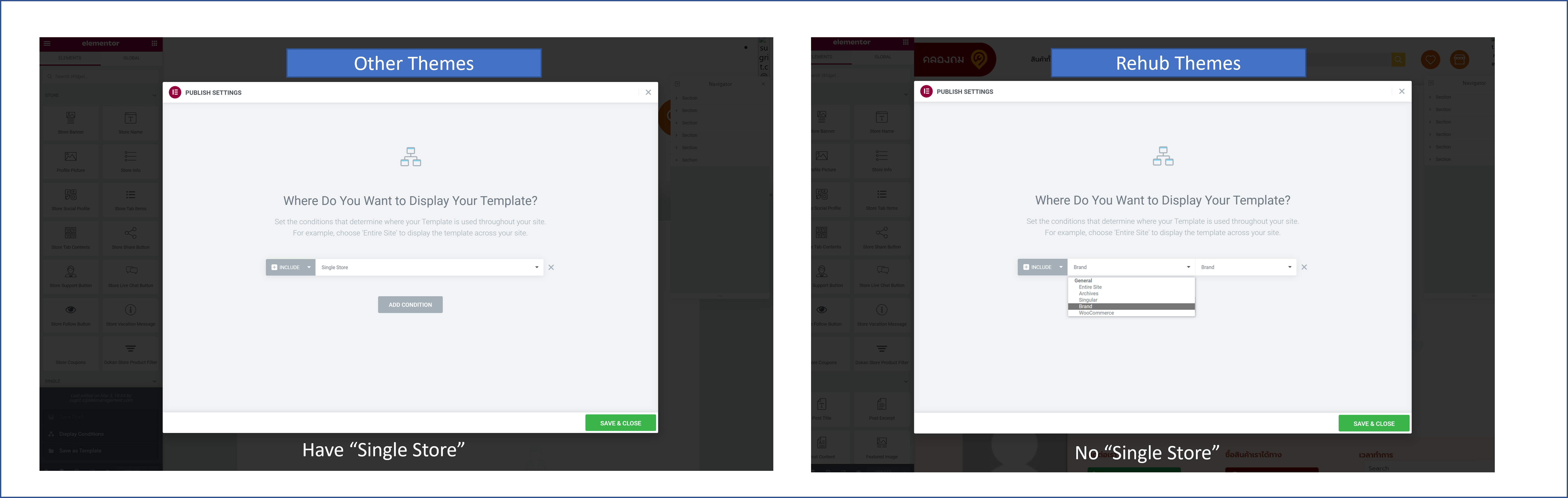
I use Rehub and now the Single Store Template (Elementor) will not apply to Dokan Store page….
But when I switch to Dokan Theme, Single Store Template (Elementor) works
I need to use Rehub Theme….please kindly advised
You can remove folder “dokan” from theme if you want to use custom
It appears that, when I change the theme to Rehub, the Display Condition lost the “Single Store” option, and instead has a “Brand” option, which does not override the Single Store page of Dokan.
Please advised on how we can use elementor to create Single Store template and override current layout from Rehub
Current Layout from Rehub (not the one created by Elementor) http://s3.amazonaws.com/appforest_uf/f1646311882206x438906237572877800/Capture.JPG Elementor Display Condition http://s3.amazonaws.com/appforest_uf/f1646311825726x596079241356073900/Picture3.pngI guess, Elementor option to include Store is feature of Dokan theme. It’s better to ask author of Dokan about this
Hi there, Can you please help me with these 2 questions:
1: How can I create an other section exactly like ‘related/recommended products’ at the end of a product page?
2: Near button area – I show product categories and tags there. How and where can I edit it to have them in 2 lines. Now looks like this: https://manofestum.com/en/product/explore-still-life-1-online-art-course/ even without the ‘back to search’ button looks the same which is not good.
Thank you
I think I have found the answer for my 1st question. I have uploaded RH Woocommerce Tools plugin. I have set up ‘accessories’ tab, added product to it, but does not show on single product page.
In the meantime, I have realized that the solution I need is an extra tab, same as ‘description’ and ‘specification’ or ‘reviews’ How can I add extra tabs like thise? Thx
Thx. I still have problem with this one: 2: Near button area – I show product categories and tags there. How and where can I edit it to have them in 2 lines. Now looks like this: https://manofestum.com/en/product/explore-still-life-1-online-art-course/ even without the ‘back to search’ button looks the same which is not good.
I think I have figured this one too. I have to change the layout haven’t I? Can I have the same result using the ‘Global layout from theme options’ please?
You can set global layout in theme options-shop settings
because you have custom button via custom plugin
body.single-product a.wcz-continue{display:block}
you can place this in theme options – general options – custom css
this will force button to be full width
That’s great. It does the job, but the Tags and Categories are not in different lines yet: https://manofestum.com/en/product/textile-embroidery-with-beads-patterns-you-can-replicate-a-course-by-raquel-ezquerro/
.posted_in{display:block}
you can place this in theme options – general options – custom css
PERFECT! THANK YOU!
Hi Sizam, I am using Re:Cash. is there a way that I can get rid of the flashing experience in the header area? Here is what I mean by flashing: When user comes to my site, the header portion gets rendered first, next, the spinner get loaded, then the entire page becomes blank and refreshes. Ideally, I want the header stays unchanged, and ajax load the body content only. Only the body portion should flash with a spinner, not the entire page. You can see this experience on my site: https://firstonsale.com Thank you for your input in advance
Hi. It looks like you are using some kind of cache plugin which breaks order of loading. Did you try to disable
Hi, I need to register a new domain and remove other domains registered with the purchase code. How can I do that please?
Regards
HI—using recash child theme. How can I have a show all stores page much like this: https://bensbargains.com/s/
Would like to show a list of featured stores and then under that a full listing in alpha order with no thumbnails just store name. I searched through the comments here but luck has been limited. Also not using woocommerce on the site—purely a affiliate site and adding stores under “Add Affiliate Store” under posts.
Thanks!
perfect! Thanks!
1. How can i customize the deal grid for post to show custom fields/shortcode below the title i.e. in deal grid like on this page https://preview.themeforest.net/item/rehub-directory-multi-vendor-shop-coupon-affiliate-theme/full_screen_preview/7646339?_ga=2.189204781.724827065.1646234799-831564695.1646234799
2. How Can I customize/add new layout for post details page to show custom fields and shortcodes
3. I am using elementor template for some post, what will be the shortcode for Affiliate store logo for that particular post i.e. Show nike logo on Nike post, Rebook logo on Reebok post
Please, update your support for customization help. Without actual support you can expect help only with possible issues
You can read about Envato’s support policy here
https://themeforest.net/page/item_support_policyThank you for understanding that our time has price.
I have renewed the support, looking forward to your response asap
Do you have code skills or no?
my development team does, ideally would prefer without coding. but if thats not an option, i can send the instruction you provide to my dev team and they can take care of it
1. So, you need to customize file inc/parts/compact_grid.php
https://monosnap.com/file/HrP4eiDxFSFaHDqYTAYnB7j6QNtnrD2. For example, you can use shortcodes in theme options – ads and code zones
3. There is no shortcode for this part. Available only function for templates
<?php WPSM_Postfilters::re_show_brand_tax('logo'); ?>
Thank you, I have forwarded the details to my dev team, they will review and get back to you.
Few more questions: 1. How Can i make the mega menu full width stretched like https://www.moneysupermarket.com/ 2. what’s the best way to customize Deal store page with more functionalities and custom design
2. taxonomy-dealstore.php is file for deal store page
I added the CSS for the full width mega menu but it doesn’t seem to work https://www.offerhub.ca/
you don’t use mega menu on site, you use Columned menus. It’s working as expected on your site
How do i start using mega menu?
Please watch video to the end https://rehubdocs.wpsoul.com/docs/rehub-theme/basic-settings/mega-menus/
Is it in planning, to update ImportWP PRO to newest Version?
updated. if you use also woocommerce addon, please, update main plugin first. New version requires to install also free version of plugin
Downloaded ImportWP PRO and it’s v2.1.1 
You must use actual theme version first
hello
i try to update theme for ayam-store.com its error
Warning: include(/home/ayamstore/public_html/wp-content/themes/rehub-theme/functions/helper_functions.php): failed to open stream: No such file or directory in /home/ayamstore/public_html/wp-content/themes/rehub-theme/functions.php on line 230
looks like your theme is broken, reupload it. Also, maybe you used some kind of plugin which changes theme folder names, something like wordpress hiding plugins
Is it possible to change the path ”/wp-content/uploads/noimage.gif”?
Theme options-loop customization- fallback image url
Hello it seems to me that I can’t compare products coming from 2 different feeds even if they are the same SKU/EAN, right?
Another point, I can’t manage to limit the import of products from 1 or 2 categories present in the merchant’s feed. All the categories and all the products are imported systematically.
Can you help me with that, please ?
You can compare. Please watch till the end
https://rehubdocs.wpsoul.com/docs/rehub-theme/affiliate-settings/bulk-import-of-offers/