362 comments found.
Hi there, I know that the theme has its own integrated booking system, but unfortunately there is no possibility of integration with booking, airbnb, etc. 1. is it compatible with the official “WooCommerce booking” plugin? 2. In that case do I have to go and recreate the rooms as products in WooCommerce? Thanks for the reply
Hi there,
We are using our own booking for the rooms where you will be able to check for availability and book a room if it is available and it is connected with the WooCommerce checkout integration plugin.
Since the author’s dashboard is meant for general inquiries and pre-sale questions we would appreciate it if you could submit a ticket to our Help Center, include your website URL, and one of our support agents will assist you. To submit a ticket please follow instructions from this article.
Support
Edge Portfolio part of
Qode Interactive
Don’t forget to sign up for our newsletter and be the first to find out all the latest news.

Hi support team, I need some help about Alloggio – Hotel Booking Theme. I am not able to change Alloggio logo when website page Loading. I have few more question about Alloggio Theme. Please reply me.
Hi there,
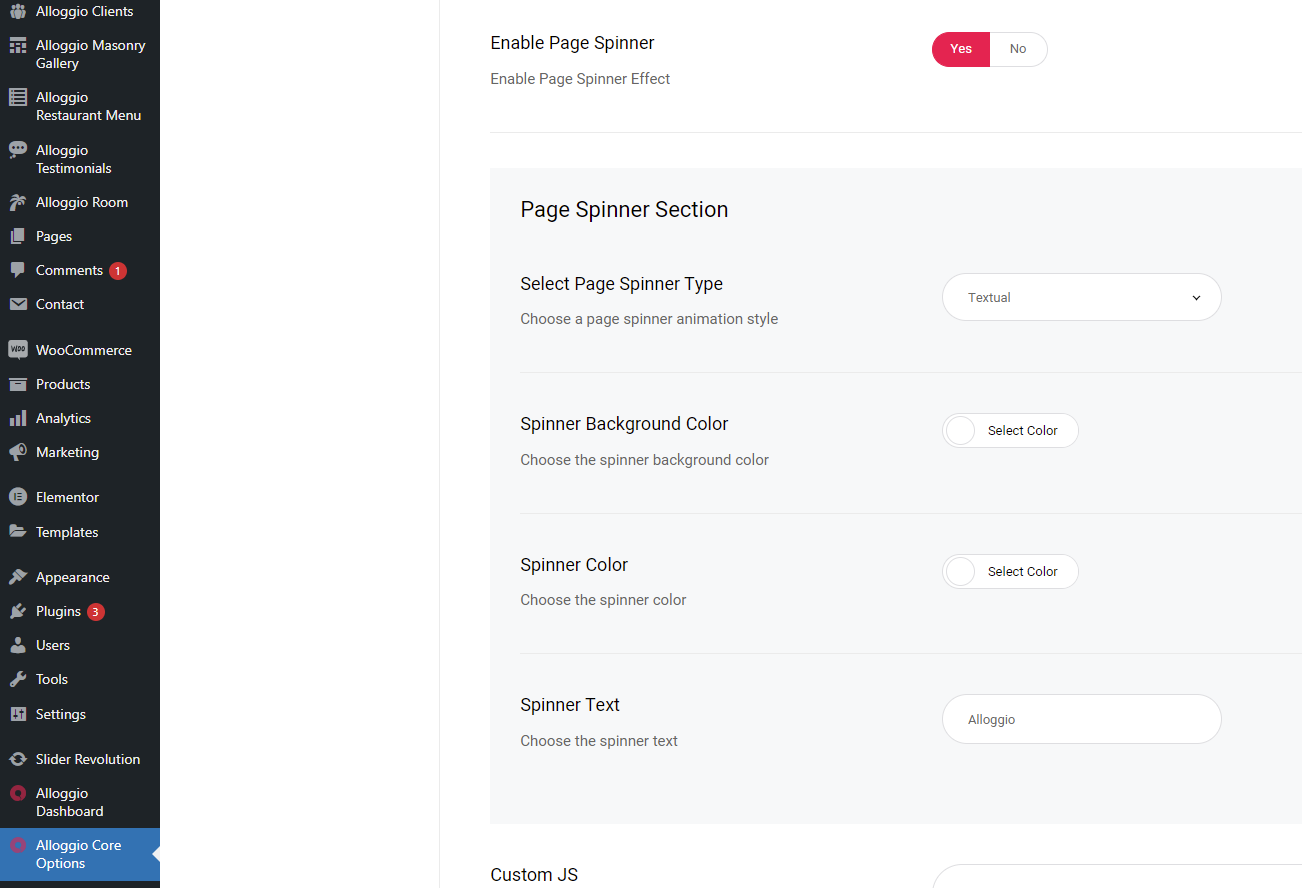
Within our Alloggio Core Options > General > Enable Page Spinner, if you choose Textual page spinner you will get access to the text field where you can change the text to suit your needs.
If you need any further assistance we would appreciate it if you could submit a ticket to our Help Center and include your website URL and one of our support agents will assist you.
Support
Edge Portfolio part of
Qode Interactive
Don’t forget to sign up for our newsletter and be the first to find out all the latest news.
Cant we book two or more rooms on single attempt.. is that possible in this theme. suppose there is 5 gusts 3 in one room 2 in another room.. can we book like that.. (eg:booking.com)
Hi there,
The Alloggio booking system is our own where the reservation form is integrated within the theme and the process of purchasing goes through WooCommerce where we do use their functionality for this purpose.
So you can add a few reservations to cart and then procede the reservation.
Do let us know if you have any additional questions.
Support
Edge Portfolio part of
Qode Interactive
Don’t forget to sign up for our newsletter and be the first to find out all the latest news.
Hello there, I’m having some kind of problem with the import. In the 90% of the importa it shows me Files don’t exist” and when I preview some of the pages it looks like there is no CSS files, because the preview doesn’t look good.
Can you give me a little support? Thanks in advance!
Hi there,
Since author’s dashboard is meant for general inquiries and pre-sale questions we would appreciate if you could submit a ticket to our Help Center, include your website URL, and one of our support agents will assist you. To submit a ticket please follow instructions from this article.
Support
Edge Portfolio part of
Qode Interactive
Don’t forget to sign up for our newsletter and be the first to find out all the latest news.
Hi, also for a reason, when i try to run “Elementor Data Updater” in my website i get this message “There has been a critical error on this website. Please check your site admin email inbox for instructions.” i think your theme needs update. It says clearly that the issue is with alloggio core plugin.
if i purchase another licence i want to be sure i will not have any issues and i hope you still update this beautiful theme.
Thanks
Hello,
This is a known issue with Elementor itself. You could contact them for further information on it, however, I have found the following as a proposed solution. You can navigate to Elementor -> Tools -> Versions -> and do a rollback to a previous version (maybe try with 3.2.4 version). This should allow the Elementor Data updater to go through quickly then you will be able to update to the later version.
We are constantly working on updating all our themes and since compatibility for WP 5.8 and block based widgets was added in the latest theme update the theme should work correctly on latest WordPress version. By purchasing Regular License you will be able to use our theme for an unlimited period of time, you’ll be able to update your theme every time we release a new theme version, and you’ll also have the option to get all the latest versions of the plugins that come bundled with our theme.
Do let us know if you have any additional questions.
Support
Edge Portfolio part of
Qode Interactive
Don’t forget to sign up for our newsletter and be the first to find out all the latest news.
Ok great ! Thanks
Support
Edge Portfolio part of
Qode Interactive
Don’t forget to sign up for our newsletter and be the first to find out all the latest news.
Hi i downgrade elementor to 3.2.4 i make the update but when i update it to the lates version again i have the same issue. Guys we must find a solution, i want to purchase 2 -3 licences of your theme. Pls i need a solution. for all your clients i guess. Thanks
Hi,
As we do not have enough information in order to help you, and since author’s dashboard is meant for general inquiries and pre-sale questions, we would appreciate if you could please submit a ticket at our Help Center or contact us through this email, include your purchase code in the email, and one of our support agents will gladly help you.
Support
Edge Portfolio part of
Qode Interactive
Don’t forget to sign up for our newsletter and be the first to find out all the latest news.
Hi Guys, i love your theme, i want to purchase it again pls tell me
1. can i use this demo https://alloggio.qodeinteractive.com/hostel-home/ but i want to to be in white. not black. is this possible. can you help on that?2. The demo imports all pages, because i want to combine layouts from different demos.
Thanks
Hello,
Thank you for taking interest in our theme!
Once you import our demo content you will get all the pages and settings which you can adjust to your needs. You can for sure adjust colors on this homepage to suit your needs (please see screenshot). You can also combine sections from different pages to create your page layout.
You should know that you can always turn to our support team and you are more than welcome to submit a request at our Help Center and our support team will be happy to help. To submit a ticket please follow instructions from this article – How To Submit A Ticket.
Support
Edge Portfolio part of
Qode Interactive
Don’t forget to sign up for our newsletter and be the first to find out all the latest news.
Great, thanks guys
Support
Edge Portfolio part of
Qode Interactive
Don’t forget to sign up for our newsletter and be the first to find out all the latest news.
Hello,
Please submit a ticket at our Help Center and one of our support agents will gladly help you regarding any theme related question. To submit a ticket please follow instructions from this article – How To Submit A Ticket.
Support
Edge Portfolio part of
Qode Interactive
Don’t forget to sign up for our newsletter and be the first to find out all the latest news.
Hi, I wanna hide reservation sidebar form, where exactly should I change in code to remove it and where? Thank you. p.s. Theme is very nice!
Hello,
Thank you for choosing our theme!
Since author’s dashboard is meant for general inquiries and pre-sale questions, we would appreciate if you could please submit a ticket to our Help Center, include your website URL, and one of our support agents will assist you. To submit a ticket please follow instructions from this article – How To Submit A Ticket.
Support
Edge Portfolio part of
Qode Interactive
Don’t forget to sign up for our newsletter and be the first to find out all the latest news.
Hello, Is it possible to delete the babies and children’s fields from the reservation form? So they are not selectable. Only on specific rooms, not all. Thanks
Hello,
Such an option, unfortunately, does not exist within the theme. It would need to be done using custom css.
In case you need further assistance for css please submit a ticket at our Help Center and one of our support agents will gladly help you. To submit a ticket please follow instructions from this article – How To Submit A Ticket.
Support
Edge Portfolio part of
Qode Interactive
Don’t forget to sign up for our newsletter and be the first to find out all the latest news.
Hi, I’d like to know if your theme is compatible with resdiary – https://www.resdiary.com/ Also, are customers able to take bookings without payments? Thanks
Hello,
Unfortunately, we haven’t tested integration of ResDiary with the theme so we cannot guarantee it’s compatibility.
You can hide our booking form and add a regular contact form where users can send inquiries.
Do let us know if you have any additional questions.
Support
Edge Portfolio part of
Qode Interactive
Don’t forget to sign up for our newsletter and be the first to find out all the latest news.
Hi, pls make an update, th new elementor cannot updated crashes the site Pls make an update Thanks
Hi there,
Since author’s dashboard is meant for general inquiries and pre-sale questions we would appreciate if you could submit a ticket to our Help Center, include your website URL, and one of our support agents will assist you. To submit a ticket please follow instructions from this article.
Support
Edge Portfolio part of
Qode Interactive
Don’t forget to sign up for our newsletter and be the first to find out all the latest news.
Hello, given the impossibility to customize the template according to the needs and therefore, given the lack of use for putting the site online, I kindly ask for the possibility of being compensated.
Hi there,
We would appreciate if you could submit a ticket to our Help Center, include your website URL, and one of our support agents will assist you. To submit a ticket please follow instructions from this article.
Support
Edge Portfolio part of
Qode Interactive
Don’t forget to sign up for our newsletter and be the first to find out all the latest news.
I am interested in buying this theme and have some pre-sale-questions.
- Is it fully translatable in more languages and compatible with WPML? - How are the free room dates handled? How can the customer set the available the free periods? - I do not want the booking in woocommerce style. Can I change that into a regular request-booking? - Gallery thumbs clickable? Lightbox ecc? - the embedded location map is not working on my side
Hello,
Thank you for taking interest in our theme!
- Yes, to translate/change any label inside the theme or bundled plugin you can use Loco Translate plugin and try following instructions from this article – How To Use The Loco Translate Localization Plugin. If you cannot locate some label inside the theme please try adding translation for Alloggio Core plugin or other bundled plugins and search for label there.
Theme is compatible with WPML and for creating multi-language site with our themes you can check this article – How To Create A Multi-Language Website
- You can find more info about available backend settings for rooms in the documentation in this link.
- The Alloggio booking system is our own where the reservation form is integrated within the theme and the process of purchasing goes through WooCommerce where we do use their functionality for this purpose.
However if you want to organize the booking or a request differently then you will need to edit our theme files, as there is no option to make a reservation request other then through our booking form.
Alternatively, you can hide the theme’s booking form using css (our support agents can assist you with this), and in the description section which can be edited with Elementor you can add regular contact form for sending inquiries.
- Top gallery on single room pages unfortunately cannot be opened using lightbox, however you can add a gallery in description section which can be edited with Elementor and set it’s behavior to open in lightbox on click (please see screenshot).
- To use google maps it is necessary to generate and use Google Maps API Key and you can find more info in this article – How To Generate And Use The Google Maps API Keys.
Do let us know if you have any additional questions.
Support
Edge Portfolio part of
Qode Interactive
Don’t forget to sign up for our newsletter and be the first to find out all the latest news.
Hello! I have been using your theme for a year now and it was working beautifully, until a month ago when the amenities list from my room dissapeared. I can’t find the shortcode in Elementor Builder to add them again, and I can’t find where the icons are to make a custom list… please help
Hi there,
As we do not have enough information in order to help you, and since author’s dashboard is meant for general inquiries and pre-sale questions, we would appreciate if you could please submit a ticket at our Help Center, include URL of your site, and one of our support agents will check this and assist you further. Thank you.
Support
Edge Portfolio part of
Qode Interactive
Don’t forget to sign up for our newsletter and be the first to find out all the latest news.
Can this theme work without the booking system and can I still use all the styling and elements as in the demo?
Hi there,
Thanks for taking an interest!
The Alloggio booking system is our own where the reservation form is integrated within the theme and the process of purchasing goes through WooCommerce where we do use their functionality for this purpose.
The customer that book a room do get a notification mail once they go through the purchase.
However if you want to organise the booking or a request differently then you will need to edit our theme files, as there is no option to make a reservation request other then through our booking form.
Do let us know if you have any additional questions.
Support
Edge Portfolio part of
Qode Interactive
Don’t forget to sign up for our newsletter and be the first to find out all the latest news.
I only need to redirect via a booking button to a booking url, I assume that this can be easily done? Also is the theme compatible with WP 5.9?
Thanks for your help and the Theme looks amazing
Sorry I’ll explain again, I just need to be able to put buttons that say bookings and put in the specific booking url to redirect to, am I able to use buttons like you have in the theme and put in the third party booking url to redirect to their booking engine?
Hi there,
You might redirect the buttons by editing the theme files. So this is something that is not covered from our themes options and will require custom coding.
When it comes to WP 5.9 we can suggest you to wait until the official update is released so you will for sure be notified about this, however there has not been any significant issues so far.
Thanks for understanding.
Support
Edge Portfolio part of
Qode Interactive
Don’t forget to sign up for our newsletter and be the first to find out all the latest news.
Is it possible to disable the integrated booking system and insert a link for booking on single room page?
Hi there,
Thanks for taking an interest! The Alloggio booking system is our own where the reservation form is integrated within the theme and the process of purchasing goes through WooCommerce where we do use their functionality for this purpose.
However, if you want to organize the booking or a request differently then you can hide our form and add one of the following forms through Element. Check this screenshot.
Do let us know if you have any additional questions.
Support
Edge Portfolio part of
Qode Interactive
Don’t forget to sign up for our newsletter and be the first to find out all the latest news.
When we give the logo from backend its not updated. Any reason for this?
Hi there,
Thank you for reaching us!
It could be that different header and logo options are set on the page. Local page options will override global theme options and you can find more in this article – The Global And Local Settings Info And Troubleshooting.
As we do not have enough information in order to help you, and since author’s dashboard is meant for general inquiries and pre-sale questions, we would appreciate if you could please submit a ticket at our Help Center, include URL of your site, and one of our support agents will check this and assist you further. Thank you.
Support
Edge Portfolio part of
Qode Interactive
Don’t forget to sign up for our newsletter and be the first to find out all the latest news.
Thanks for the quick respond. Yes that was the issue. Now its working.
Hi there,
Glad we could help!
Support
Edge Portfolio part of
Qode Interactive
Don’t forget to sign up for our newsletter and be the first to find out all the latest news.
Hello, this is a pre-sale question. Does booking function in this theme support ical sync so it can be integrated with Booking.com reservation system?
Hi there,
Thank you for reaching us!
No, unfortunately not. Booking is integrated part of the theme that can be managed within your WordPress installation only. We will for sure pass this suggestion to our team for consideration including it in the future.
Thanks and let us know if you have any additional questions.
Support
Edge Portfolio part of
Qode Interactive
Don’t forget to sign up for our newsletter and be the first to find out all the latest news.
How to show room in a page using shortcode?
Hi there,
Thank you for reaching us!
Since the author’s dashboard is meant for general inquiries and pre-sale questions, we would appreciate it if you could submit a ticket to our Help Center and one of our support agents will assist you.
Thanks.
Support
Edge Portfolio part of
Qode Interactive
Don’t forget to sign up for our newsletter and be the first to find out all the latest news.
Hi there, Need a quick reply here – for the life of me I can’t figure out how to change the preloader. It keeps saying Alloggio and I don’t know where to change it from. Change the site title, logos, everything – even played with the spinner option in the core options – but useless. Please help.
Hello,
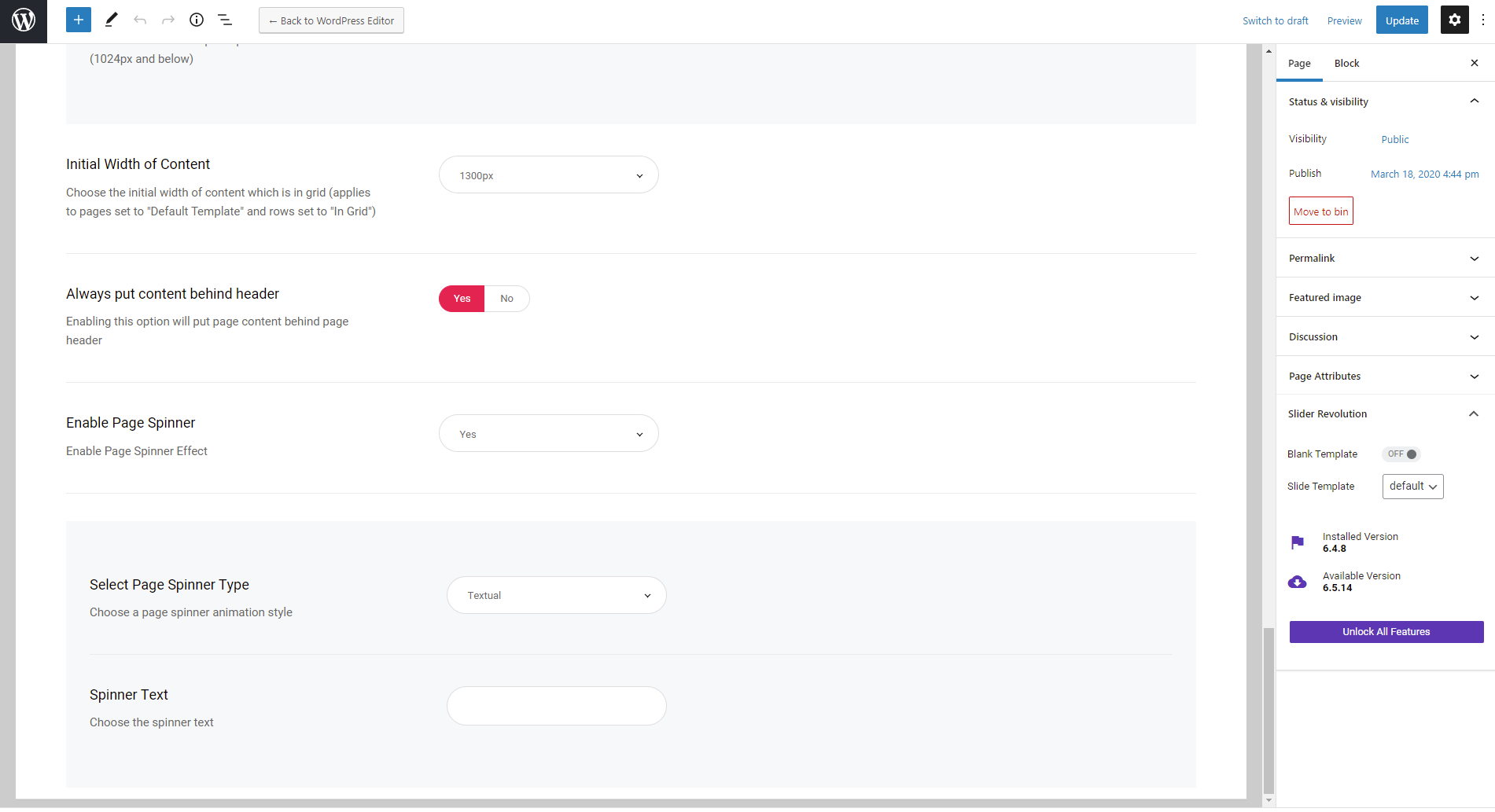
Preloader text can be changed in Alloggio Core Options > General. When the “Enable Page Spinner” option is set to “Yes” and “Select Page Spinner Type” set to “Textual” the “Spinner Text” option will appear where you can enter your preloader text (please see screenshot).
This option is available on individual pages too in “Page Settings” as shown in screenshot and options set on individual pages will override ones set in Alloggio Core Options.
In case you need further assistance please submit a ticket at our Help Center and one of our support agents will gladly help you.
Support
Edge Portfolio part of
Qode Interactive
Don’t forget to sign up for our newsletter and be the first to find out all the latest news.