23207 comments found.

single image not working with last update, This is a very important problem for us because no image is visible in any area where single image is used.
Not: The problem occurred after installing the polylang translation plugin.
Hello, @floraturkey,
Can you please contact us via our support system with your site WP Admin Login details so that we will check it for you on your site and help you out.
Regards, P-THEMES.
I opened a ticket with the ID number #25541, although 18 hours have passed, still no response.
Hello, @floraturkey,
Now please be patience, once the support ticket will be resolved, you will get the reply to your support ticket. Thanks for your understanding.
Regards, P-THEMES.
Hello friends.
Any predictions for port version 7? If yes, will it come out this year?
What news will we have?
Hello, @welli0806,
Yes our team is working on the new theme update and we will release that new version soon, unfortunately I do not have the exact time frame for it.
And you will have some new Demos and features with it as well, so please be patience and stay tuned with us.
Regards, P-THEMES.
but is it possible to setup the boxed layout to a different width? e.g. 1500px ? or in porto is not possible? the 3 width are blocked? other theme permit this feature
already settled the container max widt px in layout but it not works… i also reset all configurations of porto i know that you live on support fees but if not work also the minimal functions so strange
Hello, @nikketrikke,
I have just tested it at my end with the latest Theme on my test site and it is working perfectly fine at my end.
Please make sure that you have set/selected the Body Wrapper as “Boxed” from Appearance >> Theme Options >> General and then set the Container Max Width (px) from Appearance >> Theme Options >> Skin >> Layout as per your requirements it will work for you.
It only works with and for the Boxed Layout.
Hope this is all clear make sense.
Regards, P-THEMES.
possible that your great theme not have the possibility to set the body boxed width even if the header and footer can be wide or full… i tested other themes in free mode that do this.. i not make the names!!! i own other 3 paid themes that do the same… PORTO is the only one that cannot do this for me seems impossible sorry… Or boxed at 1140 to 1920 or FULL and WIDE but only the boxed at 1140 !!!! i like PORTO for the way it manage owned shortcodes for wpbakey… but the width boxed at 1140 is a limit too much POSSIBLe that i cannot put a CSS or some code to make the body at 1500px??? regards
Hello, @nikketrikke,
I am sorry but please check the video I have checked the same option at my end and it is working fine for me: https://streamable.com/olhyfj so please do not blame our theme for this, and If you want the Body Boxed and Footer and Header Full it has the other option, please read this article (The Full layout): https://ptheme.zendesk.com/hc/en-us/articles/4402462868241--64-How-the-Main-layouts-of-the-Theme-works-
And you can change anything using Custom CSS as per your requirements as well.
And also could you please purchase support extension to get further support? Your 6 months of support period is expired from 25/04/2020. According to Envato support policy, renewing support is required for further support.
Thanks for your understand.
I see thanks… probably i have to set the body in full but with sidebars to show at 80% as your doc suggests (even if i not want to show sidebars)...I had settled with NO sidebars so for that i think it comes 100% of screen as the WIDE setting (that i not like)... i will try it now to make full at 80% you can take a look at my actual website using another theme i hope to obtain similar result with yours.. and yes for sure upgrading support subscription… https://www.nicolameyer.com/
Hello, @nikketrikke,
You can achieve the same using (The Full layout).
Regards, P-THEMES.
Hello, @nikketrikke,
Can you please share the URL of the page having the issue so that I’ll check and help you out if possible with Custom CSS.
Regards, P-THEMES.
Hello, @nikketrikke,
For 80% width, Please copy and paste the below-given CSS code to Porto >> Theme Options >> Skin >> Custom CSS and check back your site after removing the browser cache.
@media (min-width: 1160px){
#main.main-boxed {
    max-width: 80% !important;
}
}
And regarding your other issues, you have to contact us via our support system with your site WP-Admin Login details so that our experts will check it for you on your site and help you out.
Regards, P-THEMES.
ok thanks
You’re Welcome!!
Hello, how can I add a “block” in the “Mobile Panel”?
Hello, @grueter6,
Sorry to say that but you can not add the Block under Mobile Panel as there is no such option in our theme for it.
But you can set the block in Mobile header if you use Header Builder in Customizer on your site: https://postimg.cc/TKz6Dhzz
And also could you please purchase support extension to get further support? Your 6 months of support period is expired from 04/12/2020. According to Envato support policy, renewing support is required for further support.
Thanks for your understand.
Hi guys,
Would you be able to give me the CSS code to change the “sub title text” that sits underneath each header. I need to be able to make the sub title text larger. Thanks
Hello, @frontupdesign,
Which sub title text are you talking about? Can you please share the screenshot and also the URL of the page so that I’ll check and help you out.
And also could you please purchase support extension to get further support? Your 6 months of support period is expired from 29/10/2021. According to Envato support policy, renewing support is required for further support.
Thanks for your understand.
Hi Guys, this is the last part i need to update before handing the website over to the client and i have advised them to subscibe to the support as they will be managing the site.
This is the CSS section.
<section class=”page-top page-header-7”>
FLEX SUPPORT
- I need to increase the size of the sub text below the header**
On-demand, fully-managed data centre support services. • Any time. Any location.
I have changed the title by adding this CSS } .page-top ul.breadcrumb>li { font-size: 12px !important; } h1.page-title { font-size: 60px !important; } }
I just need to be able to increase the size of the sub text
On-demand, fully-managed data centre support services. • Any time. Any location.
You will be able to see the banner on this page https://joycesolutions-4f728d.ingress-earth.easywp.com/flex-support/Much appreciated
Simon
Hello, @frontupdesign,
Simply go to the Dashboard >> Porto >> Theme Options >> Skins >> Custom CSS and then paste the below code at the bottom of the black box.
.page-top .page-sub-title{font-size:30px !important;}
Then save the settings and check back your site after clearing the browser cache.
Note: In the above code the word “30” is the size you can change it with you want.
Regards, P-THEMES.
Hi, On the products page, each product has a title. If the title is too long it gets cut. Is there an option in theme to show full length titles? Iam talking about this: https://ibb.co/RyWSYpX . Thank you!
Hello, @ArtanisZG.
Please copy and paste the below given CSS code to Appearance >> Theme Options >> Skin >> Custom CSS and check your site after removing the browser cache.
ul.products li.product-col .woocommerce-loop-product__title {
    white-space: normal !important;
}
ul.product_list_widget li .product-details a, .widget ul.product_list_widget li .product-details a{
    white-space: normal !important;
}
And also could you please purchase support extension to get further support? Your 6 months of support period is expired from 24/05/2021. According to Envato support policy, renewing support is required for further support.
Thanks for your understand.
Hi, thanks for the fast reply. Actually the support is still active. I have send you a PM with website link so you can see that licence is active. The licence is on the other user. I’m writing (becasue i also have purhased porto themes). Anyways I have tried this and it is working (i had to paste the code at the beginning). Thank you!
Hello, @ArtanisZG.
Sound’s Good!! and you can paste the code at anywhere.
Regards, P-THEMES.
Hello, @vivipapaliaga,
Please go to WPML >> Settings >> Taxonomies >> Enable or make the Template builder as Translatable and save the setting. Then you will able to translate the Block.
OR
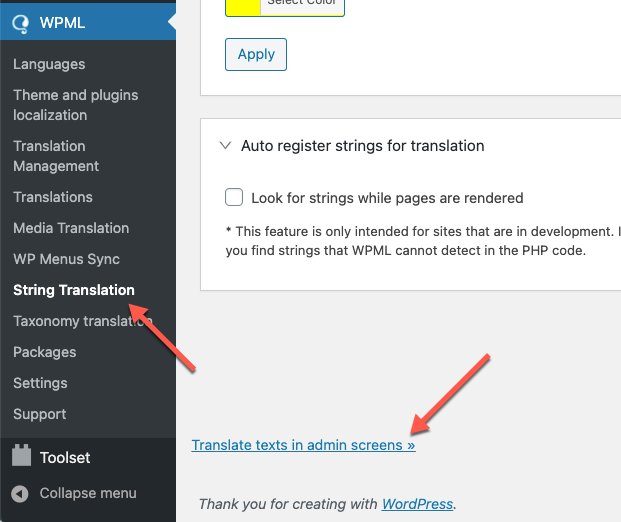
Please go to WPML >> String Translation >> Click the scroll to the bottom of the page and click the Translate texts in admin screens link. https://cdn.wpml.org/wp-content/uploads/2021/03/translate-texts-in-admin-screens.png This will take you to a searchable list of admin strings. Find the Words that you want to translate from Quick View and then select those words and add it to the string Translation then you will go to the WPML >> String Translation >> then find and translate them into other languages.
Otherwise please contact us via our support system with your site WP Admin Login details so that we will check it for you on your site and help you out.
Regards, P-THEMES.
Hello, How to stop the porto fancy text typing animation after one round? Regards
Hello, @ayesha616,
Porto fancy text element and theme has no such option to stop typing effect after one iteration. So it requires customization in the Porto functionality plugin to modify that element to stop after one round.
Regards, P-THEMES.
Hi, I’m trying to hide price and add to cart button in single product page & home non logged in user. I have used to snippet with php code and able to hide in home and shop page but not able to hide in single product page. can you help with that? Thanks
Hello, @jasoni5,
No need to hide it using the Code Snippets, but Porto provides the option for it, you can use Catalog Mode for it, you will find it under Porto >> Theme Options >> WooCommerce >> Catalog Mode: https://postimg.cc/9wF6mDZt
You can hide the product prices based on user roles as well using the Theme Options under Porto >> Theme Options >> WooCommerce: https://postimg.cc/CZfzNG1D
Regards, P-THEMES.
Thank you also how can i add custom fields for registration form. Any free recommended plugins? Thanks
Hello, @jasoni5,
You can google it and try with any third party plugin which better meets your requirements, unfortunately we had not tested any of the third party plugin with our theme for this reason officially.
Regards, P-THEMES.
ok and what about the autosuggest features of YITH. I Installed it and sometime it works some time not. How to resolve this. Thanks again
Hello, @jasoni5,
We have to check it on your site, Please contact us via our support system with your site WP Admin Login details so that our experts will check it for you on your site and help you out.
Regards, P-THEMES.
Hello I have just downloaded the recent version of the theme and installed. But whenever I activate I get this – There has been a critical error on this website. Please check your site admin email inbox for instructions.
Hello, @gentlepromise,
Please make sure that your site must meet the latest theme and plugins minimum requirements as listed below:
PHP version 7.4.
Memory Limit 256M or higher.
max_execution_time 600 or 1000
memory_limit 256M
max_input_vars 2000
post_max_size 64M
upload_max_filesize 64M
And then try to Install the theme by following this video: https://www.portotheme.com/wordpress/porto/documentation/installation-video/
And also could you please purchase support extension to get further support? Your 6 months of support period is expired from 03/05/2019. According to Envato support policy, renewing support is required for further support.
Thanks for your understand.
Hello I have done all that has been suggested but still experiencing the same issue
Hello, @gentlepromise,
Then please contact us via our support system with your site WP Admin Login details so that our experts will check it for you on your site and help you out.
Regards, P-THEMES.
Been using this awesome theme for years, but recently noticed clients don’t like the zoom in feature on photos of Woocommerce when they touch the picture, how cancel this feature please?
Hello, @YSALI,
You can turn the product image zoon turn ON/OFF from Porto >> Theme Options >> WooCommerce >> Product Image & Zoom: https://postimg.cc/8fQm1kFJ
And also could you please purchase support extension to get further support? Your 6 months of support period is expired from 19/01/2022. According to Envato support policy, renewing support is required for further support.
Thanks for your understand.
Hello! I have a question, I bought the theme 2 years ago, but it has not been possible to update it because work was done on the parent theme and style and CSS changes were made, the client needs to update the entire web but the theme is very obsolete, if I renew the support could you help me with this? Is there a possibility to create a copy to a child theme and update the main theme without problem?
Hello, @Nathamejia,
If you have done the Customization in Parent Theme files, then it will be changed/removed when you update the theme, so you have to change that Customization in Child Theme by yourself, and then try to update the Parent-Theme, we recommended to take the complete backup before updating the theme.
And sorry to say that but that thing is required Customization and Customization is not included in the theme support policy. If you want our Paid Customziation services you can contact our Customization team at ptheme.customize@gmail.com
And also could you please purchase support extension to get further support? Your 6 months of support period is expired 24/12/2020. According to Envato support policy, renewing support is required for further support.
Thanks for your understand.
Hello, Can I use a different logo on some pages? Thanks!
Hello, @fatihemregunes,
Yes, it is possible with a trick I made a video for you kindly watch the complete video for a better reference: https://streamable.com/un26p3
And also could you please purchase support extension to get further support? Your 6 months of support period is expired from 28/09/2019. According to Envato support policy, renewing support is required for further support.
Thanks for your understand.
Hello there, First of all, nice theme. I am very much interested in purchasing the theme but I have a pre-purchase question. I want to have my checkout page in sections like review order, address and finally, confirm order (please check https://www.cavaraty.com). Looking forward to your response and buying this amazing theme. Best Regards. Farouq
Hello, @farooqishere,
First of all, thanks for showing your interest in Porto WordPress 
No, Sorry to say that but this is not possible with our theme, you can check our checkout and demo pages here: https://www.portotheme.com/wordpress/porto_landing/ so you have to try with any third party plugin which better meets your requirements.
Regards, P-THEMES.
Bebuider, do you edit the product-category page and the product page? Do I need to pay extra?
Hello, @damon153068,
First of all thanks for showing your interest in Porto WordPress
Can you please explain more clearly that what you want exactly, if possible with some screenshots, because I am not getting what you want…
Regards, P-THEMES.
I imported demo28 but sections that contain “ul class” do not display correctly. Why?
Hello, @nobra21,
Can you please share the screenshot of the issue and URL of the page, so that I’ll check and help you out in a proper way?
Regards, P-THEMES.
Hello, @nobra21,
Just checked your site now and finds the hover color is there but it is white: https://postimg.cc/hhPW9bJN and that is because of the cache as you have the active server cache as well, so please read and follow the instructions written in this article: https://ptheme.zendesk.com/hc/en-us/articles/360020799098--35-Unable-to-change-color-settings-or-Setting-from-Theme-Options-Cache-Problem
And also could you please purchase support extension to get further support? Your 6 months of support period is expired from 05/10/2019. According to Envato support policy, renewing support is required for further support.
Thanks for your understand.
If I have to buy your support to fix the bugs of your theme, then it’s very sad and I’m unlucky. Unfortunately, your answer matched the price of unpurchased support – absolute nonsense. The article from your link talks about the impossibility of changing the colour, not an error with the correct settings. And you avoided the answer to the more important thing – not showing the whole section. The cache has nothing to do with it. This is a very sad answer from an expert. If you read my post better, you would understand that these two problems have one thing in common – and these are the tags “ul”, respectively. “li”.
In addition – in the backend (in the editor) the “review” section is displayed correctly, while in the frontend it is no longer.
Hello, @nobra21,
First of all, those are not our theme bugs but the issues on your site only and the above solution is perfect for the hover color issue, whether you accept it or not but that is the cache issue nothing else.
And regarding the Review image issue, that is because you have added the Custom CSS for its size: https://postimg.cc/qzNLnfqF so when you change the values in the code it will increase the size of the image. and as you see this is not our theme bug but the issue on your site only.
Thanks for your understanding.
Regards, P-THEMES.
I have made sure that the server requirements are meeting the recommended values. However, when updating the Porto Functionality plugin it fails.
Hello, @centurypixel,
Please go to Porto >> Dashboard and deactivate the theme from there and then again activate the theme with same purchase code, and then try to update the plugin from Appearance >> Install Plugins, I am sure you will not face this issue anymore.
And also could you please purchase support extension to get further support? Your 6 months of support period is expired from 15/04/2021. According to Envato support policy, renewing support is required for further support.
Thanks for your understand.
Hi, we recently bought this theme and it is really very good. we would like to do few modification on the upsell products shown on the single product page. By default, it is showing 2 columns on mobile. We would like to change that to show 1 column on mobile. Is there any settings available in the theme options to achieve the above.
Hello, @PureVentilation,
Sorry to say that but there is no such option in our theme for it but you can try it with some Custom CSS, Please share the page URL having those upsell products so that I’ll check and help you out if possible.
And also could you please purchase support extension to get further support? Your 6 months of support period is expired from 07/01/2022. According to Envato support policy, renewing support is required for further support.
Thanks for your understand.
Hello , i search on documents and i cant find nowhere the mobile menu section, i cant change or enter a mobile menu items!
Hello, @baspax1989,
The desktop Main Menu items are the mobile menu items. so you have to change the items from Appearance >> Menu as per your requirements.
And also could you please purchase support extension to get further support? Your 6 months of support period is expired from 21/11/2021. According to Envato support policy, renewing support is required for further support.
Thanks for your understand.
I want to keep description of product category and brand in the below of category and brand page. Category description shows in the above now. Please see the category for better understanding. https://cutt.ly/LSMO7Zc . Please let me know how will I do this.
Hello, @sinin,
There is no option in the Theme Options to move the Category Description from top to bottom on the category page. But you can achieve it by following the steps listed below.
1. Please go to WP-Dashboard >> Porto >> Template Builder >> Blocks and create a new block.
2. Add/Write the Description in the particular block as per your requirements.
3. Save the block and click on quick edit and copy the block slug name.
4. Go to  Products >> Categories and edit the particular category.
5. After editing the particular category scroll below, you will find the Content Bottom option.
6. Paste the block slug name in the Content Bottom Option and save the change.
7. Finally check your site after removing the browser cache.
And also could you please purchase support extension to get further support? Your 6 months of support period is expired from 28/11/2021. According to Envato support policy, renewing support is required for further support.
Thanks for your understand.