38352 comments found.

Hi ThemeNectar! I’ve a strange bug problem: after mozilla firefox browser update (version 101.0 64bit) the fonts (raleway) used on the sites are small, thin and even changing the style remain the same … why? Those from mozzilla say it depends on how the site was built, which is an internal thing … possible? Do you have feedback?
Hey thebugbear!
I haven’t been able to replicate that locally when testing with the same version of Firefox – here’s raleway displaying correctly at the specified 16px: https://ibb.co/HtRvNXL
Cam you please share your URL in regards so that I can take a look?
Thanks in advance
hi,
I have salient’s lazy loading on, do you recommend turning it off on WP Rocket?
See my settings here for WP rocket https://imgur.com/a/Y9n7vt4
Thanks
Hey toolbox101,
Salient does not currently offer lazy loading for videos, so if you’re using that aspect you could just disable the Salient lazy loading option. But yes, in general you should only have one performance option enabled for a specific task. Overlapping any tasks could result in unexpected rendering.
Kind regards,
I like Salient’s lazy loading and i turned off the Lazy loading on WP rocket for images only. However, my question is… how do i skip the site logos and any main navigation images form lazy loading because these are above the fold. Both for desktop and mobile. Wp rocket has exclude option. I want to keep your lazy loading because i find it much better then the one in Wp rocket.
Thanks
Hey toolbox101,
Salient does not apply lazy loading to the header navigation bar logo or header navigation icons by default because it’s above the fold – can you share page URL where you’re seeing that occur?
Good afternoon. I have a question about PageSpeed Insights. Why in the version for the computer he shows super results 96-97. And in the mobile version, there are only 65. And the biggest mistake is “Remove render-blocking resources.” Why does the W3 Total Cashe plug-in close all these errors in the desktop version, but they remain in the mobile version? Maybe some more settings need to be made? Also it shows error in mobile version for “First Contentful Paint (3G)”
Hey again MiraSmurkov,
Optimizing for a high mobile page score is significantly harder than desktop due to how Google has updated their grading – They run the mobile testing on throttled network connection speeds to test against slow conditions. Getting an “A” on mobile requires more advanced performance features that only premium plugins offer at the moment such as WPRocket/Nitropack etc. That being said, we’re including many new performance related items in the next release to make high mobile scoring much easier 
I understood you. Have you tested Salient with WPRocket/Nitropack? Can you share the correct settings for these services?
Hey MiraSmurkov, The two key items that will make the big difference is delaying JS execution, and generating critical CSS. Both plugins offer those settings to enable.
Kind regards,
Good afternoon. Salient hasn’t had any updates for over half a year. Should we expect something interesting in the near future?
Hey MiraSmurkov,
That’s not accurate – there has been a handful of releases this year for fixes and new features. The last update was 2 weeks ago: http://themenectar.com/changelogs/salient.htmlHowever, yes, we’re in the process of beta testing the next big release as mentioned at the top of the changelog. We’re hopeful that it will be officially released later this month
Kind regards,
Of course, I know about interim updates, but they just fix some bugs more often. We are all waiting for something new global every six months from your team. By the way, a question. Your next release is 14.1. Previously, you had either *.5 or *.0. So this update will not be so major?
Hey MiraSmurkov, The beta opt-in notice had the incorrect future version – that’s now been updated
hi, how we set 6 or 8 product show in same ROW in shop (woocommerce)
I don’t special page design. Default shop page is have 6-8 product in one row with your theme?
Hey sinayes,
In the Salient options panel > WooCommerce tab, you can set your column number for the shop pages: https://ibb.co/Tqs1J1K The maximum columns is currently 6 – anything higher than that would require some CSS.
Kind regards,
pre sale question : Essential Grid Supported ??
Hey Bleugatti,
I’m unaware of any conflicts with that plugin.
Kind regards,
Can I make a modal with a gravity form shortcode displayed?
Hey redkahl, Salient doesn’t provide a built-in modal system. You could use a plugin such as https://wordpress.org/plugins/popup-maker/ to achieve that.
Kind regards,
HI there,
I have created # links in my menu. The problem is that i have to click on the arrow icon to open dropdown and if i click in the menu item nothing happens.
this is troublesome for mobile users. Can i fix this somehow?
thank you
Hey nikosff,
In the Salient options > Header navigation > off canvas menu tab, you can change this functionality with the option titled “Off Canvas Menu Dropdown Behavior”.
Kind regards,
This is a superb versatile theme, thank you!
You’re very welcome, nikosff
Hey there, is salient compatible with WP 6.0? Cheers.
Hey born-design,
Yes it is – ThemeForest just has not updated their version list yet for us to select that in the item description.
Kind regards,
Hi – wondering why the Montserrat letter “A” shows up differently on Chrome on a Mac? All other browsers look fine.
screenshot: https://henkinschultz.com/wp-content/uploads/2022/05/A.png link: https://henkinschultz.com/2022/05/bat-out-of-hell-the-musical-is-coming-to-las-vegas-london/
Here is a post from Github regarding the issue too. https://github.com/google/fonts/issues/2602Hey henkinschultz,
I can’t observe that occurring from my end on Mac Chrome Version 102.0.5005.61 https://ibb.co/F6t4ghM However, it does look like a glyph issue. Have you tried to disable all of your performance optimization settings yet? The google font Request looks different than what Salient would normally load and might be altered from your siteground optimization.
Kind regards,
Thank you! For anyone else with the issue – Disable “Web Fonts Optimization” under SG Optimizer > General.
Glad I could help, henkinschultz
Cheers
hi https://ldflstudio.com/proyectos/ any idea why is showing the images stretched out?? thanks.
Hey dimage,
It looks as though the image sizes for the portfolio don’t exist on your server. Have you tried to run the https://wordpress.org/plugins/regenerate-thumbnails/ plugin yet?
Kind regards,
hi I all ready did but still not doing it correctly.
if that can’t be sorted, how can i adjust the boxes to a 600×400 layout for example, and not squared? thanks again
Hey dimage,
600×400 is the default image size for the portfolio when the masonry option is not in use. Because that’s not working on your end I would need to take a closer look at the backend to see what’s going on a bit closer. Please open a ticket on the support forum in regards
I manage to sorted out, thanks.
Hello, if we loads many products (3-400) using the wc carousel widget this dramatically slowdown the site. How can be solved? is it possibile to lazy load cards? looks like it preloads everything.
thank you
Hey plasticadv,
You can lazy load the carousel images with the theme option “Lazy Load Shop Images”, which is located in the Salient options > WooCommerce > general tab. However, the DOM elements for each carousel item will still exist – which is a lot. I would not recommend placing hundreds of items in a carousel instance because of that.
I am interested in this template and that is why I would like to know if it is compatible for blogger.com if I buy it I can get the xml files.
Hey bnjmedios,
Salient is available exclusively as a WordPress theme. Unfortunately, it work with blogger.com
Kind regards,
Hi again, one more questions please.
How can I make the carousel pass the “Does not use passive listeners to improve scrolling performance” test? I know this is now an issue with WordPress.
But is there a hack or a workaround for this?
What if we disable the touch/swipe option for mobile and let the carousel flip by next and previews buttons only?
Will that work?
Thanks
Hey toolbox101,
You would need to modify the core JS files, which I wouldn’t recommend since doing so will also not improve any noticeable results in page speed testing – it will only clear that warning.
You could also look into performance plugins which delay JS execution until user interaction. That would technically make the page “pass” that specific test as well.
hi, I’m trying to translate the vertical sticky content with WPML (advanced editor) and it’s doesn’t work. All the rest it’s ok but this new feature doesn’t work.
Could you chek it please?
Hey dimecris,
We’ll be adding that field into the WPML config file in the next release. If you’d like early access, feel free reach out via the contact form on my author page in regards.
Cheers
Hello. In your theme is there just 1 Single Product Template? i just see 1 “Template” with scrolling images. thank you
Hey feco84,
Salient offers multiple single product layouts:
Dual Column images: https://themenectar.com/salient/ecommerce-robust/product/face-wash-2/
Sticky Single column images: https://themenectar.com/salient/ecommerce-ultimate/product/st-louis-beanie/
Slider Images: https://themenectar.com/salient/ecommerce-creative/product/alexandria-shirt/
Kind regards,
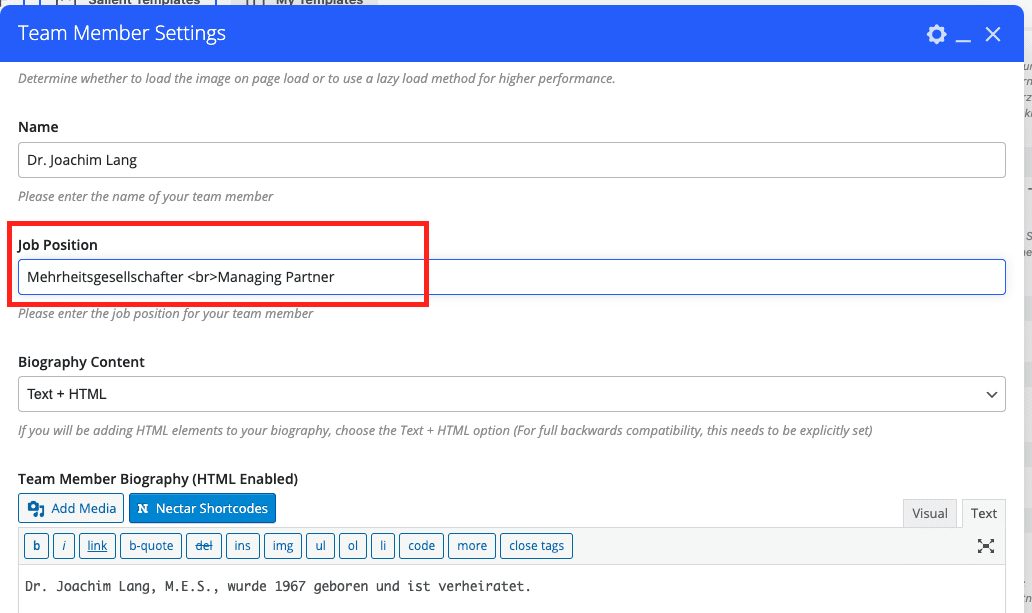
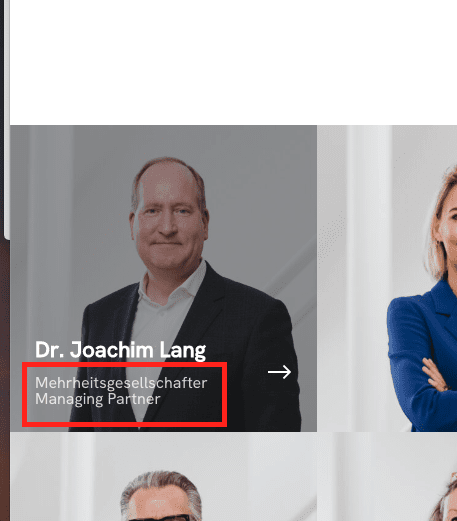
Hello, It would be awesome in your next update for the team element to be able to have two lines for the “Job position”. You can have it in the grid using
in the backend but that doesn’t work for the team member pop-up. Many thanks
Hey williambesson,
WordPress will only allow HTML for one field within each element – the team member utilizes the HMTL enabled field for the “Team Member Biography”. If you need to add simple short text for the 2nd line on your team members, you could also handle it with CSS.
Kind regards,
Hey, thanks for your answer. But I think you misunderstood me. Please check these 3 screenshots below. I am really talking about the “Job Position” field. Here’s it’s impossible to display two lines in the Bio pop-up as the data is extracted from the “Job Position” input which refuses two lines. I have this trick
for the square grid but it doesn’t work in the bio pop-up.
Thanks again.
Hey williambesson, Thanks for clarifying – I’ve noted to look into that for the next release
HI quick quesitons please.
1. are css animations on text and also the column animations fade up etc… slowing down performance or these are okay?
2. I’d like to add a line | next to every top menu item how can i do it with CSS that targets all the top menus. ? Like Home | About | Contact |
Thanks
Hey toolbox101,
1. If you use animations on items which are above the fold (within the first row), they will impact the LCP metric of lighthouse page speed scoring. However, Salient also provides the option to disable specific column animations on mobile only within the element options to avoid that negative impact for mobile scoring – Using animations on other elements below the fold won’t impact your score at all.
2. Kindly share your page URL in regards so that I can provide a snippet relevant to your settings.
Thanks in advance
hi, thanks for getting back… just to make it clear, does that LCP impact also applies to the text CSS animation? like these – > https://imgur.com/a/xyA9KaC
Also, what about the the box shadow? do they also impact the speed?
I will share the link soon, working on a local test copy, i’ll publish and share it in a few days.
About the box shadow, i have a wish list request if i may, can you please make them transition from dark to light even more smoother? Sometimes they are not smooth enough.
Also, can you add color options for the box-shadow? I see this thing is now trending, you can see a sample on this theme https://demo.phlox.pro/business-2/?r=landing-pro boxes and buttons have a very nice green shadow.
thanks
Hey toolbox101,
Any animations that are visible in the first section on your page will increase the LCP metric – regardless of the method that the animation is created with or what theme you’re using. For this reason, we often disable the top row animations on mobile only.
Box shadows will not negatively impact your page speed at all. I’ve noted the idea for custom shadow coloring on the wishlist
Kind regards,
Can i please get a CSS for changing box shadow color globally till you add that feature? Thanks
Hey toolbox101,
The CSS to alter a box shadow would depend on what elements you’re trying to target. Please share the URL of the page and specify which elements you’re trying to add a custom box shadow to.
Thanks in advance
If I use enable Woocommerce product Quick View, the product price is a different colour to the rest of the text and not very legible in the Quick View pop up window. Is this CSS possible to target please? Thanks!
Hey velocity_uk,
Could you kindly share your URL in regards so that I can take a look at your settings to assist?
Cheers
Is it viable to use Salient WooCommerce elements to create a shop and not use the default “shop” page? Are there any potential problems with this? Thanks for any pointers.
Hey velocity_uk,
You can use the page builder elements to create a main shop page. WooCommerce will automatically generate your shop pages for the archives I.e. product categories/tags etc.
Kind regards,