2080 comments found.

Please take me through how i will activate the theme and how i will import demo files
When you download full zip file from Themeforest then you should find the folder called Demo Content.
The mobile menu icons are entirely too small, they need to be bigger, I’ve tried a code snippet I found here in the comments, it doesn’t help. Solution for this?
Did you follow this tutorial – https://support.diaboliquedesign.com/forums/topic/mobile-header-nav-icons-double-the-size/
I can’t find a FAQ or code-snippet to make the register button use the Youzify Register Popup. Can this be done? I have the login function working properly but can’t get Register to work.
How did you find there is available registration pop-up? I can’t find it on the original Youzify demo – https://demo.youzify.com/members/venkat/?header=hdr-v1
We simply added this and removed the code for the register button so if you click either login or register it pops up the youzify login.
It works for login button because youzify has login popup but it doesn’t have registration popup ready to use.
Hello I am having issue with activating the Ajax Search Pro. Where do I find the activation purchase code to activate the plug-in? I tried to enter the theme purchase code but it is not working.
Hello,
Bundled plugins don’t have purchase code – https://help.market.envato.com/hc/en-us/articles/213762463-Bundled-Plugins
Hello!
1. How long does it take to setup the theme like it looks in the offer? 2. How many plugins need to be installed for this theme that it looks like in the offer? 3. Is it possible that the user logins with facebook? 4. Is it possible to set up the website with the theme and have the focus on Events at the start, and later add on functions like messaging, forum etc. Or the possibility to install these functions at the beginning and somehow fade them out/dissable them? 5. Do the users get a confirmation e-mail after registration? 6. Is it possible that also non-registered users see certain functionalities? Fe. non-registered user see the events and has the possiblity to register for the event with like an event registration form? And afterwards get a confirmation e-mail for event registration? 7. Are there videos which show how to setup this theme? 8. Can every user message every user or is it possible to put restrictions here? 9. Can every user see all the profile data of other users, or is it possible to restrict this?
Kind regards
Hello
1. The easiest way would be install 1:1 copy of demo content then everything is automatic. Installation without demo content would take about 20 minutes.
2. Ajax Search Pro bbPress BuddyPress Contact Form 7 Elementor Events Manager GamiPress GamiPress – bbPress integration GamiPress – BuddyPress integration GamiPress – WP Ulike integration OneCommunity Shortcodes rtMedia for WordPress, BuddyPress and bbPress WooCommerce WP ULike
3. You if you install some social login plugin.
4. Yes, you can rearrange these tabs ot disable.
5. Yes.
6. As far as I know in Events Manager guests can browse events but if they want to join the event then they must be registered user.
7. No, only step by step documentation.
8. Every to every.
9. It can be restricted to friends only or profile owner.
1. I see…is any of this plugins in the list to be paid extra? 2. Can users add other users as friends? If yes, is it possible to restrict private messages to friends only? 3. Is it possible to dissable private messages completely? 4. Is it somehow possible to set up that the users have possibility to see events without setting up a profile and have the possibility to register only for the event with for example name+email+age+country, and get an email confirmation for event registration? It would be amazing if we could figure that out 5. Is it possible for the events to display the following: for example users when registering enter their country of origin, and when they sign up for the event that in the event is somehow displayed: x users from y different countries signed up for this event, and also have the possibility to see which are the countries, like small country flags or expandalbe list with country names/short names?
1. No extra paid.
2. It would be possible with this plugin – https://wordpress.org/plugins/buddypress-restrict-messages/
3. Yes
4. It seems like it is possible, look at this event – https://diaboliquedesign.com/demo/onecommunity-new/events/munich-strong-beer-festival-starkbierzeit/
5. No, I don’t think it’s possible, maybe with Pro version – https://eventsmanagerpro.com/
thanks….can users see the following in the event “x amount of people responded with going” and see the list of people who are attending
also, are other users possible to create events? Can I give & take this possibility to certain users?
thanks….can users see the following in the event “x amount of people responded with going” and see the list of people who are attending
Not possible
also, are other users possible to create events? Can I give & take this possibility to certain users?
Yes
1. I see, is it somehow possible to have that function: “x amount of people are attending” for the events? It would be very important for me. 2. Also: Is it possible on the first page to have a total count of registered users, total count of events that have been held? Also total number of people who attended the events? 3. Can other people detect the theme on my website, fe. by inspect element? If I would use the theme would not want to have the possibility that someone can inspect which theme it is
1. It seems it is possible if you add special shortcode – https://diaboliquedesign.com/screenshots/4/screenshot_at_15-37-46.png
2. You can show such static stats just like on this page where you can manually change numbers from time to time – https://diaboliquedesign.com/demo/onecommunity-new/homepage-3/
3. If you change the folder and theme name then no.
I’ve noticed when on the youzify activity stream, on high resolution displays such as a UHD screen the activity stream does not center up on the page when the browser window gets wider. Is this a theme issue or a youzify issue?
Can you show a screenshot how does it look? On UHD there should be option to zoom everything so all sizes will be similar like on FHD screen.
How it is possible to install the Demo content? The “demo-onecommunity.wpress” file is 480 MB. The provider adjustment for that is for my hosting at 512 MB, I increased filed max upload size in wp config, htacess, and with a plugin: nothing works. the “the all in one migration” importer says always that there is not enough upload size. If this is the responsibility of yours or the wp importer: a very bad solution!! make your homework!
have to excuse myself. now it works. deleted wp cache and now it works. but the import solution should be considered.  thanks
mus revise again. after the installing progress is over the following message: “Unable to open file for reading. File: /is/htdocs/wp228567888_BW65N1IF6Z/www/gh_j-ghDL2-0_WWf_6-h/wp-content/plugins/all-in-one-wp-migration/storage/s0duhp4c154c/demo-onecommunity.wpress”
is there any other way to import the demo conent?
There is alternative demo installation pack which can be installed using Duplicator. Make sure your hosting can handle bigger files, you can test it using some wp files manager plugin and try to upload, unzip some random bigger file.
Support is provided for direct clients only.?? what is the meaning of words…purchased it 10 days back. if you are not interested give your support! please return my amount. thanks
It means on Themeforest theme can be used by one person on one site only. If you hired freelancer then give him the purchase code, then he will be able to create account on the support forum – https://support.diaboliquedesign.com
“load more” button not working any solution?
Hello,
Support is provided for direct clients only.
Hello Diabolique! I have a question The installation instructions say: Install and activate all necessary plugins (BuddyPress and OneCommunity Shortcodes) Where is OneCommunity Shortcodes?
Hello,
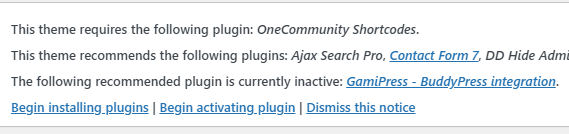
On the top of the wp dashboard you should see the plugins installation wizard.
Click on Begin installing plugins
Thank! is working
Hi Support Team, How do I change the url of the Login and Register (Button/Menu) page in the menu bar on the right side of the header? I can’t find it to change. Looking at theme customization, I didn’t find any options. Help Me Please. Advanced Thanks
Hello,
Check it out – https://support.diaboliquedesign.com/forums/topic/register-button-and-link-change/
Hi Team Diabolique. On my website-www.learninginmotion.in, the login button doesn’t lead anywhere. I am unable to find this detail in the documentation either. The documentation reads – You can enable the login popup window under customizer options – but i cant find this anywhere in the customize options. Can you please help?
Also, my sidebar doesn’t show any of the menu options we’ve selected. Help!
The side bar doesn’t show the members either unless i click on the kebab menu – the 3 dots. On the demo version, the members are visible upfront on the side panel. What settings do i need to change for this?
Hello, Go to WP Customizing -> General -> Enable login popup on the frontpage
Hi, Where can I get the Membership Pro plugin? Is it not given the theme? I would like to apply for paid membership (package) function. .
Hello, We need to know the posibilities about to hide the function and the tab of Document in the site of Profile Members when users does not logued in into the Comunity Members. In the same way, we want to hide the settings section for the guest users that do not logued into the comunity.
Hello,
Document? Do you mean BP Docs?
to hide the settings section for the guest users that do not logued into the comunity.
There are not any settings available for guests
Hello,
Thanks for your response.
Document? Do you mean BP Docs? Yes.
Please use following css:
.logged-out #docs-personal-li, .logged-out #nav-docs-groups-li, .logged-out .bp-docs { display:none!important; }
Hello Support team, Urgent help needed. I’ve bought the theme. But, I can’t import demos, and can’t see the theme dashboard either. Help me?Please Thanks
Hello, try to import demo content using Duplicator which can be found on google drive or send me login credentials to your WP dashboard.
Thanks for your response. How do I send wp-admin login info?
I have sent you the wp-admin login info. Please check your mail. Thanks
Hi Diabolique,
Just want to update you, it seems after I cloudflare the site all the associated problems originally highlighted have come back on browsers (chrome, firefox) and edge.
I’ve enabled developer mode on cloudflare and cleared all my cache to double check. Problems again:
1) Login doesn’t work on main page, also when logged in the account dropdown, bell icon or notifications aren’t working on chrome/firefox (latest versions) and edge.
The old solution: Please disable transients under customize -> transients is still disabled.
Also Login Popup is still disabled in customize -> general
Hello,
I remember few clients have problem caused cloudflare’s rocket loader.
thanks i have deactivated the rocket loader and issue resolved . thanks once again
Hi there, just another question, would the members be able to hide their friend list? Like one of Facebooks features? Thanks!
Hello,
It’s possible globally for all members only.
Hi, just a pre-sale question: Is Youzify included in the purchase of One Community theme? or have I to buy it separately?
Hello,
It’s included
Hello,
Yes, of course
Hi there, will it work with a free version of Buddy Press or do I need to buy a Buddy Press Pro? Top Theme, Thanks!
Hello, works free version. Paid version of Buddypress doesn’t exist.
Haha… I’m such a dizzy mare Thanks!