38337 comments found.

Hi Salient! I’ve only 1 problem with new version: I have looked in all the theme folders but I have not found where I can change the text of the “Hide Filters” and “Show Filters” button which can now be enabled for ecommerce …. I repeat I have looked everywhere but I cannot find it, it is possible that it is in a java or in which folder is it? I attach an image of the button to which I refer ( https://imgur.com/ymW4moe ) Thanks!!!
Hey thebugbear!
They are actually separate strings, i.e. “Show”, “Hide”, “Filters”. The file which contains them is located at: /Users/salient/nectar/helpers/woocommerce.php however, they can also be translated via your preferred translation plugin.
Cheers
Love the theme! How do I setup the social sharing buttons like they are displayed on https://themenectar.com/salient/resort/2021/11/12/the-salient-summer-music-fest/? Thank you so much!
Hey archaxis, I’m glad to hear!
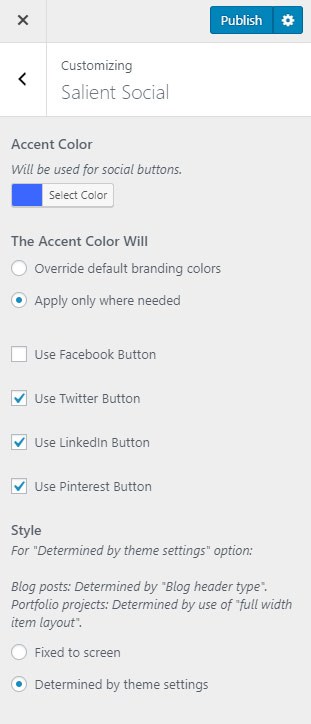
To get that style, you’ll need to set your “Blog header type” to “Featured Media Under Heading” in the Salient options panel > Blog tab, and also change the Salient Social style in the WP customizer to be ” Determined by theme settings”.
Kind regards
I purchased thsi theme three week ago. The WPBakery is not compatible with PHP8. I emailed your support about this issue. Three weeks later no reply. When will this be fixed?  .
.
Hey thewebmachine, we did get back to you three weeks ago on the ticket you’re referring to: https://ibb.co/cFK424X However, it does not seem that you’ve replied after we did.
Salient is already compatible with PHP8 – we’ve been using that on our own server for a year now. It appears that you’re using an older version of the Salient WPBakery page builder plugin. The latest version of that plugin (v6.9.1) will be needed. Please try updating all of the Salient plugins via the Plugins section in your WP admin after you’ve upgraded the theme itself to a recent release.
hi there,
I have a problem regarding this page: https://eventsoftwarebenelux.com/denk-mee/
The footer is currently showing completely different compared to all other pages on my website, see for example the homepage: https://eventsoftwarebenelux.com/
Do you know why this is happening and how to fix it?
Hey Abbenhues,
That’s occurring due to some malformed HTML code which was pasted into one of your text blocks on that page. I would recommend that you go through each row and temporarily disable it using the “Disable row” option until you find which has the HTML in it that should be removed/corrected.
Kind regards
Thanks! I’ve disabled all the rows on that page but it it still appearing. Any other suggestions how I can make it normal again? Thanks!
Hey Abbenhues,
There’s definitely some unclosed HTML added somewhere within the page content – if you’d like us to locate it in the backend, please open a ticket on the support forum in regards
Kind regards
Hi there,
I have two questions regarding this page:
https://hypercube.kleidi.nl/sport/1. On the top I have an image with hotspots. I would like to link my title of the hotspots with a tab below. So when I click on ‘rankingsystemen’ it will automatically navigate you to the tab ‘rankingsystemen’ below the hotspot image.
2. Inside the tab ‘diensten’ I’ve created another tab (with global section) but when I click on ‘competitieformats’ it goes somewhere else. When I click on stadions it shows correct, but all the other tabs seems to disfunction.
Hopefully you can help me with this.
Kind regards, Tes
Hey Tes,
1. To trigger a tab, you can give any anchor the classname “nectar-tab-trigger”. The href of that anchor should then point to the name of the tab e.g. ”#rankingsystem”.
2. Tabbed sections are not designed to be nested within each other, however, I’ve noted investigate this further and provide a fix for the upcoming minor release.
Kind regards
Hi there,
Thanks!
1. I tried, but the link ‘rankingsystemen’ in my image hotspot is not clickable. See screenshot: https://ibb.co/1zf7Vt8 or here: https://hypercube.kleidi.nl/sport/ Do you know why?
2. That would be awesome. Do you have any idea when the new minor release will be available?
Thanks again!
Hey Abbenhues,
1. You can add the following snippet to make those clickable:
.nectar_image_with_hotspots .nectar_hotspot_wrap .nttip {
  pointer-events: all;
}
2. Likely within the next week 
Hi there,
Excellent, thank you. I’ve made some progress on this page and have some addtiional questions:
1. I tried to center the tooltip texts over the white circles as you can see here: https://hypercube.kleidi.nl/sport/. It worked with “Rankingsystemen” and “Opdrachtgevers” but the others are not centered right. Is there a way to center them?
2. How can I make the hyperlink color of these tooltip texts #000 and the hover in red instead of how it is now (red and hover black)?
Thank you!
Hey Abbenhues,
The following CSS will make those changes:
@media only screen and (min-width: 690px) {
.nectar_image_with_hotspots .nectar_hotspot_wrap {
     width: 75px!important;
    height: 75px!important;
}
.nectar_image_with_hotspots[data-tooltip-func=always_show] .nectar_hotspot_wrap .nttip {
    text-align: center;
    margin-left: 0!important;
    max-width: none;
    width: 300px!important;
    left: 50%;
}
}

.nectar_image_with_hotspots .nectar_hotspot_wrap a {
  color: #000;
}
.nectar_image_with_hotspots .nectar_hotspot_wrap a:hover {
  color: red;
}
Kind regards
Yes, awesome! Thanks. Only on mobile my tooltip texts are not shown. Is there a way to show it on mobile as well?
Hi, and in addition to this: When I click on “Rankingsystemen” inside my image with hotspots it should trigger the tab below it which says ‘rankingsystemen’, only it doesn’t ‘open’ the tab. It stays at the first tab. How to fix that?
Thanks in advance!
Hey Abbenhues,
1. The default functionality of the tooltip is to change into a modal based display when clicked for mobile. This is incompatible with your customizations, so further CSS would be needed to alter the mobile view:
https://pastebin.com/nYAkrEv82. The “nectar-tab-trigger” class should be on the anchor tag – it looks like you’ve added it to the parent div instead.
1. This is great guys, thank you so much!
2. I do not understand it correct I think. This is now how I have it:
rankingsystemen
https://ibb.co/kDQz8HfWhat is not correct about this?
Thanks!
You’re welcome, Abbenhues,
Re: #2 – The class should be moved to the anchor like so: https://pastebin.com/CHmDbJva
Kind regards
Hey guys, I have a quick follow up request regarding this. I know it is not common but I have a Tabbed section inside a tabbed section (by using the Global Sections element): https://hypercube.kleidi.nl/sport/
On my first tab Hypercube & Sport I have placed text. Some are with an innerlink to the second tab Diensten (this is where the extra tab is placed). How can I make the link in hypercube & sport which says ‘boeiende competities’ (see screenshot: https://ibb.co/514bH47) go directly to open the tab ‘competitieontwikkeling’ within my ‘diensten’ tab? (see: https://ibb.co/Tb9D4bQ)
I hope it is clear what I mean. As you can see now, when you click on the link ‘boeiende comptities’ I’ve managed to open the diensten tab automaticcally, but it always starts at the first item and that’s the element I would like to change.
Hopefully you can help me with this. Kind regards.
Hey Abbenhues,
Unfortunately this won’t be possible since you would essentially need to trigger the change of two different tabs, and the “nectar-tab-trigger” functionality can only handle one at a time. You would need some custom JS to handle this in a sequence.
Kind regards
Hi guys, really enjoying the theme. Please how can I change the header navigation layout to Menu Bottom Bar. I tried to select it in the theme options but it didn’t update on the frontend. I’m using the e-commerce robust theme. Thanks.
Hey olabanjio,
After switching to the “Menu bottom bar” layout, did you reassign your menu to that new location in the Appearance > Menus section of the admin?
Kind regards
I tried that and it works! Thank you.
You’re welcome, olabanjio
hi guys, i have a problem with the nectar slider and hcaptcha and recaptcha. get an error when using the nectar slider with it. Here you can have a look at the the site – no captcha is loading: https://bit.ly/3s5brtA without the slider on a duplicate site and an header image it is working fine: https://bit.ly/3yQZA6y
please delete the links after you had a look at it! thanks for your help
Hey haoe,
There’s a javascript error coming from forminator that’s seemingly preventing the recaptcha from initializing. Have you already tried asking the plugin developer if the know of anything which could trigger such an error seen in your browser console? Could you kindly also open a ticket on the support forum in regards so that we can follow up on this.
Thanks in advance
Hi Support of this great theme! I’ve a question: how can I set a shop page, exactly like your demo page (https://themenectar.com/salient/ecommerce-robust/product-category/skincare/) with filter to left sidebar and the single product page with the 2 image? Thanks!
Hey thebugbear, thanks a lot!
The settings you’re looking for are in the Salient options > WooCommerce tab:
https://ibb.co/2Sd86KC https://ibb.co/pj7wxtTKind regards,
hi https://caremallorca.com/ how do i do the hamburger menu the 3 lines the same width? thanks!
Hey dimage!
Add the following snippet into the custom CSS box located in the Salient options panel > General Settings > CSS/Script related tab:
https://pastebin.com/9wQRnxRBKind regards
Hello Team,
While replying to the visitors comments I add “internal links” to refer other articles, page and post in the comments section.
Now they are being assigned rel=”nofollow ugc” attribute. What can I do to stop rel=”nofollow ugc” for the internal link.
Hey princebhalani143,
That’s core WP functionality and not coming from Salient. In order to alter that, you would need to disable the functionality via a filter in your child theme.
Kind regards
is there salient compatible with wp multisite?
Hey genzianafabiani, Salient is indeed compatible with WP Multisite installations.
Kind regards
Hello Phil!
So, how can we remove that little gap?
https://paste.pics/J8YOBIt’s between two rows, that are into one row… picture will be better to explain, just there : https://paste.pics/J8YPD
Thanks in advance!
Cheer!
Hey barreoblique!
Edit the parent column holding those rows and set the “Column Element Spacing” to “None”: https://ibb.co/JprCtwC
Cheers
Hello Phil! Thanks for the answer. But, it seems to be already in none.
https://paste.pics/J9HNDI’ll send you the page by email, because it’s under dev.
Thanks barreoblique, I followed up via your email
Thanks! It works very well! Case close!
Have a nice one sir!
You too, barreoblique
Cheers
how to reduce the height of a row to its maximum ?
Hey anazkhan,
I’m not sure I fully understand your question. Can you kindly share the page URL that you’re working on and elaborate further as to what you’re trying to alter in regard the sizing of your row?
Thanks in advance
Why on earth would my buttons look like this on mobile (nector slider)? https://tinyurl.com/2gcdp3ds (so so tiny)
Hey muntzdesigns,
I would recommend that you use the newer “Simple Slider” option available inside of the “Carousel” page builder element over the Nectar Slider so that you can build your slides using the page builder instead of being limited to the older post type creation. https://themenectar.com/salient/carousel/#simple-slider
However, if you’d like to keep using the Nectar Slider, you can modify the size of your buttons on mobile by adding the following snippet into the custom CSS box located in the Salient options panel > General Settings > CSS/Script related tab:
@media only screen and (max-width: 690px) {
#ajax-content-wrap .nectar-slider-wrap .swiper-slide .button a {
    font-size: 12px;
    padding: 0.6em 1.5em;
}
}
Kind regards,
I guess I’ve been away too long..lol. Thank you. This is perfect.
Glad I could help, muntzdesigns
Halo, please help, can i make this blog w sidebar at home https://prnt.sc/iYryycT60p7_ can scrolled like this https://prnt.sc/eKkcALNgWgqe
Hey shaky512,
add the following snippet into the custom CSS box located in the Salient options panel > General Settings > CSS/Script related tab:
.home .post-area.span_9 {
    max-height: 50vh;
    overflow-y: scroll;
}
Kind regards,
wow thank’s a lot. Now we need padding between articles and scrollbar like this https://prnt.sc/hc23m818WaGS
Hey shaky512,
You can alter the previously provided snippet to be as follows:
.home .post-area.span_9 {
    max-height: 50vh;
    overflow-y: scroll;
    padding-right: 60px;
}
Hi there,
on this page: https://linda.kleidi.nl/ I have a video background in the header. Only it is not showing on mobile. Do you know why?
Thanks in advance!
Hey Abbenhues,
I’m currently able to see your video playing on iOS/Android from my end: https://www.dropbox.com/s/0uw6rt35yzvft7a/Screen%20Recording%202022-10-18%20at%2012.50.44%20PM.mov?dl=0 Can you verify that you don’t have any power saving mode active on your device? https://themenectar.com/docs/salient/page-builder-row/#video-troubleshootingcan we make 6 column woocommerce product carousel
Hey anazkhan,
Yes, in the Salient options panel > WooCommerce > General tab, you can define your own desired column number via the “Archive Page Columns” fields: https://ibb.co/dMDqkn3Kind regards
Dear Salient Theme Team, please I hope you can help me. In my Shop the Woocommerce Cart Nav always shows 1 but there is no product in the Shop. I have delete the product but there is still 1 in the Cart Nav Icon. See here the Website: https://vladknives.ch/ when you scroll down there is always a One in the Cart Icon. How can I remove this?
Thank you in advanced.
A Fan of your Theme
Hey vladknivesschweiz!
That’s likely being caused by some sort of caching active within your setup. Have you tried to disable the WooCommerce fragments from WPRocket yet? https://docs.wp-rocket.me/article/1100-optimize-woocommerce-get-refreshed-fragmentsKind regards,
Hey buddy, I’m banging my head against the wall. Here are two Salient installs. I want them to look the same. But I can’t get the white spaces at https://muse.joy.net/test/ to disappear so the page will look like https://www.joy.net/poem2/ – it must be because of some Salient or other settings on the muse.joy.net install that are off. Can you help make the white areas on https://muse.joy.net/test/ disappear, and the breadcrumbs, too? I basically want the page to look like https://www.joy.net/poem2/. Thank you.
Hey marcfest,
1. You can expand the row to the sides of the screen by editing it and changing the “row type” to “full width content”. https://ibb.co/6J0wYqn
2. The header navigation bar can be set to transparent by enabling the theme option “Use Transparent Header When Applicable” in the Salient options > header navigation > transparent header effect tab. Once that’s enabled, you can use the metabox on the bottom of any page to force the effect: https://ibb.co/1fmzSd5
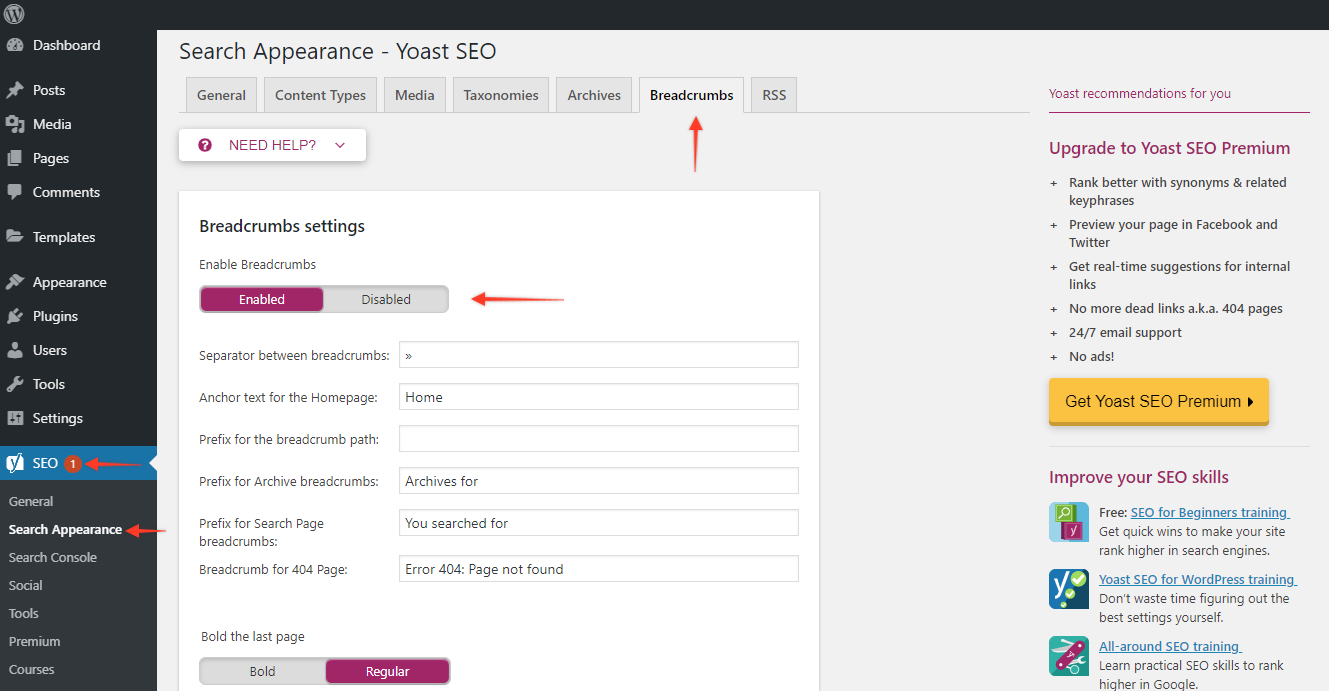
3. The breadcrumbs are coming from Yoast SEO and can be disabled in the plugin settings
Kind regards
You are a life saver. Thank you!
You’re welcome, Marc
Hi there,
Is it possible to change the plus icon in the image hotspot section to another icon?
For example see on this page: https://hypercube.kleidi.nl/sport/
Hey Abbenhues,
You can by adding the following snippet into the custom CSS box located in the Salient options panel > General Settings > CSS/Script related tab: https://pastebin.com/czKF2f8GKind regards