38337 comments found.

Hi,
Where can I find the settings for the hyperlinks? I wish to change the color from blue to white.
Best wishes, Judie
Hey Judie,
If you’re referring to standard links inline within text blocks, those inherit the accent color by default. You can switch that to inherit from the text color of the body, which I assume it white in your case by changing the “General Link Style” to be “Basic underline” in the Salient options > General settings > Styling tab.
Kind regards
Hi,
Thanks for a quick reply!
Yes, the standard links  I cannot see the “General link style” at that location. For this website I’m using Salient 13.0.2. Could that be the reason? If so, is there another place that setting could be done?
Best wishes, Judie
Hey Judie, the General Link style was added in v14. You can update to get access to that and many more features by using one of the following methods: https://themenectar.com/docs/salient/updating-salient/
Kind regards
Thanks!
/Judie 
Vertical Sticky Slider – the slider is broken after updating vom 14.0.3 to latest version 15.0.4
Hey pongo, could you kindly share your page URL so that I can take a look at your setup to assist?
Thanks in advance
error: https://latscherhof.com/it/ running: https://latscherhof.com/it/ this is the link i have a second language version with the same setup, same plugins , same settings and is runing, i re uploaded all salient an plugin files but is still broken… deactivated all plugins still the same error…
Hey pongo, you seem to be on 15.0.4 – can you please update to 15.0.5 to verify that it’s still occurring for you in the most recent release?
Thanks in advance
hello, this solves the problem, tanks
Glad to hear, pongo
Kind regards
Hi,
Just wondering, how do I make all the Accent Colors I defined in the settings appear on all the color palate dropdown whenever there is one?
Thanks
Regards Victor
Hey Victor,
The custom color picker field available within element settings such as https://ibb.co/Zx1VZKJ should already be showing the global color scheme as circle options below the picker. There are however, few exceptions to that, such as the custom gradient creator inside of the color overlay tab. Can you let me know which area you’re referring to?
Kind regards
Hi, thanks,
it’s those dropdowns under the configurations on the single Portfolio item page, for example, Project Accent Color, Project Title Color, and Page Header Background Color etc.
Even in the Salient Settings, the Footer Background Color, Footer Font Color and all those dropdowns are not inheriting the theme Accent Color.
Regards Victor
Hey Victor,
Thanks for clarifying. The color pickers outside of the page builder don’t automatically pull from the global colors, but I’ve noted the idea on the wishlist for the next release.
Kind regards
Hi guys, I am using the footer reveal effect in the Salient options panel. Is it possible to add this effect to another row? i’d like to use it with my global section…
Hey ACCA21,
Unfortunately that specific effect is not available to apply to other rows. However, I’ve noted your +1 for the idea on the wishlist
Kind regards
hello,
i just imported the frostwave demo into a clean wordpress installation. everything ok except the demo media. no files there in order to make some tests. if i delete a demo image from an element i cant find it again. Shoyld i import my media from the beginning ?
regards soto
Hey soto,
The “frostwave” demo is one of the few legacy demos (demos made before 2016) which only include placeholders for images instead of the stock images seen on the live preview. After 2016, we switched to using images from unsplash which allows for the images to be included in an importer.
Such a great theme – ThemeNectar is doing an amazing job with Salient!
But since the last update my admin bar is all white in Safari. I deactivated all plugins, but the problem persists. This only occurs in the frontend, the backend is fine.
Hey hamburgmedien, I’m glad that you’re enjoying the theme!
Which version of Safari are you using? I can’t replicate that on my end so far on v16: https://ibb.co/d4wLnDZ Could you kindly open a ticket on the support forum in regards so we can see your theme settings to see if it’s released to a specific combination?
Kind regards
Thanks for the quick reply! I use Safari 16. I’ll open a ticket, thanks!
Thanks hamburgmedien
Seems my purchase code has expired. Since I use mainly Chrome, I can ignore the issue for a while – Just wanted to bring the matter to your attention 
I appreciate it, hamburgmedien. I’ve noted to look more into it – just need to figure out how to replicate it from my end.
Cheers
I cannot seem to find any way to modify the layout of the category or archive pages? this seems like a fairly large oversite since you’re now pushing magazine style theme options. I’m trying hard to get a review site to work in salient (which has many similarities to a magazine layout). These types of sites are driven completley off categories. But I’m getting stuck with limited ability to control how categories are used. Recent post or Post sections allow me to include categories, but I cannot exclude a whole category type from the list, because it there is any crossover on one of the genre categories, it causes the parent category to also then be included. (for example if you have Book reviews and TV reviews as primary categories, but they may both share ‘drama’ as a category type. But I cannot make a blog grid with a filter that allows me to only see Drama (within the books category). or alternatively allow me to go to a ‘drama’ category page where I would then see TV and book reviews that are deemed drama – so that I have both ways of filtering my view.
I’m trying to modify the layout so that when someone clicks on a category name that I can adjust the way the page is displayed – but this seems to be fixed. Is there a way to edit this?
Hey monstrous,
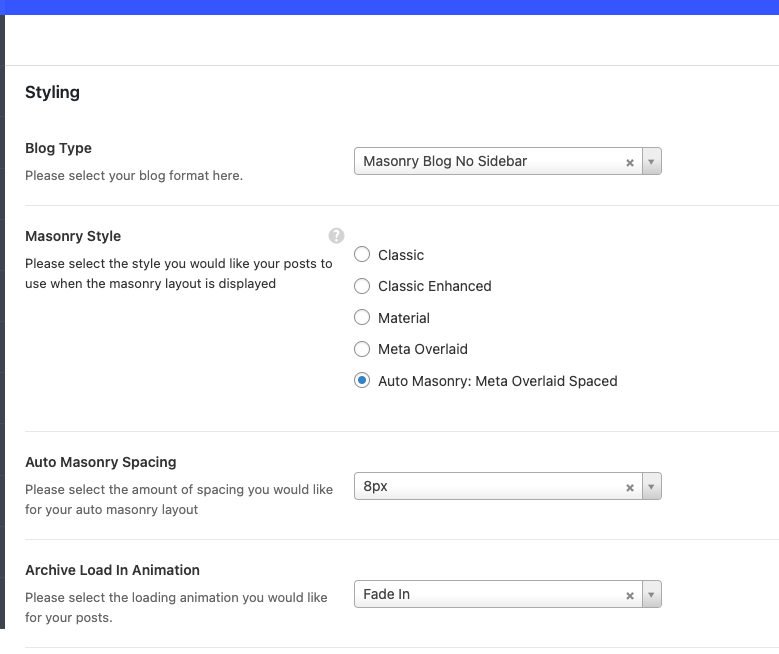
1. The archive blog settings are controlled from the Salient options panel > Blog > Styling tab. There are 8 styles to select from and control over the layout (contained/fullwidth/sidebar etc.)
2. The post grid element allows you select whatever categories or subcategories you need and should automatically bring in posts form another unselected subcategory just because they have the same name e.g. Drama. Each category must have a unique slug, and that slug is what’s used for the query. Can you kindly open a ticket on the support forum in regards so we can see your actual setup to assist?
Thanks in advance
okay, I found how to adjust the archive layout. Thank you.
For the 2nd point – this is specific to the “Blog Grid” options. a) I have 2 primary categories – Reviews and Essays. and then secondary categories for genre, such as drama, historical, action etc. In order to have a sortable filter for the ‘Review’ page, I have to select categories {drama, historical, action} for them to appear in the sortable header, but I cannot stop any posts that have the Essay tag being included.
b) The Post Grid doesn’t have an option for me to display the Author details, is there a way to include this?
c) I cannot make the blog grid layout match the material layout used for the blog layout – so if a user visits this page, and then ends up clicking on a category of a post the layout is different in both places. But I want to be able to make use of the sortable features from the Blog Grid
Hey monstrous,
a. Are you keeping the secondary categories as unique children under each parent category? i.e.- Reviews
- drama
- historical
- action
- Essays
- drama
- historical
- action
If the child categories are unique and have their own slug, you should not need to use any excludes.
b. You could add that through a hook in your child theme for now until it become an element option. An example of adding that through a hook would look like: https://pastebin.com/b47EveBYc. The “Post grid” elements and offers different style options than the “Blog” element. However, it’s an item on the wishlist to allow a post grid to be used to configure the archives.
For the categories the structure is:
Type: - Review - Essay
Genre: - drama - historical - thriller Etc
A user might be interested in drama – and want to see all reviews or essays in this category (if they view the drama category)
Or alternatively I want to make a page that shows anything with category “Review” – but exclude anything with the type “essay”. On this page a user can use the sortable filters to view all drama or historical within the review category.
Thanks for the hook for author profile. I’ll test that out.
Hey monstrous,
Yes, without using direct children categories excludes would be needed. I’ve noted your idea on the wishlist for that item.
Kind regards
Hey there! Could I please get a little help? I just realized that on my website (revunity.com/shop) the crossed out lines are way too high as they’re supposed to be on the red prices. Would you mind pointing me in the right direction to see what’s really causing it?
Also, I’ve got a second request: How could I display the “Add to Cart” button right next to the amount count section instead of showing it below that? (This is in the Product Page)
In advance, thank you very much for your massive assistance. Have a great day!
Hey AngellitoX!
1. add the following snippet into the custom CSS box located in the Salient options panel > General Settings > CSS/Script related tab:
.woocommerce ul.products li.product .price del,
.woocommerce-page ul.products li.product .price del {
  font-size: 1em;
}
2. In the Salient options panel > WooCommerce > Single product tab, you can change the “Add to Cart Style” to “Full width with Quantity” to achieve that.
Kind regards
hi,
how come this new portfolio http://preview.themeforest.net/item/salient-responsive-multipurpose-theme/full_screen_preview/4363266 grid is not in the salient studio?
Thanks
Hey toolbox101, I’ve noted the idea to add that in as an available studio template.
Kind regards
Do you think i can get the shortcode in the min time?
Hey toolbox101,
Here’s the shortcode setup for the whole row: https://pastebin.com/drKd28jr
Kind regards
Hi there,
On this page: https://hypercube.kleidi.nl/
I have a clients display element. When you hover over it, it should appear in color. But it seems my mouse over functionality is not working. I think because I have made adjustments in the Transform Y/X sections. Is there a way to make it work again?
Thanks in advance.
Hey Abbenhues,
Your other rows below that carousel are sitting on top of it in the stacking order – you can correct it by setting a z-index for the carousel row to be 100.
Kind regards
Yes, perfect. Thanks!
Hello, I need help with my Footer. I purchased this theme a long time back but very recently started building my website. I require help on one thing – my footer links. The footer links have less space between the text and the underline element on hover and they also change color to grey.
Hey asingh2404,
If you’re using the default Footer widget area and not a global section (created from the page builder), you can alter the coloring for your footer in the Salient options > Footer tab by enabling the “Custom Footer Color Scheme” option.
Can you please share your actual page URL so that I can take a look at the underline you’re referring to?
Kind regards
Thanks for the quick response. I’m using the default Footer widget. I did enable the “Custom Footer Color Scheme” but there seems to be a glitch.
https://tinyurl.com/yw42kddc – This is how the link when hovered looks in the top navigation. 2px underline animated. https://tinyurl.com/yrfhkwc8 – This is how the link in the footer looks when we hover. 2px underline animated still but changes the color to grey and the gap between the text and underline is less. I tried playing with several CSS combinations. Couldn’t figure it out.Hey asingh2404,
The footer links change the opacity when hovered, which would create that gray if you’ve specified black as the text color. You can keep the links at full opacity by add the following snippet into the custom CSS box located in the Salient options panel > General Settings > CSS/Script related tab:
#ajax-content-wrap #footer-outer #footer-widgets a:not(.nectar-button):hover {
    opacity: 1;
}
You can also move the underline further away from the links if desired by adding:
#footer-outer #footer-widgets a:not(.nectar-button) {
 display: inline-block!important;
}
Kind regards
It works. Thank you so much. Excellent Support.
You’re welcome, asingh2404
Hi, sorry to bother you again. The code solved the issues for me. However, when I did hover the links in the Footer, the underline was too low (gap between the alphabet and underline) I figured the line height is too high and that’s why I corrected it and it’s perfect. Except lowering the line height meant the footer menu links are too close when viewed in a mobile device. Please take a look at the screenshot to see what I mean. shorturl.at/swGH3
Hey asingh2404,
Can you kindly share your actual page URL so that I can assist further with the CSS for your setup?
Kind regards
Hi, is it possible to rotate text so it displays sideways (vertically) up the page like for small sub headings?
Thanks
Hey Micatuca, Yes, you could use the “rotate” option within the transform section of an inner row to accomplish that. You would also likely need to specify the position as “absolute” for that inner and move it to where you would like the title to display.
Kind regards
Thanks!
You’re welcome, Micatuca
Greetings! One question: if I wanted to create a simple landing page, with this theme, therefore WITHOUT MENU, how can I do not to show this component, both from desktop and from mobile? So just leave the image / logo in the header and nothing else? Thanks
Hey thebugbear!
I would recommend assigning the “No header” page template: https://ibb.co/j5yLkLZ If you would still like to display a logo on the top left, you could do so via the page builder.
Kind regards
Hi,
is there a way to change the order of the filter tab in the portfolio element?
And in the Salient Social Media settings, the email link works as an URL link but not email link, i.e. in the footer the email icon is now linking to a web page rather than opening up the mail client. (http://wens.co.nz/)
Regards Victor
Hey Victor,
1. You can use a plugin such as https://wordpress.org/plugins/taxonomy-terms-order/ to reorder those
2. When adding an email link, you can add “mailto:” at the beginning of it to make it open as a mail link. e.g. mailto:hello@domain.com
Is there anyway you could help me with an embed issue on the theme.
I am having conflicts and issues with the current wordpress version and embedding some brackets onto the webpages. What I am trying to do is have the full bracket display and hide the scroll sidebar from popping up on the pages so the bracket looks seamless on the website. Here is the link below.
https://www.bulbaritos.com/pickem/madness-tournament/horus-realm-season-6/Hey Anthony_And_Marisa,
I would recommend changing the parent row holding that embed to be the “Full width content” type to give it more space horizontally. You could also have the embed scale to 100% of the viewport height by using CSS such as https://pastebin.com/FCJ0tDvL
Kind regards
Hi ThemeNectar, any suggestions as to how to recreate a header navigation similar to: spline.design (namely the custom width, border radius, and margins). Thanks,
Hey webspacedesignuk,
You could achieve that with CSS similar to the following snippet:
#header-outer {
    top: 30px;
    width: 80%;
    left: 10%;
    border-radius: 50px;
    box-shadow: 0px 0px 30px rgb(0 0 0 / 20%)!important;
}
Cheers
Hi Salient,
Please I saw this site and did a backend research about the theme and saw it was developed using Salient Theme. However, I can’t find the theme in your demo page.
Can you please advice how I can get this theme??
Thank you
Hey mnwuzor,
If you can share the URL of the site you’re referring to I can let you know if it’s available demo or if they created their own design from scratch.
Kind regards
Ooh…. I am so so sorry. I thought I sent the URL already…. The link is https://www.nipc.gov.ng/
Thank you
No worries, mnwuzor.
That’s not a pre-made demo available to import. THey’ve utilized the elements within Salient to create their own design.
Kind regards
I thought as much….
Thank you so much
You’re welcome, mnwuzor
Hello guys, we get an issue with dynamic bg with off canvas menu. Background images are not loaded on roll over. anyone experienced this issue? the site is: https://omnia.base.studio
Hey plasmedia,
That issue with the dynamic BG will occur when using the same menu instance in multiple areas i.e. the footer in your case.
We’ve pushed a fix for it in the latest release 15.0.5.
Kind regards
Hi we’ve had a ticket in with you for over a week now regarding main nav problems happening upon updating the theme, its a live site and we need urgent help please. the issue is happening on other sites with salient also.
Hey thumbdesign_OT,
I looked into your ticket earlier today – it looks like it was escalated on Friday from the support team, so I appreciate your patience with the weekend delay.
Kind regards
ticket #3119346 was escalated 1 week ago on October 17, 2022 at 2:50pm
Thanks for letting me know. I’m going to check now with the support team why that one was not properly escalated.
Hi, I currently have this issue: PHP Warning: Trying to access array offset on the value of type bool in /home/mhbotzmx/public_html/wp-content/plugins/salient-portfolio/includes/frontend/shortcode.php on line 722
Is this a theme or hosting issue?
Hey gustav939,
That warning would show if the featured image selected for your project has been removed from your server or can’t be found. I would suggest going into the relevant project and reassigning your featured image.
Kind regards
Thank you!!!! That did the trick!
You’re welcome, gustav939