38337 comments found.

Hey team nectar, is there a way that you can add within the next update elements/presets for the costume salient-menu? That would be so great and would save up much time as well. thanks 
Hey Layoutmachen, thanks for the request
Kind regards
Hi – can you please let me know why essential grid plugin doesnt work on mobile for Salient theme? Thanks https://shoalsbrewery.com/gallery/ The gallery below the video is not showing…
Hey surfershort,
It looks like you’re deferring jQuery in your setup (likely from one of your performance plugins) and that’s causing an error within Essential grid. I would recommend skipping jQuery from being deferred in order to not cause issues with other scripts that rely on it.
Kind regards
Brilliant that worked – it was the SG optimizer plugin
Glad I could help, surfershort
Best regards. Is there any way that the secondary menu links are on the left of the screen and not on the right?
Thanks for the help
I’ve figured it out, but is there a way to resize the text without affecting the main browser?
Hey marketingCOLORSit,
Are you trying to resize the text within the secondary header only? If so, you can add the following snippet into the custom CSS box located in the Salient options panel > General Settings > CSS/Script related tab:
body #header-secondary-outer .container nav >ul >li >a {
  font-size: 14px;
}
Kind regards
Is there a way to have an image caption show up in the lightbox? Right now it only seems possible to have it overlay on the image gallery.
Failing that, how can I disable the built-in lightbox so I can use a 3rd party one instead?
Hey focalmatter,
1. The caption within the Lightbox for the gallery element will be populated from the text added to the “Description” field: https://ibb.co/wR6SRtn
2. You can still optionally disable the built-in Lightbox via the Salient options panel > general settings > functionality tab
Kind regards,
I entered a description and it’s still not showing up, either with the Magnific lightbox or fancybox3. Should I have something else installed?
Can you please share your page URL so that I can take a look at your settings to assist further?
Thanks in advance
Actually I was able to get it sorted. Thanks though!
Glad to hear, focalmatter
Hi,
Under the Lightbox Only display mode of Portfolio element, when the lightbox is opened, is it possible to have the bigger image not fits to the page, but displays in its original size (scrollable vertically if neccessary)? In other words, a long and tall image wouldn’t be shrinked down to fit into the page, but rather displays in its full size.
Regards Victor
Hey Victor,
There’s no built-in functionality for that exact format. However, by switching your Lightbox script to the more modern “fancybox3” option in the Salient options > general settings > functionality tab, the image will be able to be zoomed in to reveal the full details within the Lightbox.
Cheers
Brilliant! Thanks!
You’re welcome, victordd
Hi there, just two easy questions. I’m on Salient 14.7+Salient Child: 10.0.1.1571676557. My developer keeps telling me it’s fine. Is that right?
On the other hand, maybe this issue is related but, draft and published versions of the same page aren’t the same. Any clue?
Hey juandoscuartos
1. The version of a child theme is not connected to the parent theme and can be specified to be whatever is needed or makes sense as it’s developed. That version is set in the child style.css file
2. Can you please open a ticket on the support forum in regards with your site information so that we can take a closer look?
Kind regards
hi, anyway to change the text in the 404 page? thanks
Hey dimage,
You can alter that by translating the existing strings via your desired translation plugin, or by copying the 404.php file to your child to manually override the contents.
Kind regards
thanks.
You’re welcome
Hello friends
I wanted to update the theme, as we have a version 7.0.9 on the website. http://seomaraton.pl But, how to update the theme to the newest version 15?Thank you for the lovely theme
Hey feminaplatform!
I would read through the following guide to get familiar with some major changes you’ll need to be aware of when updating from a version prior to 10.5 https://themenectar.com/docs/salient/important-salient-update-for-new-envato-requirements/
Once you’ve read that, you can update by using any of the available methods listed here: https://themenectar.com/docs/salient/updating-salient/
Cheers
Thank you, I willk start the updating process now. I have read the document that you sent
hello I want to make my website have facilities for visitors who have vision problems so they can enlarge and reduce the writing / fonts on the website
oh yeah one more thing, I want to put it in the menu or above the menu so that when scrolling that part is still visible
Hey shaky512,
There’s no built-in functionality for a font resize, however you could use a plugin such as:
https://wordpress.org/plugins/zeno-font-resizer/Kind regards
Hi,
I’ve loaded the Minimal Portfolio demo onto my new site (http://wens.co.nz/), but somehow the homepage Portfolio element is only displaying 3 items, even there are more than 10 portfolio items. Could you please have a look and let me know what was going on?
Also, what is the difference between portfolio category and portfolio attributes?
Thank you.
Regards Victor
Hey Victor,
There’s a category called “Adverts” imported with that portfolio. If you’re using any adblocker plugin within your browser, any item assigned to that portfolio category will be hidden. You can reveal them on your end by renaming that sample category/category slug to something else.
Kind regards
Works like a charm! Thanks!
Could you please also tell me what is the difference between portfolio category and portfolio attributes?
Also, how do I change the order of the items that is shown in the Portfolio Masonry view?
Hey victordd,
1. Categories act as the main taxonomy for groupings for your projects. The categories you create can be set as filters to sort any portfolio instance on the frontend.
Attributes are more akin to “tags” of the core blog post type. You can optionally access all projects under the same tag at the URL domain.com/project-attributes/{tag} for example https://themenectar.com/salient/classic/project-attributes/photography/
2. Projects are ordered by their creation date by default. You could alter the dates to suit the ordering you would like or use a plugin such as https://wordpress.org/plugins/post-types-order/ to drag and drop your items around.
Kind regards
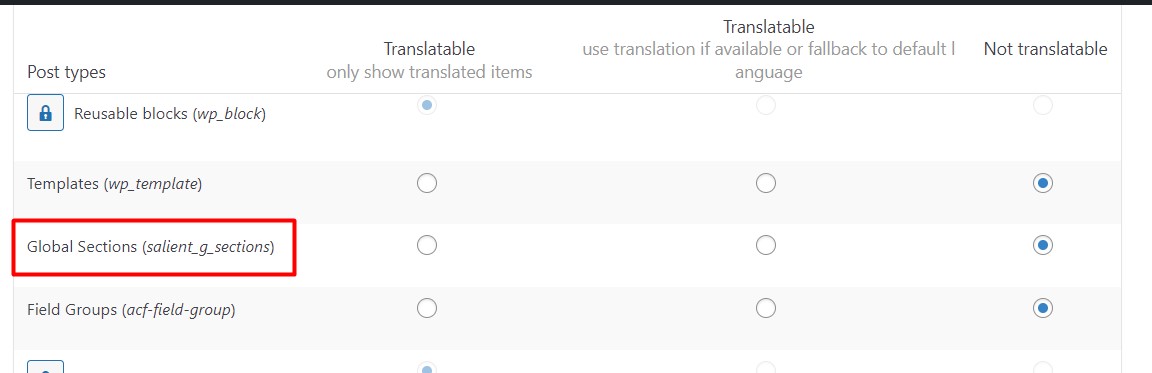
I created footer using global section. How do I translate it so that everything works fine in WPML? Currently, the WPML plugin does not translate it.
https://i.postimg.cc/wjsKsfbs/2022-10-21-00-20-30.pngHey art_andry,
Ensure that you’ve specified that post type to be “Translatable” in the WPML settings: https://cdn.wpml.org/wp-content/uploads/2021/12/10252495-Global_sections.jpgKind regards,
Thanks! It works!
You’re welcome. art_andry
Curious, is there an easier way to make tables with WPBakery page builder, or do we pretty much have to rely on HTML? I know the Gutenberg editor has the ability to make tables.
Hey mrittman, currently Salient does not have a 1:1 HMTL table element, however the Horizontal List Item could achieve a similar layout depending on your needs: https://themenectar.com/salient/horizontal-list-item/
Kind regards,
Okay thank you so much
You’re welcome, mrittman
Hi ThemeNectar! Your theme is amazing, I love it but I noticed only 1 (strange) bug/error, in checkout page (of theme with WooCommerce). Practically, immediately, you see everything correctly, but after 1/2 seconds the page (ONLY THAT!) Is pulled up by 2 cm and the space (between the menu and the top of the page) is eliminated … it’s ugly from see each other, because it moves after a few seconds (see this attached image to understand what I’m refer > https://imgur.com/sBKDXbz ) Thanks, if you will show me how to solve this thing too it is perfect!
Hey thebugbear
I would need to see your actual page URL in order to see what’s causing that during the page load. Can you please share it here?
Kind regards
Hi ThemeNectar! It is a project under development, I have to send you the admin credentials to access: where can I do it in private?
Hey thebugbear, you can open a ticket on the support forum in regards.
Thanks in advance
Hi ThemeNectar! I’ve added this CSS rules
body[data-header-resize=”0”] .container-wrap, body[data-header-resize=”0”] .project-title { padding-top: 40px !important; }
And it seems to work … but if I want to apply this rule only to the payment page ID which is 18 what should I do?
Thanks as usually!
Hey thebugbear,
You could modify the snippet to be as follows:
body.page-id-13 .container-wrap,
body.page-id-13 .project-title { padding-top: 40px !important; }
Cheers
As a site builder, Salient has evolved, however as a magazine or blog theme it has not, or not as fast as other new themes.
Hope you can consider some improvements in that area.
Still, this is one of my favorite themes around, and support is always there for you, when small issues or customization appear.
Greetings!
Hey myuption, thanks for the request! Any specific magazine related functionality you’re looking for?
In v15, Salient has also recent released new performance related theme options specifically tailored for lighthouse – I’m not sure if you’re seen those yet.
It’s worth noting that within the past few versions we’ve still been adding new options to post grid element, as well as the single post layout options.
Kind regards
Certainly, a “dark mode” feature or a progress bar could enhance the theme look and feel.
I will take a look, thanks.
Is it possible inside post grid excerpts to have live links or even images with links? I’m trying to have in this page for example the list of Masters to have live links from the urls: https://nhmc.edu.uoc.gr/en/archives/nhmc-person/poulakakis-nikos
Scroll and press Content tab to see it’s list of excerpts that I’ve hid the titles of the imported list of posts.
Thanks in advance TN, Salient is the best template out there…
Hey vagdesign, thank you for the kind words!
Unfortunately, that functionality wouldn’t be possible by default as of now. Two things would need to be altered via a child theme/custom CSS.
1. The link that leads to the post currently surrounds the entire item – that would need to be removed and placed in a button or limited to a specific area to allow the links in the excerpt to the accessible for clicking. CSS to remove the wrapping link would look like this:
.nectar-post-grid .nectar-post-grid-link {
  display: none;
}
2. The excerpt currently does not allow HTML to pass through, a modification via your child functions.php to enable that would look like: https://pastebin.com/cv5dxWQM
Cheers
Perfect! The only change was on the last line I changed “40” with $limit and now if you check the link again you will see it appears as I wanted
Pass through to excerpt text styles and even images! 
Thanks again @ThemeNectar, your support and the quality of this template are beyond rating. Cheers and greetings from Greece!
Glad I could help out, vagdesign!
Cheers
Hi, is there a way to find out what search terms are being used on my website with the search item in my menu? So where my visitors are looking for?
Hey Abbenhues,
Salient does not offer built-in tracking/analytical data. You would need to integrate a third-party service to handle that.
Kind regards.
Yes, great! Thanks.
Hi there,
On this website: https://ikwilboaworden.nl/ I have a breadcrumb activated from yoast SEO (i think) but it is showing on top of my header (image and menu) on this page: See here: https://ikwilboaworden.nl/domein-1/ . I have transparent navigation active.
How to fix it?
Thanks in advance.
Hey Abbenhues,
By default, you won’t be able to use the Transparent header option when also enabling the Yoast breadcrumbs. You will either need to disable that option within the Yoast settings, or disable the transparent header effect within the page settings unless you create a custom CSS rule to handle the display.
Kind regards
Hi there,
Thanks. Only I see that with posts https://ikwilboaworden.nl/de-impact-op-team-handhaving-is-groot-enkele-boas-langdurig-uitgevallen-na-geweldsincident-in-zoetermeer/) I also have a transparent header and there it works well with the breadcrumb. Wouldn’t it be possible to have it at pages working as well?
Thanks again.
Hey Abbenhues,
The blog header is output before the page content for posts. You don’t appear to be using a page header on your pages, but rather are creating the top level section from within the page builder, which it why it’s below the breadcrumbs.
I understand, I’ll fix that. Thanks!
Hi, the search function in my menu is not working, and the mobile menu does not work. This just started 1-2 days ago. What could it be? Lightbox is also not working. Did latest Wordpress update break something?
Hey hermannhaf,
Salient is compatible with the latest WordPress. Are you using a recent release of Salient in your setup? (v13+) If so, I would try deactivating your third party plugins to see if any are causing a JavaScript error to occur, which would in turn break all of the themes JavaScript based functionality.
Kind regards
I’m trying to save my Saleint theme settings but seeing this error message: “There was a problem with your action. Please try again or reload the page.”
I’ve tried clearing the cache but can’t seem to update or save my settings suddenly?
Hey monstrous,
An error like that would be coming from either a PHP error occurring from a third party plugin, or a security module incorrectly configured on your server. If you’ve already attempted to deactivate your third party plugins to see if any are causing the issue, I would suggest getting in touch with your hosting company to see if they have recently updated any Security modules that would effect your setup.
Kind regards
I tracked it down an a backup issue that consumed all of the space on my server. Solved now. Thanks for the reply
Glad to hear that you sorted it out, monstrous
Have to good weekend!
Hi Nectar! Thank you for all, a question about widget woocommerce: is it possible to create/have a TAG filter? Now I see only the categories filter… correct? And work the Ajax filter search (or only in the add to cart action)? thanks!
Hey thebugbear!
1. If you use the classic widgets, there is an option for a “Product Tag Cloud”. However, if you want to keep using the block based widgets, you would need a plugin to add such a filter.
2. I’m not sure I understand what you mean with the second part of your question, “And work the Ajax filter search (or only in the add to cart action)?” Can you kindly elaborate further?
Kind regards