22358 comments found.

Hi again AJ,
Ican´t get this option working.
I select right sidebar design in teh customizer: https://i.imgur.com/L1kPfLD.pngI create new pages and sidebar doesn´t show:
https://i.imgur.com/tjo4dGO.pngSidebar only appears if i select right sidebar in every page options.
Thanks
Hi,
This is the Global setting so if it’s not overriding pages it would mean you have selected a custom option for pages as well – https://a.cl.ly/L1u9wEY7
- AJ
You are right. Thanks so much.
Hi AJ,
two questions I hope you can help with:
I would like to define different heading styles for subheadings. I understand that h1, h2 etc is meant to do this. In the customizer I know I read somewhere, that you have to tick this box to activate the h1 h2 etc. Please help: where is this “somewhere”? I just cannot find it anymore…
I would like to have single words in a column appear one by one from top to bottom. I tried to implement this by using the headline element for each single word and add an animation. The animation delay was set a little later each time you go one down in the column. The increment in delay was 0.2 seconds per line. However, the result looks nothing like what I intended :-/ Instead of appearing one by one, there are pauses of a few seconds, and then a few words appear. It seems to be rather random, it looks different each time I preview the site. Do you have any suggestion on how I can realize the line by line appearance of single words in a steady way?
Thank you!
Susanne
Hi Susanne,
1. Heading tags like h1, h2, h3, h4 are NOT meant to be used for styling. Heading tags are strictly for SEO reasons. Now, the fonts of these headings can be styled differently if you wanted and you will find the options under Customize > Typography – however, these will only apply to headings added into the post editor or the text block element. It will not apply to elements like the heading, icon box, feature box…etc. You can read about that here: https://wpexplorer-themes.com/total/docs/headings-typography-shortcodes-entries/
What most people do though is add some classnames to their CSS and then use those classes in their designs. Example: https://a.cl.ly/z8uQgRgr
This way it’s very easy to manage your styles and it’s usually the best way to manage a more complex site if you have various global styles you are applying to many pages and don’t want to edit things manually.
2. The theme has a somewhat “hidden” feature you can use to stager animations all you need to do is add the classname “wpb-animate-in-sequence” to any row that has the elements you want to stagger. Example: https://a.cl.ly/4gueEGgd (because of how WPBakery works you will only see the sequence on the live site not the editor).
Because CSS animations rely on showing as soon as the element becomes visible if your column is too long adding a delay to each won’t really work as you expect because the delay starts as soon as the item becomes visible which means if you have to scroll down to view new items whats going to happen is the delay will just get larger it’s not really animating in “sequence” – it’s actually very complex to do the sequential animation, that’s why it’s an exclusive feature to Total  And it may not even be that perfect either because it’s having to listen for scroll events to display items and animate based on previously animated items…so if you have any issues let me know!
I will write a doc page right now for sequential animations!
- AJ
Hi AJ,
thank you for your helpful answer! Follow up questions: 1. I will try this. What do I have to add to define the different font sizes on mobile, tablet, etc.? Or will it auto-resize? What do I have to add to choose the font family? I know these are probably very basic questions, I just have no idea about how to write CSS code … 2. That is pretty cool, that there is a feature like that in Total! Question: Can I add the extra classname to a column as well? In my row are two columns, and I need the effect on just one of them. And: is there a way to control the speed of the sequential entry? If the doc is ready, maybe just leaving the link here will help answer my questions. Thank you very much! Susanne
Hi,
1. If you are writing custom CSS you simply define your font family using font-family – https://developer.mozilla.org/en-US/docs/Web/CSS/font-family
For responsive font-sizes things can get a bit complex because you can either use media queries – https://www.w3schools.com/css/css_rwd_mediaqueries.asp – or you can use the modern clamp() function – https://developer.mozilla.org/en-US/docs/Web/CSS/clamp
What are you trying to do though exactly? Because maybe you don’t really need to worry about adding custom CSS for your needs.
2. Yes you can add the class to a column. In fact you can add it to any element and it will target the items inside of it
- AJ
ps: I am planning on adding a new admin panel for creating “Typography Styles” so you can create styles and then select them when using various elements. Maybe I’ll try and add this in the next update since I think it would be helpful for many.
Hi, how to remove Google fonts completely from your theme? This is important because we have to be GDPR complaint. We are using lastest version of your theme. Thanks.
Hi,
This is Aj the theme author.
The theme itself doesn’t add any Google fonts by default unless you have selected Google Fonts for your site via the Customizer or any custom elements.
There is a quick link you can use though in the Theme Panel: https://wpexplorer-themes.com/total/docs/disable-google-fonts-completely/
But this will only remove theme Google fonts.
If you want to use Google fonts you can also upload them manually via Theme Panel > Font Manager – https://wpexplorer-themes.com/total/docs/font-manager/
Let me know if you have any other issues or questions!
- AJ
Hi AJ … I’m having a problem with 5.5.2 … it’s introduced a horizontal browser scrollbar, as if the content is a few pixels wider than the screen.
I couldn’t see any other reports of this in the comments, but I’ve seen it happen on both sites I have upgraded.
One of the sites I restored back to its older version, but one of them I am unable to so would like it fixed. I can open a ticket if that’s best. Thank you.
Hi,
By any chance did you copy the header.php file into your child theme?
The theme used to have custom CSS added to apply a hidden overflow to the #outer-wrap element, but I removed the custom CSS and updated header.php to use a utility class instead to slim things down.
So if you added header.php to your child theme it would need to be updated. Which by the way…there is NO reason to every modify this file via a child theme, if you aren’t sure how to make the changes without overriding the file let me know so I can help!
- AJ
Hi AJ—you’re absolutely right, I have a child theme header.php … I’ve updated it and all is well. Brilliant, thanks.
Now – the reason I have the header.php is because I have some custom PHP code there, so I can’t use Custom Actions, indeed the note at the top of Custom Actions tells me to use a child theme.
So is there another way?
Thanks.
To insert custom code to the header via the child theme you should still use action hooks but do so via the functions.php file. Example:
// Insert code to the wp_head action hook.
add_action( 'wp_head', function() {
    // YOUR PHP CODE
} );
Simply change “wp_head” to the hook that you want to use
Hi AJ, I hope all is good!
I have a ”Post cards” -element with ”Advanced Query” ”Callback Function” that displays a custom ”Card Style”. This is working great (thanks to your help). Now I need a way to filter the items and so far I have been trying the ”navigation bar” -method https://wpexplorer-themes.com/total/docs/filter-grid-navbar/ This works really great however from what I understand, this will only filter what is currently loaded on the screen? …or is it possible to have the page re-fetch items based on the current filter? It would be perfectly fine with a page reload here also if that ´s what it takes. Do you have any suggestions on how to best solve this ?Thanks!
Hi,
All good here Hope you are good also!
Correct, it will only filter items on the page because it uses javascript to sort the items – https://isotope.metafizzy.co/
There is no “quick” fix for this because I’m thinking what you want is an AJAX function that pulls items from the database which would require basically a whole new functionality and quite a lot of code.
I do have plans to add an ajax filter function to the theme but maybe not till next year. Really I would recommend against ajax filtering because results aren’t cached so it requires accessing the database every time, also it’s not ideal for SEO.
The best is just use the navigation bar to link to the archives, similar to what I did on the blog here – https://total.wpexplorer.com/boomerang/blog/
That said…if you wanted to filter the items on the same page (and you don’t care about the page refreshing – aka no ajax) it’s not very hard to do. I recently did a little custom work for another customer do accomplish this. Example: https://a.cl.ly/12uzdmGX – if you want I can help you code something like this (send me an email to my wpexplorer [at] gmail dot com email).
I can also build you a custom AJAX filter if needed (I’ve done that before for another customer which you can view here – https://marvistaresources.com/products/ – but it’s a big project, I think I ended up billing the customer $500 for this).
There are also some recommendations here for AJAX filters if that’s what you need – https://wpexplorer-themes.com/total/recommended-services-plugins/#toc-grids (FacetWP is awesome but expensive and has yearly costs – I hate how plugins want to charge yearly fees…but of course I understand, mostly I’m just jealous cause ThemeForest doesn’t – I wish you could just buy a Total membership for Total on Themeforest)
- AJ
Thank you so much for great suggestions there AJ!
I followed a link to Ultimate Layouts from your Recommended Services & Plugins -page and it has a really interesting demo with multiple filter options which is actually something we also will need, do you happen to know if it´s possible to integrate custom Total post cards there?
I see that you have prepared option to use custom cards layout through your post types -plugin which is awesome!
I guess multiple tags filter /navigation would not be possible?
...I would purchase Total membership any day 
Thanks!
Hi,
That would be something to ask the plugin developers about. The theme has an easy to use helper function to display any Card design for an entry – https://wpexplorer-themes.com/total/docs/wpex_card-arguments/
I would be more then happy to work with the Ultimate Layouts Plugin developer to integrate Total cards! If you message them you can have them email me directly (to the email I posted in my last reply) and I can work with them for the integration.
- AJ
ps; I do have plans to add a filter function in Total but I don’t think it will be ready till Jan 2023. The plan is to design something that looks like this – https://a.cl.ly/5zuPqE14 – so you can filter by multiple taxonomies and to keep the design cleaner (compared to a horizontal bar). But perhaps I will add a few “styles” to choose from (most likely I’ll do that actually…) But ya, I am going to create the Post Cards AJAX Filter element, so if you have any suggestions feel free to send them over. If anything maybe next year you can make use of it for some other projects
Thank you AJ! I just asked the question over at Ultimate Layouts -forum.
...yes, sounds like a very useful feature for an upcoming Total also
Great, hopefully they message me so we can integrate things!
- AJ
ps: Not sure if you ever need this but I’m working on a new function for the upcoming update (hopefully to release over the weekend or next week) so you can give any element the classname “wpex-js-sticky” to make it sticky – including WPBakery elements.
Awesome! ...sounds like another useful addition, now that I know of it I’m sure it will come to use
Good morning, We are having problems with the theme, when we update it, it eliminates the styles, besides creating the whole web in boxed. We have version 5.2. and we can not upgrade to 5.5.2. Also when updating, the slider revolution is blank. Thanks
Hi,
This is AJ the theme author.
These aren’t known issues (no one else had these issues when updating). I’m wondering if perhaps you just need to clear the site cache after updating.
Are you able to share the URL so I can take a look to at least see if anything stands out? Thanks!
Also, are you using a child theme and if so, are you sure the issues aren’t child theme related?
- AJ
Please how do I get the RevSlider latest update. Your Total theme update seem to be missing that package See error below
“An error occurred while updating Slider Revolution: Update package not available.”
Hi,
This is AJ the theme author.
Slider Revolution updates are provided with the theme, so it will be included in the next update. You can view the upcoming changelog here: https://wpexplorer-themes.com/total/upcoming-update-changelog/
More info on plugin updates here: https://wpexplorer-themes.com/total/docs/update-plugins/
Now, Total actually has code to disable the plugin’s update notifications (unless it’s registered) to prevent confusion. So I’m not sure how you are getting this error. Are you actually seeing update notifications in the dashboard? If so, are you perhaps using a multi-site or maybe an old version of the theme? https://wpexplorer-themes.com/total/changelog/
- AJ
Hi AJ – I haven’t been around in awhile (got hooked on Statamic CMS, Tailwind & Alpine JS). I’m updating an old total site. Looks like some pretty sweet updates recently!
Question – I’ve got a page header with a background image, and default center text. I went to the customizer “Page Header Title” typography setting to set my different font sizes. But it’s not working. It’s always font-size: var(—wpex-text-7xl). Is there another setting I’m not seeing for this.
Thanks!
Welcome back
The Customizer settings will only affect the “Globally” set page header, when you choose a custom page header via the Theme Settings on a per page basis it uses its own styles to prevent conflicts. Lets say your default page header is supposed to be black and have a smaller font size, but then you want only 1 page to have a background image you wouldn’t want those smaller dark fonts applied to the custom selected page header style.
If you set your page header title to background style globally though the typography settings will apply: https://a.cl.ly/jkuWj0dG
Make sense?
So what to do?
- You could target it with CSS.
- Better…you can disable the page title on the page and just insert your own row with the page builder: https://a.cl.ly/nOub42z7 (if you need this function on many pages you could always create a template via WPBakery > Templates and then insert it on the pages where you need this). There are other things you can do, but really depends on what you need – if you provide more details I can give you my recommendation.
- AJ
Hi AJ, Thanks for the reply. The global background page header style is what I was looking for. If I run into anything will just target via CSS.
Thanks again!
Also, depending what you want to do you can also disable the default title and create your own. Example: https://www.youtube.com/watch?v=GV4eSBoTwT4
The form seems to be broken on your support ticket page here. Just spins and spins upon submission. Tried on CHrome and Safari. Please fix so I can submit a support request.
https://wpexplorer-themes.com/support/submit-request/Hi,
This is AJ the theme developer. I’m not having any issues when I test ( https://a.cl.ly/d5unQl14 ) and I see many new tickets submitted since yesterday.
Are you by any chance trying to insert PHP or Javascript into the form? If so, the form won’t submit for security reasons. If you must share code please do so by linking to a site like – https://pastebin.com/
Also if you don’t need to share anything private you can always reply back here and I will help you out, thanks!
- AJ
Hi AJ, how do I set up my custom blog post to be in a central position like this here: https://www.wpexplorer.com/best-wordpress-themes/. Here’s my site: https://freelancerkenya.com/money-online/how-to-make-money-online-in-kenya-as-a-freelance-writer/. I want the blog post to be at the center without a sidebar.
Another question. How do you include this color button on the header menu? For example, in this demo (https://total.wpexplorer.com/samus/) there’s a button labelled ‘Purchase.’ Thank you!
Hi,
1. I’m not seeing the sidebar anymore, so looks like you figured it out?
For anyone else wondering though, you can go to Appearance > Customize > Blog > Single Post and edit the layout like this:
2. You can add menu buttons like this – https://wpexplorer-themes.com/total/docs/header-one-menu-button/
- AJ
Thanks so much! I have implemented them and it works well. Now here are my last questions:
1. How can I include more than two fields in the Newsletter form. The newsletter form in the builder has only two fields, that’s Email and Submit option. I want something like this (see screenshot): https://drive.google.com/file/d/17r1JwC3vAfd0fbM9te5D52AzwS_oueyn/view?usp=sharing
2. Is it possible to integrate the newsletter form with AWeber?
Hi,
1. The default theme Newsletter form doesn’t support extra fields (reason I kept it simple is because it usually converts better). If you want more fields it’s possible to add custom fields using the “vcex_newsletter_form_extras” action hook (its a hook inside the form so you can just return custom fields) via some custom code. I can provide an example if you want. But depending what newsletter service you are using, most have form builders now you can use and then just insert their code into the site instead.
2. Yes – Here is their documentation: https://help.aweber.com/hc/en-us/articles/204027896-Can-I-use-my-own-form-
I just wrote up a little guide for Total: https://wpexplorer-themes.com/total/docs/how-to-use-aweber-with-newsletter-form/
Let me know if you have any issues or questions about that.
I can look into adding a name field to the theme’s newsletter form, but the default design has a right side button and there are various options to customize the widths and design, so I will need to update the element to add a new option where you could choose from different styles, which is what I think I’ll do. Let me look into that, I think offering a few different designs and options could be good
- AJ
Hi AJ,
I have several licenses of your awesome theme. Just this month running 5.4.5 I got this error displaying when using the portfolio carousel… Warning: A non-numeric value encountered in /homepages/45/d220246698/htdocs/clickandbuilds/zrs/wp-content/plugins/total-theme-core/inc/vcex/carousel/inline-css.php on line 82. Any idea what that is from? I have tried turning plug-ins off, no change. No custom CSS is used on the site. Also happens when I add a brand new portfolio carousel. Thanks for your incredible support.
Hi,
This error would happen if your PHP is outdated (it would be good to update to PHP 8+ if possible) but also the notice has been fixed in the latest versions – https://wpexplorer-themes.com/total/changelog/ – so if you did want to update that should also remove the error notice.
In fact in the latest versions of the theme there are some big optimizations for carousels so that they render on page load (previously they had to wait for the whole page to load before they would show up) now they render using flex styles before “swapping” into a carousel.
If you do go a head and update and have any issues or have any concerns before updating let me know!
- AJ
Thank you so much. Fixed!
Hi there. Are there any bugs concerning the “disable google fonts” option in the theme panel? I checked this option, but google’s “roboto” is still loaded. If I deactivate the WP Bakery Page Builder (Version 6.9.0), the font disappears, reactivationg the Page Builder brings it back. So the font should be somewhere in there, but I see no possibility to disable it. The only font I use is a self-hosted font. Any known problems?
Hi,
This is Aj the theme author.
The option in the Theme Panel is exclusively for the fonts loaded by the theme, it can’t possibly hook into other plugins if they are inserting fonts in different ways.
It sounds like perhaps you have an element added to the site that’s using a WPBakery element (maybe the single heading) which is loading a Google font. Can you share the URL so I can inspect the site and see?
That said, I will double check to see if it is possible for the theme to disable the WPBakery Google fonts when using that setting though.
Additionally, in the new version of WPBakery (which will be included in the next theme update – I’m just waiting for the plugin developers to fix a bug from their last update before sending it to you guys) they added an option to automatically self host Google fonts.
- Aj
HI Aj, thank you the quick response. I thought the WPBakery fonts would already be disabled as described here: https://wpexplorer-themes.com/total/docs/disable-google-fonts-completely/ – that’s why I asked.
You can find the page here: https://www.reiner-engelmann.de
Thank you for your help and best regards
Uli
Hi,
- Oh yes sorry the theme does remove the WPBakery fonts, had a brain fart, my bad ;(
- Looking at the site I’m not seeing Roboto loaded anywhere – https://a.cl.ly/bLu5N6KP – did you already resolve the issue? And if so, what was it? Thanks!
- AJ
My google fonts checker says, there is still roboto loaded. Looking more closely, I see https://fonts.gstatic.com/s/roboto/v18/KFOmCnqEu92Fr1Mu4mxK.woff2, initiated by https://www.youtube-nocookie.com/embed/9yjysJW6i2I – so embedded youtube-videos seem to cause the cookies. I embedded the videos manually via iframe, because WPBakery does not accept https://www.youtube-nocookie.com/embed/.... so it’ more or less an youtube-issue. So it would be really great, if the video-module in WPBakery could handle https://www.youtube-nocookie.com/ – without using google fonts.
Hi,
The WPBakery element just uses the core WordPress oEmbed functionality – https://wordpress.org/support/article/embeds/ – it doesn’t actually do anything besides pass the link to WordPress and then WordPress returns the video, so really it would be a WP issue.
It’s possible to hook into WordPress to allow nocookie URLs for embeds but it requires quite a bit of code – https://github.com/bcollin/nocookie4yt/blob/master/index.php – I tried looking for a plugin but couldn’t find anything, this is all I could find. But perhaps there is a plugin you could use for this.
- AJ
BUG Report with the custom 404 page in your new version of the theme.
It seems to be setting the page to blog post that then basically loops all posts underneath it….
demo https://travelport.dev/wp-adsdsdsasa
(pass = go6)
This has only happened since the last update.
my settings = https://snipboard.io/AdVHw2.jpg
Hi,
I’m not having any issue when checking demos or checking locally:
- https://total.wpexplorer.com/biz/test-404
- https://total.wpexplorer.com/worship/test-404
- https://total.wpexplorer.com/poppy/test-404
- https://total.wpexplorer.com/pottery/test-404
Are you sure your custom 404 page is not using the blog template and also that the issue is not being caused by a 3rd party plugin. Or maybe there is a file in your child theme that needs updating?
I can’t really think of any reason why it wouldn’t be working for you. The only changes in the last update is that the dynamic post templates are calculated sooner, so the only thing I can think of is that perhaps there is a plugin or code on the site that is making the theme thing that the 404 page is an actual post and not the 404 page.
Let me try and “break” things locally doing a few different things to see if I can figure it out, if not I may need to log into your site to see how it’s setup and what’s going on.
- AJ
If you download, extract and replace this file – https://a.cl.ly/xQuxJZJ8 – under Total/inc/theme-builder/ – it has an extra check to prevent any issues on the 404 page with the updates to how post dynamic templates work, but really the extra check shouldn’t be needed, it’s very strange. For some reason your site would need to be returning a value for get_post_type() on the 404 page essentially for this bug to happen.
- AJ
Ok, I can confirm the fix works!
It is happening on all of my sites after I just checked some! So I have no idea what the common denominator is for all of them doing the same thing.
Will replace the file on them all
Hey AJ, me again. I have an issue on one of my sites. It’s a tiny site with only 3 plugins activated. I have automatic updates turned on. But the WPBakery page builder auto update keeps failing and sending out notifications. When I go in and manually updates, it updates just fine. This is not a huge issue, just annoying to have to keep getting notifications and having to go in and do it manually. Any thoughts on this, or should I reach out to WPBakery directly?
Hi,
By default the theme disables notifications for WPBakery via the Theme Panel option named “WPBakery Builder Theme Mode” – by any chance has this setting being disabled? This setting should only be disabled if you are also activating your own license of the plugin – https://wpexplorer-themes.com/total/docs/activate-wp-bakery-page-builder/
Now, when you say “Auto Updates” I’m thinking you mean the WordPress automatic updates feature which you can enable via the Plugins, however, you shouldn’t even be able to enable this for WPBakery – https://a.cl.ly/5zuPoDDj – are you actually able to see the link to do this?
- AJ
Thank you! That did the trick. Once I turned on that option (not sure why it was off), the auto updates choice went away. This should fix that pesky messaging from wordpress. thanks.
Great!
By the way…the new version of the theme also has these new options: https://a.cl.ly/z8uQRww6
So you can disable any bundled plugin you don’t want to be notified at all about (installing or updating). Just note, if you disable WPBakery here you will never be notified of updates when updating your theme so only do this if you aren’t using the plugin, for example on a site where you use Elementor instead (yes Total is also 100% compatible with Elementor and some customers prefer using that plugin – I prefer WPBakery myself though).
- AJ
This is great! I hardly ever use the slider revolution plugin, so those messages are annoying. Thank you!
I also prefer WPBakery.
Hi AJ, Im using wpml to translate a shop. Im using a templatera template to show extended product info from aditional fields. Im using your custom field element with a before text label.
https://luzbotanica.com/en/product/castor-oil-shampoo/How can i translate every before text label? i cant see them in the string translation (I think this is because they are stored in the ddbb)
Thanks so much
And…
I have linked some elements and banners to internal wordpress pages. But when i change to english version https://luzbotanica.com/en/ thoose links don´t change to english permalink. Product cards do.
https://www.loom.com/share/39cc3bbf6a1248d08b12ab08a9dddf87Hi,
It’s been a while, hope you are doing well.
- Looks like the custom field element was not included in the theme’s wpml-config.php file, thanks for the heads up! Here is the updated file: https://a.cl.ly/YEuWb8p9
You can download, extract and replace the file inside the Total folder, but I’m honestly not sure where the WPML setting is to “re-scan” the file to find new strings…
Of course this change will be in the next theme update as well. If you find any other missing string let me know! It’s a pain in the butt to manually update this file whenever I’m creating new elements or adding new settings and sometimes I forget 
- The links in elements like the Image Banner are saved using the full link URL not the page ID so they aren’t auto translated. You need to translate the URL’s via WPML – https://wpml.org/documentation/plugins-compatibility/how-to-build-multilingual-sites-with-wpbakery-page-builder-and-wpml/
I double checked and the link field is included in the wpml-config file already: https://a.cl.ly/Kou18LZ8 – sot it should already be translatable.
Not sure what you mean by “Product cards too” – do you mean
- AJ
ps: There is a JS error on your site – https://a.cl.ly/NQuj9do6 – this is being caused by the following custom code – https://a.cl.ly/nOub2YvO
Sorry again for my bad spoken english
PD:Im working in some new projects of course with total theme. I will send you soon all new links because all of them are very different.
Ya when you set the link to an internal page it still stores the full URL and not an ID, unfortunately it’s just how the WordPress core link selector works
I could create a custom function where it stores the ID instead of the link, but it does require adding extra functions to the theme.
What if I add a new field like this – https://a.cl.ly/E0uZNWA9 – it would be manual where you would need to enter the ID (i could add a search though like this – https://a.cl.ly/4gueLAne – but then I could have that ID automatically translated with WPML. Then maybe I can rename the “Internal Page” option to something else, but I’m not sure what…Any thoughts on this? I could add this functionality and send you a “beta” version of the theme (i was going to update the theme this week, but I’ve been feeling pretty sick and was waiting to feel better before pushing out a new version).
In terms of translating the current method, maybe you can ask WPML if they can update the way the translation works so it’s easier, there isn’t anything I can do on my end
- AJ
That new id field would be great and of course with the search it would be perfect. It also would be usefull for the image banner element, icon box….
Maybe the “internal page” option could be something like “Native wordpress internal link”?
If you send me the beta i will test it tomorrow in luzbotanica.com page.
I hope you get better soon
Sorry, I haven’t had the time to work on this but I will try and do it today. Good ideas!
And yes, I would add the function to all the elements that allow you to choose “Source” for the link.
- AJ
Thinking about the new field…If I add a new search feature using WPBakery it would need to search all pages and posts which can be very very slow. So I’m thinking maybe I should create my own custom search field type that lets you select the post type to search from and then it displays a dropdown of items as well as allow you to search by taxonomy if you want to link to an archive.
Because if I’m going to add a dynamic link function it would be ideal if you can not only link to pages/posts but also archives since that’s something people would likely want to do as well and don’t want to have to add another field in the future just for that, best if it’s done in a single field. And the value could be saved type|id – for example: like post|4 or term|5 – this way the theme will know what the link is for.
But if I make my own custom field selector it will probably take like 3-5 hours to code and will probably not be able to do it today.
So I’m thinking also of an alternative which doesn’t include adding extra bloat. WordPress has a function named url_to_postid() so what I can do is get the ID of the defined URL, then pass it through WPML to translate and return a translated URL without you having to do anything.
This is an example of what that would look like with code added to your child theme if you want to test:
add_filter( 'vcex_shortcode_onclick_attributes', function( $atts ) {
    if ( ! empty( $atts['href'] ) ) {
        $href = $atts['href'];
        $post_id = url_to_postid( $href );
        if ( $post_id ) {
            // Translate ID
            $post_id = wpex_parse_obj_id( $post_id, get_post_type( $post_id ) );
            if ( $post_id ) {
                $url = get_permalink( $post_id );
                if ( $url ) {
                    $atts['href'] = $url;
                }
            }
        }
    }
    return $atts;
} );
I tried locally and it works for me and it will work with any builder element automatically that is using the “On click action”.
So I’m thinking maybe to have this code built-into the theme, but I’m not sure if it will cause any issues with people that have already translated the fields. So I will have to test and see. I think what I can do is just disable translations for the parameter and so WPML won’t try and translate it and it will just work automatically.
I need to download new versions of WPML and set things up, but if you want to try the code above and see how it works that would be great, thanks!
- AJ
Hi AJ, That code for “vcex_shortcode_onclick_attributes” filter is so simple and works like a charm. I just have had to save again some translated pages to get all the links translated. (I don´t know why ) You can see it working at https://luzbotanica.com/en.
I think you are right and maybe you could add this function to the theme but disabbling translations for that parameter.
PD: I have wpml licensed and up to date. if yoy want to access this admin site please just tell me.
Hmm… I am scared to add the code to the theme if it will require people to re-save all their pages, that would be very bad.
I’ll try setting up a demo with a couple pages (one translated and one not translated) and try adding the functionality to the theme to see what happens.
But it would be awesome if the theme automatically translated links so you don’t have to
I really appreciate you bringing this to my attention!
- AJ
ps: I can actually log into WPML and create test sites there as well as download the latest versions of the plugin. They basically give me access to make sure I can keep compatibility with Total.
I think I’m going to keep the ability to translate the URL’s just incase someone needs to actually link to a different page as opposed to having the theme automatically go to it. But I did add the code to automatically try and translate the URL – if they manually translated the URL it shouldn’t cause an issue anywhere because the theme should end up returning the same url…
Here is the updated file if you want to try so you can remove the custom code from the child theme and be ready for the next update: https://a.cl.ly/qGux87y4
This file would be extracted and replaced under plugins/total-theme-core/inc/vcex/functions/
I tested this various ways but if you still have issues let me know!
- AJ
Thanks so much. Im triying to download new file but when i click the link i see “Content is being uploaded.”
Oh, I must have deleted the file before it was fully uploaded. Sorry!
Please try this link: https://a.cl.ly/bLu52XRR
- AJ
AJ, I hope you are well buddy. Just a heads up, on a landing page, the vertical menu does not appear, but the spacing where it should be still remains, making the page look squashed to the right or left side, here is an example, https://moriti.co.za/private-african-safari-tours/2023-botswana-zebra-migration-safari/
Hi,
I’m doing good thanks, hope you are too. Haven’t seeing you around here in a while.
Oh I see, it’s a bug with the Landing Page template. Thanks for the heads up!
For a quick fix you can disable the header on the page via the Theme Settings: https://a.cl.ly/geuyK01l
But I will apply the fix in the upcoming update, thank you for reporting it!
- AJ
If you want this is the fixed file – https://a.cl.ly/jkuW0JpL – you can download, extract and update via FTP under Total/inc/header/ – if you want to patch before the official update. But you will need to update the site to the latest version before applying this patch to prevent any issues – https://wpexplorer-themes.com/total/changelog/ (5.5.2) – since your site is all minified and you’ve removed the theme’s generator tag it’s not possible for me to see what version you are currently running
- AJ
Thanks buddy, as always I appreciate your work.
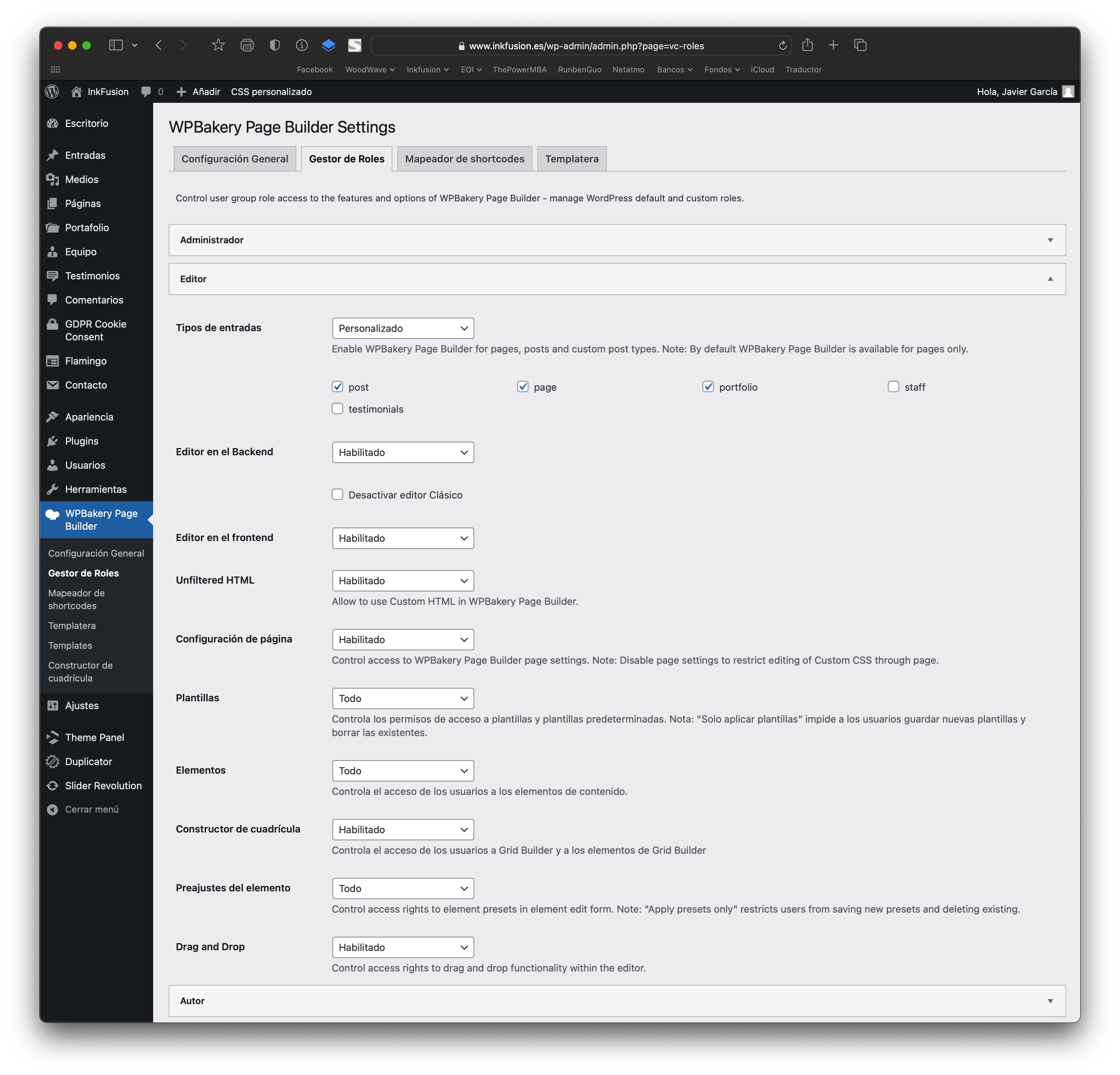
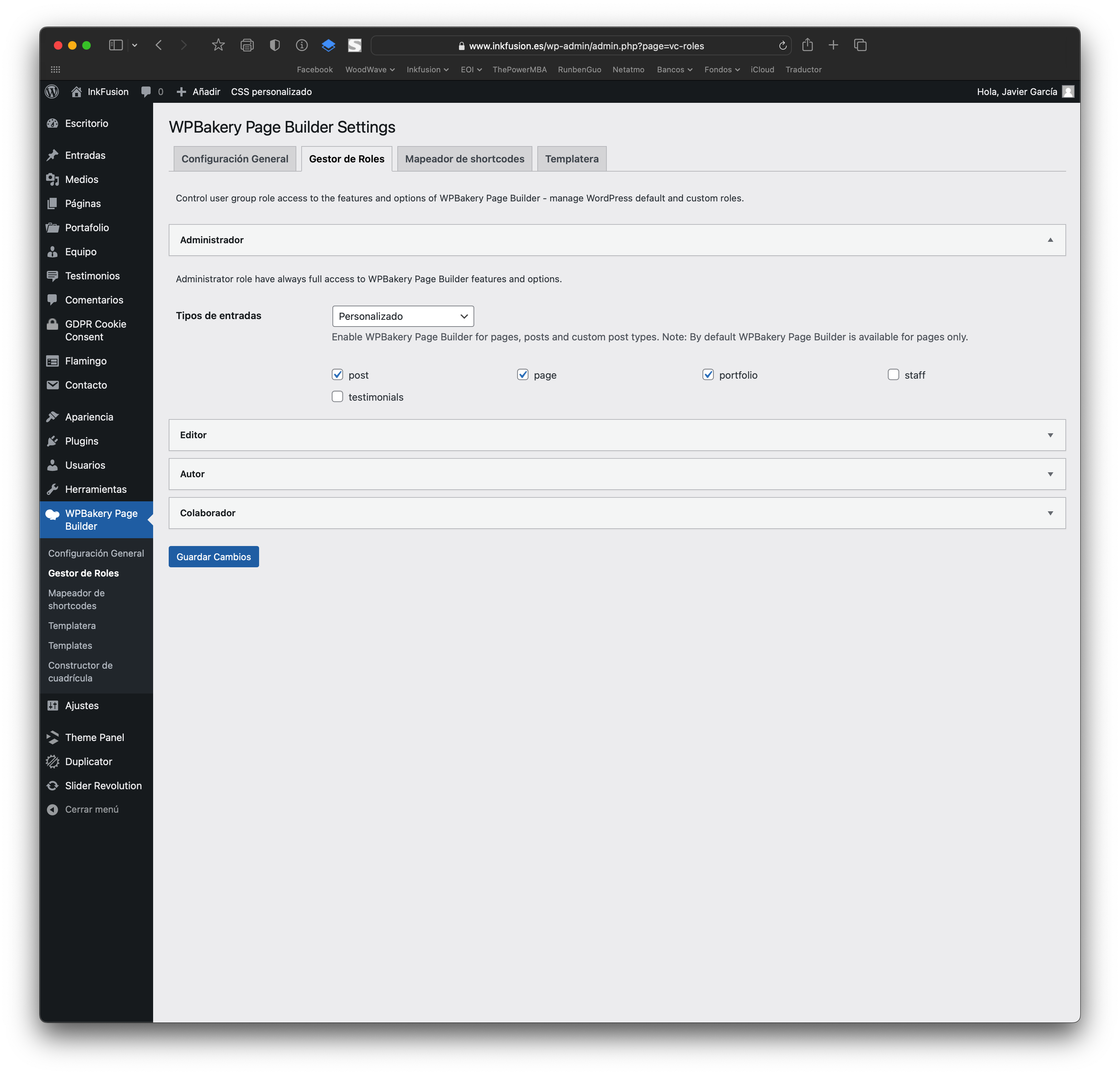
Hi! I can´t see Administrator options in Visual Composer Settings. I see any others roles, but no Administrator. May you help me? Thanks!
Hi,
This is AJ the theme author.
This isn’t a known issue, here is a screenshot from the latest version of the theme: https://a.cl.ly/12uzlpkq
Is this a new issue? I wonder if perhaps a newly installed plugin is causing a conflict. Did you double check?
Also is your site all up to date? https://wpexplorer-themes.com/total/changelog/
- AJ
Hello AJ! Thanks for answering. All updated; theme, WP and plugins. This is how the configuration of the Administrator is shown, and of the rest of the roles.
https://www.inkfusion.es/screenshot_01.png https://www.inkfusion.es/screenshot_02.pngI would like to know if it is possible to have the same settings for the administrator role, as it has always been.
Oh,
So you can see the Admin role you just can’t change the settings. The reason for this is because a few versions ago WPBakery updated the plugin so that admins always have access to everything. This is to keep consistency with WordPress since administrators should technically be allowed to do anything and shouldn’t be restricted.
That said it’s possible to change some things with custom code. What is it that you are trying to change for the admin specifically? When looking at the settings it appears the Editor roles are just using the default settings/
- AJ
Hi,
Is there a way to add a dark backghround overlay on the main content while hovering the navigation menu?
Hi,
This is AJ the theme author. There isn’t any built-in method but it’s definitely possible but the custom code for this will really depend on your current site setup for various reasons, the primary reason is because if you are using one of the “older” header styles that doesn’t have a fixed height you may need additional javascript to properly offset the header height and this code may need to run on the window resize event, but if you are using a newer “Flex” header style this wouldn’t be needed.
Also the code will depend if you want the dark overlay to show up ONLY when hovering on the menu items or whenever you hover inside the header. If you want it only when hovering on menu items then it will require Javascript as it would be impossible to do with pure CSS.
If you could share the URL and let me know exactly how you want it to work I’d be more then happy to assist you with the custom code to add to your site for this
- AJ
hi there, I would like to add linked content on an opacity layer over an image. How can I do this? I watched the video for the post card feature and it’s close but how do I create the layer under the text and over the image?
Hi,
I’m honestly not quire sure what you are trying to do.
If you want a single element that has an image with text over it, you can use the theme’s “Image Banner” element. Here are some examples of the element in use: https://total.wpexplorer.com/features/elements/image-banner/
Not sure what you mean by ‘post cards feature” – Are you actually trying to create a custom card design with an overlay to display post entries? So like you have your featured image behind the card design? If so, this is possible by using a row with the background set to the featured image and then using the overlay settings. I can make you a video if that’s what you are trying to do.
- AJ
hi AJ, thanks for getting back to me. The banner method is sort of the idea just without an coloured or white box over it to make the text the focus. An example is here https://www.moltenglasscreations.ca/ scroll down about half way to the box that says Looking for Inspiration? I tried adding the image to the row and the text over that but it’s the layer under the text with the faded white box I’m struggling with. I’m sure there’s a simple way to do this and I’m just missing it.
Oh ok, this shouldn’t be to hard
The easiest is probably using a section for the background and then a row with the contents you want inside it with a max width. Here is a sample video: https://a.cl.ly/p9uQojvz
These are the main steps:
- Insert a section and give it a background (stretch this section) - Insert rows for spacing inside the Section (optional – you could just apply top/bottom padding to the section, but I prefer more control over the spacing allowing me to use the CSS clamp() function) - Insert a row inside the section to hold your content with the see-through background and give this row a max-width. - Enable the “Disable Bottom Margin” on all the rows inside the section to prevent added spacing (relevant docs).
Let me know if you have any followup questions or issues!
- AJ
excellent. thank you for the video. I will get to work now
We’re having a form validation problem on all our sites using Total theme with Contact Form 7. If the user doesn’t complete a required form field, the CF7 error message will appear as expected under the field. But if the user goes back and completes the required field, a different error message pops up which looks like it’s from the Total theme and not CF7. It says the field is required even though it has been completed.
See form at https://cudaoptics.com/contact/
Hi,
This is AJ the theme author.
The Total theme itself doesn’t’ add any sort of extra verification or functionality to the Contact Form 7 plugin – all it does is add some extra CSS for the styling and nothing else. So if there is an error it’s in the plugin itself.
Is this what you are referring to? https://a.cl.ly/rRuQBL4n – if so, this is actually coming from the browser via HTML5 form validation. In this specific case what I’m seeing is that the last name field has an aria-invalid attribute of true – https://a.cl.ly/lludOyxY – not sure if this is a bug in Contact Form 7 or perhaps in the form itself, are you sure this attribute wasn’t added to the form itself in the backend?
Also did this issue start recently (maybe it’s a bug in one of their latest updates) or have you always had the issue?
- AJ
Thanks for the reply. Nothing was added in the backend to the form. I’ve only recently noticed this with the form. It could have been going on for a while, though. No customers have mentioned problems with it so I’m assuming it’s fairly recent. I’ll do some more research on CF7. Thanks.
The current version of CF7 is 5.6.3. I rolled back to 5.5.6.1 with no problems. It seems all version after 5.5.6.1 are causing this problem for us.
I think there is probably an issue in the plugins javascript logic and it’s not correctly changing the aria-invalid attribute I will take a look on WordPress.org to see if others have reported the issue and if not maybe I can do my own local test and create a new forum post.
- AJ
I started a post on WordPress.org and the plugin author replied. Looks like he’s going to look into it.
https://wordpress.org/support/topic/contact-form-7-version-5-6-3-this-field-is-required-problem/#post-16114674Actually, I wonder if the issue is because the form is inside of Tabs – maybe you can try moving it out to test. Because the form is inside tabs it’s technically hidden on page load and maybe that’s causing the issue. Just a thought…
- AJ
We have another site with same form, same plugins and theme, but the form is not inside tabs and the problem still exists. But I’ll do a test outside the tabs and let you know.
Update: I tried moving the form outside of tabs in it’s own row and that didn’t help. Rolling back to Contact Form 7 version 5.5.6.1 is the only thing that helps for now.
Hopefully they are able to push out a fix quickly!
- AJ
Found the problem. We had this in our child functions.php. When I deleted this, the form worked fine…
// Turn off HTML5 input types for Contact Form 7
add_filter( 'wpcf7_support_html5', '__return_false' );
If I recall correctly, we added this because there was a problem a few years back with the date picker on mobile.
Oh great, glad it was an easy fix
Still means there is a bug in the plugin, but I’m guessing most sites aren’t actually disabling html5 support since it’s been out for almost 2 decades
- AJ