471 comments found.

URGENT! Guys need urgent help as when we reply to users on a topic it just prints the same question in the reply. In backend and when you edit it shows the answer we typed but when saved it just duplicates. I opened a ticket too. https://helpdesk.spider-themes.net/forums/topic/urgent-unable-to-reply-users-duplicating-the-question-as-a-response/
we were able to resolve the issue we found in Docy/bbpress/loop-replies.php not sure if it had to do with anything with the doc core plugin v2.2.3 we were still using.
We’ve replied you on the ticket.
Hello,
We would like to purchase this theme for our knowledge base website. We would like to docy theme. Already in the current website we have 220+ articles listed. It is not listed in posts but inside a section called articles which is alost similiar to posts. Our question is, can we change to docy and utilie the existing pages without changing the url?
https://www.sellerapp.com/helpThis is the current site
If the articles post type is getting/register from a plugin, you can keep activate that plugin to keep the existing articles.
Thanks
Hello. I would like to ask what components (elementor object or shortcode) are used on https://wordpress-theme.spider-themes.net/docy/forums/topic/about-bbpress-plugin-and-features/ in the sidebar ? For Forums, Recent Topic and Recent Replies sections. Thx. Rado
These are Forum Sidebar widgets. You can set the sidebar from Appearance > Widgets > Forum Sidebar.
Thanks
Sorry, but I thought what were the names of those shortcodes in the Forum side bar?
I can’t find (recognize) what the shortcuts (from the Forum plugin) are used on your demo page (sidebar). Thx for help.
Those are not shortcodes. It’s called widgets. You can find the widgets on the Appearance > Widgets page. Take a look at the widgets set on the dashboard.
Note: Install and activate the Classic Widgets plugin to view the widgets page look like this.
Thanks
I am trying to have 4th level submenus for my main nav at the top of the page. I have done some research and it seems I need to add something to the CSS so that it can be nested beyond the 3rd child/level but I am at a loss for what to edit. Is there any chance you have the CSS that I need to add already on hand? Or could you point me in the right direction so I can attempt to code it myself?
Thanks!
You can add the 4th level sub menu. I’ve checked that it’s supported.
Thanks
Apologies, I mean 4th level SUBmenu, meaning 5th level menu. Example: Page > Submenu 1 > Submenu 2 > Submenu 3 > Submenu 4. Currently this does not work via the main nav menu in wordpress with this theme, but it does work with the default wordpress theme.
Sorry, the 5th-level dropdown menu isn’t supported in the Docy theme.
If you need to enable support 5th level menu items, you need to do it yourself. Or you can also hire to do that job.
Thanks
Why is this huge gap between the Doc left side menu bar and the footer? https://ibb.co/BgX5Mk9
Could you give us the page URL, please?
Thanks
Can i send you email? I dont want to share publicly.
In this case, open a support ticket here . Then submit your website URL via a private reply.
Thanks
Hi!
We purchased this to our multisite, but when trying to active it on second site in multisite it says the license is invalid?
Thanks!
The license is valid for one single site.
Thanks
How can we buy license for multisite? I mean it’s really just one and same site, just with different sections, therefor multisite.. So can’t buy 5 licenses for it.
You can use the Extended License for unlimited websites. See the license-
Also, you can pay us directly a flexible amount (discounted) to get the other 4 licenses. In this case, you can send us a message through the Envato profile.
Thanks
My set up versions —
- Docy Core: Version 2.2.7
- Easy Docs: Version 1.3.6
- Elementor: Version 3.8.0
- DocyVersion: 2.2.8
In the single doc layout, there is an issue in the left sidebar. I see some articles have crept in under the ToC (marked in red box in the attached screenshot)...Is this a bug ?
https://i.imgur.com/3ge6gJJ.pngHi,
I can’t see the screenshot. Upload it elsewhere.
Thanks
Hey, okay. Here is the screenshot, can you see https://snipboard.io/m3uTPJ.jpg
What is the screen resolution when this issue happens? And could you share the page link where the issue happened?
Thanks
A new Pro-Max plan has been launched which we have to buy to be able to use features that we were already using. May I ask why this sudden change? We’ve bought the plugin just 2 months back and now we need to make a big payment again?
Hi,
We are extremely sorry for your bad experience with the last update. We’ve updated the EazyDocs plugin (1.3.6) with fixing that issue. Please update the EazyDocs plugin to get fixed the issue.
Thanks
For the post type ‘docs’ how can I see the Version History? We are having issues with multiple users making multiple edits on docs and we have no way to find out who changed what. We know that version history is available or the post type ‘post’. I am asking purely about the post type ‘docs’ which for some reason has been supressed by eazydocs and docy.
The ‘docs’ post type has the Revision History feature. See the screenshot below.
Thanks
Thanks. Restored it from the wp-config.php file
We are glad to know that you have solved the issue yourself.
Thanks
Hi, how and where should I incorporate the most effective tags or JS code for Google Analytics 4? Thx for answer
Hi,
This question is not clear to us. Could you explain it more, please? What tags did you mean here?
Thanks
I just bought the theme, I installed it and a box appeared.. I spent more than 4 hours trying to hide it, but to no avail. See the attached picture
https://ibb.co/Dz29J7gThis shouldn’t show on your website with the Docy theme. Could you share your website URL to let us check it live?
Thanks
How much time do you need to give me the solution!
.side_menu {
    transform: translate3d(-300px, 0, 0);
}
Thanks
Bravooooooooo
Hi, I wanted to know if i can add live chat plugin on this template.
Thanks for your query. Yes, you can add live chat plug in with this theme.
Site error when I try edit Home Light home page via Elementor.
When seeking help with this issue, you may be asked for some of the following information:
WordPress version 6.0.2
Active theme: Docy (version 2.2.7)
Current plugin: Docy Core (version 2.2.7)
PHP version 7.4.30
Error Details
An error of type E_ERROR was caused in line 37 of the file /wp-content/plugins/docy-core/widgets/inc/video-playlist/video-playlist-2.php. Error message: Uncaught Error: Call to undefined function bbp_author_url() in /wp-content/plugins/docy-core/widgets/inc/video-playlist/video-playlist-2.php:37
Stack trace:
#0 /wp-content/plugins/docy-core/widgets/Video_playlist.php(168): include()
#1 /wp-content/plugins/elementor/includes/base/controls-stack.php(2266): DocyCore\Widgets\Video_playlist->render()
#2 /wp-content/plugins/elementor/includes/base/widget-base.php(609): Elementor\Controls_Stack->render_by_mode()
#3 /wp-content/plugins/elementor/includes/base/widget-base.php(733): Elementor\Widget_Base->render_content()
#4 /wp-content/plugins/elementor/includes/base/element-base.php(534): Elementor\Widget_Base->get_raw_data(true)
#5 /wp-content/plugins/elementor/includes/base/element-base.php(534): Elementor\Element_Base->get_raw_data(true)
#6 /na
Hi,
Thanks for noticing the issue. You will get this issue fixed in the next version of the theme.
BTW, you can get this issue fixed by activating the bbPress plugin for now.
Thanks
Hello Developers…was there any update to the light version of the homepage layout. For some reason, it’s appearing centered like a mobile view….how can I reset it back to look like how its shown in the import demo for home light.
If your website don’t have any real data, you can reset it and import the demo again. And if you already have some real content on your website, give us your website URL. We’ll check the issue.
Thanks
Okay, thanks. I will reset and try. Also, could you help in updating ACF Pro, no matter what I do, the update always fails. Any options or method to update this plugin. Its been like this for a very long time.
I was looking for any css chagnes and notices the following, there is a setting for max-width [img]https://snipboard.io/gUzZei.jpg (https://snipboard.io/gUzZei.jpg)
Hello, any update on what caused the new css addition to the body. Also, is there an issue with Elementor after your updates. Whenever I tried to make any change to the Home Light page via Elementor, I get a critical error on website message.
In the home page with tiles, I see the title repeating in the excerpt, please check [img]https://snipboard.io/Qyc68a.jpg , what needs to be done to fix this.
Could you share your website URL with us, please? We’ve to check it live.
Thanks
How do I share login details in private ? I am getting 403 error in spider themes website, when I select respond in private option.
Open a support ticket here . You will see a option for posting private reply there.
Thanks
I keep getting 403 issues when I try to reply to any message in the forum… here are more details of the title repeating in tiles…please help fix this issue..
So, I am using the Home Light landing page. Pls see pic one:
Pic 1—> https://prnt.sc/2oujqYqUh0Jg
In Pic 2, you can see that the title of the tile is also repeating as part of the excerpt..
Hi,
I checked this section is rendering as well. Did you you check your post content?
Make sure you are using the latest version of theme as well as the updated Docy Core plugin.
Thanks
Versions..please check if they are okay…
-
Plugins [img] https://i.imgur.com/80hLoD6.png
- theme [img]https://i.imgur.com/rIa19z5.png
The issue still exists… [img] https://i.imgur.com/1njlDGG.png
I have shared login access to my site via private reply in your helpdesk website.
We haven’t found your new reply on our forum.
Noticed that, your support period has been ended already. Please renew the support to post new reply on our forum and get support from us.
Thanks
FYI, I was able to fix it. Apprently for any text to appear, an excerpt must be added to the topic. that fixed the title repeating in tiles.
Hello. I not able to setup Header with search toolbar for forum page. What I should to do? On page setting I not able to find it, when I ablle to setup. On import pages is working ok, but if I try copy via duplicate, on tne new pages the are some “basic” page layout. Thanks.
Hi,
Could you give me your forum page URL, please? I’ve to check your forum pages.
Thanks
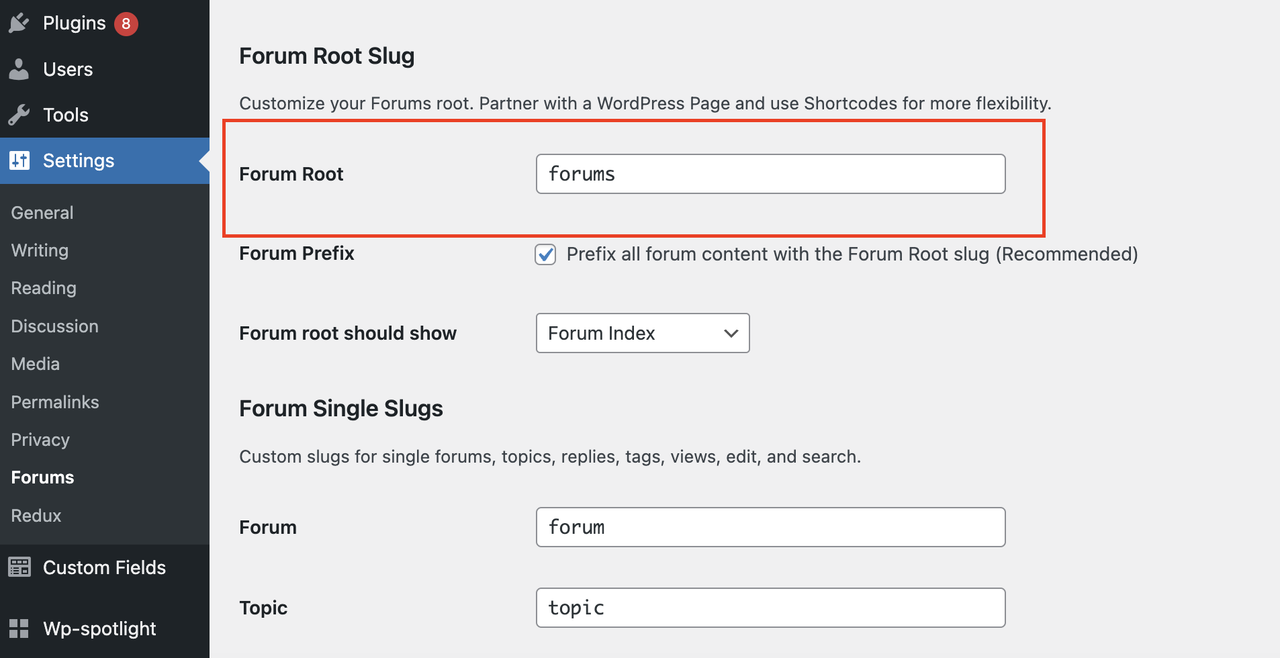
To fix this issue, you need to assign the Forum Root slug from Settings > Forum. See the settings here . Then visit the forum page with this slug (yourwebsite.com/forum-slug).
Thanks
I apologize for the probably not very precise explanation. But I’ll try to explain it again. The Forums page at the URL https://online.worksys.space/forums/ works fine. But when I created her language mutation, it was not good. See the link https://online.worksys.space/sk/forum-sk/. It has a different header.
If you create multiple pages for multiple languages, the other pages will get the theme’s default page layout style. That’s why the page titlebar isn’t showing on your website.
I recommend you create the language variations using ? parameter in URL as like /forums?lan=en
Thanks
Polylang WPML plugin does the way to create language and their final URL alternative. For the main page (it worked fine before the last theme update). I can somehow set the new SK page individually so that it looks the same as the EN variant. Thanks
I fix it via diferent setup. Thx.
Glad to know that.
Hi there! I recently updated Docy template and the right menu in the Eazy docs pages are not rendering anymore. I refer to the CONTENT menu on the right side of the page.
What did you mean by the ‘right menu’? Could you show me that area with a screenshot, please?
Thanks
I have purchased the proversion of eazydocs, how do I get the elementor kits ad widgets?
Elementor widgets are not available in the EazyDocs pro. There available two Gutenberg blocks name “EazyDocs shortcode” and “EazyDocs Search Banner”.
Thanks
Since you are using only our plugin, use the plugin’s contact form for getting support regarding any plugin-related issues.
Thanks
Good morning,
I have a little question regarding the Docy plugin:
As the “User Manuals” preview shows, there is a menu structure that can be collapsed and extended. Is it possible to make categories out of sub points, too and thus creating a “deeper” structure?
For Example “Getting started” extended shows “Theme installation”, which also can be extended and that then shows the point “How to run the setup” etc.
Thanks for your time and effort!
Marcus Bretschneider Business Analyst XCelsus GmbH
Hi,
Thanks for your query and the feature request. If you purchase the theme, we’ll update the theme with adding additional depth in the User manuals doc section.
Confirm us after purchasing the theme.
Thanks
Hi,
I am having a problem with Docy plug-in. When I update, my website runs into a critical error.
And when I do not update, header is missing in documents,
Search function does not work.
And can’t swap between Docs Table tabs, which I use on the main page.
Turn on wp_debug to see the critical errors. Show us that errors to let us understand the issue.
Thanks
With the latest update, the Right Hand Side ‘Contents’ menu doesn’t show up. I compared the code of this version and the previous version and looks like the docs-right-sidebar file has changed significantly.
Please help resolve this.
Thanks for noticing this issue. You will get this issue fixed in the next version of EazyDocs plugin.
Thanks
Hi, the new version still doesn’t have this fix. The LHS and RHS sidebar code has been significantly cropped in the new version. Request you to please look into this.
I’ve checked that the right sidebar is showing properly. Could you give us your website URL where it’s cropping?
Note that, you can use the Doc Full-width layout for a bigger right sidebar area.
Thanks
I figured this issue out. The newer version has a toggle in EazyDocs->Customize->Single Page… for Right sidebar TOC. We had to turn it off and Publish changes and immediately Turn it back On and publish changes. The ‘Content’s section was visible after that.





)