23243 comments found.
Just some feedback – We have had a really bad time with this theme. The WP Bakery plugin is very basic and hardly works at all. So we started again this time using Elementor – Now, we are developers, so we are not novices, but we encountered issue after issue, and how you expect a non deveoper to work this editor is beyond me. Visual composer is far superior, more stable, and way easier and faster to use, but you seem to have fallen in love with Elementor. Your theme seems to be a compromise between opposing editors, and the end result is neither work very well. Unless you provide a full version of Visual Composer, which actually works! We wont be buying Porto theme again. A shame, because your theme has been around a long time.

Hello @collylad
I’m sorry to hear that you had a difficult experience trying to work with our theme. We understand that not everyone is comfortable with website design and development and we strive to make our theme as easy to use as possible. In that light, we included WP Bakery and Elementor, two of the most popular page builder plugins so that anyone can use them. We do value your feedback and the team is always open to incorporating new features to make our theme easier to use.
Please contact us if there is a problem that you do not know about the development method or if it is a problem that we can develop. We will do our best to help.
Best regards, P-THEMES
Fair enough – but the POINT IS – Visual Composer does NOT WORK properly in the way you have incorporated it. We have built hundreds of sites using Visual Composer – we know it inside out. It simply doesnt work the way you have set things up.
Hi @collylad
I’m not sure in which case it doesn’t work. If you provide us with crediantls information through support, we will directly investigate why it is not working.
Thank you.
Regards.
Hi, I like the Porto theme. Can you tell me how much it costs to update this theme? I mean, is there any annual fee to get regular updates?
Hi @riderumair
Thank you for contacting us. You don’t have to pay costs any more, if you purchased.
Best regards.
Hello!
There is any option to add search form in mobile header (top or bottom) ?
I tried all the header options, but none of them display the search form on mobile. Not even with the header editor.
Thanks!
Hi @DigiteriaRO
Sorry for the late reply. Generally, search form isn’t displayed on mobile devices. Instead you can show search form on mobile menu using theme option. If you must solve, add custom css. #header .searchform-popup { display: block !important; }
Best regards.
Hello, I have noticed that in the product page, video thumbnails are not visible in mobile screens or small resolution screens. Thats a big problem since most of the traffic comes from mobile devices. Is this something that can be fixed or that’s the way Porto theme works? Thanks.
Hello @theoto
It is a pleasure to answer you. The product thumbnail is hidden because the below style is existing
.product-summary-wrap .summary-before .product-thumbnails { display: none; }
This style should be in the Theme option. Please verify this and remove it. If this style is necessary, you can override it.
We wish you success here and in your business.
Thank you.
hi, thats fantastic , thank you so much
You’re Most Welcome!!
I have a Regular License and I used to register on my old website which was closed for a long time now, so I want to use porto on the new website.
but not available And there is a message in WP “This code was already used in another site. One standard license is valid for only 1 website. Running multiple websites with a single license is a license violation according to Envato license terms. If this is a valid case, please reset your purchase codes through here or contact us with your site url.”
How can I solve this problem?
Hello, @ssaiphan,
Could you please share the first eight digits of your license so that I will check/verify and reset it for you.
Regards, P-THEMES.
adc8ad8e
ty
Hello, @ssaiphan,
Done, I have reset your purchase code, now you can use the same purchase code for activation of your theme.
Regards, P-THEMES.
Hello I update php version to 8 and I get this error:
Fatal error: Array and string offset access syntax with curly braces is no longer supported in /mnt/web113/e2/24/5490424/htdocs/wp/wp-content/plugins/Ultimate_VC_Addons/admin/admin.php on line 610
on wp-admin I get this error:
Fatal error: Array and string offset access syntax with curly braces is no longer supported in /mnt/web113/e2/24/5490424/htdocs/wp/wp-content/plugins/Ultimate_VC_Addons/admin/admin.php on line 610 Notice: The function is_embed was called incorrectly. Conditional Tags do not work if the post query (query_posts) has not yet been performed. They then always return ‘false’. More information: Debugging in WordPress. (This message was added in version 3.1.0.) in /mnt/web113/e2/24/5490424/htdocs/wp/wp-includes/functions.php on line 5835 Notice: The function is_search was called incorrectly. Conditional Tags do not work if the post query (query_posts) has not yet been performed. They then always return ‘false’. More information: Debugging in WordPress. (This message was added in version 3.1.0.) in /mnt/web113/e2/24/5490424/htdocs/wp/wp-includes/functions.php on line 5835 There was a critical error on your website. Please check the inbox of your website administrator email address for further instructions.
I guess that these plugins are coming with theme and functions.php also must be fixed?
Hi @danil0
Our Theme is fully compatibility with php 8.0
This is not our issue. Please contact plugin support.
Regards.
Hello when I enable php version 8 I get 503 error. Is it compatible?
Hello, @dimitrios0731,
Porto WordPress latest version is fully compaitable with the PHP version 8, It seems some third party plugin is conflicting with the PHP version 8, Please try to disable all the plugins on your site except Porto Functionality plugin and check back, if that will resolve your issue then again please activate all the plugins one by one and check which is not compaitable with the PHP version 8.
Regards, P-THEMES.
Hi, Team
Could you please take a look from your end if the porto functionality plugin conflicts with the woocommerce dashboard? Right now, I find woocommerce dashboard shows up blank pages. For example, analytics, customers at the admin all show blank page.
To find out the issue, I did the following:
1. I changed the theme to twentytwentythree. The problem still exists
2. Disable the porto functionality, everything comes back to be normal.
Please help to check your end. If you can not find out this issue, I will submit a support ticket.
Regards
Hello, @crazy_cube,
Please try to disable all the third party plugins on your site and check back again, if that will resolve your issue then please again activate all the third party plugins one by one and check which one is generating the issue on your site.
And if the issue will still persist then please remain all the third party plugins deactivated on your site and share your site WP Admin URL and Credentials with us via our support system so that we will check it for you and help you out.
Regards, P-THEMES.
I did what you said. I find out it is Porto functionality plugin that causes this issue. I guess it override the woocommerce admin files. A support ticket is sent and take your time to fix it.
Regards
Hello, @crazy_cube,
Thanks for your contact via our support system, I have just confirmed with the support department and they said that they already replied to your support ticket, so please check back your support ticket reply and then reply back to it accordingly.
Regards, P-THEMES.
Hi, I’m trying to have this form in the theme. After import the demo, it’s only show some code, after i checked there’s no contact form plugin, so I install it. But I can’t have similar as i want (https://tinyurl.com/29gfv4vc) How to do this?
Hello, @abhirasyid,
You can use the Porto Studio functionality and try to import any form from contact as per your requirements: https://postimg.cc/CZQgMYS1
https://www.portotheme.com/wordpress/porto/documentation/porto-studio/
Regards, P-THEMES.
Okay, but how to add portfolio page? I tried to find it in menu but couldn;t find it https://tinyurl.com/27b65wn2
Hello, @abhirasyid,
You have to go to Porto >> Theme Options >> Portfolio and turn that Custom Post Type ON from there, then it will be able to accessable under WP-Dashboard, Please refer to this screenshot: https://postimg.cc/Mctg94kR
Regards, P-THEMES.
Hello, @abhirasyid,
Actually it’s there on your site, but you changed its name to Products, please refer to this screenshot: https://postimg.cc/SJL0cxG1
Regards, P-THEMES.
Well I haven’t change anything yet  . I changed the name now to portfolio. But I dont have any product menu yet or product list. How to get that?
Hello, @abhirasyid,
You have to Install WooCommerce plugin and it will show the Product Menu as well.
Regards, P-THEMES.
Hey there, I need to convert product title from h2 to h1 tag. Please share the script if you don’t mind!
Hello @solothinker23
Sorry for the inconvenience with the theme.
There are 2 ways to change the tag.
1. If you use a child theme, you can override the template in porto-child/woocommerce/single-product/title.php.
2. You can also change the title tag with the single product builder. Please see the video here. https://www.portotheme.com/wordpress/porto/documentation/single-product-builder-elements/
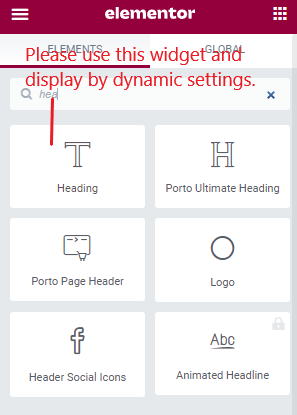
2-1). Drag and Drop Heading Widget (Elementor general widget) on the single product builder template.
2-2). Change the HTML tag to H1 in that widget.
2-3). Please use dynamic content in the heading widget.
2-4). There is no need to override the template of the WooCommerce heading. https://postimg.cc/nMhM4w5f
Hope this helps you.
Best regards.
Can you please share me the code to override the template. I’m using the chile theme already. 1. If you use a child theme, you can override the template in porto-child/woocommerce/single-product/title.php.
Hi @solothinker23
How are you!!! Ok, If you use a child theme, at first you copy file porto/woocommerce/single-product/title.php to porto-child/woocommerce/single-product/title.php
Here, please change h2 tag to h1 tag on line 13.
Hope you are well. Best regards.
How to turn off Featured image in the page, post that everyone.
Hello, @alohasmartphonedn,
You have to edit the page and post and then remove the featured images from there as per your requirements.
OR
You can try with the below given CSS code as well.
.page-image.single {
    display: none !important;
}
Regards, P-THEMES.
Hello
The last update has messed up my mobile view on the home page slightly.
Please see this image:
https://pasteboard.co/TJhSgJQarDuq.pngPlease can you fix this bug?
This is the link to my website:
www.myconsumables.com
Hello, @pipin3000,
I can see most of your site CSS is coming from the cache, so please first remove the cache from your site and then deactivate all the cache plugins from your site, after that remove the cache folder under wp-content and wp-content/uploads and finally check back to your site after removing the browser cache, I am sure your issue will be resolved.
Otherwise, please remain all the third party plugins deactivated on your site and contact us via our support system with your site WP Admin Login details so that we will check it for you on your site and help you out.
Note: Please take the complete backup of your site before proceeding.
Regards, P-THEMES.
ASAP 1. demo install is not working and i think css file is not working Please help!!! theme is very slow
and page save button is not working too..
Hello @happiash,
Sorry for the inconvenience with the theme. Could you please contact us via our support system with your site WP Admin Login details so that we will check it for you on your site and help you out.
Regards, P-THEMES.
Hi, Live search (based on SKU, tags and custom) isn’t working anymore. Yith WooCommerce Ajax Search is removed. I’m using the latest version of Porto with LiteSpeed V7.9. Can you help me? Thanks!
Hello, @kool007,
The theme default Live search is working perfectly fine for us, and the Yith WooCommerce Ajax Search is there too, it seems you have the issue on your site only, please make sure that you have properly updated the theme and porto-functionality plugin on your site.
Please try to check once after disabling all the third-party plugins on your site, might be any additional third-party plugins creating that issue on your site.
And if the issue will still persists then please remain all the third-party plugins deactivated on your site and share your site WP Admin URL and Credentials with us via our support system, so that our experts will check it for you on your site and help you out accordingly.
Regards, P-THEMES.
Hi P-Themes, thanks for your quick reply. I’ve located the culprit (a custom plugin). Thanks!
Sound’s Good!! You are the best 
Hey there I need to reset the purchase code! I don’t know where to login from the account as I don’t which email I have used to sign up on porto support website.
Hello, @solothinker23,
I have reset your purchase code, now you can use the same purchase code for activation of your theme.
Regards, P-THEMES.
Hi, i need your assistance please, i took a client website with your excellent theme installed already (v 6.7.3), but i can’t install the Dark Original Demo, it’s says “Connection timed out” (standard or alternative import) i confirmed the status and the server meets all the requirements and I went through all the setup wizard steps correctly ... is there another way to install the demo content? (the plugins installed are: backuply, Contact Form 7, Loginizer, Porto Theme – Functionality, Slider Revolution and WPBakery Page Builder). Thanks in advance!
Hello, @javila10,
Please ask your client to contact us via our support system with the theme purchase code account, and with site WP Admin URL and Credentials on which you are facing the issue, so that we will check it for you on your site and help you out accordingly.
Regards, P-THEMES.
Ok, thanks!
You’re Most Welcome!!
It is a very bad SEO practice to change product title to h2 from h1. I tried to change it from wp-content/themes/porto/woocommerce/single-product/title.php but no luck. I searched docs and google no luck. May I learn why did you change the product title of the single product from H1 to H2? How can we revert it?
I figure it out how to change from h2 to h1, just edit wp-content/themes/porto/woocommerce/single-product/title.php and use product hooks element instead of page title element in the elementor. I think page title element in the elementor is buggy, it doesnt read the file /woocommerce/single-product/title.php
can you fix this bug? I want to use “Product Title” widget in the Elementor.
Hello @amrod1
Sorry for the inconvenience with the theme.
There are 2 ways to change the tag.
1. If you use a child theme, you can override the template in porto-child/woocommerce/single-product/title.php.
2. You can also change the title tag with the single product builder. Please see the video here. https://www.portotheme.com/wordpress/porto/documentation/single-product-builder-elements/
Best regards.
Thank you for your answer but I am reporting you a bug so you can fix it asap. What I did: 1- installed porto 2- run setup wizard and import one of the demo 3- added a new single product using “Template Builder”
In Elementor menu when editing the single product template, I added 2 widgets; 1 – Porto Single Product > Product Title 2 – Porto Single Product > Product Hooks > woocommerce_single_product_summary
Then I edited porto-child/woocommerce/single-product/title.php and changed h2 to h1.
Result: 1 – Porto Single Product > Product Title DOES NOT SHOW H1 2 – Porto Single Product > Product Hooks > woocommerce_single_product_summary DOES SHOW H1
There is a problem with Elementor > Porto Single Product > Product Title widget because when I delete title.php, or add some brackets to force php error, it makes no change to single product page where Elementor > Porto Single Product > Product Title widget is used.
It looks like Elementor > Porto Single Product > Product Title widget is ignoring title.php
I hope you understand
Hello @amrod1
Sorry for inconvenience with the theme.
I understand your feelings.
I suggest you solve the problem.
1. Drag and Drop Heading Widget (Elementor general widget) on the single product builder template.
2. Change the HTML tag to H1 in that widget.
3. Please use dynamic content in the heading widget.
4. There is no need to override the template of the WooCommerce heading. https://postimg.cc/nMhM4w5fI’m very sorry for the misinterpretation again. Hope you are well.
Best regards.
Thank you for the neat solution, I appreciate your help.
Can you confirm the bug? “Elementor > Porto Single Product > Product Title widget is ignoring title.php” or is it just occurs in my setup?
Hi @amrod1
Please use the general heading widget provided by Elementor like the description above. https://i.postimg.cc/cHLgkchJ/heading.pngRegards.
Hello.. There is a Bug in /inc/lib/porto-studio/porto-studio.php. Error message: Uncaught TypeError: method_exists(): Line: 529 – if ( method_exists( $block_categories, ‘get_error_message’ ) ) { causing critical site error if we create a page or try to open a created pages.
So I resolved this error by changing that line to – if ( is_object( $block_categories ) && method_exists( $block_categories, ‘get_error_message’ ) ) {
Hope it will help someone.
Hello @Deva89
Thanks for bringing this issue to our attention. Please try to update theme using Porto Patcher https://www.portotheme.com/wordpress/porto/documentation/porto-patcher/
I am sure it will solve your issue.
Best regards.
Hi, I want to adapt this portfolio layout. How to do that?
Hello, @abhirasyid,
You can set/choose the portfolio layout from Porto >> Theme Options >> Portfolio and the options under it as per your requirements.
Regards, P-THEMES.
Hi, Team
in the linked prodcuts widget, the wishlist heart icon does not show up on the product image. Please vertify and fix it.
Regards
Hi @crazy_cube
Thanks for bringing this issue to our attention. We’ll take a closer look at the widget and make sure it is functioning properly. We’ll get back to you soon.
Regards
Hello @crazy_cube
I am sorry to have caused you trouble.
I’ll explain how to get rid of the current issue.
1. Set the button style to textual in the wishlist plugin as shown in the figure below. https://app.screencast.com/qmzBRM2xu4djL?conversation=41b4BmOaVADznT3jBWTpLU&tab=Details2. Add the following custom CSS to the Theme option.
li.product-wq_onimage .links-image .yith-wcwl-add-to-wishlist .button { display: block; }
If you have any difficulties, please feel free to contact us.
In addition, we are discussing your request and it will be reflected in the next version.
Please wait with anticipation. Thank you.
Thanks for your quick reply.
In the Yith wishlist dashboard, I choose the style to match the theme. If I did what you said, my personal customization on the product page will be changed.
So I will wait for the next version. Please let it work.
Hi,
I did some minor css on my codes. Now it is ok. Just change to “Textual (anchor)” in the wishlist settings.
Thanks again.
Hi @crazy_cube
No problem! Glad I could help. Let me know if you need any more assistance.
Best regards