787 comments found.
is the a one page demo?

Hello,
No, there is no one-page demo.
If you have any other queries, please create a pre-purchase ticket on our support (https://potezasupport.ticksy.com/) so that we can guide you in a more organized way.
Thanks, Dinesh – https://www.potenzaglobalsolutions.com/
Hello, I’m running Homepage 8 on the website for quite some time. I would like to “redesign” site homepage to Homepage 6.
Is it possible to import sample data of only homepage (from Homepage 6 template) as a new page which I can adjust per requirements?
Hello,
You can import it from the Sample Data section. For this, go to Theme Options > Sample Data and click on the Home 6 Import button. Once Home 6 is imported, but it’s not set as the home page, follow the below steps:
- Go to Admin Panel > Settings > Reading Setting.
- Select “A static page” in the “Your homepage displays” field.
- Then, select “Home 6” in the “Homepage” field. Please refer to the below link for more information.
https://wordpress.org/support/article/settings-reading-screen/
If you have any other queries, please create a support ticket on our support (https://potezasupport.ticksy.com/) so that we can guide you in a more organized way.
Thanks, Dinesh – https://www.potenzaglobalsolutions.com/
Hello, I have an active Google Ads campaign and it is negative my ads saying that there is Malware on my site.
Google Support has recommended removing these links from the entire site
http://sample-data.potenzaglobal.com/cardealer/themes/cardealer/images/404-error.png, https://sample-data.potenzaglobal.com/cardealer/themes/cardealer/images/404-error.pngHow do I remove?
My Site www.hmveiculos.com.br
Hello,
We fixed the issue on our sample data CDN. And we have sent a request to Google to mark it as fixed. We are waiting for their response.
To resolve the issue, you need to replace the path in Theme Option from our URL with your URL. Please create a support ticket on our support (https://potezasupport.ticksy.com/) so we can provide the file and steps to replace it.
Thanks, Dinesh – https://www.potenzaglobalsolutions.com/
Hello Dinesh, Thanks for the feedback.
I can’t create a ticket because my support has already expired! Can you email me maico@g2digital.com.br
Thanks
Hello,
If you’re not able to create a ticket, please create a pre-purchase ticket on our support (https://potezasupport.ticksy.com/) so we can provide the file and steps to replace it.
Thanks, Dinesh – https://www.potenzaglobalsolutions.com/
Hello Dinesh,
I managed to create a ticket, I’m waiting for the return there!
Thanks
Hello,
We replied to your ticket and attached the required image with steps to replace it. Please check and provide your feedback.
Thanks, Dinesh – https://www.potenzaglobalsolutions.com/
Hello,
I purchased the template to create a website for a used car dealership. I saw that it is compatible with WooCommerce…
My issue was to allow the addition of vehicles without going through the back office for a user who is not very comfortable with the back office. This seems possible at first glance (I haven’t set everything up and tested it all yet).
My main problem now is that in the vehicle listing that will be created, I would like to have the option to pay for the vehicle (using WooCommerce or WordPress payment plugins) or pay a deposit without going through the WooCommerce product page. Preferably, the payment options should be automatically available for each vehicle listing created from the front office.
Do you think this is possible?
Hello,
Please refer to the below document for more information.
https://docs.potenzaglobalsolutions.com/docs/cardealer/?section=sell-vehicle
Hope this will resolve your query. If you still have any other queries, please create a pre-purchase support ticket on our support (https://potezasupport.ticksy.com/) and provide detailed information about your requirements so that we can guide you in a more organized way.
Thanks, Dinesh – https://www.potenzaglobalsolutions.com/
Hello, after upgrading to 4.9.0 i can’t unset any field from the add car page, i was using this filter to unset fields and it was working good until version 4.8.0:
add_filter(‘cdfs_car_form_fields_items’,’cdfs_car_form_fields_items_custom’,10,1);
function cdfs_car_form_fields_items_custom($form_fields){
$colunms=array_column($form_fields, 'name');//print_r($colunms);$stock_number_key=array_search('stock_number',$colunms);$trim_key=array_search('trim',$colunms);$vin_number_key=array_search('vin_number',$colunms);$drivetrain_key=array_search('drivetrain',$colunms);$fuel_economy_key=array_search('fuel_economy',$colunms);$interior_color_key=array_search('interior_color',$colunms);$regular_price_key=array_search('regular_price',$colunms);$city_mpg_key=array_search('city_mpg',$colunms);$highway_mpg_key=array_search('highway_mpg',$colunms);$video_link_key=array_search('video_link',$colunms);$tax_label_key=array_search('tax_label',$colunms);$technical_specifications_key=array_search('technical_specifications',$colunms);$features_and_options_key=array_search('features_and_options',$colunms);$general_information_key=array_search('general_information',$colunms);
$vehicle_overview_key=array_search('vehicle_overview',$colunms);unset($form_fields[$stock_number_key]);unset($form_fields[$vin_number_key]);unset($form_fields[$trim_key]);unset($form_fields[$drivetrain_key]);unset($form_fields[$fuel_economy_key]);unset($form_fields[$interior_color_key]);unset($form_fields[$regular_price_key]);unset($form_fields[$city_mpg_key]);unset($form_fields[$highway_mpg_key]);unset($form_fields[$video_link_key]);unset($form_fields[$tax_label_key]);unset($form_fields[$features_and_options_key]);unset($form_fields[$technical_specifications_key]);
unset($form_fields[$vehicle_overview_key]);return $form_fields;}
i have also tested this filter :
add_filter( ‘cdfs_car_form_fields_items’, ‘cdfs_car_form_fields_items_custom’,10,1 ); function cdfs_car_form_fields_items_custom($form_fields){ for($i=0;$i<count($form_fields);$i++){ if($form_fields$i==’trim’){ unset($form_fields[$i]); break; } } return $form_fields; }
but same issue i always see fields on add car page please could you correct this bug ?
thanks in advance
Hello,
Please create a support ticket on our support (https://potezasupport.ticksy.com/) and provide the access and customization details so that we can check and guide you in a more organized way.
Thanks, Dinesh – https://www.potenzaglobalsolutions.com/
Hello,
Change the below code, from:
$colunms = array_column( $form_fields, 'name' );
To:
$colunms = array_column( $form_fields, 'name', 'name' );
And, try again.
Hope this will resolve your query. If the issue persists, please create a support ticket on our support (https://potezasupport.ticksy.com/) and provide the access and customization details so that we can check and guide you in a more organized way.
Thanks, Dinesh – https://www.potenzaglobalsolutions.com/
thanks a lot your solution is workin as expected i have also another solution working good:
add_filter( ‘cdfs_car_form_fields_items’, ‘cdfs_car_form_fields_items_custom’,10,1 ); function cdfs_car_form_fields_items_custom($form_fields){
foreach ( $form_fields as $field_key => $field_array ) {if ( ('car_title' === $field_array['name']) || ('trim' === $field_array['name']) || ('stock_number' === $field_array['name']) || ('vin_number' === $field_array['name']) || ('drivetrain' === $field_array['name']) || ('fuel_economy' === $field_array['name']) || ('interior_color' === $field_array['name']) || ('regular_price' === $field_array['name']) || ('city_mpg' === $field_array['name']) || ('highway_mpg' === $field_array['name']) || ('video_link' === $field_array['name']) || ('tax_label' === $field_array['name']) || ('technical_specifications' === $field_array['name']) || ('features_and_options' === $field_array['name']) || ('vehicle_overview' === $field_array['name']) ) {
}unset( $form_fields[ $field_key ] );
}I need a urgent support from you people ,demo import not available ,i already send you a mail and message trought the protal ,try to find out a solution asap for me thanks
Hello,
Currently, two domains are on the activation list, but none have the Car Dealer theme installed.
So please install and activate the Car Dealer theme on any one website, and provide us detailed information with screenshots by creating a support ticket on our support (https://potezasupport.ticksy.com/). So we can check and guide you in a more organized way.
Thanks, Dinesh – https://www.potenzaglobalsolutions.com/
sir my vehicle inventory in category section set thumbnail option is disabled after update installed, theme version is 5.8 how to fix this issue
Hello,
A conversation is being carried on with this same question in your support ticket (3268461), which we’ve already answered. Please check it, and provide feedback if you still have any queries.
Thanks, Dinesh – https://www.potenzaglobalsolutions.com/
Do you have HTML version?
Hello,
Yes, please refer to the below link.
If you have any other queries, please create a pre-purchase support ticket on our support (https://potezasupport.ticksy.com/) so that we can guide you in a more organized way.
Thanks, Dinesh – https://www.potenzaglobalsolutions.com/
Hello. We need to insert some script tags into the <head> section for various purposes. Is there not an option area in the Theme Options to insert items like tracking codes and other <script> tags that would go into the <head> section? Or do we have to manually edit the header.php file to insert them? Because when I do them manually, updating the theme writes over them and everything breaks. Please advise, thank you.
Hello,
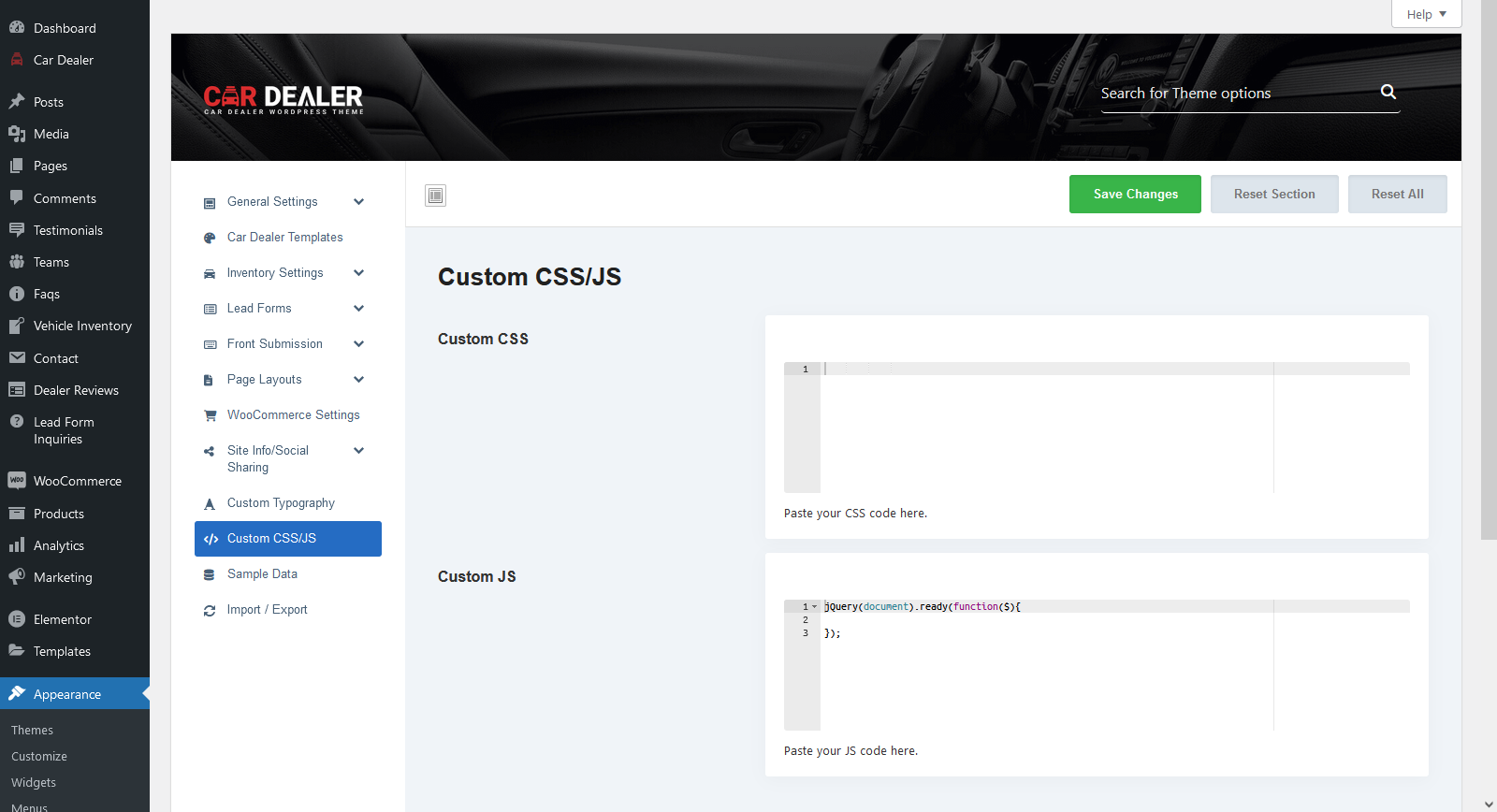
The theme has provided option to insert custom CSS/JS. Please refer to the this document.
If you have any other queries, please create a pre-purchase support ticket on our support (https://potezasupport.ticksy.com/) so that we can guide you in a more organized way.
Thanks, Dinesh – https://www.potenzaglobalsolutions.com/
I need to insert a <script> tag into the <head> section in order for a specific feature to work. Normally a theme has an area in the Options for inserting tracking tags, script tags, Google verification tags, etc. instead of having to manually insert them into the header.php file. Our problem is that each time we update the theme it overwrites that file and wipes out all the tags we’ve inserted. Please advise how we can insert a <script> tag without this occurring. Thank you.
Hello,
The theme has provided the option to insert custom CSS/JS where you can add your custom JS (see screenshot).
If you have any other queries, please create a pre-purchase ticket on our support (https://potezasupport.ticksy.com/) so that we can guide you in a more organized way.
Thanks, Dinesh – https://www.potenzaglobalsolutions.com/
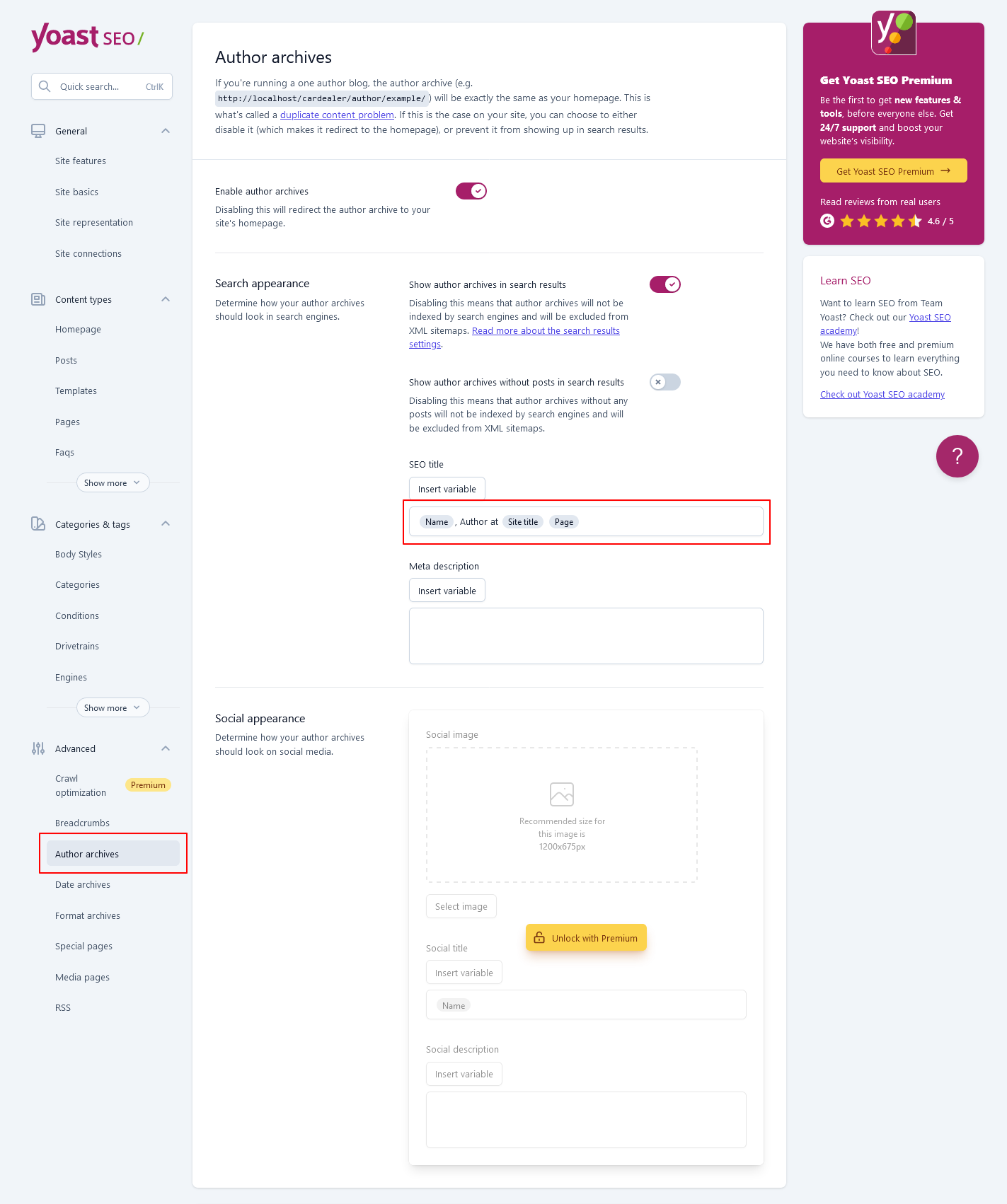
On the dealer listings page, the page title in the browser is for example “John Smith, Author at mysite” How can I can edit? As rather not have Author in the page title.
Hello,
It’s coming from the SEO plugin. So, please check and configure the Author archive in the SEO plugin setting. If you are using the Yoast SEO plugin, see this screenshot.
If you have any other queries, please create a support ticket on our support (https://potezasupport.ticksy.com/) so that we can guide you in a more organized way.
Thanks, Dinesh – https://www.potenzaglobalsolutions.com/
Hello, we have a problem with price range filter. It is not working – you can test it here on the filter that we setup on homepage – https://hs-auto.cz We have tried to update to the latest versions of everything, we tried to change the separator to something else but the price filtr is still not working. Any suggestions will be apreciated Best regards Marek Draganovsky
Hello,
We checked
We checked the price range filter on your site (https://hs-auto.cz/), and it’s working fine (see screencast). Please clear the browser and server-side cache and try again.
If the issue persists, please create a support ticket on our support (https://potezasupport.ticksy.com/) and provide a screencast of the issue so that we can check and guide you in a more organized way.
Thanks, Dinesh – https://www.potenzaglobalsolutions.com/
Hi , Sorry for provide no clear information It’s possible to put whole this section into the homepage also. Mean the customer also can do the filter in homepage and the result also will appear in homepage
https://prnt.sc/bnfzAVYrnomRHello,
No, there is no such feature to put the whole car listing section on the homepage where customers also can do the filter.
If you have any other queries, please create a support ticket on our support (https://potezasupport.ticksy.com/) so that we can guide you in a more organized way.
Thanks, Dinesh – https://www.potenzaglobalsolutions.com/
Hi, how can i modify the mobile theme ? i need to remove the loan calculator from the mobile version! thanks.
Hello,
You can manage this setting using the widgets section. In the widget section, select “Vehicle Detail Sidebar” & “Vehicle listing sidebar using the following path “Appearance > Widgets > Vehicle Detail Sidebar or Vehicle listing sidebar” (see screenshot).
Also, you can manage the sidebar location using the theme option by using the following path “Theme option > Inventory Settings > Detail Page Mobile” (see screenshot).
https://docs.potenzaglobalsolutions.com/docs/cardealer/?section=financing-calculatorIf you have any other queries, please create a support ticket on our support (https://potezasupport.ticksy.com/) so that we can guide you in a more organized way.
Thanks, Mukesh – https://www.potenzaglobalsolutions.com/
Hi, It’s possible to added this right sidebar car widget into the homepage and other page?
https://cardealer.potenzaglobalsolutions.com/elementor/cars/?lay_style=view-grid&listing_sidebar=rightHello,
You can manage this setting using the widgets section. In the widget section, select “Vehicle Detail Sidebar” & “Vehicle listing sidebar using the following path “Appearance > Widgets > Vehicle Detail Sidebar or Vehicle listing sidebar” (see screenshot).
If you have any other queries, please create a support ticket on our support (https://potezasupport.ticksy.com/) so that we can guide you in a more organized way.
Thanks, Mukesh – https://www.potenzaglobalsolutions.com/
It possible put this section into two page which is home and car page?
Hello,
Yes, you can manage on both pages. For home page, There is sidebar shortcode available while editing a home page. Please refer to the link :- https://prnt.sc/NrEpBkgmJzmN
For car pages, You can manage this setting using the widgets section. In widget section select “Vehicle Detail Sidebar” & “Vehicle listing sidebar using following path “Appearance > Widgets > Vehicle Detail Sidebar or Vehicle listing sidebar”.
Please refer to the link https://prnt.sc/OvF2famlBiGY
If you have any other queries, please create a support ticket on our support (https://potezasupport.ticksy.com/) so that we can guide you in a more organized way.
Thanks, Mukesh – https://www.potenzaglobalsolutions.com/
Hi, Since the last theme update, my social profiles have disappeared from TopBarLayout and FooterTopLayout;
Hello,
It seems like you have not updated core and bundled plugins after updating the theme. Please update the plugins and check again after clearing browser and server-side cache.
If you have any other queries, please create a support ticket on our support (https://potezasupport.ticksy.com/) so that we can guide you in a more organized way.
Thanks, Dinesh – https://www.potenzaglobalsolutions.com/
Is there a way to integrate OpenStreetMaps?
Hello,
Currently, there is no built-in option to integrate OpenStreetMaps.
If you have any queries, please create a support ticket on our support (https://potezasupport.ticksy.com/) nd so that we can guide you in a more organized way.
Thanks, Dinesh – https://www.potenzaglobalsolutions.com/
Hello,
I have the defaut data imported but when i try to import the home page service the system doesn’t import elementor tags but just a simple html tags so its not styled.
i incresse the server configuration as recomended but no result.
thank you.
Hello,
Please create a support ticket on our support (https://potezasupport.ticksy.com/) and provide detailed information with URLs (where you are facing the issue) and screenshots so that we can check and guide you in a more organized way.
Thanks, Dinesh – https://www.potenzaglobalsolutions.com/
Hello, I need to change the price Filter in the home page: 1. Can I change these number? $0 – $2,500,000 …. I need to set 0 – 25.000.000
2. Remove that filter.
Thank you
Hello,
- Can I change these numbers? $0 – $2,500,000 …. I need to set 0 – 25.000.000
=> Sorry to say, but there is no option to remove the currency symbol, but you can change the currency separator from Theme Options > Inventory Settings > Currency Settings. Please refer to the below document for more information.
https://docs.potenzaglobalsolutions.com/docs/cardealer/?section=currency-settings - Remove that filter.
=> You can remove the filter by editing a home page by elementor (see screenshot )
Hope this information will resolve your query. If you have any queries, please create a support ticket on our support (https://potezasupport.ticksy.com/) and provide detailed information with screencast/screenshots and URLs so that we can guide you in a more organized way.
Thanks, Mukesh-https://www.potenzaglobalsolutions.com/
Hello, I don´t have Elementor … the Theme I ´ve bougth has wpBakery page builder and I can´t find the option mentioned on point 2. Let me know please…. thanks a lot
Hello,
The “Custom Filter” is also available in the WPBakery. Please refer to the below document for more information.
https://docs.potenzaglobalsolutions.com/docs/cardealer/?section=custom-filters
Hope this information will resolve your query. If you have any queries, please create a support ticket on our support (https://potezasupport.ticksy.com/) and provide detailed information with screencast/screenshots and URLs so that we can guide you in a more organized way.
Thanks, Dinesh – https://www.potenzaglobalsolutions.com/
Hi, In the configuration of the stock page that I use today, it is in four columns, is there a possibility to change it to three columns?
https://www.dropbox.com/s/crlmdj4z91iqasu/Screenshot_8.jpgThanks.
Hello,
You can manage it from Theme Options with the Vehicle Listing Column setting. Please refer to the below document for more information.
https://docs.potenzaglobalsolutions.com/docs/cardealer/?section=inventory-page
If you still have any queries, please create a support ticket on our support (https://potezasupport.ticksy.com) and provide detailed information with screenshots/screencasts and links so that we can guide you in a more organized way.
Thanks, Dinesh – https://www.potenzaglobalsolutions.com/
Hi, where I can manage or add this information – can’t find anywhere in documentation! https://snipboard.io/v5dHCq.jpg
Hello,
You can manage it from the Excerpt field in the vehicle editor (see screenshot).
If you still have any queries, please create a support ticket on our support (https://potezasupport.ticksy.com) and provide detailed information with screenshots/screencasts and links so that we can guide you in a more organized way.
Thanks, Dinesh – https://www.potenzaglobalsolutions.com/