23243 comments found.

Hi!
I don’t understand very well what this two option do to existing page?
- Refresh templates information (This tool will reset the information about Porto templates used in pages, posts, sidebars, menus, etc.)
- REFRESH TEMPLATES (Refresh Templates’ display conditions This tool will reset the display conditions for all templates.)
I’ve been using porto for 5 years and some things on the site work differently than when i tested on a “fresh” installation. I would like to update the old (porto) site, but installing from scratch is not an option.
Thank you
Hello, @igorjup,
1. The content you created under Porto >> Template builder has been assigned to some sections, and pages on your site, and that option you indicate will refresh the information such as if you change the content of those templates.
2. Same as like point 1, it will refresh the conditions of those templates.
You can duplicate/clone your site as a test site and then apply the update on it, and if everything will go smoothly then you can follow the same on your live site, please refer to our theme documentation on the update here: https://www.portotheme.com/wordpress/porto/documentation/update-theme/
Regards, P-THEMES.
Good day,
I have a question supported porto theme no <!-more->
If I use the tag ”<!-more->” in “Edit category” it doesn’t work, what could be the reason?
Hello, @digitotaal-csu,
Could you please check it once with activating the default WordPress Theme like Twenty Twenty Three, just to make it sure that the issue is with our theme or not?
Regards, P-THEMES.
I have selected the theme “Twenty Twenty Three”, then unfortunately it does not work either
Hello, @digitotaal-csu,
That is the main point, this confirms that the issue is not related to our theme and we suggest you to contact WordPress support for this concern, as when it will work fine with the default WordPress Theme, it should also work fine with our theme as well.
Regards, P-THEMES.
what’s the difference between the demo shops which are being referred as marketplace and those which none. for marketplace use?
Hello, @projectmano,
A demo shop that is referred to as a “marketplace” typically has features that allow multiple vendors to sell their products on the same platform. In other words, the marketplace acts as an intermediary between buyers and sellers, providing a platform for vendors to showcase their products and for buyers to browse and purchase them.
On the other hand, a demo shop that is not referred to as a “marketplace” may only showcase products from a single vendor or company. It may not have the functionality to allow multiple vendors to sell on the platform.
Regards, P-THEMES.
Well thank you. But I saw in another answear that can works only with manual installation. Which are this settings, if they do, and does shop 36 works for marketplace by default because there is no refference to wcfm or dokan as the shop22
Hello, @projectmano,
Yeah there is no such reference, and yes if you have to use the WCFM, then you have to Install the plugin and configure it as per your requirements, there is no pre settings for the plugin.
Regards, P-THEMES.
In an older version posts does not have the featured image show in content area, while when updating the theme to the latest it shows the featured image on top of the post.
There does not seem to be a setting to remove/hide it. What is the best way to hide all featured image in the content area, but keeping it in the post archives?
Thanks,
Hello, @SolutionsDev,
Could you please share the URL of the page from where you want to remove that featured image from the post so that I will check and assist you accordingly?
Regards, P-THEMES.
I am sorry that it is a local development server and cannot be shared. This is a standard featured image.
Hello, @SolutionsDev,
Ok, then to remove the featured image of the post from the single post page only, please copy and paste the below given CSS code to Porto >> Theme Options >> Skin >> Custom CSS and check back to your site after clearing the browser cache.
.single-post .post-image.single {
    display: none !important;
}
Regards, P-THEMES.
Thanks for the quick reply. I will apply the code and get back to you.
Sure take your time.
This just worked fine. Thanks
You’re Most Welcome!!
reset my license please. I need to change domain
Hello, @Pixel_7Star,
Could you please share first eight digits of your theme purchase code with me here, so that I will try to look it into our database and will reset it for you.
Regards, P-THEMES.
Hello, For an online store we are using the Shop Demo 1 template. I am interested in exactly what sizes the theme uses, because I notice that the theme creates over 40 separate sizes for each photo uploaded to the site. For example, a product photo starts at 32×32 pixels. This is filling up disk space on my hosting which is not good. My request is that you tell me the exact dimensions of the images that use the theme and how I can limit the creation of unnecessary dimensions. Greetings and Thanks
Hello, @gs-webcreator,
By default, WordPress generates three sizes of each image that you upload. Themes and plugins can generate additional image sizes which can easily push the number between 5 – 10. If you have a lot of image-based content on your site, then after a while this may increase your storage needs and backup file size.Please read and follow the instructions written in the below-given docs:
https://www.wpbeginner.com/wp-tutorials/how-to-prevent-wordpress-from-generating-image-sizes/
https://premium.wpmudev.org/forums/topic/wp-is-creating-multiple-files-for-every-image-uploaded-more-than-4/
https://www.templatemonster.com/blog/fighting-duplicate-images-wordpress/
https://cloudinary.com/blog/how_to_prevent_wordpress_from_generating_multiple_images
https://wordpress.org/plugins/image-sizes/
And Regarding Theme generating Image Sizes, Please add the following code in the child theme’s functions.php.
add_action( 'after_setup_theme', 'porto_child_setup', 11 );
function porto_child_setup() {
remove_image_size('blog-large' );
remove_image_size( 'blog-medium' );
              …
}
Please add “remove_image_size” functions with the image sizes to remove in … position in the upper code.
Regards, P-THEMES.
Wordfence scan result: The Plugin “Dynamic Featured Image” appears to be abandoned Plugin Name: Dynamic Featured Image Current Plugin Version: 3.7.0 Last Updated: January 29, 2021 Details: It was last updated 2 years 2 months ago and tested up to WordPress 5.6.10. Plugins can be removed from wordpress.org for various reasons. This can include benign issues like a plugin author discontinuing development or moving the plugin distribution to their own site, but some might also be due to security issues. In any case, future updates may or may not be available, so it is worth investigating the cause and deciding whether to temporarily or permanently replace or remove the plugin ........ Why Still recommend this plugin ?
Hello, @bakulutu,
It is generally recommended to keep your website and its plugins up-to-date to ensure security and compatibility with newer versions of WordPress.
Although the plugin has not been updated for more than two years, it does not necessarily mean that it poses a security risk or that it will not work with newer versions of WordPress. It could still function properly for the time being, but the longer it remains unmaintained, the greater the chance it will become incompatible or vulnerable to security issues.
So we will try to reach out to the plugin Author officially and ask to update the plugin as soon as possible to make sure its compatibility with the latest WordPress.
Regards, P-THEMES.
Hi! How i can change the color of the menu icon? Im using a pop up menu. https://ibb.co/KqqnLjj
Hello, @Jettools,
You can change its color from Porto >> Theme Options >> Menu >> Mobile Menu >> Mobile Menu Toggle as per your requirements.
OR
You can change it using the Custom CSS as well, Please copy and paste the below given CSS code to Porto >> Theme Options >> Skin >> Custom CSS and check back to your site after clearing the browser cache.
#header .mobile-toggle {
    background-color: yellow !important;
    color: red !important;
}
Note: You can change the color in the given code as per your requirements.
Regards, P-THEMES.
Thats not the correct way to change the icon color. Im using popup main menu so the icon is showing on all devices. There must be a different way to change the color.
Hello, @Jettools,
Ok, then could you please contact us via our support system with your site WP Admin Login details so that we will check it for you on your site and help you out?
Regards, P-THEMES.
External URL on post not working!! I put the link and post format LINK, bit it doenst work…. On Porfolio tab it works ok
Hello, @cutmim,
Could you please contact us via our support system with your site WP Admin Login details so that we will check it for you on your site and help you out.
Regards, P-THEMES.
Hi, I’ve created some custom post types with a plugin. Is it possible to add “Porto Skin Options” and “Porto View Type” to these?
Hello, @Jonas-Delfi,
Unfortunately No, this is not possible as the Porto Skin Options and Porto View Options are only for the Porto own Posts, Products, Pages and Custom Post Types.
Regards, P-THEMES.
Hello, I’m currently trying to design the layout of many similar pages and I’m struggling to figure how to change the breadcrumb/logo/menu background photo to full width since the logo and menu items are not fully visible. Basically, I’d want the breadcrumb background photo full width, not contained while keeping the page content still contained. Where do I fix that? I tried messing around the Porto > “Theme Options” > “Layout” but it screwed up the home page and other pages but luckily I returned to original layout so I’m stuck.
Hello, @seanthadlock,
Please navigate to Porto >> Theme Options >> Layout and set:
Site Layout Mode as "Container"Page Layout as "without sidebar"Banner Wrapper as "Wide"By following the above setting, your page will be contained and the breadcrumbs will of full width.
If still you need our help, then please contact us via our support forum with your site WP Admin Login details so that we will check it for you on your site and help you out.
Regards, P-THEMES.
Unfortunately, my settings are already the same as your suggestion. I’ve reached out to Support Forum just now. Thanks.
Hello, @seanthadlock,
Ok Great!! Now, please be patience, once your support ticket will be resolved, you will get the reply to your support ticket accordingly.
Regards, P-THEMES.
With the latest updates there are problems between Bakery and Stripe in the mobile version. Does this happen to anyone else?
Hello, @Hipercaza,
Could you please contact us via our support system with your site WP Admin Login details and explain your issue in detail there, if possible with some screenshots for our better understanding so that we will check and assist you accordingly.
Regards, P-THEMES.
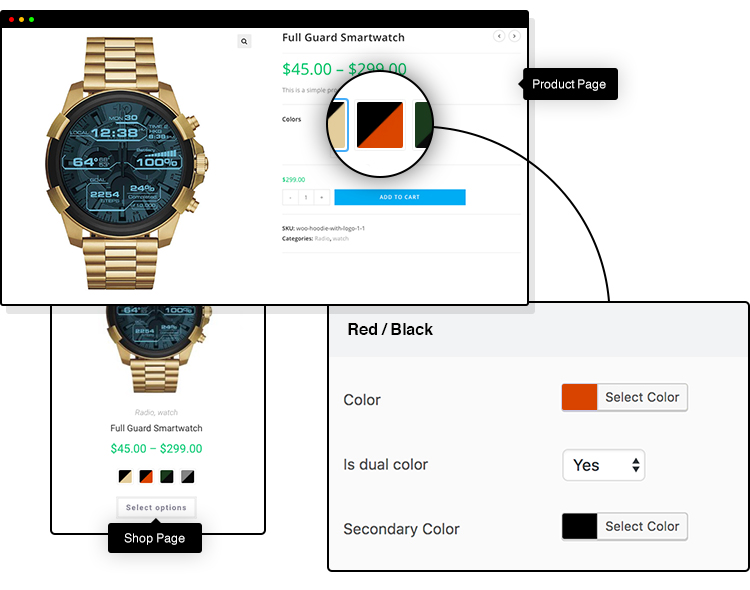
Which plugin is bundled for color/image swatches. I reviewed your video https://jumpshare.com/v/JaN1yVjlgnoYfnsISo9J . I already using another theme and want to move to porto and studying my gaps. I see same configuration but i am not sure if it is “Variation Swatches for WooCommerce” https://wordpress.org/plugins/woo-variation-swatches/ . What i need and not clear in your demos is if you support changing product image whith selected variance beside the original product gallery ?
Hello, @esaesa,
First of all, thanks for showing your interest in Porto WordPress 
Thank you for reaching out to us regarding the color/image swatches functionality of our theme. We are pleased to inform you that our theme comes with pre-built and default functionality for using color/image swatches without requiring any additional plugins.
Furthermore, we confirm that our theme allows users to set different images for different variations, and when a particular variation is selected, the selected variation image will be displayed instead of the main product image. This functionality is also a default feature of our theme.
Regards, P-THEMES.
Do you have a demo for such selection functionality as i checked some of your demo like this https://www.portotheme.com/wordpress/porto/shop4/product/brown-women-casual-handbag/and all without image change. Also do you support dual color swatches
Hello, @esaesa,
Please watch this video I have captured for you: https://streamable.com/k8ml8o
Hope this will clear your thoughts…
And what do you mean by dual-color swatch?
Regards, P-THEMES.
Thanks. But the demo showed me that no dual color functionality. Am i right?
Hello, @esaesa,
Unfortunately no, there is no such built-in functionality, so you have to try with any third-party plugin which better meets your requirements.
Regards, P-THEMES.
After latest update, the footer twitter widget started showing tweets of “swtheme”, I checked the API settings, they were intact, not sure what is wrong. :\
Hello, @webnita,
If your Twitter widget is displaying tweets from an account that you did not intend to show, it’s possible that the account in question is using a hashtag or keyword that is triggering the display of their tweets in your widget.
Here are a few steps you can take to troubleshoot this issue:
1. Check the settings of your Twitter widget and make sure that the correct Twitter handle or hashtag is entered. Double-check the spelling and capitalization.
2. Check if the tweets displayed on the widget are coming from retweets or replies to the account you intended to display. In this case, it’s possible that the retweets or replies include the keyword or hashtag used in your Twitter widget, which is why they are being displayed.
3. If you are still unable to figure out the issue, try refreshing your browser cache or clearing your browser cookies. Sometimes, old data can cause issues with the widget display.
4. Finally, if none of the above steps work, then please contact us via our support system with your site WP Admin Login details so that we will check it for you on your site and help you out.
Regards, P-THEMES.
Hi, how can I manage my licences. I will change my site to another domain.
Hello, @vapis,
You can manage your licenses here on this site: https://www.portotheme.com/support/reset-sites/
Regards, P-THEMES.
Thank you!!!
You’re Most Welcome!
I’m having trouble translating the theme into Portuguese, for example the add to cart button, among other translations. how do I do ? I’ve tried using the plugin loco translate, but it doesn’t work. judge me please.
Hello, @bellaflex,
If you are using the Loco translate plugin then please follow the below procedure:
Please use the Loco translate plugin on your site. After installing the plugin please Navigate to Loco >> Themes >> Porto >> Edit the translation which you are using for the site >> Click the Sync button >> Find the words and add the translation for them and save it.
Also, please Navigate to Loco >> Plugins >> Woocommerce >> Edit the translation which you are using for the site >> Click the Sync button >> Find the words and add the translation for them and save it.
Also, please Navigate to Loco >> Plugins >> Porto -functionality >> Edit the translation which you are using for the site >> Click the Sync button >> Find the words and add the translation for them and save it.
https://wordpress.org/plugins/loco-translate/
Note:
1. Custom (recommended)2. This is Loco’s protected folder under “wp-content/languages/loco/” which is safe from automatic updates and provides priority over the above locations. https://localise.biz/wordpress/plugin/manual/msginit?utm_medium=plugin&utm_campaign=wp&utm_source=admin&utm_content=plugin-msginit#order
If this folder doesn’t exist you may need to create it and ensure it has the correct permissions.
https://localise.biz/wordpress/plugin/manual/filesystem
If the issue still exists then please send me the WP admin login details of your site through our support forum so we will check and solve the issue for you.
Regards, P-THEMES.
Hello, I have been using the ECHO Knowledge Base plugin for a long time with PORTO Theme and it worked very well but for some time now it has stopped working properly, the KB menu no longer appears. Will you restore compatibility with this plugin in future versions please? Best regards
Hello, @Ermane,
What exact issue you are facing with working our theme and that plugin? Could you please explain a bit more clearly, if possible via our support system with your site WP Admin Login details so that we will check it for you on your site, Please also share the small video clip of the issue as well.
Regards, P-THEMES.
Hello, thank you for the answer, The problem is that the ECHO Knowledge Base plugin gives a template that contains a menu that allows to navigate through topics. This menu is no longer displayed from versions of PORTO greater than 6.4.0 I had already contacted the support and had the answer below, that’s why I ask you if this plugin will be compatible again soon. ””The plugin you are using was compatible with the theme’s old version but not with the latest version and I have confirmed it from our compatible plugins list the plugin you are using for this doesn’t exist in the list.”“
Hello, @Ermane,
Ok, thanks for your explanation, I request you to please write it as a feature request on our forum here: https://www.portotheme.com/forums/topic/feature-request/ so that our dev team will check it and make it compatible with the upcoming updates of the Theme.
Thanks for your understanding.
Regards, P-THEMES.
Hello PT-Support2,
Version 6.9.3, it’s ok : - Fixed: Issue which the bulk menu function did not work (Feature Request)
Thank you very much !! I really appreciate *
Hello, @Ermane,
We’re glad to hear that version 6.9.3 is working fine for you. We appreciate your feedback regarding the fix for the bulk menu function issue. Our team is committed to addressing feature requests and ensuring a smooth user experience.
If you have any further questions or need assistance with anything else, please feel free to let us know. We’re here to help!
Regards, P-THEMES.
Please join our Discord Lesson
Hi,
i update the theme and all plugins, but the message when edit/create a page
You Should Know Now Your site has been optimized. We recommend to uncheck Optimize WPBakery & Shortcodes during page edit.
Don’t show this message again.
I click the IGNORE button but doesnt do nothing? Need help please. I already did REFRESH and APPLY PATCHES
Hello
First, update Porto theme and Porto functionality to latest version.
And go to Porto>Patcher, Click ‘refresh patches’ and ‘Apply patches’. If there is no patch file still, please contact us via https://www.portotheme.com/forums/forum/porto-multi-purpose-woocommerce-theme/ with your wp admin credentials.
And we’ll release Porto Theme 6.9.1 for this issue within 1~2 hours.
Please wait…
Kind regards.
ok, will wait
Hello
We already updated to Porto 6.9.1.
You can update the theme and functionality in Dashboard>Updates and Plugins menu.
Thank you for your understanding. Kind regards.
Perfect! thanks
You’re Most Welcome!!
Hello 1 Please I have a full license of WPBakery Page Builder and am thinking of activating it to enable me use the templates and back-end elements, but I want to find out first what the downside will be on the performance of the theme if any, And please if am to upgrade do I only need to activate the license?
2.Secondly the issue regarding the new patch you just released has it been fixed? Will it be fixed if I update the theme, my site is still new and under construction, I can update the theme if that will help.
Thank You
Hello, @Duangmal,
1. Activating WPBakery Page Builder may have an impact on your website’s performance depending on various factors such as:
Page Load Time:
Server Resources:
However, with proper optimization, you can minimize the impact of WPBakery Page Builder on your website’s performance.
And If you want to update the plugin no need to activate it, and you will always get the latest update with the theme update, OR contact us via our support system, we will provide you with the latest update.
2. Yes, you can easily update the theme to the very latest version and then Apply the Patch.
Regards, P-THEMES.
Hi, just a quick query. We are getting this message “Now Your site has been optimized. We recommend to uncheck Optimize WPBakery & Shortcodes during page edit.” when trying to edit our product pages, I can’t find out where I can turn this setting off, I have ignored it for a while now but due to the recent update, the ignore button doesn’t work. I’ve tried display:none on the element but it doesn’t work.
Hello
Thank you for contacting us. Please apply patch. https://www.portotheme.com/wordpress/porto/documentation/porto-patcher/ Sorry again. Kind regards.
Hi, thank you so much for your quick reply. The patcher isn’t showing any patches even after refreshing the patcher. Thanks
Hi
First, update porto theme and porto functionality to 6.9.0.
And go to Porto>Patcher, Click ‘refresh patches’ and ‘Apply patches’. If there is no patch file still, please contact us via https://www.portotheme.com/forums/forum/porto-multi-purpose-woocommerce-theme/ with your wp admin credentials.
Kind regards.
Thank you. I have filled out a contact form with the required details. Site is buildersmerchant.com
Please can you update me on this as my staff can’t edit products or elementor templates. Thanks
Hello
We already updated to Porto 6.9.1 for fixing this issue.
You can update the theme and functionality in Dashboard>Updates and Plugins menu.
Thank you for your understanding. Kind regards.
Hi! Thank you so much for fixing this so quickly. How would I go about turning the message off completely? Thanks
Hello, @BMTilbury,
At that time, the modal doesn’t show for 7 days with cookies. You can not permanently disable it.
Regards, P-THEMES.