5512 comments found.

Hi. I’m considering buying this theme, but can’t seem to be able to find login info. I was able to get user:1234 to work for one of the demo’s, but I’m wanting to check out the admin stuff. How can I get demo admin login?
Hello. Thank you for your interest. You can register a test account on all demos. No demo publishes submissions, but you can test the dashboard functionality. If you want to test our theme backend, please send a message from here https://themeforest.net/user/wpestate
Thank you
1. Can you ask the theme support if we can change the url for the pay now button on the instant booking
2. i am not able to get the twilio integeration to work on the site. i have followed the intsrtuction as mentioned in the video below and still seems to not work. the twilio account works fine on other systems so not sure why in not able to receive any sms when using it on your platform.
https://www.youtube.com/watch?v=DbbKkTcnFbEfor some reason, when a user is logged in, and they try to make a booking, they are not taken to the cart page. rather they skipped straight to the checkout page. is there a way to prevent that from happening. i want all bookings to go through the cart page before going to the chekout page
Hello, Thank you for buying the theme and for the comment.
For SMS Twilio – we have an update planned and we can share the solution in support now .
Please use our client support https://support.wpestate.org/ to send the solution.
If you wish my assistance to register in support please send a message from here – https://themeforest.net/user/wpestate
Please note that our standard office hours are Monday – Friday, 9AM-5PM Europe timezone.
For Cart Redirect – I do not know if there is a way to make the change by code. I have to check with development team to offer an answer. Please open a separate ticket for this question and we will check at least the current code to make further changes in it.
For Instant booking button – what kind of change do you wish to make? If it is the same same you explained with cart redirect instead of checkout redirect – please include this detail in the ticket. If you wish to redirect to some other link, the entire purpose of instant booking will not work. You can change the button book now redirect if you wish – help https://help.wprentals.org/article/add-a-redirect-url-instead-of-book-now-button/
Thank you
If I have a package setup for four listings, and the member adds each listing on different dates, will all four listings expire on the expiration date of the package or the expiration date of the listing? Thanks
Hello, Thank you for the comment. The expiration with paid membership packages is for the package. So when package expires, all listings expire.
The free listings you allow users to add with free membership have an expiration day in days by listing. You set how many days for each free listing in theme options.
Please use our client support https://support.wpestate.org/ if you need further help. This is also a private support where you can send us your site details (url and wp-admin access).
If you wish my assistance to register in support please send a message from here – https://themeforest.net/user/wpestate
Please note that our standard office hours are Monday – Friday, 9AM-5PM Europe timezone.
Thank you
I figured out the issue of installing demo data. Now the issue is with the translation. Through loco, the translator does not translate all the words, but I can’t find where to translate. Do you have Russian translation for this template?
Hi Alex, the translations we have are in child theme and wprentals-core/languages. We do not have a russian po as far as I checked, but we have a paid translation tool. i can try to make the translation and send it it to you. Not sure how good is with Russian, but it can save time. Please send me an email here to help with this directly bye mail https://themeforest.net/user/wpestate
Thank you
Hello, wprentals.
Twilio / SMS notification feature doesn’t work currently, as confirmed by your team to my support ticket.
This feature is very important to us, infact one reason I had to purchase.
Could you let me know the exact reason for this, and how soon it will be resolved?
Looking forward to your response soon.
Hello. Thank you for the comment. Please let me know the ticket ID and we will follow up on this item there. What I can share here is that we are still looking into this. We got different results with different twilio accounts and the code is correct. I will not be able to add a follow up comment for you here, so please let me know the ticket ID and will follow up in there with all the details we have. Thank you
ticket ID is #226132
Looking forward to your reply on support ticket.
Hello. Thank you very much. Yes, we will follow up directly in the ticket as soon as possible. Thank you
Hello. We have replied and we are waiting for your feedback in the ticket. Thank you
Hello. I can not install demo data, writes this error Error: Internal Server Error (500)
Hello Alex, I understand you want to import demo content. The message says you have a server error. Can be to insufficient server side requirements.
In shared hostings, with limited resources, you can get such message. Sometimes it help to repeat import on such hostings, and in repeat the demo goes through.
If the hosting is very limited, and repeat does not work, hosting would have to check the server requirements – https://help.wprentals.org/article/wordpress-server-requirements-to-install-and-use-wp-rentals/
Please use our client support https://support.wpestate.org/ if you need further help. This is also a private support where you can send us your site details (url and wp-admin access).
If you wish my assistance to register in support please send a message from here – https://themeforest.net/user/wpestate
Please note that our standard office hours are Monday – Friday, 9AM-5PM Europe timezone.
Thank you
Hi, I’m trying to make the map(s) more mobile friendly. Can you tell me how to enable pinch and grab, and make the map scrollable on mobile? I saw on another guide for your wp-estate product you say to enable gesture: ‘greedy’ and a few other options but they dont seem to do the trick.
Hello. Thank you for the comment. I am not familiar with this description and I am not able to offer a reply here. I found this on google https://developers.google.com/maps/documentation/javascript/interaction related to zoom control, but I am not sure if this is the documentation you need to apply.
Please open a ticket in support https://support.wpestate.org/, let us know the documentation from google maps you try to implement and on what maps from the theme and my colleagues from development team to be able to advise if they can assist with directions further.
Thank you
I’m adding some additional questions that are not clear to me after reading the documentation.
1) Can I have different rates for each property, right? For example, a high-season rate and a low-season rate, where each property can have different rates.
2) Can I display these different rates in the property listings? I mean not just on the individual property page, but in the grid where all properties are shown.
3) Can I have two reservations for the same property on the same date/day? I’m referring to the scenario where one client checks out in the morning, and another client checks in for their reservation in the afternoon. So the checkout date for Client 1 and the check-in date for Client 2 would be the same.
Hello again, please see my reply to these new questions below
1) Can I have different rates for each property, right? For example, a high-season rate and a low-season rate, where each property can have different rates.
-> Yes. You select the period from a calendar. This is the help https://help.wprentals.org/article/how-to-choose-different-prices-for-different-dates/
2) Can I display these different rates in the property listings? I mean not just on the individual property page, but in the grid where all properties are shown.
-> No, we do not have a calendar with all properties and all custom rates to show publicly on front end.
3) Can I have two reservations for the same property on the same date/day? I’m referring to the scenario where one client checks out in the morning, and another client checks in for their reservation in the afternoon. So the checkout date for Client 1 and the check-in date for Client 2 would be the same.
—> You can have this. The booking allows to book check-in and check-out from 2 different bookings on the same day.
If you need further info or want to test our theme, please send a message from here https://themeforest.net/user/wpestate
Thank you
Thank you very much for your prompt response. I am interested in being able to test the item before closing the purchase, so I will be communicating through the suggested channel. Thank you!
Hello. I sent the test admin credentials. Please contact me via email if you need help. Thank you
Hello, I’m interested in acquiring the theme, but I’d like to make sure I can do the following:
1) Can I customize or personalize the emails? 2) Can I determine which emails will be sent and to whom? For example, I’d like to prevent the reservation confirmation email from being sent to the client (I’ll explain the reason below). Can I manage these email triggers? 3) Can an admin user generate reservations from the dashboard?
The website would be used to showcase properties, but the reservations would be arranged offline with the site owner. That’s why the owner would be the one generating reservations, not the clients/visitors to the site.
Looking forward to your response. Thanks!
Hello. Thank you for your interest in the theme. Please see my reply below
1) Can I customize or personalize the emails?
—> We have several options to customize emails, but i need to know what you need to change to confirm exact if we can support it. I will explain how to contact us to see the theme admin and test as well. Help is here https://help.wprentals.org/article/theme-options-email-management-email-settings/
2) Can I determine which emails will be sent and to whom? For example, I’d like to prevent the reservation confirmation email from being sent to the client (I’ll explain the reason below). Can I manage these email triggers?
-> As functionality, we made the emails to send if there is a subject saved and to not send if subject does not exist. So you can control what emails are sent.
—> To who. you cannot control. You can control who gets duplicate emails by adding specific emails in wp-admin theme options
3) Can an admin user generate reservations from the dashboard? —>Only property owners can manage reservations. If admin is the property owner too, he manages reservations in dashboard (front end). If you are admin and you have other users adding properties, admin cannot manage reservation in owner name unless you login as user.
The website would be used to showcase properties, but the reservations would be arranged offline with the site owner. That’s why the owner would be the one generating reservations, not the clients/visitors to the site.
-> The owner can add bookings manually. Help https://help.wprentals.org/article/adddelete-booked-periods-as-owner/
If you need further info or want to test our theme, please send a message from here https://themeforest.net/user/wpestate
Thank you
Thank you very much for your prompt response. I am interested in being able to test the item before closing the purchase, so I will be communicating through the suggested channel. Thank you!
Hello. I sent the test admin credentials. Please contact me via email if you need help. Thank you
1.) The Theme looks very similar to the Homey – Booking and Rentals WordPress Theme which is also available here. Is it the same codebase and do you also plan to support monthly and weekly bookings as an operation mode?
2.) where can i find the connection between the ICAL-Calendars (ICS) and the Listings. Is there any lookup-Table in the database or (better) an option in the WP-Admin-Backend to access and modify the calendar-URLs (imported icals and export-Links)? Is the ical-System based on another framework or library or custom made for your theme?
Hello. Thank you for the comment.
I have no way to answer questions about other themes. I can answer about ours anything you need to know.
We have different price per night for longer periods (7 or 30 days) and you can change these values. We do not have a way to set price per month. Based on clients feedback, long term rentals comes with totally different features than short term (recurring monthly rent payments, documents and fees are different, etc) . Because it is a totally different theme and functionality, we have not made plans to create such a long term rental system (it implies different submission form, different payments, different price, different calendar, different management or bookings and users)
If you have details about what you would need, please explain as best as you can so we understand the feature list and we will review your suggestions for sure. We are open to understand how this feature should work in detail and add to wishlist the ideas that can be integrated in the future.
We need to understand how this booking can be integrated with current booking system so it actually helps expand the current functionality Our interest is to make the theme useful to real life use and as complete as possible for our customers. This has been our goal since we created the theme, everything is built based on clients needs.
2. The ical export and import is managed from each property calendar. Help is here https://help.wprentals.org/article/icalendar-import-export/ It is ical system based.
Please use our client support https://support.wpestate.org/ if you need further help. This is also a private support where you can send us your site details (url and wp-admin access).
If you wish my assistance to register in support please send a message from here – https://themeforest.net/user/wpestate
Please note that our standard office hours are Monday – Friday, 9AM-5PM Europe timezone.
Thank you
Thanks for your answer. Could you please tell me if it is possible to check on a listings-page if there is an imported ical-feed saved for a propery or not? i would like to show the availibilities just in the case that there is an imported ICS-Feed connected.
Hello. If an ical you add has booked dates – it will show on the calendar on listing page. There is a cron – every 3 hours. The ical feed is updated based on the ical source and the cron checks every 3 hours is dates are in the ical and if yes, blocks the calendar availability. This is done automatic when you add the ical feed (as explained above)
For more help we need to see the ical feed – to see the dates in the field and check the property where you added the feed as well – so we need access to the site too.
Please use the support system link above to send us these details.
Thank you
Hi! You can explain how booking works, it seems that there are errors in the functionality. For example, I created a listing and blocked some dates, but then something changed and I want to unblock these dates. I can’t do that. How do I unblock them? I have already clicked both the calendar and other sections, there is no way to do this anywhere. https://prnt.sc/4KB97zk-XER6
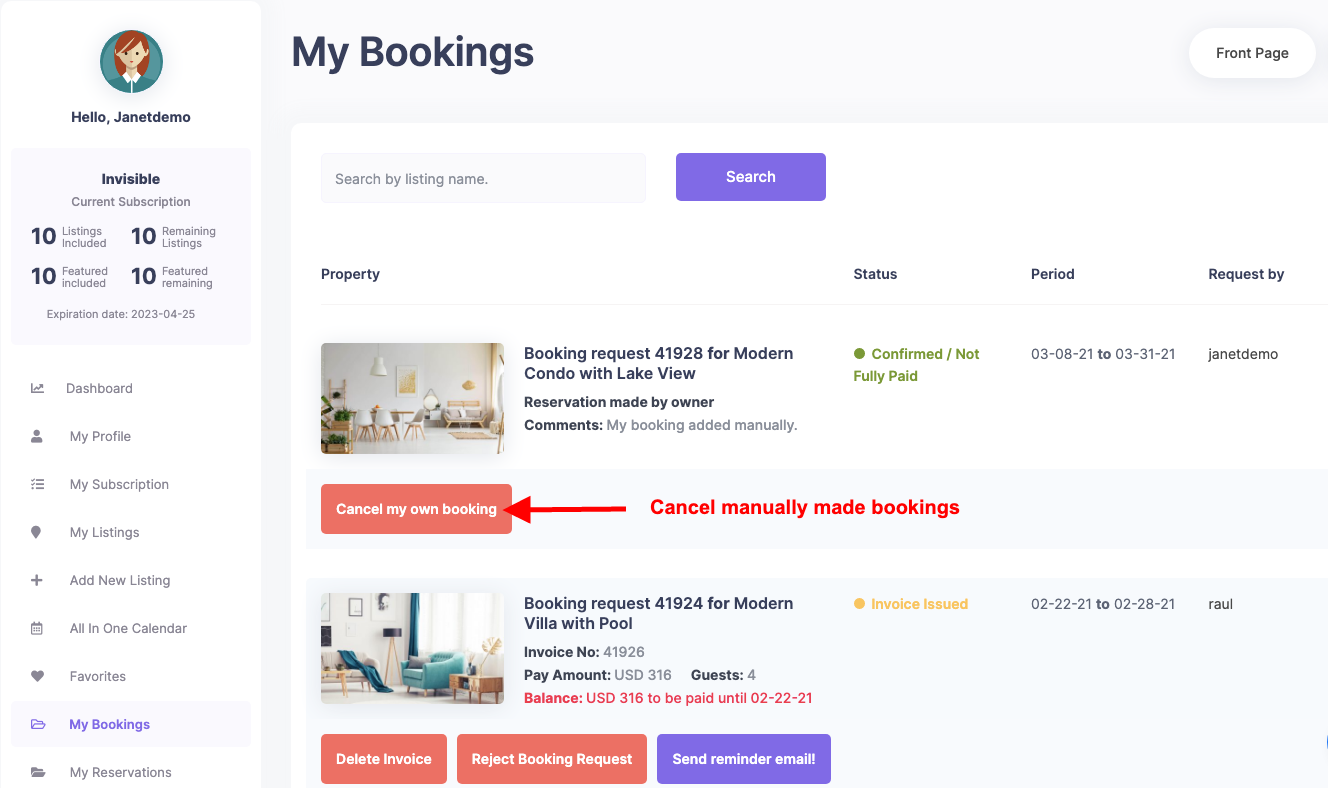
Hi. As owner you cancel bookings made by you or other users from MY BOOKINGS page – https://help.wprentals.org/wp-content/uploads/2015/10/manual-booking.png . This video explains the entire process https://help.wprentals.org/article/issue-invoice-reject-booking/
Thank y ou
Hi! You have sent a screenshot where you can cancel another person’s reservation, but when the listing owner himself blocks some dates on which he does not rent the property, then they cannot be unblocked. Since these armors do not exist in the control panel. https://awevideo.s3.amazonaws.com/video-19285534-479b1c59d4a3f5615fc51bad4ffb612b.webm?X-Amz-Algorithm=AWS4-HMAC-SHA256&X-Amz-Credential=AKIAJSCJQ2NM3XLFPVKA%2F20230720%2Fus-east-1%2Fs3%2Faws4_request&X-Amz-Date=20230720T131218Z&X-Amz-Expires=86400&X-Amz-SignedHeaders=host&X-Amz-Signature=a3182042c0e65f0097f0b4fdc93f2898c026abc0fcd49b1db5b68a58bb8da8ed
Hi. It is not correct. The screenshot shows how to cancel booking made by owner, as you asked.
In the screenshot https://help.wprentals.org/wp-content/uploads/2015/10/manual-booking.png you see owner booking (manual booking).
Owner adds manual bookings from calendar and deletes them from MY BOOKINGS. Manual bookings have the button with text name CANCEL MY OWN BOOKING as in the screnshot https://help.wprentals.org/wp-content/uploads/2015/10/manual-booking.png Click on that button for the reservation you wish to cancel and you clear the calendar exactly as you need.
Thank you
Have you seen the video? What you are referring to does not exist! If I have reserved some dates on my own as the listing owner, I cannot release them anymore, even if circumstances have changed. These reserved listing dates are not released anywhere, there is no function or button for this. Watch the video above.
Hi. I only saw your video now.
You use the demo site – your property is not published (pending approval it says). So no bookings are saved for properties that are not published. That is why you do not see in the video the button from the screenshot I shared.
If you wish to test with a published property, you must contact us to give you access to a test domain where you can publish your properties. We do not allow that on demos, we have manual approval enabled and only our demo properties are published.
But we share the wp-admin access for those who want to test the backed and with published properties.
If you need further info or want to test our theme, please send a message from here https://themeforest.net/user/wpestate
Thank you
Thank you, I sent the request via the web form, because I don’t have a license yet and I can’t create a support request without a key. I also have a question, why when you create a listing and come to the final stage to submit for moderation, the listing form does not redirect to the page with confirmation of submission for moderation or to the page with booking lists? The form just saves the data and that’s it. It is not entirely clear to the user that the listing has been created and submitted for moderation. Thanks
Hi, I have replied by email yesterday with the test domain. I do not understand the 2nd part of your question. There is an option to choose where users are redirected after adding a listing / property https://help.wprentals.org/article/how-to-be-redirected-to-a-specific-page-after-submitting-a-property/
Thank you
Is there a way to adjust the date of a review? For example if somebody leaves a review today, can I go into the backend and adjust the date to make it appear that the review was left at an earlier date?
Hello. Thank you for the comment. Yes, you can edit comment from wp-admin – comments – and change from wordpress options (Submitted on detail) https://prnt.sc/ZnzHCtYBSDKv
Please use our client support https://support.wpestate.org/ if you need further help. This is also a private support where you can send us your site details (url and wp-admin access).
If you wish my assistance to register in support please send a message from here – https://themeforest.net/user/wpestate
Please note that our standard office hours are Monday – Friday, 9AM-5PM Europe timezone.
Thank you
hi there. i would like to know how to block off an hour for every event booking so i can be able to clean and get the place ready for the next event. i have the minimum hours set to 3. but i want to also block off the 4th hour if someone is to book 3 hours.
Hello. Thank you for the comment. You would need to use ical to block the hours you wish to not be available for booking. We do not have a way to automatically block calendar otherwise. Help https://help.wprentals.org/article/icalendar-import-export/
Please use our client support https://support.wpestate.org/ if you need further help. This is also a private support where you can send us your site details (url and wp-admin access).
If you wish my assistance to register in support please send a message from here – https://themeforest.net/user/wpestate
Please note that our standard office hours are Monday – Friday, 9AM-5PM Europe timezone.
Thank you
does the theme come with webhooks in order to edit the theme files themselves
Hello, The theme is ready to be modified by child theme, but I am not able to offer a specific list of webhooks. However, in support development team can offer technical directions for existing code if you need to know about specific features. Thank you
I wanted to know how to use the new Paphos Rentals Demo template, do I need to buy the theme again?
Hi. You do not need to buy the theme again. You can update the theme to have the latest widgets. Help https://help.wprentals.org/article/how-to-update-the-theme-and-plugins/ The demo can be imported, but we recommend to import a demo on a clean installation so you do not lose options. You can import the homepage template from paphos only – if you do it on a site with content added by you.
Please use our client support https://support.wpestate.org/ if you need further help. This is also a private support where you can send us your site details (url and wp-admin access).
If you wish my assistance to register in support please send a message from here – https://themeforest.net/user/wpestate
Please note that our standard office hours are Monday – Friday, 9AM-5PM Europe timezone.
Thank you
hi, sorry for asking, can know any new update this month? tq
Hi, I cannot confirm a timeline at the moment. We do updates regularly though.
Please look over our demos to understand what the theme can do and let me know any question you have. I can answer and clear any question before making a decision.
If you need further info or want to test our theme, please send a message from here https://themeforest.net/user/wpestate
Thank you
ok, hope new update will have for this short term, |
would live on improving layout option which looks more professional and clean UI as current widget elementor built in for this theme not good looking
tq
Hello. Thank you as well. Unfortunately i do not understand which layout you would like to see improved. Please send me links, examples or more detail in private https://themeforest.net/user/wpestate
Thank you
Is there a way for vendors to list multiple services on a single page? Here are a few scenarios, if we are a marketplace of private tour/experience operators.
1.An operator/vendor might have 4 hour tours, starting at 7 am and 2 pm (two separate tour times) Monday though Friday and 8 hour tours on Sat and Sun. When someone books given day/time, it is no longer available for booking.
2. A tour operator offers 4 and 8 hour tours. 4 hour tours start at 7am and 2pm. 8 hour tour starts at 9am. If someone books 4 hours 7am tour, another person can book 4 hours 2pm tour on the same day, but no one can book 8 hour tour on this day. If someone books 8 hour tour, no one can book 4 hour tours on that day.
Can your booking theme accommodate those scenarios?
Hi,
Thank you for the comment.
1.An operator/vendor might have 4 hour tours, starting at 7 am and 2 pm (two separate tour times) Monday though Friday and 8 hour tours on Sat and Sun. When someone books given day/time, it is no longer available for booking.
-> You can block the hours that you do not want to be booked and you can set a minimum number of hours that can be booked, but we do not have an option for maximum hours that can be booked.
2. A tour operator offers 4 and 8 hour tours. 4 hour tours start at 7am and 2pm. 8 hour tour starts at 9am. If someone books 4 hours 7am tour, another person can book 4 hours 2pm tour on the same day, but no one can book 8 hour tour on this day. If someone books 8 hour tour, no one can book 4 hour tours on that day.
-> We do not have this option. Once a period is booked, that period cannot be booked again, but we do not have the option to set different tours starting hours for the same period.
Thank you,
Hi, I love this theme and have been proud to give it top marks. I have 2 questions though regarding maps.
1) I am using google, how do I enable satellite view as default? 2) I wish to edit the property cards you see on the map, where do I edit this please? (I want to remove unused stuff, my cards simply say ”/ 1 1” its not relevant for me). Thank you.
Hi,
Thank you for the comment.
1) I am using google, how do I enable satellite view as default?
-> The theme does not have this option but you can change the map layout by using a snazzy maps code: https://help.wprentals.org/article/google-maps-settings/
2) I wish to edit the property cards you see on the map, where do I edit this please? (I want to remove unused stuff, my cards simply say ”/ 1 1” its not relevant for me).
-> You can manage the details in infobox from Theme Options: https://help.wprentals.org/article/theme-options-map-marker-infobox-design/
Thank you,
Hope this month will have new update with better improvement like more layout or UI outlook
Hello. Thank you for the comment. We hope that as well. If you have examples / suggestions you can send your details through this form https://themeforest.net/user/wpestate
Thank you
Hi, before i buy the theme i want to ask if there is some API documentation to synchronize the apartments with a channel manager.
I ask this because i want to synchronize the dates and the prices with a channel manager. The channel manager dont have a plugin but they give me the documentation to do it, so i want to know if you have some documentation to see if i can use this theme.
Thank you so much. Regards
Hello. Thank you for your interest. We do not have channel manager support for import properties and price sync. I do not know if we can help. Such an integration implies extensive custom development. If that is what you are interested in, you can send the documentation you have here – https://themeforest.net/user/wpestate and development team will check and reply if it is something that could be done and what kind of costs are involved. thank you
how do your theme updates work? do you generate a license key which i can put in the theme and receive updates in my wordpress dashboard?
Hi,
Thank you for the comment.
The theme can be updated via the Envato Market plugin or manually. Both ways are explained in the below help article: https://help.wprentals.org/article/how-to-update-the-theme-and-plugins/
Thank you,