6689 comments found.
Hi, I want to show Static Block Newsletter on button click. How I can do this?
Hello, @braincodersltd,
We appreciate your recent contact and your use of XStore.
In response to your query on how to display the Static Block Newsletter upon a button click, we have prepared a comprehensive video guide for you. This video, recorded on our test site, provides a step-by-step walkthrough of the process. We kindly request you to watch the video in its entirety and follow the instructions provided.
https://www.veed.io/view/deebc82b-c758-467f-91f6-a448a323a7d5?sharingWidget=true&panel=shareWe trust that this will be of assistance to you.
Should you need any further help or clarification, please feel free to reach out to us at any time.
Best Regards,
8Theme’s Team
SUPPORT
CONTACT FORM
THEME DOCUMENTATION
Follow our Telegram chanel and be the first to find out all the latest news.
No, I don’t to display on header. I want to display before footer.
Hello, Braincodersltd,
We appreciate your prompt response.
Please try to use our Modal Popup element – https://xstore.8theme.com/elementor/demos/minimal-fashion02/modal-popup/
Kind Regards,
8theme team
SUPPORT
CONTACT FORM
THEME DOCUMENTATION
Follow our Telegram chanel and be the first to find out all the latest news.

Hello,
I had one old website (5 years ago), but I want to use this licence on new one. I am not able to login (register) on your site, can you reset the licence for me?
Hello, Wizale,
Thank you for getting in touch with us.
Please contact us via form on this page – https://themeforest.net/user/8theme by email and provide your purchase code.
Thank you for your cooperation and we look forward to hearing from you soon.
Kind Regards,
8theme team
SUPPORT
CONTACT FORM
THEME DOCUMENTATION
Follow our Telegram chanel and be the first to find out all the latest news.
I sent. And please give me option so I can reset (Delete) by myself
We have already provided a response to your previous inquiry.
Hi guys,
I’m trying to sync my store with “Drip.com” email marketing and it did not work with this theme… this is what the support has told me
“For some reason within your product catalog, you have an HTML tag linking a stylesheet, these characters aren’t standard JSON format which is what we’re expecting in the response from Woo. “
referring to this ”...wp-content/themes/xstore/css/modules/mark-text.min.css”
Is there a fix for this??
I have setup many sites with Drip.com however this is the only one that im having issues with,
please help.
This is the support ticket url: https://www.8theme.com/topic/issues-with-drip-com-cannot-sync-store-due-to-theme-code/
Hello, @mjuiceeee,
We apologize for any inconvenience caused. We would like to inform you that we have already responded to your query on the same issue in your support topic. We kindly request you to review our response in your support topic and provide your feedback accordingly.
We appreciate your understanding in this matter.
Best Regards,
8Theme’s Team
SUPPORT
CONTACT FORM
THEME DOCUMENTATION
Follow our Telegram chanel and be the first to find out all the latest news.
Hello. Regarding an imported template, built with V Backery, how is the footer made and where can it be edited? Thamk you!
P.S.. is ok. I’ve found it….. On static blocks menu area…
Hello, @tstoicescu,
Thank you for reaching out, and we are glad to hear that you’ve found what you were looking for on the static blocks menu area! If you have any more questions or need further assistance, please don’t hesitate to ask. We’re here to help.
If there’s anything else you’d like to know or if you require additional support in the future, feel free to get in touch. We’re always ready to assist you.
Have a great day!
Kind Regards, The 8Theme Team.
SUPPORT
CONTACT FORM
THEME DOCUMENTATION
Follow our Telegram chanel and be the first to find out all the latest news.
Hi team, awesome theme! I am about to purchase and wanted to check if you provide any discounts!
Hello, @gurudutt-narayan,
Thank you for your interest in our theme.
We regret to inform you that we do not have a discount offer code & plans for an upcoming sale at the moment.
Ping us along the way if you have any questions or concerns.
Kind Regards,
The 8Theme Team
SUPPORT
CONTACT FORM
THEME DOCUMENTATION
Follow our Telegram chanel and be the first to find out all the latest news.
Thanks, I bought the theme!
Hello, @gurudutt-narayan,
You’re very welcome! Thank you for choosing our theme. We’re thrilled that you’ve made the purchase, and we’re here to assist you every step of the way.
If you have any questions or need any help with setting up or customizing the theme, please don’t hesitate to reach out to us.
We hope you enjoy using the theme and that it helps you achieve your website goals.
Have a fantastic day!
Kind Regards, The 8Theme Team.
SUPPORT
CONTACT FORM
THEME DOCUMENTATION
Follow our Telegram chanel and be the first to find out all the latest news.
how can i use this on WordPress Network / Multi Site as we have 2 websites on 1 domain for different locations? When we try install it it says we have reached our activations limit
Hello, @beninuk,
We appreciate your recent contact and your usage of XStore.
We would like to inform you that if you wish to utilize our theme for new projects, regardless of whether they are on a subdomain or multisite, a new license will be required. The same license can be used for the same project, for instance, for the development version and the production version of the site. For more details, please refer to the following link: https://themeforest.net/licenses/standard
We recommend reading this article for further information on how to register and deregister the XStore theme on live/staging websites: https://xstore.helpscoutdocs.com/article/163-how-to-registerderegister-xstore-theme-livestaging-websites
To activate the theme on your new site, you will need to unregister and delete the theme from the old project.
We trust this information will be of assistance to you.
Yours sincerely,
8Theme Team
SUPPORT
CONTACT FORM
THEME DOCUMENTATION
Follow our Telegram chanel and be the first to find out all the latest news.
thank you for yur reply
Hello, @beninuk,
You’re Most Welcome!! We’re delighted to hear that XSTORE continues to meet your expectations and resolve any issues you encounter.
If you ever need further assistance or have any questions, please don’t hesitate to reach out. Your satisfaction is our priority!
Best Regards,
Team 8Theme.
SUPPORT
CONTACT FORM
THEME DOCUMENTATION
Follow our Telegram chanel and be the first to find out all the latest news.
Do you have a admin demo? I would like to try the chatgpt options
Hello, @mikkeli,
Thank you for your interest in our theme.
Regrettably, we do not currently offer an administrative demo. However, we do have a video tutorial available that provides a comprehensive guide on the options available in ChatGPT. We kindly encourage you to watch it in its entirety for your reference.
https://youtu.be/kf5fUK8Wh_4?si=3KGT3M7W3DLeR4d6
Additionally, we would like to inform you that you can access our theme documentation on the topic of ‘How to setup ChatGPT (OpenAI) with XStore theme’.
https://xstore.helpscoutdocs.com/article/159-how-to-setup-chatgpt-openai-with-xstore-theme
We hope this information is helpful.
Best Regards,
The 8Theme Team
SUPPORT
CONTACT FORM
THEME DOCUMENTATION
Follow our Telegram chanel and be the first to find out all the latest news.
Nevermind 
hello, sir
just yesterday i have installed xstore on a site, with plugins, and today i’ve found this in plugin list..
“There is a new version of Quform available. View version 2.19.0 details. Automatic update is unavailable for this plugin”
“There is a new version (6.6.16) of Slider Revolution available. To update directly register your license key now or purchase a new license key to access all premium features.”
“There is a new version of WPBakery Page Builder available. View version 7.0 details. Automatic update is unavailable for this plugin. To receive automatic updates license activation is required. Please visit settings to activate your WPBakery Page Builder. Go”
and at “There is a new version of WZone – WooCommerce Amazon Affiliates available. View version 14.0.6 details or update now.” gives me this message: “Update failed: Invalid product license key!”
what’s the sollution?
Hello, @tstoicescu,
Thank you for using our theme and for contacting us.
The plugins included with our theme are external. We have purchased an Extended License for each of these plugins. They are fully functional and should run perfectly.
The latest plugin versions are always available. You can find them in the theme folder, and you can get them directly from us. Simply login to your account on our site ( http://www.8theme.com/my-account/), go to the https://www.8theme.com/downloads/ page, enter your purchase code, and you’ll be granted access to the appropriate archives. Registration of these plugins is not necessary. They will function perfectly without any need for activation.
The plugin activation option was added only for those who need to get automatic updates and support directly from plugin developers. If you need this option, you will first need to purchase and register the plugin.
Should you have any further inquiries or issues, we encourage you to contact us and create a topic in our support system. Our dedicated support team is always ready to provide assistance.
We trust that you will find this information beneficial.
Best Regards, 8Theme Team
SUPPORT
CONTACT FORM
THEME DOCUMENTATION
Follow our Telegram chanel and be the first to find out all the latest news.
Hello, I am using the products carousel, however, it does not look good on mobile. It shows like 4 items in a row (too small on mobile view, I think 1 item at a time would be best for me) and it also shows a lot of empty spots (see screenshot: https://prnt.sc/gab5zjhJreAd ) Can you please assist me with this? Thank you so much!
Hello, @tigerdesign2,
If you are utilizing the Elementor page builder along with the 8theme products carousel element, we kindly request you to make the following adjustments:
Please navigate to the product carousel element and select ‘Content’ > ‘Carousel’ > ‘Slides Per View’.
Once there, choose the ‘mobile portrait mode’ and select ‘1’. Don’t forget to update it once you’ve made these changes.
For your reference, you can view this image: https://ibb.co/qFbG5LY
Should you have any further inquiries or issues, we encourage you to contact us and create a topic in our support system. Our dedicated support team is always ready to provide assistance.
We trust that you will find this information beneficial.
Yours Sincerely,
8Theme’s Team
SUPPORT
CONTACT FORM
THEME DOCUMENTATION
Follow our Telegram chanel and be the first to find out all the latest news.
Thanks a lot!!!
Hello, @tigerdesign2,
You’re very welcome! If you have any more questions or need further assistance, feel free to reach out. We’re here to help!
Best Regards, 8Theme’s Team
SUPPORT
CONTACT FORM
THEME DOCUMENTATION
Follow our Telegram chanel and be the first to find out all the latest news.
Good evening, how can I activate the search by product tags in the “general search” module of my header?
https://images2.imgbox.com/9b/2b/G7hvVNSe_o.pngThank you
Hello, @JH_1978,
We appreciate your recent purchase of our theme and your subsequent contact with us.
We would like to inform you that our theme’s search functionality includes the ability to search by title, description, SKU, posts, and pages.
However, it currently does not support searches by tags, brands, or categories. For a more detailed explanation, we invite you to visit the following link: https://www.8theme.com/topic/include-brands-in-search-results/
Should you wish to propose the inclusion of this feature, we encourage you to post your request on our Taskboard at https://www.8theme.com/taskboard/
If your suggestion garners sufficient support from other customers, our development team will take it into consideration for inclusion in a future update.
Kind Regards,
8theme team
SUPPORT
CONTACT FORM
THEME DOCUMENTATION
Follow our Telegram chanel and be the first to find out all the latest news.
OK thanks.
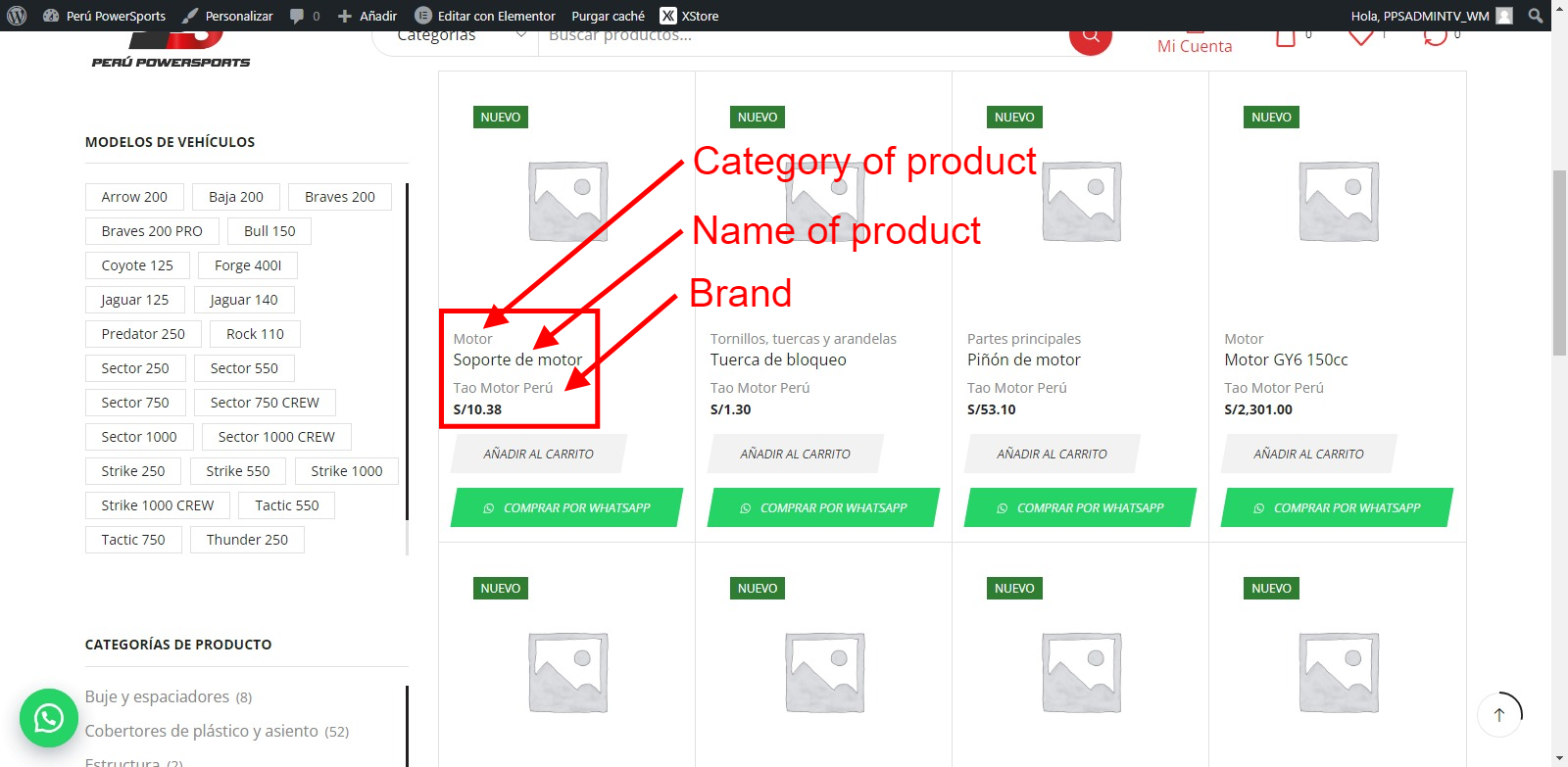
An additional query, how can I show the “product label” in the product list?
https://images4.imagebam.com/e5/3b/bb/MEOMUIF_o.pngI have tried all the variants of the customization and I can’t find the option for it.
Greetings.
Hello, @JH_1978,
Thank you for your prompt response.
We understand that you wish to display the product category and name, as well as the brand name on your shop page. Please follow the steps below:
1) To display the product category and name, please navigate to the following path: Xstore > Theme Options > Woocommerce > Shop > Products Design > Product Content Elements. Here, select the options for ‘Product name’ and ‘Product categories’, then click ‘Publish’.
For your reference, you can view the process in this image: https://postimg.cc/CZPFG9F3
2) To display the brand name, please navigate to the following path: XStore > Theme Options > Woocommerce > Shop Elements > Brands > Show on archives. Here, toggle the option to ‘ON’ and click ‘Publish’.
For your reference, you can view the process in this image: https://postimg.cc/Whk6QPC7
We trust that these instructions will be helpful to you. Should you require further assistance, please do not hesitate to contact us.
Best Regards,
8Theme’s Team
SUPPORT
CONTACT FORM
THEME DOCUMENTATION
Follow our Telegram chanel and be the first to find out all the latest news.
Good morning, my query was related to the “product TAG”, there is no problem in the rest of the information (Name, Category, Brand).
Is it possible to show the “product TAG” in the product list?
Thank you.
Hello, JH_1978,
Thank you for getting in touch with us.
There is no such option right now, unfortunately. We encourage you to post your request on our Taskboard at https://www.8theme.com/taskboard/. If your request receives sufficient votes from other customers, our development team will add it in a future update.
Kind Regards,
8theme team
SUPPORT
CONTACT FORM
THEME DOCUMENTATION
Follow our Telegram chanel and be the first to find out all the latest news.
I missed your discount sale for 38$. When are you offering it to 38$ again?
Hello, mikkeli,
Thank you for your inquiry.
We regret to inform you that we do not have plans for an upcoming sale at the $38 price point.
If you have any further questions or need assistance with any other matters, please do not hesitate to contact us. We appreciate your interest in our products.
Kind Regards,
The 8Theme Team
Im helping a friend setting up this theme who has zero knowledge of WP, I like the editor but there is no option to increase the font size of the menu in the main header.. that is pretty much an options everywhere. You can only change this with CSS?
I’m considering buying this theme for my own projects but I don’t want to change basic things with CSS.
And for anyone who is looking to change the size with CSS, it’s:
.et_b_header-menu.et_element-top-level .menu > li > a { font-size: 18px; }
Hello, @Billy_Batts,
We appreciate your interest in our theme
We would like to inform you that XStore comes with an integrated feature, “Content Zoom (%)”, which allows you to adjust the font size of the main menu located in the main header. You can customize this setting according to your preference by navigating to Xstore > Theme Options > Header Builder > Main Menu > Style.
For your convenience, we have attached an image for reference. https://ibb.co/12zJLMN
Should you have any further queries or concerns, please feel free to contact us. Our support team is always at your disposal.
Kind Regards,
8Theme Team.
SUPPORT
CONTACT FORM
THEME DOCUMENTATION
Follow our Telegram chanel and be the first to find out all the latest news.
TY for the quick reply, will check it out. Good first impression of the support!
Hello, @Billy_Batts,
We are delighted to receive your positive feedback regarding your experience with our support team. Your satisfaction is our utmost priority.
Should you have any additional inquiries or require further assistance, please do not hesitate to contact us. We are committed to providing you with excellent service and ensuring your experience with our products/services is nothing short of exceptional.
We eagerly anticipate the opportunity to assist you further, if necessary. Wishing you a splendid day!
Best Regards,
8Theme’s Team.
SUPPORT
CONTACT FORM
THEME DOCUMENTATION
Follow our Telegram chanel and be the first to find out all the latest news.
Hi!, I can’t find the options to hide or, at least, edit these options (titles and categories) from my shop page:
http://tinyurl.com/236r8vfwThank you in advance
Hello, @marianogi,
Thank you for choosing our theme and reaching out to us.
The section you are referring to is set on the shop page using the static block. To modify the content, please follow these steps:
1. Navigate to WP-Dashboard >> Static Blocks.
2. Edit the “Custom block for Shop page” block using the Elementor page builder.
3. Refer to this screenshot for guidance: https://postimg.cc/G9ZWGttg
4. Make any necessary modifications as per your requirements, as shown in this screenshot: https://postimg.cc/s1pcHgKN
If you wish to completely remove this section from the shop page, please follow these steps:
1. Navigate to Xstore >> Theme Options >> WooCommerce >> Shop >> Shop Page Layout.
2. Remove the shortcode of the block from the Banner Content.
3. Publish the changes and clear your browser cache.
4. Check your site to confirm the changes. Please refer to this screenshot for guidance: https://postimg.cc/bDGzY5VZ
We trust these instructions will assist you in resolving your issue.
Best Regards,
8Theme’s Team
SUPPORT
CONTACT FORM
THEME DOCUMENTATION
Follow our Telegram chanel and be the first to find out all the latest news.
Thank you very much! you were very kind and fast!
Hello, @marianogi,
You’re very welcome! We’re delighted to hear that you had a positive experience with our service. Providing fast and friendly assistance is our top priority,
If you ever have more questions or need assistance in the future, please don’t hesitate to reach out. We’re here to help!
Best Regards,
8Theme’s Team
SUPPORT
CONTACT FORM
THEME DOCUMENTATION
Follow our Telegram chanel and be the first to find out all the latest news.
The category description is showing up in the extreme left side of the web page, not confined by the container. I’m using the minimalfashion02 child theme.
Hello, @cindysays,
We appreciate your recent contact and your usage of XStore.
To select the position of the category description, please navigate to Theme Options > WooCommerce > Shop > Shop page layout > Shop Page Banner Position.
For a more detailed guide, you may refer to the image provided in the following link: https://imgur.com/ArpM3JM
We are confident that this solution will effectively address your query.
Should you have any additional questions or concerns, we encourage you to reach out to us through our support forum. Our dedicated support team is always ready to assist you.
Best Regards,
8Theme Team
SUPPORT
CONTACT FORM
THEME DOCUMENTATION
Follow our Telegram chanel and be the first to find out all the latest news.
I really like your Theme & cosidering to buy it. But I have a question before buying it. In these Demo (https://xstore.8theme.com/elementor2/marseille04/), (https://xstore.8theme.com/elementor/demos/minimal-fashion03/), Can I add Many Menus (upto 20 Main Menu) Items. And if U have a demo/ tutorial/ picture, do share it with me. Reply Soon.
Hello, @rizwitzsolutions,
We appreciate your interest in our theme.
We would like to confirm that you have the ability to add main menu items according to your specific needs. For guidance on how to create a main menu, we recommend viewing our video tutorials at the following links:
https://www.youtube.com/watch?v=OnxkixHtVLI
https://www.youtube.com/watch?v=JiI6qDaVtY4
We trust that this information will be of assistance to you.
Kind Regards,
8theme team
SUPPORT
CONTACT FORM
THEME DOCUMENTATION
Follow our Telegram chanel and be the first to find out all the latest news.
My Question wasn’t related to Mega Menu. Look at the Sceenshot Link & tell me if I can create multiple Menus here (more then 20 Main Menu Items). Link: https://www.dropbox.com/scl/fi/0qifb716gwppzooxw36oz/xprime-menu.JPG?rlkey=est275t2933xi92k30sla22te&dl=0
Hello, @rizwitzsolutions,
We appreciate your prompt response and the screenshot provided.
In response to your request on adding more than 20 main menus in the header, we have prepared a video guide for your convenience. This guide, recorded on our test site, provides a step-by-step walkthrough on how to achieve this. We kindly request you to watch the video in its entirety and follow the steps as demonstrated.
https://www.veed.io/view/26a16554-ef35-4056-b7f8-bac991198178?sharingWidget=true&panel=share
We sincerely hope that this information is of assistance to you.
Please do not hesitate to reach out if you have any further queries or require additional assistance.
Best Regards,
8Theme’s Team
SUPPORT
CONTACT FORM
THEME DOCUMENTATION
Follow our Telegram chanel and be the first to find out all the latest news.
Yes, this is good. This is what I want.
Hello, @rizwitzsolutions,
Thank you for your feedback, and we’re delighted to hear that you are satisfied with the product or service! It’s always a pleasure to know that we’ve met your expectations.
If you have any further questions or need any assistance, please don’t hesitate to reach out. We are here to help and ensure that you continue to receive the excellent experience you deserve.
Thank you for choosing us, and we look forward to serving you in the future.
Best Regards, 8Theme’s Team
SUPPORT
CONTACT FORM
THEME DOCUMENTATION
Follow our Telegram chanel and be the first to find out all the latest news.
May I know how I can use this template in more than one scope?
Hello, Mohsen22,
Thank you for choosing XStore as your WooCommerce WordPress theme.
According to the ThemeForest license policy, you can use 1 license for 1 project only (dev site, production site and/or localhost, but the same project), read more – https://themeforest.net/licenses/terms/regular If you want to use our theme for a few different projects you need to buy a few licenses.
We hope this information is helpful.
Kind Regards,
8theme team
SUPPORT
CONTACT FORM
THEME DOCUMENTATION
Follow our Telegram chanel and be the first to find out all the latest news.
Can you give me the ideal image size for boxed and full-width banners? No matter what I try, they are blurry.
Ha! I figured it out. Use the image icon in Elementor instead of Banner
Hello, Cindysays,
Thank you for choosing XStore as your WooCommerce WordPress theme.
Should you have any further inquiries or issues, we encourage you to contact us without hesitation. Our support team is consistently accessible to provide assistance through our support forum – https://www.8theme.com/forums/xstore-wordpress-support-forum/
Kind Regards,
8theme team
SUPPORT
CONTACT FORM
THEME DOCUMENTATION
Follow our Telegram chanel and be the first to find out all the latest news.
hello dear please support the autocomplete is by default off on search how i change change it to on since search is not working . thank you so much
Hello, Zeinajfr,
Thank you for getting in touch with us, but we can’t verify your purchase right now.
We kindly request that you submit a support request via our support forum as it will be much more efficient in assisting you – https://www.8theme.com/forums/xstore-wordpress-support-forum/
Thank you for your cooperation and we look forward to hearing from you soon on the support forum.
Kind Regards,
8theme team
SUPPORT
CONTACT FORM
THEME DOCUMENTATION
Follow our Telegram chanel and be the first to find out all the latest news.
Hello, there’s a weird conflict with Xstore and Rankmath. Am i right thinking that Xstore is pushing some SEO stuff, like meta’s that is unwanted? How do i disable this… why did Rankmath detect Yoast while there’s no yoast installed?
The meta is pushing out a twitter:description that gives wrong descriptions of archive pages and its not added by Rankmath. I need this removed ASAP before google starts crawling all archives and products with wrong Meta’s that are pushed to front by the theme. My SEO options are disabled in cutomizations but it did nothing. It’s still there.
Hello, @matzedoon,
It seems like you’re experiencing conflicts between (Xstore) and the Rank Math SEO plugin. Let’s address your concerns step by step:
1. Disabling Xstore’s SEO Features: Xstore come with built-in SEO features that are conflicting with Rank Math. To disable these features:
In your WordPress dashboard, go to “Xstore >> Theme Options >> SEO” Look for SEO-related settings or options. Disable or turn off any meta tags, titles, or descriptions generated by Xstore. This should prevent Xstore from adding unwanted SEO elements to your website.
2. Detecting Yoast with Rank Math: It’s possible that Rank Math is detecting some residual settings or data from a previous installation of Yoast SEO. Even though you’ve uninstalled Yoast, some remnants may still exist.
To address this:
Go to your WordPress dashboard and navigate to “Rank Math” settings. Look for an option that allows you to “Remove Data” or “Clean Up” from other SEO plugins. Use this feature to remove any lingering Yoast SEO data.
3. Incorrect Meta Description on Archive Pages:
If you’re still encountering issues with meta descriptions on archive pages, this might be due to Rank Math settings or other plugins affecting your SEO. To fix this:
In the WordPress dashboard, go to “Rank Math” > “Titles & Meta” settings. Check the settings for archive pages and ensure they are configured correctly. You may need to customize the template for archive pages to display the desired meta description. Double-check other SEO-related plugins and make sure they are not conflicting with Rank Math.
4. Clearing Cache:
After making these changes, it’s a good practice to clear your website’s cache (if you are using a caching plugin) and your browser cache to ensure that you’re seeing the most up-to-date version of your site.
5. Verify the Issue is Resolved:
After implementing these changes, check your website’s archive pages and products to ensure that the incorrect meta descriptions have been removed.
If the issue persists after trying these steps, it may be necessary to reach out to the support team of Rank Math for further assistance. They can provide guidance specific to SEO plugin versions and help resolve any conflicts that may exist between them.
Best Regards, 8Theme’s Team
SUPPORT
CONTACT FORM
THEME DOCUMENTATION
Follow our Telegram chanel and be the first to find out all the latest news.
The SEO options are turned off in Xstore, yet Rankmath support found that theres still active meta tags thats not from them, nor have i ever installed yoast, its a clean server installation with only Xstore theme and rankmath plugin
Hello, @matzedoon,
If the SEO options are turned off in Xstore, and Rank Math support has identified active meta tags that are not from either Rank Math or Yoast, it suggests that there might be another source adding these meta tags. In such cases, you should further investigate to identify and resolve the issue. Here’s what wesuggest:
Plugin Conflict Check:
Disable all other plugins except for Rank Math.
Check if the unwanted meta tags are still present.
If the issue is resolved, re-enable your plugins one by one, checking after each activation, to identify which plugin is causing the conflict. This will help pinpoint the source of the unwanted meta tags.
Database Cleanup:
Sometimes, residual data can be left in the database even after plugin deactivation. You can use a database cleanup or optimization plugin to remove any remaining traces of previously installed plugins. Plugins like “WP-Optimize” or “WP-Sweep” can be helpful.
Server-side Inspection:
Check with your hosting provider or server administrator to see if there are any server-level configurations or server-side scripts that might be adding these meta tags.
Rank Math Support Follow-up:
Continue working with Rank Math support and provide them with the results of your investigations. They may have specific insights or recommendations based on your setup and the data they have collected during their initial analysis.
Remember to always backup your website before making significant changes to plugins, themes, or the database to ensure that you can restore it if anything goes wrong during the troubleshooting process.
Best Regards,
8Theme’s Team
SUPPORT
CONTACT FORM
THEME DOCUMENTATION
Follow our Telegram chanel and be the first to find out all the latest news.