237 comments found.
“Opal Image Gallery” no longer works with the new version of wordpress/elementor – endless loading gif and does not load images….
Hi there, Thanks for choosing our theme. For your issue, please contact our support team at https://wpopal.ticksy.com and attach your site info also, they will check and support you. Thanks,

hi team, kindly revert on my ticket: #3667977, i need urgent help
We have responded to your ticket. Please check your ticket again. If you have any problems with the theme please let us know. We will check and assist you.
Hi, i updated the ticket as well with the necessary credentials, the issue still not resolved. kindly help me with the solution. Thanks!
Hi.. We solved the issues. Pls clear all cache then recheck the site.
Hi, Thanks for the quick response team, much appreciated But there are still some elements which are not working, i updated my ticket on the same. Could you please check it . Thanks in advance!
Hi.. We will check ticket and solve the issues.
hi team… the same issue occured again. can you please fix it permanently so that it shouldnt work abnormally again & again. Need Urgent Help
guys, kindly revert on my ticket: #3667977, i need urgent help
Please recheck your ticket. We have answered your question in the ticket.
Hello, i have a pre-purchase question. Is it possible to change the Opening Hours in the Revolution Slider in the homepage?
Dear mate,
Of course. You can click the edit slider and change it. If you have any further questions or need further assistance, please get in touch. We will be here to help you.
Thank you and have a nice day.
Hello, i am trying a demo and i cant understand where to change it. Could you post a screenshot please? Thanks in advance
Dear mate,
Please click the edit slider and choose the global layers slider then edit it. https://prnt.sc/I3VZwDdU1USN
Thanks.
Thanks!!
Hi.. Thank you for choosing our template.
Hi,
I’m experiencing a compatibility issue with your MaisonCo Core plugin and Elementor. I receive the following error: Declaration of Elementor\OSF_Elementor_Widget_Button::render_text() must be compatible with Elementor\Widget_Button::render_text(?Elementor\Widget_Base $instance = null) in /var/www/vhosts/loscabosrealestate.org/httpdocs/wp-content/plugins/maisonco-core/inc/vendors/elementor/widgets/button.php on line 573.
I have everything updated, including themes, plugins, and PHP 8.2. The fatal error occurs when I activate Elementor. Could you please provide a solution to resolve this compatibility conflict?
Thank you.
Hi..
For your issue, please contact our support team at https://wpopal.ticksy.com and attach your site info also, they will check and support you.
Thanks.
Pre-sale questions
Is there a demo of your backend dashboard. If so, please share link
Dear mate,
Thank you for your inquiry. Unfortunately, we are unable to provide access to the backend dashboard of our demo version. We have implemented this restriction to ensure the security and integrity of our demo environment.
If you have any specific questions about the backend functionality or if there’s a particular feature you would like more information about, please let us know. We’re here to assist you with any details you may need.
We appreciate your understanding and look forward to addressing any further inquiries you may have.
Best regards,
my homepage has lost all it’s formatting. Things appear normal on all other sub-pages.
Hi there, Thanks for choosing our theme. For your issue, please contact our support team at https://wpopal.ticksy.com or email:help@wpopal.com and attach your site info also, they will check and support you. Thanks,
How can I import your demo version No. 4 with Demo Importer?
Dear mate,
Step 1- Login to the WordPress Dashboard.
Step 2- From the OpalTheme—> Import demos.
Step 3 – Click to button “Import Demo ” and you will see all our demos, please choose one demo that you want to import and click to button “Set up”.
Or please contact our support team at https://wpopal.ticksy.com/submit and attach your site info also, they will check and support you.
Thanks.
Hello, thank you for a wonderful theme. I am using it already for many years and it works great. As your slider in part of the theme. I would like to updatre the Slider Revolution but it does no allow me. Can you please send me an updated version for the plugin. Thanks
Hi..
To update our plugin include on our theme. Please delete current version then click re-install on top message about plugin requires. Or please contact our support team at https://wpopal.ticksy.com/submit or email:help@wpopal.com and attach your site info also, they will check and support you.
Thanks.
thank you, if i Delete the Slider Revolution plugin and re-install, will I loose the data on the slides?
Yes. You can delete and reinstall the plugin without affecting the slider data.
Why can’t I find the sticky menu settings anymore?
Hi…
Pls click edit header with elemenmtor and enable sticky https://prnt.sc/V529IOo2gvef Then recheck the site. Or please contact our support team at https://wpopal.ticksy.com/submit and attach your site info also, they will check and support you.Thanks.
Do you have a version where I can get only the html files?
Hi.. Unfortunately, our theme doesn’t include HTML files. Thanks.
Header/Footer cannot be edited…
Dear mate,
1. Log in to your WordPress dashboard and go to Elementor > Settings. 2. In the Settings panel, click on General. You will see a list of all available post types on your site. Toggle on the switch next to the post types that you want to enable in Elementor (Header and Footer).
Once you’ve enabled the post types, click on the Save Changes button to save your settings.
After enabling the post types(Header and Footer), You can edit the header and footer with Elementor.
Thanks.
Hi,
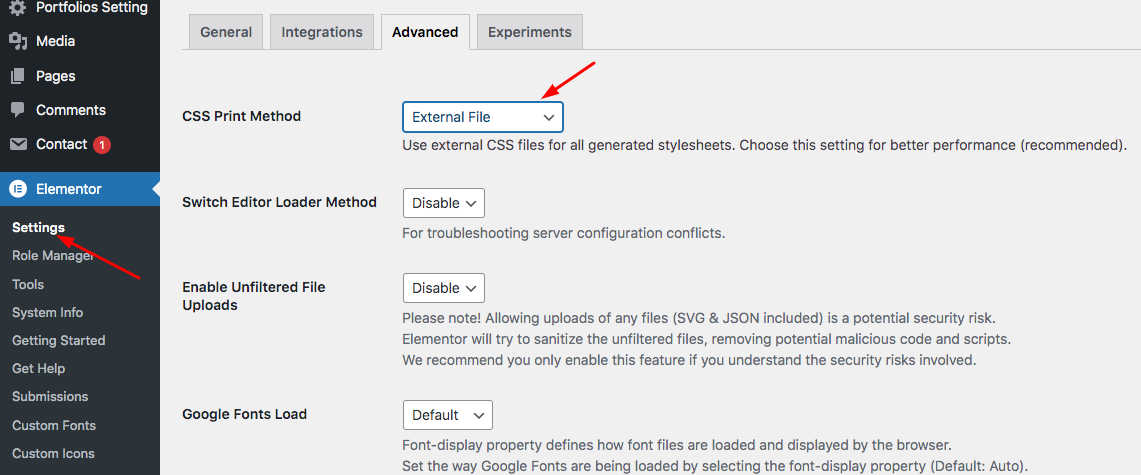
My website is not getting optimized for Mobile. I’m using Elementor editor with Maison Co theme. While editing the entire page and footer in elementor responsive mode (mobile view) everything looks perfect and finished (just the way i want it to be), but after publishing it when I check back in my mobile, the changes made in ‘responsive mode’ are not shown. The major issue is with padding and spacing of some sections and footer in mobile view.
When I open elementor again to re-edit, everything appears perfect there in elementor’s responsive mobile view.. but its bad in real mobile view.
Please suggest a way to fix this!
Dear mate,
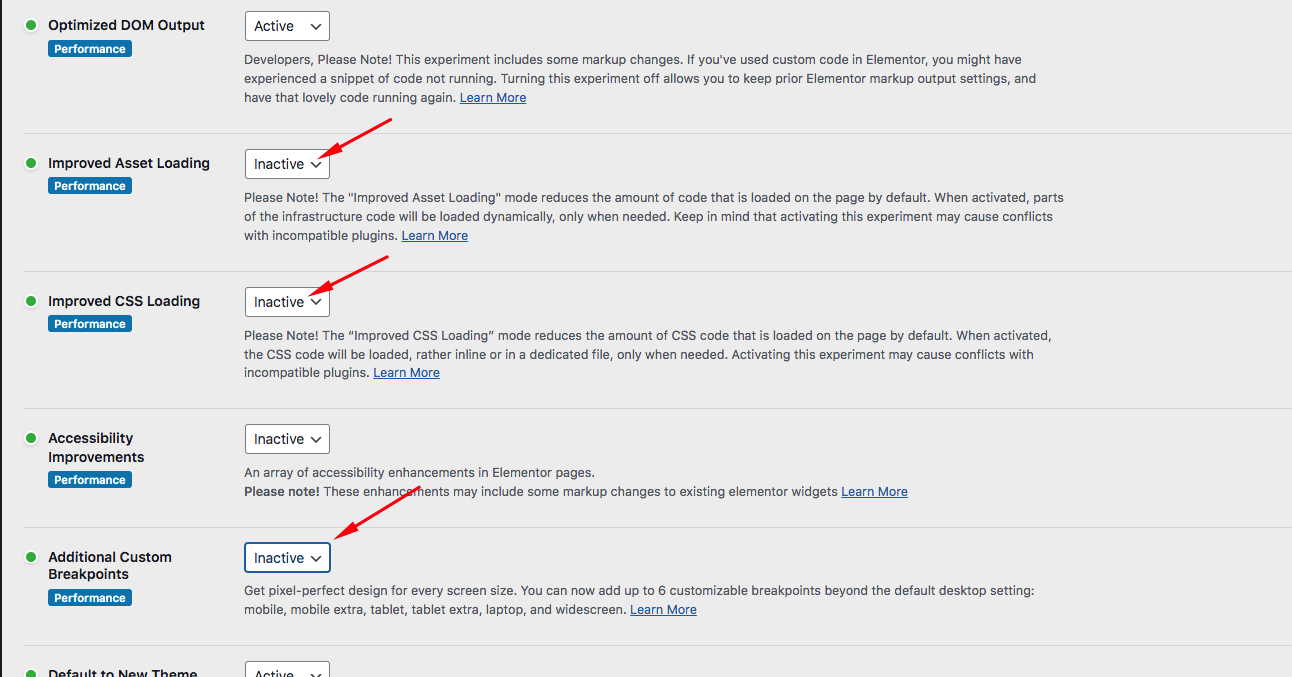
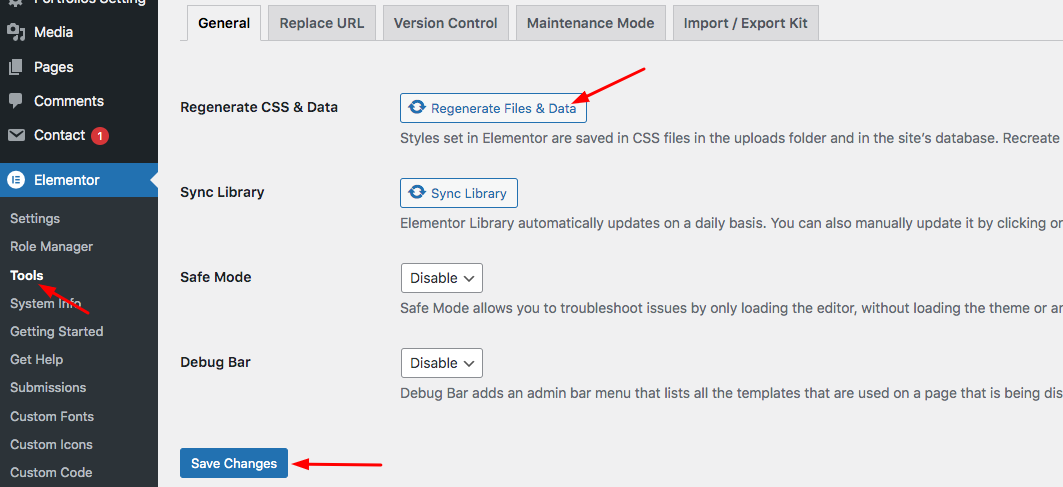
Pls setting Elementor and recheck the issues. 1. Check CSS Print Method Choose External File then Save Changes button. https://ticksy_attachments.s3.amazonaws.com/8342639140.png 2. Check Elementor Experiments Go to Elementor > Settings > Experiments tab Then Select Inactive from the dropdown https://ticksy_attachments.s3.amazonaws.com/7459672306.png Click the Save Changes button. 3. Regenerate CSS https://ticksy_attachments.s3.amazonaws.com/1801366391.png Then recheck the issues. Or please contact our support team at https://wpopal.ticksy.com/submit and attach your site info also, they will check and support you.Thanks,
Hi, Thanks for the help. It worked.
Best regards,
Hi.. Thank you for choosing our template.
Hi there, this is a pre-sale question. Does the theme come with license for Elementor, or this is something that needs to be purchased separately?
Dear Customer,
We would like to inform you that our theme utilizes the free version of Elementor, offering complete functionality just like the demo version. If you wish to use Elementor Pro, you will need to purchase it separately. Thank you for your understanding.
Best regards,
Hello, My old domain/website is closed, can i use the same theme for another new domain/website?
Yes, you can use the same theme for a new domain/website as long as you have the appropriate license or permission to do so.
Hi, it looks like Elementor is breaking very badly the responsiveness of the template. Is there any alternative to elementor? I have submited the ticket number: #3347849
I would appreciate if you can help me to fix this out. Thanks!
Dear mate,
Please check your ticket again. We have answered your problem in the ticket.
Thanks.
Hi, does this theme support other languages? such as Arabic, Persian, Russian? my email : mohammadkhosha2001@gmail.com
Hi.. Unfortunately, this is not an option built into the theme at the moment. Thanks.
Hello This is a Pre-Sales question:
I need a theme and/or plugin for real state, that doesn’t list properties on frontend. I need all Buy requests goes to Admin AND all Sell requests goes to admin; and admin match them later over phone.
So its kind of common real estate website, but works on the backend by sales team not by individuals (C2B2C NOT C2C)
Can your product fit for my requirement?
Thank you…
Hi.. Unfortunately, this is not an option built into the theme at the moment. Thanks.
Hi I am looking for personalized listing ( to real estate agency ) in the dynamic page ( customer profile / single announcement page or other ..) sync with the subscription system
1- possibility to Customize field / added modified deleted Option: example: add 3 phone numbers – integrated zoom (like WhatsApp) – add a button or other fields – text zone …
2- multilingual
3- possibility of displaying / hiding ADS advertising
4- visit statistics for subscribers
5- integrating short code
6- Hide competitors in premium offers
Note :
-Possibility to create iOS/ Android mobile application (or with another plugin)?
- Do you offer special paid customization services?
-Can I send customer requests to technical support ?
Thanks
Hi there, Thanks for choosing our theme. For your issue, please contact our support team at https://wpopal.ticksy.com/submit and attach your site info also, they will check and support you. Thanks,
I cant remember how to edit the availability page can you help please?. My site only shows some of the available apartments. Also how do I mark them rented?
Dear mate,
- I cant remember how to edit the availability page can you help please? Pls click edit page with Elementor and edit Element Opal Availabilities https://prnt.sc/r2mMoreZLknK
- My site only shows some of the available apartments. Also how do I mark them rented? For your issue, please contact our support team at https://wpopal.ticksy.com/submit and attach your site info also, they will check and support you.
Thanks.
Hello, I cannot change the logo in the home page. I uploaded my logo and favicon in the site identity widget and the favicon changed but not the logo
Dear mate,
Pls click edit header with Elementor and change Logo Image: https://prnt.sc/2AwX1gPciZwP
If you use site logo. 1. Log in to your WordPress website and go to the dashboard.
2. Go to the Appearance section and select Customize. In the Customizer, select Site Identity. You will see an option to upload a logo. Click on the Select logo button. Upload your logo from your computer and then select it. Once your logo is uploaded, you can adjust its size and position using the options in the Site Identity section. After making the desired changes, click the Publish button to save your changes.
Thanks.
Thank you for your answer, I followed the exact steps and my logo got uploaded to all pages except the home page. I made sure to clear my cache, publish and refresh.
Hi there, Thanks for choosing our theme. For your issue, please contact our support team at https://wpopal.ticksy.com/submit and attach your site info also, they will check and support you. Thanks,