38322 comments found.

Hello there! Thank you for replying my previous question! One more thing: Could you let me know how to change “out of stock” text? I searched for your previous answers but the links you provided has expired about this subject.
Hey Orhangok!
You can use a free translation plugin in order to alter that, or any other WooCommerce text: https://woocommerce.com/document/woocommerce-localization/#section-5
Kind regards
Hello!
First of all, I am really impressed with this theme; it’s so robust and beautiful with an outstanding feature set. I am excited to try it for the first time.
Before purchasing I had a question about what’s possible with the theme. I am including a reference website that’s not built by wordpress, I just have it as an HTML file, but hopefully it will be illustrative
I am looking to mimic this closely: https://www.dropbox.com/s/dhk1onub9jw1wtv/salient%20theme%20pre-purchase%20q.mov?dl=01) For the home page only or for pages featuring full screen content only – Transparent header navigation until the user scrolls further down on the page. I am thinking something like upload a logo that’s empty/transparent png for a transparent state and then to define a non-transparent state with a cream background/dark logo.
2) Left side off-canvas menu that’s similar to the above? I see you have a split screen off-canvas menu here – https://themenectar.com/salient/nonprofit/. Is it possible to show the navigation links on the right side, leave the other side empty and change the color of the two containers? (Just asking in terms of the whether it’s possible to change the navigation side from left to right and the div structure of the split screen containers; I know I’d need to figure out the java script changes as that seems beyond the scope of support).
3) My website will need to have a language selector for Translate Press. Is it possible to put that either next to the hamburger icon or in the off canvas menu under the navigation links. Is that technically feasible/possible?
Sorry for the long message and thank you for reading!
Hey estojchevska,
I’m glad to hear you’re impressed with Salient!
1. Unfortunately there’s no option to delay the visibility of the navigation by the height of another row. It can easily be manipulated via simple CSS to be hidden prior to scrolling though.
2. The off canvas menu could be made to display on the right-hand side, it would just require a CSS rule to do so.
3. Yes, I believe that plugin allows you to add the language selector directly via Appearance -> Menus
Kind regards
wow you guys are so responsive and I haven’t even bought the theme yet; honestly, kudos!
1) Thank you again for the response! Is there a creative way to achieve my desired effect by perhaps utilizing a “transparent” (empty) image and using that as a secondary logo? and then the other logo activating on scroll down?
2) yay on number 2! is that something that would be within your team’s scope to help with?
3) again yay!
Hey estojchevska 
1. You can set the logo to be hidden prior to scrolling, however, the main difference is that the secondary logo will be revealed as soon as you scroll rather than waiting until you pass the first section.
2. Yes, just open a ticket on the support forum in regards
Cheers
Thanks again for the response. Understood! So without significant modifications and asking someone outside of your team to modify it, there is no way to delay the navigation by the height of another row/block.
That’s correct, estojchevska.
Kind regards
hi on the Header Box Shadow (large with bottom line) can this line be thicker and in red color?
Hey dimage,
You can make that change by adding the following snippet into the custom CSS box located in the Salient options panel > General Settings > CSS/Script related tab:
body #header-outer[data-box-shadow=large-line] {
 box-shadow: 0 0 2px rgba(255,0,0,1), 0 18px 40px rgba(0,0,0,0.045);
}
Kind regards
Hi, is it possible to implement a 360° product view (mouse to rotate)?
Hey Shingaz,
There’s no built-in functionality to do that, however you might be able to utilize an existing WP plugin to add that feature. e.g. https://codecanyon.net/item/smart-product-viewer-360-animation-plugin/6277697?ref=topdevs
Kind regards
Hi, is there any info yet when it will be compatible for wordpress 6.3.x?
Hey ganzrund,
Salient is already compatible with WP 6.3, ThemeForest just doesn’t have that as a listed version for us to select from for the product description yet.
Kind regards
Hello. Is it possible to make multiple websites with this plugin or is this only for one website?
For an example, if I wish to make websites for my customer, is one license enough or should they all be bought separately to work? Cheers.
Hey 8jvhdvnmzcm,
You will need a license for each website you build using the theme. You can review the license here: https://themeforest.net/licenses/standard
Kind regards
Why this theme is not suitable for Elementor? Elementor is now the most popular page builder plugin. I don’t understand why Salient uses the wpbakery plugin instead of Elementor. Elementor is now the world’s most popular page builder. Other side wpbakery is old, boring, and less available of addons and templates in the market.
Hey shahab2001uddin,
Salient has existed for years prior to the creation of Elementor and offers a collection of elements, features, and templates tailored specifically for our own page builder. It’s important to note that our page builder differs significantly from the standard WPBakery, as it includes a heavily extended feature set. Characterizing it as “old” or “boring” doesn’t align with the continuous development efforts we’ve invested in it over the past 10 years.
Seamlessly integrating all our existing components into Elementor would essentially entail creating an entirely new product. If you have a preference for Elementor, we would recommend choosing a theme designed specifically for that page builder in the market.
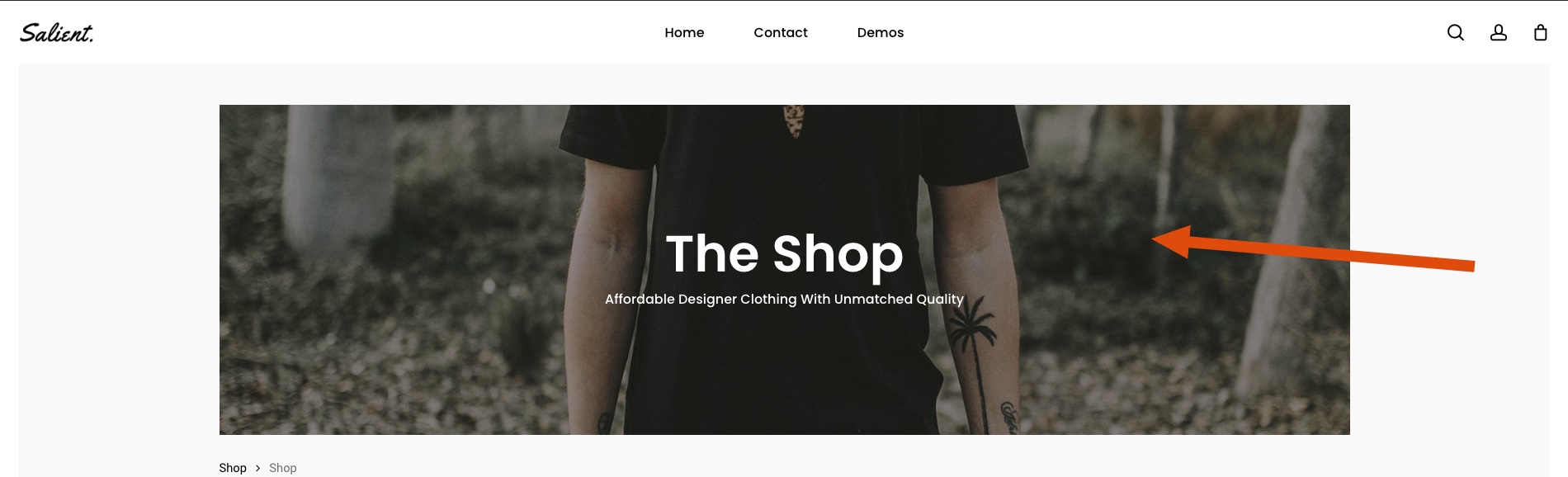
1. How do we change the default Shop and Category header image?: https://cdn.zappy.app/4d84f2802fe04e285c18a76040ab4552.jpeg
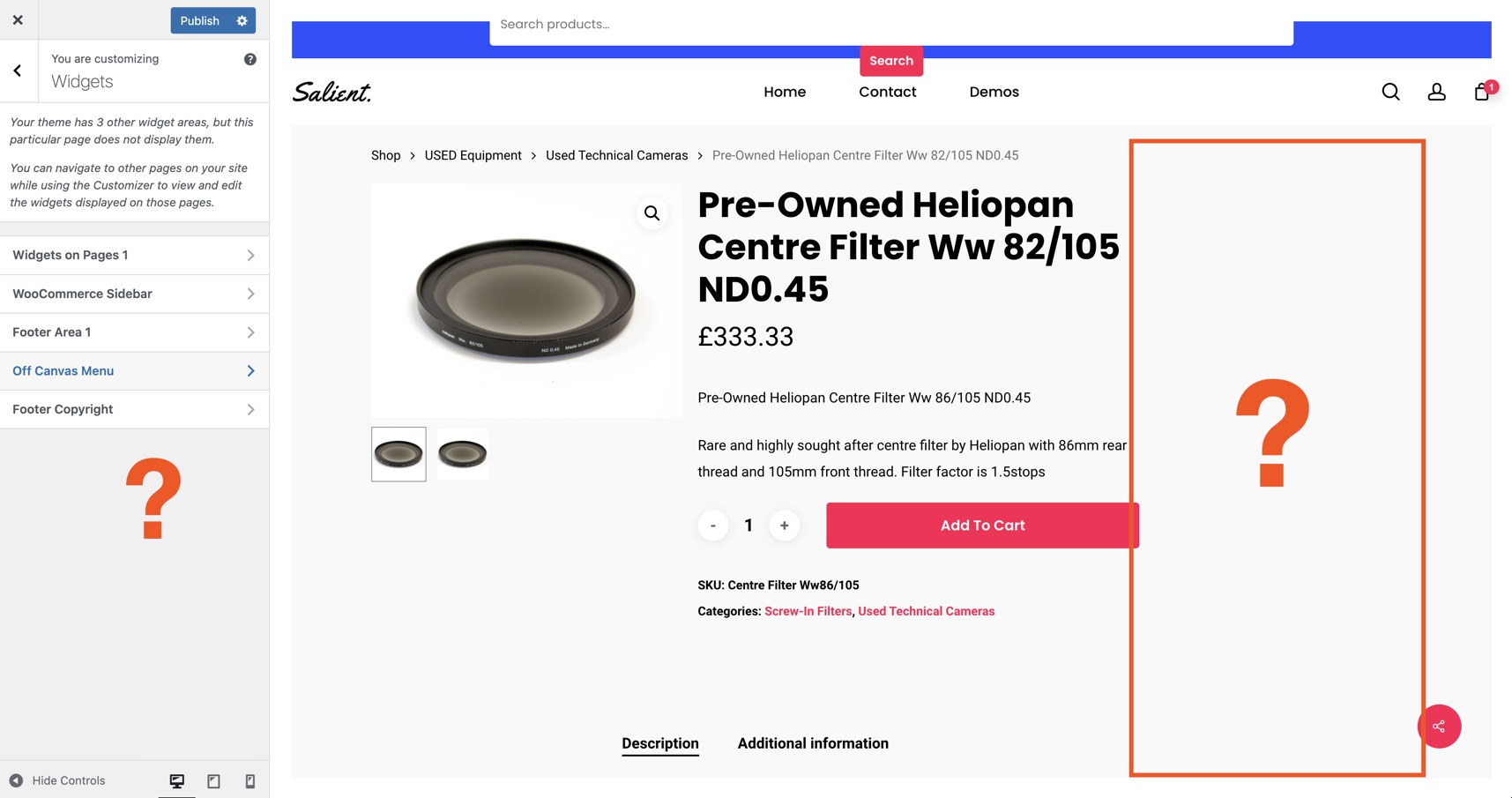
2. Where do we add widgets to the Single Product sidebar? I can’t find the sidebar anywhere in the backend: https://cdn.zappy.app/f99cd2ceffd11cbd0ae11cb1f7cd1e27.jpeg
Hey pipelinedigital,
1. You can edit the page that is defined as your “Shop” page and use the “Page header settings” metabox: https://ibb.co/nPXBVTJ
2. The widget area for that will be in the Appearance > Widgets section of the WP admin: https://ibb.co/nPXBVTJc
Kind regards
Thanks.
1. Thanks, I have changed the default image now which applies to all categories pages too without a category image defined.
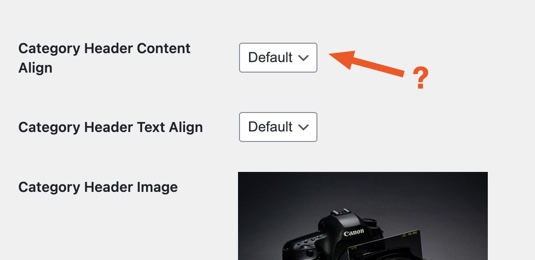
1b. Why can’t the category show a Page Header Subtitle like this: https://cdn.zappy.app/67021f0e5f33fdfebfbc30d7bc7ca3ac.jpeg, https://cdn.zappy.app/3001218da8e187ba560c93e856211f48.jpeg. Surely the Product Category description (https://cdn.zappy.app/37743a82086748ccdfcdb8f1259c84c0.jpeg) can be output here too? https://cdn.zappy.app/f2bc391660ab8d54d549dcfc058f5f82.jpeg. if not, what does the Category Header Content Align settings apply to? https://cdn.zappy.app/8f3799c9d8fa42df9aaaaa2dd6cbeccc.jpeg
2. None of these sidebars apply to the product page, so which one is it? https://cdn.zappy.app/e1383cc6c8f7ffa8d3b78ddeab70a6db.jpeg
Hey pipelinedigital,
1. Salient does support the use and display of the product category “description” field. An example of that being utilized can be found on the eCommerce robust demo.
Similar to your other question related to the sidebar not displaying, I would need to inspect your actual setup in order to help further since this isn’t a known issue.
2. The “Woocommerce Sidebar” widget location is the one utilized for the single product template. You can confirm this in salient/sidebar.php. Since that’s not working in your setup, I would need to take a closer look at your actual site in order to assist further. Please open a ticket on the support forum in regards
Thanks in advance
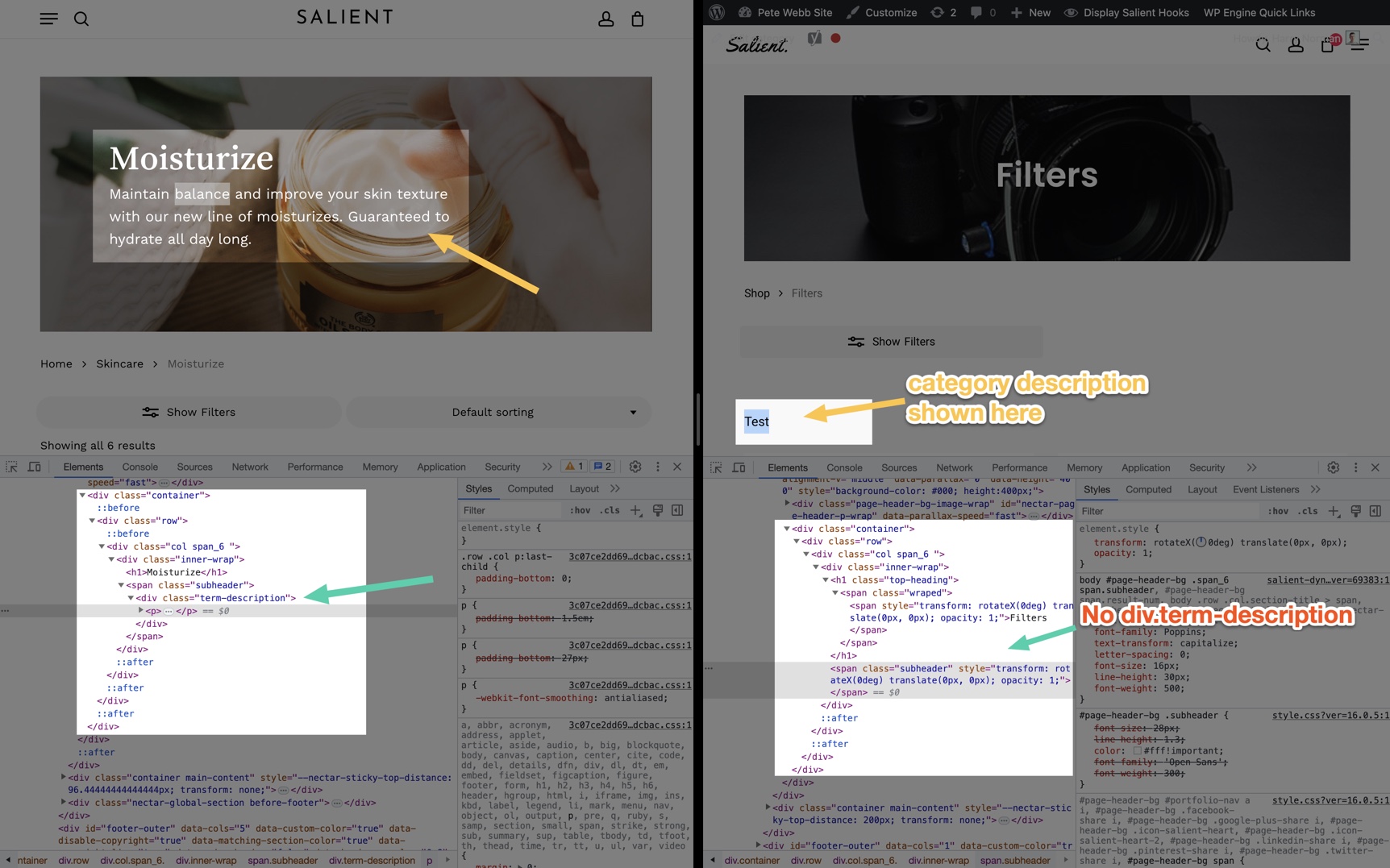
1. Looking at the side-by-side comparison of your page, and my page. You can see the description text “test” displayed in the wrong area, where it should actually be under the main heading. https://cdn.zappy.app/11417c73b14c3da91cddbedad430e7ae.jpeg
2. We do have the Woocommerce Sidebar, but this only displays on Shop and Category pages, not product pages. And product pages should have it’s own sidebar..
1. You can adjust the location of the category description output in the Salient options panel > WooCommerce > Archive Header tab: https://ibb.co/MZhjYKx
2. The WooCommerce sidebar widget area is setup to display on both the archives as well as the single product page. I would need to take a closer look at your setup in order to help troubleshoot why that’s not occurring. Kindly open a ticket on the support forum in regards
Hi there, I would like to ask you a presale question. I want to create a multilingual website and I nedd to know if with the same license can I have domains like these.
en.example.com, de.example.com, fr.example.com
etc.
Thank you!
Hey bill_ch!
Yes, you can create translated versions of your site using a multilingual plugin with a single license.
Cheers
I want to do it manualy witout any plugin Is it possible in this way to use the same license? Thank you!
I mean to create subdomain on hosting panel
Hey bill_ch,
That should be fine, as long as the subdomains are used strictly for translated versions and are not unique variants of the main site.
Kind regards
If window is resized the scroll bar gets hidden and we can no longer scroll the page
Hey AngelaLamHF, Since there’s no known issue as you’ve described, have you veered that no third party plugins you have active are causing the issue? If so, we would need to see your actual URL in order to assist. Please open a ticket on the support forum with that information so we can follow up.
Kind regards
Hey AngelaLamHF,
So far I’ve been unable to replicate the error you’ve reported. Can you kindly specify what browser and OS you’re seeing that occur on?
Google Chrome latest version. Open the page, try to open inspect elements or resize the page, it becomes unresponsive and very buggy.
Hey AngelaLamHF, here’s a screen recording from the latest Chrome on my end.
Hello, please help me how to hide global section to show in certain page, i already set display location in page/post like in this screeshot https://prnt.sc/AuCdwPoYAW75.
Hey shaky512,
You can use a snippet such as the following in your child theme functions.php https://pastebin.com/MwWPM0WQKind regards
Is there any options to make the Toggle pannels with Anchor links?
Hey romankac,
Are you trying to trigger an existing toggle panel via an external anchor or are you saying you want to recreate the toggle panel functionality with via a custom anchor?
I can’t find the option to add an anchor link to expand a specific section from the toggle panel using a specific ID for example domain.com/site#anchor-id
Hey romankac,
There is no built-in functionality to trigger a toggle element by a custom anchor link, however you can link to specific toggles from a different page by using the URL ?toggle=toggle-slug e.g. https://themenectar.com/salient/elements/toggle-panels/?toggle=available-directly-in-page-builderKind regards
The main menu is so borked in one of our clients sites on mobile that we have to turn it off. How do we hide the nav on mobile?
Hey quomo,
You can disable the mobile menu by adding the following snippet into the custom CSS box located in the Salient options panel > General Settings > CSS/Script related tab:
@media only screen and (max-width: 999px) {
.slide-out-widget-area-toggle {
 display: none!important;
}
}
Apologies, this was a silly question poorly contextualised as I actually had some custom CSS affecting the menus. All sorted, and with thanks.
Aside, have you any experience of how Salient works with Relevanssi and WPML? I have all 3 working together and the searches coming from the search tool in the header seem to be outside Relevanssi’s reach.
The issue is that the searches provide results in the two languages of this multilingual site when it should only provide these on the active one.
WPML and Salient work perfectly, and the searches done through the Relevanssi tool in Dashboard>Admin Search provide only those on the active language.
For what I gather, from WPML and Relevanssi, I have to discuss this directly with you.
Any thoughts?
Hey quomo,
Can you share your ticket ID with WPML so that I can follow up with them on what they’ve determined?
Salient offers the ability to filter the quick search query to override/add custom query params as needed through “nectar_quick_search_query”, so if there’s some extra query param that Relevanssi would need in order to limit the results, it could be achieve through that filter in your child theme.
Kind regards
There was no response from WPML yet https://wpml.org/forums/topic/relevanssi-showing-more-than-one-language/
Hey quomo, you can also try the following snippet in your child theme in the meantime:
https://pastebin.com/mqJGRXWBKind regards
I understand that I should add this to the functions.php right?
I did, but it didn’t work. I will reach out to Relevansi
Hi ThemeNectar Team! I selected the Recent Posts item and I’m testing two variations:
A) Recent Posts Style: Single Large Featured Color Scheme: Light BG Overlay: Diagonal Gradient Blog Categories: All Auto Rotate: No Auto Rotate
B( Recent Posts Style: Multiple Large Featured Color Scheme: Light BG Overlay: Diagonal Gradient Blog Categories: All Auto Rotate: 5 Seconds
I would like to go with  Multiple Large Featured, but this variation doesn’t show a description for the post. How can I do that?
Also, how can I decide what goes in that preview?
Thanks!
Hey apinzon!
You could utilize the action “nectar_recent_posts_multiple_large_featured_after_title” from your child theme functions.php to add additional content, such as the description. E.g. https://pastebin.com/wRBSknq3
Cheers
Hey! Curious how I can get my project cards (sticky project section) to be wider on mobile. I don’t believe I have any side padding or margins applied for mobile but they’re pretty narrow — definitely room to go a bit wider.
Is there a way to achieve this?
https://andrewklotz.ca/Hey A_K
The column which is holding your post loop builder has 5% padding specified which is active for tablet / mobile.
Kind regards
sheesh! thank you!
You’re welcome, A_K
Thank you!!
Hey svtmuscle!
There are a bunch of studio templates that use text with an accompanying image. e.g. https://ibb.co/NxRTmQK https://ibb.co/r5GwR9nIf you’d like in-depth assistance in recreating the specific layout you’ve shared, kindly open a ticket on the support forum in regards so that we can create an example on your site for you.
Kind regards
Hi, I noticed when I enable the Twitter X social icon logo, it doesn’t show up. Maybe a bug?
Found a fix: Had to exclude this CSS from minification: /themes/salient/style.css
Wonder if you can change something on your end to not have to exclude this main CSS file?
I did also the new X variant of Twitter is not included in the Font Awesome library.
Hey mrittman,
1. CSS minifcation is not known to break that icon alone. Have you verified that you also cleared the cache from your performance plugin? If so, kindly specify which performance plugin you’re using for minfiicaiton.
2. That’s correct, since the version of FA used in Salient does not include an X logo. However, we’ve noted to include it via a Salient-specific social pack.
Cheers
Thanks for your reply. Yes I cleared both the plugin cache, as well as the browser cache, and still had the issue. I am using SiteGround Optimizer.
Great to hear the X logo will be included in a future update
Hey,
I haven’t been able to replicate that with SiteGround’s CSS optimization: https://ibb.co/vZmg0Jx
If you’d like us to take a closer look at your setup, feel free to open a ticket on the support forum in regards
Cheers
Dang, well thanks so much for trying! I’ll submit a ticket
Hi, Logo does not appear after i went to Logo & General Styling, use Use Image for Logo, and Logo Height 30. nothing shows at the top left corner. then when i am scrolling down, i see that logo showing and disappearing close to the middle of the screen. please assist
Hey willmak, I would need to see your actual site URL to assist in troubleshooting that. Kindly share that here or open a ticket on the support forum in regards if you’d prefer to keep the URL private.
Thanks in advance
i have submitted a private ticket. Thanks
Hi, is there a way to change the menu hoven style? Don’t want the underline anymore. Thanks in advance!
Hey studioluttmer!
You can alter that in the Salient options > Header Navigation > Animation Effects tab.
Kind regards
Hey! I was hoping you could help with achieving something.
On my website: https://andrewklotz.ca/
I have a similar layout to this page on your site: https://themenectar.com/salient/whats-new/
With the sticky text left and scrolling content on the right. I was wanting get the rounded corners you have at the top with the hero section seemingly going behind it. Currently, mine is just a flat straight line across.
Is this possible for me to do using the portfolio section I’m using?
Thanks!
Hey A_K!
Yes, that effect that created with by utilizing the “clip path” animation option set a static amount coupled with a negative margin:
https://ibb.co/h2LYGkJ https://ibb.co/xzVywYPIf you’d like assistance implementing those settings, kindly open a ticket on the support forum in regards
Cheers
This totally makes sense. Unfortunately when I put in those settings it didn’t work. I’m really not sure why.
It looks like my support has expired so I can’t submit a ticket  If there’s anything else you think that would help, that’d be awesome.
Thanks again for your help.
Hey A_K,
Those are the exact settings used on the “What’s new” page, so I really would need to take a closer look at your page from the backend to assist with that further.
Kind regards
Ok. It won’t let me submit a ticket. Oh well… Thanks.





)