23243 comments found.

Hi , I have updated PHP and I cannot open the backend . I am getting critical error , Revolution slider is causing problem and it needs to be updated . please let us know how can I solve this problem .
Hello, @manishchahal,
Are you saying that the recent PHP update is causing issues with your site’s Revolution Slider? Could you confirm which version of the Revolution Slider you’re currently using? Also, please download the latest version of the Revolution Slider from this link and manually update it on your site: https://m.dropmefiles.com.ua/en/mkwYVN
Regards, P-THEMES.
Please join our Discord Lesson
can you please let me know , how to update revolution slider plugin manualy ?
Hello, @manishchahal,
Please navigate to WP-Dashboard >> Plugins and delete the RS plugin from there.
After that download the zip file of the very latest version of the plugin from my previous reply and then upload > Install and Activate it again from WP-Dashboard >> Plugins.
It should work for you.
Regards, P-THEMES.
Please join our Discord Lesson
Hello, there is a problem with the cart icon on the site and it does not load the cart contents. There is a problem especially in the header area. The header menu and cart do not work on WooCommerce pages, but the menu works on normal pages. But in all cases the basket does not work. Please direct me to the source of the problem. Thanks.
https://www.pazartan.com/Hello, @sonertan,
Apologies for any inconvenience caused. Upon testing the same elements on our test site, we couldn’t detect any issues with the theme. Both the header/menu and mini cart content seem to be functioning perfectly. We notice you’re also using the latest version of the theme. However, to thoroughly debug and identify the root cause of the issue you’re experiencing, could you kindly reach out to us via our support forum? Please create a ticket and provide a detailed description of the problem, along with sharing your site admin access. This will enable one of our customer support team members to investigate the issue directly on your site and offer you tailored assistance and a suitable solution.
Regards, P-THEMES.
Please join our Discord Lesson
Hi Porto,
I changed the configuration regional predetermined (ES_ES to ES) and hrflag (ES_ES to ES). Same for the rest of languajes. https://candleart.es/editado%20href.JPG And this message from wordpress: https://candleart.es/hrflag.JPG “Wordpress can’t donwload automatic translations for the following languajes” says the message.Now in the check out of my webside I have seen there are not translations (even the string is translated). All in check out in the languajes is in spanish.
You can see: https://www.candleart.es/it/completa-transazione/please any help?
thanks, Candle Art
Hello, @Joaquim_,
Apologies for any inconvenience caused, but it appears that the issue you’re encountering is not related to our theme. It seems to be more related to the settings or specific functionalities of a plugin. This isn’t a matter of theme translation. We recommend reaching out to the WPML plugin support for further assistance, as they are better equipped to address plugin-related issues: https://wpml.org/forums/forum/english-support/
Thank you for your understanding.
Regards, P-THEMES.
Please join our Discord Lesson
Pls where do I find term to add to Template Builder for services in the porto theme
Hello, @staymedia,
Could you kindly provide a detailed explanation of your specific requirements? Additionally, could you please share a screenshot of the issue so that I can accurately assess it and provide you with the appropriate instructions?
Regards, P-THEMES.
Please join our Discord Lesson
Hi, I need to reset my purchase code, i was activated my theme to one of my domain.. the domain and hosting is expired. now i am not able deactivate it for that domain, please help me by reset my purchase code. Thanks.
Hello, @wpshaon,
I have reset your purchase code, now you can use the same purchase code for activation of your theme.
Regards, P-THEMES.
Please join our Discord Lesson
Hello, How do i get rid of “Follow Me” on the “Members”? I have created several Team Members, but i do not want to show any Social links for them. I am leaving the links (Facebook, Twitter, etc…) blank, but the “Follow Me” still shows up and I can’t figure out how to get rid of it? thanks
Hello, @shingt,
Could you please share the screenshot and the page URL too with me here, so that I can check and assist you accordingly?
Regards, P-THEMES.
Please join our Discord Lesson
I am using this demo page: https://www.portotheme.com/wordpress/porto/shortcodes/member/will-doe/ – but do not want the “Follow Me” – it automatically puts it in even if i don’t have any social links? thanks
Hello, @shingt,
To solve your issue simply navigate to the Dashboard >> Porto >> Theme Options >> Members >> Single member >> Click on Show Options >> then simply turn off the social icons button as you can see in this screenshot: https://postimg.cc/XrbF1HRd Then save settings and check back to your site by clearing the browser cache. I hope it will be resolved.
Regards, P-THEMES.
Please join our Discord Lesson
Hello, how can I make the products look like in this page https://www.portotheme.com/wordpress/porto/shop11/ (black button at the bottom) instead of what I curently have on my test site?—> https://allofvape.gr/newshopallofvape/ – -I can’t seem to find a setting for product appearence. Thank you in advance.
Hello, @teliss,
Thank you for contacting us. Our theme features a custom product showcase layout created via the template builder. To modify it, follow these steps: navigate to the dashboard, then to Porto, Template Builder, and finally, Post Types. Edit the product layout using the Gutenberg editor. Customize the layout to your preferences, save the settings, and refresh your site by clearing the browser cache. For a more detailed guide, please refer to the following articles:
https://www.portotheme.com/wordpress/porto/documentation/type-builder-elements/
https://www.portotheme.com/forums/topic/how-to-create-modify-products-design-on-product-archive-shop-page/
Feel free to reach out if you need further assistance.
Regards, P-THEMES.
Please join our Discord Lesson
Hi,
WP Engine give me notification regarding vulnerability Plugin ( Porto Theme – Functionality 3.0.8 ). see below. Can you please fix this and release updated version ASAP.
Security risk: sqli. The plugin contains a vulnerability wherein unauthenticated visitors could inject SQL statements into WordPress. SQL injection could allow an attacker to gain control of your site. Severity: critical Fixed in: no fix yet
Security risk: no authorisation. An unknown vulnerability exists. Severity: medium Fixed in: no fix yet
Hello, @shahja99,
We have already fixed this vulnerability, please check this site: https://patchstack.com/database/vulnerability/porto-functionality
Regards, P-THEMES.
Please join our Discord Lesson
I am trying to update the domain for one of the 7 Porto licenses that I have purchased. I cannot login to the Support portal, and I’m not getting email messages to reset the password. How can I get access to my account?
Hello, @gwenfaye,
Could you please share the first 8 digits of your theme purchase code with me here so that I will check/verify and reset it for you.
Regards, P-THEMES.
Please join our Discord Lesson
Hello, I am experiencing the same problem below. How can I solve the problem? I am working on localhost. https://paste.pics/706e419fa0a6946337d43ffa04707177
Hi @PT-Support2, Thanks for getting back to me quickly. I’ve had a read and still no luch with getting it to apear full width after converting? https://paste.pics/QLHJU Image shows margins on the container. I have also imported a Porto Studio Section below to show
Hello, @ercanm,
Apologies for any inconvenience caused. The issue lies with Elementor’s Flexbox containers, which by default have some spacing on their right and left sides. These containers are inherently designed with fixed width and cannot extend to full width. To gain a deeper understanding of this behavior and learn how to address it, you can refer to this detailed article: https://www.portotheme.com/forums/topic/understanding-elementor-container-width-in-web-design/
If still you need help, please contact us via our support system with your site WP Admin URL and Credentials so that we can have a look into it for you on your site and help you out.
Regards, P-THEMES.
Please join our Discord Lesson
Hi Porto the best theme ! Can you update soon the revslider and WPBakery plugins ?
Hello, @alexissatok,
We have already updated the WP Bakery plugin in our theme, you can simply update it from Appearance >> Install Plugins.
And for the RS plugin update, we will release its update soon.
Regards, P-THEMES.
Please join our Discord Lesson
Hi how to change the filter-title in the FAQ cause by default it’s À
Hello, @alexissatok,
Could you please share the screenshot and the URL of the page, where exactly, and what do you want to change? So that I will check and assist you accordingly.
Regards, P-THEMES.
Please join our Discord Lesson
Hello, I have a problem with the search bar Specifically, I am using Porto Theme: version 7.0.6. When I paste a product with its full name, it tells me that there are no products available. However, when I start typing it in the search bar, it automatically appears before I finish typing the word. How can this be fixed?
With regards, Chris
Hello, @chytoudis,
I’ve actually tested the same scenario on our test site, and the theme appears to be functioning correctly. It seems you’re using version 7.0.6 of the theme, which is outdated. I recommend updating the theme by following the instructions outlined in this article: https://www.portotheme.com/wordpress/porto/documentation/update-theme/ . After updating, please clear your browser cache and revisit the issue. Hopefully, this resolves the issue. If not, please reach out to us through our support forum. Create a ticket detailing your issue and provide your site’s admin access. This will allow one of our customer support team members to investigate the issue on your site and provide further assistance with a suitable solution.
Regards, P-THEMES.
Please join our Discord Lesson
cant find a way to change to RTL, the theme tags and updates says it have RTL. can i get help?
Hello, @Ariel_hatav,
If you would like to change your site as RTL, then please navigate to WP-Dashboard >> Settings and change your site language as any RTL language, save changes and it will automatically change your site as RTL version.
Regards, P-THEMES.
Please join our Discord Lesson
Hello, unfortunately the “porto functionality” plugin cannot be translated into Turkish, there is an error there, I would like you to correct this error.
Hello, @gencmedya,
What specific error are you encountering? Could you kindly provide a screenshot? Additionally, if feasible, please share the screenshot along with your WordPress Admin URL and credentials via our support system. This will allow one of our customer support team members to assess the issue on your site and assist you further.
Regards, P-THEMES.
Please join our Discord Lesson
Good morning,
I’m having problems with my site.
I updated my site and nothing works anymore. Here is the result of the first investigation. - The porto-woo.php file, line 27 presents an error - The functions.php file line 6031 also presents an error. I see send the screenshot by email.
Please check things on your side. Thanks
Hello, @CELINCO,
To solve your issue, please refer to our theme documentation here: https://www.portotheme.com/wordpress/porto/documentation/php-critical-issues-after-updating-woocommerce-8-5/
Regards, P-THEMES.
Please join our Discord Lesson
Hey there! I’ve been exploring the possibilities with the Porto theme and I’ve been considering the integration of a user profile and community feature. Have you come across any successful implementations of such features with Porto? Also, what are your thoughts on plugins that enhance the social and community aspects of a website? Have you had any experience with plugins like Youzify? I’m particularly interested in how these elements can elevate the overall user experience without overwhelming the site with unnecessary features. Looking forward to hearing your insights!
Hello, @jackwilson4,
First of all, thanks for showing your interest in Porto WordPress 
Plugins that enhance social and community aspects of a website can be incredibly valuable for fostering engagement and creating a sense of belonging among users. Features like user profiles, activity feeds, messaging systems, and forums can all contribute to a vibrant online community.
Regarding Youzify specifically, while I don’t have direct experience with it, I can provide some general insights. It’s essential to choose plugins carefully, considering factors such as ease of use, integration with your existing systems, and the level of customization they offer. Youzify, like similar plugins, likely provides a suite of features designed to facilitate social interaction and community building.
And our theme is fully compatible with some social and community plugins such as:
https://wordpress.org/plugins/buddypress/
https://www.hubspot.com/
https://bbpress.org/
So you can try with anyone that better suits your requirements.
Regards, P-THEMES.
Please join our Discord Lesson
I want to use custom mini cart icon, not your defined icons classes. Any help? I have my svg, png
Hello, @aalaquis,
Unfortunately, this is not possible, you can not use the Custom icon for mini cart, you can request it as a feature request on our forum here: https://www.portotheme.com/forums/topic/feature-request/
Regards, P-THEMES.
Please join our Discord Lesson
Trying to add a Porto Carousel logo but it isn’t working when I try to add multiple logos. It’s stuck with just one logo only…Is that a bug?
Hello, @seanthadlock,
Apologies for any inconvenience caused. I’ve tested the same process on our test site and it seems to be functioning perfectly without any issues. To address your concern effectively, could you kindly reach out to us through our support forum? Please create a ticket detailing your issue and provide your site admin access. This will enable one of our dedicated customer support team members to investigate your specific situation directly on your site and provide tailored assistance to resolve it.
Regards, P-THEMES.
Please join our Discord Lesson
Hello, @seanthadlock,
Apologies for any inconvenience caused. I’ve tested the same process on our test site and it seems to be functioning perfectly without any issues. To address your concern effectively, could you kindly reach out to us through our support forum? Please create a ticket detailing your issue and provide your site admin access. This will enable one of our dedicated customer support team members to investigate your specific situation directly on your site and provide tailored assistance to resolve it.
Regards, P-THEMES.
Please join our Discord Lesson
Hi Porto, candleart.es; in the check out when I am selecting the countries Spain is in english and I need “España” in spanish. Please can you help me how to change it? I have loco translate.
thanks
Hello, @Joaquim_,
If you are using the Loco translate plugin, Please Navigate to Loco >> Plugins >> Woocommerce >> Edit the translation that you are using for the site >> Click the Sync button >> Find the words and add the translation for them and save it.
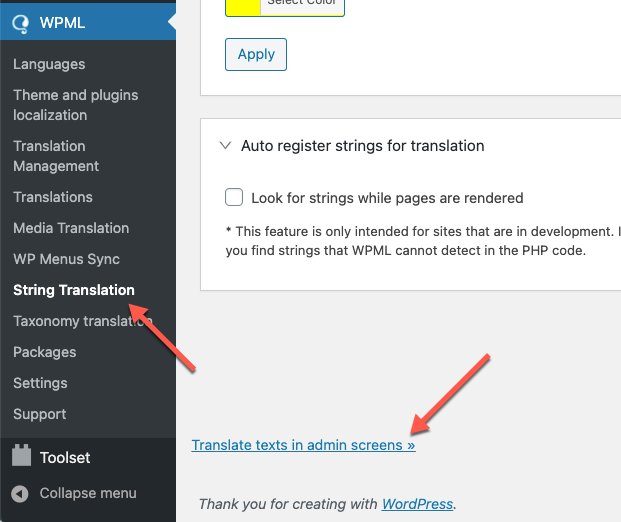
Also, I have found that you are using the WPML plugin for the site as well, Please go to WPML >> String Translation >> Click the scroll to the bottom of the page and click the Translate texts in admin screens link. https://cdn.wpml.org/wp-content/uploads/2021/03/translate-texts-in-admin-screens.png
This will take you to a searchable list of admin strings. Find the Words that you want to translate and then select those words and add them to the string Translation then you will go to the WPML >> String Translation >> then find and translate them into other languages.
If the problem persists, kindly provide the WP admin login credentials for your site via our support forum. We’ll investigate and offer a potential solution.
Regards, P-THEMES.
Please join our Discord Lesson
Hi Porto,
Problem is there are lots of countries to translate (snap). Any way to transform them from English to Spanish? mandatory I have to edit all of them with Loco?
Also any way to hide countries? There are too much.
https://www.candleart.es/idiomasEspanol.JPGthanks, Joaquín
Hello, @Joaquim_,
1- Would you please contact us via our support forum by creating a ticket and describing your issue in detail while sharing your site admin access so that one of our customer support team members will be able to check your issue on your site and assist you further accordingly with a proper solution.
2- To hide the countries from checkout page please refer to this article: https://wordpress.org/support/topic/hiremove-country-selection-field-on-checkout-page/
Regards, P-THEMES.
Please join our Discord Lesson