22305 comments found.

Hi, In https://themeforest.net/comments/26747474 you mention the wpex_self_hosted_video_bg_attributes filter. I am using the self-hosted video value in the Media tab of certain posts and a Dynamic template that uses the Post Media module to display this in a banner at the top. I’d like the video to autoplay and to have controls. Is this the method I’d use to enable those video attributes? Perhaps the vcex_post_media shortcode already supports an attribute for html5 video attributes? Thanks for any help!
I see in themes/Total/inc/integration/wpbakery/video-backgrounds.php that this particular filter is deprecated now.
I see that the code looks like this now:
                        $video_attributes = (array) \apply_filters(
                                'totaltheme/integration/wpbakery/video_backgrounds/video_attributes',
                                $video_attributes,
                                $atts
                        );
What would the add_filter snippet look like for a self hosted video with a specific css ID where I would want it to loop, autoplay and have controls?
Thanks!
Hi,
The filter you mention will still work, but it’s specifically for the Self Hosted Video Background setting for WPBakery sections, rows and columns: https://a.cl.ly/YEuw5AWg
In terms of video attributes when displaying the Post Media video the correct filter for modifying the video output would be “wpex_post_video_html” – so you can hook into this filter and use str_replace to replace <video with <video and whatever attributes you want. Example:
add_filter( 'wpex_post_video_html', function( $video_html ) {
    if ( $video_html ) {
        $video_html = str_replace( '<video', '<video autoplay', $video_html );
    }
    return $video_html;
} );
Personally, what I would do in the Dynamic Template is use the Video element instead of the Post Media element so you can set up the Video element with all the controls you want.
And if you must you can always set up a different template just for videos that is separate from other post types. You can do this either by using this plugin and having a separate video category – https://wordpress.org/plugins/term-based-dynamic-post-templates-for-total/ – or a little custom code that modifies the template based on either the post format – https://totalwptheme.com/docs/snippets/set-dynamic-template-based-on-post-format/ – or based on if the current post has a video or not (I don’t have a snippet for this currently – but if you purchase a license or log in with the account that owns the theme license I can create a custom snippet for you).
- AJ
Hey, that snippet worked brilliantly! The reason I chose the Post Media module is that I only wanted it on a handful of posts and they would each have a different video (specific to the post) and the Post Media module picks up the link of the specific video chosen for that post. Would the Video module be able to do that? I was not under the impression that it could, but could be totally wrong.
(still searching for which account was used to purchase Total)
Yes, the Video module can display the post video as well like such: https://a.cl.ly/5zuog59x
A lot of the Total elements allow for dynamically displaying post content. For example the Image element can also display the featured image or a custom field image.
And for other element fields where you may not be able to select dynamic data to display, you can use dynamic variables to pull post data – https://totalwptheme.com/docs/dynamic-variables/ – for example you could use an Icon Box to display post data like such: https://a.cl.ly/jku02yWD
- AJ
Hello, is it possible to use images + videos mixed in a gallery? As far as I can see, only images are possible. Is that correct?
Im looking for a gallery where I can use images and videos. Does anyone know one for free? I hope its included here in this theme but I cant find it.
Hi,
Thank you for your patience, I hope you had a nice weekend. I just replied to your followup comment on the same subject 
- AJ
I could fix it.
I could not fix this.
is it possible to use images + videos mixed in a gallery? As far as I can see, only images are possible. Is that correct?
Im looking for a gallery where I can use images and videos. Does anyone know one for free? I hope its included here in this theme but I cant find it.
Hi,
This is Aj the theme author. I hope you had a nice weekend.
There isn’t a function that will display images and videos “inline” because usually videos have different aspect ratios and would look strange inside an image grid. However, you can assign videos to images for different galleries as mentioned in the documentation here: https://totalwptheme.com/docs/image-videos-attachments/ – this way you can have videos inside Image Sliders or added to image grids where they would open in lightbox format.
Of course, depending what you are doing you can always use for example the Grid Container to insert images and inline videos into the same grid – https://totalwptheme.com/elements/grid-container/ – but this would be more of a “manual” gallery as opposed to a dynamic gallery which you can do using the theme’s Post Gallery functionality and the guide mentioned above – https://totalwptheme.com/docs/using-post-gallery-image-galleries/
- AJ
Hi AJ, Quick question, I hope! I have a custom post, Workshops, created using your Post Types plugin and ACF for the fields. It has text in the editor field. How do I set the excerpt length displayed in a custom card? I’m using the post excerpt module in wpbakery in the card template. The Entry tab of my post cards element is blank except for a place for a custom class name.
I hope you’re doing well through this crazy summer!
Best, Alice
Hi Alice,
By default the Post Excerpt element displays only the custom excerpts. In older versions of the theme there was a length field you could use so if you added a length it would switch to a custom excerpt. I changed things a bit in 5.18 so what you would do now if you want a custom excerpt is enable the “Fallback” setting like such: https://a.cl.ly/p9u2vKYE
In the 5.18 update I also added the ability to display your Yoast SEO descriptions as your excerpts as well. For SEO you will want to have meta descriptions, which will generally be a better excerpt the one automatically pulled from the content. So I thought having the ability to display the meta description for the excerpt is best for usability and SEO. Ex: https://a.cl.ly/yAuzpvnd
- AJ
Thanks AJ!
Hi AJ,
Last question for the day! The heading (H4) for social share icons isn’t displayed front-end when adding them in a dynamic template. If you open the customizer on a page using a dynamic template the heading text which can be changed is previewed. Is this the correct behaviour?
Thanks, Paul.
Hi Paul,
That is 100% correct, when creating a dynamic template I wouldn’t want the heading to be manually added when adding the social links because there wouldn’t be a way to remove it on a per-post type basis. If you want a heading when creating a dynamic template you would just add it yourself to the template.
- AJ
Hi AJ,
Do you have a video example of using the ‘right column is sidebar’ and ‘float column right’ options working please? Really can’t figure this out.
Thanks, Paul.
Hi Paul,
The “Right Column is Sidebar” basically just sets the column to the same width as defined for your sidebar under Customize > Layout
Sample video from the poppy demo: https://a.cl.ly/E0ueDqep
The “Float Column Right” is intended so that you can have a column on the right side but display it at the top of your site on mobile. Let’s say you already have a layout with 2 columns, when you click this option it will swap their direction so whatever was on the left will be on the right and whatever was on the right will be on the left side. So if you are working with an existing layout you would probably want to first move the column around so they end up where you want them after enabling the setting otherwise you can enable it first then setup your layout. Ex: https://a.cl.ly/mXuWkqNb
Now, if you look in the WPBakery front-end editor because of how the setting works since it’s not a “standard” WPBakery feature it may seem broken on mobile, but if you look at the live site it makes sense what it’s doing.
In web design when elements stack whatever came first in the HTML will of course display at the top. So by default any WPBakery rows that have columns will stack with the left most column at the top. If you want the right most column at the top on mobile this is where this setting comes into place. It adds CSS that will “float” or move the left columns so they display on the right and the right columns so they display on the left, this way you can have the code added to the left column display at the bottom on mobile and vice versa.
Hope that clears things up!
- AJ
Hi AJ,
Small issue – since the last update I’m unable to set the color of a side border on the Heading element, using my palette or the picker. Always uses var(—wpex-gray-900).
Nothing set in CSS and cache has been flushed.
Thanks, Paul.
Thanks Paul. Sorry about that, I modified the side border element classname to make it easier to target and prevent conflicts with the same classname added to the parent, but I forgot to modify the classname for the inline CSS.
If you delete and re-install the Total Theme Core plugin via the WP admin the fix is there. Or if you want to fix the file yourself the fix is simple: edit plugins/total-theme-core/inc/vcex/shortcodes/heading.php and on line 135 you will find this:
$selector = "{$unique_selector} .vcex-heading-side-border";
which you will replace with this:
$selector = "{$unique_selector} .vcex-heading-side-border__border";
Sorry again and thank you again for reporting the bug!
- AJ
No problem, working now with the plugin reinstall, thank you!
Hey A.J.
I trust all is well. We just got an indexing report from Google pointing out my staff page on the site has multiple versions (see e.g. below). We have only created one page per staffer.
Any clue why these pages were generated? And how can we avoid these pages to be created automatically?
Page we created:
https://orchango.com/staff-member/edmond-mellina/Duplicated pages that somehow were generated:
https://orchango.com/staff-member/edmond-mellina/page/4/ https://orchango.com/staff-member/edmond-mellina/page/13/ etc. etc.Ed.
Hi,
These aren’t duplicated pages, what it is is that WordPress has built-in functionality to support pagination, let’s say you insert the post cards element on a page and you enable pagination, this allows you to click through to page 2, 3, 4…etc to display more items for that grid.
They aren’t pages per-se, it’s just dynamically generated URL’s for pagination purposes and no one or any page on your site should be linking to these for Google to even find them, unless you have inserted a grid with pagination on the page.
You can test this out on any page, for example: https://orchango.com/nimble-change-leadership-program/page/2
And this will work on ANY WordPress site standard page, but Total specifically has a little code that allows pagination on any post type so that you can insert elements with pagination anywhere and make them work. If you aren’t using any pagination on any singular post you can add this code to your child theme to prevent the ability for paginated posts:
add_action( 'after_setup_theme', function() {
    remove_filter( 'redirect_canonical', 'totaltheme_filter_callback' );
} );
But, standard WordPress pages will still allow for pagination natively and I’m not sure if it’s possible to modify this without complex code. My thought is that it’s a non-issue and can be ignored.
The paginated pages all have canonical meta tags pointing to the primary URL so in terms of SEO it doesn’t matter. But you may want to see if for some reason you are linking to these from somewhere on the site or maybe some 3rd party spammer was linking to these pages. Because Google shouldn’t have ever crawled them unless they are being linked to somewhere that the bot can crawl.
And I don’t personally do this and I’m not sure if it’s recommended by anyone, but if it’s a concern to you then you can also consider noindexing the paginaged pages. I see you are using an SEO plugin named “The SEO Framework by Sybre Waaije” (they put a comment with this at the top of your site’s code) which I’m not familiar with, but perhaps they have an option to enable noindex for paginated pages?
- AJ
Thx so much A.J. Thorough & very useful response – as usual
ps: I added some code for the next theme update to check the current post content so if there aren’t any paginated elements the theme won’t add it’s code to allow pagination. This way those paginated pages will redirect automatically when not needed. Thank you for bringing this to my attention!
Excellent! Thx A.J.
I recently updated the theme to 5.18.1 in our development environment for testing and now the elementor editor will not load and displays loading spinner (I am using elementor pro 3.23.2 ). I downgraded the theme to 5.17 and the elementor editor will function again. While using 5.18.1 I also got an error when attempting to edit a template that had a nested template saying (the content area has not been found). Again downgrading to 5.17 did fix all errors. Please let me know of any fix for this or an update I can apply?
Hi,
I’m unable to recreate this issue myself, but I was notified of a different bug which I fixed that could possibly lead to something like this. I patched the live version of the theme already that gets updated when you use the built-in theme update in the WordPress dashboard (on an activated site). If your dev site is active can you try updating a gain?
Or any chance that you can email the logins privately to wpexplorer [at] gmail dot com so I can test before I push out the official 5.18.2 patch to make sure if there is another bug it get’s fixed up. Thank you and sorry for the troubles!
- AJ
Actually I do see that there is a debug error in Elementor that can stop the page from loading. This edit isn’t live yet. If you want to send me logins so you can try out the update before I make it like that would be very helpful.
Unfortunately I don’t have Elementor Pro to test the template inside a template issue, but I’m thinking it’s related to the same debug error. Since nothing else has changed that would affect Elementor.
Thank you for helping me test, otherwise I will be releasing the 5.18.9 update tonight and fingers will be crossed.
- AJ
Thank you for looking into this. I updated to 5.18.2 and the issue remains. I sent you an email with credentials.
I logged into the site and everything worked for me (that I tested). I replied back to your email, because I’m wondering if perhaps it’s a specific page or template. Thanks!
- AJ
after update Total 5.18
we got error in text and main menu direction our site is Arabic with RTL take alook https://bit.ly/46IDMsM main menu going to right after update also here all text go to left https://bit.ly/2Ivrk84how can we fix this
Hi,
This is Aj the theme author.
Your website is loading the default style.css file not the correct style-rtl.css file so it’s using the default styling and not the RTL styles. I just tested in the latest version of the theme and I’m not having that issue.
Instead your site is trying to loading a style-rtl.css file from your child theme which doesn’t exist.
Now, I was able to recreate the issue myself when using a child theme. There seems to be a conflict with the way WordPress loads child theme’s and the wp_style_add_data() function which replaces the style.css file with the style-rtl.css file. I’m looking into this right now and will push out a quick 5.18.1 patch! Thank you so much for letting me know of the issue!
- WPBakery: This update was actually applied many versions ago (in Total 5.10) so when you are using a translation plugin you don’t have to modify your alignment and you can keep the same shortcode values between languages. So if you select right alignment it will be right on LTR but it will be left on RTL.
You can add this code to your child theme functions.php file:
add_filter( 'vcex_inline_style_parse_direction', '__return_false' );
More importantly, if your site is in RTL there is no reason to align your text to the right, because that’s the default alignment for your text. So you would just be manually changing alignment when not needed. Just like if you have an LTR site there is no point to set your text alignment to left, because that’s the default.
The problem currently is that style-rtl.css file isn’t loading as expected so the text isn’t properly aligned which may be why you were trying to manually change it. Sorry about that
I’m getting to work right now to patch this issue, than you again for reporting it!
- AJ
thank,s for fast respond we use child theme so i did what you said i add function to child theme also i upload style-rtl.css to my child theme and the proplem fixed
You can do that for a temp fix if you want, but it will cause issues with future updates. I just finished implementing the fix and will release the patch right now.
So once you update to 5.18.1 I recommend un-doing the child theme edits just to prevent any issues in the future. Especially because in Total 6.0 there will no longer be a style-rtl.css file because everything will be updated to use modern direction aware CSS (so for example using margin-inline-start instead of margin-left).
Thank you again for reporting this issue and sorry for the troubles!
- AJ
If your license is active on the site you can go to Dashboard > Updates and you should see 5.18.1 with the fix now. It takes a few minutes for the update to be live here in the ThemeForest downloads.
- AJ
yes my license is active and i update theme also i delete style-rtl.css frome my child theme and every thing is perfect
I want to say that you are a wonderful person, and this is very clear through my dealings with this wonderful theme, which is rich in features and characteristics, and I have been using it for the past years. I wish you all the best
I’m very upset about the bug and having to release a patch, so I really appreciate the kind words. Thank you!
- AJ
Hi support, When can we expect an update for the bundled plugin Revolution slider from 6.7.13 to 6.7.15 ? – There has been security warnings for the last 30 days.
Hi,
I released Total 5.18 today – https://totalwptheme.com/docs/changelog/
The Slider security vulnerability only affects users with “Administrator” access and administrators can already log into a site, delete everything or upload anything they want. This is why there wasn’t a rush to release an official update. I honestly don’t understand why these security plugins are even displaying warnings for something like this.
That said, in the future usually when there is a security patch I actually update the server where the plugin gets downloaded from when you install it via the theme (within 24hrs) so you can always log into your site and delete/re-install the plugin for an immediate fix.You can always comment here and ask if the update is ready before doing anything so I can confirm.
By the way, Slider Revolution is a terribly bloated plugin and if I could I would never recommend or include it with my theme. However, since it’s always been bundled I need to continue including it for legal reasons. If you want to share the site where you are using the slider perhaps I can recommend an alternative design that doesn’t use the plugin so that you can speed up your site. In general I don’t recommend sliders for sites these days either. Here is a good read if interested: https://yoast.com/opinion-on-sliders/
And if you must use a slider this is a good free alternative that you could consider replacing RevSlider with – https://wordpress.org/plugins/depicter/ – and you will always get updates via the WP dashboard directly from WP.org.
Like I mentioned, I must always include Slider Revolution with the theme since it has always been included, but I am exploring some ideas for Total 6.0 to discourage people from using it. If you have any ideas or suggestions I would love to hear them, thank you!
- AJ
Hi AJ
Bit of a fussy one this! Probably “just me” 
With the image grids that open lightboxes, the navigation arrows disappear / defocus after 2 or 3 seconds. It takes mouse movement to bring them back into focus.
However I tend to have my mouse pointer resting over the arrows, look at the images and click when ready to move on. But in fact it needs two clicks – the first click makes the arrows reappear / refocus, and the second one actually moves the image on.
Hope I explained it OK!
Can you provide some code to prevent the arrows from disappearing / defocusing? That way it won’t need two clicks to move between images.
Thanks
James
Hi James,
You could use CSS to keep the arrows always visible, but the best solution is to modify the lightbox settings and set the idleTime value to false. Example:
add_filter( 'totaltheme/lightbox/l10n', function( $l10n ) {
    $l10n['idleTime'] = false;
    return $l10n;
} );
The default value is 3 (aka 3 seconds) but if you set it to false it removes the check all together. Perhaps this is something I should add a customizer option for, I put it on my todo list.
This is PHP code so it would be added in your child theme functions.php file or via a code snippets plugin.
Additionally, if you aren’t adding captions to your images you could also try this CSS – https://gist.github.com/wpexplorer/39bcdf49b5bc6cdb3138a4cde4bb4209 – which places the gallery thumbnails below the image which you can use to navigate instead. Example result: https://a.cl.ly/12ulWLXE
- AJ
Hi AJ
Think I might have discovered a small bug. Trying to add an Extra class name to the List (bullet) element, and when I save the element the class is not getting saved. When I reopen the element the field is empty.
Thanks
James
Hey James, I just saw your latest comment with the same report, please have a look
- AJ
Example: I have two (or more) rows on a page, which I differentiate between >1280px and <1280px. The related rows always have the same “Local Scroll ID”. The local scroll works on devices >1280px, but not on mobile devices. Is there a trick?
Hi,
You shouldn’t use the same local scroll ID for 2 elements on the page because it will conflict and more importantly cause potential accessibility errors. If you must have 2 different rows with the same local scroll ID, you should place both rows inside a Section, remove the local ID’s from the rows then add the local scroll ID to the section.
That said, having different rows for different breakpoints is often not recommended, can you share the URL to see what you are doing so I can perhaps provide an alternative to help keep the site better optimized?
- AJ
Hi AJ,
Quick question.
I use ACF quite a lot. It has a custom post types feature. Are there any differences between that and your Post Types Unlimited plug-in?
I’m considering using ACF for custom post types but if Post Types Unlimited is better I will use that.
Any pros / cons to consider?
Thanks
James
Hi James,
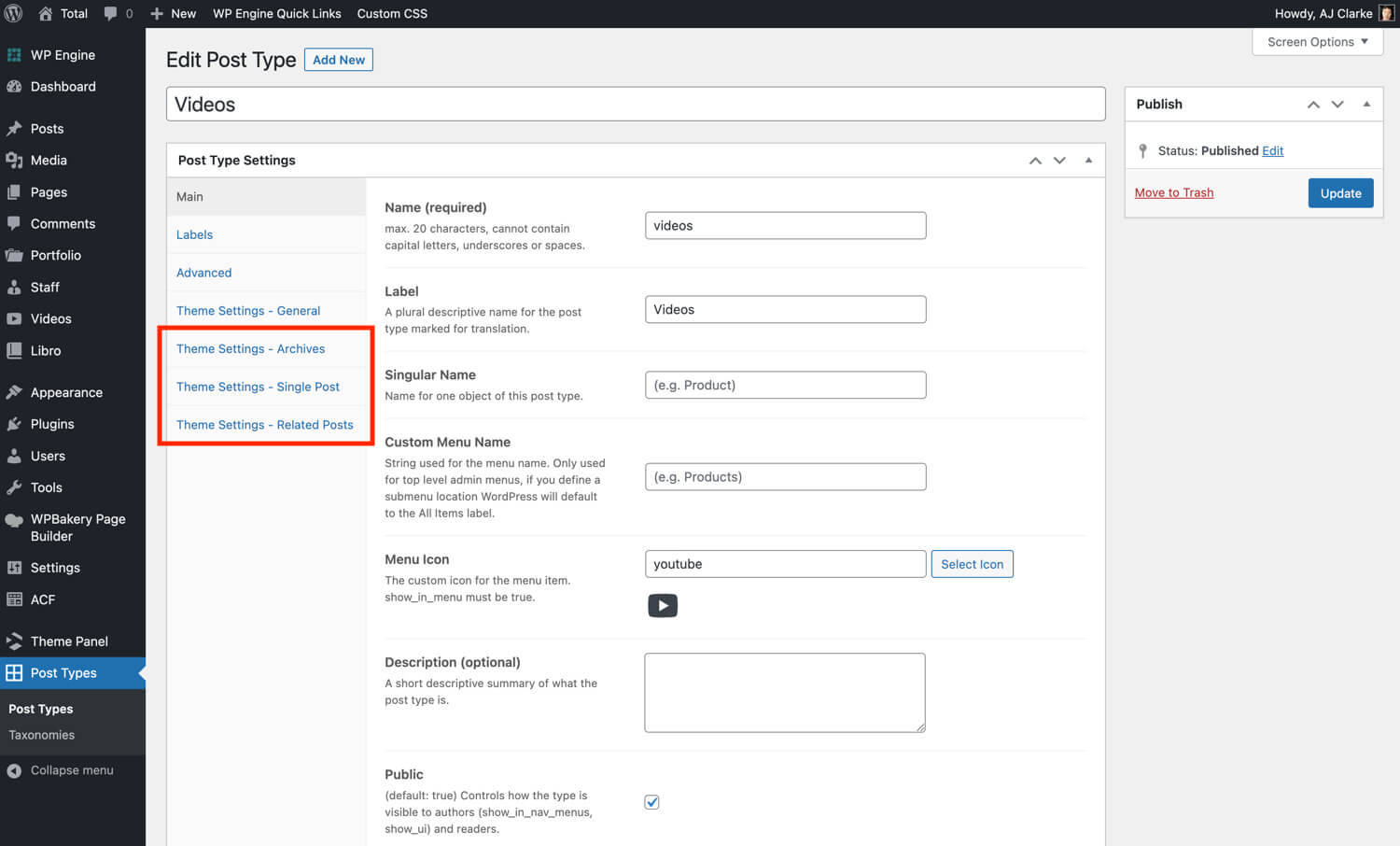
Big difference, because my plugin is integrated with the theme so you won’t have access to all the theme settings when you create your post types or taxonomies – https://totalwptheme.com/docs/wp-content/uploads/sites/51/2023/08/total-post-types-unlimited-total.jpg – which means you will need to use custom code for this (which you can of course if you prefer, but a bigger pain IMO).
ACF works, but it’s such a mega bloated plugin I’ve really become less of a fan as they keep adding more and more bloat. So many plugin developers just dump every feature in the universe into their plugin to try and make more money. In my opinion plugins should be coded to serve a single purpose. A custom fields plugin should be used to add custom fields – not post types, taxonomies or become a page builder (ACF also has tons of code for creating templates, custom blocks and page building capabilities).
You could also use the Total’s meta factory class to add custom fields via a child theme – https://totalwptheme.com/docs/snippets/add-custom-metaboxes-to-total/ – it’s quite simple to use and includes the basic fields needed for most sites.
I hope to make my own free custom fields plugin in the future that is JUST for custom fields (using the class from the snippet above so if you are using Total it won’t need to load any extra code for registering/saving fields). I just don’t have the time right now and it’s not something that will help pay the bills :/ Hopefully next year! Or maybe if someone want’s to help fund/sponsor the project…
- AJ
Great info, thanks AJ.
Hello – my footer has disappeared for some reason. I’ve done it through the footer builder and disabled the other footer elements via the customizer. Any ideas?
Hi,
This is Aj the theme author. Thank you for your patience!
Is the footer gone on all pages? If it’s just a specific page perhaps it was disabled via the Theme Settings metabox on the specific page – https://totalwptheme.com/docs/page-settings-metabox/
Or maybe for some reason the actual footer created with the Footer Builder has some issues. Here are some things to check.
- Is the Footer Builder page drafted or published?
- Did you perhaps click the “Disable Row” option on the row being used for the footer builder template – so the row is being hidden on the frontend?
- Is there any child theme code that may be disabling/removing the footer?
It’s also possible that if there is some sort of PHP error on the page it is causing the rest to not render, so if there is an error before the footer it could stop the footer from showing. Are you able to share the URL so I can have a look?
- AJ
Hi AJ! Too long since we were last in touch and I continue to be in awe of how the theme keeps on growing, and smashing everyone’s “if only a theme could..” wishes! I have three questions: a) if I email you privately (best email address?) with a Total Theme License Key code, would you or someone be able to tell me to which website it is linked/active? Possibly a test site.. or should I simply try reusing it? b) if I wanted a quote for some major work on the main agency website would you be up for that? Have been wanting to do it myself but time does not permit it.. and you would be such a good guide and developer to hand it over to …and wou of course do a far better job than I would! c) I am really interested in using your category based colour scheme ie to use a different accent colour depending on the specific project (for which I could use either categories or, preferably a custom taxonomy). I tried to set it up – both using standard categories and also my custom taxonomy (with the snippet I found in your docs) but without success. Are there some prerequisites which need to be in place for it to work? For example a lot of my business’s website colours are led by CSS rather than your more recently available colour customisations. Maybe the category colour feature doesn’t work if there is CSS taking priority (??) – or is there something else I need in place?
Thanks so much! Best, Sally
Hi Sally,
Sorry for the delayed reply, things have been a bit crazy over here!
a) You can actually use this URL – my.totalwptheme.com/wp-json/twpt-license-manager/check/ – and enter the license code at the end to see where it’s currently registered.
Or if you own the license you can log into the site my.totalwptheme.com/ – and click on “License Manager” at the top to see where all your licenses are activated.
b) Email me at wpexplorer [at] gmail dot com for any sort of custom work. I can let you know if it’s something I can help with and provide a quote for you Thank you for thinking about me! I would love to help with some customizations.
c) Depending where and how you want to use the colors there is a new option in the updated Total color picker that lets you use the category colors in various elements. Example: https://a.cl.ly/5zuKxAGb (in WordPress categories are referred to as “Terms” – terms is a global name for any taxonomy item – category, tags, custom taxonomy terms such as portfolio categories, portfolio tags, etc).
Now, the Total color picker is not yet integrated into WPBakery rows because of some limitations, but you can use utility classes to target any element as mentioned on the docs here – https://totalwptheme.com/docs/category-colors/ – for example if you have a category with an ID of “5” you can add the classname “has-term-5-background-color” to any element to give it a background equal to the primary category color.
Here is how you can locate a term ID – https://totalwptheme.com/docs/locate-page-id/
It would be helpful if you can share an example of what you are doing (feel free to do so privately) so I can see why whatever you are doing isn’t working as expected.
- AJ
Hi AJ – this was so very kind of you, and helpful to me at the time. I did try but couldn’t implement your suggestions in point c) re the colour picker but I will return to this soon when I have more time. I also decided against completely renewing the main agency website for now, but again I will return to this anon and be in touch!
In the meantime, and where I would really welcome your help in the shorter term, is with the following (copied and pasted below). I would be VERY grateful if you could indeed ” help you make a custom shortcode you can add into your card that does nothing but grab the information you need and display it without any custom loops, thus avoiding the WP limitations and issues”. Shall I give you access to the specific site in question? Yours extremely hopefully and sorry about the long pause in the convo! S
Original question and your kind response:Hi AJ! Thanks so much again for your help. Since we were last in touch I have familiarised myself with postcards and they are out of this world! ....
Anyway… On a different site (Ensemble360.co.uk) I tried out the postcards too, with great success, again using the post card facility to enter a custom field (containing the relationship with other posts) in the query. I have a question however:
On this new site I use an ACF field (relationship) to be able to add the related Programmes (CPT) for an Ensemble (CPT) and vice versa. (There is a function to make each get added to the other ie bi-directional). On an individual programme post I can nicely show not only the information from the programme post but also from the related (via ACF field) Ensemble post. Example: https://ensemble360.co.uk/programme/mahler-faure-and-dvorak/ I could even show the related PLAYERS stored on the Programmes’s related Ensemble using postcards – such happiness! Anyway, my actual question is this: can one use PostcardsCards within Custom Cards?! On this page I am using postcards to list the programmes. https://ensemble360.co.uk/concert-programmes/ If however I try to also show on that list, for each programme, the ensemble name (and ideally more info eg number of players which is a field on the ensemble post) it won’t work. I tried this using postcards within the card design, the former to get inormation from the Ensemble. It worked for the first programme listed but not for the remaining ones on the page. I can set up an example (I deleted the tests) if helpful but if essentially it is crazy to try to use postcards WITHIN the design of a custom card and I am trying to do something the theme is not designed to allow, then I will try it a different way instead. This is my question!
Thanks AJ!
WPExplorer WPExplorer Author
10 months ago Flag Hi there,
Hey, that’s awesome! Glad you like the post cards feature
The problem with Post Cards within post cards is it starts creating an infinite loop (because of how WP_Query works in WordPress) so while it’s technically possible (I’m not quite sure how you are doing it though) there are definitely some limitations. I would be more then happy to log into your site to see what you are doing.
Because perhaps instead of using a post card inside a post card like you mentioned I can just help you make a custom shortcode you can add into your card that does nothing but grab the information you need and display it without any custom loops, thus avoiding the WP limitations and issues.
Hi Sally,
Have you by any chance tested in more recent versions of the theme? At some point I updated the Post Cards to allow for inner cards by storing the previous query in a class variable if the query is inside another – https://a.cl.ly/E0uOJ267
So it should technically work now. But if it’s not, I would be more then happy to log into your site to see what’s going on and get this fixed up – https://my.totalwptheme.com/log-in/
- AJ
is there any custom snippet or setting in the theme where I can add a google tag snippet to the HEAD and BODY only on one page not globally? I have a tag the hte head and body using the them custom actions, but I need a different tag only on one page of the site. Thank you in advance.
Hi,
This is Aj the theme author. Thank you for your patience, things have been a bit crazy over here!
Since the Custom Actions panel doesn’t support PHP (for security reasons) you would need to use a child theme or a code snippet for this. The code is very simple. Example:
function digitaliway_google_tag() {
    if ( ! is_page( 'page-slug-goes-here' ) ) {
        return; // bail if not on the page we want the code added to.
    }
    ?>
    YOUR CODE HERE;
    <?php
}
add_action( 'wp_head', 'digitaliway_google_tag' );
add_action( 'wp_footer', 'digitaliway_google_tag' );
Let me know if you have any followup questions or issues!
- AJ
I wanted to let you know of another bug
It relates to https://totalwptheme.com/docs/adding-ilightbox-popups-inline/If you insert the ID name in the Scroll ID instead of the row ID , it will produce a an unclear message such as content could not be loaded try again later or something like that. this message sends you on the wrong path since the problem is just the location of the ID name.
Plus, if the content is iframe or video, the content opens with an internal max width of 70% for some reason and it leaves a section of white area to the right of a video
Hi,
That is correct, the Local Scroll ID doesn’t get added as an ID attribute on an element, it gets added as a data-attribute so the lightbox script won’t locate it. You need to use the Unique ID field instead.
Video and iFrame lightbox is working just fine for me. I don’t see that 70% max width you are referring to. You can try on this page – https://totalwptheme.com/elements/image/ ( the last image in the first row is a video lightbox) – do you have the issue here?
Can you share the URL you are working on that has the issue so I can inspect it and see what’s going on? Thanks!
- AJ
ps: Total actually has built-in support for the native browser <dialog> element which you could use for inline modal windows as well. Here is a basic HTML example:
<a href="#" aria-controls="popup-1" class="wpex-open-modal">Popup</a>
<dialog id="popup-1" class="wpex-modal"><div class="wpex-modal__inner">This is my Popup</div></dialog>
I’m not sure how or why you are using the inline Lightbox, but you may want to use dialog element instead so it can use native browser functionality instead of the lightbox scripts which require added CSS and jQuery.
I’m using it because I thought the lightbox is the only option, having it listed somewhere in the light box page could let people know that this option exists. I’m assuming that there isn’t a dedicated page explaining this option, If there is, I didn’t notice it.
Regarding the local scroll ID, the problem is that The light box does get open but it gets open with a misleading message, It sends you searching for a solution somewhere else while the problem is that the ID is in the wrong place.
Regarding the 70%, To reproduce it you need to create an inline Lightbox, place a video inside it and open it. You’ll see that the content Inside of the light box is max width 70%
The modal function was added fairly recently. I added a new doc article just now – https://totalwptheme.com/docs/modal-dialogs-html/
I just recently updated the docs design and I’ve been going through and updating articles as many are a little outdated, I have over 400 documentation articles so it takes quite some time and I have many new ones to add also because the theme has really evolved over the years.
If you ever see a doc that isn’t very helpful, is outdated or something is missing please let me know and I can work on it right away. Thank you!
I’m not able to recreate the video issue. Here is an example of the code I’m using to test – which is the correct way to add a video in lightbox if you aren’t using one of the theme’s elements:
<a href="https://www.youtube.com/embed/1iI4tAoUzgc?si=kTlP7Fge0H6LF2bx" class="wpex-lightbox">Open video</a>
Which works perfectly for me: https://a.cl.ly/d5uXoRe0
I’m curious to know what you are doing on your site where you are adding lightbox links using HTML rather then using theme elements/functions instead, if you are willing to share
- AJ
Hi AJ, I have a license that was previously activated for my old domain. The license manager shows that the license is active for that old domain which is no longer in use. I have a new domain and wanted to know if it is possible to transfer over the license to the new domain. If yes then how do I do this? If not then do I need to purchase a new license for the new domain? Thanks
All you need to do is click the little trash can icon next to your license in the license manager under the “Deactivate” table heading so that you can then use it anywhere else
- AJ
Thanks AJ!!
Getting a warning that the bundled plugin are out of date and have CVE https://www.wordfence.com/threat-intel/vulnerabilities/wordpress-plugins/revslider/slider-revolution-6713-authenticated-administrator-stored-cross-site-scripting
Remediation Update to version 6.7.14, or a newer patched version
Hi,
This is AJ the theme author. I am releasing an official Total update this week, for the meantime I’ve already uploaded the updated slider plugin so you can just delete and re-install the plugin to get the latest patched version.
If you read the vulnerability warning though it says that it requires “administrator-level access and above” – which isn’t really a vulnerability since administrators can basically do anything they want to your site and it also only affects multi-site websites, so if you aren’t using a multi-site install you don’t even worry about updating at this point.
I’ve included RevSlider since the theme was released many years ago so I must continue including it with the theme, but honestly if you can avoid using the plugin on your site it’s highly recommended. Sliders are not recommended for most websites. This is a good read if interested: https://yoast.com/opinion-on-sliders/
If you show me what you are using the plugin for on your site, I can help you come up with an alternative so you can delete the plugin from the site, speed things up and never have to worry about updating it.
- AJ