17872 comments found.

checked out the app but it’s not working
can you ppl please work on that
Please email at vibethemes@gmail.com
it’s not working
what need to mail on that
not even login is working
Thanks, we were able to identify the issue with outdated plugins. Please check now, also tell which app you’re testing : Windows, Android, iOS . The app is built from the live site https://app.wplms.io , so you may need to uninstall and re-install the app.
android app
app i still not upto the mark
Thanks, we’ve identified the issue and are releasing an update soon.
please look into this. a user can login into the app page by entering his username or email id while login form show only email id. https://jmp.sh/wfbLkebd https://jmp.sh/wzStJgk9 . Let’s translate this by loco plugin and get the desired text as https://jmp.sh/xWuNWjgE. but then the next issue comes in the registration form, here too email id field shows ‘email id or username’, while this field is for ‘email id’ only. https://jmp.sh/YoUnwsto
I hope I’m not bothering the ‘wplms team’ by notifying issues frequently.
No problem, fix added in vibebp plugin update. releasing soon.
2. after converting a batch into group, (
1,2. You can enroll like this : https://jmp.sh/ogmCwrYQ , each batch has its own interface
3. Its 39 since last year. Thanks for pointing this out.
1. member can’t be added in a Batch directly. We have to first covert the batch into group then only we’re able to add a member, which I already showed in my video: https://jmp.sh/F0MmXEi0. In your video too, member is being added in a group, while there should be a ‘Batch’ menu and member should be added straight forward in a batch. 2. https://jmp.sh/zSJ5QUuN comes in batch description after converting a batch into group. Sir, I’ve informed you the genuine issues what I came through. you should look into this from a user prospective. User interface and workflow should be user friendly and intuitive.
administrator or Instructor should be able to add student in a Batch within the course area itself. Currently this is done by coming out of the course area and going to Groups menu then only after converting a batch into group and with a lot of steps as per your video.
Batches is built over the groups functionality, it is a group which has LMS features. So, adding member to a group or batch is same. Batches are used for a variety of purpose , a. Instructor led training ( multiple intructors can create multiple curriculums for the same course ) b. Corporate trainings, a batch administrator manages users and see stats of students in the batch c. Classes, Batch acts as a class, with multiple subjects/courses, timetables etc. d. Recurring Course starting at different dates. Besides above, Batches can have their own curriculums, price, seat count,certificate, instructor, for the same course.
1. Usually batch enrolment happens automatically, by setting the group and batch as same, or you can enforce batch enrolment in courses so the student has to pick a batch to enrol into the course.
2. This is a bug, we’ve fixed in coming update of wplms plugin thanks.
3. Adding student directly into batch, this is a good suggestion but as I shared, a course instructor might not necessarily be a batch administrator for corporate trainings, so while the suggestion is useful, if the instructor has batch access, he can add the student into the batch as well.
Sir, I know the Batches is built over the BP Groups functionality as this is already elaborated many times by you in this forum and in your tutorials too. And I appreciate the Batch features as many of the lms don’t have this. One of my client asked me about the batch feature then I went through wplms-batches plugin and came to know the above issues. As a freelancer, I just informed you about the difficulties while adding a student in a batch. It’s up to you to consider the improvement or not. my suggestions are as follows: 1. there should be a menu named “Batches” under course and this menu can be added in profile sidebar also as per requirement. 2. Student can be added in Batch straight forward without any hassle. and yes Instructor can add if has the permission granted otherwise admin will. 3. for the bulk upload of the student, other profiled should also be required as Name, password etc. Current csv has email and username only. User account create If we add by uploading csv. How will a user be able to login into his account without knowing the password. and it’ll be very cumbersome to intimate the ‘login credentials’ to all users in bulk and educate them to create or change their password.
Please inform if you are updating your plugin so that I can suggest to my clients to buy this addon.
1. Accepted, we’re adding this in our update. 3. The password is the email id by default.
thank you. 3. email id as a password is not working. sample csv has two columns “email, Name” but its “email, username” in actual.
hi, is there any update?
hello, student need to be added in two places: into the course and group both. also a batch works only when converted into group. its a very lengthy process and is not feasible for an institution having large number of students. can you please make it simple and straight forward?
The batch gets automatically created when you use the course creator in components section
please fix the chatgpt question generator module and the ai quiz generator i bought both of them two weeks ago and still have yet to generate a single question or quiz.. and you havent replied in 6 days whats up mr vibe?

Please check this out for me https://wplms.ticksy.com/ticket/3717459
was resolved.
I use Elementor page builder to build my website footer and I can not use the “code validator widget” on Elementor for certificate verification, any other option for certificate verification?
You can create a custom sidebar in WP admin – WPLMS – sidebar manager, and add the widget in that sidebar. Embed that sidebar in a page in Elementor. Let me know if this does not help.
hi! is there any option to check history for live classes?
We record the activity, so when a user clicks on “join” class button in the course panel, we record its activity in course – activity. For BBB we also record the end of the meeting.
yes, it’s there but that’s not the perfect solution. is there any better solution so that instructor can have the history of check-in and check-out time of all the participants?
Currently this is not available. We will check BBB and update you if they’re passing this information in any API.
thank you
question before purchase, can i test it in my other sub domain first for staging then transfer it to my diff domain that i will use?
Yes you can.
Please check tickt number: Private Ticket #3714093. It is quite urgent
Support already replied, we’re awaiting an update
cannot hide the header and use custom instead. kindly hep URGENTLY
You can use the page template “Barebones” or “Fullwidth” , share ticket Id at wplms.ticksy.com
Hello, I just purchased the theme, and it looks quite good. However, I noticed that upon installation, some of the features offered by the theme need to be purchased separately. In other words, besides the price you pay for the theme, there are additional costs, such as calendar bookings, which cost $59 USD, among others. It would be highly recommended to specify these additional paid features to give a clearer picture of what you’re offering. I will test the theme and let you know. Regards.
Yes, these premium features are over and above LMS functions. The theme already comes with a huge feature set which is a full featured LMS. The paid features are not displayed in any of the demos. In the documentation https://docs.wplms.io , you can see which all features are paid and which are included. Also check our addons section, https://wplms.io/downloads
Also check our video series for more details : https://youtube.com/@vibethemes/videos
hello, kindly check this out for me https://wplms.ticksy.com/ticket/3715180
on it thanks
Hello! I want to buy your system! but I have couple of things I want to test regarding the batches, attendance, certificates and offline courses I trired to login to https://demos.wplms.io/playground/app/ as instructor, but the addons I want to test arent there, can you help me with that?
Batches and attendance is enabled. Certificates and offline courses require WP admin access so that is unfortunately not available.
Thank you for this report, we’re checking this. If possible create a ticket at wplms.ticksy.com and share. a screenshot / video of the process to understand what exactly is not working.
hi, this is to remind you that this issue is not fixed yet
Hello, I keep getting this error: “There has been a critical error on this website.”. Could please help install. Your urgent help will be greatly appreciated. Private Ticket #3714093
Checking right now.
Discount Code Field in Checkout form for Paid Membership Pro is DISABLE OR not possible on WPLMS.
Do you have the discount code? Click here to enter the discount code (THIS IS NOT WORKING OR ENABLED ON WPLMS)
Replied on ticket.
PMPro comes pre-installed with WPLMS, and it works fine across all other themes except WPLMS.
Even though PMPro is not your product but this plugin is part of the your bundled plugins on WPLMS.
This is a specific PMPro issue, which is a direct conflict with WPLMS.
If you are unable to fix PMPro specific issue on WPLMS, who else should fix it?
Please advise: https://wplms.ticksy.com/ticket/3713365
We’re working the ticket, this could be a likely template update only.
Perfect! Problem solved. Well, done.
you forgot about me again .. please fix the following
1. BOTH ai module and chatgpt question generator addons need to be fixed and tested for 4.o and generating properly because as of not it wont generate a single letter
my api key is 100% correct and ive tried 1000-2000-4000-10,000-15,000 tokens .. i have a paid abbount id ont even care how many tokens it costs me ..
i just want it to work as expected
2. the pwa builder is not compiling
3. please reply to me
1. This is not our limit, this is a limit of chatGPT 4096 tokens. This has been clarified to you in earlier emails as well. Also shared video on how it is working in your site. Try reducing your prompt size.The chatGPT 4o-mini model is working differently, so we need more time as this is a new feature.
2. The PWA builder is not able to load this image of your app : yoursite.com/wp-content/uploads/icon-512×512.png , please upload it manually if possible.
1. it IS YOUR WPLMS Limit >> Proof Trying to use the Conversation in ChatGPT app with the GPT-4o model, which has a Max Token limit of 128,000 according to the OpenAI API Documentation.Jun 3, 2024
2. i have uploaded it and still not working ..
ive bent over backwards to accomodate every one of your requests . these plugins i bought from you nor does the wplms is working, pwa isent working and your so stuck on this saas version and abandoning wplms that i cant get you to focus on fixing the issues ..
ive even offered to pay some money personally for you to fix your software problems .. time is money and we can not buy time . . we can make more money ..
im very inconvenienced over wplms .. man ill bet you $1000 that you cant even run the installer from scratch with out it bumping into problems
theres alot of money to be made but you gotta deliver a fully functional product. this is embarrassing not to say the least..
please fix this ..
1. The 128k token limit is for ChatGPT Enterprise users. Again the error in the API calls result from chatGPT itself it is not our limit. It also makes no sense for us to add a fictional limit in the code when the backend service allows it.
2. Please share FTP details in the email and I can setup for you.
please fix the chatgpt question generator module and the ai quiz generator
im still waiting please help me .. this was a week ago man ???
Hello Vibe,
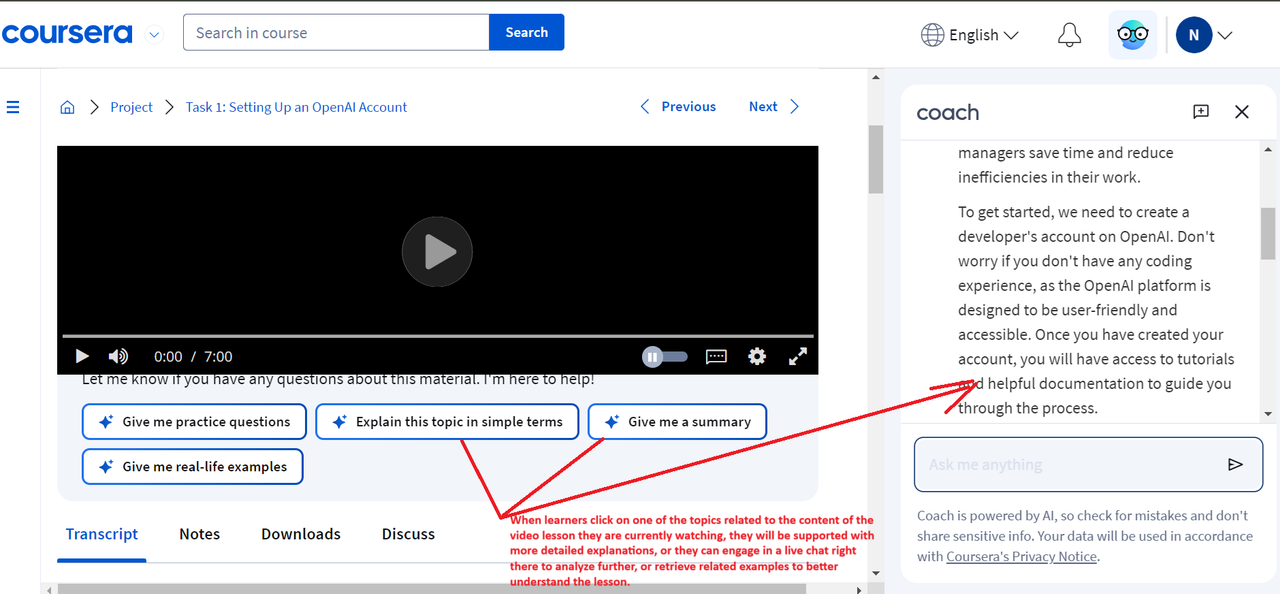
Do you have any plans to develop AI features for WPLMS that support learners in gaining more knowledge during lectures, similar to the system on coursera.org?
The features shared in Coursera require a vector database which is not available in WP. We’re adding this feature in the SAAS and a service will empower existing WPLMS users. kindly connect at vibethemes@gmail.com for more details
I’ve sent mail to you, please help me check
Regards,
Any one reply email for me?
Regards,
I am setting up a demo for you to try out. Replied on mail.
I’m still wait for this
Please, I need help setting up certificate. I have not been able to use the drag and drop certificate builder I will also like to upload my pdf certificate.
Sure, please post a ticket at wplms.ticksy.com and share ticket id with me. You can also check this video link
Ticket created, please help me out. Ticket #3712867
vibe popup do not work. am I right? if yes, why is this there? if not, please guide how will this work?
You can use this plugin : https://wordpress.org/plugins/popup-maker/ , it works in 3.x versions and if you enable legacy mode then the shortcode would start working.

This item was featured on ThemeForest

Power Elite Author
Contact the Envato Market Help Team