22317 comments found.

Hey AJ, I am currently facing the task of rebuilding 22 websites after the existing theme is no longer being updated.
I came across your Total theme and have found it quite pleasant to work with so far. I’m currently in the process of switching one of the smaller sites to the Total theme and I’ve come across a few problems and hope you can help me.
The breakpoints of the theme or of WPBakery are the normal ones: > 1200 Desktop 992 – 1199 Tablet Horizontal 768 – 991 Tablet < 767 Mobile
Why are the breakpoints different when specifying the font variable to be used in a total element? For the heading element, for example, the breakpoints are as follows > 1025 Desktop 960 – 1024 Tablet Horizontal 768 – 959 Tablet 480 – 767 Mobile Horizontal < 479 Mobile
Unfortunately, this makes it impossible to adjust the behavior of the text size to the column width.
Then I tried to make a single menu item look like a button and gave the menu item the class menu-button as specified here: https://totalwptheme.com/docs/header-one-menu-button . Unfortunately, the only associated CSS seems to be the following:
.menu-button { —wpex-btn-font-size: 1em; }
Of course, it would be no problem for me to write the CSS myself, but if the functionality already exists in the theme to use the values stored in the Customizer, that would of course be nicer. Website: https://total.neunender.de/
The last question is whether you can change the behavior of the columns in the backend page builder with the “Float Columns right” functionality switched on.
It seems unintuitive that you have to swap the columns in the backend after turning on the function, where the page builder in the backend actually reflects the desktop view.
A hint like “Columns reversed” at the same place where e.g. the background color of the row is displayed could make the whole thing easier to read in the backend.
Otherwise, so far a really successful theme with many simplifications that I have not seen before.
Thanks - Florian
Hi Florian,
Font Size Breakpoints:
The theme’s font size breakpoints actually the following:
'tl' => '1024px',
'tp' => '959px',
'pl' => '767px',
'pp' => '479px',
These are actually the same ones used in WPBakery but with minus 1px because WPBakery uses a mobile first approach to their column breaks and the font size media queries work backwards. So the sizes do match up with WPBakery.
As I mentioned they work “backwards”, in other words they use a “max-width” media query. So if you were to set a font size for let’s say the 3rd field it will apply to that browser size and below (I mention because I notice sometimes customers adding the same font size to multiple fields).
Now, you can actually modify these breakpoints if you want via a little custom code:
// Define my total element font size breakpoints.
add_filter( 'vcex_css_breakpoints', function() {
    return [
        'tl' => '1024px',
        'tp' => '959px',
        'pl' => '767px',
        'pp' => '479px',
    ];
} );
But…in Total 6.0 I actually made all the theme’s preset font sizes fluid so they are natively responsive – https://totalwptheme.com/docs/preset-font-sizes/ – and it’s generally best to use these than to define manual font sizes across the site as it will make it harder to manage.
If your font sizes aren’t fluid it’s possible you installed the theme prior to the 6.0 update and if you wanted you can go to Theme Panel > Deprecated filter link and disable “Classic Styles”. Or you can go into the customizer and set your custom preset font sizes to use modern clamp values like such: https://totalwptheme.com/docs/preset-font-sizes/ – And there are many sites you can use to create your own custom fluid font size scale such as – https://www.fluid-type-scale.com/
Menu Button:
Your site is using a custom header with the Horizontal Menu element, this element doesn’t support the menu button classname for various reasons. Generally what I would recommend doing is just adding your button text to the menu and then enabling a button for your Off Canvas menu.
Easiest way to add a button next to the Horizontal Menu is via the Flex Container.
I made a video to show you how you can do this: https://a.cl.ly/nOu4w80P
This gives you way more control because the button element can do much more than a simple menu link. Which is why I opted out of the menu-button class for this newer element.
Reversed Columns:
I agree it can be a bit confusing. I”m not really sure the best way to handle this due to some WPBakery limitations. My thought is that once you know how the feature works, in the future you would enable it before adding any content to the row to begin with and then it’s not a concern.
One thing I want to mention also is that the Feature Box element could also be used to accomplish similar things without having to use WPBakery rows. It will give more flexibility in the spacing between the content and the image as well: https://totalwptheme.com/elements/feature-boxes/
Glad you like the theme! Let me know if you have any followup questions and the theme thrives on feedback. Feel free to share any suggestions!
- AJ
Hi AJ, is it possible to have the menu item text wrapped into 2nd line?
Hi,
You can use the theme’s [br] shortcode inside your menu to break up any text.
But if you are using the theme’s new Horizontal Menu element you can also use the menu description field to display descriptions under your menu item label. Example video; https://a.cl.ly/8LuWQjRD
- AJ
I prefer not to use the horizontal menu. what i need is this: menu item is ‘Schedule A Demo’ .. where ‘A Demo’ appear below ‘Schedule’. Can you show where & how to do the [br] shortcode?
You would just add the shortcode to the menu label like this: https://a.cl.ly/jkujoQwb
Thanks a lot, AJ 
the center alignment is not nice if there is a dropdown .. do you have the left alighnment shortcode?
Sorry I’m not sure what you mean, can you share the URL so I can see what’s going on?
By default the theme uses left aligned text for the header menu unless you are using header styles 3 or 4 or if you are using header style 2 with the “Fill Space” setting enabled.
If you want to change the text alignment of a specific menu item though you can’t use a shortcode for that. You would need to add custom CSS and the CSS really depends on the site setup.
- AJ
oh ya .. im using syle 3 ..
wish that it will stil have left-aligned text even though the menu items are centered in the row
Gotcha,
This is very easy to do. Here is some example CSS:
.main-navigation-three .main-navigation-ul > .menu-item > a > span {
    text-align: start;
}
Now, this header style also has a fixed height added to the menu items so things may not look very good if not all items have 2 lines.
In which case you may want to also add this CSS:
.main-navigation-three .main-navigation-ul {
    display: flex;
    flex-wrap: wrap;
    justify-content: center;
}

.main-navigation-three .main-navigation-ul > .menu-item > a {
    line-height: 1.5;
    display: flex;
    align-items: center;
}
That will convert the menu into a modern flex container so all the links are vertically aligned.
- AJ
fantastic ! thanks
Hi AJ,
After the last update, or a bit before, woocommerce subcategories product archives are not showing any product or result and show the message “Nothing found”. And some subcategories are not showing the corresponding subcategory and displays them all mixed together.
How we can fix that?
Thanks in advance!
Jaume,
Ups, sorry!
This website: https://www.llevantmobiliari.es
Hi Jaume,
Ok I see for example this page has the issue: https://www.llevantmobiliari.es/categoria-producto/sillas/sillas-de-comedor/
Are you using the theme’s Post Cards element in a dynamic template for your shop? It seems so…
I did a test locally to try and recreate the issue but it’s working correctly for me: https://a.cl.ly/Blum0OLJ
Is there any child theme code perhaps that is making modifications to the the WordPress queries? Maybe a year ago the theme’s dynamic query worked differently by running an extra query based on the archive shown, but it was optimized to instead use the global $wp_query to prevent extra database hits and allow for code hooking into pre_get_posts to work correctly. It’s possible if you are updating from a very old theme version and your site had some code that was modifying queries that it didn’t break things before but now it does.
That’s pretty much all I can think of…
If you want shoot me an email directly to wpexplorer [at] gmail dot com so we can get this issue fixed up ASAP since it’s a live store. If you send me the logins I can log in and have a look. But I will likely need FTP access so that I can do a print_r() on the page to see what the current query is doing and troubleshoot accordingly. Please use this site to share logins securely: https://onetimesecret.com/
- AJ
Hi, I’ve just started to get acquainted with the Revolution Slider plugin. One of the first things I came across was to activate it.
I could not find an activation code. Could you please let me know what I need to do to activate the full version please?
Thanks in advance.
Hi,
This is Aj the theme author.
Because it’s a bundled plugin you can not “activate” it in the traditional sense. Plugin updates are provided via the theme – https://totalwptheme.com/docs/update-plugins/
Now, Slider Revolution is a MASSIVE plugin and I actually don’t really recommended it. It’s included with the theme because it’s always been included. But really you shouldn’t be using ANY sliders on modern websites if you can avoid it – https://yoast.com/opinion-on-sliders
That’s why in Total 6.0 I added these notices to the bundled plugins installation page: https://a.cl.ly/L1u2xDKy
To keep your site fast and optimal, for Hero sections it’s best to use static images or video backgrounds. For example:
- Static hero: https://totalwpthemedemo.com/biz/
- Video bg: https://totalwpthemedemo.com/consultative/ (this is a new demo to be released later today)
Let me know if you have any followup questions or concerns!
- AJ
Hi AJ, 1. How can i change the background colour of the Form 7 submit button? 2. I have a child theme. How can i remove it and just have Total parent theme?
Hi,
- The Contact Form 7 plugin should be inheriting the theme’s button colors and styles as defined in the theme or your custom styles defined in the Customizer – https://totalwptheme.com/docs/button-colors/ – if you want to target the plugin’s button separately then you will need to use custom CSS. Example:
input.wpcf7-submit { background: red; }
- If you have any code in your child theme you will need to move it first. Any custom CSS can be moved to the Theme Panel > Custom CSS page and any PHP can be moved into a snippets plugin. Then you will need to copy your settings from Theme Panel > Import Export. Then you can switch to the parent theme, then import the settings you copied previously. There isn’t going to be any speed difference switching though, no real benefit to do so. So if it ain’t broke, don’t fix it.
- AJ
hi
how we can show menu description under menu item is there function code or what
and thank,s for helping us and improve total theme
i use this function add_menu_item_description($item_output, $item, $depth, $args) { // تحقق من وجود وصف (description) للإدخال if ($item->description) { // إضافة الوصف أسفل العنصر $item_output .= ‘ ’ . esc_html($item->description) . ‘ ’; } return $item_output; } add_filter(‘walker_nav_menu_start_el’, ‘add_menu_item_description’, 10, 4);
Hi,
Yes, that code should work  I have a snippet here as well: https://totalwptheme.com/docs/snippets/menu-descriptions/
I want to mention this for anyone else reading this…
The default theme header menu doesn’t natively support descriptions, but if you use the Header Builder and the theme’s new Horizontal menu element it does. Example: https://totalwptheme.com/elements/horizontal-menu/
Here is a guide for using the Header Builder: https://totalwptheme.com/docs/header-builder/
And you can view the theme’s header patterns as well, which can be used to quickly create your header: https://totalwptheme.com/patterns/header/
- AJ
What happened to the mobile-menu-toggle class? It doesn’t seem to be working since the last update. It doesn’t work on our live site (https://airflowdesigns.com), but it still works on our staging site (https://stg-airflowdesigns-staging.kinsta.cloud/) using Total 5.19. Also, the doc at your page for “How To Toggle The Mobile Navigation With Any Link” (https://totalwptheme.com/docs/?post_type=docs&p=700) is 404 not found.
Since mobile menu Toggle Button Style “Custom” is currently not working, I switched to the “Fixed Top Navbar” style mobile menu on our live site. But we still need to get the custom working, so please let us know how. Thanks.
Hi,
This is AJ the theme author, sorry for the troubles!
I’m honestly not sure what happened to the old docs. I think I re-named it for SEO reasons so the slug changed but I can’t find it.
What’s happening is that on your site the custom mobile menu icon is not a link it’s a span and the theme is checking for “actionable” elements (links or buttons). The theme’s code looks like this:
document.querySelectorAll( 'a.mobile-menu-toggle,button.mobile-menu-toggle,li.mobile-menu-toggle > a' ) {}
The change was made to prevent people from using non-focusable elements for their mobile menu toggle because it causes issues with accessibility. In your staging site for example, it’s impossible to ever open the mobile menu with a keyboard because the icon is a SPAN and not a link or a button.
The simple fix would be to edit the Icon element and give it a link (#) this way it becomes an actionable/focusable element.
The best way to set up a custom toggle would be with a little html instead of the icon element, so it’s more accessible.
Example:
<button class="mobile-menu-toggle wpex-unstyled-button" aria-label="Toggle menu" aria-expanded="false"><span class="wpex-icon wpex-icon--2xl"><svg xmlns="http://www.w3.org/2000/svg" viewBox="0 0 448 512"><path d="M0 96C0 78.3 14.3 64 32 64l384 0c17.7 0 32 14.3 32 32s-14.3 32-32 32L32 128C14.3 128 0 113.7 0 96zM0 256c0-17.7 14.3-32 32-32l384 0c17.7 0 32 14.3 32 32s-14.3 32-32 32L32 288c-17.7 0-32-14.3-32-32zM448 416c0 17.7-14.3 32-32 32L32 448c-17.7 0-32-14.3-32-32s14.3-32 32-32l384 0c17.7 0 32 14.3 32 32z"/></svg></span></button>
I would recommend doing it by creating a custom shortcode:
add_shortcode( 'mobile_menu_toggle', function() {
    return '<button class="mobile-menu-toggle wpex-unstyled-button" aria-label="Toggle menu" aria-expanded="false"><span class="wpex-icon wpex-icon--2xl"><svg xmlns="http://www.w3.org/2000/svg" viewBox="0 0 448 512"><path d="M0 96C0 78.3 14.3 64 32 64l384 0c17.7 0 32 14.3 32 32s-14.3 32-32 32L32 128C14.3 128 0 113.7 0 96zM0 256c0-17.7 14.3-32 32-32l384 0c17.7 0 32 14.3 32 32s-14.3 32-32 32L32 288c-17.7 0-32-14.3-32-32zM448 416c0 17.7-14.3 32-32 32L32 448c-17.7 0-32-14.3-32-32s14.3-32 32-32l384 0c17.7 0 32 14.3 32 32z"/></svg></span></button>';
} );
Then using [mobile_menu_toggle] where you want to display the mobile menu toggle.
The other benefit of doing it this way, is that your old staging site was using a custom font icon (Entypo) so it’s loading the whole font icon library. By using your own custom code you can directly add the SVG you want to use and keep the site fast!
Let me know if you have any issues or followup questions!
- AJ
Thanks for the info. On another note, any idea why the all the main menu items in the Customizer are now height: 100%? See https://i.imgur.com/4uvMohG.png
This of course shouldn’t be happening. It should look like this: https://a.cl.ly/KouRGElO
WordPress updated their Customizer scripts in 6.7 so the issue could just be cached related. I would recommend you first try clearing your browser cache.
If that doesn’t work it could be a plugin conflict. I know for a fact this plugin causes the issue: https://wordpress.org/support/topic/customizer-styles-in-wordpress-6-7/
But you don’t seem to be using that plugin from what I can tell.
- AJ
That’s correct, we’re not using that particular plugin. I did find several posts about this exact problem, so it seems like a common issue in WordPress 6.7.1. This page https://wordpress.org/support/topic/customizer-sidebar-accordion-buttons-100-height-in-6-7/page/2/ suggests adding the following to function.php. I did, and it worked!
/* wp-admin panel Appearance > Customize button css fix */

function custom_admin_styles() {
    ?>
    <style type="text/css">
        .accordion-section-title button.accordion-trigger {
            height: auto;
        }
    </style>
    <?php
}
add_action('customize_controls_print_styles', 'custom_admin_styles');
Is your customizer showing the icons next to your tabs like in my video? Just want to make sure, because I your previous screenshot it didn’t seem like it.
It definitely sounds like some plugin on the site is messing with the WP button styles. This extra CSS shouldn’t be needed. Of course it’s not a huge deal to add the extra code.
- AJ
Hi AJ
My question is about the “Reach” demo. How can I remove the social media icons in the header (X, facebook), which are there by default in the upper right corner?
Hi,
This is Added via a dynamic template part created under Theme Panel > Dynamic Templates and then inserted into the field at Appearance > Customize > Header > General > Side Content. See here: https://a.cl.ly/4guLYlAq
- AJ
It works, thank you.
Hi AJ
I wonder if there is a solution to this little issue?
https://www.orchardsuite.co.uk/landing-page-test/On certain screen sizes, the image sliders appear smaller than the column next to them, introducing a white margin top and bottom. Easiest to explain through a screenshot:
https://ibb.co/71X2Jr5I wondered if there was some kind of clever “stretch” setting for this, a bit like the stretch setting in feature boxes.
This isn’t a huge issue because hardly anyone will have the screen sizes affected, but it’s just for perfection if there is something I can do.
Thanks
James
Hi James,
Did you delete the URL? I’m getting a 404 page.
Based on the screenshot I see you’ve inserted an image slider. So it would be a bit complex to “stretch” the slider to fill the column. It’s much easier if you are just adding an image background to the column itself (generally this is how it would be done). I wrote a little doc for this: https://totalwptheme.com/docs/how-to-add-a-stretched-image-inside-a-wpbakery-column/
If you want a slider to stretch (or any other element) you need to make your columns equal height then add CSS to the site to stretch the WPBakery wrapper inside the column, around the slider, the slider itself and the images inside the slider.
My personal advice is to not have a slider. People won’t sit there and click through photos (they just wont) and so you are slowing down the site by introducing extra images, slider CSS, slider JS, jQuery and JS processes. Having a single image next to the content will keep the site loading fast which is what the visitor really wants. If you want to have photos for the visitor to look through that’s what the gallery page is for.
- AJ
Hi AJ
Could you help me out with some custom CSS?
https://www.sandbanksbrewery.net/On mobile, the logo should be centered, but is now left aligned.
I had been achieving this with the following CSS, but it stopped working when the theme was updated (not sure which version).
@media only screen and (max-width: 1160px){ #site-logo.header-five-logo {margin:0 auto;} }
(1160 being the mobile breakpoint)
Thanks
James
Hi James,
This is a bug with your specific setup. I am adding a fix for the upcoming 6.0.2 patch which I plan to release most likely tomorrow.
The correct CSS fix would be this:
@media only screen and (max-width: 1160px) {
    #site-logo.header-five-logo {
        justify-content: center;
    }
}
Thank you for reporting this!
- AJ
ps: If you want you can patch your theme right now, it’s very simple. You just need to edit the file at Total/inc/header/logo.php locate line 582 which looks like this:
case 'three':
case 'four':
    $classes[] = 'wpex-text-center';
    classes[] = 'wpex-justify-center';
break;
And include ‘five’ in the header styles like this:
case 'three':
case 'four':
case 'five':
    $classes[] = 'wpex-text-center';
    classes[] = 'wpex-justify-center';
break;
End result: https://a.cl.ly/xQukljew
Thanks AJ, I used the CSS for now, works great.
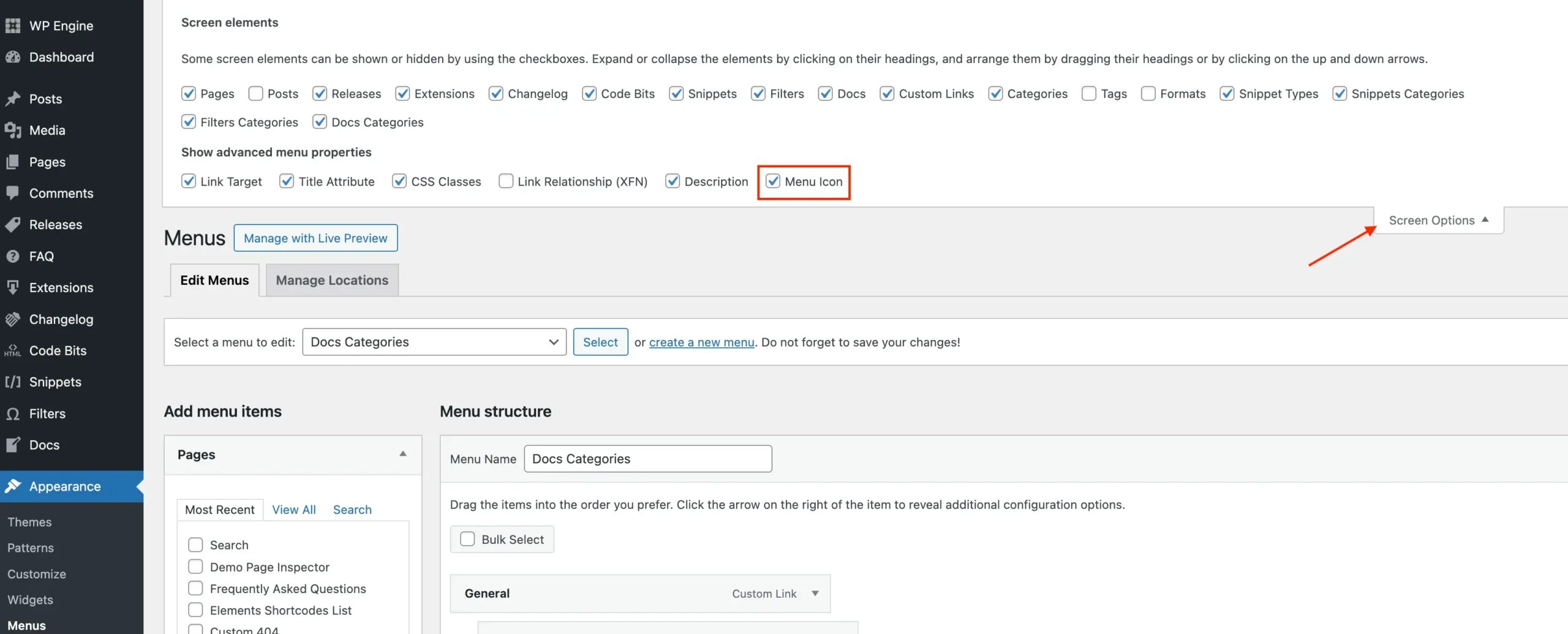
Hey AJ, is there a new way to add icons to the menu items? I went to the support docs: https://totalwptheme.com/docs/adding-icons-menu-items/ and I don’t see the option here on the screen shots. Thanks!
It’s possible you have the Icon option disabled under Screen Options: https://totalwptheme.com/docs/wp-content/uploads/sites/51/total-menu-icon-enable-screen-options-scaled.webp
If not, then maybe a 3rd party plugin is breaking things. If your site is updated to the latest version of the theme you should see these new settings.
- AJ
ps: You can still add menu icons the same way as before using the theme icon shortcode, but of course using the new feature is much easier and it also ensures that the the theme adds proper classes to your icons for spacing.
Hmm, I don’t see that under my screen options. I just used the shortcode method. Thanks AJ!
Maybe your theme is outdated: https://totalwptheme.com/docs/changelog/
- AJ
Hi AJ, we use Total on 3 of our sites and it’s a great theme! We have licenses for live sites and until recently, on our development environments, we could check a box to specify that they were “development environments”. It was located just below the license key field, the exact label was “Check this box if this is your development environment (not the final or live website)”. This box seems to have disappeared with the latest update. Is this normal? Do we have to buy new licenses for our development environments specifically?
Thanks for taking time to reply.
Hi,
This is AJ the theme author.
I actually had to remove this checkbox because it technically violates the licensing terms here on Envato. But you can still enable the theme on as many development sites as you need to. You just simply can’t “activate it”.
The way Total is coded, NOTHING is hidden behind the license. The theme license simply enables automatic downloads and access to support for the domain. So you can still use it freely on development/staging sites without limitations. And if you really need automatic updates for those sites you can just install the Envato Market plugin on the dev server – https://www.wpexplorer.com/envato-market-plugin-guide/
- AJ
I have a question, I use the Total theme and I am looking to add a dropdown menu to my existing Top Bar Menu. This menu is located in the Top Bar of the site, but when I try to have it be a dropdown menu, meaning it has children, they do not appear on hover. Any ideas?
Hi,
This is AJ the theme author.
This is actually on purpose, because dropdown menus require excess code and mobile menu support. So I don’t enable this for the Top Bar menu area to keep things slim.
Now, you have a couple options:
1. This is the more time consuming option, but I want to let you know incase you didn’t know this ability exists. You can use the function at Theme Panel > Header Builder create your entire header using your page builder of choice (WPBakery/Elementor). So you would disable the Top Bar in the Customizer and insert anything you want for your site header via the Header builder.
This way, you can add infinite dropdown menus via the theme’s Horizontal Menu and/or Off-Canvas Menu elements. I don’t have any header patterns with double menus, but you can use a header pattern to get started quickly with your custom header to see how I set things up:
This method gives you the most freedom to design a truly unique header.
2. You can continue using the default site header and top bar. But create a new template part for your top bar menu. Here is a video showing how to do that: https://a.cl.ly/eDubzg5A
- AJ
AJ, Thank you for the reply. I will try the solutions that you have mentioned.
Love the Total Theme.
Hello Aj,
It seems that the “Portfolio Carousel” module is broken after the update to Total Theme 6. https://www.querus.de/projektmanagement/
The “Center Element” option doesn’t work anymore?
Thanks and best regards
Hi,
Nothing changed in how the carousel works in this regards, but I did a test anyway and I can’t recreate the problem on my end: https://a.cl.ly/2NuQkPpq
You have some child theme code that’s adding custom CSS to the carousel like this:
.wpex-carousel {
    overflow: hidden;
    margin-left: -30% !important;
    width: 160% !important;
}
I’m guessing this is causing the issue. If I remove this code in the browser and resize your page then it works correctly. Video test: https://a.cl.ly/6quARvpB
What probably happened is that previously your child theme code was not overriding the theme’s code, but because of the optimizations made to the carousel’s CSS your child theme code now overrides and causes display issues.
- AJ
ps: Your stretched row has a negative -40px margin added to the left/right. If you add any margins/paddings to your stretched rows, the theme’s CSS based stretched row can’t work so your site is using the default WPBakery JS based stretched rows, which isn’t “ideal” because it requires added javascript which slows down the site and also delays the row’s visibility.
Hi AJ. Is there any way to use Custom Cards on the Categories/Terms Grid element? ...Or query the portfolio categories in the Post Cards element?
Hi,
No, it’s impossible because cards are coded to work with Posts so all the functions used are specifically to get post data (get_the_title, get_the_excerpt, get_the_content…etc) those are all functions for pulling post data. It would require a completely different element and completely differently coded cards to be able to work with taxonomy terms instead of posts. It’s something I’ve thought about, but it introduces a lot of bloat so I’ve hold off – especially because for most websites it’s simply not needed.
Also querying terms is different then querying posts. So it would also requires a whole separate “Term Cards” element, custom query class and if you want ajax support a new ajax functionality (for load more/filters).
If you want a custom design for displaying terms and the Terms/Grid element doesn’t work for you you’ll need to code a custom shortcode/element. And you can use the theme’s CSS utility framework for your grid/cards design without having to introduce custom CSS – https://totalwptheme.com/css-framework/
If you want you can hire me as well to custom code something for you, email me at wpexplorer@gmail.com if interested. I charge $75/hr and I work fast and know my theme better than anyone
- AJ
Actually, I did get your email. Just replied back
Hi AJ. Wow, that’s a lot of work that I hadn’t considered. I’ll just make a static page and design link boxes to the taxonomies. ...Many thanks for your reply and for the hard work that goes into this theme and all the support we get!
That’s probably best if there aren’t a lot of terms to add. And also sorry if I confused you with my last response about receiving your email – that was intended for another customer!
Thanks AJ for your update today on 6.1 to include Term Cards element for displaying taxonomy terms. My site design looks so much more consistent now and the functionality will save me a lot of time managing category updates. You’re a star!
Hi AJ. The only problem I’ve encountered is that when using ‘Term Description’ in my Custom Card for Terms, it’s not grabbing the description from the Category. Perhaps I need to get this metadata from some other module.
That’s great!
You are correct, I made a little error when updating the Term Description element to work in the context of term cards. I’ve fixed the issue and manually patched the version of Total Theme Core that gets installed in your dashboard. If you delete the Total Theme Core plugin, then go to Appearance > Install Plugins and re-install it, it will fix the issue.
Sorry for the troubles and thank you for reporting the bug!
- AJ
Hi ! It seems that suddenly, on Safari, some toggle elements do not “force” other elements onthe page to slide down, which means that the toggle content is actually behind other elements. Any idea why that would be ?
Best, JM
Hi,
It’s impossible for me to know what could be going on without looking. Are you able to share the URL?
The Toggle element is working correctly for me when testing for example here: https://totalwptheme.com/elements/toggle/
- AJ
When looking at the page, I see you hare using the “Equal Content Height” option for the Staff Grid. What this does is it adds a height to each entry so all the entries have the same height. Here is a screenshot: https://a.cl.ly/JruQlnRD
This function has always worked like this. My guess as to what’s happening is that some browsers are ignoring the inline height and letting the container overflow. Technically Safari is working correctly and the bug is that the other browsers are expanding. Perhaps a recent Safari update fixed this.
You’ll want to edit the Staff Grid to disable the Equal Content Height field under the Style tab like this: https://a.cl.ly/12udBP2g
- AJ
Hi AJ,
as “Tonis_troubles” described, we have the same Issu, can we please also get the Zip with the Plugin for the old Fonts?
Thanks and BR
Hi,
Here is the plugin you can use: https://a.cl.ly/o0u1y6ZQ
And of course you can rename this plugin whatever you want or even grab the code and files and dump them in a child theme if you prefer. The plugin/code will never require updating because it’s just loading font files that won’t ever be updated.
But as I explained previously I would recommend not using icon fonts because then you miss out on the optimization (switching to svg based icons). If you needed any help tweaking your CSS to work with SVG’s let me know or you can also just ask chatGPT and it can give you the code for you (I’ve tested this).
- AJ
Hello Aj, thank you very much.
No problem!
Hi, I have purchased this theme’s license, I want to ask, If I have activated this license for my website www.mydomain.com, then I want to migrate my website to new domain www.new-domain.com, can the license I have purchased be transferred to the new domain? is that possible? How to ? Thanks
especially for WPBakery addon’s license
Hi,
Yes you can transfer the theme license. The easiest is to just de-activate the license under Theme Panel > Theme License before moving the site. But you can always log into our site here – https://my.totalwptheme.com/ – and click on “license manager” to de-activate any license
Now, bundled plugins do NOT include “licenses” for the add-ons such as WPBakery. The way bundled plugins on ThemeForest work basically is that you don’t have a license for the plugin itself so updates and support for the plugin (WPBakery) are provided via the theme and theme developer.
So any issues you have with WPBakery I would help you out and anytime there is a WPBakery update I release the update with the theme – https://totalwptheme.com/docs/update-plugins/
You don’t need a separate WPBakery license but you can purchase one if you want (some customers do this) – https://totalwptheme.com/docs/activate-wp-bakery-page-builder/ – this way you also have access to automatic plugin updates (although not recommended, it’s best to wait for me to test and ensure full theme compatibility and update the plugin with the theme) and to receive support directly from the plugin developers.
- AJ
Hi AJ, After updating the theme I see some issues. Icons placed as pseudo elements font-family Ticons don’t show anymore. Issue with icons on the whole. Sidebar on my shoppage doesn’t show up. Am I the only one with such issues? https://hairweave.nl/producten/ is where I should see the sidebar with filters. Icons I fixed by adding them in a different way. Cheers, Tonny
Hi Tonny,
- The theme no longer loads theme icons. Please see the changelog: https://totalwptheme.com/docs/changelog/6-0/ (second point in the yellow notice). Here is the response I sent to another customer regarding the change:
Changing font icons to SVG’s has been highly requested for years because using font icons is much slower and bloated as opposed to only loading icons you need on your site via SVG’s.
It’s a little bit of a pain (I understand) if you were using CSS to insert icons because now the theme’s font icons aren’t loaded on the site so you will need to tweak your CSS a bit to use SVG’s as well.
I can create and give you a plugin that loads the old icon CSS (let me know if you want this) so you can just enable it on your site. But then you lose the benefits of a faster site and higher page speed score.
Instead recommend instead changing your CSS to use SVG’s.
For example to add an arrow on the right of an element named “my-element” you can use something like this:
.my-element::after {
    content: '';
    display: inline-block;
    margin-inline-start: 10px;
    width: 1em;
    height: 1em;
    background-color: currentColor; /* Inherits the text color of the element */
    -webkit-mask-image: url('data:image/svg+xml;charset=UTF-8,%3Csvg xmlns=%27http://www.w3.org/2000/svg%27 viewBox=%270 0 448 512%27%3E%3Cpath d=%27M438.6 278.6c12.5-12.5 12.5-32.8 0-45.3l-160-160c-12.5-12.5-32.8-12.5-45.3 0s-12.5 32.8 0 45.3L338.8 224 32 224c-17.7 0-32 14.3-32 32s14.3 32 32 32l306.7 0L233.4 393.4c-12.5 12.5-12.5 32.8 0 45.3s32.8 12.5 45.3 0l160-160z%27/%3E%3C/svg%3E');
    -webkit-mask-repeat: no-repeat;
    -webkit-mask-size: contain;
    mask-image: url('data:image/svg+xml;charset=UTF-8,%3Csvg xmlns=%27http://www.w3.org/2000/svg%27 viewBox=%270 0 448 512%27%3E%3Cpath d=%27M438.6 278.6c12.5-12.5 12.5-32.8 0-45.
}
This is the modern way of adding icons with CSS without having to load a whole massive font icon set. Which requires not only extra font files but also CSS files. SVG’s are added as inline code so only the code for the icons used for the site will be added to the site and doesn’t require additional font/CSS parsing. It’s much better.
I am sorry for the troubles this causes when updating. But I really wanted to bring Total to modern standards and provide my users with faster sites and higher page speed scores.
If you do update your CSS to use SVG icons I recommend these sources to get SVG’s:
https://fontawesome.com/ https://fonts.google.com/icons?icon.set=Material+Symbols https://icons.getbootstrap.com/ And you can just copy the SVG and ask ChatGPT to give you the CSS to speed things up.But if you really want to go back to the “old way” I will make and zip over a plugin to you that loads the old font files.
- If your sidebar is missing it’s most likely due to the changes in sidebar placement and custom child theme code. I also mention this in the yellow notice of the changelog:
Missing Sidebar? A new and highly requested setting has been added to the Customizer so you can choose your sidebar placement on mobile (top, bottom or auto). Because of the required changes to make the setting work if you were using this snippet to move your sidebar it will cause the sidebar to be removed completely. So, if your sidebar is missing on your site after updating you likely have added that code to your site and it will need to be removed.
Please make sure you are not using a snippet that looks like this: https://totalwptheme.com/docs/snippets/move-sidebar-up/ – on your site, because it will cause the sidebar to go missing.
- AJ
HI AJ, should have read the changelog, but had a case of slight panic
Sidebar is fixed, great addition to have the placement as an option in the customiser.
So yes, realising I’ll have to change 20 something websites to the new way of adding icons I would be helped with a fix which doesn’t involve me altering the CSS of all those sites. So if there were a plugin holding the old CSS together I’d be much obliged.
Thank you for your quick response! Tonny
I totally understand! Here is the plugin: https://a.cl.ly/o0u1y6ZQ
If you have any issues with the plugin or any other questions/concerns let me know!
And in the future if you are going to insert icons into the design somewhere before you start messing with CSS feel free to ask me here in the comments (if you have the time to wait for a reply) because almost always there will be a way to do it with PHP instead.
- AJ
Thank you!
I finally read the changelog. Now I’m in awe! What an amazing update. I can’t wait to test the ACF repeater fields solution you came up with.
I did find something I can’t seem to fix. I have a product dynamic template for woocommerce product. You helped me a while back to show the featured image as well is the gallery images in the same Image slider. But after update no image shows.
It seems like the previous addition you made (showing the featured image as well as the image gallery in the same slider) doesn’t work anymore. The featured image doesn’t show anymore.
Hi,
Sorry, I can’t locate the original email regarding this. But there is a new hook you can use that I added in the last update. So if you just add this line of code to your site it will include the featured image in any post gallery:
add_filter( 'totaltheme/post/gallery/include_post_thumbnail', '__return_true' );
And if you want to target the products only you can use this:
add_filter( 'totaltheme/post/gallery/include_post_thumbnail', function( $check ): bool {
    if ( function_exists( 'is_product' ) && is_product() ) {
        $check = true;
    }
    return $check;
} );
The old code I helped you with may have been more complex since this filter didn’t exist before.
What may have happened, is I may have updated your site with a filter I told you I was going to add to the theme but then when I actually did the update I renamed the filter to something better so your code stopped working. If so, I am so sorry!
- AJ
Great, that fixed it!
Url: https://havitsteelstructure.com , I just updated the theme, but there is a problem with the Header. “Skip to content” appears on the left, the social media icons on the header are not displayed, and the search icon on the right is not displayed.
Hi,
Make sure to log into your site and clear the WPRocket plugin cache. You need to do this every time you update WordPress a plugin or the theme. Your site is currently loading old HTML and scripts. So a lot of things will appear broken.
By the way, WPRocket has a known bug in their plugin that can break your mobile menu. This is because they incorrectly grab CSS files that have media attributes and don’t apply the media attribute to the inline CSS. This has been an issue with their plugin for a years now.
So after clearing your cache you will want to either report the issue to the WPRocket developers so they can fix it or you will need to exclude the following theme CSS files in WPRocket:
/wp-content/themes/Total/assets/css/frontend/breakpoints/max.min.css
/wp-content/themes/Total/assets/css/frontend/breakpoints/min.min.css
To prevent the plugin from breaking your mobile menu.
- AJ