6407 comments found.

Hello. Why is DJNews Customize Style not showing?
I look under Dashboard > JNews Dashboard and the Customize is not there. I can only access the basic WP Customize under appreances.
I know I am out of the support period but this should not be disabled, correct?
Thank you for your help
Hi watergirl_2,
Thank you for reaching out Yes, you should still be able to access the Customize option under JNews Dashboard, even if your support period has expired.
If the Customize option is not showing, I recommend troubleshooting the issue by following the steps below
1. please make sure you have activated the theme license, please follow the steps below to activate the theme, please make sure you are using the same Envato account that you use to buy JNews when activating the theme
JNews activate license documentation
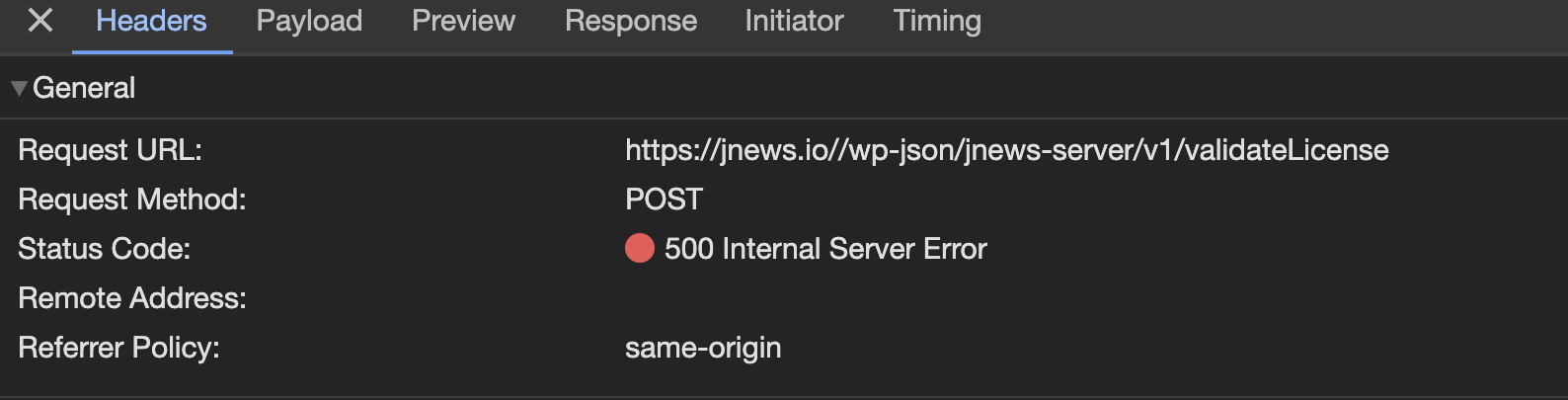
2. Make sure you are using strict-origin-when-cross-origin in your Referrer Policy setting. This is necessary for your server to make requests to the JNews server when accessing the JNews Dashboard, validating licenses, and installing JNews Plugins & Demos. Alternatively, if the Hypertext Transfer Protocol on your website is using HTTPS, you can use strict-origin in your Referrer Policy setting. You can change the Referer Policy setting in the Apache config or Nginx of your site. If your server is managed by a server administrator, you can contact your server administrator.
if the problem still persist, please contact us through the link below
our team will try to help you
https://themeforest.net/user/jegtheme#messageThank you
Bug – incompatibility with Elementor 3.26.0. See staging dot futurecfo dot net, pw “jnews”. Only Elementor & JNews Essential plugin active. Compare to non-staging URL where Elementor plugin rollback to 3.25.11.
Hi pixldigital,
Thanks for reaching out to us, we’ve checked our theme with Elementor v3.26.0 and it is still working properly, could you please give us more information about the bug you’re experiencing? please attach a screenshot or video
please also try to troubleshoot this issue by deactivating third-party plugins that are not related to JNews to see if there are any plugin conflicts or not, if you are using any caching plugin or CDN caching please try to clear it
Thank you
I have 3 license on 3 of my sites. I notes that is a bug in theme with elementor latest version 3.25.11 . When I role back elementor to previus version 3.25.10 everyting work normale. Please check this bug a relase fix as soon as possible
Hi alexk66,
Thanks for reaching out to us, we’ve checked our theme with the latest version of Elementor and it is still working properly, could you please give us more information about the bug you’re experiencing? please attach a screenshot or video
please also try to troubleshoot this issue by deactivating third-party plugins that are not related to JNews to see if there are any plugin conflicts or not, if you are using any caching plugin or CDN caching please try to clear it
Thank you
I was make a screen record. Where I can send to you?
Why can’t I activate the theme on the subdomain or subdirectory of the main domain without deactivating the main domain??
WHY??
Hi afolabiot,
Thanks for reaching out to us, you can activate the license on your subdomain or subdirectories without deactivating the license on your main domain as long as the subdomain or subdirectories are in the same domain as your main domain for example if the main domain is jnews.io and the subdirectories is jnews.io/default or jnews.io/newsplus or the subdomain default.jnews.io or newsplus.jnews.io all of it can use 1 license at the same time
you can activate the license t the subdomain or subdirectories as you activate the license first time at your main domain, please follow the documentation below for the license activation
JNews Acitvate License Documentation
if your license still got deactivated, it may indicate an issue preventing the license from being updated. This often occurs when someone is using a Jnews theme file from an unauthorized source, to troubleshoot this please follow the steps below
1. Replace the JNews theme file by downloading the latest version from ThemeForest then install the zip file theme from Appearance > Themes
2. Reset your license by accessing the following URL.
yourdomain/wp-admin/admin.php?page=jnews&path=jnews&action=reset-licenses
please replace yourdomain with your actual domain
3. Reactivate your license. When trying to activate your license, remember to use the Envato account that you are using to buy the JNews theme to allow you to access the activate license page. If you cannot change the account logged in on Envato, you can activate the license in an incognito browser so that during the license activation process, you will be prompted to log in to your Envato account again.
if you need help to activate the license please contact us through link below
https://themeforest.net/user/jegtheme#messageour team will help you to activate the license
Thank you
Hi, i can’t create an account in support.jegtheme with envato ho to solve the problem ?
Thanks
Hi yacineamotech,
Thanks for reaching out to us, to log in to our support forum please make sure that you are using the same Envato account that you use to buy Jnews because on your current Envato account, we didn’t see a purchased label
after your login is successful you can create ticket in he link below
if you still having problems to login to our support forum, please contact us through the link below
https://themeforest.net/user/jegtheme#messageour team will try to help you
Thank you
When will this theme be fully integrated with Gutenberg??
And why are the BuddyPress options tied with the JNews + Video plugin?? Shouldn’t they be independent??
What if I don’t want to use the JNews + Video plugin, but need to use BuddyPress??
Please you need to disassociate the BuddyPress options with the video plugin and make it standalone or perhaps add it to the JNews Essential.
I haven’t used this theme since I purchased it a year and a half ago. I thought it would have been much better by now, and totally integrated with Gutenberg.
Hi afolabiot,
Thanks for your feedback and for reaching out to us, currently we are working on expanding our theme’s compatibility and functionality with the Block Editor (Gutenberg). we also have Gutenverse News dedicated block plugin for Gutenberg / block editor, that you can consider
Regarding the BuddyPress integration with the JNews Video plugin, we integrate it to jnews video because of our jnews video utilize some feature from Buddypress such as subscription feature . We understand your concern about making this integration independent, and we will consider this suggestion. I’ve added it to our feature request list for evaluation, but please note that we cannot guarantee it will be implemented immediately.
Thank you
Yes, please make the options and styles a stand-alone or in one of the more essential plugins.
What’s delaying the full Gutenberg compatibility?
Please, we need this thing. We don’t want an extra page builder plugin when we have a native one, please.
Hello afolabiot,
We sincerely apologize for the delay in our response and for the inconvenience you have experienced. At this time, you can use the Gutenverse News plugin for your News Block needs.
Additionally, you may also use the Gutenverse plugin to enhance your overall WordPress design experience.
Thank You
i want to setup rss feed from multiple websites where it will just fetch the latest news and auto publish it. I purchased this software because of this. Can this software auto fetch any news feeds or RSS that i want to use and list on website, automatically?
Hi fadedplanet,
Thanks for reaching out to us, to display and fetch posts from the RSS feed you can use our JNews – RSS Block, to use the block, first please create a page > edit the page with WP bakery or Elementor > search for JNews – RSS Block > add the JNews Rss Block to the page
after you add the block, edit the RSS block setting and you can add your RSS URL in the Feed URL input field, the feed will also be fetched automatically
If you have any further questions or need further help, please create a support ticket in our official support forum using the link below
Thank you
what happen to the built in plugins you said that worth $375 if they are out of update. Will i be forced to pay $375 or more to keep using those plugins. what cost will have keep your theme run effectively.
Furthermore, hope, I will get source code for buying this?
What is your server requirement to run your theme?
Hi chima10,
Thanks for reaching out to us, We have a strong commitment to continuously improving our theme and the built-in plugins, as can be seen in our Change Log. We deliver updates regularly. After purchasing a JNews license, you will receive a lifetime update.
Regarding server requirements, you can find all the necessary details in the link below
if you have another question, don’t hesitate to reach us
Thank you
Hey guys! I have the same size logo on the black mode of the site as on the white mode, but the size on the black is small and I can’t increase it, not even with CSS. Please give me some advice. And why don’t you have support for the customers so I can open a ticket?
Hi infoermestv,
Thanks for reaching out to us, to adjust the logo size, please try to use the CSS code below, you can add the CSS code into Dashboard > JNews Dashboard > Customize Style > Additional CSS you can adjust the width in the code below according to your needs
if you need further help, we have an official support forum that you can access at the link below, please log in to our support forum using the same Envato account that you use to buy the JNews theme
Thank you
Thank you for adding Threads icon. It would be great if Bluesky were also added.
Hi jijojose,
Thanks for reaching out to us, we will add the blue sky icon in the upcoming update
If you have any further questions or need further help, please create a support ticket in our official support forum using the link below
if your support license expires, please try to extend or renew your support license.
Thank you
Friends, I have a problem and I can’t find a place to contact the support group. I can’t set up a sidebar structure on a single post template and I have a few other problems.
Hi infoermestv,
Thanks for reaching out to us, to setup the sidebar structure, you can go to Dashboard > Appearance > Widgets > Default Sidebar
if your need further help, please create a support ticket in our official support forum using the link below
Thank you
The thumbnail for module three is no longer showing after the latest update. Could you please assist with this issue?
Hi AMGdevelopment,
Thanks for reaching out to us, to troubleshoot the issue, please try to check if both your site url and thumbnail url using https or not and theres no mixed content error in the browser console
please also try to disable third party plugin for a while to see if there are any plugin conflict or not, if you are using any plugin caching or CDN caching please try to clear it
if the problem still persists, please try to open a new support ticket on our forum. please also attach your site url in our support forum, our team may need to check the issue directly in your site
Thankyou
I enter the Adsense code in the Additonal Code> Header javascript section in the theme settings. However, it does not accept the code and gives an error like in the picture. https://prnt.sc/XKZLdhG21EDd
This was not happening before.
Hi thnx88,
Thanks for reaching out to us, if you want to use the Google Adsense script code you can use the ads placeholder that we provide
you can use our JNews – Ads Block
for the ads type choose script code and you can paste your script code on the ads code input field
we also have several advertisement placeholders that you can find in Dashboard > Appearance > Customize > JNews : Advertisement Option
please check the documentation below for more information
If you have any further questions or need further help, please create a support ticket in our official support forum using the link below
if your support license expires, please try to extend or renew your support license.
Thank you
i had applied for refund request – pls approve that (as mentioned to the support team, I am trying to use Jnews for lifetime subscription feature – but the implementation, i.e. unlock countdown popup) isn’t an ideal experience – so the best thing to do is to get the refund. hope you understand,
I have a very strange problem with the categories of the post. After importing the demo I removed all categories and added only two “Poradniki” and “Wiadomości” but every time I add a new post, new random category is created with some random name here e.g. “Film and Animation” probably with the same name as before when importing the demo? Where does this come from and how to fix it?
Graphics: https://ibb.co/ZBWjb0q
Hi marinbiznesuk,
thanks for reaching out to us, we don’t have a feature or functionality to add a category to post after the demo import
to troubleshoot this issue please try to disable third-party plugins related to JNews to see if there are any plugin conflicts or not
if the problem still persists, please try to open a new support ticket on our forum. Our support team may need further information about your website based on your problem.
if your support license expires, please try to extend or renew your support license.
Thank you
Hi, My complimentary support ended and now my theme is not updating. I already bought 2 licenses but now again asking for the license for updating the theme. Here are the both licenses https://snipboard.io/dZYe2i.jpg
Kindly let me know how to update
Hi 33qamar,
Thanks for reaching out to us, If you consistently receive an invalid message when updating the theme, it may indicate an issue preventing the license from being updated. This often occurs when someone is using a Jnews theme file from an unauthorized source, to troubleshoot this please follow the steps below
1. Replace the JNews theme file by downloading the latest version from ThemeForest then install the zip file theme from Appearance > Themes
2. Reset your license by accessing the following URL.
yourdomain/wp-admin/admin.php?page=jnews&path=jnews&action=reset-licenses
please replace yourdomain with your actual domain
3. Reactivate your license. When trying to activate your license, remember to use the Envato account that you are using to buy the JNews theme to allow you to access the activate license page. If you cannot change the account logged in on Envato, you can activate the license in an incognito browser so that during the license activation process, you will be prompted to log in to your Envato account again.
If you have any further questions or need further help, please contact us through the link below
https://themeforest.net/user/jegtheme#messageour team will help you to update the theme
Thank you
I want to ask, can this be for multiple domains, or just for one domain?
Hi boxtechid,
Thanks for reaching out to us, 1 JNews license can only be used for 1 domain, but you can also use it in a WordPress multisite environment as long as it uses the same domains, for example, id.jnews.io, us.jnews.io, and sg.jnews.io
if you have another questions don’t hesitate to reach us
Thank you
Halo selamat siang team JNews,
Makin kesini makin manteb nih Jnews, makin keren, terima kasih sudah menemani kami sejak 2018 sampai sekarang.
Oh iya ada yang yang mau tanyanya, sejak update 3 atau 2 versi sebelumnya untuk bagian detail berita ada yang bikin saya bingung, kok setiap di akhir berita atau postingan kenapa ada penumpukan ya, contohnya seperti yang saya SS berikut, hampir semua postingan ada penumpukan di bagian akhirnya. web saya yang lampost.co
Berikut ss nya : 01. https://prnt.sc/lsUIJtpLkUvd 02. https://prnt.sc/EzGOlPJZfuN8
Kemudian untuk yang template bola, saya mencoba import di subdomain saya, sudah sukses, tapi kenapa untuk yang bagian widget “Match Result” dan “Standing” itu tidak muncul ya, kalau di demo nya yang di alamat https://jnews.io/sport/ itu muncul, tetapi ketika saya import ke web saya tidak muncul, kira2 apa yang kurang ya : saya sertakan ss apa yang saya maksudn widgetnya :
03. https://prnt.sc/nc_RlfBFknyH
Sekiranya mohon pencerahan dari team JNews
Salam hangat
Hi lampungpost,
Terima kasih telah menggunakan JNews, kami memeriksa website anda tapi kami tidak menemukan overlapping yang anda maksud pada single post di website anda, berikut screenshot saat kami mengunjungi website anda
jika anda masih mengalami hal tersebut pada website anda kami sarankan untuk mencoba membersihkan cache pada chaching plugin atau cdn caching jika anda menggunakanya
anda juga dapat mencoba menonanktifkan third party plugin yang tidak terkait dengan JNews sementara utk memeriksa apakah ada plugin conflict atau tidak
untuk widget widget “Match Result” dan “Standing” pada demo https://jnews.io/sport kami memang tidak mengincludenya pada demo, tapi anda dapat menambahkanya menggunakan third party plugins Sportpress pada link dibawah
setelah anda menginstall dan aktifkan plugin sportpress, anda dapat menambahkan widget Event Blocks dan league table melalui Dashboard > Apperance > Widgets , contohnya seperti gambar dibawah ini
Jika ada pertanyaan lebih lanjut silahkan membuat ticket di support forum kami
jika support license anda sudah expired, mohon untuk memperbarui support license anda
Terima kasih
Terima kasih atas jawaban dan informasinya, saya coba dulu ya. Mantab
Salam hangat
Hi! I need the id of the Video URL field, which is in the post format type – video. It would be ideal to also have the ids of the post subtitle, source name and source url fields.
I need the ids of these fields to be able to set up automation correctly in Make.com, without it I am not able to add a link to the video.
graphics; https://ibb.co/5xJzmxK Make.com graphics – https://ibb.co/1vymbs3
Hi marcinbiznesuk,
Thanks for reaching out to us, below is the ID of the subtitle and post source name
subtitle id: jnews_single_post-subtitle
source name id: jnews_single_post-source_name
for controls like source URL and several controls currently, we’re not using ID, but we will add it in the future update
If you have any further questions or need further help, please create a support ticket in our official support forum using the link below
if your support license expires, please try to extend or renew your support license.
Thank you
And when will this update be? Approximately?
Do we have to install the page builders? Are these required for the theme to function? can we just use WP /Gutenberg and the theme settings and modules?
Hi watergirl_2,
Thanks for reaching out to us, currently our theme only supports WP bakery and Elementor page builder, but we are actively working on expanding our theme’s compatibility and functionality with the Block Editor
we also have a dedicated Gutenberg post block plugin that you can check in the link below
Thank you