38271 comments found.

Hi, I’m looking for a way to make my header have an absolute position so that it overlaps the elements of my pages.
Hey epico_db,
You can get an absolute position on your header by using the “Header Remove Desktop Stickiness ” option in the Salient options > Header navigation tab. However, CSS would be needed to allow for the overlap on your page content. If you would like assistance with that, feel free to open a ticket on the support forum in regards with your website URL and we’ll follow up.
Cheers
Hi. I need to be able to choose different font colours for the secondary navigation depening on whether the header is transparent or normal. I have tried all settings to achieve this but can’t work it out. I want it to behave in the same way as the main nav which is currently white on a trasparent background and black on a normal header. Hopefully there is a way to acheive this?
Hey wints77,
By default the secondary navigation doesn’t utilize the transparent header effect like that. However, if you would like to open a ticket on the support forum in regards we would be happy to assist with that change.
Cheers
Thank you. I have posted in the support forum and I have been told it isn’t possible
Hey wints77, I’ve followed up earlier today on your ticket 
Hello, question, why is my shop not showing filters? https://coffeewithdamian.com/shop/
Hey Fixedman,
Do you have widgets assigned to the “WooCommerce Sidebar” widget area in the Appearance > Widgets? If so, please open a ticket on the support forum in regards so that we can follow up.
Kind regards
That works! But there is no filter by category?
Hey Fixedman,
We don’t provide custom WooCommerce widgets for Salient, but WooCommerce does include a ‘Product Categories’ widget that renders a list of categories linking to their respective archive pages
Kind regards
I see thank you, also is there a way of editing “cart” page? After someone add an item to it?
If you utilize the Block-based cart, you could more easily customize the structure: https://themenectar.com/docs/salient/using-legacy-woocommerce-cart-checkout/
thank you!
You’re welcome, Fixedman
Hey! I’ve used Salient for years now and love it. It’s my go-to recommendation for people and clients.
One issue I’ve had for a long time is load times. My site is shockingly slow to load. I keep things updated but it doesn’t seem to help. Do you have any recommendations for this?
https://andrewklotz.ca/Hey A_K,
I’m seeing that URL quickly: https://pagespeed.web.dev/analysis/https-andrewklotz-ca/8wi0ptqf9x?form_factor=desktop
However, it appears that occasionally the initial requests are taking longer which would point to something with your server configuration. I would recommend using a caching plugin and verifying that your server is not struggling with resources: https://themenectar.com/docs/salient/performance-optimization-guide/Kind regards
Thanks for this. The speed index is nearly 6 seconds at that link and highlighted in red. Desktop looks like it’s a bit faster though.
Is there a cache plugin you recommend? I had one but saw zero difference.
Hey A_K, we cover all the key steps that impact page speed in the documentation I linked earlier. Taking a quick look at your site, it seems like a few of those steps are missing—like enabling the ‘Delay JavaScript Execution’ option. For caching, it depends on whether your hosting provider offers a built-in caching service. If not, we’d recommend WP Rocket or a similar third-party solution.
Thank you for your help!
Hey guys, pre Resale question.
Is there a way in the theme to have one different header on each page? We need a different header logo on each page,
Thanks!!
Jhon
Hey Jhon!
Currently, assigning different headers to each page would require a custom modification via your child theme or a multisite installation of WordPress.
Kind regards
Got it!
Do you think the support will help me with the file I need to modify within a child theme? I can use ACF and display the ACF on the header
Thanks
Hey jhonb,
You could copy the function “nectar_logo_output” from salient/nectar/helpers/header.php into your child theme in order to make that modification.
Kind regards
thanks!!
Duplicate the function within the functions.php file or duplicate the file within the same path of the child theme?
Thanks
Hey jhonb,
You would need to just copy the function itself into your child theme functions.php file
Kind regards
bug (or bad implementation): if in one row you have “recent projects” element with “fullscreen zoom slider” set, and the following row has got a higher z-index to overlap the first row on scrolling, on mobile devices the first row disappears. Please check it out.
Hey Eluvial,
I haven’t been able to replicate that issue when testing on mobile using the same setup you’ve described. For example: https://themenectar.com/salient/slider-portfolio/home-alternative/
If you’d like, you can share your page URL with us by submitting a ticket, and we’d be happy to take a closer look.
Kind regards
Hi! I have a question about the Post Loop Builder. I’m using it to build a sortable gallery, which works perfectly. But I’m having trouble to get the layout to act as a traditional masonry layout.
See example page: https://bloemistdegroot.nl/test/
The top gallery with filters is made with the post loop builder, but the predefined masonry layouts don’t have the option for a traditional masonry layout. The bottom gallery is made with the image gallery block, but it doesn’t support filters (sortable content).
So I’m trying to somehow achieve the traditional masonry layout with the post loop builder. Is there some tweak using code to achieve this? I have tried everything, but I can’t seem to make it work.
Thanks in advance!
Hey neliuss,
The Post Loop Builder does not use JavaScript for rendering, resulting in a significantly more performant display. However, this also means it does not support a traditional Masonry layout. The ability to achieve this with CSS alone will eventually be possible, at which point we will add it as an option. For now, you will need to use the Portfolio element instead for a Masonry display.
Kind regards
Hi, Thank you for your reply! Ah I see, that makes sense.
I tried to use the Portfolio element instead, and this actually works perfectly for what I want. The only problem is that I need 4 different galleries with each their own filters. So basically have no choice to create Custom post types. Is there a way to assign the Portfolio element to custom post types?
Thanks again! Kind regards.
Hey neliuss,
Unfortunately, that wouldn’t be possible without custom development via a child theme to alter the query based on a new custom parameter you would need to pass.
Kind regards
Hi, thanks again for your reply. I understand. I might consider asking a developer to help me with this.
Just for me to know, what are the chances of possible bugs after future theme updates when I do this through custom development? Or should this be safe as long as it’s done within the child theme?
Kind regards.
Hey neliuss,
As long as the modifications are kept targeted to with as few files touched as possible, generally you should be safe through updates.
Kind regards
Is there any plan to make this Elementor page builder?
Hey prenvatoin,
We have no plans to change Salient to use Elementor instead of the custom version of WPBakery on which it is currently built.
Kind regards
Any sandbox available to try this theme?
Hey prenvatoin, there is currently no sandbox area to try Salient before purchasing.
Kind regards
Hi—I was looking at the video thumbnail on the Astralis portfolio post here https://themenectar.com/salient/portfolio-layered/
What is the best way to get the smallest video file size while retaining high quality for these thumbnails?
Hey JayCarver,
Video thumbnails are supported in any Post Loop Builder display, so the video size depends on your display settings. However, in general, you should compress your render to balance quality and file size. For full-width videos, we typically aim to keep the file size to a few megabytes at most.
Kind regards
Hi! The theme is very good, i like your attention to details. But my question is:
Are you planning to integrate GSAP libraries and new GSAP related effects/functions to the template?
Thank you!
Hey cristiand, I’m glad that you’re enjoying Salient
We currently do not have plans to switch from anime.js to gsap. However, we’re always considering new animation options and effects to add to Salient.
Kind regards
Hi there,
really appreciate your work, thanks for that! I got two small questions. I’m working with WPML for a new project and can’t find a solution in the documentation.
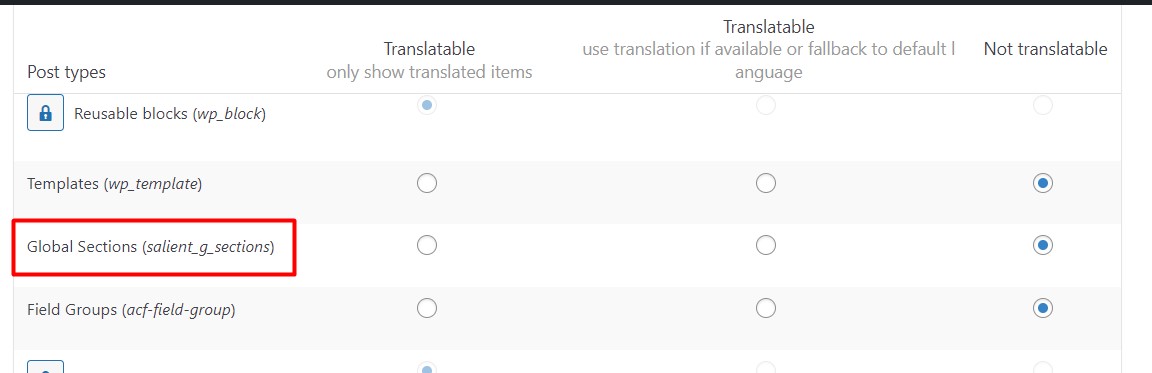
1. I want to use a custom footer, build with Bakery. It’s working fine normally with the global section, but i can’t assign a german version and an english version. Only got the option to show one footer version at all languages. Do you got a fix for that?
2. After i installed WPML, the whole layout of cart, checkout etc. changed. Is it caused by the translation?
Hey HITMILK,
1. You can enable the Global Sections post type to be translatable in the WPML settings > Post Types Translation.
2. There are two options for the cart/checkout: block-based or traditional shortcode layouts. Perhaps, the method was switched in your setup: https://themenectar.com/docs/salient/using-legacy-woocommerce-cart-checkout/
Kind regards
Hi,
We would like to change the colour slightly of the box shadow to suit our site colours a bit better, is there a way we could do this in the theme options?
Cheers
Hey Micatuca,
Which box shadow are you trying to alter? If you can share the page URL where you’re trying to make the change, I’d be happy to help out.
Kind regards
I need urgent support because I am unable to customize my mobile header.
Hey nick_boss,
The options to control your mobile header exist in the Salient options > Header Navigation > Off Canvas Menu / Mobile Header tabs. If those options are not working for you, feel free to open a ticket with specific information regarding the issue you’re facing along with your website URL so that we can follow up.
Kind regards
Hello, when I add a custom post type to my website using the Cutstom Post Type UI plugin. The page title and featured image are automatically added to every page within the custom post type. This seems to come from the theme. Is there an easy way to disable this for custom post types? So I only see the content that has been added with the page builder. Thanks in advance!
Hey neliuss!
You could either create a single-{YOUR-CPT}.php file for your custom post type in your child theme which contains the contents from the page.php template, or you could add the following snippet into the custom CSS box located in the Salient options panel > General Settings > CSS/Script related tab:
.single:not(.single-post) .featured-media-under-header,
.single:not(.single-post) .heading-title,
.single:not(.single-post) .post-featured-img {
  display: none;
}
Kind regards
Hi, thanks a lot, both options work perfectly!
You’re welcome, neliuss
How do you remove the automatic shift when you make an update. I would add a new section or an update on the theme builder and it would shift up? How can I remove this animation?
Hey Missnice,
The option to toggle that functionality will be available in the next release of the Page Builder plugin. As of now, there’s no built-in option to alter that.
Kind regards
Thank you. That would be wonderful.
Is there an easy way to add non google fonts that can be used in the Salient typography settings? appreciate the guidance
Hey mbianchi27,
You can utilize the plugin Use Any Font to add custom fonts into the Salient options > Typography tab.
Kind regards
Hi. Is there a way to disable PictureInPicture functionality which comes up in Firefox for row / column backgound vidoes. I found this but not sure how to apply it or if it will work. </video>
<video controls disablePictureInPicture controlsList="nodownload">
 <source src="https://www.w3schools.com/html/mov_bbb.ogg" type="video/mp4">
<source src="https://www.w3schools.com/html/mov_bbb.mp4" type="video/ogg">Hey wints77,
The FireFox PIP functionality shouldn’t be displaying on video backgrounds already. Can you kindly share your website URL where you’re seeing that option occur?
Kind regards
I will share privately
Hi guys ! I import the demo Architect but not import any image all are broken and repeat take a look: https://shorturl.at/ANL7A How can i solve this??
Thanks a lot!
Hey antalvespo,
The images are all returning a server error. I would contact your hosting company in regards, as it appears to be a server configuration issue.
Kind regards
The host is DonWeb.com, can you send me the correct requeriments to install the theme? Thanks!
I solve the problems and the theme work like a charm now. Thanks a lot! PS: How can i make the background video work in mobile? Send link of the website https://tinyurl.com/5mur8hr8
Hey antalvespo, I’m glad to hear
It looks like your server is unable to playback the mp4 file when accessed directly:
https://cihsoluciones.es/wp-content/uploads/2025/02/architect-landing2.mp4Please take a look through the troubleshooting section for video backgrounds here, and if that doesn’t help, feel free to open a ticket on the support forum in regards.
Cheers
Hi! What is this mean?
Videos won’t play on mobile or Safari only Ensure that a power-saving or data-saving mode is not on: If a power-saving mode is active, it will prevent ANY video from auto-playing. Because of this, it’s recommended to still supply a fallback image for these instances
how can i turn off, from where can you send me tutorial??
Hey antalvespo,
It doesn’t look like the “low power mode” aspect applies to your case, as I can see the mp4 files on your server are not able to playback when directly accessed on a mobile device. I would check that your server has the necessary htaccess rules for videos and if so, please open a ticket on the support forum in regards so we can follow up.
I am using SaaS template. I want to create a Blog subpage, but the available blog design options look like they are from an old template and don’t match the modern SaaS template at all. Is there a way to add a blog with the design from the Mag template to the SaaS template? I tried inserting a ready-made block from Mag into the ‘Blog’ subpage, but it doesn’t have the Mag template’s design—it looks like it’s from some other old template Thanks in advance!
Hey zzz_it,
If you want to utilize a Post Loop builder element to create the look of your blog archives, as done in the “Mag” demo, you can create a Global Section and assign it to your Blog Archive Loop.
Kind regards
Hey ThemeNectar – I found a bug in Salient.
If you create a portfolio page and assign the ‘Portfolio’ template in Page Attributes, everything works fine.
If, instead, you leave the page template to ‘Default’ and use the ‘Post Loop Builder’ element instead, the ‘Back To All’ icon in the top left-hand corner (four squares) doesn’t work correctly.
It defaults to a URL like this: domain.com/portfolio-title
Instead of this: domain.com/portfolio/portfolio-title
The only option available in the ‘Project Configuration’ section for ‘Parent Portfolio Override’ is Default. There is no way to change this behaviour.
Hey Tbone17,
Have you specified your desired URL in the Salient options panel > Portfolio > Functionality tab in the “Main Portfolio Page URL” field?
Kind regards
Sorry, my mistake. I thought I’d found a bug.
No worries, Tbone17