8685 comments found.

Hello…. are days that i opened 2 ticket and nobody is answering us. we have some issues about cart and buying courses.
Please answer to the ticket because my boss is very angry and asked me to ask back money.
Thank you.
Hello there!
Thank you for reaching out. I’ve checked the status of your tickets, and they have already been assigned to support agents who will respond to you soon. I apologize for the delay—due to a high volume of requests, the waiting time has increased.
We appreciate your patience, and our team is working to assist you as quickly as possible.
Best regards,
Hi. elementor not opening my pages
Hello there!
Thank you for reaching us out!
Could you please ensure you are using the latest version of the MasterStudy theme, which you can verify in the changelog here: https://docs.stylemixthemes.com/masterstudy-theme-documentation/extra-materials/changelog. To update the theme and its plugins, follow the instructions provided here: https://docs.stylemixthemes.com/masterstudy-theme-documentation/getting-started/how-to-update-masterstudy.
If the problem persists after updating, try disabling any third-party or server plugins and test again. This can help identify if a conflict is causing the issue.
Please let me know how it goes!
Best regards,
I have a question.
We are considering purchasing this theme because it is very complete, both the WordPress theme itself and the course creation and management features.
My question is: the website will be developed in a closed environment on our server, which does not allow external access due to our firewall. However, as soon as testing is complete, the site will be made public and externally accessible.
Will there be any issue with license validation during the development phase? Or is it necessary for the server to be public from the beginning in order to validate the license?
Hello there!
Thank you for considering the Masterstudy theme! It’s great to hear that you find both the WordPress theme and the course creation and management features appealing.
Regarding your question about license validation: the use of the license does not depend on the server’s accessibility. The theme purchased can be used only on one project, which includes one live website and one staging website. Since you’ll be developing the site in a closed environment on your server during the testing phase and then making it public afterward, this should not pose any issue with license validation. You can proceed with development in your closed environment, and once testing is complete, move it to the live website.
For more detailed information, please refer to our documentation here: https://docs.stylemixthemes.com/motors-theme-documentation/general/theme-license.
If you have any further questions, feel free to ask!
Best regards,
Hello. My domains have expired. Please reset the license. I’m not using any live website that Envato says I’m using, as I don’t have the website anymore.
Thanks!
Hello there!
Thank you for reaching us!
I’ve removed the license from your account. Now you can activate the license on another domain.
Let me know if you need further assistance!
Best regards,
Thank you so much for the fast assistance!
Subject: CourseBuilder Still Showing a Blank Page
Hello again,
I was hoping that activating my license would resolve the issue, but unfortunately, I’m still experiencing the same problem. Whenever I try to view or edit my course through CourseBuilder, the page remains completely blank.
I’ve taken a screenshot of the issue, but I’m not sure how to attach it here. Please let me know the best way to share it with you.
Thank you for your help!
Best regards, Mariska
You’re very welcome—we’re glad we could assist you quickly!
We’d be incredibly grateful if you could leave us a 5-star rating for our support service here: https://wordpress.org/plugins/masterstudy-lms-learning-management-system/#reviews. Your feedback means a lot! Let me know if you need anything else!
Best regards,
Subject: CourseBuilder Still Showing a Blank Page
Hello again,
I was hoping that activating my license would resolve the issue, but unfortunately, I’m still experiencing the same problem. Whenever I try to view or edit my course through CourseBuilder, the page remains completely blank.
I’ve taken a screenshot of the issue, but I’m not sure how to attach it here. Please let me know the best way to share it with you.
Thank you for your help!
Best regards, Mariska
I’m sorry to hear that activating your license hasn’t resolved the blank page problem when viewing or editing your course.
Could you please try re-checking and re-saving the settings for your LMS pages and go to your WP Dashboard, navigate to Settings, then Permalinks, re-save them, and we recommend using the “Post name” structure.
To help us investigate this further, it would be great if you could record a short video demonstrating how you reproduce the issue. This will give us a clearer picture of what’s happening. For sharing the video, you can upload it to a cloud service like WeTransfer, Google Drive, Dropbox, or any other platform you find convenient, and then send us the link.
We’ll review the information you provide.
Let me know if you have any questions!
Best regards,
Hello. My two domains have expired. please reset the license.
Hello there!
Thanks for reaching out about your expired domains.
I’ve removed the domain engageablebydesign.com from your license since it’s now available for sale. However, the second domain is still active, so I can’t reset it. You can deactivate the license yourself on that domain by following the instructions here: https://docs.stylemixthemes.com/masterstudy-theme-documentation/installation-and-activation/license-key-deactivation.
Please note that one license can only be used on a single live site—if you need it on another, you’ll need to purchase a new license.
Let me know if you need further assistance!
Best regards,
I’m facing an issue with updating student attendance certificate information. As you know, by default, many students forget to enter or update their full name in their profile. As a result, the certificate is automatically issued using their username or email instead of their real name.
Even after we guide students to update their profile with their correct name and ask them to regenerate the certificate, the name on the certificate remains unchanged.
Is there a solution to ensure the updated name appears on the reissued certificate?
Hello there!
Thanks for reaching out!
Could you please try activating the “Use current student name on certificate” setting under MasterStudy > Settings > Certificates, following the instructions here: https://docs.stylemixthemes.com/masterstudy-theme-documentation/lms-settings/masterstudy-theme-manual-certificates . This should ensure the updated name appears on reissued certificates.
Let me know how it goes or if you need further assistance!
Best regards,
WPBakery Page Builder still not updated to 8.5, even 1 month later. Please push 8.5, cannot do it manually as it ships with the theme
Hi there! Thanks for raising the concern about the WPBakery Page Builder!
The WPBakery version 8.5 is included with theme version 4.8.111. Please try updating the plugin via Appearance > Install Plugins. If that doesn’t work, download the latest theme archive from your Envato account, where you’ll find the updated WPBakery file.
Let me know how it goes!
Best regards,
just for your reference in case someone asks about it in the future. I had version 4.8.116 and WPBakery was not 8.5 Still i manually updated the theme files with the latest from here. No success, WPB not 8.5 However, updating it from ‘required plugins’ and not from ‘plugins’ did work. Seems because the update link in ‘plugins’ is from the wpb server which i do not have a license to, and from ‘required plugins’ it’s from your server which i do have a license for. Hope this helps someone in the future
Thank you for your feedback and detailed description of the situation! You’re absolutely correct: updates in the WP Dashboard > Plugins section do come directly from the WPBakery server, and a separate license is required for them. Since the MasterStudy theme already includes our plugin license, we recommend updating plugins via MasterStudy > Plugins, as outlined in our instructions: https://docs.stylemixthemes.com/masterstudy-theme-documentation/getting-started/how-to-update-masterstudy#stage-2-update-all-plugins. This ensures compatibility and proper functionality.
If you prefer to update plugins directly through WP Dashboard > Plugins, you will need to purchase your own WPBakery license. We hope this helps avoid similar issues in the future.
Let me know if you have any further questions!
Best regards,
Issue with Course Enrollment Display in WPML Multilingual Setup (Arabic vs. English)We are currently experiencing a critical issue related to user course enrollment visibility on our multilingual WordPress website, which uses WPML for language management and a LMS plugin Issue Summary: When a student purchases a course and accesses their account, the course does not appear under “Enrolled Courses” if the website language is set to Arabic. However, when the language is switched to English, the enrolled course displays correctly.
Technical Details: The site is fully multilingual using WPML.
Course purchases are allowed for both logged-in and guest users.
For guest users, after completing the purchase and creating their account, no courses appear in their profile in Arabic.
When attempting to fetch enrolled courses using custom PHP code, the behavior is consistent:
Courses appear only when the language is set to English.
Switching to Arabic results in the message: “You have no enrolled courses.”
We also noticed that no orders appear in the student’s account
What We Have Tried: Tested user enrollment in both Arabic and English languages.
Verified that the user is correctly assigned to the course in the backend.
Used PHP to fetch user courses with standard functions — same issue persists.
Hello there!
Thanks for reaching us out!
It seems likely that not all LMS pages are correctly translated or configured.
Please double-check the LMS page settings and translations following the guide here: https://docs.stylemixthemes.com/masterstudy-theme-documentation/additional-features/wpml. For a more detailed consultation, I recommend reaching out to our support team. They can review your specific settings and guide you further.
Let me know if you need help with anything else!
Best regards,
Hey everyone, I recently purchased your fantastic theme. Nice WORK
Hello there! Thank you so much for your kind words—we’re thrilled you love the MasterStudy theme!
If you have a moment, we’d greatly appreciate it if you could leave a review on our page here: https://themeforest.net/item/masterstudy-education-center-wordpress-theme/reviews/12170274. Your support means a lot.
Let me know if you need any assistance!
Best regards,
Hello, I have a problem with the theme. I hope you can help me. I want to update de social urls but the sistem says that something is wrong and can´t do it. “There was a problem with your action. Please try again or reload the page” https://www.dropbox.com/scl/fi/e7mnokd04f5t65dhzkog5/Captura-de-pantalla-2025-07-23-a-las-16.03.06.png?rlkey=mlvgert0n9k7qeviapcmlyrge&st=b9q028fs&dl=0 I have update every plugins and theme but is still the same problem. Thank you for your help,
Hello there!
Thanks for reaching out.
Could you please try increasing the PHP time limit to 300 or higher and disable all third-party plugins one by one, leaving only the MasterStudy theme plugins active. Then, check the issue again and let me know if this resolves it.
Thanks for your patience!
Best regards,
Thank you! solved!
You are welcome! I’m glad that you could solve it. Let me know if you have more questions.
Best regards,
URGENT MATTER! I have been a customer for over 4 years now. I need help with updating the theme. I need to make sure of that info before the server’s PHP version is updated.
Kindly advise if it is safe to update to WordPress version 6.8.3 and with PHP version 8.3. If so, how can we update or do something to avoid any mistakes?
Theme compatible - PHP version 8.3 & WordPress version 6.8.2?
Can we hire you to do the THEME update for us?
Hi there!
Hi! Thank you for being a loyal customer for over 4 years!
I would like to clarify that we officially support WordPress 6.8.0 and higher, as well as PHP 7.4 and higher, so updating to WordPress 6.8.2 and PHP 8.3 should not pose any issues with theme compatibility. However, to avoid any potential problems, we always recommend creating backups or testing updates on a staging environment first.
If you need assistance with the update process, you can reach out to our Digital Agency team via the “Hire Us” button below for professional support.
Let me know if you have additional questions!
Best regards,
I came across this theme and I love the features, but unfortunately, I can’t preview the demo. can you give me an accessible link to view the demo in detail before making a purchase?
Hello there!
Thanks for your interest in the theme—I’m glad you love the features!
Sorry you’re having trouble previewing the demo. Please try checking it out here: https://stylemixthemes.com/masterstudy/ .
Let me know if you need further assistance or if the link doesn’t work for you!
Best regards,
Check the link from your end, it is still not working…
Could you please try to check it using VPN?
Best regards,
Hello, I purchased Masterstudy Pro Plus and tried to update, but it gave me a fatal error. I no longer have access to the dashboard, so I created a ticket, and the site is not working. Can you fix the error? I don’t know how to proceed since I no longer have access.
Hi there!
Sorry for the wait—apologies for the delay, as we’re currently experiencing a peak season, which might slow down responses a bit.
I’m sorry that you have faced a fatal error after updating MasterStudy Pro Plus. The credentials you provided unfortunately don’t work. Please include FTP credentials in your ticket so our specialists can quickly check and resolve the issue.
Let me know if you need help with anything else!
Best regards,
I understand the delays. But the site hasn’t been working for 2 days. Because of an update and because I bought the LMP Pro Plus. I sent the login details again and the login I provided works fine. I tried again. Please do it as soon as possible.
I appreciate you resending the login details, and the credentials work fine. However, could you please clarify if the access you provided is to the correct folder? We’ve disabled all plugins and the theme on your site, but it hasn’t responded to the changes.
Let’s get this fixed ASAP—please confirm, and I’ll escalate it!
Best regards,
After the recent updates, I can still add a quiz to a course, but I am just unable to open it from the front-end. The screen just shows a rotating circle.
Hello there!
Thank you for reaching us out!
Please try updating the MasterStudy LMS Free plugin to the latest version — this should resolve the issue with quizzes not opening on the front end.
Let me know if the problem persists after updating — happy to assist further!
Best regards,
I purchased the theme some time ago, and recently bought Pro Plus. I get a ‘Fatal Error’ when I tried to activate the Free version, and so the Pro Plus version doesn’t work. I’ve opened support tickets, and no one has replied. I’m asking for a refund because it doesn’t work, and I can’t get support.
Hello there!
Thank you for reaching out, and I’m very sorry to hear about the trouble you’ve experienced. We completely understand how frustrating that must be.
Based on your message, it sounds like the issue may be related to using an outdated version of the MasterStudy plugin.
Please try updating the MasterStudy LMS Free plugin to the latest version available in the WordPress repository. If the problem continues, feel free to reply here or update your support ticket — we’ll make sure it’s looked into as soon as possible.
Looking forward to your update,
Best regards,
I have paid for a full-year subscription via PayPal. In my billing history, it shows that I have renewed my subscription. I went to update my payment method, and you all removed my premium plugin from my site, although I have already paid for my full-year subscription
Hello there!
Thank you for your message, and I’m really sorry for the confusion.
Just to clarify — did you purchase the MasterStudy Pro Plus plugin and renew the license, but it’s not showing as active on your site? I checked our records and couldn’t locate a recent purchase under your account.
Could you please send us your purchase details or invoice using the form on our page https://themeforest.net/user/stylemixthemes ? Once we receive that information, we’ll review your case and help you get everything sorted as quickly as possible.
Looking forward to your reply!
Best regards,
Hello Dear Support_StylemixThemes team please remove my old domain licences. Thanks Regards
Hello again my still waiting please any answer ??? Thanks
Hello there!
Thank you for reaching us out!
I’ve removed the domain engineeringed.net from your license as requested. The second domain is still active, so I’m unable to remove it from our side — but you can deactivate it yourself by following this guide: https://docs.stylemixthemes.com/masterstudy-theme-documentation/installation-and-activation/license-key-deactivationJust a quick reminder: one license can only be used for one live site. If you plan to use it on another live domain, you’ll need to purchase an additional license.
Let me know if you need help with anything else!
Best regards,
Hello, I created a video lesson and wanted to add some questions to create an “interactive video”. I select the “add a question” button and then order the details. However, as soon as I save the lesson, the question is been tagged as a marker as appear as such in the student profile. Any thoughts on how to fix this? Thank you in advance.
Hello there!
Thank you for your request!
Just to clarify — are you following the steps outlined in this guide when adding the video questions? https://docs.stylemixthemes.com/masterstudy-lms/lms-course-features/how-to-add-video-to-the-lesson/video-lesson-questionsIf the issue still persists after following the instructions, please open a support ticket via our support portal and provide temporary admin access so our team can check the case directly.
We’ll be happy to take a closer look and help resolve it!
Best regards,
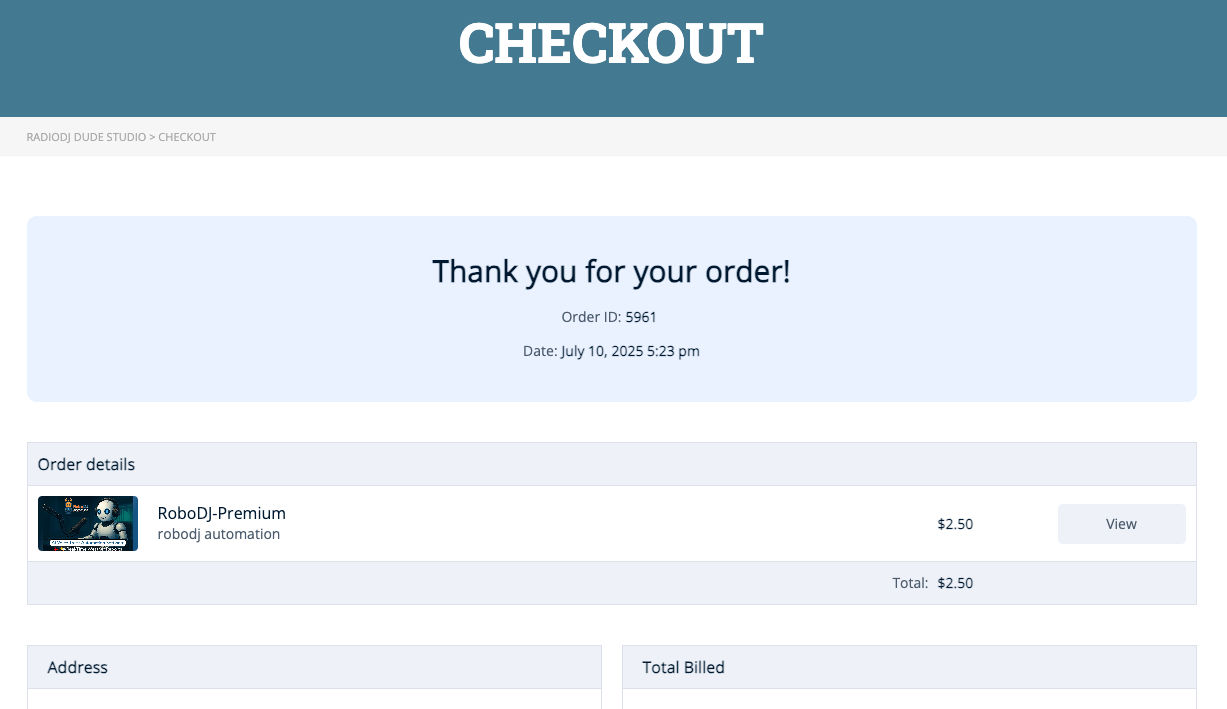
Love your theme! Something that would improve customer experience is to allow them to click through to product details (like download info) after checkout. Currently, the View button on “Thanks for Order” page takes you back to product sales page. Odd, because most expect more order details. Where can I change that code? Thanks!
Page screenshot: https://ik.imagekit.io/fz2wmv3lk/Screenshot%202025-07-10%20at%2010.43.19%E2%80%AFAM.png?updatedAt=1752169412660
Hello there!
Thanks so much — we’re really glad you’re enjoying the theme!
What you’re describing is actually the theme’s default behavior — the “View” button redirects users back to the product sales page. To change this flow and redirect to a more detailed order or download page, it would require developer-level customization.
If you’re comfortable with code, you can try modifying this behavior through a child theme. But if you’d prefer help with a custom implementation, we recommend reaching out to our Digital Agency via the “Hire Us” button below. They can review your request and offer a tailored solution based on your needs.
Let me know if you need further assistance!
Best regards,
Hello, Can you help me with this, In Mail content for Quiz completed, I need to also sent the number of passed questions. Example: the quiz is 12 questions the result should be from 12 If I answered 2 questions right, I will have mark 2/12 and seen of the mail like that. how can I approach it? Best Regards.
Hello there!
Thanks for reaching out with your request!
Unfortunately, this isn’t a default option in the MasterStudy theme. However, you can contact our Digital Agency for a custom solution tailored to your needs. Reach out to them at hello@stylemix.net or clicking the button Hire us below.
Let me know if you need further assistance!
Best regards,